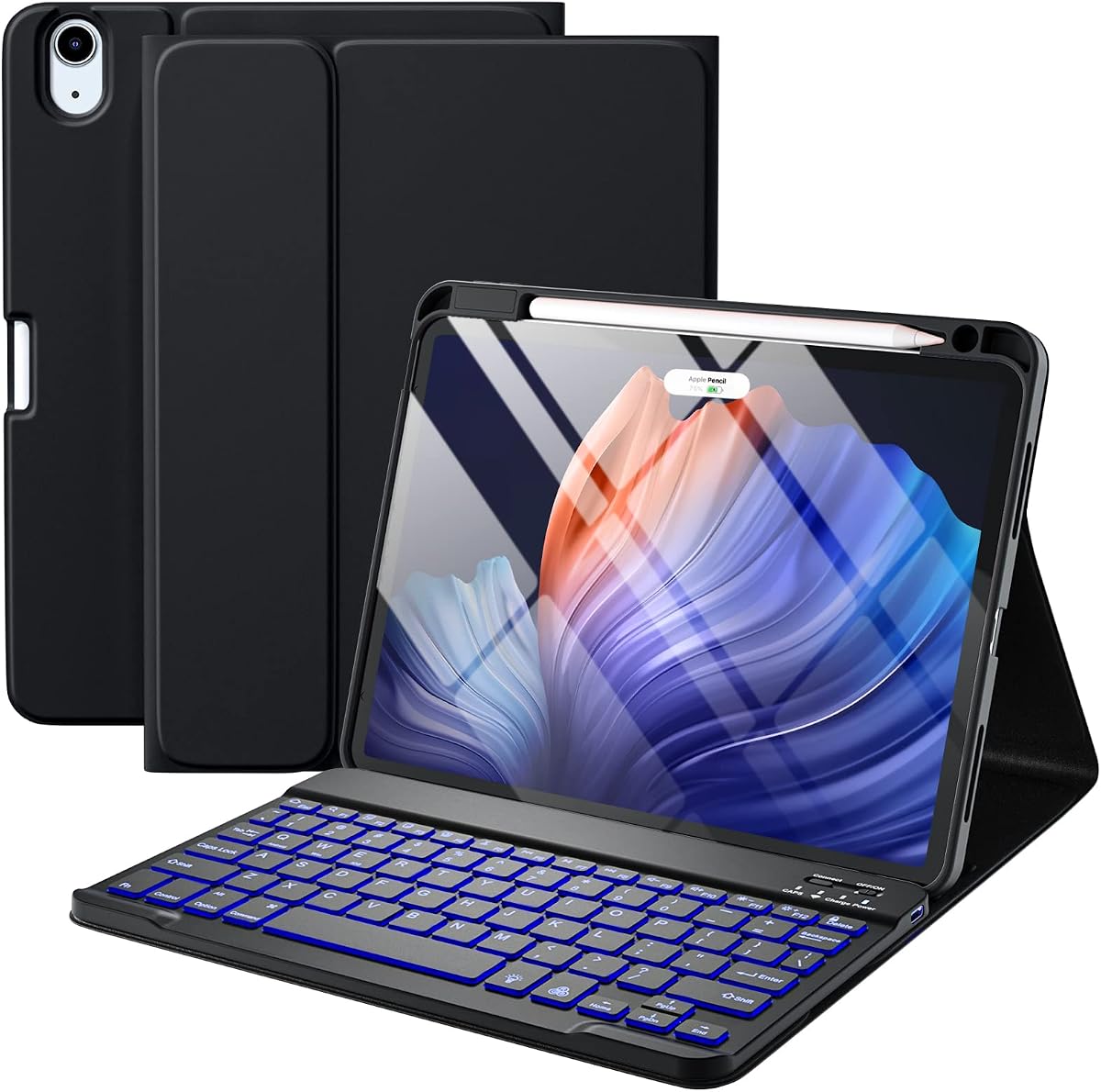
Harvopu Keyboard Case
4.3Editor score
Detachable backlight keyboard
7-color breathing backlight
Type-C charging port
Compare the top 10 iPad Air Folio Case with Keyboard options for productivity, protection, and typing comfort in October 2026 to find the best match for your
Transform your iPad Air into a powerful workstation with a quality Folio case that includes a built-in keyboard. These accessories offer protection and typing comfort for students and professionals alike.
We compared ten leading models based on trackpad quality, key travel, battery life, and overall build durability. Our analysis covers everything from premium magnetic designs to budget-friendly Bluetooth options.
Each selection highlights unique strengths like backlit keys or multi-mode stands. Remember that availability and terms may shift frequently so verify current details before finalizing your purchase decision today.
4.3Editor score

4.5Editor score

4.5Editor score
This side-by-side comparison evaluates the ten best keyboard folio cases for the iPad Air. We examine connectivity, stand mechanisms, and protective features to help you choose the right tool for your workflow.


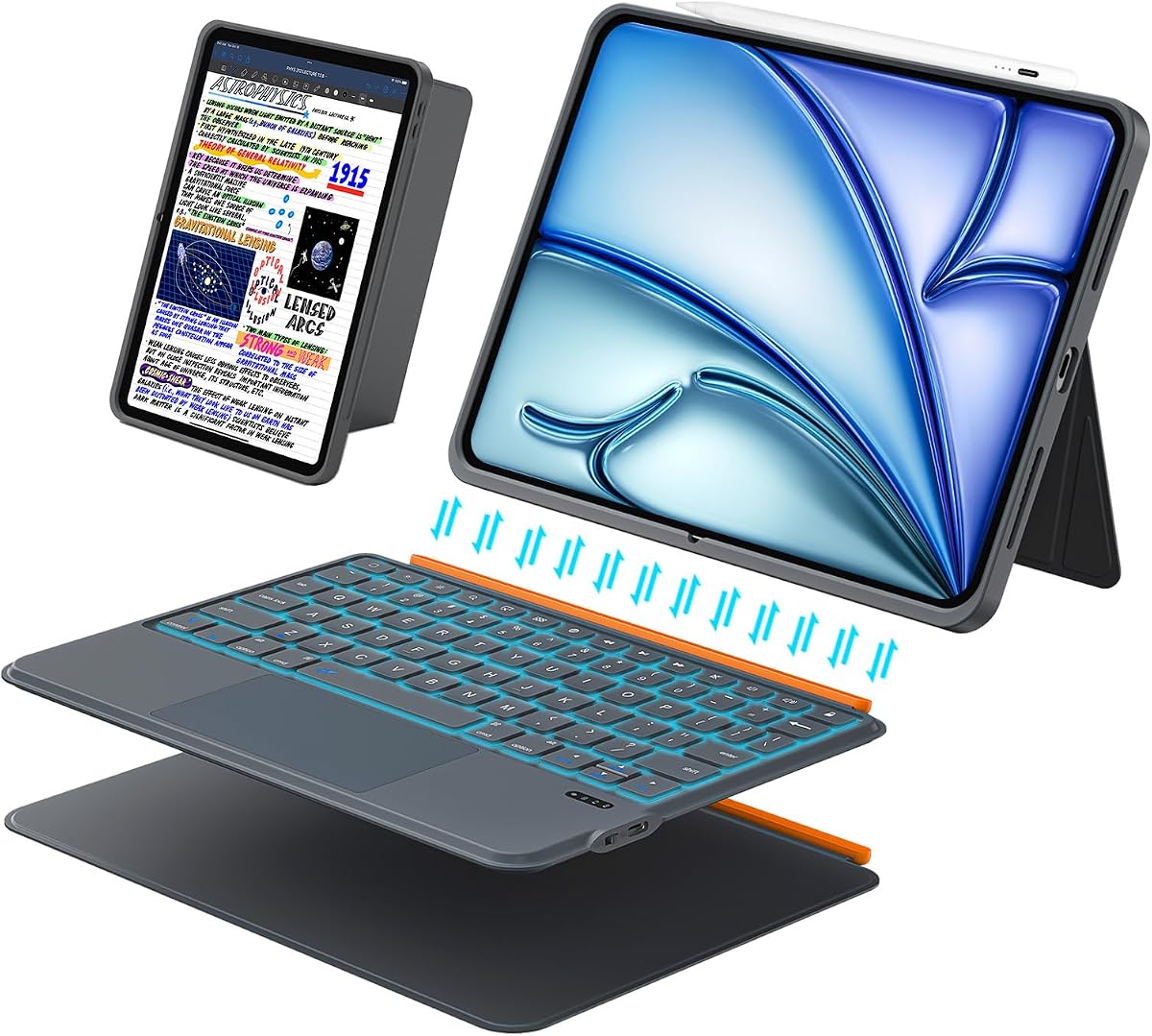


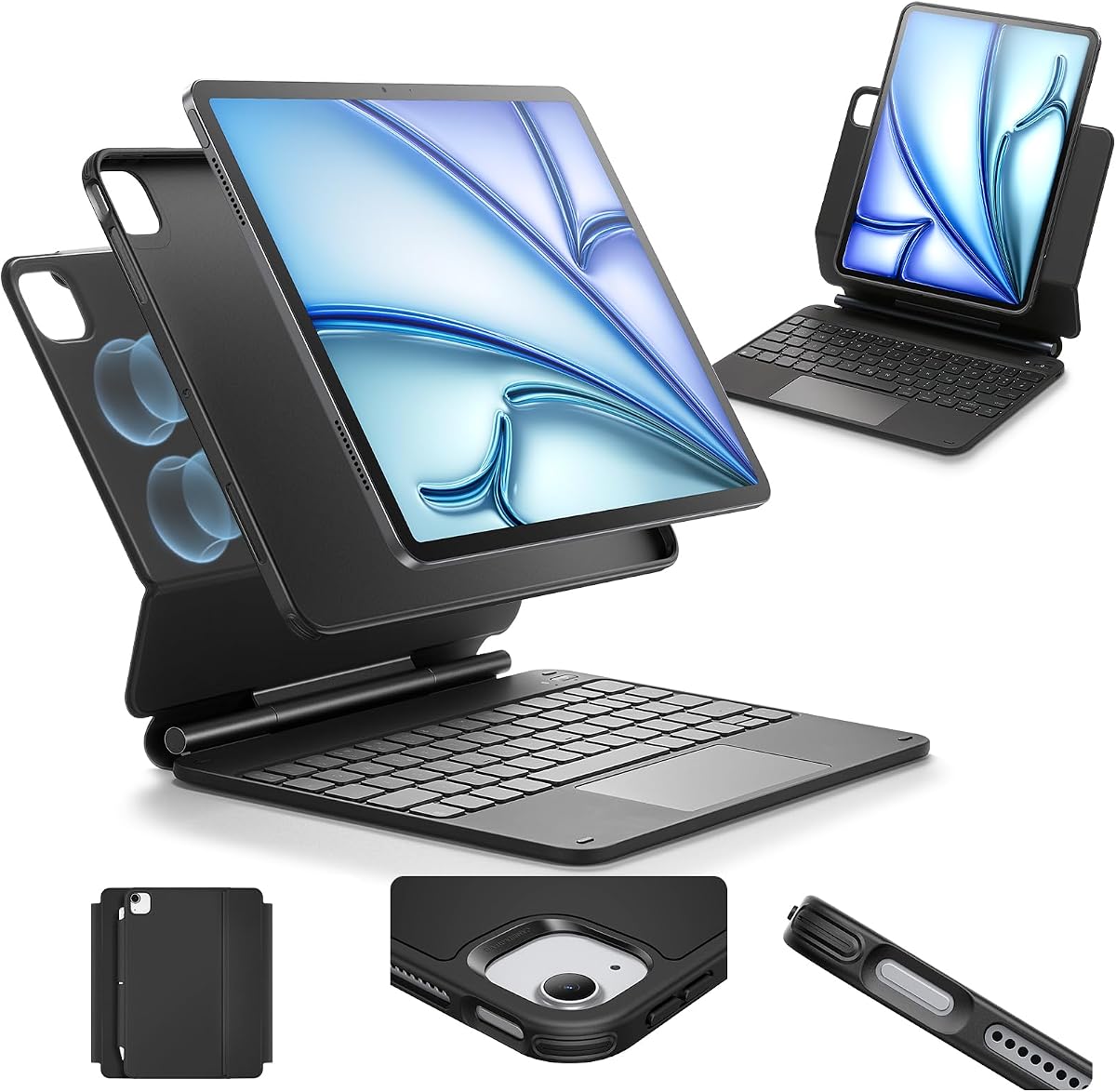
The Logitech Flip Folio stands out as a premier option for iPad Air users seeking a complete typing solution. It combines a protective case with a full keyboard and trackpad to transform your tablet into a laptop alternative efficiently.
We may earn a commission when you buy through this link, at no additional cost to you.
Its high-precision trackpad supports multi-touch gestures like swipe and pinch which significantly speeds up navigation compared to touch-only inputs. The backlit keys adjust automatically to your environment ensuring you can type comfortably in any lighting condition without distraction.
While it offers robust protection with MIL STD 810G certification the unit is heavier than basic covers which might matter for travel. However the magnetic latch and adjustable kickstand provide versatile viewing angles that justify the added weight for most stationary work scenarios.
We recommend this case for professionals who need reliability and speed. The ability to power via the Smart Connector means you never worry about battery life for the keyboard itself making it a hassle free choice for daily tasks.
You can switch between typing sketching and reading modes easily thanks to the foldable keyboard design. This flexibility allows you to adapt the device to different tasks without needing multiple accessories or complex setups.
The keyboard draws power directly from the iPad Air through the Smart Connector so there is no need to charge it separately. This design choice eliminates one less battery to manage and keeps your workflow uninterrupted for longer periods.
We may earn a commission when you buy through this link, at no additional cost to you.
The Harvopu case offers an affordable entry point for those needing a keyboard folio without breaking the bank. It supports a wide range of iPad Air models and provides essential features like a detachable keyboard and pencil storage.
We may earn a commission when you buy through this link, at no additional cost to you.
One of its standout features is the customizable backlight which offers seven colors and breathing modes. This adds a touch of personalization while ensuring visibility in low light environments. The Type-C charging port allows for quick recharges when the battery runs low.
Though it relies on Bluetooth pairing which can occasionally introduce a slight delay compared to direct connectors the battery life is impressive. You can expect weeks of standby time making it suitable for intermittent use without constant charging anxiety.
Ideal for students or casual users this case balances cost and function well. The protective PU leather cover ensures your device stays safe from minor bumps while the honeycomb design helps with heat dissipation during extended typing sessions.
The keyboard attaches via strong magnets but can be removed completely when you want to use the iPad as a standalone tablet. This modular approach lets you enjoy a lightweight device for media consumption while keeping the keyboard handy for work when needed.
A built-in tray holds your Apple Pencil securely so you never lose it. Additionally it supports charging for the second generation pencil without needing to remove the case which adds significant convenience for digital artists.
We may earn a commission when you buy through this link, at no additional cost to you.
The Apple Magic Keyboard represents the gold standard for premium tablet typing accessories. Its floating cantilever design offers smooth and adjustable viewing angles that feel intuitive and sturdy during extended use. This case transforms your iPad Air into a true laptop replacement effortlessly.
We may earn a commission when you buy through this link, at no additional cost to you.
Every detail is crafted for comfort including physical keycaps with a scissor mechanism that provide a satisfying typing experience. The glass trackpad supports multi-touch gestures with precision allowing you to navigate apps and files with ease. It includes a full row of function keys which is rare for iPad accessories.
Although the price is high compared to third-party alternatives the build quality and seamless integration with iPadOS justify the investment. The USB-C pass-through charging means you can charge your iPad while keeping the keyboard attached without needing extra cables or docks.
This option is best for professionals who demand the highest quality and performance. If you value a seamless user experience and do not want to compromise on features or aesthetics the Magic Keyboard delivers a unmatched typing and viewing experience.
The two-cantilever hinge design allows the screen to float at various angles smoothly. This mechanism provides a premium feel and ensures the keyboard remains stable whether you are typing on a lap or a desk.
It folds to provide front and back protection for your iPad whenever you are on the go. The case is designed to fit perfectly ensuring that your device is shielded from scratches and bumps while maintaining a sleek profile.
We may earn a commission when you buy through this link, at no additional cost to you.
The ESR Ultra-Light case prioritizes portability without sacrificing core functionality. It is designed to be exceptionally thin and light making it easy to slip into a bag. Despite its slim profile it includes a surprisingly large precision trackpad for better navigation.
We may earn a commission when you buy through this link, at no additional cost to you.
The magnetic detachable design allows you to separate the keyboard instantly for pure tablet mode. This is perfect for switching between reading and typing quickly. The triangular support stand keeps the screen steady without wobbling ensuring a comfortable viewing experience.
While it lacks a backlight which may limit use in dark environments the lightweight construction makes up for it. The durable form-fit cover protects against scratches and dust. It ensures full access to all ports so you do not need to remove it for charging.
This case is ideal for commuters who value minimal weight. If you need a travel-friendly solution that still offers a robust typing experience and trackpad controls the ESR Ultra-Light provides a balanced mix of protection and utility.
The touchpad is 65% larger than regular keyboards allowing for effortless gestures like three-finger scrolling. This extra space enhances productivity and makes navigating the interface smoother compared to standard sized trackpads found on other cases.
Strong magnets keep the keyboard attached firmly during use but allow for quick removal when needed. This balance ensures stability for typing while offering the flexibility to detach for media consumption or sketching sessions easily.
We may earn a commission when you buy through this link, at no additional cost to you.
This keyboard case offers broad compatibility covering both iPad Air and Pro models across several generations. It features a floating cantilever stand that transforms your tablet into a laptop instantly. The vegan leather case provides a premium look and feel while protecting your device.
We may earn a commission when you buy through this link, at no additional cost to you.
The backlight includes three brightness levels and a 750mAh battery that supports long work sessions. You can work for months on a single charge depending on usage. The multi-touch trackpad allows for smooth navigation including gestures like swipe and scroll.
Although it is slightly bulkier than the thinnest options it offers better protection with a sturdy base. The magnetic connection is stable and secure for typing. It is a great choice if you need a single case that works across different iPad models you might own.
We suggest this for users who switch devices or want a versatile option. The combination of protection battery life and backlight features makes it a reliable companion for both travel and daily office work.
With a 750mAh battery and ultra-efficient design this keyboard lasts significantly longer than many competitors. You can work daily for months or nightly for weeks on a single charge ensuring you rarely run out of power during important tasks.
The floating stand design allows you to position the screen at the perfect angle for comfort. It mimics the experience of a laptop providing a stable and ergonomic setup that reduces strain during extended typing sessions.
We may earn a commission when you buy through this link, at no additional cost to you.
This magnetic detachable keyboard case supports an extensive list of iPad models including both Air and standard iPad generations. It features Bluetooth 5.3 for a stable and lag-free connection. The stand offers a wide range of adjustment to suit any preference.
We may earn a commission when you buy through this link, at no additional cost to you.
The keyboard layout includes dedicated iPadOS shortcuts for quick adjustments to brightness and volume. The trackpad supports full multi-touch gestures which helps you navigate smoothly without touching the screen. This makes editing documents and browsing the web much more efficient.
While the build is practical it may not feel as premium as higher-end cases. The skin-friendly PU leather offers decent protection and a soft feel. The flexible design allows you to detach the keyboard for a cleaner experience when watching videos or drawing.
This is a strong choice for users with older iPad models who still want modern features. The wide compatibility and adjustable stand make it a versatile solution for both home and office environments.
Using the latest Bluetooth 5.3 ensures a stable and lag-free connection. This technology gets you to work quickly in seconds without dropouts making it reliable for continuous tasks or important video calls.
The back stand supports a 160-degree angle adjustment in landscape mode to keep the device stable. It also supports portrait mode which is useful for FaceTime calls or reading content in a vertical orientation.
We may earn a commission when you buy through this link, at no additional cost to you.
The Apple Smart Keyboard Folio renewed offers a reliable typing solution at a more accessible price. It connects via the Smart Connector so there is no need to pair or charge it separately. This ensures a seamless experience every time you open the cover.
We may earn a commission when you buy through this link, at no additional cost to you.
It folds into a stand and doubles as a cover for the iPad. The full-size keys provide a comfortable typing experience. While it lacks a trackpad it is still a solid choice for users who prioritize typing accuracy over navigation features.
As a renewed product it provides a way to access Apple quality without the full cost. The Smart Connector technology remains unmatched for reliability ensuring the keyboard is always ready when you need it. This makes it a dependable tool for daily work.
We recommend this for those who prefer a no-fuss accessory. If you do not need a trackpad and want a proven connection method the Apple Smart Keyboard is a durable and practical choice.
The Smart Connector allows the keyboard to draw power directly from the iPad. This means there is no need to charge it separately or pair it via Bluetooth ensuring a seamless connection every time you open the cover.
The keys are full-size and provide a comfortable typing experience. They are designed to be durable and responsive so you can type accurately without fatigue during long work sessions.
We may earn a commission when you buy through this link, at no additional cost to you.
The Logitech Folio Touch renewed brings premium features to a more accessible price point. It includes a high-precision trackpad and backlit keys that adjust to your environment. The Smart Connector ensures it pairs instantly and draws power directly from the iPad.
We may earn a commission when you buy through this link, at no additional cost to you.
Its four use modes allow you to switch between typing sketching and reading easily. The adjustable kickstand provides a range of angles for comfort. This versatility makes it a great all-in-one solution for various daily tasks.
While it is a renewed product it retains the sturdy build quality Logitech is known for. The magnetic latch keeps it shut securely on the go. If you want the benefits of a trackpad without the full price of a new unit this is a smart choice.
We suggest this for older Air models who need a reliable trackpad case. It balances cost and functionality well making it a practical option for students or professionals.
You can type sketch view or read with ease thanks to the versatile use modes. This flexibility allows you to adapt the device to your current task without needing extra accessories or complex setups.
It pairs instantly via the Smart Connector and draws power directly from the iPad. This means you never have to charge the keyboard separately ensuring it is always ready when you need it.
We may earn a commission when you buy through this link, at no additional cost to you.
The Harvopu Gen 2 offers a highly customizable typing experience with its vibrant lighting options. It features a sensitive touchpad that enhances navigation precision. The magnetic design allows for easy switching between laptop and tablet modes seamlessly.
We may earn a commission when you buy through this link, at no additional cost to you.
The backlight includes seven vibrant colors and three brightness levels. This allows you to personalize your setup for late-night work or dim environments. The adjustable viewing angle ensures you find the perfect position for typing or watching videos.
While it is a budget-friendly option it delivers core features effectively. The cutouts are precise for all ports and buttons. It provides a practical solution for students or casual users who want modern features without a high cost.
We recommend this for those who value color options and flexibility. It is a solid budget choice for daily tasks where customization and cost are key priorities.
The built-in touchpad is sensitive enough to support navigation and control without touching the screen. This makes tasks like editing documents and browsing the web smoother and more efficient for daily work.
Multiple adjustable viewing positions allow you to find the perfect angle for any task. Whether you are typing or drawing this flexibility ensures comfort and maximizes productivity.
We may earn a commission when you buy through this link, at no additional cost to you.
The ESR Multi-Mode case transforms your iPad into a portable productivity machine with ease. It features a quick-set magnetic stand that lets you open the floating cantilever stand to the perfect angle instantly. The extended trackpad uses every millimeter for precise navigation.
We may earn a commission when you buy through this link, at no additional cost to you.
The case can be set up in raised screen view or portrait mode for better posture. This makes it easy to use in different environments like coffee shops or desks. The magnets combine the case and tablet securely for stability.
While the multiple modes can be slightly complex to set up initially they offer great flexibility. The trackpad is responsive and supports pinch and swipe gestures. This ensures you can navigate the iPad in a whole new way.
We suggest this for users who need to work from anywhere. The combination of stand flexibility and trackpad precision makes it a powerful tool for on-the-go productivity.
Ultra-strong magnets let you easily open the floating cantilever stand to the perfect angle for typing. This quick setup ensures you can start working immediately without fiddling with complex adjustments.
The extended multi-touch trackpad gives you more space to use gestures like tap and swipe. This enhances navigation precision and allows you to interact with the iPad in a more natural way.
We may earn a commission when you buy through this link, at no additional cost to you.
Selecting the right keyboard case depends on your specific workflow and priorities. We break down the key factors you should consider before making a decision.
Decide between Smart Connector and Bluetooth options. Smart Connector connects directly to the iPad without charging or pairing but is limited to specific models. Bluetooth offers wider compatibility but requires battery management and occasional pairing steps.
If you want reliability and convenience Smart Connector is ideal. If you need versatility across devices Bluetooth is better.
A large high-precision trackpad transforms your iPad experience significantly. Look for multi-touch gesture support to navigate easily. Smaller or less responsive pads can limit efficiency and make using cursor-based tasks harder.
Prioritize models with glass or large plastic surfaces for smooth navigation.
Backlit keys are essential for working in low-light environments. Check if the model supports auto-adjustment or multiple brightness levels. Some budget models skip this feature entirely which limits their use in dim settings.
Ensure the backlight offers sufficient brightness for your needs.
For Bluetooth keyboards battery life is a critical factor. Look for models with efficient power modes or long standby times. Some can last months on a single charge reducing the need for frequent charging.
Choose a model with a USB-C port for faster recharging.
The stand should offer multiple angles for different tasks. A cantilever design is generally better than a basic kickstand for stability. Check if it supports both landscape and portrait modes if needed.
Ensure the stand keeps the screen steady without wobbling.
Verify that the case supports your specific iPad Air model number. Generations change frequently and older cases may not fit newer devices. Check the model list provided by the manufacturer before buying.
Always confirm the A-number of your device.
Durable materials like PU leather or reinforced corners protect your device. Some cases include a honeycomb design for better heat dissipation. Ensure the material offers good protection against scratches and drops.
Look for features like magnetic latches to keep it closed securely.
Many cases include a holder for the Apple Pencil. Some even allow charging while attached which is highly convenient. Check if the case fits your specific pencil generation if you use one.
A built-in tray saves space and prevents lost accessories.
To get started ensure your iPad is properly aligned with the case. If it uses a Smart Connector simply open the case and the keyboard will connect automatically. For Bluetooth models you need to pair them via the iPad settings menu once.
Clean the keyboard and trackpad regularly with a soft lint-free cloth. Avoid using liquid cleaners directly on the keys to prevent damage. If the stand allows wipe down the surfaces to remove dust that can affect stability.
Store the iPad in the case when not in use to maximize protection. Keep the case away from extreme heat or humidity to prolong the life of the materials. Regularly check the magnetic latch to ensure it remains secure.
No, not all cases are compatible with older models. You must check the specific model number of your iPad Air. Manufacturers list compatible models explicitly, so verify that your device is supported before purchasing.
Yes, you can use the iPad Air while the keyboard is attached. Most cases are designed to fold back or detach so you can use the touchscreen freely. This allows you to switch between typing and touch use easily.
Many top-rated models offer a high-precision trackpad that supports multi-touch gestures. This makes navigation smooth and responsive similar to a laptop. Look for a large glass pad for the best experience.
Bluetooth keyboard cases typically charge via a USB-C or micro-USB port built into the keyboard. Some models are powered by the iPad via Smart Connector so they do not need charging. Check the specifications of your specific model.
Yes, most folio cases provide front and back protection. Some include military-grade drop protection or reinforced corners. This ensures your device is safe from bumps and scratches while you are on the go.
Many cases have a designated holder or magnet for the Apple Pencil. Some allow you to charge the pencil without removing the case. Check the product details to confirm Pencil compatibility and charging features.
Yes, a keyboard and trackpad make multi-tasking much easier. You can split apps and navigate quickly with the trackpad. This setup helps you manage multiple windows and tasks efficiently on your iPad Air.
Most cases allow you to fold the keyboard back or detach it completely. Simply close the keyboard cover or remove it via magnets. This transforms the device into a standard tablet for reading or media consumption.
Choosing the right iPad Air Folio Case with Keyboard depends on your priorities for features and budget. The Apple Magic Keyboard leads in premium quality while the Harvopu offers excellent value for budget-conscious buyers.
Consider whether you need a trackpad, backlight, or specific compatibility with your model. A case with a strong magnetic stand and durable material ensures longevity and usability for your daily workflow.
Prices and availability change frequently so verify the current details before purchasing. Use this guide to find a model that transforms your iPad into a reliable tool for work and creativity.