
Acer 13-in-1 Laptop Docking Station
4.5Editor score
Triple display support
110W Power adapter
Aluminum build quality
Explore our top 10 docking stations with 2 HDMI ports for dual monitor setups in October 2026, comparing performance and compatibility.
Finding a reliable docking station with 2 HDMI ports is essential for modern professionals seeking to expand their workspace efficiently. These devices allow seamless connection to multiple displays, enhancing productivity without cluttering your desk with excessive cables.
We evaluated ten top-rated models based on connectivity options, video output capabilities, and overall build quality. Each product offers unique features tailored to different needs, from budget-friendly hubs to premium docks with advanced power delivery.
Each pick highlights key strengths and potential limitations to help you make an informed decision. Please note that prices and availability may change frequently, so check the latest details before purchasing your ideal docking solution.
4.5Editor score

4.5Editor score

4.4Editor score
This side-by-side comparison highlights the core specifications of each docking station to help you quickly identify the best fit for your specific workflow and hardware requirements.


The Anker Laptop Docking Station Dual Monitor stands out as a top choice for professionals needing dual HDMI connectivity. With a solid 4.5-star rating, it delivers reliable performance for expanding your workspace efficiently and effectively.
We may earn a commission when you buy through this link, at no additional cost to you.
This 8-in-1 hub features dual HDMI ports capable of 4K@30Hz output for extended displays or 4K@60Hz for mirrored content. The 85W Power Delivery pass-through ensures your laptop remains charged during heavy use without additional power bricks.
While it lacks an external power adapter, the compact design saves desk space significantly. macOS users should note that extended desktop mode is limited to mirroring due to system constraints rather than hub limitations.
Ideal for Windows users seeking a balance of performance and portability, this docking station simplifies daily workflows. Its robust construction and versatile connectivity make it a dependable long-term solution for modern workstations.
Extend your workspace across two monitors to multitask efficiently without constant window switching or distracting interruptions.
The 85W Power Delivery pass-through keeps your laptop powered up while connecting multiple peripherals simultaneously.
We may earn a commission when you buy through this link, at no additional cost to you.
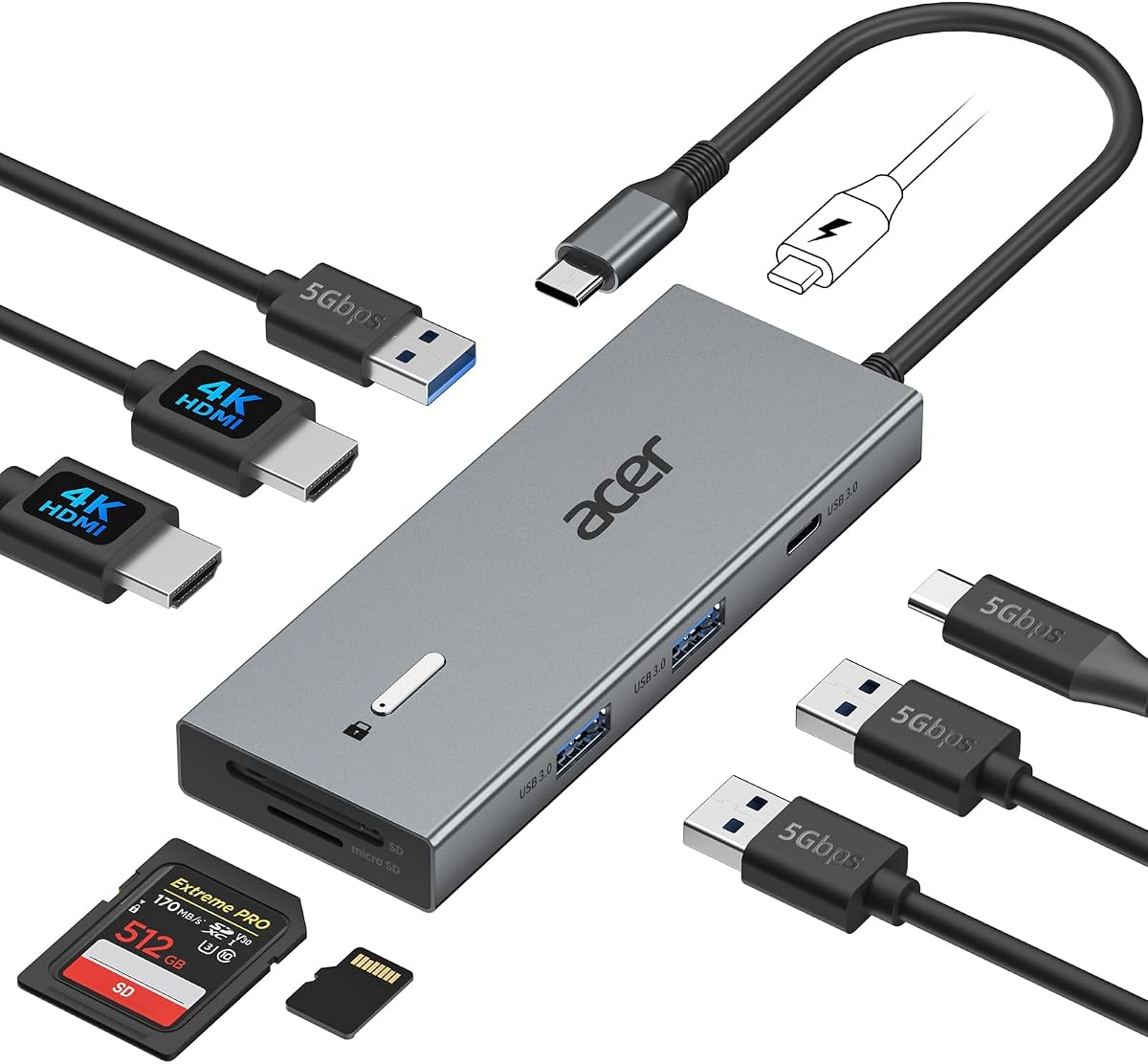
The Acer 13-in-1 Laptop Docking Station offers premium features for users requiring extensive connectivity and triple display support. Its 4.5-star rating reflects consistent performance and build quality suitable for demanding environments.
We may earn a commission when you buy through this link, at no additional cost to you.
With two HDMI ports and one DisplayPort, this dock supports three independent screens via MST technology on Windows. The included 110W power adapter provides stable power delivery for laptops under heavy workloads without performance drops.
The aluminum body efficiently dissipates heat during prolonged use, ensuring stable operation. However, the higher price point may not suit budget-conscious buyers, and macOS users face limitations with extended desktop configurations.
For professionals needing maximum connectivity and stability, this docking station delivers exceptional value. Its comprehensive port selection and secure design make it ideal for office environments or home offices.
Connect three monitors to manage complex tasks like data analysis, coding, or content creation seamlessly.
The integrated security slot allows physical locking of the dock to prevent theft in shared spaces.
We may earn a commission when you buy through this link, at no additional cost to you.
The Selore USB C Docking Station Dual Monitor provides an affordable entry point into dual monitor setups without compromising essential features. Its 4.4-star rating indicates reliable performance for budget-conscious users seeking quality.
We may earn a commission when you buy through this link, at no additional cost to you.
Equipped with dual HDMI ports supporting 4K@60Hz, this hub delivers crisp visuals for work or entertainment. The 100W Power Delivery input ensures fast charging while connected, keeping your laptop powered during extended sessions.
While it lacks an included power adapter, the lightweight design enhances portability. macOS users will find it supports mirroring only, which aligns with system limitations rather than hub constraints.
Perfect for home users or students needing dual screens on a budget, this docking station offers excellent value. Its simplicity and performance make it a practical choice for everyday productivity tasks.
Achieve a dual-screen setup without breaking the bank while maintaining high-resolution display capabilities.
Support for 100W Power Delivery ensures your laptop stays charged even during intensive multitasking.
We may earn a commission when you buy through this link, at no additional cost to you.
The Acer USB-C Docking Station Dual Monitor offers a balanced mid-range option with dual HDMI 4K@60Hz support and reliable build quality. Its 4.2-star rating reflects consistent performance for users seeking essential features at a reasonable cost.
We may earn a commission when you buy through this link, at no additional cost to you.
This 9-in-1 hub supports dual monitors efficiently while delivering up to 90W PD output for laptop charging. The built-in lock button provides convenient security, allowing quick locking of your device with a single click.
While it lacks an external power adapter, the compact design saves desk space effectively. macOS users are limited to mirroring mode, which is a common constraint for this product category overall.
Suitable for professionals needing reliable dual display support without premium pricing, this dock delivers value. Its secure features and fast charging capabilities make it a practical choice for daily use.
The built-in lock button allows you to secure your connected device quickly with a single click.
Dual HDMI ports support 4K@60Hz for crisp visuals and smooth performance during intensive tasks.
We may earn a commission when you buy through this link, at no additional cost to you.
The Dell D3100 USB 3.0 Docking Station is designed for users with older hardware needing triple display support through USB 3.0 connections. Its 4.2-star rating indicates solid performance for legacy systems seeking expanded connectivity options.
We may earn a commission when you buy through this link, at no additional cost to you.
Featuring dual HDMI ports and one DisplayPort, this dock supports three independent monitors when properly configured. The 65W power supply ensures stable operation for compatible Dell laptops, though power delivery may be lower than modern standards.
While it uses USB 3.0 instead of USB-C, this model remains compatible with systems lacking newer ports. However, the older technology may not support the latest high-speed data transfer rates or charging capabilities.
Ideal for organizations with legacy hardware infrastructure, this docking station offers practical expansion. Its triple display support and reliable build make it a functional choice for specific legacy environments.
Supports three monitors for enhanced productivity on systems without Thunderbolt or USB-C support.
Maintains compatibility with older Dell laptops and operating systems requiring USB 3.0 connections.
We may earn a commission when you buy through this link, at no additional cost to you.
This listing currently lacks specific product details and specifications, making it difficult to assess suitability for your needs. Always verify the exact product details before purchase to ensure it meets your dual HDMI docking requirements effectively.
We may earn a commission when you buy through this link, at no additional cost to you.
Without clear information on ports or performance, caution is advised when considering this option. Buyers should research the actual product identity and confirm compatibility with their hardware before completing any purchase transaction.
While some listings may offer competitive pricing, lack of clarity can lead to mismatched expectations. Ensure you have full specifications and verified seller reputation before proceeding with any order.
For reliable dual HDMI docking solutions, we recommend choosing products with transparent details. This ensures you receive a functional and compatible device without unexpected issues during setup or use.
Always confirm product details to avoid purchasing incompatible or misleadingly described items online.
We may earn a commission when you buy through this link, at no additional cost to you.
The Anker 7-in-1 USB-C Hub provides a compact solution for users needing dual HDMI connectivity without extensive port requirements. Its 4.2-star rating reflects dependable performance for portable setups requiring basic expansion options.
We may earn a commission when you buy through this link, at no additional cost to you.
Supporting dual 1080p@60Hz displays, this hub balances visual quality with portability. The 10Gbps data transfer port enables fast file movement, while the 85W PD output ensures efficient laptop charging during use.
While it lacks an Ethernet port, the compact design is ideal for travel. Users requiring higher resolution like 4K may find this limited, but for standard office tasks, it performs effectively.
Best for professionals prioritizing portability and simplicity, this hub simplifies connectivity on the go. Its reliable performance and compact form make it a practical choice for mobile workstations.
A lightweight and compact design ideal for professionals working from multiple locations regularly.
10Gbps data transfer speeds ensure quick file access and movement between connected devices.
We may earn a commission when you buy through this link, at no additional cost to you.
The MOKiN USB C Docking Station Dual Monitor offers extensive connectivity with 13 ports including dual HDMI and Ethernet. Its 4.3-star rating indicates satisfaction among users needing diverse options for comprehensive workspace setups.
We may earn a commission when you buy through this link, at no additional cost to you.
Featuring dual HDMI ports supporting 4K@60Hz, this dock delivers high-resolution visuals for professional tasks. The privacy lock button provides added security, while the Gigabit Ethernet ensures stable network connections during use.
While it lacks an included power adapter, the 13-in-1 layout caters to diverse peripheral needs. Users needing extensive connectivity without additional hubs will find this option highly functional and practical.
Ideal for users requiring extensive port selection, this dock simplifies multi-device setups. Its versatility and performance make it a strong choice for offices with varied hardware requirements.
With 13 ports, this hub supports a wide range of peripherals for versatile workflow needs.
The privacy lock button allows quick screen locking to protect sensitive information effectively.
We may earn a commission when you buy through this link, at no additional cost to you.
The Selore USB C Docking Station Dual Monitor extends beyond dual HDMI to offer triple display capabilities via DisplayPort. Its 4.5-star rating highlights strong performance for users seeking expanded multi-monitor productivity.
We may earn a commission when you buy through this link, at no additional cost to you.
With dual HDMI ports supporting 4K@60Hz and a DisplayPort output, this dock enables three independent screens. The monitor control button provides convenient power management, while the Ethernet port ensures stable network connectivity.
While macOS users are limited to mirroring, Windows users benefit fully from extended modes. The aluminum chassis ensures durability, though compatibility with full-featured USB-C ports is required.
Perfect for traders, developers, or designers needing multiple screens, this dock maximizes workspace efficiency. Its robust features and reliable performance make it a top choice for professional environments.
Support three independent monitors to streamline complex tasks and improve overall workflow efficiency.
A dedicated button allows quick control over monitor power states for energy conservation and privacy.
We may earn a commission when you buy through this link, at no additional cost to you.
The Anker Laptop Docking Station offers comprehensive connectivity with 13 ports and triple display support via MST. Its 4.0-star rating reflects solid performance for users needing extensive port options and reliable power delivery.
We may earn a commission when you buy through this link, at no additional cost to you.
Featuring dual HDMI and one DisplayPort, this dock supports up to three 1080p monitors at 60Hz. The included 135W power adapter ensures powerful charging, while the vertical design saves valuable desk space effectively.
While macOS users face mirroring limitations, Windows users can utilize extended modes fully. The compact form factor enhances portability, though some users might prefer horizontal layouts for cable management convenience.
Ideal for power users needing maximum connectivity and charging capability, this dock offers robust features. Its comprehensive design and reliable brand support make it a strong option for complex workstations.
Thirteen ports support a wide array of peripherals for versatile and flexible workstation setups.
The included 135W power adapter ensures your laptop stays charged even under heavy workload demands.
We may earn a commission when you buy through this link, at no additional cost to you.
Selecting the right docking station requires understanding your specific connectivity needs, laptop compatibility, and workspace requirements.
Ensure the docking station supports your desired resolution and refresh rate via HDMI. Most models support 4K at 30Hz for extended displays or 60Hz for mirrored content. Verify whether your laptop's port supports DisplayPort Alt Mode to enable these features effectively.
Look for dual HDMI ports capable of matching your monitor capabilities for optimal visual performance.
Power Delivery (PD) pass-through ensures your laptop remains charged while using the dock. Check wattage ratings to match your laptop's charging needs, with many models offering 65W to 100W. Verify whether the adapter is included or sold separately.
Choose a model with sufficient wattage to handle your laptop's power demands under heavy usage scenarios.
USB port speeds affect file transfer rates and peripheral performance. USB 3.0 or 3.1 supports up to 5Gbps, while USB-C ports may offer 10Gbps. Ensure your laptop supports these speeds to fully utilize connected devices like external drives.
Prioritize high-speed USB ports if you frequently transfer large files or use high-performance peripherals regularly.
Built-in Gigabit Ethernet provides stable, fast internet without relying on Wi-Fi. This is crucial for video calls and large downloads where consistency matters. Ensure the dock includes an Ethernet port if wired connectivity is a priority for your setup.
Ethernet connectivity ensures reliable network performance especially in areas with unstable wireless signals.
Most docking stations work seamlessly with Windows, but macOS often limits multi-monitor support to mirroring unless using Thunderbolt. Verify compatibility with your specific OS version to avoid unexpected limitations. Linux support may also vary by manufacturer.
Confirm macOS compatibility expectations since extended desktop modes may not function as on Windows systems.
Aluminum alloys offer better heat dissipation and durability compared to plastic. Check for solid construction and secure cable connections to ensure longevity. A compact design saves space while maintaining robust build quality for daily professional use.
Quality materials ensure the dock withstands regular use and keeps connected devices cool during operation.
Beyond HDMI, consider additional ports like USB-A, USB-C, SD readers, and audio jacks. A 13-in-1 dock offers extensive connectivity but may be bulkier than a 7-in-1 hub. Choose based on your peripheral needs to avoid unnecessary cables.
Balance port variety with size requirements to fit your desk space while covering all connection needs.
Prices range from affordable budget models to premium options with advanced features. Look for warranties of 18 months or longer for peace of mind. Balance cost against features needed to avoid overspending on unnecessary capabilities.
Invest in models offering strong warranty coverage to protect your purchase against defects or failures.
Connect your laptop to the docking station using a compatible USB-C or Thunderbolt cable. Ensure the port supports video and data for dual monitor functionality. Plug the power adapter into the dock and your outlet to enable Power Delivery charging.
Connect your monitors to the HDMI ports and peripherals to available USB or Ethernet ports. Adjust display settings in your operating system to extend or mirror screens as needed. Allow a few moments for drivers to recognize devices after initial setup.
Keep the dock on a flat, well-ventilated surface to prevent overheating. Avoid placing heavy objects on the device and disconnect cables gently to protect ports. Regularly update your laptop's drivers for optimal compatibility and performance stability.
Most docks with 2 HDMI ports support macOS but only enable mirrored displays rather than extended desktops. This is due to macOS system limitations rather than the dock itself. Check specific model documentation for Thunderbolt support if extended modes are needed.
Some models include a power adapter while others rely on your laptop's USB-C Power Delivery. Verify product details to confirm inclusion. An adapter is recommended for stable performance under heavy workloads and multi-monitor setups.
Yes, HDMI ports work with displays requiring adapters or converters to DisplayPort or VGA. Ensure you use high-quality adapters to maintain signal integrity. Check your monitor's input options for compatible connection methods.
Most docking stations support 60Hz at 1080p and 30Hz at 4K for extended displays. Mirrored content may allow higher refresh rates depending on your hardware. Check your monitor and laptop specifications for optimal performance settings.
Pass-through charging delivers power to your laptop but may reduce charging speed slightly under heavy loads. Models with higher wattage ratings ensure faster charging. Using the included adapter or a high-wattage power source helps maintain performance.
Most docking stations work plug-and-play on Windows 10 and 11 without drivers. However, updating your GPU and USB drivers can improve compatibility. Check manufacturer support pages for any firmware updates specific to your model.
We reviewed ten top docking stations offering dual HDMI ports to suit various needs from budget to premium. The Anker, Acer, and Selore models led our picks for reliability and feature balance across different price points and use cases.
Prioritize models with sufficient Power Delivery wattage, high-speed data transfer, and compatibility with your operating system. Consider whether you need extended displays or mirroring especially if using macOS hardware regularly.
Prices and availability can change, so check current listings before purchase. Ensure your laptop supports DisplayPort Alt Mode or Thunderbolt for optimal dual HDMI performance. With the right dock, you can efficiently expand your workspace productivity.