
Dell Wired Mouse MS116
4.6Editor score
Plug and play
Reliable wired connection
Compact lightweight design
Discover the top external mouse for Dell laptop users. This guide compares wireless, wired, silent, and gaming mice for comfort, battery life, and performance.
Finding the right external mouse for Dell laptop setups can transform your daily workflow and comfort levels significantly. A good mouse offers precise tracking, ergonomic design, and reliable connectivity to match your specific computing needs effectively.
We evaluated ten top-rated options based on connectivity types, battery longevity, sensor accuracy, and overall build quality. Our analysis focuses on how each device integrates with Dell systems and general Windows environments for seamless operation.
Each selection highlights unique strengths whether you need silent clicks for offices or high DPI for detailed work. Remember that availability and specific model features may vary so always verify details before purchasing your preferred device.
4.6Editor score

4.9Editor score

4.6Editor score
This table provides a quick side by side overview of the top ten external mice selected for Dell laptop users. Compare key specs like connectivity type, battery life, and special features at a glance to find your match.






This wireless mouse stands out as the top choice for Dell laptop users seeking a perfect blend of convenience and performance. With a near perfect rating, it delivers reliable dual mode connectivity and an impressive thirty six month battery life that minimizes interruptions.
We may earn a commission when you buy through this link, at no additional cost to you.
The standout feature is its ability to switch between 2.4GHz wireless and Bluetooth 5.0 effortlessly. Users benefit from Microsoft Swift Pair for instant connection without navigating settings repeatedly. The adjustable DPI ranging from 1000 to 4000 ensures precise tracking on high resolution screens.
While the advanced exchange service adds value, the price might be higher than basic options. However, the extended battery life and seamless integration with Dell Display and Peripheral Manager justify the investment for professional environments.
Ideal for business professionals and power users who need a dependable tool that integrates well with their Dell ecosystem. This mouse offers the reliability and feature set necessary for daily productivity without compromising on comfort or battery longevity.
The dual mode system allows you to switch between wireless and Bluetooth connections effortlessly adapting to different laptop setups and docking stations seamlessly.
With a run time of up to thirty six months on a single battery you can work for years without the hassle of frequent replacements or recharging.
We may earn a commission when you buy through this link, at no additional cost to you.
The MS5120W combines gaming grade performance with everyday utility making it a strong contender for diverse computing needs. It features a 4000 DPI sensor and dual mode connectivity ensuring smooth tracking across various surfaces and operating systems including Mac and Linux.
We may earn a commission when you buy through this link, at no additional cost to you.
Users can customize the seven buttons via Dell Peripheral Manager software to streamline workflows. The thirty six month battery life ensures minimal maintenance while the Advanced Exchange Service provides peace of mind with quick replacements for defective units.
Its utilitarian design might not appeal to those seeking flashy aesthetics but the functionality is undeniable. The high DPI supports detailed work while the ergonomic layout maintains comfort during extended use periods without fatigue.
This mouse is perfect for users who need a robust tool that handles both creative tasks and casual gaming. Its reliability and customization options make it a versatile addition to any Dell laptop setup.
Intuitively positioned shortcut buttons allow you to map frequent actions for faster navigation across web pages applications and system settings without leaving your workflow.
Whether you use Windows Mac Chrome Linux or Android this mouse works seamlessly across platforms ensuring consistent performance regardless of your specific environment.
We may earn a commission when you buy through this link, at no additional cost to you.
For those prioritizing simplicity and affordability the MS116 offers essential functionality without extra costs. It connects via a standard USB port ensuring a stable link that never requires charging or pairing making it ideal for stationary workstations.
We may earn a commission when you buy through this link, at no additional cost to you.
The optical sensor provides consistent tracking on most surfaces while the compact black design fits easily into laptop bags. Its plug and play nature means no drivers are needed allowing for immediate use with any Dell laptop.
While it lacks wireless convenience the wired connection ensures zero latency and zero battery anxiety. This makes it a practical choice for settings where wireless interference is a concern or budget constraints are tight.
This mouse is best suited for students and office workers who need a dependable backup or primary device. Its straightforward design and low cost make it a sensible purchase for anyone looking to upgrade from a touchpad.
Because it relies on a wired connection you never have to worry about replacing batteries or charging the device ensuring it is always ready to use when needed.
By focusing on core functionality the MS116 delivers solid performance at a fraction of the cost of advanced wireless models making it accessible for all users.
We may earn a commission when you buy through this link, at no additional cost to you.
The VssoPlor wireless mouse blends sleek aesthetics with functional efficiency making it a charming choice for users who value style. Its black and gold finish adds a touch of elegance while the slim profile ensures it fits easily in backpacks or laptop sleeves.
We may earn a commission when you buy through this link, at no additional cost to you.
Quiet clicks are a major highlight allowing for distraction free use in libraries or shared offices. The intelligent sleep mode extends battery life by automatically powering down when inactive ensuring you get maximum value from every charge cycle.
Although it lacks advanced ergonomic contours the lightweight design makes it comfortable for short to medium sessions. The 2.4G wireless connection offers stable performance with minimal interference suitable for most daily computing tasks.
This mouse is ideal for travelers and home office users who appreciate a quiet and stylish accessory. Its balance of form and function provides a pleasant user experience without breaking the bank.
Smooth frosted surface and quiet clicks prevent noise disturbances keeping you focused and respectful of others in shared workspaces like offices or libraries.
The auto sleep mode engages after five minutes of inactivity saving power and extending the overall lifespan of the battery for longer uninterrupted usage periods.
We may earn a commission when you buy through this link, at no additional cost to you.
The M510 is renowned for its comfortable design and versatile features making it a favorite among professionals. Its contoured shape with soft rubber grips supports hands of various sizes while the broad palm area reduces strain during long work sessions.
We may earn a commission when you buy through this link, at no additional cost to you.
The Unifying receiver allows you to connect multiple Logitech devices to one USB port freeing up space on your laptop. Side to side scrolling and zoom capabilities enhance navigation through spreadsheets maps and long web pages with a single click.
While the battery life is impressive at two years the physical size may be too large for users with small hands or tight workspaces. The software required for certain features like zoom might be a minor hurdle for some.
This mouse is perfect for users who spend long hours at their desks and prioritize comfort. Its reliable connectivity and thoughtful button layout make it a practical tool for both work and browsing.
Soft rubber grips and curved sides cradle your hand naturally allowing you to relax and maintain productivity hour after hour without discomfort.
The tiny receiver stays in your laptop so you can unplug and travel without losing it while adding compatible keyboards easily without extra ports.
We may earn a commission when you buy through this link, at no additional cost to you.
The M185 is designed for portability and ease of use making it a reliable companion for travelers. Its compact size and ambidextrous shape ensure it fits comfortably in either hand while taking up minimal space in a bag or desk.
We may earn a commission when you buy through this link, at no additional cost to you.
Plug and play simplicity means you can start working immediately without installing drivers. The included nano receiver stores inside the mouse when not in use preventing loss and ensuring you always have the necessary hardware on hand.
While it lacks advanced customization the reliable connection and one year battery life cover most basic needs. The use of recycled plastic parts adds an eco friendly aspect that appeals to environmentally conscious consumers.
This mouse is ideal for students and remote workers who need a simple dependable tool for laptops. Its blend of portability and reliability makes it a great secondary mouse for on the go computing.
Small smooth cursor control and a lightweight design make this mouse suitable for small workspaces offices and busy desks where space is limited.
No setup hassles are required just insert the receiver and start working immediately with a strong reliable connection that stays consistent up to ten meters.
We may earn a commission when you buy through this link, at no additional cost to you.
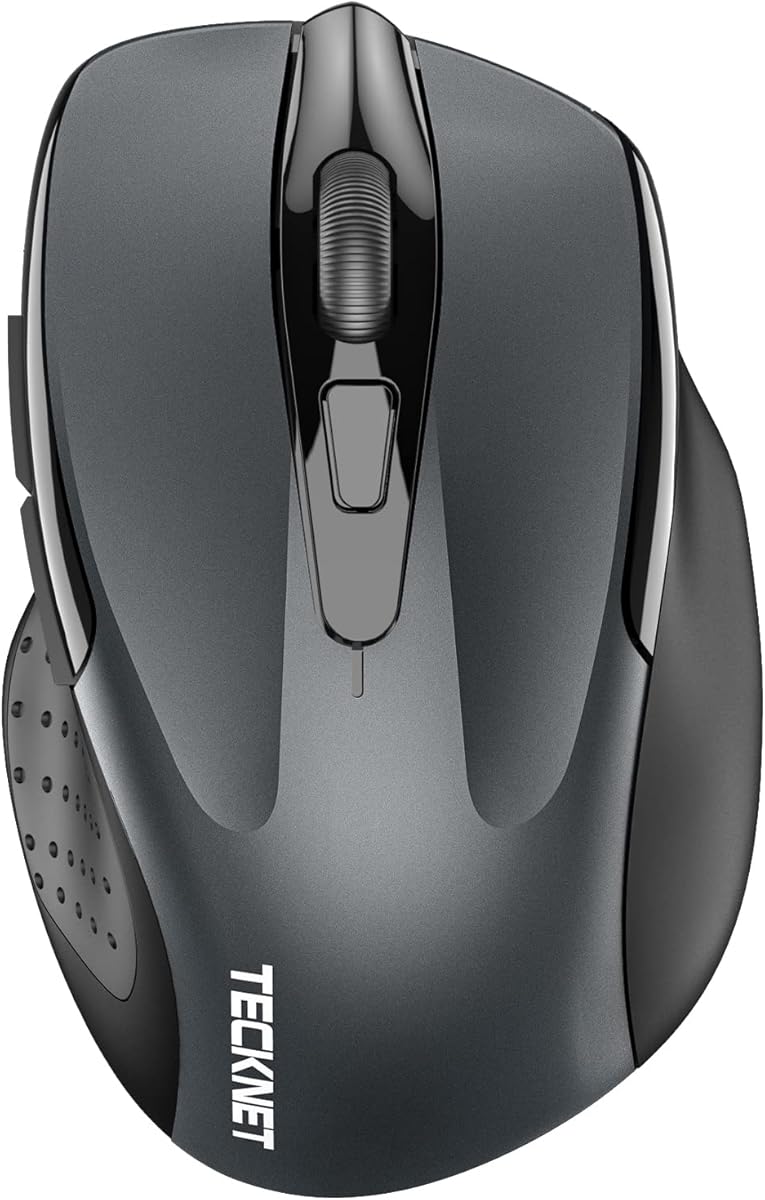
The TECKNET compact mouse offers a fresh look with its mint green color appealing to users who want personalization. Its small size is specifically tailored for children or adults with smaller hands ensuring a comfortable fit without excessive strain.
We may earn a commission when you buy through this link, at no additional cost to you.
Soft quiet clicks prevent noise distraction which is beneficial for shared environments. The USB receiver stores conveniently inside the back compartment keeping it secure and ready for future use without risk of losing the small part.
Adjustable DPI levels allow you to switch between speeds for different tasks although the range is limited compared to premium models. The battery life extends up to fifteen months providing consistent performance without frequent maintenance.
This mouse is perfect for home users or kids who need a colorful and functional device. Its ergonomic design and quiet operation make it a delightful addition to any laptop setup.
The compact size ensures optimal fit and comfort for children or individuals with smaller hands reducing fatigue during extended use.
Responsive buttons provide very soft clicks that minimize noise so you can focus on work without disturbing others around you.
We may earn a commission when you buy through this link, at no additional cost to you.
The M330 Silent Plus is engineered for quiet operation reducing clicking sounds by over ninety percent. This feature makes it an ideal choice for libraries or open offices where noise pollution is a concern for others.
We may earn a commission when you buy through this link, at no additional cost to you.
Designed specifically for right handed users its contoured shape with natural grips ensures comfort over long periods. The eighteen month battery life with auto sleep mode ensures you spend more time working and less time changing batteries.
While it is not suitable for left handed users the performance and comfort for right handers are excellent. The plug and play setup and wide OS compatibility mean it works seamlessly with almost any computer system.
This mouse is perfect for professionals who need a silent reliable device for shared spaces. Its focus on noise reduction and ergonomics provides a comfortable and respectful computing experience.
SilentTouch Technology reduces over ninety percent of clicking sounds ensuring top performance while contributing to a quieter working environment.
Naturally shaped contoured plastic grips are built for long lasting comfort and functionality specifically for right handed users.
We may earn a commission when you buy through this link, at no additional cost to you.
This wireless mouse excels at connecting multiple devices allowing you to switch between a desktop and laptop with a single button slide. The Bluetooth 5.0 and 2.4G options offer flexibility to suit different system preferences and connection needs.
We may earn a commission when you buy through this link, at no additional cost to you.
With six adjustable DPI levels up to 4800 you can customize sensitivity for detailed editing or fast browsing. Silent clicks ensure a quiet experience although side buttons remain louder. The extended battery life keeps you productive for months.
While side buttons are not silent and macOS support is limited for them the core experience remains smooth. The ergonomic design enhances comfort during long work sessions ensuring you stay focused on your tasks.
This mouse is ideal for power users managing multiple machines who need reliable switching. Its versatile connectivity and customization options make it a robust choice for demanding workflows.
Effortlessly connect to two devices at once and switch between them with a slide of a button for a seamless experience.
Tailor the sensitivity to your liking with six DPI settings whether you need precise control or swift movement.
We may earn a commission when you buy through this link, at no additional cost to you.
The TECKNET rechargeable mouse offers sustainable usability with a built in battery that charges quickly. Once fully charged it delivers up to three months of use on a single charge eliminating the need for disposable batteries entirely.
We may earn a commission when you buy through this link, at no additional cost to you.
Switching between two devices is seamless thanks to Bluetooth 5.0 and 2.4G connections. Silent clicks and six adjustable DPI levels ensure the mouse adapts to various environments from quiet libraries to detailed design work.
Although the connection may become unstable when the battery is low the charging indicator helps manage this. The compact ergonomic design suits small to medium hands well making it comfortable for long periods.
This mouse is perfect for eco conscious users and professionals who value convenience and style. Its rechargeable feature and robust connectivity make it a top tier choice for modern computing.
Our bluetooth mouse for laptop is rechargeable taking only 1.5 to 2 hours to fully charge delivering 3 months of use with 2 hours of daily use.
Enjoy a noiseless experience with this silent mouse designed to provide quiet operation suitable for libraries or offices.
We may earn a commission when you buy through this link, at no additional cost to you.
Selecting the right mouse involves considering your specific needs such as budget connectivity preferences and ergonomic requirements to ensure a comfortable and efficient experience.
Choose between wired and wireless options based on your usage environment. Wireless mice offer mobility while wired models provide stable connections without battery concerns. Bluetooth models connect easily while USB dongles offer universal compatibility.
Assess whether you prefer the freedom of wireless or the reliability of a wired connection for your daily tasks.
Look for long lasting battery performance if you opt for a wireless mouse. Rechargeable models reduce waste while AA battery models are easy to replace. Some options offer months of usage on a single charge.
Consider how often you are willing to charge or replace batteries to maintain uninterrupted work.
Comfort is key for extended use. Ergonomic shapes with soft grips reduce strain on your hand and wrist. Ensure the size fits your hand comfortably whether small large or medium.
Prioritize shapes that support natural hand positions to prevent fatigue during long work sessions.
DPI determines the cursor sensitivity on your screen. Higher DPI is useful for detailed tasks or large screens while lower DPI offers control. Optical sensors provide consistent tracking across different surfaces.
Check if adjustable DPI settings are available to customize sensitivity for different applications.
Features like silent clicks programmable buttons or side scrolling can enhance productivity. Silent clicks are essential for shared spaces while programmable buttons streamline complex workflows.
Identify which features align with your specific daily requirements.
Ensure the mouse works seamlessly with your operating system and laptop. Most mice support Windows and macOS but specific software may be needed for advanced features or customizations.
Verify compatibility with Dell Display and Peripheral Manager if you use Dell specific tools.
Look for models with solid build quality and warranty coverage to protect your investment. Some brands offer extended warranties or exchange services for added peace of mind.
A reliable warranty ensures you have support in case of defects or issues.
Prices vary widely based on features and brand. Determine your budget early to narrow down options between basic models and premium feature rich devices.
Balance cost with essential features to find the best value for your needs.
To set up your wireless mouse simply insert the USB receiver into an available port or enable Bluetooth on your Dell laptop and pair the device. Follow on screen prompts if necessary to complete the connection.
Keep the sensor lens clean by wiping it gently with a dry cloth to ensure precise tracking. Store the mouse in a dry place when not in use to prevent damage to internal components.
Regularly check battery levels and replace or recharge as needed to avoid interruptions. For wired mice avoid excessive bending of the cable to maintain connection integrity over time.
Yes most external mice work with any Dell laptop via USB ports or Bluetooth connectivity. Ensure your system supports Bluetooth if you choose a wireless mouse without a receiver.
Wireless mice offer mobility and a cleaner setup while wired mice provide reliable connection and no battery concerns. The choice depends on whether you value convenience or constant power.
Ensure the mouse surface is clean and non reflective. Adjust DPI settings in your computer settings to match your screen resolution and usage style for optimal tracking.
Absolutely gaming mice often have extra features like adjustable DPI and buttons that enhance productivity. They are excellent for daily use and offer high performance for various applications.
Lagging can be caused by low battery interference from other devices or driver issues. Try updating drivers replacing batteries or moving to a less congested USB port.
Go to Settings on your laptop select Devices then Bluetooth. Turn on your mouse and select it from the list of available devices to complete pairing.
We have explored ten excellent options ranging from budget friendly wired mice to feature rich wireless models. Each choice offers distinct advantages tailored to different needs and work environments.
Prioritize ergonom comfort battery life and connectivity features that matter most to your daily workflow. The right mouse can significantly enhance your productivity and comfort while using your Dell laptop.
Remember that specific pricing and availability may change over time. Always check current product details to ensure you select the best option available at the time of purchase.