
Apevia VENUS500W
3.9Editor score
Comprehensive protection suite
Auto-thermally controlled fan
Versatile connector options
This guide compares the top low power PSU options for small builds and energy efficiency to help you find the right supply for your specific system needs.
Finding the right low power PSU is essential for compact builds and energy-conscious setups. A reliable unit ensures stable performance while minimizing heat and electricity costs.
We compared ten real products based on efficiency ratings, connector types, cooling solutions, and build quality. Each entry offers unique benefits for different small form factor applications.
Each pick shows key specs and verified ratings to guide your choice. Prices and availability change frequently, so check current listings before finalizing your purchase decision.
3.9Editor score

4.6Editor score

5.0Editor score
The following table provides a side-by-side comparison of all ten featured low power units. It highlights key specifications and features to help you quickly identify the best fit for your specific build requirements.




The Apevia ITX-PFC500W is a reliable power unit for mini ITX builds. It has a 4.1 rating and offers 500W output in a compact chassis with active PFC support.
We may earn a commission when you buy through this link, at no additional cost to you.
Its fully modular design allows you to connect only the cables you need. This improves airflow and reduces clutter inside small cases. The unit includes essential connectors like 20+4pin, 8pin CPU, and PCIe options.
While the 40mm fan is standard, it may generate some noise under load. You must manually split connectors for legacy motherboards. These trade-offs are acceptable for the price and form factor.
Build your mini ITX workstation with this PSU. It provides stable power and fits standard ITX cases. Check current prices before buying.
The unit measures 160mm by 73.66mm by 35.5mm which fits most ITX cases perfectly.
It includes overvoltage overcurrent short circuit and heating protection to keep your components safe.
We may earn a commission when you buy through this link, at no additional cost to you.
The Apevia ITX-AP300W is ideal for budget HTPC or POS systems. It offers 300W output and fits standard Mini-ITX or Flex-ATX chassis with ease.
We may earn a commission when you buy through this link, at no additional cost to you.
It includes essential ports like SATA and Molex for drives and fans. The manual switch allows voltage selection but requires user attention to prevent damage.
The manual voltage switch is a drawback for international users. You must toggle it correctly before plugging in. This step ensures safe operation in different regions.
Choose this unit for entry level builds. It supports retail motherboards and compact servers. Verify voltage settings before installation.
This unit is engineered specifically for small form factor cases and 1U servers.
A 40mm double ball-bearing fan with thermal speed control keeps noise levels low.
We may earn a commission when you buy through this link, at no additional cost to you.
The Thermaltake Smart 500W is a strong performer with 80 PLUS White certification. It delivers 500W continuous power and features a 120mm ultra quiet fan for steady operation.
We may earn a commission when you buy through this link, at no additional cost to you.
It supports active PFC and meets Intel ATX standards. The 120mm fan moves air efficiently without loud noise. This makes it suitable for living room or office PCs.
Cables are fixed and may cause clutter in tight cases. You cannot route them away from airflow paths. However the reliable output justifies this minor inconvenience.
Use this PSU for standard ATX builds. It offers consistent performance and strong protection. Check the warranty details when purchasing.
This unit achieves 80 percent efficiency under typical load for reduced energy waste.
It features an MTBF of 100000 hours and a five year warranty for long term use.
We may earn a commission when you buy through this link, at no additional cost to you.
The MSI MAG A650BE delivers 650W in a compact semi-modular design. It carries 80 PLUS Bronze certification and features a low-noise fan for quiet operation.
We may earn a commission when you buy through this link, at no additional cost to you.
Its semi-modular setup lets you connect only essential cables. This improves airflow inside the case. Active PFC ensures efficient power draw from the wall.
Fixed cables for main rails may limit routing. But the extra headroom supports better performance. This balance works well for compact gaming builds.
Select this for mid-range systems needing space. It provides reliable power with flexible cabling. Review specs before installation.
Semi-modular design allows for cleaner cable management by connecting only necessary power cables.
Industrial level protections like OVP OCP OPP OTP and SCP safeguard your system components.
We may earn a commission when you buy through this link, at no additional cost to you.
The NovaMist Misting Fan is an accessory not a power supply. It holds an 80 PLUS Bronze certification and offers a five year limited warranty.
We may earn a commission when you buy through this link, at no additional cost to you.
It features a low noise fan designed for steady operation. This product helps with cooling rather than power delivery. Ensure you verify its function before purchase.
It does not provide electricity to your PC. Buyers might expect a PSU but get a fan. Read the title carefully to avoid confusion.
Use this for system cooling if needed. It is not a replacement for a PSU. Check product details for accurate info.
This unit focuses on thermal management with a low noise fan setup.
It includes a five year limited warranty guaranteeing long term reliable operation.
We may earn a commission when you buy through this link, at no additional cost to you.
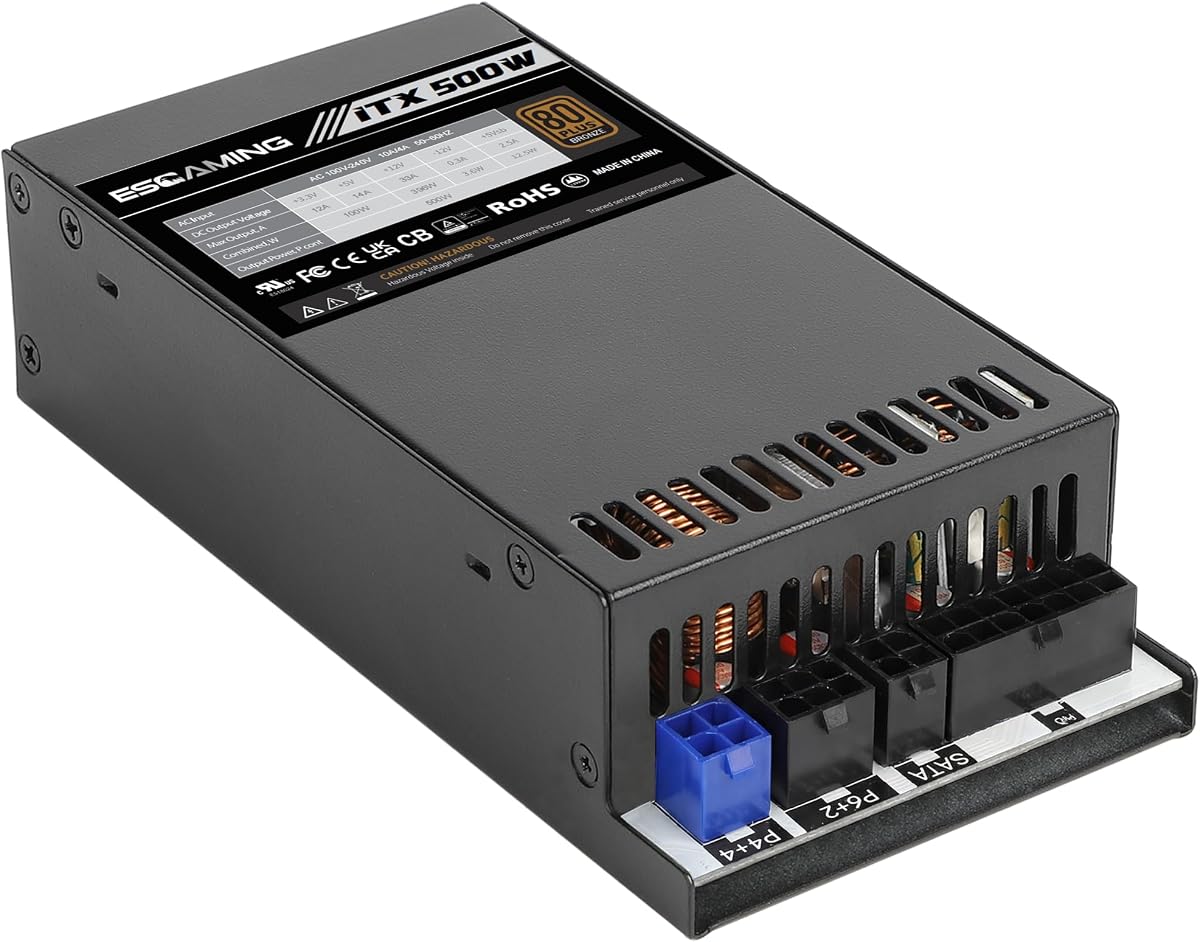
The ESGAMING Fully Modular PSU offers 500W in a compact design. It supports 80 Plus Bronze efficiency with active PFC for stable power.
We may earn a commission when you buy through this link, at no additional cost to you.
Its fully modular cable system simplifies installation. You can use only required wires for improved airflow. Active PFC reduces electrical interference effectively.
Support is customer dependent. You must contact the seller directly for issues. Build quality is adequate for small budgets.
Pick this for 1U cases or ITX builds. It delivers consistent output. Contact support if you face problems.
This unit features a fully modular cable system for simplified installation and improved airflow.
It supports full range 90 to 264 volts for global compatibility.
We may earn a commission when you buy through this link, at no additional cost to you.
The Apevia TFX-PFC500W is designed for TFX cases. It delivers 500W with active PFC and auto-switching voltage for global use.
We may earn a commission when you buy through this link, at no additional cost to you.
The silent start fan remains stationary during low loads. This keeps the unit quiet until temperature rises. A 33A 12V rail supports gaming loads.
Cables are fixed and non-modular. You cannot remove unused wires from the case. This is a standard trade-off for this form factor.
Choose this for TFX chassis compatibility. It provides stable power for workstations. Check case dimensions before buying.
Full range active PFC automatically detects voltage without manual toggles.
Silent-start fan technology reduces noise during low load periods.
We may earn a commission when you buy through this link, at no additional cost to you.
The Apevia VENUS500W provides 500W power for standard ATX cases. It includes a 120mm auto-thermally controlled fan and a full protection suite.
We may earn a commission when you buy through this link, at no additional cost to you.
It delivers precise voltage regulation with 5 percent tolerance. This ensures stable power for components. The protection suite guards against electrical damage.
The 115/230V switch requires manual settings. Incorrect setup could cause damage. This is a manual step not automated like newer units.
Use this for basic builds on a budget. It offers reliable power for standard use. Check voltage settings carefully.
5 percent tolerance on output ensures stable power delivery to all components.
Includes short circuit over current over voltage and over temperature protections.
We may earn a commission when you buy through this link, at no additional cost to you.
The 600W Flex ATX PSU is a top premium choice for 1U ITX builds. It features over 92 percent efficiency and full Japanese capacitors.
We may earn a commission when you buy through this link, at no additional cost to you.
It supports 12VHPWR for high-end GPUs and uses fully modular cables. A silent fan and 12VHPWR design prevent power drops during peak loads.
The price is higher due to quality components. But the efficiency and stability justify the cost. Ideal for professional or high-end compact servers.
Select this for NAS or surveillance systems. It offers stable output. Verify compatibility with your chassis.
With over 92 percent efficiency it generates less heat and reduces fan noise.
Standard 16-pin connector design resists power drops from high-end GPU loads.
We may earn a commission when you buy through this link, at no additional cost to you.
The Smart W3 Series 600W meets ATX v3.1 specs. It delivers high amperage 12V power with a 120mm FDB fan for cooling.
We may earn a commission when you buy through this link, at no additional cost to you.
It supports modern standards with DC to DC design. This improves stability under load. The 120mm FDB fan runs quietly.
Cables are low-profile but fixed. You cannot detach unused wires. However the ATX 3.1 compliance ensures future compatibility.
Use this for ATX 3.1 compliant systems. It offers reliable power with modern specs. Check current listings for details.
Fully compatible with Intel ATX v3.1 specification for future readiness.
120mm FDB cooling fan ensures quiet and efficient thermal management.
We may earn a commission when you buy through this link, at no additional cost to you.
Choosing a low power PSU involves evaluating several technical and practical factors. This guide outlines key criteria to consider for compatibility efficiency safety and longevity.
The physical size of your power supply must match your case. Small form factor builds often require ITX TFX or Flex ATX units. Standard ATX units may not fit compact chassis.
Measure your case dimensions before selecting a PSU. Verify length width and height clearance to ensure a proper fit.
Ensure the PSU can deliver enough power for your components. High wattage units support more powerful GPUs and CPUs. The 12V rail amperage is critical for modern systems.
Match wattage to your total system draw. Include headroom for future upgrades and avoid running at full load.
Check available connectors for motherboard GPU and drives. Modular PSUs offer easier cable management. Non-modular units have fixed cables that may clutter small cases.
Confirm that PCIe and CPU connectors match your motherboard. Some motherboards require 4pin CPU 20pin main or 12VHPWR inputs.
Look for 80 PLUS certification to ensure efficiency. Higher ratings reduce heat and power waste. Bronze Silver Gold Platinum and Titanium tiers exist for selection.
Efficient units convert more AC power to DC. This lowers energy costs and reduces thermal output in compact enclosures.
Protections safeguard your system from electrical faults. Common features include OVP OCP SCP OTP and OPP. Industrial grade protections are preferred for stability.
Adequate protections prevent damage during surges or shorts. Check product specs for listed safety features before buying.
A quiet fan helps maintain low noise levels. Fan size and bearing type affect performance. 120mm fans often run quieter than 40mm fans.
Consider fan control options like thermal speed or silent start. Better cooling extends PSU lifespan and reduces noise.
Units with auto-switching support 90-264V input. Manual switches require toggling for different regions. Auto-switching prevents damage from voltage mismatches.
Check voltage options if traveling or using international supplies. Full range input offers flexibility and safety.
A longer warranty indicates manufacturer confidence. Five year terms are common for quality units. Check support channels for returns or repairs.
Keep receipts and registration details for warranty claims. Reliable support helps resolve issues quickly if the unit fails.
Install the PSU in a well-ventilated area to ensure efficient cooling. Secure it properly using screws to prevent vibration or movement inside the case. Ensure airflow paths remain clear of obstructions.
Connect cables firmly to motherboard drives and GPU. Check connectors for secure seating before powering on. Loose connections can cause instability or system crashes.
Avoid overloading the unit beyond rated wattage. Monitor temperatures and fan noise over time. If the unit overheats or becomes loud consider cleaning filters or replacing it.
A low power PSU is designed for small form factor or energy efficient builds. These units deliver stable power with lower wattage and reduced heat. They often feature compact sizes and efficient components.
Modular PSUs simplify cable management and improve airflow in small cases. They allow you to connect only necessary cables. Non-modular units work well but may cause clutter if unused wires remain.
Wattage depends on your components like GPU and CPU. A 300W unit may suit basic systems while 500W or more supports gaming. Calculate total system draw and add headroom for safety.
Many units feature low-noise fans and thermal control. Silent start technology helps reduce noise at low loads. Choose larger fans or advanced controls for quiet operation.
Look for 80 PLUS certifications to ensure efficiency. These ratings confirm energy performance. Higher tiers offer better efficiency but cost more. Bronze and Silver are common entry levels.
Yes but you must match the manual switch to local voltage. Incorrect settings can damage the unit. Auto-switching models detect voltage automatically for easier global use.
Most include essential connectors like SATA PCIe and CPU. Some models offer split connectors for legacy boards. Check specific cable sets to ensure compatibility with your hardware.
Check ratings warranty and protection features. Units with high MTBF and industrial protections are preferred. Read reviews and compare specs before purchasing a model.
We reviewed ten units including options from Apevia Thermaltake MSI and more. Each offers unique benefits for small builds and energy efficiency. Select based on form factor and connector needs.
Prioritize form factor efficiency and safety features. A unit with auto-switching and protections adds value. Consider long-term reliability and warranty when choosing.
Prices and specs may change frequently. Always check current listings before purchasing. Verify compatibility with your case and components for the best experience.