
Cudy R700
4.4Editor score
Five Gigabit Ethernet ports
OpenWRT support included
Built-in VPN gateway
This guide compares the top ten load balancing routers for reliability and performance across home offices and businesses.
Modern networks demand robust solutions that handle multiple internet connections seamlessly. A load balancing router distributes traffic across various WAN links to maximize speed and ensure continuous uptime even when one line fails.
We evaluated ten leading models based on port flexibility, security features, and ease of management. Our analysis covers devices ranging from compact budget units to high-performance enterprise gateways designed for heavy workloads and complex routing needs.
Each pick highlights specific strengths like VPN support or cloud management tools. While prices fluctuate frequently due to market dynamics, these selections represent the best value and performance available in the current landscape for diverse networking requirements.
4.4Editor score

4.7Editor score

4.0Editor score
This side-by-side comparison highlights the core specifications of each router to help you identify the model that fits your specific bandwidth and connectivity requirements without confusion.



The Cudy R700 stands out as an affordable option for users who want extensive control over their network traffic. It offers five gigabit ports and supports OpenWRT, making it highly customizable for advanced users.
We may earn a commission when you buy through this link, at no additional cost to you.
Its primary strength lies in its ability to connect up to five ISPs with automatic failover. This ensures business continuity even if one connection drops. The built-in VPN suite including WireGuard adds significant security value.
While the interface is functional, it lacks the polish of enterprise systems. Support is also less robust than major brands. However, for the price, it offers features that usually cost much more.
This router is ideal for home labs or small offices needing reliability without high costs. If you value customization and multiple WAN links on a budget, the R700 is a compelling choice.
Full OpenWRT support allows you to install custom packages and manage VLANs directly on the device.
Automatic failover ensures your internet stays up by rerouting traffic instantly when a connection fails.
We may earn a commission when you buy through this link, at no additional cost to you.
The Omada Fusion 2.5G combines high-speed connectivity with intuitive management features that simplify network administration. It brings 2.5G speeds to the desktop with a touchscreen for on-site monitoring without extra tools.
We may earn a commission when you buy through this link, at no additional cost to you.
Its quad-core processor handles heavy traffic efficiently while the touchscreen provides instant insights into network health. The ability to manage devices via Bluetooth simplifies initial setup significantly for non-technical staff.
Although it works best within the Omada ecosystem, the integration is seamless. Some users might find the initial hardware investment higher than basic routers but the performance gains justify the expense.
This router is perfect for businesses needing multi-gigabit speeds and simple management. If you want a unified experience with excellent speed and control, this model delivers on all fronts.
The touchscreen allows quick checks of speed tests and traffic without needing a laptop connection.
Five 2.5G ports ensure your internal network can handle modern bandwidth demands without bottlenecks.
We may earn a commission when you buy through this link, at no additional cost to you.
The Alta Labs Route10 is a powerhouse built for environments where speed and hardware acceleration are critical. It supports 10 Gigabit connections and integrates Power over Ethernet to reduce cabling complexity significantly.
We may earn a commission when you buy through this link, at no additional cost to you.
Powered by a quad-core Qualcomm processor, it delivers low latency performance even under heavy loads. The real-time monitoring allows administrators to optimize traffic flow effectively without third-party tools.
The price point is significantly higher than standard options and requires technical expertise to utilize fully. It is not designed for typical home users but rather for advanced setups needing maximum throughput.
If you need enterprise-grade routing speeds in a compact form factor, this device is unmatched. Choose it when your network demands high-speed WAN aggregation and integrated power delivery features.
Hardware acceleration ensures consistent multi-gigabit performance for routing and VPN traffic without bottlenecks.
PoE+ support allows the router to power access points directly through Ethernet cables reducing adapters.
We may earn a commission when you buy through this link, at no additional cost to you.
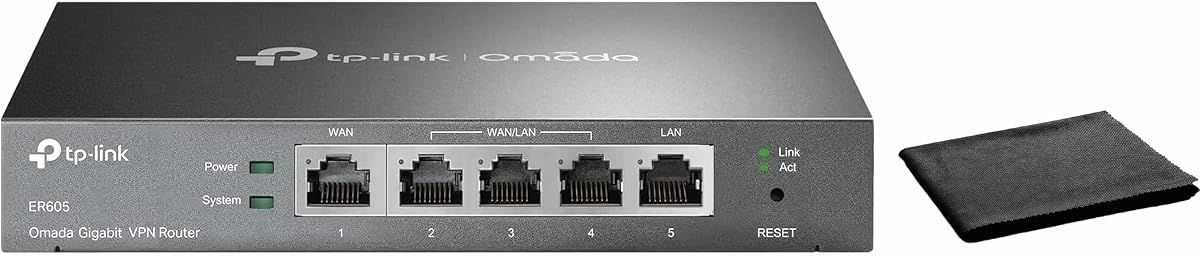
The TP-Link ER605 offers a straightforward solution for small businesses needing basic load balancing. It features three WAN ports and supports a variety of VPN protocols for secure remote access capabilities.
We may earn a commission when you buy through this link, at no additional cost to you.
Its ease of use makes it a popular choice for those without deep networking knowledge. The firewall security features protect against common threats like DoS attacks while maintaining network performance levels.
It may lack advanced features like multi-gigabit ports or extensive VPN sessions. However for these limitations are acceptable given the low price point and solid reliability for daily operations.
This router is ideal for small offices needing failover without complexity. If you prioritize simplicity and cost efficiency for basic load balancing, the ER605 is a reliable starting point.
Support for multiple VPN types ensures you can connect securely from remote locations to your office.
Advanced bandwidth management optimizes usage for critical applications to maintain smooth performance.
We may earn a commission when you buy through this link, at no additional cost to you.
The ER7206 integrates seamlessly with the Omada SDN platform to provide centralized control for growing networks. It supports four WAN ports and offers extensive VPN capabilities for complex enterprise environments.
We may earn a commission when you buy through this link, at no additional cost to you.
Its ability to manage multiple sites via the cloud makes it valuable for distributed businesses. The hardware is robust enough to handle up to 700 clients without significant performance degradation over time.
Setting it up requires familiarity with the Omada software which might challenge simple home setups. However once configured it delivers professional grade stability and management tools for large networks.
Choose this router if you plan to expand your network with Omada devices. It provides the scalability and control needed for professional deployments requiring centralized oversight.
Cloud access allows you to manage the entire network from anywhere with a single interface view.
Support for up to 700 clients ensures your network remains stable even as your team grows.
We may earn a commission when you buy through this link, at no additional cost to you.
The ER7412-M2 is designed for networks needing higher throughput than standard gigabit connections. It offers two 2.5G ports and extensive WAN capacity to maximize broadband utilization across multiple lines.
We may earn a commission when you buy through this link, at no additional cost to you.
Security is a strong suit with built-in IPS/IDS to detect and prevent advanced threats. The ability to aggregate up to eleven WAN lines ensures maximum redundancy for critical operations.
It comes with a higher price tag and requires advanced configuration to unlock all features. This makes it better suited for IT professionals than typical home users seeking simple internet failover.
Select this model if you need multi-gigabit performance and advanced security. It is an excellent fit for businesses needing robust protection and high-speed network aggregation.
Load balancing across up to eleven WAN lines ensures you get the maximum speed from your ISPs.
IPS/IDS protection adds an extra layer of security to detect and mitigate sophisticated network attacks.
We may earn a commission when you buy through this link, at no additional cost to you.
The TL-R470T+ provides a compact solution for small offices that need basic failover without modern gigabit speeds. It supports four WAN ports and includes portal authentication for guest network management easily.
We may earn a commission when you buy through this link, at no additional cost to you.
Its smaller case makes it easy to fit in limited spaces while providing reliable performance. DDNS support allows for easy remote management without needing complex networking skills or setup.
The lack of gigabit ports may limit speed potential for bandwidth-heavy tasks. However for cost effective environments where reliability is key it offers solid value for the price.
Ideal for small shops needing basic load balancing, this router simplifies network redundancy. If you need a reliable failover device that fits in a tight spot this is a practical choice.
Portal authentication lets you manage guest access securely without needing complex external solutions.
The smaller case ensures the device fits easily into crowded desks or small network closets.
We may earn a commission when you buy through this link, at no additional cost to you.
The TL-R480T+ is designed for those needing a no-frills load balancing router at a low cost. It provides three configurable WAN/LAN ports and basic VPN support for essential security requirements.
We may earn a commission when you buy through this link, at no additional cost to you.
Its straightforward design reduces the complexity of network setup significantly. Users can switch ports between LAN and WAN as needed to adapt to different connectivity scenarios easily.
While it lacks modern speed capabilities it remains a reliable option for older networks. The simplicity makes it easy to troubleshoot without needing deep technical networking knowledge.
This router works best in environments where basic internet continuity is the main goal. If you want a simple device that handles basic load balancing without issues this is a good choice.
Configurable ports allow you to assign WAN or LAN roles based on your current network needs.
An affordable price point ensures you get essential load balancing without a significant financial investment.
We may earn a commission when you buy through this link, at no additional cost to you.
The ER-605 offers easy management through cloud monitoring tools that simplify network oversight. It supports dual WAN ports and provides robust security features like SPI firewall and bandwidth management.
We may earn a commission when you buy through this link, at no additional cost to you.
Intuitive web interfaces make configuration accessible for non-technical staff. The compact design ensures it fits easily on desks while maintaining performance for small businesses.
With only dual WAN ports it might not suit larger setups needing multiple connections. However the balance of features and simplicity makes it a versatile option for basic failover.
Ideal for small businesses needing remote visibility into their network status. If you want a simple reliable router with cloud tools this model delivers consistent performance.
Cloud monitoring allows you to check status and configure settings from anywhere using a web browser.
A compact design ensures the router fits easily on any desk without taking up much space.
We may earn a commission when you buy through this link, at no additional cost to you.
The Ubiquiti EdgeRouter 4 is a fanless device designed for users who prefer command-line interfaces for full control. It offers three gigabit ports and an SFP port for fiber connectivity needs.
We may earn a commission when you buy through this link, at no additional cost to you.
Its powerful CPU handles complex routing tasks efficiently while maintaining silence due to the fanless design. It supports extensive configuration options for deep network segmentation and traffic management.
The lack of a simple web GUI means it requires strong technical networking skills. For beginners it might be overwhelming compared to plug-and-play alternatives available in the market today.
Select this router if you are a network professional needing granular control. If you value advanced routing and a silent environment this is a top-tier choice for experts.
The fanless design ensures the router operates silently making it ideal for quiet office environments.
Full CLI access allows for deep customization of routing tables and network policies.
We may earn a commission when you buy through this link, at no additional cost to you.
Selecting the right load balancing router requires understanding your specific bandwidth needs and security requirements.
The number of WAN ports determines how many internet connections you can connect simultaneously. More ports allow better redundancy and speed aggregation.
Look for models offering at least three WAN ports if you plan to use multiple ISPs for reliability.
Ensure the router supports the speed of your internet plan. Gigabit ports are standard but multi-gigabit ports are becoming necessary for high-speed fiber.
Choose 2.5G or 10G ports if your internet exceeds 1Gbps to avoid bottlenecks.
Automatic failover switches traffic instantly when a connection fails. This ensures uninterrupted internet access for businesses.
Verify that the router supports automatic detection of connection loss without manual intervention.
Look for built-in firewalls and intrusion prevention systems to protect your network. VPN support is crucial for secure remote access.
Ensure the router includes SPI firewalls and supports modern protocols like WireGuard or OpenVPN.
A user-friendly interface simplifies setup and daily management. Some routers offer cloud management for remote access.
Consider whether you prefer a web GUI or a command-line interface based on your technical expertise.
Choose a router that allows future expansion. SDN support can help integrate with other network devices easily.
Check if the device supports additional switches or access points for growing networks.
Price varies significantly based on features. Higher-end models offer better performance but cost more.
Balance your needs with cost to avoid overspending on unused features.
Reliable customer support ensures you get help when issues arise. Check the warranty period provided by the manufacturer.
Opt for brands with a strong reputation for service and technical support availability.
Begin by connecting your modems to the WAN ports and your devices to LAN ports. Configure the router settings via the web interface or app as instructed.
Regularly update the firmware to ensure security patches are applied. This helps protect your network against vulnerabilities and improves performance.
Keep the router in a well-ventilated area to prevent overheating. Dust it occasionally to maintain proper airflow and hardware longevity.
A load balancing router distributes internet traffic across multiple connections to maximize speed and ensure redundancy. If one connection fails, the router reroutes traffic automatically.
Yes if you require high reliability or multiple internet lines. It prevents downtime and aggregates bandwidth for better performance in business environments.
They analyze traffic and send requests to available connections. They monitor link health and switch to backups if a primary line fails.
Yes many models are suitable for home labs or smart homes needing multiple ISPs. Look for simpler interfaces if technical expertise is limited.
It can increase effective speed by combining multiple connections. However individual downloads usually use one line unless configured for session splitting.
Failover switches to a backup when the main link fails. Load balancing actively uses all connections simultaneously to distribute traffic and improve throughput.
Most include firewalls and VPN support. Always keep firmware updated to ensure maximum security for your connected devices and data.
Many models offer cloud management tools. This allows you to monitor and configure settings from anywhere via a web portal or app.
We reviewed ten routers offering diverse capabilities from basic budget units to high-performance enterprise gateways. The Cudy R700 stands out for value while the Omada Fusion 2.5G leads in performance.
Prioritize factors like port count and security features when selecting a model. Your choice should align with your specific need for speed and reliability.
Check current prices and availability before purchasing as they fluctuate frequently. Investing in the right router ensures your network remains fast and secure for the future.