
VSDISPLAY H/D VGA DVI LVDs Controller Board 40Pin for 15.6"
4.4Editor score
VGA and DVI inputs
Works with 40 pin LVDS
Low power consumption design
Finding the right LCD controller board for laptop screen repairs or DIY monitor projects can be challenging. You need a board that matches your panel resolution and interface type perfectly to avoid display issues or hardware damage during setup.
We analyzed ten highly rated controller boards based on user feedback technical specifications and compatibility ranges. Each product was evaluated for signal stability power requirements and ease of installation to help you choose the best fit for your specific screen panel.
Each pick below shows key specs pros and cons along with detailed installation notes. Prices and availability change frequently so please verify current details on the product page before ordering to ensure you get the correct kit for your panel model.
4.4Editor score

4.4Editor score
5.0Editor score
As an Amazon Associate we earn from qualifying purchases.
The following table provides a side by side comparison of all ten LCD controller boards reviewed in this guide. Check the specs carefully to ensure the board matches your screen panel resolution interface type and physical connector before purchasing for successful installation.


This H/D LCD controller board is specifically designed for 1366×768 panels with 30-pin eDP interfaces. It earns Editor's Choice status for its stable signal output and easy installation process. Users appreciate the pre-connected cable and clear pin markers that reduce setup errors during DIY repairs.
We may earn a commission when you buy through this link, at no additional cost to you.
The board provides a reliable HD signal suitable for converting old laptop screens into desktop monitors. Its 12V 2A power requirement ensures consistent performance without flickering. The LED indicator confirms signal status and allows quick factory mode reset via the ON/OFF key.
Keep in mind this board does not support 1920×1080 FHD panels so verify your screen resolution before purchasing. Power requirements must be met to avoid rebooting issues. These limitations are acceptable given its strong performance and price point for HD screens.
Buyers should choose this if they have a 11.6 to 15.6 inch 1366×768 panel with eDP interface. It is ideal for hobbyists and technicians needing a reliable solution for screen repairs or monitor conversion projects with minimal troubleshooting time.
This board delivers a stable high-quality signal specifically optimized for HD resolution panels ensuring crisp visuals for any DIY monitor setup.
Pre connected cables and clear pin 1 markers simplify installation reducing the risk of connection errors during the setup process.
We may earn a commission when you buy through this link, at no additional cost to you.
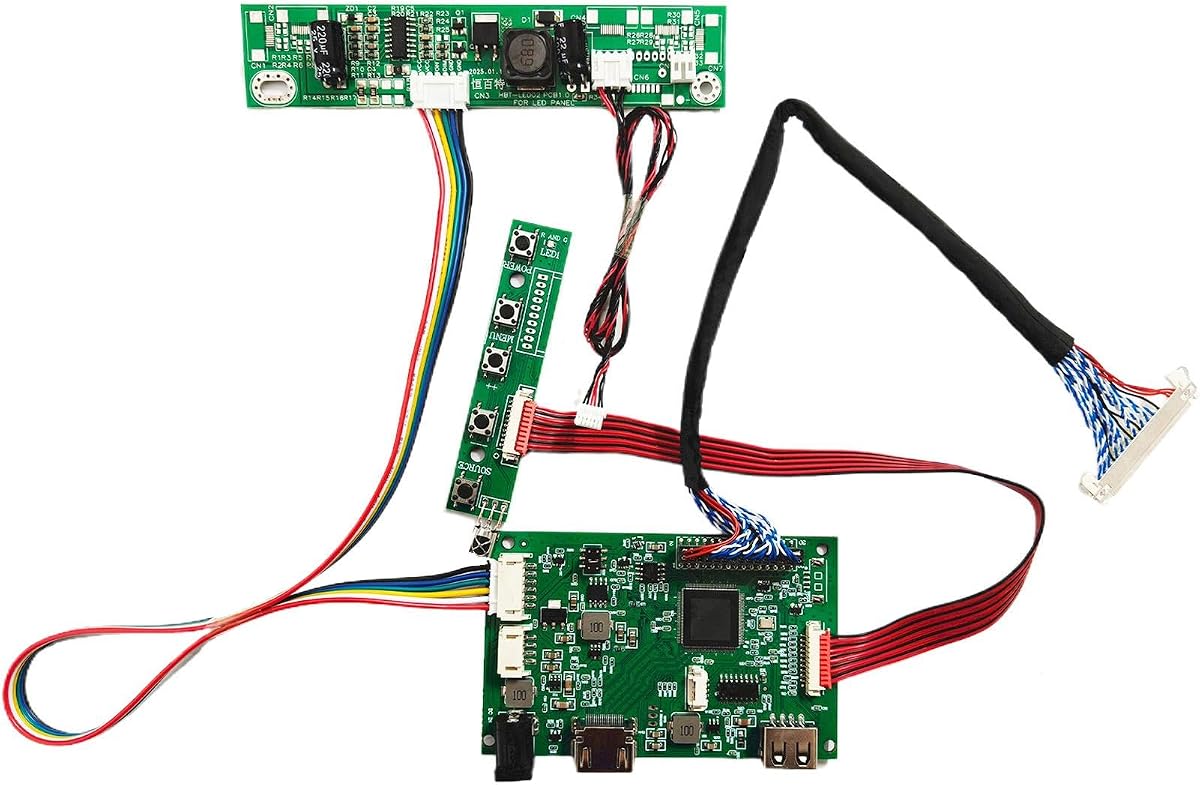
This VSDISPLAY board offers an affordable solution for 15.6 inch 1366×768 screens with 40-pin LVDS interfaces. It stands out as the Best Budget option by providing essential VGA and DVI inputs along with audio support. The plug and play design makes it accessible for beginners.
We may earn a commission when you buy through this link, at no additional cost to you.
The board features built-in self-check LEDs that help diagnose connection issues quickly. Power requirements are standard at 12V 2A which most users can source easily. Audio output via 4Pin connector adds value for multimedia setups without extra hardware.
It is limited to LVDS interfaces which may not fit newer eDP screens. External power adapters are not included so factor that into your budget. These trade-offs are minor compared to the cost savings for compatible panel owners.
Choose this board if you have a budget constraint and need basic monitor conversion for older laptop screens. It is perfect for users wanting essential video inputs without paying for premium features they may not use.
This board supports both VGA and DVI video inputs providing flexibility for connecting various external devices without additional adapters.
Simple cable connections and clear diagrams allow users to set up the board quickly without needing specialized technical knowledge or tools.
We may earn a commission when you buy through this link, at no additional cost to you.
This board supports full 1920×1080 resolution on 30-pin eDP screens up to 17.3 inches. It eliminates the need for driver installation allowing direct cable connections for immediate use. Users value its compatibility with popular high definition panel models.
We may earn a commission when you buy through this link, at no additional cost to you.
The board handles larger screens well making it suitable for ambitious DIY projects. Clear documentation helps match cables correctly to avoid white or black screen errors. Power supply current must be adequate to prevent restarting issues during operation.
Installation errors can cause display issues so double check cable orientation before powering on. The power adapter is not included requiring a separate purchase. These factors are manageable for users who verify their panel specs beforehand.
Select this if you need full HD support for larger 30-pin eDP panels without buying expensive new monitors. It works well for converting laptop screens into external displays for gaming or productivity with crisp 1080p visuals.
This board enables crisp 1920×1080 image quality for high definition viewing across a range of laptop panel sizes from 11.6 to 17.3 inches.
No drivers are needed as the board connects directly to your screen panel and external video sources for simple plug and play operation.
We may earn a commission when you buy through this link, at no additional cost to you.
This board is optimized for 17 to 19 inch panels with 1280×1024 resolution and 30-pin LVDS interfaces. It offers excellent build quality and clear LED indicators that help confirm normal operation. Users report high satisfaction due to its stability and audio support.
We may earn a commission when you buy through this link, at no additional cost to you.
The 12V 3A power requirement ensures sufficient current for larger screens to prevent flickering. VGA and DVI inputs allow flexible connectivity for various desktop setups. The included speaker connector adds audio capabilities without extra components.
Higher power needs mean you must use an adequate adapter which may not be included. LVDS interface limits use to older panel types. These are acceptable trade-offs for users needing reliable support for larger screens.
Choose this for converting larger legacy laptop screens into desktop monitors with audio. It suits users who prioritize stability and compatibility with 17 inch panels over modern interface requirements like eDP.
This board delivers stable performance for 17 to 19 inch panels ensuring consistent image quality for larger display conversions.
A built-in speaker connector allows you to add audio capabilities to your monitor setup without needing external speakers or amplifiers.
We may earn a commission when you buy through this link, at no additional cost to you.
This board supports 21.5 and 23.8 inch screens with 1920×1080 resolution and 30-pin LVDS interfaces. It stands out by including a USB cable for touch screen models and an inverter board in the package. Users appreciate the detailed compatibility list provided.
We may earn a commission when you buy through this link, at no additional cost to you.
The board works well for larger monitors turning old laptop panels into desktop displays. DVI and VGA inputs provide flexibility for connecting desktops or laptops. Clear documentation helps match the correct models to avoid incompatibility issues.
Some models like LM215WF3-SLA1 are not supported so verify your panel number carefully. Power adapters are not included requiring separate purchase. These details are manageable with proper planning before ordering.
Buy this if you have a 21.5 or 23.8 inch panel and want a complete kit with touch support. It is ideal for converting large laptop screens into high resolution monitors with audio and video input options.
This board handles 23.8 inch panels with full 1080p resolution providing a cost effective way to build large desktop monitors.
The package includes an inverter board and USB cable for touch models giving you everything needed except the power adapter.
We may earn a commission when you buy through this link, at no additional cost to you.
This board supports 1920×1080 resolution on 30-pin eDP screens up to 17.3 inches. It earns praise for its extensive model compatibility and field tested reliability. Pre connected cables and clear pin markers simplify installation reducing errors during setup.
We may earn a commission when you buy through this link, at no additional cost to you.
The board ensures vibrant color reproduction with crisp image quality. Technical support is ready to assist with compatibility verification via messages. Power requirements are standard at 12V 2A to prevent automatic restarting or flickering.
Adapter purchase is separate so factor that into your total cost. Compatibility limits to 1080p panels mean FHD only screens work best. These are minor considerations for users seeking reliable 1080p performance.
Select this for reliable 1080p display conversion with wide panel compatibility. It works well for technicians needing a dependable solution for various laptop screen repairs or DIY monitor projects.
This board supports a broad range of 1920×1080 30-pin eDP panels ensuring you can convert many laptop screens effectively.
Pin 1 is clearly marked with a red circle helping you align cables correctly to avoid connection errors during setup.
We may earn a commission when you buy through this link, at no additional cost to you.
This universal controller board supports screens from 10 to 65 inches with HDMI DVI and VGA inputs. It features the NT68676 chipset known for reliability and multi language OSD support. Users appreciate its flexibility for various display conversion projects.
We may earn a commission when you buy through this link, at no additional cost to you.
The board handles different resolutions and interfaces through universal settings. Power input uses standard 12V DC which is easy to source. OSD menus are available in multiple languages making adjustments accessible globally.
Universal design means you may need to configure settings differently for each panel. Less specific compatibility compared to model specific boards may require more trial and error. These factors suit experienced users comfortable with customization.
Buy this if you need a versatile board for multiple screen types or sizes. It is ideal for hobbyists or repair shops handling diverse panel models and requiring broad interface support.
This board handles screens from 10 to 65 inches giving you flexibility for various DIY projects and display conversion needs.
On-screen display menus are available in multiple languages making it easier for users worldwide to adjust settings and configurations.
We may earn a commission when you buy through this link, at no additional cost to you.
This premium board supports USB video playback and 180 degree image rotation for 21.5 to 23.8 inch 1080p screens. It earns Best Premium status for its advanced features and perfect rating. Users love the HDMI USB combo for modern connectivity.
We may earn a commission when you buy through this link, at no additional cost to you.
The board includes an inverter board and signal cable making setup straightforward. Power requirements are standard at 12V 2A. Audio support via speaker connector enhances multimedia experience without extra hardware.
Higher price reflects advanced features like USB playback and rotation. Some specific models like LM215WF3-SLA1 are excluded so check compatibility carefully. These limitations are minor given the feature set.
Choose this for advanced display conversion with modern video playback options. It suits users wanting premium features like USB playback and rotation for multimedia or signage applications.
This board supports USB video playback allowing you to play media files directly from a USB drive without a computer.
You can rotate the display 180 degrees giving you flexibility to position the screen vertically or horizontally as needed.
We may earn a commission when you buy through this link, at no additional cost to you.
This board targets specific 15.6 inch 1366×768 panels with 40-pin LVDS interfaces. It emphasizes precise signal transmission and optimized image quality. Users report stable operation and rapid response to commands without lag or distortion.
We may earn a commission when you buy through this link, at no additional cost to you.
The board monitors voltage and current to prevent hardware overload. Compatible with external devices like gaming consoles for flexible setup. Parameters for brightness and contrast are adjustable for better visuals.
Specific model focus limits use to listed panels only. Compatibility is narrower compared to universal boards. These trade-offs are acceptable for users with matching panel requirements.
Select this for stable conversion of specific 15.6 inch panels. It suits users needing reliable HDMI VGA inputs with optimized signal quality for gaming or general use.
This board reduces signal loss ensuring images display accurately without lagging or distortion during normal use.
Adjustable brightness contrast and color parameters allow you to fine-tune visuals for a vivid and clear viewing experience.
We may earn a commission when you buy through this link, at no additional cost to you.
This board offers high interface matching and strict screen adaptability for B173HW02 panels with 40-pin LVDS. It converts video signals into screen-recognizable formats with brightness and color control. Users report perfect performance due to its precision design.
We may earn a commission when you buy through this link, at no additional cost to you.
The board manages power consumption efficiently supporting low-power modes. Compact size relies on notebook motherboard power supply reducing external power needs. Integration is higher than external display boards making setup seamless.
Very specific panel type means compatibility is limited to listed models. Matching interface requirements are strict to avoid communication errors. These constraints ensure stability for supported panels only.
Choose this for precise conversion of B173HW02 panels. It suits users needing reliable performance with tight power management for 17.3 inch high definition screens.
This board ensures input and output interfaces match exactly for reliable communication and display functionality.
Efficient power management supports low-power modes extending battery life when used with notebook power systems.
We may earn a commission when you buy through this link, at no additional cost to you.
Selecting the right controller board requires attention to resolution panel type interface connectors and power needs. Follow these factors to ensure compatibility and avoid common installation pitfalls.
Your board must match your panel resolution exactly such as 1366×768 or 1920×1080. Mismatched resolution leads to no signal or distorted images.
Check the panel sticker to confirm resolution before buying the board.
Identify whether your screen uses eDP or LVDS interface and how many pins it has. Boards are not interchangeable across these types.
Verify pin count and connector shape to ensure physical fit.
Boards may support specific size ranges. Ensure your screen falls within the listed sizes like 11.6 to 17.3 inches.
Larger panels might require higher power or specific boards.
Most boards need 12V DC with 2A to 3A current. Insufficient power causes flickering or rebooting issues.
Ensure your adapter matches voltage and amperage specs.
Choose based on needed inputs like HDMI VGA DVI or USB. More inputs add flexibility but may increase cost.
Pick inputs matching your external devices.
Some boards include speaker connectors for audio. This adds value if you need sound without external speakers.
Check if speaker cable is included or needs separate purchase.
Many boards support specific panel models. Verify your exact model number against the compatibility list provided.
When in doubt contact support for verification.
Packages vary in included cables inverter boards and cables. Some exclude power adapters requiring separate purchase.
Review packing lists to plan total cost.
Before installation verify your panel resolution and interface type match the board specs. Connect signal cable aligning Pin 1 marked on the board to the screen connector. Power on the board to check for green LED status before connecting video sources.
For ongoing use keep the board in a well ventilated environment to prevent overheating. Avoid bending cables sharply which may damage internal wires. Use appropriate power adapters to ensure stable performance without flickering.
Troubleshoot issues by checking cable orientation and power supply current. If screen cycles colors press ON/OFF to reset factory mode. Verify input signal source is active and connected properly for best results.
Check the panel model number on the back of the screen sticker. Match the resolution pin count and interface type like eDP or LVDS with the board specs provided in the product listing.
Most do not include power adapters. You will need to source a 12V DC adapter with required amperage separately such as 2A or 3A depending on board specs.
No eDP and LVDS interfaces are not interchangeable. You must choose a board specifically designed for your panel interface type to avoid physical mismatch or no display issues.
Flickering often results from insufficient power supply current. Ensure your adapter meets the board amperage requirements and check cable connections for secure fit.
Using a board not matching your panel resolution may result in no signal or distorted image. Always verify exact resolution like 1366×768 or 1920×1080 before purchasing.
Some boards support touch screens if USB data is routed correctly. Check product listing for touch support details like USB cable inclusion for models like LM238WF5-SSA1.
If the screen cycles through colors indicating factory mode press the ON/OFF key once to reset. This restores normal operation after initial setup.
Many kits include pre connected signal cables but confirm before purchase. If not included you may need to source compatible cables matching your interface type and pin count.
This guide reviewed ten controller boards for laptop screens ranging from budget to premium options. The H/D LCD Controller Board 1366×768 offers best overall value while the VSDISPLAY USB board leads in advanced features.
Prioritize matching resolution and interface type over other factors to avoid incompatibility. Ensure power adapter meets amperage specs and check model compatibility lists before purchase.
Prices and availability change frequently so verify current details on the product page. Always compare your panel specs with board requirements to ensure successful installation and long-term reliability.