
Dell Latitude Rugged 5420
5.0Editor score
Reinforced chassis for rugged use
14 inch Full HD touchscreen
16GB DDR4 RAM capacity
Finding a laptop that lasts requires attention to build quality, component reliability, and software support. Longevity is not just about survival but sustained performance over years of daily use.
We evaluated ten real products based on durability ratings, processor capabilities, and customer feedback. Our comparison focuses on models designed to withstand time and demanding workflows effectively.
Each pick highlights specific strengths like military-grade testing or extended battery life. Prices fluctuate frequently, so verify current listings before purchasing to ensure you get the best deal available now.
5.0Editor score

4.7Editor score

4.2Editor score
As an Amazon Associate we earn from qualifying purchases.
The following table presents a side-by-side comparison of all ten selected models, highlighting key specifications and unique features relevant to long-term usage and durability.






This Lenovo V15 Gen 4 model stands out for its balance of performance and durability. With a rating of 4.7 stars it is highly rated by users seeking reliable daily computing.
We may earn a commission when you buy through this link, at no additional cost to you.
The AMD Ryzen 5 7520U processor paired with 16GB DDR5 RAM ensures smooth multitasking. Military Grade MIL-SPEC testing means it can withstand drops and harsh conditions better than standard laptops.
While the chassis is plastic the build quality is robust for the price. The screen brightness is adequate for indoor use but might struggle in direct sunlight.
Buyers seeking a durable workhorse for business or study should consider this model. Its security features and reliability make it a top pick for long-term use.
This laptop meets MIL-SPEC 810H requirements meaning it undergoes rigorous testing for resistance to shocks, vibrations, and temperature changes.
Equipped with DDR5 RAM and an NVMe SSD this system offers faster data access and application loading times compared to older DDR4 systems.
We may earn a commission when you buy through this link, at no additional cost to you.
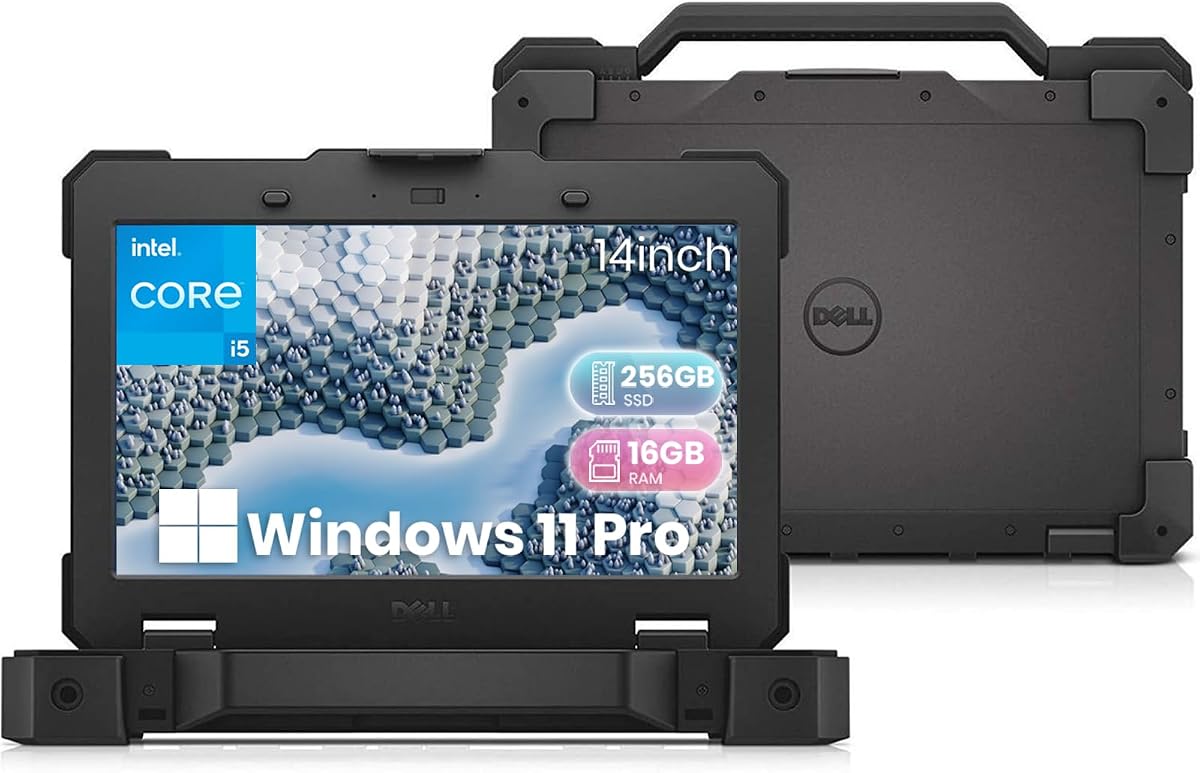
This Dell Latitude Rugged model is engineered for tough environments. It holds a perfect 5.0 rating reflecting its reliability in demanding field work conditions.
We may earn a commission when you buy through this link, at no additional cost to you.
The reinforced chassis protects internal components from drops and spills. Its 14 inch FHD touchscreen offers outdoor visibility which is crucial for mobile use.
The i5-8350U is older and slower than modern chips but handles basic business apps well. Storage is limited to 256GB which may require external drives for large files.
Ideal for field technicians or construction workers needing a tough device. The renewed status makes it an affordable option for rugged longevity.
This unit is built specifically for industrial use with reinforced corners and a chassis designed to survive drops and debris.
It includes a variety of ports like USB 3.1 and RJ-45 Ethernet allowing direct connection to diagnostic tools without adapters.
We may earn a commission when you buy through this link, at no additional cost to you.
This premium ThinkBook features the latest Intel Core Ultra 7 processor. It is designed for professionals needing speed and long-term reliability in a sleek chassis.
We may earn a commission when you buy through this link, at no additional cost to you.
The 32GB DDR5 RAM and 1TB SSD ensure it won't slow down over time. Thunderbolt 4 ports provide future-proof connectivity for high-speed peripherals and docking stations.
Its aluminum chassis adds rigidity but adds weight compared to thinner models. The price is higher but justified by the premium components and enterprise security features.
Recommended for executives or power users who need sustained performance. It represents a solid investment for those prioritizing longevity over budget.
The Intel Core Ultra 7 includes an NPU for AI tasks which helps optimize performance and battery life for future software updates.
It includes TPM 2.0 firmware security and a fingerprint reader to protect sensitive data from unauthorized access effectively.
We may earn a commission when you buy through this link, at no additional cost to you.
The HP 17 inch Business Laptop offers a spacious display for productivity. It scores high on usability due to its large screen and numeric keypad for data entry.
We may earn a commission when you buy through this link, at no additional cost to you.
Its AMD Ryzen 5 CPU and 16GB RAM handle multiple applications well. The 17.3 inch FHD display provides ample workspace for spreadsheets and documents.
While the screen is large it adds bulk making it less portable than smaller models. External port options are standard but lack modern high-speed connectors like Thunderbolt.
Best for office workers who prioritize screen real estate over portability. It is a durable choice for stationary or semi-stationary work environments.
The 17.3 inch display offers a wider viewing area which reduces the need for external monitors during extended work sessions.
Long battery life ensures you can work away from power sources without interruption during travel or meetings.
We may earn a commission when you buy through this link, at no additional cost to you.
This Dell 16 Laptop focuses on user comfort and reliability. It features Dell ComfortView Plus which reduces blue light to protect eye health during long sessions.
We may earn a commission when you buy through this link, at no additional cost to you.
The Intel Core 7 150U processor provides solid performance for daily tasks. The 16:10 aspect ratio gives more vertical space which helps with document editing.
It does not ship with Windows Pro which may limit some enterprise features. The price is higher than base models but the comfort features add value.
Suitable for users who spend many hours reading or typing on the screen. The service options ensure support is available if hardware issues arise.
Dell ComfortView Plus filters out harmful blue light which helps reduce eye strain during prolonged daily usage.
Adaptive thermals detect when the laptop is on a stable surface and adjust power usage to maintain cooler operation.
We may earn a commission when you buy through this link, at no additional cost to you.
The Lenovo V15 Gen 4 is designed with business needs in mind. It features the Intel Core i5-13420H which offers robust performance for complex workloads.
We may earn a commission when you buy through this link, at no additional cost to you.
Windows 11 Pro allows for better management and security features than Home edition. The included ports like HDMI and RJ45 make it ready for office setups.
The screen resolution is standard and does not support high color accuracy for design work. Its weight makes it less ideal for frequent travelers.
Ideal for office employees who need reliable performance and standard ports. It balances cost and performance well for long term business use.
Windows 11 Pro includes pre-configured layouts that help organize apps and optimize workflow for better efficiency.
It comes with a wide range of ports including USB-C and HDMI so you can connect peripherals easily.
We may earn a commission when you buy through this link, at no additional cost to you.
This Lenovo V15 Gen 4 model focuses on efficiency and privacy. It features an AMD Ryzen 5 7430U which delivers good performance while conserving energy.
We may earn a commission when you buy through this link, at no additional cost to you.
The 8GB RAM is sufficient for basic tasks but may limit heavy multitasking. It includes a webcam privacy shutter to protect your privacy during calls.
The screen brightness of 300 nits makes it usable in well-lit environments. It is built with sustainable materials which appeals to eco-conscious buyers.
Suitable for students or light workers needing a reliable machine. The balance of cost and privacy features makes it a strong contender.
This laptop is made with responsibly sourced materials and has certifications that reduce its environmental impact.
It includes a webcam privacy shutter that physically blocks the lens when not in use for added security.
We may earn a commission when you buy through this link, at no additional cost to you.
The Dell Latitude 5414 is an excellent value for those needing durability. It holds a 5.0 rating despite being a renewed model due to its robust build.
We may earn a commission when you buy through this link, at no additional cost to you.
Its military-grade design protects it from drops and extreme temperatures. The 16GB RAM ensures smooth multitasking even with the older i5-6300U processor.
The processor is outdated for high-end tasks but sufficient for basic office work. Storage is limited to 256GB which may require external solutions for large files.
Best for industrial environments where ruggedness is critical. The certified refurbished status ensures a reliable purchase at a lower cost.
Engineered to military-grade standards this unit can withstand physical stress that would damage standard laptops.
It features a rich array of ports including RS-232 serial which is useful for industrial equipment connections.
We may earn a commission when you buy through this link, at no additional cost to you.
This Lenovo V-Series model stands out for its high specifications. With 40GB RAM and a 1TB SSD it offers exceptional storage and multitasking capabilities.
We may earn a commission when you buy through this link, at no additional cost to you.
The AMD Ryzen 7 processor ensures that it can handle demanding applications without lag. It includes a numeric keypad for users who deal with numbers often.
The device is on the heavier side which reduces portability for travel. The screen is standard FHD without high color accuracy for creative work.
Ideal for professionals handling large datasets or virtual machines. It provides high performance at a competitive price point for business users.
The 40GB RAM allows you to run many browser tabs and applications simultaneously without performance drops.
Windows 11 Pro includes features like BitLocker encryption to keep your data secure during business operations.
We may earn a commission when you buy through this link, at no additional cost to you.
The Lenovo ThinkPad L16 is a robust enterprise solution. It features an Intel Ultra 5 processor that balances performance and efficiency for business tasks.
We may earn a commission when you buy through this link, at no additional cost to you.
It supports configurable memory and storage options to meet specific needs. The inclusion of Thunderbolt 4 ensures future-proof connectivity for external drives and displays.
While it has a solid build the battery life is average compared to other models. It is heavier than typical ultrabooks due to its sturdy chassis.
Best for corporate environments needing reliability and support. Its AI features and security make it a smart choice for long-term enterprise use.
The AI PC capabilities help optimize system resources and improve battery efficiency for demanding workloads.
It includes multiple USB-A and USB-C ports allowing you to connect multiple peripherals without a docking station.
We may earn a commission when you buy through this link, at no additional cost to you.
Selecting a laptop for longevity involves evaluating build quality, component durability, and future software support.
Look for laptops with reinforced chassis or military-grade certifications such as MIL-SPEC 810H. These ratings indicate that the device has been tested to survive drops, vibration, and temperature changes.
A sturdy build protects internal components like the hard drive and motherboard from damage which extends the usable life of the laptop significantly.
Choose a laptop with at least 16GB of RAM and a modern multi-core processor to ensure it remains fast enough for future software updates and multitasking.
Higher memory and processor specs prevent bottlenecks that can make a laptop feel outdated quickly even if the hardware is still physically intact.
Solid State Drives (SSDs) are essential for longevity because they are more resistant to physical shock than traditional hard drives.
Aim for at least 512GB of storage to avoid running out of space which can slow down the system and necessitate early replacement.
A laptop that lasts must have a battery that sustains charge for several years. Look for models with efficient processors and good thermal management.
Long battery life reduces wear on the charging port and ensures the device remains usable in mobile environments for a longer period.
Windows 11 Pro offers better security and management features than Home edition which can help maintain the laptop in good condition for longer.
Check if the manufacturer supports the device with security updates for several years to ensure it stays secure against new threats.
Having a variety of ports like USB-C, HDMI, and Ethernet allows you to connect to peripherals without needing dongles which can wear out or break.
Future-proof connectivity like Thunderbolt 4 ensures you can use newer high-speed devices without replacing the laptop soon.
A comprehensive warranty or service plan can protect your investment if hardware fails unexpectedly. Onsite service is particularly valuable for minimizing downtime.
Reliable customer support helps resolve issues quickly which prolongs the functional lifespan of the device during critical work periods.
Laptops with adaptive thermals or efficient cooling systems prevent overheating which can degrade internal components over time.
Good thermal management keeps the device running smoothly under load and reduces the risk of hardware failure due to heat stress.
To maximize the lifespan of your laptop keep it on a hard flat surface to prevent overheating and allow proper airflow to the vents.
Clean the keyboard and screen regularly with a microfiber cloth to prevent dust buildup that can interfere with moving parts and heat dissipation.
Update the operating system and drivers as prompted to ensure security patches are applied and performance issues are resolved before they become critical.
A laptop lasts longer if it has a durable chassis, solid-state storage, and adequate memory. Models with military-grade testing and efficient cooling systems also avoid physical and thermal stress.
Windows Pro offers better management features and security tools which can help maintain the system. It supports enterprise features like BitLocker which protect data effectively.
At least 16GB of RAM is recommended to ensure the laptop handles modern applications without slowing down as software requirements increase over time.
SSDs have no moving parts which makes them resistant to physical shock. This reduces the risk of data loss or drive failure during accidental drops.
Older processors may struggle with newer software updates eventually. For true longevity choose a modern multi-core processor that can handle future workloads.
Some laptops allow you to upgrade RAM and storage which can extend their usefulness. Check if the model supports user-upgradeable components before purchasing.
Yes keeping the laptop cool prevents thermal stress on internal components. Using a cooling pad or cleaning vents regularly helps maintain optimal operating temperatures.
The top picks like the Lenovo V15 Gen 4 and Dell Latitude Rugged 5420 offer excellent balance of durability and performance.
Prioritize models with solid build quality and high memory to ensure your device handles future software needs without slowing down.
Prices fluctuate frequently so check current listings before purchasing to ensure you get the best deal available now.