
NIMO 15.6" AI Ready Laptop
4.8Editor score
Fast charging technology
Full range connectivity
Privacy webcam shutter
Choosing the right laptop for karaoke gear requires balancing screen size audio audio output and processing speed. Whether you are hosting parties or managing events you need a reliable machine that handles streaming without lag or stuttering during performances.
We compared ten real models focusing on display quality connectivity options and overall performance for multimedia tasks. Each product offers unique strengths ranging from large screens for visual cues to robust audio jacks for mixing equipment integration.
Our detailed reviews highlight key features pros and cons to help you make an informed decision. Prices and availability change frequently so please verify current details on the product pages before finalizing your purchase for your next singing session.
4.8Editor score

4.5Editor score

4.5Editor score
As an Amazon Associate we earn from qualifying purchases.
The following table provides a side by side overview of all ten models evaluated in this guide. Compare screen sizes processors storage options and key features to identify which machine best suits your specific karaoke streaming needs.






The HP 17 inch Business Laptop Computer stands out as a top choice for karaoke setups needing large visuals. It holds a strong rating for performance and screen quality making it ideal for tracking lyrics and streaming videos without lag.
We may earn a commission when you buy through this link, at no additional cost to you.
Its 17.3 inch FHD display provides ample space for karaoke software interfaces and video lyrics. The AMD Ryzen 5 CPU combined with 16GB RAM ensures smooth playback even when running multiple apps like music players and browsers simultaneously.
While it offers robust performance the larger chassis means it is less portable than 14 inch options. The extra weight might be a consideration for users moving between locations frequently but the screen real estate often outweighs this for fixed setups.
This laptop is best suited for home karaoke enthusiasts or small venue hosts who prioritize screen size over portability. The included Office 365 and Windows 11 features also add value for managing playlists or event schedules on the fly.
The wide screen allows for split viewing so you can manage lyrics while monitoring audio levels or guest requests simultaneously.
With 16GB RAM you can run background downloads while performing live without risking system freezes or audio dropouts.
We may earn a commission when you buy through this link, at no additional cost to you.
The NIMO 15.6" AI Ready Laptop delivers exceptional value for users seeking an affordable karaoke machine companion. It boasts a high rating reflecting user trust in its reliability and performance for daily multimedia consumption and streaming tasks.
We may earn a commission when you buy through this link, at no additional cost to you.
Its standout feature is the full stack I/O suite which eliminates the need for extra dongles when connecting mixers or displays. The 65W PD fast charging ensures the device stays powered during long sessions without hunting for power outlets constantly.
The 8GB RAM is sufficient for standard karaoke apps but might struggle with heavy editing software or dozens of browser tabs. Additionally the plastic chassis while durable lacks the premium feel of metal alternatives but this does not impact audio processing capabilities.
This model is perfect for budget conscious buyers or students who need a reliable device for occasional home karaoke use. The included 2 year warranty provides peace of mind ensuring that any potential issues are covered without extra cost to the owner.
Multiple USB and HDMI ports allow direct connection to speakers or projectors without needing additional adapters or hubs.
The built in fingerprint reader offers quick secure logins ensuring your playlists and accounts remain safe when shared.
We may earn a commission when you buy through this link, at no additional cost to you.
The HP OmniBook 3 16 inch Laptop PC brings premium features to the karaoke setup including a stunning 2K touchscreen for crisp lyrics and visuals. It is rated highly for its modern design and advanced audio noise reduction capabilities that enhance voice clarity during streaming.
We may earn a commission when you buy through this link, at no additional cost to you.
The Advanced AI Noise Reduction is particularly useful for cleaning up microphone input if you are using a USB mic directly connected to the laptop. This feature filters out background noise ensuring your vocals sound professional and focused on the track.
While the 8GB RAM limits heavy multitasking the LPDDR5 technology ensures fast responsiveness for typical karaoke apps. The price point is higher than basic models but the touch interaction and audio features offer a more engaging user experience for hosts.
This laptop is ideal for hosts who want a stylish device that doubles as a high quality presentation tool. The large screen and responsive touch interface make navigating song catalogs intuitive and engaging for guests during any type of event.
AI noise reduction tracks your voice specifically helping to isolate vocals from room noise during live recording or streaming.
The 2K touchscreen allows direct touch interaction with song lists or video controls adding a fun tactile element to shows.
We may earn a commission when you buy through this link, at no additional cost to you.
The Dell Pro 15.6" Laptop offers a balanced combination of processing power and display speed suitable for karaoke use. With a 120Hz refresh rate the screen remains fluid when switching between apps or playing video clips ensuring a visually pleasant experience for guests.
We may earn a commission when you buy through this link, at no additional cost to you.
Its 16GB DDR5 memory provides excellent responsiveness for opening multiple browser tabs to access different song libraries or lyric sites quickly. The NVME SSD ensures that the system boots up fast so you are ready to start singing without long wait times.
The SD card slot is a useful inclusion for quickly transferring playlists from a camera or other devices without needing a network connection. However the lack of a backlit keyboard might make typing song names harder in dimly lit party environments compared to other laptops.
This device is well suited for users who value smooth visuals and memory speed over heavy storage needs. It serves as a reliable workhorse for standard streaming tasks and can handle the digital demands of a lively karaoke night effortlessly.
The 120Hz refresh rate reduces motion blur when switching apps ensuring a smooth experience during fast menu navigation.
The SD card slot allows easy import of video files or tracks directly from portable storage devices into the system.
We may earn a commission when you buy through this link, at no additional cost to you.
The HP OmniBook 3 17.3 inch brings a generous screen size to the table making it a strong contender for venues needing visible lyrics. It holds a solid rating for general usability and performance in standard consumer tasks like video streaming and browsing.
We may earn a commission when you buy through this link, at no additional cost to you.
Its 512GB SSD offers generous local storage for storing downloaded karaoke files or high quality video tracks directly on the device. The battery life is impressive allowing for extended use on a single charge which is vital for events with limited outlet access.
While the Ryzen 3 processor handles typical tasks well it may not be as robust as higher tier CPUs for heavy multitasking. The 8GB RAM is adequate for most applications but users running many background programs might find performance throttling under heavy load.
This laptop is best for home users who want a large screen without the higher price of business class models. The balance of display size and storage capacity makes it a practical tool for hosting regular parties at home or in a classroom.
Long battery life ensures the laptop lasts through an entire event without needing to plug in or charge frequently.
The ample SSD space allows you to keep your entire song library locally avoiding reliance on internet connections.
We may earn a commission when you buy through this link, at no additional cost to you.
The HP Ultrabook 14 Laptop is a highly portable option for those who need to move their setup between different locations easily. It holds a decent rating for its versatility and bundle value which includes useful accessories like an external drive and mouse.
We may earn a commission when you buy through this link, at no additional cost to you.
Its compact form factor makes it easy to fit into tight spaces or small bags for transport. The inclusion of 16GB RAM helps maintain performance even with the smaller screen ensuring that playback remains smooth during live usage sessions.
However the 14 inch screen might feel cramped for reading lyrics or managing detailed settings without zooming in. Users will need to rely on external displays or larger monitors for group viewing since the screen size limits visibility for multiple people.
This model is perfect for solo performers or small gatherings where portability is the top priority. The bundle accessories provide immediate utility without needing to buy extra peripherals making it a complete solution for beginners on a budget.
Accessories like the external drive and wireless mouse come included providing a complete setup right out of the box.
The compact 14 inch design fits easily into backpacks making it ideal for carrying to events or different rooms.
We may earn a commission when you buy through this link, at no additional cost to you.
The HP 255 G10 Laptop offers a reliable mid-range solution for karaoke setups requiring a balance of size and performance. It has a solid rating for everyday reliability and performance in handling common multimedia tasks without major performance issues.
We may earn a commission when you buy through this link, at no additional cost to you.
Its 16GB RAM ensures that the system remains responsive even when streaming high definition video content. The AMD Radeon Graphics support adds to the visual capability making video playback look crisp and clear on the screen for viewers.
While the build is durable it is lightweight which might feel less robust to users expecting a heavy sturdy machine. The port selection is standard enough for most needs but advanced audio setups might require a USB hub for extra connections.
This laptop is suitable for general home entertainment or educational settings where budget and performance must be balanced. It provides enough power to run karaoke software smoothly while remaining affordable for most users entering the hobby space.
With 16GB RAM the system stays smooth during multitasking so you can manage tracks and chat apps simultaneously.
AMD Radeon Graphics enhance video rendering making music videos and lyrics look sharp and detailed on the display.
We may earn a commission when you buy through this link, at no additional cost to you.
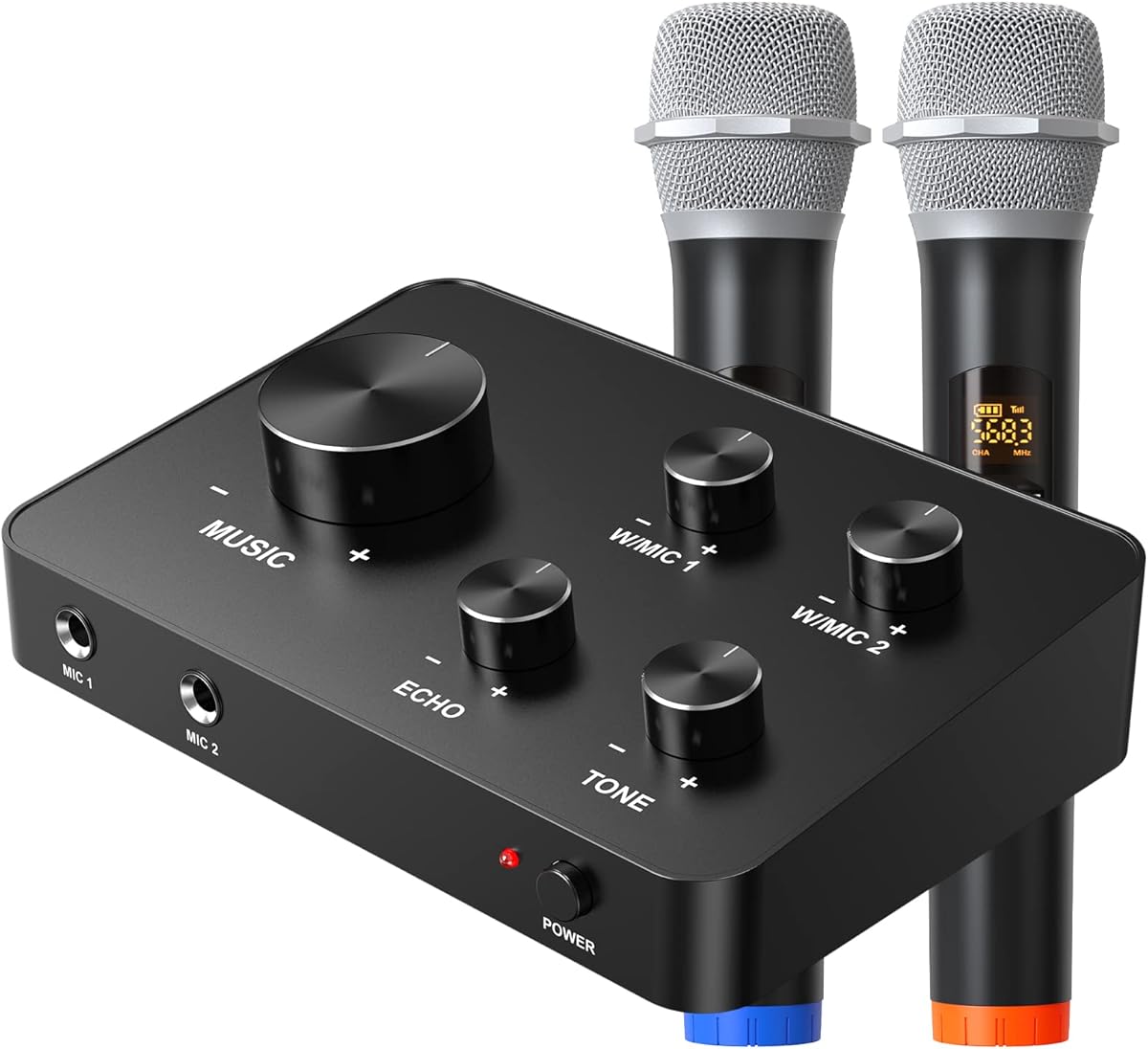
The Rybozen Wireless Mic System serves as an essential accessory to connect your laptop to sound equipment for professional audio quality. It holds a rating that suggests mixed experiences but the core functionality of wireless audio transmission is generally reliable for casual users.
We may earn a commission when you buy through this link, at no additional cost to you.
Its 100ft range allows singers to move freely around the room without being tied down by cables. The independent volume control for each microphone helps balance vocals and background music ensuring a harmonious mix during the performance.
The device works well with PCs and TVs but requires external speakers for sound output which is a critical note for setup. Some users might find the sound quality varies based on the specific amplifier or speaker system used with the mixer.
This system is best for those who already have speakers and want to upgrade to wireless microphones for easier use. It provides a plug and play solution that simplifies the connection process between your laptop and the main audio system quickly.
The 100ft range gives singers the freedom to dance and interact with guests without tripping over wires or cords.
Adjustable echo and tone dials let you tweak the audio to match different rooms or vocal styles easily.
We may earn a commission when you buy through this link, at no additional cost to you.
The Sound Town 16 Channels mixer is designed for users needing robust connectivity between their laptop and complex audio systems. It has a rating that reflects its niche utility for advanced setups where standard ports may not be sufficient for high fidelity audio routing.
We may earn a commission when you buy through this link, at no additional cost to you.
Its HD ARC and Optical inputs allow direct audio extraction from TVs or receivers enabling seamless integration into home theater setups. The 16 channel layout gives you plenty of room to mix various inputs like mics instruments or backing tracks simultaneously.
Setting up the system might require following specific connection diagrams to ensure audio flows correctly from laptop to speakers. The complexity can be a barrier for beginners but experienced users will appreciate the control over echo and reverb effects provided.
This mixer is ideal for serious enthusiasts or small venues that need to manage multiple audio sources professionally. It enhances the quality of the karaoke session by allowing precise control over sound levels and effects for a polished output.
Multiple ports like Optical and HDMI allow connections to almost any modern home entertainment device without adapters.
Independent dials for music and voice ensure that vocals are never drowned out by the background track during singing.
We may earn a commission when you buy through this link, at no additional cost to you.
The Wireless Bluetooth Microphone is a fun portable option perfect for casual gatherings or quick sing along sessions without complex gear. It has a solid rating for its entertainment value and ease of use making it an instant choice for spontaneous fun.
We may earn a commission when you buy through this link, at no additional cost to you.
Its dynamic LED lights and voice effects add a playful element to performances which is especially engaging for children or beginners. The built-in speaker allows it to work independently without needing external audio hardware for small quiet room singing.
While great for portable use it lacks the professional audio routing needed for full karaoke systems with large speakers. The battery life supports typical session lengths but might need recharging after extended use over several hours of continuous playing.
This mic is best for families looking for an easy to use tool that encourages singing and creativity. It serves as a fun gift or supplementary device to enhance the atmosphere of casual events without requiring technical setup or knowledge.
Voice effects and light modes turn simple singing into an interactive performance that guests love to engage with.
The built-in speaker means you can sing anywhere without needing to connect wires to a separate sound system.
We may earn a commission when you buy through this link, at no additional cost to you.
Selecting the right laptop for karaoke gear involves considering several technical factors that impact performance and usability. We break down the essential elements to look for to ensure your device handles music and video smoothly.
A larger display such as 15 inches or more makes it easier for guests to read lyrics and see song choices clearly. High resolution screens with good color accuracy ensure that video backgrounds and visuals remain crisp during playback.
Look for models with at least 1080p resolution and anti-glare coatings to reduce reflections in bright room settings.
Multitasking is common during karaoke events when you might be running a web browser music software and chat apps simultaneously. A modern processor combined with 16GB RAM ensures that the system does not freeze when switching between these applications.
Prioritize laptops with mid-range or better CPUs and ample RAM to maintain smooth playback and fast loading times.
To connect external speakers or mixers you need a laptop with versatile ports like HDMI USB-C and standard audio jacks. Some advanced setups might require multiple connections so having a full range of ports reduces the need for extra adapters.
Check that the device has both USB-A and USB-C ports along with an HDMI output for seamless integration with sound systems.
Portable events often lack easy access to power outlets so a laptop with long battery life is crucial for uninterrupted shows. Look for devices that promise at least eight hours of use to ensure you can finish the event without interruption.
Models with fast charging capabilities are also beneficial as they allow quick top ups during breaks in the performance.
Windows systems generally offer the broadest compatibility with karaoke software and audio drivers making them a safe choice. Ensure the OS version is up to date to benefit from security features and optimized performance for multimedia apps.
Stick with mainstream operating systems that have community support to avoid driver issues with audio interfaces.
While external speakers are preferred the laptop's built-in audio jack quality affects how well it interfaces with your mixer. Ensure that the headphone jack is 3.5mm standard so you can plug in a variety of external audio equipment easily.
Choose devices with dedicated audio drivers if possible for lower latency and cleaner signal output to speakers.
If you plan to move the laptop between venues frequently a durable chassis that can withstand transport is important. Lightweight models around 3 to 4 pounds are easier to carry but still offer enough build quality to handle daily use.
Consider the thickness and material of the laptop to ensure it fits into standard carrying bags without damage.
Balancing cost with performance is key as higher specs do not always guarantee better results for basic streaming tasks. Evaluate what features are essential for your specific setup such as touch screens or large storage versus pure raw power.
Invest in a device that meets your core requirements without paying for unnecessary premium features you will not use.
Begin by connecting your external audio system to the laptop using the appropriate HDMI or audio cables. Ensure that the audio output settings are configured to send sound to the external speakers or mixer rather than the built-in speakers.
Install and update all necessary drivers for audio interfaces to guarantee smooth performance during live sessions. Keep your software and operating system updated to avoid compatibility issues with new karaoke applications or streaming services.
Maintain the laptop by keeping it on a flat stable surface during use to prevent overheating or accidental spills. Regularly clean the keyboard and screen with a soft cloth to remove dust and protect the display from scratches or glare.
Yes you can connect a laptop to an external mixer using HDMI or USB audio interfaces. This setup allows the laptop to play backing tracks while the mixer handles the microphone vocals and effects for a professional sound.
A screen size of 15 inches or larger is recommended so that lyrics are easy to read from a distance. This ensures guests can follow along without straining their eyes during the performance.
Streaming requires a decent processor and at least 8GB of RAM to prevent buffering and lag. A mid-range CPU ensures that video and audio streams remain synchronized and high quality during the event.
Most wireless microphone systems require a receiver connected to the laptop via USB or audio jack. Check the receiver compatibility to ensure it works with your laptop operating system before purchasing.
Windows is generally preferred because most karaoke software supports it natively. While Macs can run many apps the variety of compatible tools is larger on Windows making setup easier for most users.
Tablets work well for simple setups but may struggle with complex audio mixing or multitasking. If you need to manage multiple streams and audio inputs a laptop provides more robust performance and ports.
At least 256GB of storage is advisable to store a large library of songs and high quality video clips. Having local storage prevents dependency on internet speed and ensures tracks are available even offline.
Use a direct audio interface instead of Bluetooth to minimize delay between singing and hearing the sound. Adjust audio buffer settings in your software to optimize the balance between stability and response time.
We have explored ten versatile options ranging from high performance business laptops to affordable multimedia machines. Each model offers distinct strengths in screen size processing power and connectivity that suit different karaoke needs and venues.
Prioritize display quality and audio connectivity to ensure your guests have a smooth and enjoyable experience. A laptop that balances speed with usability will serve as the backbone of your karaoke setup for years to come.
Always check the latest product details and availability before purchasing to confirm that the specs match your current requirements. Our guide aims to simplify this process so you can focus on the fun of hosting a great event.