10 Best Keyboard Tray for Standing Desk (November 2026) Expert Guide
Written by Jamie · Updated November 2026
Finding the right keyboard tray for your standing desk can transform your workspace into a healthier environment. A quality tray supports ergonomic typing positions and reduces strain on your wrists and shoulders during long work sessions.
We evaluated ten top-rated models based on installation ease, adjustability, and build quality. Our analysis covers clamp-on designs, slide-out mechanisms, and versatile options suitable for various desk types and office setups.
Each pick highlights key features, pros, and cons to help you decide quickly. Prices fluctuate frequently so check current listings before purchasing to ensure you get the best value for your investment today.
Top 3 Picks for Best Keyboard Tray for Standing Desk
Best Budget
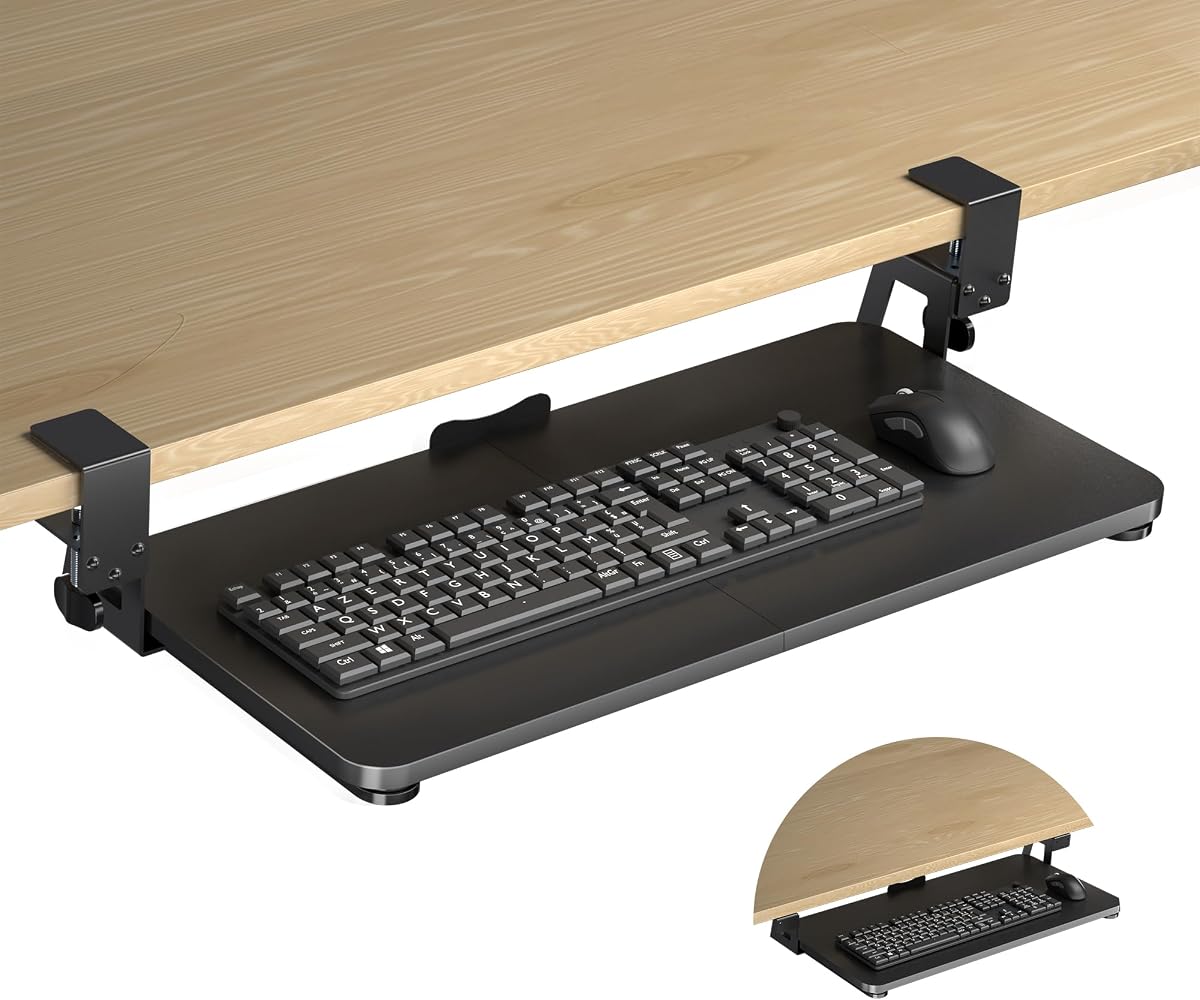
XINLEI Keyboard Tray Under Desk Large C-Clamp 25.6” (30” Including Clamps) x 11.8” Slide-Out Platform Computer Drawer Pull Out Keyboard & Mouse Tray Black DSF4
As an Amazon Associate we earn from qualifying purchases.
Top 10 Best Keyboard Tray for Standing Desk in 2026 Compared
This side-by-side comparison highlights the key specifications of each model to help you choose the right tray for your specific desk and ergonomic needs efficiently.
ProductsSpecificationsEditor scorePrice
1
Editor's Choice
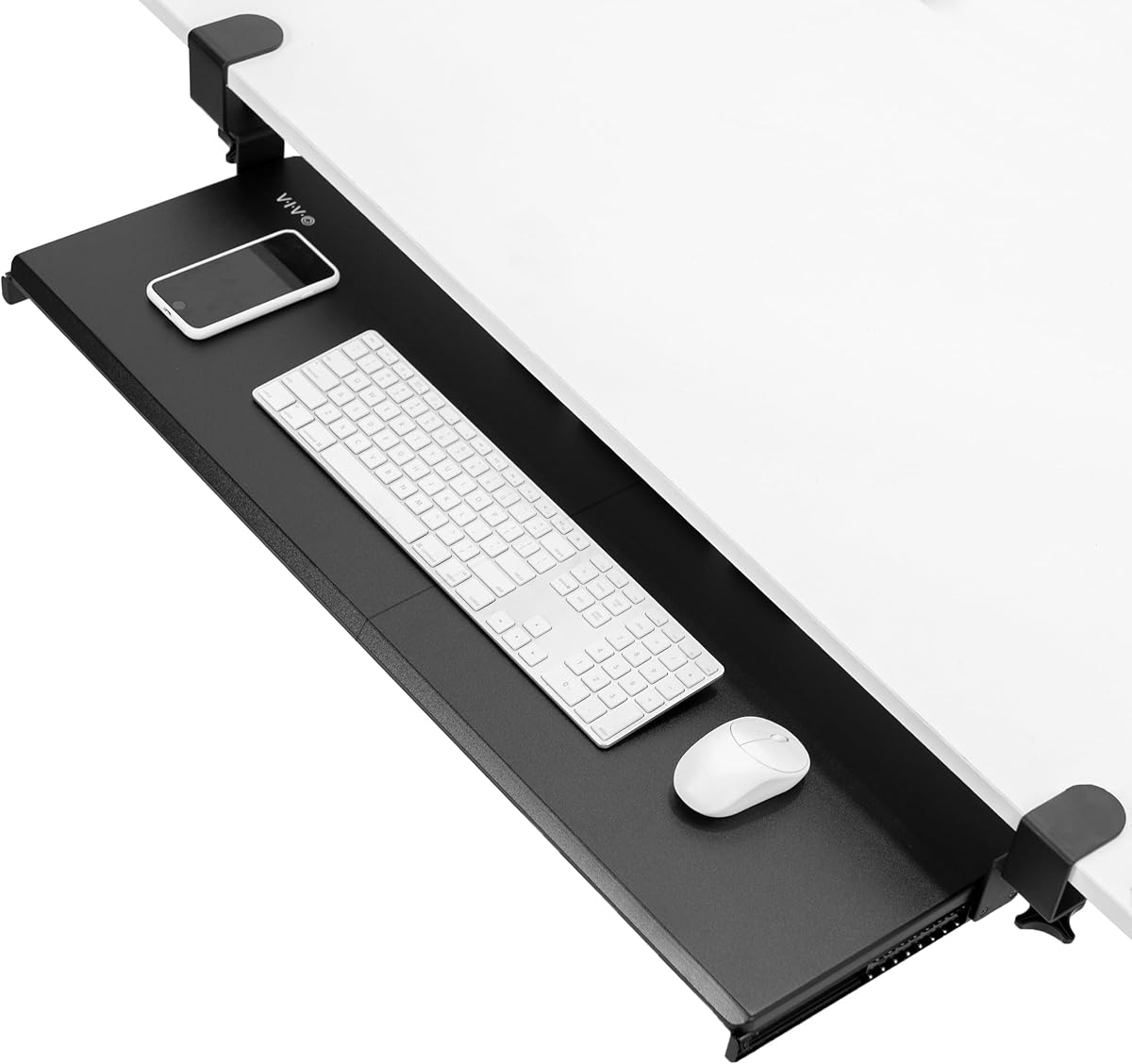
VIVO Black Extra Large Clamp-on 34 x 11 in Keyboard Tray, MOUNT-KB15EB
XINLEI Keyboard Tray Under Desk Large C-Clamp 25.6” (30” Including Clamps) x 11.8” Slide-Out Platform Computer Drawer Pull Out Keyboard & Mouse Tray Black DSF4
VIVO Black Extra Large Clamp-on 34 x 11 in Keyboard Tray, MOUNT-KB15EB
33.9 inch tray length
Up to 11 lbs capacity
8.5 inch maximum extension
C-clamp mounting system
This VIVO keyboard tray stands out as a top choice for those needing ample space under their desk. With a 33.9 inch surface it accommodates full-size keyboards mice and accessories effortlessly. Its 4.4 star rating reflects strong user satisfaction with build quality and ease of use.
Pros
Extra large surface for multiple devices
Smooth sliding mechanism for easy access
Sturdy clamps protect desk surface
Ergonomic angles reduce wrist strain
Simple installation with included hardware
Cons
Requires 39.4 inch total desk space
Not compatible with beveled edges
We may earn a commission when you buy through this link, at no additional cost to you.
The tray features a smooth sliding mechanism that extends up to 8.5 inches for comfortable reach. Users appreciate the ergonomic angles that relieve stress on wrists and shoulders. The solid C-clamps ensure a secure fit without damaging the desk surface making it ideal for home offices.
One consideration is the total length of 39.4 inches including clamps which requires sufficient desk space. Additionally it is not compatible with desks featuring beveled edges. Despite these limits the tray offers excellent value for its size and stability.
This tray is perfect for users with large flat desks seeking extra workspace and ergonomic comfort. Its durable construction and straightforward assembly make it a reliable long-term investment. We recommend checking your desk dimensions before purchase to ensure a proper fit.
Ergonomic Comfort for Long Work Sessions
The adjustable angles help maintain a neutral wrist position which reduces fatigue during extended typing periods.
Secure and Damage-Free Mounting
Strong C-clamps hold the tray firmly in place while protective pads prevent scratches on your desk surface.
HUANUO Under Desk Keyboard Tray for Flat Bottom and Cross Beam Desks
25 inch width by 9.84 depth
Fits cross beams up to 2 inches
6.3 inch height adjustment
360 degree swivel capability
The HUANUO tray offers unique flexibility for desks with cross beams or flat bottoms. Its 4.3 rating highlights reliable performance and adaptability to various desk setups. The dual installation options make it a standout for electric standing desks with complex structures.
Pros
Compatible with cross beam desks
Smooth metal roller track system
Flexible height and angle options
Easy installation without holding tray
Supports up to 11 lbs
Cons
Requires 35 inch width for full swivel
Check beam size before purchasing
We may earn a commission when you buy through this link, at no additional cost to you.
Engineered with a high-quality metal roller track it ensures smooth sliding tested for 20,000 cycles. Users can adjust height by 6.3 inches and swivel 360 degrees for optimal positioning. This makes it ideal for multi-tasking workstations and L-shaped desks.
Installation is designed to be hassle-free requiring only the top plate to be held during setup. However achieving full 360 degree swivel needs at least 35 inches of under-desk width. Verify your desk dimensions to avoid limitations.
Ideal for users needing versatility in mounting and movement this tray supports both seated and standing typing. Its durable track system and adjustable features provide long-term value. Confirm your desk type and dimensions to maximize its benefits.
Cross Beam Compatibility for Electric Desks
Specially designed brackets allow secure installation on desks with cross beams up to 2 inches in height.
Durable Metal Roller Track System
Tested for 20,000 cycles the smooth sliding mechanism ensures reliable performance for frequent daily use.
Mount-It! Standing Keyboard Tray, Sit to Stand 1.7-15.6 in, 23.6 in
23.6 by 11.8 inch platform
1.7 to 15.6 inch height range
Lifetime warranty included
Scissor-lift mechanism
This Mount-It tray excels with its extensive height range accommodating both seated and standing positions seamlessly. Rated 4.4 stars it is praised for its build quality and user-friendly design. It stands out for being ready to use straight out of the box.
Pros
Lowest height for seated comfort
Lifetime warranty with US support
No assembly required
Sturdy frame with non-slip feet
Smooth height adjustment range
Cons
Higher price point than basic trays
Requires space for scissor mechanism
We may earn a commission when you buy through this link, at no additional cost to you.
The scissor-lift mechanism allows smooth adjustments from 1.7 to 15.6 inches ensuring comfort in any posture. Its wide footprint and rubber feet provide stability during typing. The lifetime warranty and US-based support add significant value for long-term users.
While it comes at a higher price it delivers superior adjustability and durability. The lack of assembly saves time but the mechanism may require clearance under your desk. Ensure your setup supports the height range for optimal use.
Perfect for professionals prioritizing ergonomics and warranty coverage this tray is a premium investment. It suits shared workstations and home offices needing flexible typing heights. The ease of use and reliability justify the cost for most buyers.
Lowest Seated Height Available
Adjusts as low as 1.7 inches providing comfortable typing height for seated users unlike many competitors.
Lifetime Warranty and Support
Backed by a lifetime warranty and US product support ensuring long-term peace of mind for buyers.
XINLEI Keyboard Tray Under Desk Large C-Clamp 25.6” (30” Including Clamps) x 11.8” Slide-Out Platform Computer Drawer Pull Out Keyboard & Mouse Tray Black DSF4
25.6 by 11.8 inch tray
Fits desks up to 1.63 inch thick
Metal sliding rails included
Total height clearance 4.45 inches
This XINLEI tray delivers excellent value with a spacious design at a budget-friendly price. Its 4.4 rating reflects user satisfaction with its stability and ease of installation. It is ideal for those seeking ergonomic improvements without a high cost.
Pros
Affordable price for large space
Smooth glide metal sliding rails
Sturdy C-clamp installation
Back baffle prevents keyboard from falling
Two installation methods available
Cons
Less height adjustment than premium models
Requires 30 inch total desk space
We may earn a commission when you buy through this link, at no additional cost to you.
The high-quality metal sliding rails ensure quiet and smooth movement with a max extension of 12.24 inches. The C-clamp design accommodates desks up to 1.63 inches thick without damage. The back baffle adds security by preventing the keyboard from sliding off.
While it lacks the extensive height adjustment of premium options it provides a secure platform for typing. Installation offers two methods including screw mounting for thicker desktops. Check desk clearance to ensure full retraction when in use.
Best for budget-conscious users with standard flat desks this tray balances functionality and cost. Its sturdy build and smooth rails support daily use effectively. Verify your desk dimensions and thickness before ordering to avoid fit issues.
Secure Slide Protection
A back baffle design prevents your keyboard from falling off the tray during movement or usage.
Dual Installation Flexibility
Choose between clamp-on or screw mounting options to suit your desktop thickness and aesthetic preferences.
VIVO Black Clamp-on 23” to 30” x 11" Adjustable Keyboard Tray, Mount-KBST1
22.5 by 30 inch tray surface
Fits desks up to 3.4 inch thick
5 height adjustment points
Includes keyboard wrist pad and mouse pad
This VIVO tray offers unique adjustability with settings for both height and width to fit diverse desks. Rated 4.3 stars it is praised for accommodating thick desktops up to 3.4 inches. It includes essential ergonomic accessories for a complete setup.
Pros
Wide desk thickness compatibility
Adjustable height and width settings
Includes ergonomic wrist and mouse pads
Secure C-clamp mounting
Simple assembly process
Cons
Not compatible with beveled edges
Requires sufficient under-desk clearance
We may earn a commission when you buy through this link, at no additional cost to you.
Users can select from five height adjustment points and adjust the width from 8.8 to 10 inches from the desk edge. The included wrist pad and mouse rest enhance comfort during long typing sessions. Sturdy clamps hold everything securely without damaging the surface.
Installation is straightforward but requires checking for beveled edges which are not supported. The tray extends up to 8.5 inches from the desk edge offering good access. Ensure your desk can support the weight of the tray plus accessories.
Perfect for users with thick or variable desks needing customization this tray provides versatile support. The included ergonomic accessories save extra purchases. Confirm your desk type and dimensions to ensure a proper installation and fit.
Exceptional Thickness Compatibility
Accommodates desks up to 3.4 inches thick making it suitable for heavy-duty workstations and tables.
Ergonomic Accessories Included
Comes with keyboard wrist pad mouse pad and mouse rest for immediate comfort and convenience.
BONTEC Under Desk Keyboard Tray, Pull-Out Keyboard & Mouse Platform
25.6 by 11.8 inch platform
Fits desks up to 1.97 inch thick
No-drill installation with C-clamps
Up to 11 lbs capacity
This BONTEC tray emphasizes space-saving and protection with its no-drill installation design. Rated 4.4 stars it is favored for its simplicity and effective desk surface preservation. It fits most standard flat desks with generous thickness tolerance.
Pros
No drill installation protects desk
Wide capacity for most desks
Space-saving design frees desktop
Sturdy C-clamps with protective pads
Simple pull-out mechanism
Cons
Not compatible with curved or beveled edges
Requires 31.3 inch width clearance
We may earn a commission when you buy through this link, at no additional cost to you.
The C-clamps accommodate desks up to 1.97 inches thick without permanent modification. Protective pads help prevent scratches while securing the tray firmly. The platform holds up to 11 lbs ensuring stability for keyboards and mice during use.
Check your desk edges as it does not work with curved beveled or rounded designs. Ensure 31.3 inches of width and 11.8 inches of depth for smooth sliding. This model is ideal for renters or those avoiding desk damage.
Best for users seeking a simple reliable solution this tray maximizes desk space efficiently. Its sturdy clamps and protective features offer peace of mind. Verify your desk dimensions and edge type before purchasing to avoid compatibility issues.
Damage-Free No-Drill Setup
Install securely without drilling holes keeping your desk surface intact and renter-friendly.
Maximized Desktop Space
Keep your workspace tidy by placing keyboard and mouse below the desktop surface.
VIVO Black Under Desk 25 x 10 in Keyboard Tray, MOUNT-KB03B
25 by 10 inch tray
Fits desks with minimum 5/8 inch thickness
5 inch height adjustment
Requires spacer bracket for adjustable desks
This compact VIVO tray is an affordable upgrade for standard desks seeking ergonomic improvements. With a 4.2 rating it is appreciated for its simplicity and reliable support for basic typing needs. It includes essential accessories for immediate use.
Pros
Compact and fits most standard desks
Full side to side rotations
Supportive rubber padding included
Simple assembly process
Affordable price point
Cons
Requires spacer for height adjustable desks
Total weight 10 lbs needs desk support
We may earn a commission when you buy through this link, at no additional cost to you.
The tray offers 5 inches of height adjustment and full side to side rotations for flexible positioning. Rubber padding supports wrists to reduce soreness during long sessions. Installation is simple with all hardware provided for quick assembly.
Note that height adjustable desks require a spacer bracket sold separately to fit over crossbars. Also ensure your desk can support the 10 lbs tray weight safely. This limits use with certain desk frames without the adapter.
Ideal for home offices with standard desks this tray provides essential ergonomic benefits. Its compact size suits smaller workspaces. Check your desk type and support capacity before ordering to ensure compatibility.
Basic Ergonomic Support
Rubber padding helps reduce wrist strain and enhances comfort during typing sessions.
Simple Assembly
All mounting hardware included allows for fast and easy installation.
HUANUO Under Desk Keyboard Tray, 360 Degree Adjustable Mouse Platform
25 by 9.84 inch platform
6.3 inch height adjustment
180 degree swivel capability
Fits desks over 0.6 inch thick
This HUANUO tray offers flexible movement with tilt and swivel features for diverse typing positions. Rated 4.3 stars it is praised for its adjustability and wrist support. It helps users find a comfortable posture for extended work periods.
Pros
Full 180 degree swivel
Tilt options for posture comfort
Height adjustable for sit stand
Wrist rest included for comfort
Space-saving slide design
Cons
Requires 35.4 inch width for rotation
Check desk crossbars before installation
We may earn a commission when you buy through this link, at no additional cost to you.
The platform tilts 6 degrees up and 22 degrees down enhancing ergonomic comfort. It adjusts by 6.3 inches and swivels 180 degrees for versatility. The included wrist rest adds extra comfort during typing and mousing.
Installation needs careful planning as rotation requires 35.4 inches of width clearance. Also ensure no crossbars or obstacles obstruct the slide mechanism. Verify your desk dimensions to maximize these movement benefits.
Best for users needing versatile positioning this tray supports both seated and standing work styles. Its tilt and swivel features allow for ergonomic customization. Confirm your workspace layout to avoid installation limitations.
Ergonomic Tilt and Swivel
Tilt and swivel capabilities allow for customizable typing angles and movement.
Integrated Wrist Rest
Included wrist rest provides added comfort during prolonged use.
Klearlook Upgraded Adjustable Keyboard Tray for Above Desk & Under Desk Use
Above or under desk installation
Integrated drawer for items
360 degree horizontal rotation
Built-in headphone hanger
This Klearlook tray is versatile supporting both above and under desk placements for flexible setups. Rated 4.2 stars it is liked for its organization features like the drawer and headphone hanger. It suits users wanting extra storage with their typing station.
Pros
Dual above and under desk use
Integrated drawer for organization
Headphone hanger included
Full motion rotation and tilt
Space-saving design
Cons
Higher price compared to basic trays
Check clearance for rotation
We may earn a commission when you buy through this link, at no additional cost to you.
The tray offers full motion including 360 degree horizontal rotation and tilt for comfort. Its built-in drawer keeps small items tidy while the hanger secures headsets. These features make it a convenient all-in-one workspace organizer.
Installation requires checking clearance for rotation and ensuring the chosen height is appropriate for your desk. The price reflects added features compared to simpler models. Review product images to confirm fit with your specific setup.
Ideal for gamers or professionals needing organization this tray combines utility and ergonomics. Its dual installation options offer unique flexibility. Verify your workspace dimensions to ensure smooth operation and fit.
Dual Installation Flexibility
Design allows for both above and under desk use adapting to different preferences.
Organized Workspace Features
Integrated drawer and headphone hanger keep small items within reach and tidy.
Mount-It! Keyboard Tray Under Desk, 30" (36" Including Clamps) Extra-Wide Pull Out Drawer, No-Drill C-Clamp Mount, Fits Desks 0"–1.77" Thick, Holds 11 lbs, Black
30 inch tray width
Fits desks up to 1.77 inch thick
Lifetime warranty included
No-drill mounting system
This Mount-It tray stands out for its exceptional 30 inch width and tolerance for thicker desks. While rated 3.9 stars it offers significant value with a lifetime warranty and US-based support. It targets users needing robust capacity and flexibility.
Pros
Extra-wide 30 inch surface
Fits thicker desks than most
Premium steel gliding rails
Lifetime warranty and US support
No-drill installation protects desk
Cons
Lower rating than other models
Check desk edges before buying
We may earn a commission when you buy through this link, at no additional cost to you.
The tray fits desks up to 1.77 inches thick making it versatile for various office furniture. Premium steel rails ensure quiet wobble-free movement and the clamps require no drilling. This protects your desk surface while providing stability.
The lower rating suggests some users experienced fit or stability issues so precise measurement is crucial. It requires flat edges and clearance for clamps to work properly. Review product details carefully to avoid installation problems.
Best for large desks needing extra width this tray supports full-size keyboards and mice. The lifetime warranty adds confidence to the purchase. Ensure your desk meets all compatibility requirements before ordering for the best experience.
Extra-Wide Workspace
At 30 inches wide it accommodates full-size keyboards and mice with room to spare.
Lifetime Warranty Support
Backed by a lifetime warranty and US product support for long-term reliability.
We may earn a commission when you buy through this link, at no additional cost to you.
Buying Guide – How to Choose the Best Keyboard Tray for Standing Desk
Selecting the right tray involves checking desk compatibility, adjustability, and build quality. This guide outlines key factors to consider before making a purchase.
Desk Compatibility
Ensure the tray fits your desk type. Clamp-on models require flat edges and specific thickness limits. Check for cross beams if you have an electric standing desk as some trays need special brackets.
Tray Size and Capacity
Measure your keyboard and mouse dimensions to choose a tray with enough surface. Most models hold 11 lbs which covers standard devices. Ensure clearance under the desk for sliding without obstruction.
Adjustability Range
Look for height and tilt adjustments to find a comfortable typing position. Some trays offer limited height settings while others allow full sit-to-stand ranges. More points give you finer control over ergonomics.
Mounting Method
Decide between clamp-on or screw-on installation. Clamps are reversible and protect the desk but may limit thickness options. Screws provide more security but require drilling holes in your furniture.
Slide Mechanism
Check the rail system for smooth movement. Metal tracks are durable and silent compared to plastic rollers. A good mechanism ensures the tray stays in place while you type without drifting.
Ergonomic Features
Wrist rests and tilt options can reduce strain during long sessions. Rotating platforms offer flexibility for multi-device use. Prioritize trays with rubber padding to support your wrists comfortably.
Build Quality and Warranty
Steel frames offer better durability than plastic models. A longer warranty indicates manufacturer confidence and provides protection against defects. Read reviews for real-world performance feedback.
Budget and Value
Trays vary widely in price from budget to premium options. Balance cost with features like adjustability and width. Higher-priced models often include better materials and warranties for long-term use.
How to Use and Care for Your Keyboard Tray for Standing Desk
Start by measuring your desk dimensions and thickness to ensure compatibility. Assemble any included brackets or clamps carefully following the manual instructions for safety. Mount the tray at a comfortable height where your wrists stay neutral while typing.
Adjust the sliding mechanism to lock securely before heavy use. If the tray has tilt or rotation features test these gently to avoid sudden shifts. Tighten knobs and screws periodically to maintain stability over time.
Clean the tray surface regularly with a soft cloth to remove dust and debris. Avoid harsh chemicals that could damage the material or rails. Periodically lubricate the sliding tracks if movement feels stiff or noisy.
Frequently Asked Questions
Can a keyboard tray be installed on a standing desk?
Yes but you must check if your desk has cross beams or specific thickness limits. Some trays offer brackets for beams while others require flat undersides. Ensure the tray height can reach comfortable typing levels when the desk is fully raised.
What is the typical weight capacity for keyboard trays?
Most models support up to 11 pounds which covers standard keyboards and mice. Heavier devices like mechanical keyboards may require a sturdier frame. Always verify the load limit to prevent the tray from sagging or detaching.
Do I need to drill holes to install a keyboard tray?
Many trays use clamps or adhesive to avoid drilling and protect the desk. These options are reversible but may have thickness limits. Drilling provides more security but requires permanent modification to your furniture.
How much desk width is needed for a keyboard tray?
You typically need at least 31 inches of under-desk width for standard trays. Models with swivel or larger clamps may require 35 inches or more. Measure carefully before purchasing to ensure proper fit and movement.
Can keyboard trays accommodate different typing heights?
Adjustable trays allow height changes for seated or standing positions. Look for scissor-lift or multi-point adjustment mechanisms for flexibility. This helps maintain proper posture as you switch between work modes.
What maintenance do keyboard trays require?
Clean the surface with a soft cloth and check screws regularly. Lubricate sliding rails if they become stiff over time. Inspect clamps and pads for wear to ensure they stay secure.
Final Thoughts on Choosing the Best Keyboard Tray for Standing Desk
We reviewed ten top keyboard trays offering diverse solutions for various desk types and needs. Options like the VIVO Black Extra Large and Mount-It! Stand out for size adjustability and warranty coverage.
Prioritize trays that fit your specific desk dimensions and thickness for a secure fit. Consider your typing habits to choose between basic slides and adjustable ergonomic models.
Prices change frequently so check current listings before purchasing to get the best value. Verify all compatibility details with the seller to ensure a smooth installation experience.