
PXN 2113PRO
3.6Editor score
Vibration function
12 programmable buttons
4 axis controlling
This guide compares the top ten joysticks for Windows 11 to help gamers and sim enthusiasts choose the right controller for their setup today.
Finding the right joystick for Windows 11 can transform your gaming experience from standard inputs to immersive simulation control. Whether you prefer flight sims or space games, a dedicated stick offers precision that keyboards cannot match for precise movement and actions.
We analyzed ten top-rated controllers based on compatibility, build quality, and features like programmable buttons and vibration. Each product was evaluated for its ability to integrate seamlessly with modern Windows systems and popular simulation software platforms used by enthusiasts.
Every pick highlights specific strengths such as ergonomic design or advanced sensor technology for accurate input. Remember that prices fluctuate frequently so check current listings before buying to ensure you get the best value for your specific gaming needs and budget today.
3.6Editor score

4.4Editor score

4.0Editor score
This side-by-side comparison outlines the key specifications and features of each joystick to help you identify the most suitable option for your specific gaming or simulation requirements quickly and effectively.




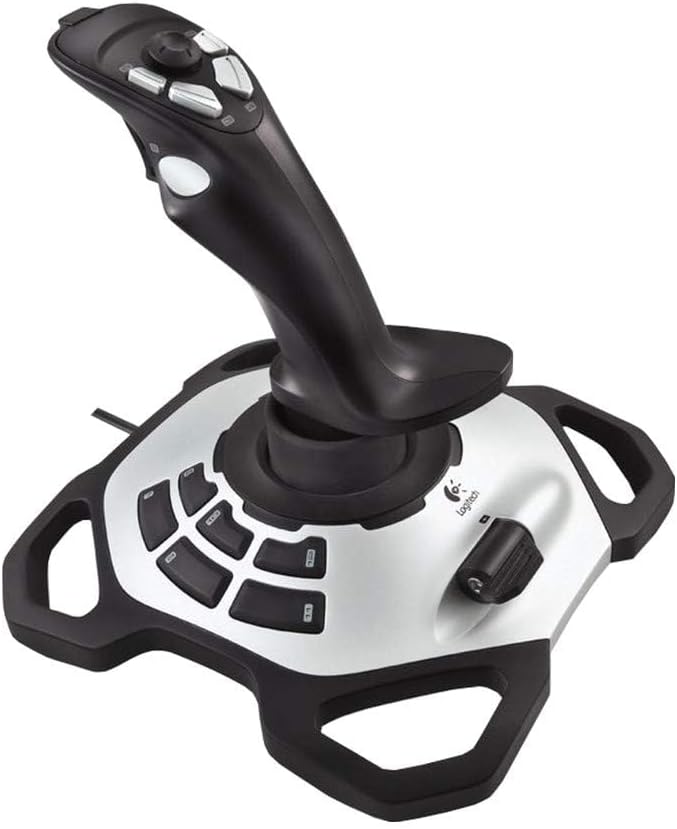


The PXN 2113PRO stands out as a budget-friendly option for those looking to enter flight simulation without a huge investment. It offers a solid array of programmable buttons and axis controls that map well to many simulation titles on Windows 11.
We may earn a commission when you buy through this link, at no additional cost to you.
Its vibration function adds a layer of immersion that enhances the feeling of flying when engaged correctly. The design includes a robust base with suction cups to keep it stable during intense gaming sessions where precision is key.
While the vibration may require manual adjustment in the driver to be noticeable, it remains a useful feature for feedback during turbulence or weapon fire. Some users note that the build quality feels lighter than premium competitors but holds up well for casual use.
This controller is ideal for beginners or those wanting a secondary stick for testing new games. It provides sufficient functionality for most standard flight sims and offers good value for the features it brings to the desktop setup today.
Adjusting the vibration strength ensures you feel in impact without overwhelming your hands during long sessions.
The suction cups on the bottom secure the stick to smooth surfaces for consistent control accuracy.
We may earn a commission when you buy through this link, at no additional cost to you.
The Thrustmaster T-Flight Hotas One provides a modular approach that allows users to adapt the controller for desk or lap use. Its detachable throttle makes it easy to store or move around the room without cluttering your workspace unnecessarily.
We may earn a commission when you buy through this link, at no additional cost to you.
Designed for both PC and Xbox, this controller ensures broad compatibility across platforms which is a significant advantage for multi-system gamers. The ergonomics are well thought out to reduce fatigue during extended play sessions focusing on comfort.
Users appreciate the plug and play nature which eliminates driver headaches for most modern setups. However the throttle section lacks the weight and precision found in more expensive models which may limit high-end simulation enthusiasts.
This system is perfect for casual flight sim players who want a complete setup without breaking the bank. It balances cost and functionality effectively and offers a reliable entry point into dedicated flight stick hardware for Windows users.
Detaching the throttle lets you use the stick alone for games that do not require throttle control.
Seamless switching between PC and Xbox allows for a unified control experience across different devices.
We may earn a commission when you buy through this link, at no additional cost to you.
The V-one controller offers impressive versatility by supporting a wide range of operating systems and platforms including Android. This makes it a unique choice for users who need a single controller for PC gaming and mobile emulation on the go.
We may earn a commission when you buy through this link, at no additional cost to you.
Its support for Xinput and Dinput modes ensures compatibility with both modern and legacy games which broadens its utility significantly. The inclusion of vibration feedback and turbo functions adds depth to gameplay without requiring complex configuration steps.
While the build quality is basic compared to specialized flight sticks, it serves well as a general-purpose input device for various genres. The wired connection ensures stable performance without latency issues which is crucial for competitive or timing-sensitive games.
Ideal for budget-conscious gamers who need a reliable input device across multiple devices, this controller delivers solid performance. It is particularly useful for those who enjoy retro gaming on PC or simulation titles that accept generic controller inputs easily.
Support for multiple modes ensures you can use it with a wide variety of games and emulators seamlessly.
Using it with Android devices expands your gaming options significantly when paired with a suitable OTG adapter.
We may earn a commission when you buy through this link, at no additional cost to you.
The Thrustmaster USB Joystick represents a simplified approach to flight control with essential features for basic gaming needs. Its compact design makes it easy to fit on smaller desks while still offering the necessary axes for flight and space simulations.
We may earn a commission when you buy through this link, at no additional cost to you.
A standout feature is the Point-of-View button which allows quick camera changes during gameplay without needing keyboard shortcuts. This small addition improves immersion and convenience significantly for titles that rely heavily on dynamic camera angles.
However the limited number of buttons may restrict its use in complex simulation setups where many commands need mapping. It remains a good option for casual players who want a straightforward controller that works out of the box with Windows systems.
Best suited for casual gamers or as a backup device, this joystick provides reliable performance from a trusted brand. It is an excellent choice for those who need simple control without the bulk or cost of a full HOTAS system for their PC.
The dedicated POV button streamlines navigation and observation during intense simulation scenarios or combat scenarios.
Its compact size ensures it fits easily in tight spaces while maintaining ergonomic comfort for your hand.
We may earn a commission when you buy through this link, at no additional cost to you.
The Microsoft Sidewinder Precision 2 is known for its durable construction and precise control mechanisms that have stood the test of time. Its rotating handle offers unique rudder control that is highly appreciated by simulation enthusiasts for its tactile feel.
We may earn a commission when you buy through this link, at no additional cost to you.
With 16 programmable functions and built-in throttle control, it provides ample customization for various game types including flight and racing sims. The ability to save and download game commands into profiles allows for quick switching between different titles seamlessly.
Despite its age, the controller remains highly regarded for its reliability and comfort during long sessions. Finding it might be harder now, but those who find it often cite it as a gold standard for precision and build quality in entry-level sticks.
This joystick is recommended for users who prioritize durability and mechanical feel over modern digital features. It offers a timeless experience for flight enthusiasts who value a robust controller that delivers consistent performance without complex digital dependencies.
The rotating handle provides intuitive rudder input that enhances realism in flight simulation environments significantly.
Saving commands to specific profiles saves time and ensures you always have the right setup ready to play.
We may earn a commission when you buy through this link, at no additional cost to you.
The Logitech Extreme 3D Pro is a staple in the joystick market for its balance of precision and affordability. Its twist rudder function offers precise control for flight sims, allowing for smooth banking and steering without additional hardware.
We may earn a commission when you buy through this link, at no additional cost to you.
Designed with an ergonomic shape, it fits comfortably in the hand, reducing strain during long gaming sessions. The rapid fire trigger feature adds versatility for players who need quick response times in action-oriented simulation scenarios or games.
While it lacks force feedback, the mechanical feel is robust and responsive for most standard gameplay needs. Users often praise its simplicity and ease of use, making it a reliable choice for both beginners and experienced flight sim gamers.
Recommended for those seeking a reliable, mid-range stick, this model delivers consistent performance across a variety of titles. It is a practical choice for gamers who want precision without the complexity or cost of a high-end system for their PC.
The twist rudder provides intuitive yaw control that is essential for realistic flight simulation experiences.
Its shape is designed to support your hand for hours of play without causing discomfort or fatigue.
We may earn a commission when you buy through this link, at no additional cost to you.
The VOYEE PC Controller offers an affordable alternative for gamers who prefer gamepad inputs over traditional flight sticks. It mimics the familiar Xbox 360 layout, making it easy to adapt for users already accustomed to console controllers on their PC.
We may earn a commission when you buy through this link, at no additional cost to you.
Its ergonomic grips and responsive triggers enhance the playing experience, ensuring comfortable handling during extended sessions. The long cable provides flexibility in positioning, allowing you to sit comfortably without being restricted by USB port locations.
While it is not a specialized flight stick, it serves well for games that support controller inputs and simulation titles with flexible mapping. The rumble feedback adds a nice touch of immersion, though it is basic compared to high-end alternatives available today.
Ideal for budget-conscious users or as a secondary controller, this option delivers reliable performance for its price. It is a practical choice for casual gamers or those who want a familiar layout without investing in specialized hardware for their Windows setup.
The contours of the grips fit naturally in your hands to reduce strain during long gaming sessions comfortably.
The extended cable gives you the freedom to position the controller where it suits your playstyle best.
We may earn a commission when you buy through this link, at no additional cost to you.
The Thrustmaster SimTask FarmStick is uniquely designed for Farming Simulator 25, offering tailored controls that enhance realism for agricultural enthusiasts. Its 3-axis joystick provides smooth operation for heavy machinery, making tasks like harvesting feel more authentic and precise.
We may earn a commission when you buy through this link, at no additional cost to you.
Equipped with HALL effect magnetic sensors, the controller eliminates drift and wear, ensuring long-term precision which is vital for repetitive farming tasks. With up to 33 programmable inputs, players can manage complex machinery functions without switching between keyboard and controller inputs.
The ambidextrous design allows flexible setup options, supporting various cockpit configurations for personalized gaming experiences. While it is specialized, its build quality and sensor technology make it a superior choice for dedicated farming simulation players over generic options.
Recommended for serious simulation fans, this controller delivers a high level of immersion and durability. It justifies its cost for those who play farming games regularly and want a setup that mirrors real-world machinery controls effectively on their PC.
HALL effect technology ensures your inputs remain accurate over time without mechanical wear affecting performance.
With over 30 inputs, you can control every function of complex machines without relying on keyboard shortcuts.
We may earn a commission when you buy through this link, at no additional cost to you.
The Logitech G X56 H.O.T.A.S is a premium system designed for serious pilots and simulation enthusiasts who demand maximum control. With over 189 programmable controls, it offers unparalleled customization that lets you map every button and axis to your exact needs.
We may earn a commission when you buy through this link, at no additional cost to you.
Its mini analog stick provides extra control surfaces for pitch, roll, and yaw, adding a layer of precision rarely found in other joysticks. The RGB lighting adds a stylish aesthetic to your setup, blending function with form in a visually appealing way.
While it requires a significant investment and desk space, the performance and build quality justify the cost for dedicated users. The adjustable force spring system allows you to tweak resistance to match your flying style, enhancing comfort and realism significantly.
This is the ultimate choice for high-end flight sim rigs where realism and detail are paramount. It delivers a professional-grade experience that bridges the gap between casual gaming and real-world flight simulation controls for Windows users today.
With so many programmable controls, you can replicate complex cockpit layouts for detailed flight simulation scenarios.
The spring system lets you adjust tension so the stick feels exactly like the aircraft you are flying.
We may earn a commission when you buy through this link, at no additional cost to you.
The Thrustmaster T.16000M FCS is widely recognized for its precision and durability thanks to H.E.A.R.T technology which ensures input accuracy over time. This joystick offers a level of detail that makes it a favorite among simulation enthusiasts looking for reliable flight control.
We may earn a commission when you buy through this link, at no additional cost to you.
Its ambidextrous design allows for easy adjustment to fit left or right-handed users, improving comfort for a wider audience. The 16 action buttons with braille-style identification make it easy to locate controls by touch during intense gameplay without looking down.
The software allows for detailed mapping profiles per game, ensuring that you always have the optimal setup ready to load. While it lacks force feedback, the build quality and precision make up for it with a solid and responsive experience for any flight title.
Recommended for those seeking a balance of performance and value, this stick delivers professional-grade input for its price. It is a top choice for serious gamers who need a controller that performs flawlessly across various simulation and flight titles on PC.
The braille-style buttons let you identify controls by touch which speeds up reactions during complex maneuvers.
The T.A.R.G.E.T software helps you create and save profiles that streamline your workflow and game settings.
We may earn a commission when you buy through this link, at no additional cost to you.
Selecting the right joystick requires understanding your specific simulation needs, hardware requirements, and budget constraints to find a controller that enhances your gaming experience effectively.
Ensure the joystick explicitly supports Windows 11 to avoid driver issues and ensure seamless integration with modern operating systems. Check for Xinput or Dinput support depending on your game requirements and platform preferences for optimal performance.
Always verify system requirements on the product page to confirm full functionality without needing complex workarounds.
Flight simulations often require numerous buttons for complex controls, so look for controllers with enough programmable inputs to map all essential functions. Higher-end models allow for multiple profiles so you can switch between games effortlessly.
Choose a stick with enough buttons to handle your favorite game's controls without constantly needing keyboard access.
A well-built joystick with comfortable grips prevents fatigue during long gaming sessions and ensures durability over time. Look for sturdy bases or clamps that secure the controller to your desk for precise inputs.
Prioritize ergonomic designs that fit your hand shape to maintain comfort during extended use without strain.
Advanced sensors like H.E.A.R.T technology provide precise input detection without drift over time which is crucial for accurate control. Analog sticks with high-resolution sensors ensure smooth and linear movement for better simulation realism.
Opt for joysticks with high-quality sensors to maintain accuracy and reliability over years of frequent use.
Force feedback adds a tactile layer to gameplay, allowing you to feel turbulence or weapon impacts, though it is not always available in budget models. Vibration is a simpler alternative that provides basic feedback for less expensive controllers.
If immersion is a priority, check if the controller supports force feedback or strong vibration feedback for enhanced realism.
Modular designs with detachable throttles offer flexibility for setup and storage but may lack the precision of fixed systems. Fixed systems often provide more stability and robust feel for serious simulation enthusiasts.
Decide based on your space and portability needs whether a modular or fixed setup fits your gaming area better.
Robust software support allows for advanced customization of profiles and macros which can significantly improve workflow during gaming. Look for tools that let you save specific mappings per game or scenario for quick access.
Ensure the manufacturer provides active driver support and software updates to keep the device functional long-term.
Determine your budget early to balance features like programmable buttons and sensor quality with price point limitations. Entry-level sticks may lack advanced features but are perfect for casual gamers looking for basic simulation support.
Invest in a model that offers the best features within your budget while ensuring it meets essential functionality requirements.
Start by installing any necessary drivers or software provided by the manufacturer to ensure full functionality on your Windows system. Connect the device via USB and check the device manager to confirm the operating system recognizes it correctly.
Calibrate the joystick using the built-in Windows calibration tool or the manufacturer's software to ensure accurate axis movement and button registration. This step is essential for precision and can prevent input drift over time.
Clean the joystick regularly with a dry cloth to remove dust from the base and buttons, and avoid exposure to liquids to maintain performance. Store it in a dry place when not in use to prevent potential damage or component wear.
Most of the listed products explicitly support Windows 11, but you should always check the product details for the latest driver updates. Some older models may require generic drivers to function correctly on modern systems.
Yes, many of these joysticks can be mapped for use in other genres like racing or strategy games using third-party software. However, their primary design is optimized for flight simulation and space control tasks.
Absolutely, as long as your laptop has a USB port. The controllers are plug and play on most systems, though space for the base or clamp may be limited on smaller desks.
Many are plug and play for basic functions, but using the manufacturer's software is recommended for full customization and calibration. This allows you to map buttons and axes exactly to your preferences.
HOTAS stands for Hands On Throttle And Stick, meaning it includes both a stick and a separate throttle for more complex control. A single stick typically has a throttle on the stick itself or lacks it entirely.
Recalibrating the joystick through Windows settings or manufacturer software usually resolves drift. If the issue persists, it may be due to internal wear requiring a repair or replacement.
Some models allow you to adjust vibration strength via driver settings or game menus. Budget models may offer basic vibration but with limited customization options for intensity.
Budget options like the PXN 2113PRO or V-one are great for beginners due to their ease of use and lower cost. They provide essential features without overwhelming complexity for those new to simulation.
We reviewed ten distinct controllers ranging from budget-friendly models to premium systems offering advanced customization and precision. Each option brings unique strengths, whether you need a detachable throttle or a specialized farming joystick for specific simulations.
Prioritize ergonomics and compatibility with your preferred games to ensure a smooth and comfortable experience over time. Consider your budget and whether features like vibration or programmable buttons are essential for your gameplay style.
Prices and availability change frequently so check current listings before purchasing to secure the best deal for your setup. With the right controller, you can elevate your simulation experience to new heights with precise and intuitive control.