
Harvopu for iPad A16 11th/10th Generation Case with Keyboard
4.3Editor score
RGB Backlit Keys
Multi-touch Trackpad
Detachable Magnetic Design
This guide compares the top 10 iPad A16 Folio Case with Keyboard options for productivity and protection, evaluating trackpads, battery life, and build quality.
Finding the right iPad A16 Folio Case with Keyboard transforms your tablet into a powerful workstation. These accessories combine protection with typing comfort, making them essential for students and professionals who need mobility without sacrificing performance.
We analyzed ten leading models based on compatibility, trackpad quality, keyboard layout, and overall durability. Each product was selected for its ability to meet specific user needs, ranging from budget-friendly options to premium designs with advanced features.
This guide details the strengths and weaknesses of each pick to help you decide. Keep in mind that prices and availability can change quickly, so verify current details before purchasing to ensure you get the best value for your setup.
4.3Editor score

4.4Editor score

4.4Editor score
The following table provides a quick side-by-side comparison of the top ten models. Use this overview to identify key differences in features like backlighting, battery capacity, and stand functionality before diving into detailed reviews.




The Apple Magic Keyboard Folio stands out as the premier choice for iPad A16 users seeking a seamless experience. It holds a solid 4.4 rating from thousands of users who appreciate its direct connectivity and premium feel.
We may earn a commission when you buy through this link, at no additional cost to you.
Its standout feature is the lack of Bluetooth pairing or battery charging needs. The keyboard draws power directly from the iPad via the Smart Connector, ensuring you never run out of power mid-session. The built-in trackpad supports precision cursor control, transforming the tablet into a true laptop substitute.
While it lacks backlighting for low-light typing, the trade-off is a sleek profile that maintains the iPad's portability. The detachable two-piece design allows for versatile positioning, making it suitable for various work environments without sacrificing protection.
This model is ideal for professionals and creatives who prioritize reliability and integration. If you want an accessory that just works without setup hassle, this is the top recommendation for the A16 generation.
The keyboard connects via the Smart Connector, eliminating the need for Bluetooth pairing and charging, which ensures uninterrupted productivity.
A built-in trackpad enables smooth scrolling and gesture control, allowing for precise navigation that mimics a traditional laptop experience.
We may earn a commission when you buy through this link, at no additional cost to you.
The Harvopu case offers an incredible value for those needing full laptop functionality without the premium price tag. Rated 4.3 stars, it appeals to budget-conscious students and casual users who still want a modern typing setup.
We may earn a commission when you buy through this link, at no additional cost to you.
A key strength is the full row of iPadOS shortcuts combined with a 7-color RGB backlight. This allows for personalized aesthetics and practical visibility in dim environments. The keyboard is detachable, letting you use the iPad as a pure tablet when desired.
However, being Bluetooth dependent means you must remember to pair it and charge it separately. While the battery lasts long, the need for occasional charging is a minor inconvenience compared to direct-connect models.
If you want a versatile accessory that looks great and saves money, this is the smart choice. It delivers essential features like backlit keys and a trackpad at a fraction of the cost of other brands.
The customizable backlight offers three brightness levels and seven colors, allowing you to personalize your typing environment for style and visibility.
The keyboard can be removed magnetically, giving you the freedom to switch between a laptop setup and a lightweight tablet instantly.
We may earn a commission when you buy through this link, at no additional cost to you.
The typecase Edge elevates the standard folio with a unique floating magnetic stand that hovers the iPad above the keys. With a 4.4 rating, it is designed for users who demand a true laptop form factor and robust protection.
We may earn a commission when you buy through this link, at no additional cost to you.
The floating stand creates a natural gap for airflow and typing comfort, while the 11-color backlight offers more variety than typical models. Precision multi-touch tracking and palm rejection ensure a smooth experience for both typing and navigation.
Though it is more expensive, the added features like a 12-month warranty and durable materials justify the investment. The design prioritizes stability and ergonomics, making it ideal for long work sessions or travel.
This is the best premium option for those who want high-end features without sacrificing durability. If you value a laptop-like workflow and superior build quality, the Edge delivers a polished and reliable experience.
The stand holds the iPad above the keyboard, mimicking a laptop screen position and improving airflow for better cooling during use.
With eleven distinct backlight colors and adjustable brightness, you can choose a setting that matches your mood or lighting conditions.
We may earn a commission when you buy through this link, at no additional cost to you.
The typecase Folio is praised for its balance of protection and lightness, earning a 4.6 rating from satisfied users. It focuses on essential functionality with a refined design that keeps the iPad portable and safe.
We may earn a commission when you buy through this link, at no additional cost to you.
The scissor-style keys provide a comfortable typing experience similar to a laptop, while the detachable magnetic feature adds flexibility. A built-in pencil holder ensures your stylus is always within reach without taking up extra space.
While it lacks advanced features like backlighting or floating stands, it excels in reliability and ease of use. The synthetic leather exterior offers durability without adding bulk, making it a practical choice for daily commutes.
This model is perfect for users who prioritize simplicity and a light weight. If you need a solid case that protects your device and offers decent typing without extra gadgets, the Folio is a strong contender.
A dedicated holder built into the case keeps your Apple Pencil secure and accessible, preventing loss during travel or daily use.
The magnetic keyboard can be removed easily, allowing you to switch between typing and tablet modes without removing the case.
We may earn a commission when you buy through this link, at no additional cost to you.
CHESONA offers a versatile solution that stands out for its dual wireless channel capability. With a 4.5 rating, this keyboard appeals to users who manage multiple devices and need quick switching between them.
We may earn a commission when you buy through this link, at no additional cost to you.
The ability to pair with two devices simultaneously means you can switch from an iPad to a laptop with a single click. The 500mAh battery ensures long usage times, and the auto-off backlight helps conserve power during breaks.
The multi-touch trackpad adapts well to iOS gestures, though Bluetooth connection can occasionally lag compared to direct links. However, the convenience of wireless freedom often outweighs this minor drawback for most users.
Choose this if you need a keyboard that handles multiple devices efficiently. Its robust feature set and solid battery life make it a reliable option for professionals who juggle tasks across platforms.
You can pair with up to two devices at once, switching between them instantly with a dedicated shortcut key for streamlined workflow.
The backlight automatically turns off after thirty seconds of inactivity, ensuring that the battery lasts for extended periods without interruption.
We may earn a commission when you buy through this link, at no additional cost to you.
The Logitech Rugged Folio is designed for durability, featuring military-grade drop protection and a spill-resistant membrane. Its 4.3 rating reflects its reliability in tough conditions, making it ideal for fieldwork or active students.
We may earn a commission when you buy through this link, at no additional cost to you.
It connects directly via the Smart Connector, so no charging is needed for the keyboard itself. The four use modes, including Write & Sketch and Type, provide flexibility for different tasks without compromising structural integrity.
While it is heavier than thin cases, the protection it offers is unmatched. The waterproof seal ensures that accidental spills can be wiped clean without damage, providing peace of mind during daily use.
This is the top choice for those who need a rugged case. If your iPad travels through harsh environments or requires constant protection from drops and spills, the Rugged Folio delivers peace of mind.
A durable membrane seals the keyboard, protecting against spilled drinks and crumbs, ensuring the device stays safe in messy environments.
Powered directly by the iPad via the Smart Connector, the keyboard never needs separate charging or batteries for continuous operation.
We may earn a commission when you buy through this link, at no additional cost to you.
The typecase Folio Duo adapts effortlessly between productivity and pure tablet mode, earning a 4.4 rating from users who appreciate its versatility. It supports both portrait and landscape orientations, making it useful for various content types.
We may earn a commission when you buy through this link, at no additional cost to you.
The precision trackpad offers smooth navigation for editing and browsing, while the 7-color backlight adds a stylish touch. A built-in pencil holder ensures your tools are secure, and the leather-style exterior provides a refined look.
Although it relies on Bluetooth, the connection is stable and the battery life is robust. The design prioritizes flexibility, allowing you to detach the keyboard quickly when you just need to read or watch media.
If you value adaptability and a premium feel, this is a great choice. It combines style with function, offering a balanced solution for users who need both typing capability and tablet versatility.
The design supports portrait mode in addition to landscape, allowing you to view content in multiple orientations without removing the case.
An integrated pencil slot keeps your stylus protected and easily accessible, ensuring you never have to hunt for your drawing tool.
We may earn a commission when you buy through this link, at no additional cost to you.
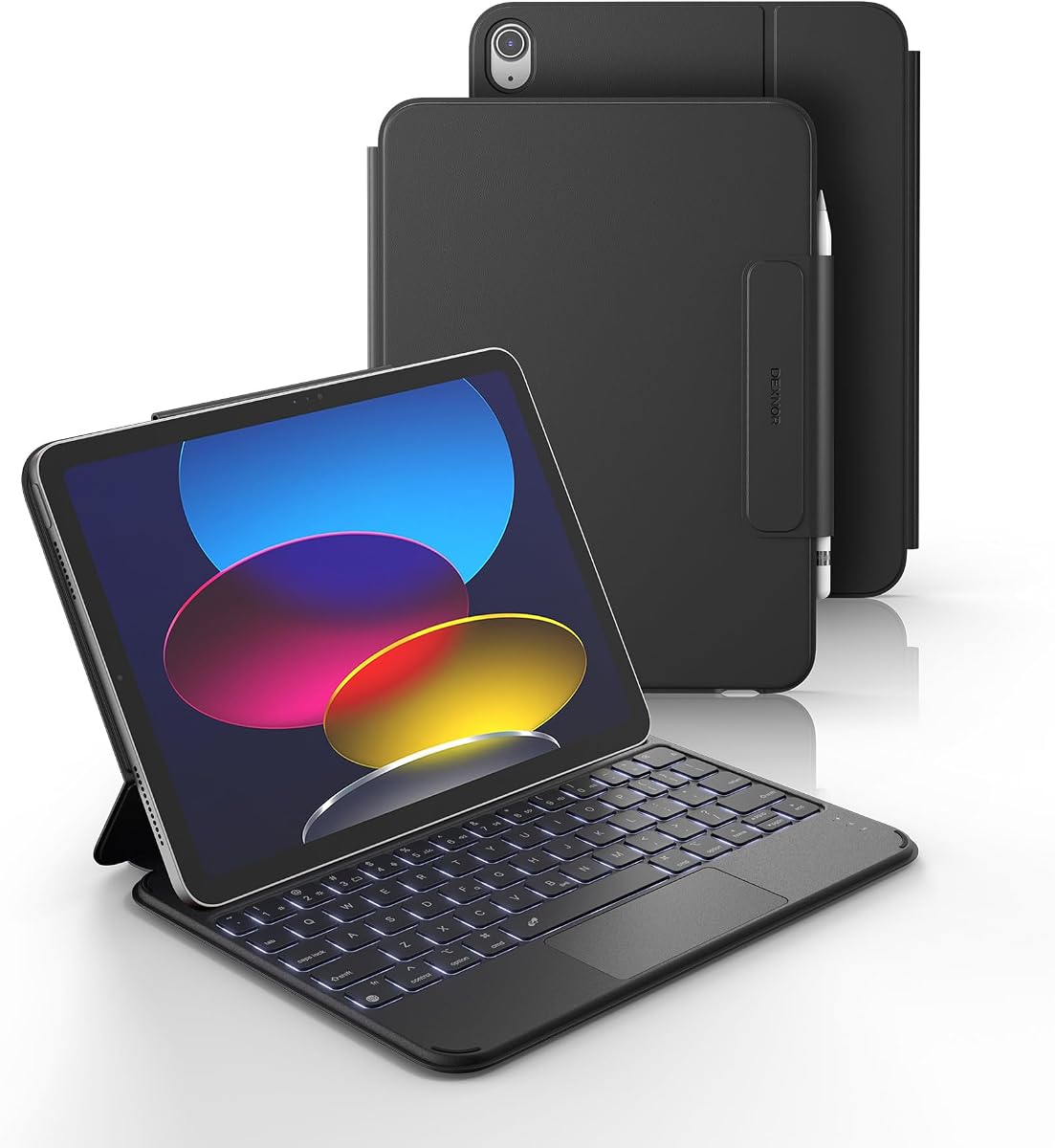
Dexnor focuses on battery longevity, with a massive 650mAh cell that supports over 200 hours of typing. Rated 4.3 stars, it is a practical choice for travelers who want to avoid frequent charging sessions.
We may earn a commission when you buy through this link, at no additional cost to you.
The keyboard features a 120-degree ergonomic viewing angle that is comfortable for long sessions. An intelligent sleep mode activates after inactivity, preserving battery life and ensuring the device is ready whenever you need it.
It is not a floating stand, but it offers stable support for typing on a desk or couch. The scissor-switch keys provide a satisfying tactile feel, making the typing experience enjoyable and efficient.
For users who prioritize battery life and stability, this is an excellent option. Its combination of long run time and energy-efficient design makes it perfect for extended use without worrying about power.
The 650mAh battery provides up to 200 hours of typing, ensuring you can work for days without needing to recharge the keyboard.
An automatic sleep mode kicks in after inactivity to conserve power, ensuring the battery lasts as long as possible between charges.
We may earn a commission when you buy through this link, at no additional cost to you.
The ESR keyboard stands out with an extra-large precision trackpad that is 65% bigger than typical models. Rated 4.4 stars, it is perfect for those who rely heavily on mouse gestures and navigation.
We may earn a commission when you buy through this link, at no additional cost to you.
The design includes two specific viewing angles for work and sketching, making it versatile for different tasks. Its ultra-thin profile ensures it remains lightweight and easy to carry in a backpack without adding bulk.
While it lacks backlighting, the precision trackpad compensates with smooth scrolling and gesture support. The Air Guard corners protect your iPad from drops and scratches, offering peace of mind during transport.
If navigation is your priority, this is the ideal pick. The large trackpad transforms how you interact with your iPad, making multitasking and content creation significantly easier and more intuitive.
With a 65% larger surface area, the trackpad supports smooth scrolling and intuitive gestures for a more seamless user experience.
Two specific angles allow for comfortable work viewing or precise sketching, adapting to different needs without additional accessories.
We may earn a commission when you buy through this link, at no additional cost to you.
The CC Store case earns a 4.6 rating for its impressive battery performance and responsive support. It is designed to keep you productive with a large capacity battery that supports over 200 hours of use.
We may earn a commission when you buy through this link, at no additional cost to you.
It charges fully in just 2 to 3 hours, ensuring minimal downtime. The magnetic attachment is strong and stable, and the built-in pencil holder keeps your accessories secure and ready for action at all times.
While it is a standard Bluetooth model, its reliability and battery life make it a dependable daily driver. The premium PU leather adds a touch of style while keeping the overall design sleek and easy to handle.
Choose this if you need consistent performance without a high price tag. It delivers essential features with a focus on battery longevity and ease of use, making it a great option for general users.
The keyboard charges fully in just a few hours, allowing you to spend less time plugged in and more time working on your projects.
High-quality PU leather provides a stylish finish and scratch resistance, ensuring your device stays protected and looks great.
We may earn a commission when you buy through this link, at no additional cost to you.
Choosing the right case depends on your workflow and priorities. We break down the critical factors to help you select the perfect match for your iPad A16.
Some models connect via the Smart Connector directly to the iPad, meaning no Bluetooth pairing or charging is required. Others use Bluetooth, which offers more flexibility but needs separate power and setup.
If you want zero setup time, look for Smart Connector options. If you prefer flexibility across devices, Bluetooth is the way to go.
Backlights come in various forms, from single white to RGB or 11-color options. Adjustable brightness is essential for working in dim environments like airplanes or cafes.
Select a model with adjustable brightness if you work at night. If you work in well-lit offices, you might save money by skipping backlighting.
Bluetooth keyboards rely on internal batteries. Look for capacities above 400mAh to ensure you don't charge too often. Some models offer over 200 hours of typing time.
Prioritize battery life if you travel frequently. A larger battery means less downtime and more reliable access to your tools.
A good trackpad supports multi-touch gestures like scrolling and app switching. Precision trackpads mimic laptop behavior, while basic ones may feel less responsive.
If you do a lot of document editing, ensure the trackpad supports precise cursor control. This feature makes the iPad feel like a true computer.
Some cases offer adjustable angles or floating stands that lift the iPad above the keys. Others provide fixed viewing positions. A floating stand improves typing ergonomics significantly.
Consider how you will position your iPad. If you type for hours, a floating or adjustable stand is crucial for comfort.
Rugged cases offer military-grade protection and water resistance, while slim cases prioritize style and lightness. Check for materials like shock-absorbent TPU or reinforced corners.
Choose rugged protection if you work in harsh environments. For daily commuting, a durable leather or plastic case is usually sufficient.
Many modern cases include a dedicated slot or holder for the Apple Pencil. This keeps your stylus safe and prevents it from being lost in a bag.
Ensure the holder fits your specific Pencil model. Integrated storage adds value by keeping your setup organized.
Prices vary from budget-friendly options to premium models. Check for warranty coverage, which is often around 12 months. This protects your investment against defects.
Look for a balance between cost and features. A solid warranty ensures support if issues arise during normal use.
To connect a Bluetooth keyboard, open the settings on your iPad and enable Bluetooth. Follow the pairing instructions provided with the product, usually involving a specific key combination.
Keep the keyboard clean by wiping it with a dry, soft cloth. Avoid using harsh chemicals or sprays directly on the keys, as this can damage the internal mechanisms over time.
When not in use, close the magnetic cover to protect both the screen and keys. This also helps trigger sleep modes on Bluetooth models to save battery life.
No, the Smart Connector model does not charge the iPad; rather, the iPad charges the keyboard. This means you do not need to charge the keyboard separately using a USB cable.
Yes, most of these cases are compatible with both the iPad A16 11th Gen and the 10th Gen models. Always verify the specific model number before buying to ensure a perfect fit.
Many Bluetooth keyboards support multi-device pairing. Check the product manual for the specific shortcut, usually Fn + key, to switch between connected devices instantly.
Most standard folio cases are not waterproof. However, rugged models often include spill-resistant membranes. Wipe up spills immediately to prevent damage to the electronics.
No, the Apple Pencil is sold separately. These cases often include a slot or holder to secure your Pencil, but you must purchase the stylus itself if you do not already own one.
No, you do not need to install drivers. These keyboards are designed to work natively with iPadOS once paired via Bluetooth or connected via Smart Connector.
Most models offer 200 hours of typing time or more. Usage time depends on backlight usage and frequency of typing. Recharging usually takes a few hours via USB-C.
Yes, the keyboard is designed to work with the iPad securely placed inside the case. Some models allow you to detach the keyboard for use as a standalone input device.
We reviewed ten top models including the Apple Magic Keyboard Folio and several high-value Bluetooth options. Each offers unique benefits for different needs, from rugged protection to floating stands.
If you want seamless integration, the Apple Magic Keyboard Folio is unmatched. For budget-conscious users seeking style and function, Harvopu and typecase offer excellent value with customizable backlights.
Prices and availability can change quickly, so always check current offers before purchasing. Select the option that best fits your workflow to maximize productivity and device protection.