
GRAUGEAR 20Gbps Type E Key A Front Panel USB C Header Extension Cable
4.6Editor score
Supports 20Gbps transfer speeds
Double shielded EMI wires
Includes sturdy metal PCIe bracket
Modern computer cases often lack the latest ports for fast devices. Front Panel USB C Headers solve this by bringing high speed connectivity to the front of your desktop PC easily and efficiently.
We evaluated ten leading adapters and hubs based on speed data transfer reliability and ease of installation. Our analysis covers headers for both older and newer motherboards to ensure broad compatibility.
Each pick shows real world performance and key specs from verified listings. Prices and availability change often so check current listings before finalizing your purchase decision today.
4.6Editor score

4.6Editor score

4.2Editor score
As an Amazon Associate we earn from qualifying purchases.
The following table provides a side-by-side look at the top ten Front Panel USB C Headers available today focusing on speed connectivity options and installation requirements.


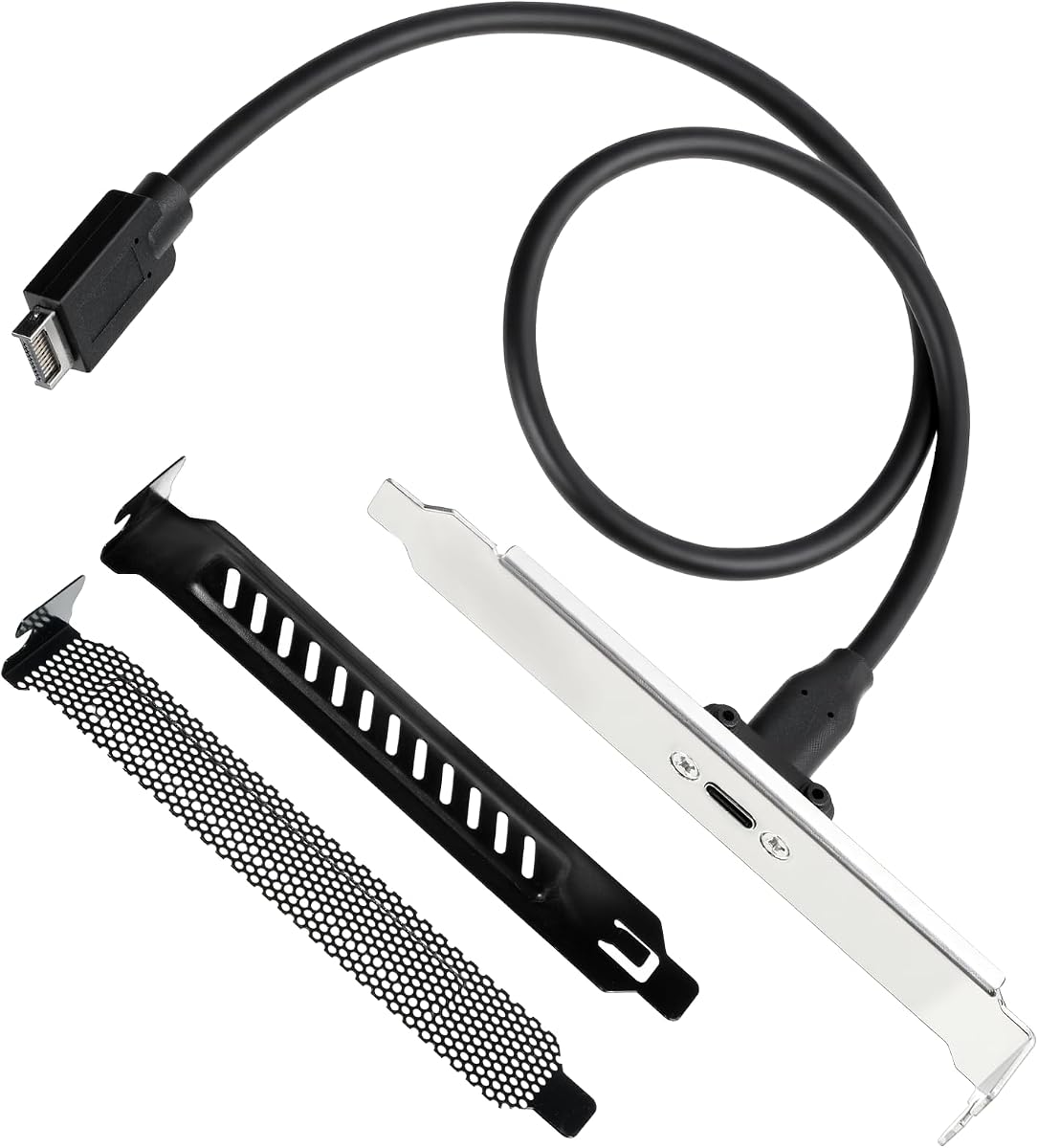


This cable stands out for its low cost and high performance capabilities. It delivers up to 20Gbps speeds when paired with compatible motherboards and supports a wide range of USB-C devices.
We may earn a commission when you buy through this link, at no additional cost to you.
The build quality includes double shielded wires that reduce interference during data transfers. The included metal PCIe bracket ensures a secure fit on the back of your case.
Users may find that older motherboards lack the necessary Type-E header. In such cases an adapter card might be needed to use this product effectively.
Anyone looking for a cost effective way to add fast USB-C to the back panel should consider this cable. It offers excellent value for the price.
The cable supports USB 3.2 Gen 2×2 ensuring you get the fastest possible transfer rates for large files and external drives.
Metal construction and shielded wires provide long term reliability and protect against electrical noise during operation.
We may earn a commission when you buy through this link, at no additional cost to you.
This adapter offers nearly identical performance to the first pick but with slight variations in branding. It supports 20Gbps speeds and includes a sturdy bracket for easy mounting.
We may earn a commission when you buy through this link, at no additional cost to you.
The 60cm cable provides plenty of slack for managing wires inside larger cases. Users report smooth connectivity with modern devices without needing additional software.
Compatibility remains a key consideration since it requires a Type-E header. Older systems might need an adapter to utilize this cable effectively.
For those seeking a reliable and budget friendly solution this cable is a solid choice. It balances speed and cost well.
The 60cm length ensures you can route the cable easily even in cases with tight spacing or complex layouts.
Installation is straightforward with no drivers needed. Simply connect to the header and you are ready to use your USB-C devices.
We may earn a commission when you buy through this link, at no additional cost to you.
This hub transforms a spare drive bay into a versatile USB expansion point. It combines a high-speed USB-C port with two standard USB-A ports for flexibility.
We may earn a commission when you buy through this link, at no additional cost to you.
Safety features like over-current protection ensure your connected devices remain safe during use. The sturdy construction keeps the hub stable inside your case.
Installation is slightly more involved as it requires both Type-E and USB 3.0 headers. Ensure your motherboard has both before purchasing.
Users needing multiple front ports without compromising speed will appreciate this hub. It offers a robust expansion solution for modern desktops.
With both USB-C and USB-A ports you can connect a wide variety of devices without needing dongles or adapters.
Built-in safety measures protect against power surges and short circuits ensuring reliable performance for your peripherals.
We may earn a commission when you buy through this link, at no additional cost to you.
This hub provides a robust set of four USB ports including two fast USB-C connections. It is built to handle high power devices thanks to its SATA power connection.
We may earn a commission when you buy through this link, at no additional cost to you.
The metal casing ensures stability and durability. Users can connect multiple devices simultaneously without worrying about power limitations.
The need for a SATA power connector adds a layer of complexity. Ensure your power supply has an available connector before installation.
Power users needing maximum front panel connectivity will find this hub invaluable. It delivers premium performance and durability.
The inclusion of a SATA power connector ensures sufficient power for demanding devices like external drives and charging stations.
A metal chassis provides a professional look and protects the internal electronics from physical damage.
We may earn a commission when you buy through this link, at no additional cost to you.
This expansion card is ideal for systems that lack modern headers. It converts a PCIe x1 slot into a Type-E header and standard USB ports.
We may earn a commission when you buy through this link, at no additional cost to you.
The card includes both USB-C and USB-A outputs making it versatile for various devices. Installation is straightforward with simple screw mounting.
While it does not support 20Gbps speeds it offers significant upgrade potential for older hardware. Users gain modern connectivity without replacing the entire system.
Anyone upgrading an older PC will find this card highly useful. It bridges the gap between legacy and modern standards.
By using a PCIe slot this card works with motherboards that do not have built-in USB-C headers or Type-E connectors.
The combination of USB-C and USB-A outputs ensures you can connect virtually any peripheral you might need.
We may earn a commission when you buy through this link, at no additional cost to you.
This hub offers a balanced mix of ports for everyday use. It provides a high-speed USB-C port alongside two standard USB-A connections.
We may earn a commission when you buy through this link, at no additional cost to you.
The fit is designed for standard 3.5 inch drive bays ensuring a clean look. Users appreciate the ease of installation and robust build quality.
Compatibility depends on having both Type-E and USB 3.0 headers. Check your motherboard specifications before purchase.
This hub is a solid mid-range option for those needing flexible connectivity. It offers a great balance of features and price.
The USB-C port supports speeds up to 20Gbps ensuring your high-speed devices perform at their best.
Designed to fit standard bays the hub blends seamlessly into your case without looking bulky or out of place.
We may earn a commission when you buy through this link, at no additional cost to you.
This cable provides a simple way to add a USB-C port to older systems. It connects to standard USB 2.0 headers found on most motherboards.
We may earn a commission when you buy through this link, at no additional cost to you.
While speed is limited to USB 2.0 it is sufficient for basic peripherals. The short cable ensures it stays organized inside the case.
Users expecting fast data transfer might be disappointed. It is best suited for charging or low-speed data tasks.
For basic connectivity on older hardware this cable is an easy upgrade. It is an excellent low-cost option for simple needs.
Using a standard 9-pin USB 2.0 header makes this cable compatible with nearly any older motherboard you own.
The short cable length helps prevent clutter inside your PC case while still reaching the front panel effectively.
We may earn a commission when you buy through this link, at no additional cost to you.
This cable offers a complete package with included slot covers for a clean back panel. It supports high-speed data transfer up to 20Gbps.
We may earn a commission when you buy through this link, at no additional cost to you.
The flexible insulation makes routing easier inside the case. Users can achieve professional results without additional purchases.
The rating is lower than some competitors which might indicate mixed experiences with durability. Still it offers good value with the included accessories.
Those wanting a clean and professional setup will appreciate the included covers. It is a solid choice for a tidy build.
The inclusion of PCI slot covers ensures your back panel looks finished and protects against dust and debris.
Supporting 20Gbps speeds this cable ensures your storage devices and peripherals run at top performance levels.
We may earn a commission when you buy through this link, at no additional cost to you.
This cable features an ultra-thin flat design that simplifies routing inside tight cases. It supports up to 10Gbps speeds and 100W power delivery.
We may earn a commission when you buy through this link, at no additional cost to you.
The silver-plated conductors ensure efficient signal transmission. Users benefit from reduced impedance and stable performance.
The cable is slightly shorter than some options but is sufficient for most standard cases. Ensure your panel screw spacing matches.
For tight builds needing high power delivery this cable is an excellent choice. Its thin design helps keep things organized.
With support for up to 100W power you can charge laptops and other high-demand devices directly through the front panel.
The flat TPE cable is flexible and thin allowing it to bend easily without obstructing airflow or other components.
We may earn a commission when you buy through this link, at no additional cost to you.
This adapter stands out with a perfect rating from verified users. It combines high-speed USB-C with standard USB-A ports for ultimate versatility.
We may earn a commission when you buy through this link, at no additional cost to you.
The build quality is sturdy and designed to last. Users appreciate the ease of installation and reliability of the connection.
Installation requires both Type-E and USB 3.0 headers which might be a limitation. However the performance justifies the extra setup effort.
Anyone seeking reliability and speed will find this adapter exceptional. It is a top-tier choice for demanding users.
By supporting both USB-C and USB-A outputs you can connect any peripheral without needing extra adapters.
With support for 20Gbps speeds this adapter ensures your fastest devices perform at their peak potential.
We may earn a commission when you buy through this link, at no additional cost to you.
Selecting the right USB C header requires understanding your motherboard and case requirements.
The most critical factor is the header available on your motherboard. Most modern boards have Type-E 20-pin headers for 20Gbps support while older ones might have 19-pin USB 3.0 headers or standard USB 2.0 9-pin connectors.
Check your motherboard manual to confirm which headers are available before purchasing a cable or hub to avoid incompatibility.
Data transfer speeds vary widely between products. USB 3.2 Gen 2×2 supports up to 20Gbps while Gen 2 supports 10Gbps and USB 2.0 caps at 480Mbps.
Choose a speed that matches your use case such as high-speed drives or basic peripheral charging to get the best value.
Cable length matters for routing inside your case. Longer cables like 23.6 inches provide flexibility while shorter ones keep things tidy.
Look for double-shielded wires and durable materials like PVC or TPE to ensure signal integrity and physical longevity.
Determine how many ports you need. Some cables offer a single USB-C connector while hubs provide multiple USB-A and USB-C ports.
Select a product that provides the number and type of connectors you need for your daily workflow and peripherals.
High power devices like laptops need cables that support power delivery. Some hubs require additional SATA power connectors for full functionality.
If you plan to charge power-hungry devices ensure the product supports sufficient wattage like 100W or includes extra power cables.
Sturdy metal brackets and durable casing protect your connection. Cheaper plastic options may bend or break over time under stress.
Look for products with metal construction and protective features like over-current and over-voltage protection for safety.
Some products require multiple headers or expansion slots which can complicate installation. Others are plug and play with a single connection.
Evaluate your case and motherboard layout to ensure you can accommodate the physical requirements of the product.
User reviews provide real-world insights into reliability and performance. Look for consistent feedback on speed and durability.
Choose products with high ratings and verified purchase reviews to ensure you get a quality experience.
Begin by powering down your computer and unplugging the power cord to ensure safety. Remove the side panel of your case to access the motherboard and front panel area.
Locate the correct header on your motherboard such as Type-E or USB 3.0. Align the connector on the cable with the header and press gently until it clicks into place.
Secure the USB-C bracket to the back of your case using screws. Route the cable neatly to avoid blocking fans or other components then close your case.
Yes most adapters require a specific header such as Type-E 20-pin for 20Gbps speeds. Check your manual before buying to ensure compatibility with your motherboard model.
Some adapters are designed for USB 2.0 9-pin headers but they will be limited to 480Mbps speeds. Ensure you choose the correct cable for your available header type.
Most adapters are plug and play and do not require drivers. Modern operating systems like Windows 10 and 11 recognize them automatically upon connection.
20Gbps supports USB 3.2 Gen 2×2 while 10Gbps supports Gen 2. The former is twice as fast and ideal for high-speed external storage drives and professional use.
Yes many USB-C headers support power delivery. Ensure the specific product you choose supports sufficient wattage like 100W to charge laptops effectively.
If you do not have a 3.5 inch bay use extension cables that mount to the back panel instead. This bypasses the need for internal drive bay space.
We have reviewed ten top options ranging from simple cables to versatile hubs. Each offers a unique balance of speed compatibility and price for different user needs.
Prioritize header compatibility and speed when choosing. Ensure your motherboard supports the required connection type to get the most out of your purchase.
Prices fluctuate frequently so check current listings before buying. Investing in the right header now will future-proof your desktop for modern USB-C devices.