
Ubiquiti Unifi Security Appliance
4.5Editor score
Affordable price point
Simple network integration
Compact desktop design
This guide compares ten top firewall appliances for businesses and homes, evaluating security features, throughput, and management tools to help you choose the
Network security is more critical than ever as cyber threats evolve rapidly. A reliable firewall appliance acts as the first line of defense for your data and devices against malicious attacks.
We analyzed ten leading firewall appliances based on performance, connectivity options, and security features. Our comparison includes solutions from major vendors tailored to different network sizes and needs.
Each pick highlights specific strengths like throughput speed and ease of use. Note that prices and availability can change frequently, so verify current details before making a purchase decision.
4.5Editor score

4.4Editor score

4.7Editor score
The following table provides a side-by-side comparison of all ten selected firewall appliances. Review the key specifications and features to determine which model best fits your specific network security requirements.



The FortiGate-60F stands out as a top choice for medium sized businesses needing robust security. With a rating of 4.4 stars it delivers reliable performance and advanced threat detection capabilities.
We may earn a commission when you buy through this link, at no additional cost to you.
Its ten Gigabit Ethernet ports offer exceptional flexibility for diverse network needs. The purpose built security processor ensures high speed SSL inspection and effective defense against unknown threats.
While the appliance requires a separate subscription for full security services the performance justifies the investment. The management console simplifies deployment and provides deep network visibility.
Businesses needing high performance and scalable security should consider this model. It balances enterprise grade features with manageable complexity for modern network environments.
The built in processor acceleration delivers consistent throughput even under heavy load.
Zero Touch Integration with Fortinet Security Fabric reduces setup time significantly.
We may earn a commission when you buy through this link, at no additional cost to you.
The Ubiquiti Unifi Security Appliance offers exceptional value for small businesses or home offices. Its 4.5 star rating reflects user satisfaction with its ease of use and solid performance.
We may earn a commission when you buy through this link, at no additional cost to you.
Integration with the Unifi Controller provides powerful management tools without complexity. The device supports VLANs and QoS ensuring voice and video traffic get priority on your network.
Compared to enterprise options the port count is lower but sufficient for basic needs. It lacks some advanced threat features but covers essential security functions effectively.
Ideal for those on a budget needing reliable firewall and VPN capabilities. It fits well in unified Unifi ecosystem setups.
Managing the appliance becomes seamless when paired with the Unifi software ecosystem.
Built in QoS ensures enterprise VoIP calls remain clear and uninterrupted.
We may earn a commission when you buy through this link, at no additional cost to you.
The Fortinet FG-100E represents a high end solution for demanding network environments. With a 4.7 star rating it excels in protecting against known and unknown threats effectively.
We may earn a commission when you buy through this link, at no additional cost to you.
It identifies thousands of applications and blocks malicious websites using advanced detection. The performance ensures network speed remains high even with full security inspection enabled.
While the price is higher the protection it offers is unmatched in its class. Businesses needing granular control over traffic will appreciate the deep application features.
Choose this appliance for critical network segments requiring top tier security. It delivers premium protection for sensitive data.
The system detects unknown attacks by analyzing traffic patterns and signatures.
Identifying thousands of apps allows precise policy enforcement per user or group.
We may earn a commission when you buy through this link, at no additional cost to you.
The Protectli Vault FW4B is a versatile micro appliance designed for open source enthusiasts. Its 4.6 rating indicates strong reliability for custom firewall configurations like pfSense.
We may earn a commission when you buy through this link, at no additional cost to you.
Powered by an Intel Quad Core processor with AES-NI support it handles encryption tasks efficiently. The fanless design ensures silent operation in noise sensitive environments like home offices.
Users must install their own operating system but this allows maximum flexibility. The hardware is tested for compatibility with popular open-source software solutions.
This appliance is perfect for those who want control over their firewall software. It offers a cost effective way to build a custom secure network.
No OS pre-installed allows you to choose the software that fits your needs.
The fanless form factor means you get power without disturbing noise.
We may earn a commission when you buy through this link, at no additional cost to you.
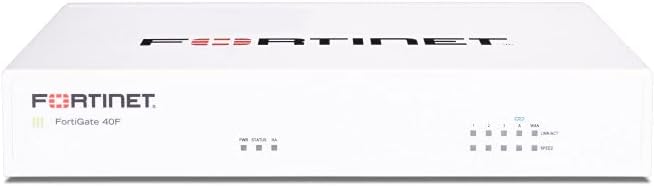
Designed for small businesses the FortiGate-40F offers a compact form factor without sacrificing security. It earns a 4.2 star rating for delivering solid protection in a small package.
We may earn a commission when you buy through this link, at no additional cost to you.
The device provides five Gigabit Ethernet ports including one WAN and four internal ports. Its AI powered FortiGuard Labs help identify and mitigate unknown threats automatically.
Despite the small size it manages complex tasks like SSL inspection efficiently. Zero Touch Integration simplifies deployment for IT managers managing multiple branch offices.
This model is ideal for branch offices needing reliable security in tight spaces. It scales well as business network needs grow.
The compact desktop form factor minimizes space usage in small server rooms.
Setup is streamlined with automated configuration tools for faster installation.
We may earn a commission when you buy through this link, at no additional cost to you.
The SonicWall TZ280 delivers high throughput for small businesses and branch offices. With a 4.7 star rating it is praised for its fast inspection and reliable protection features.
We may earn a commission when you buy through this link, at no additional cost to you.
Its patented Reassembly-Free Deep Packet Inspection engine ensures rapid security processing. The device includes multiple Ethernet and SFP ports to accommodate diverse connectivity needs.
Users can manage the appliance on-box or via cloud tools for flexibility. However the hardware requires a service subscription to activate full security services.
This appliance suits organizations needing fast network speeds and robust security. It is a strong choice for modern distributed workforces.
The RFDPI engine allows for rapid inspection without compromising network speed.
Zero touch deploy and cloud options simplify remote administration tasks.
We may earn a commission when you buy through this link, at no additional cost to you.
The Netgate 1100 comes pre-loaded with pfSense+ software for easy deployment. It holds a 4.1 star rating and is trusted by businesses for its reliable firewall and router capabilities.
We may earn a commission when you buy through this link, at no additional cost to you.
Powered by a dual core ARM Cortex-A53 processor it delivers over 650 Mbps of throughput. The package includes software updates and technical support for the lifetime of the product.
Its compact design allows it to fit in small spaces without generating noise. The appliance supports three separate network ports for flexible configuration options.
Ideal for businesses needing an integrated open source gateway solution. It provides essential security and routing without complexity.
Business ready pfSense+ software updates are included for the product lifetime.
Free help with setup is available from the expert Technical Assistance Center.
We may earn a commission when you buy through this link, at no additional cost to you.
The Palo Alto PAN-PA-220 brings Next Generation Firewall capabilities to smaller environments. While its rating is lower it offers advanced security features and visibility for network traffic.
We may earn a commission when you buy through this link, at no additional cost to you.
It includes eight ports for connectivity and focuses on application visibility to manage access. The device helps prevent threats by analyzing traffic patterns and application behavior.
This model is suitable for those prioritizing application control on a budget. Note that detailed specifications and reviews are currently limited for this unit.
Consider this appliance if you need brand recognition and standard features. Verify current support details before purchasing.
The device focuses on identifying applications to ensure better control and security.
Traditional firewall rules are enhanced with deep packet inspection capabilities.
We may earn a commission when you buy through this link, at no additional cost to you.
The Protectli Vault FW4C stands out with 2.5G Ethernet ports for faster internal transfers. Its 4.5 star rating reflects reliability for users needing faster network speeds than standard Gigabit.
We may earn a commission when you buy through this link, at no additional cost to you.
It features an Intel J3710 CPU and AES-NI support for efficient encryption. The fanless design ensures quiet operation making it suitable for office environments.
Users must install their own OS but hardware testing ensures compatibility with open source software. This model balances speed and affordability for network enthusiasts.
Ideal for those needing faster internal speeds without enterprise costs. It is a great upgrade from older Gigabit models.
The 2.5G ports enable faster data movement across local network segments.
The fanless design ensures the appliance runs quietly in any setting.
We may earn a commission when you buy through this link, at no additional cost to you.
This bundle includes the FortiGate-60F appliance along with one year of security services. With a 4.2 star rating it offers a complete package for businesses needing immediate protection.
We may earn a commission when you buy through this link, at no additional cost to you.
The included UTP service secures against advanced online threats like botnets. FortiCare Premium ensures high quality support and service continuity for your investment.
It is tailored for medium sized businesses needing robust security without enterprise complexity. The bundle simplifies procurement by combining hardware and software services.
Ideal for organizations wanting a turnkey security solution from day one. It eliminates the need to purchase licenses separately.
The bundle includes web filtering and anti-botnet technologies out of the box.
FortiCare Premium ensures high quality support and service continuity for your business.
We may earn a commission when you buy through this link, at no additional cost to you.
Selecting the right firewall appliance requires evaluating several technical and operational factors. This guide outlines key considerations to ensure you pick a device that matches your network needs.
Throughput speed determines how fast your firewall can process traffic without slowing down your internet. Look for models where the IPS or threat protection speed matches or exceeds your internet connection speed.
Choose a device with enough throughput headroom to handle peak usage times effectively.
The number of physical ports determines how many devices or network segments you can connect directly. More ports reduce the need for additional switches and simplify cabling.
Ensure the appliance has enough ports for your current setup plus future growth needs.
Modern appliances offer features like intrusion prevention deep packet inspection and sandboxing. These tools are essential for detecting advanced threats beyond simple malware.
Verify that the device includes the specific security tools your organization requires.
Management interfaces vary widely from command lines to intuitive dashboards. A user friendly interface reduces the time needed to configure rules and monitor traffic.
Prioritize appliances that offer tools you find comfortable to manage daily.
Many appliances require a paid subscription to activate signature updates and cloud threat feeds. Ensure you factor in the long term cost of these services before buying hardware.
Check whether critical features are available without a subscription or if they are locked.
If you plan to place the device in an office or home environment consider the physical size and noise level. Fanless units are quieter and often more reliable due to fewer moving parts.
Select a design that fits your physical space and noise tolerance.
Reliable support is crucial if the appliance encounters hardware failures or configuration issues. Look for vendors that offer warranties and accessible technical assistance.
Choose a brand known for responsive support and regular hardware updates.
Proprietary systems offer ease of use while open source options provide flexibility for custom configurations. Decide whether you prefer a closed system or one you can modify.
If you need custom software options consider an open source appliance.
Start by connecting the appliance to your modem and internal network switches using Ethernet cables. Configure the initial admin settings through the device interface or web portal.
Keep the firmware updated regularly to ensure you have the latest security patches. Check the vendor dashboard for updates and follow the instructions to install them safely.
Monitor traffic logs and security alerts weekly to identify any unusual activity. Adjust firewall rules as needed to maintain optimal performance and security.
Many appliances require a paid subscription for advanced threat protection features like signature updates and sandboxing. While the hardware functions without a subscription full security capabilities usually depend on it.
A firewall appliance is a dedicated physical device designed to run security software. Software firewalls run on general purpose computers. Appliances usually offer better performance.
Choose a throughput speed that meets or exceeds your internet connection speed. If you have a 500Mbps connection ensure the firewall appliance handles at least that much throughput.
Not all appliances support open source software. Look for models explicitly tested with pfSense or OPNsense if you plan to install custom software.
Yes fanless firewalls are often better for home use because they run silently and have fewer moving parts. This reduces noise in living spaces and increases hardware reliability.
You should update your firewall firmware whenever the vendor releases a security patch. Regular updates ensure your system stays protected against new vulnerabilities.
Look for intrusion prevention deep packet inspection and sandboxing capabilities. These features help detect and block sophisticated threats that standard firewalls might miss.
We have reviewed ten top firewall appliances ranging from budget friendly units to high end enterprise solutions. Each offers distinct advantages depending on your network size and security needs.
Prioritize performance and security features that match your specific requirements. A device that is too small will bottleneck your connection while one that is too large may waste money.
Remember that prices and availability can change so always check current listings before finalizing your purchase. Verify that the latest security features are included with your model choice.