
SUNLU Filament Dryer Box 2026 New Upgrade S1 Plus
4.3Editor score
Fast drying with fan
Visual LCD display
Personalized settings
This guide compares the top 10 filament dryer boxes for 2026, reviewing heating tech, capacity, and features to help you choose the best dryer for your 3D
Filament dryers are essential tools for anyone serious about 3D printing quality. Moisture in filaments causes stringing, bubbling, and weak layers. A good dryer box protects your materials and ensures consistent results every time you print.
We evaluated ten leading filament dryer boxes based on heating efficiency, capacity, user interface, and build quality. Each model offers unique features like dual chambers, touch screens, and humidity monitoring. Our analysis focuses on real-world performance and value for different printing needs.
Each pick below highlights key specs, pros, and cons to help you decide. Prices and availability change frequently on Amazon. Always verify the latest details before purchasing to ensure you get the best deal for your specific printing setup.
4.3Editor score
4.4Editor score

4.6Editor score
This side-by-side comparison highlights the key differences between the top 10 filament dryer boxes. Each entry shows core specs to help you quickly identify the best fit for your printing needs and budget constraints.


This SUNLU model offers a straightforward solution for drying filaments without breaking the bank. It features a built-in fan to speed up moisture removal and an LCD screen for easy monitoring. It is ideal for beginners or those on a budget who need reliable drying.
We may earn a commission when you buy through this link, at no additional cost to you.
The fan design significantly improves drying efficiency by circulating air around the spool. The temperature range of 35C to 55C covers most standard materials like PLA and PETG. Users appreciate the simple button controls that make setting time and temperature intuitive.
While it lacks advanced features like humidity monitoring, it does the core job well. The max temperature limit might be a constraint for high-performance filaments like Nylon. However, for general use, the performance is solid and consistent.
Buy this if you need an affordable dryer for standard filaments. It is perfect for home users who print occasionally and want to avoid common moisture issues like stringing.
The included fan helps remove excess water vapor from the box more quickly than passive heating alone.
Physical buttons make it easy to adjust settings without navigating complex menus or touch interfaces.
We may earn a commission when you buy through this link, at no additional cost to you.
This premium dryer excels in capacity and heating performance. It holds up to four standard spools and uses dual independent chambers for efficient drying. The high temperature capability makes it suitable for engineering filaments that require precise thermal treatment.
We may earn a commission when you buy through this link, at no additional cost to you.
The dual chambers allow you to dry different filament types simultaneously at different temperatures. The touch interface is intuitive and displays real-time data. It functions as both a dryer and a storage box, maintaining low humidity when not actively drying.
The size is substantial and may not fit on smaller workbenches. The price is higher than basic models but justified for users with multiple spools or demanding materials. It is a robust investment for serious makers.
Choose this if you need to dry multiple spools or use high-temp materials like PC or ASA. It is designed for efficiency and long-term storage reliability.
Separate chambers let you run different temperature profiles for two filament types at the same time.
Heating up to 85C ensures even tough engineering plastics get dried effectively without damage.
We may earn a commission when you buy through this link, at no additional cost to you.
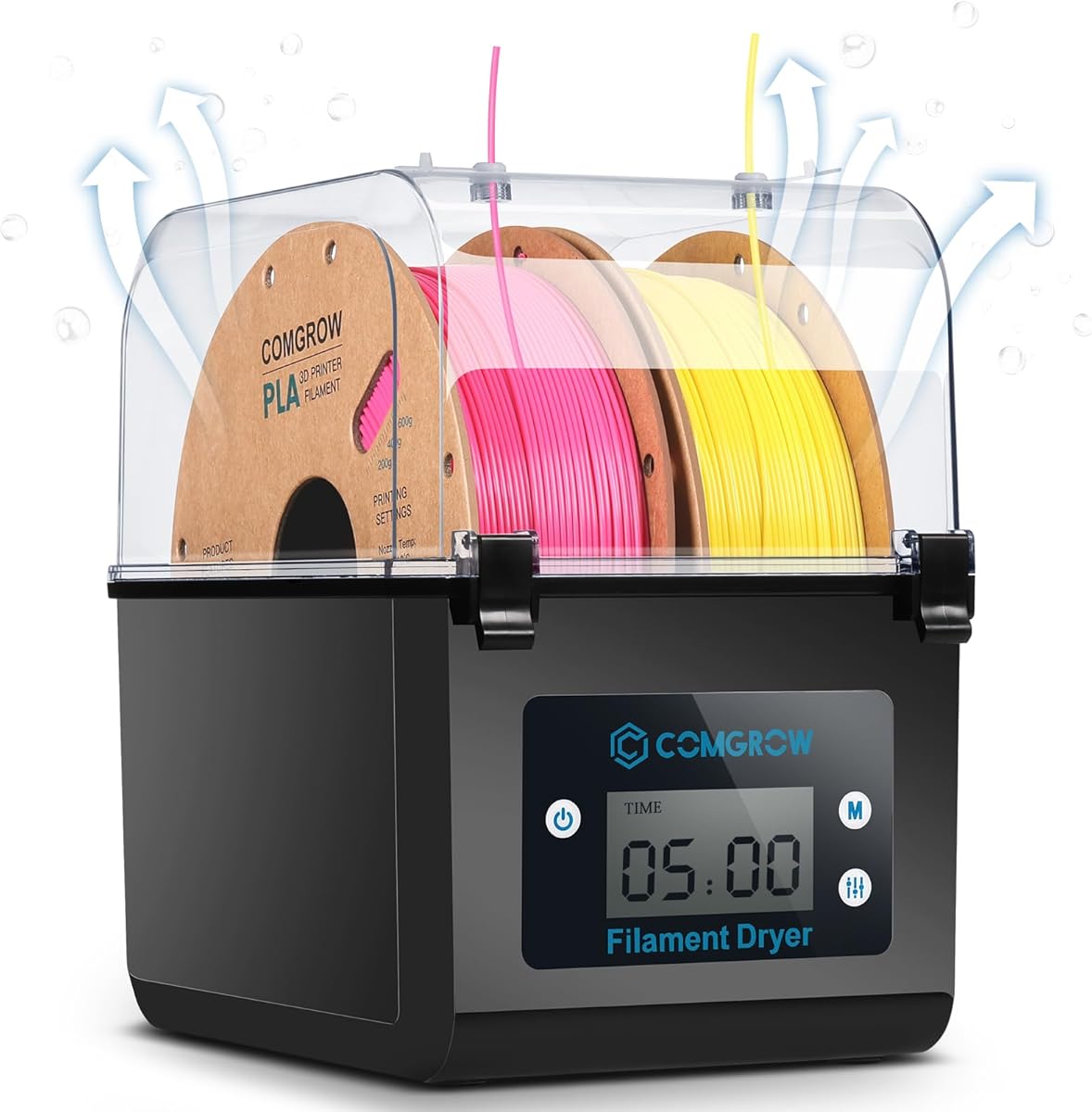
This Comgrow dryer balances capacity and functionality well. It stores two large spools and keeps them dry during printing with a sealed design. The touch screen makes it easy to monitor temperature and set timers for specific drying sessions.
We may earn a commission when you buy through this link, at no additional cost to you.
The internal heating and sealed environment prevent moisture absorption. The silicone cable sheath ensures the exit point stays dry. Users find the large inner size accommodates spools comfortably without tight fits.
The temperature limit of 50C may be too low for some high-performance materials. However, for standard PLA, PETG, and ABS it is sufficient. The build quality is solid and the design is practical.
This is a great choice for mid-range users who need reliable drying for common materials. It offers good value and consistent performance without unnecessary complexity.
The silicone sheath on the outlet keeps moisture from entering through the filament exit point.
Designed to hold two large spools simultaneously for extended uninterrupted printing sessions.
We may earn a commission when you buy through this link, at no additional cost to you.
This storage box focuses on keeping filaments dry over the long term without active heating. It is fully sealed and includes a hygrometer so you can check conditions. It relies on desiccant packs to absorb moisture inside the box.
We may earn a commission when you buy through this link, at no additional cost to you.
It is perfect for storage between print jobs. The built-in hygrometer helps you know when to change the desiccant. The design is simple and does not require electricity or complex setup.
Since it does not heat the filament, it cannot revive damp spools quickly. You will need to use a separate dryer if the filament is already wet. It is strictly a preventative measure.
Use this for maintaining dry filament after it has been dried. It is ideal for users who need a reliable storage solution without extra power or heat.
Allows you to monitor humidity levels easily to ensure the environment stays dry.
Operates without electricity using only physical seals and desiccant packs for protection.
We may earn a commission when you buy through this link, at no additional cost to you.
This SUNLU dryer uses a spindle to spin the filament while heating it. This ensures that the entire spool gets even exposure to heat. The translucent lid lets you check progress without opening the box.
We may earn a commission when you buy through this link, at no additional cost to you.
The spindle is a key feature for even drying. It helps avoid hotspots that can damage the filament. Users like that it can hold a large spool and heat up quickly for efficient use.
The size is larger than some compact models which may limit bench space. The touchscreen is intuitive but adds to the cost. It is a good option if you need even drying for high volumes.
Pick this if you want consistent results across full spools. The spinning mechanism ensures that every part of the filament is dried evenly over time.
Rotates the filament continuously to ensure uniform heat exposure across the entire spool.
Translucent design allows checking spool status without breaking the seal during cycles.
We may earn a commission when you buy through this link, at no additional cost to you.
This SH02 model improves on the SH01 with a faster PTC heater and presets. It heats to 70C and has one-touch settings for nine different filament types. The sealed design uses rings to keep moisture out effectively.
We may earn a commission when you buy through this link, at no additional cost to you.
The presets save time by not requiring manual temperature entry. The 150W heater reaches target temps quickly. The multiple sealing rings protect the outlet and cover for consistent humidity control.
The fan circulates hot air but might be noisy. Some users report occasional issues with the touch screen responsiveness. Still, the drying performance is solid and efficient.
Choose this if you want quick setup and energy efficiency. It is great for standard filament types where you need reliable drying without fuss.
One-touch settings for common filaments save time and reduce setup errors.
Multiple sealing rings ensure the box stays closed tight to lock out humidity.
We may earn a commission when you buy through this link, at no additional cost to you.
This dryer uses 360 degree heating to ensure uniform warm air circulation. It offers 12 presets and remembers settings after power loss. The large touch screen makes it easy to navigate and set cycles.
We may earn a commission when you buy through this link, at no additional cost to you.
The power-off memory is a useful feature if your power flickers. The timer can run up to 48 hours so you can leave it unattended. It covers a wide range of standard and composite filaments.
The max temperature of 70C is good for most but not for high-temp materials. The design is compact and fits standard workspaces. It is reliable and efficient for most common uses.
Buy this for a reliable, versatile dryer with advanced controls. It suits users who need to dry various filaments without manually adjusting settings every time.
Hot air circulates 360 degrees to prevent uneven drying or hotspots on the spool.
Remembers your last settings even after a power outage so you do not reset.
We may earn a commission when you buy through this link, at no additional cost to you.
This version adds humidity monitoring to the Space PI design. It offers dual spool support and the same 12 presets. The screen displays real-time humidity so you can adjust settings dynamically.
We may earn a commission when you buy through this link, at no additional cost to you.
The humidity monitor adds value by giving you more data on conditions. It is useful for verifying that the box is sealed properly. The heating system is fast and efficient.
The setup can be a bit complex compared to simpler models. You might need to read the instructions carefully to get the most out of it. It is a step up in features though.
Pick this if you need more control over conditions. The humidity readout helps you ensure your filament stays in optimal shape.
Displays current humidity levels to help you confirm the box is keeping things dry.
Supports two spools so you can prepare more material in one session.
We may earn a commission when you buy through this link, at no additional cost to you.
This X4L model is designed for volume drying with four spool capacity. It uses two independent heating chambers for faster results. The silicone sealed enclosure maintains low humidity when not in use.
We may earn a commission when you buy through this link, at no additional cost to you.
The dual chambers and high temperature make it great for tough materials. You can dry PC or PA efficiently. The large window lets you check spools without breaking the seal.
It is a large unit that needs dedicated space. The cost is higher but worth it for users who print frequently. It is a professional-grade solution for serious makers.
Use this if you need to dry large batches. It saves time and ensures you always have dry material ready.
Two separate chambers allow different drying profiles at the same time.
Up to 85C makes it suitable for high-performance engineering plastics.
We may earn a commission when you buy through this link, at no additional cost to you.
The official model offers reliable performance with dual independent heating chambers. It heats to 85C and includes energy-saving modes. It is designed for high volume use with up to four spools.
We may earn a commission when you buy through this link, at no additional cost to you.
The official build quality is consistent and trusted by many users. The dual chambers allow you to optimize different materials. The energy modes help reduce power usage when needed.
The unit is heavy and large. It takes up significant space and has a high price point. However, the performance and support justify the cost.
Choose this for a proven, high-capacity drying solution. It is ideal for users who need reliability and official support.
Official Creality product means better compatibility and access to support resources.
Power saving modes reduce energy use when single chamber operation is enough.
We may earn a commission when you buy through this link, at no additional cost to you.
Choosing the right dryer depends on your material needs, print frequency, and workspace size. This guide breaks down the key factors to consider.
Check how many spools the unit holds. Larger units can dry multiple spools at once which saves time if you run multiple printers.
Match the capacity to your workflow.
Standard materials like PLA need lower temps but engineering plastics need higher temps. Look for units that support up to 70C or 85C if you use high-performance filaments.
Ensure the range covers your common materials.
PTC heaters are efficient and heat up quickly. Some units use fans to circulate air for even drying. These features help prevent hotspots.
Prioritize units with good air circulation.
Look for intuitive interfaces like touch screens or physical buttons. Preset options can save you time when switching between filament types.
Simple controls make daily use easier.
A good seal keeps moisture out when not in use. Silicone rings or tight locks are key. Some units include hygrometers to track conditions.
A tight seal is critical for storage.
Consider energy-efficient models that have auto-shutoff or standby modes. This saves money over time if you run the dryer often.
Look for power saving features.
Measure your bench space before buying. Some units are compact while others are large. Ensure it fits in your workspace comfortably.
Match size to your available area.
Most units support 1.75mm filaments but check for 2.85mm if needed. Ensure the filament exit fits your printer extruder setup.
Verify diameter and exit options.
Place the dry box near your printer but ensure it has enough ventilation. Do not block the air vents.
Run the dryer for several hours before printing with new or old spools. This removes moisture quickly.
Clean the unit regularly and replace desiccant if it is a passive storage model.
It depends on the material and how damp it is. Typically, 4 to 8 hours is enough. Check your filament type recommendations for best results.
Yes. Many units seal tight and can hold dry spools. Some have hygrometers so you can monitor humidity levels over time.
Most standard plastics work well. High-temp materials need higher heat settings so check the max temperature of the unit you choose.
If you print often, a dryer is worth it. It prevents common print failures like stringing or weak layers caused by moisture.
Look for signs like stringing or bubbles during prints. A dry box with a monitor can help track conditions to confirm moisture is low.
Yes. Many dryers have exit tubes that allow filament to feed directly into the extruder while drying inside the box.
We reviewed ten top filament dryer boxes offering a mix of budget and premium options. Each unit brings unique strengths in heating, capacity, and usability.
Prioritize your needs based on filament types and print volume. A high capacity unit helps if you print often while a basic one works for occasional users.
Always check current prices and availability on Amazon. Your ideal dryer depends on balancing cost and features for your specific workflow.