
Samsung T7 Portable SSD
4.7Editor score
Up to 1050MB/s speed
Compact aluminum unibody
Wide device compatibility
This guide compares the top 10 external SSDs for Mac Mini M4, focusing on speed, durability, and compatibility to help you choose the right storage solution.
Finding the right external SSD for your Mac Mini M4 is essential for expanding storage without compromising performance. Whether you are editing video or managing large datasets, the right drive ensures seamless integration with your workflow.
We evaluated ten leading models based on speed, durability, and macOS compatibility. Our analysis focuses on real-world performance metrics and build quality to help you make an informed decision for your specific needs.
Each pick highlights unique strengths, from budget-friendly options to high-performance thunderbolt drives. Keep in mind that availability and specifications can change, so verify details before purchasing to ensure compatibility with your setup.
4.7Editor score
4.5Editor score

3.9Editor score
The following table provides a side-by-side comparison of all ten selected external SSDs. This overview helps you quickly identify key specifications and performance metrics relevant to your Mac Mini M4 setup.






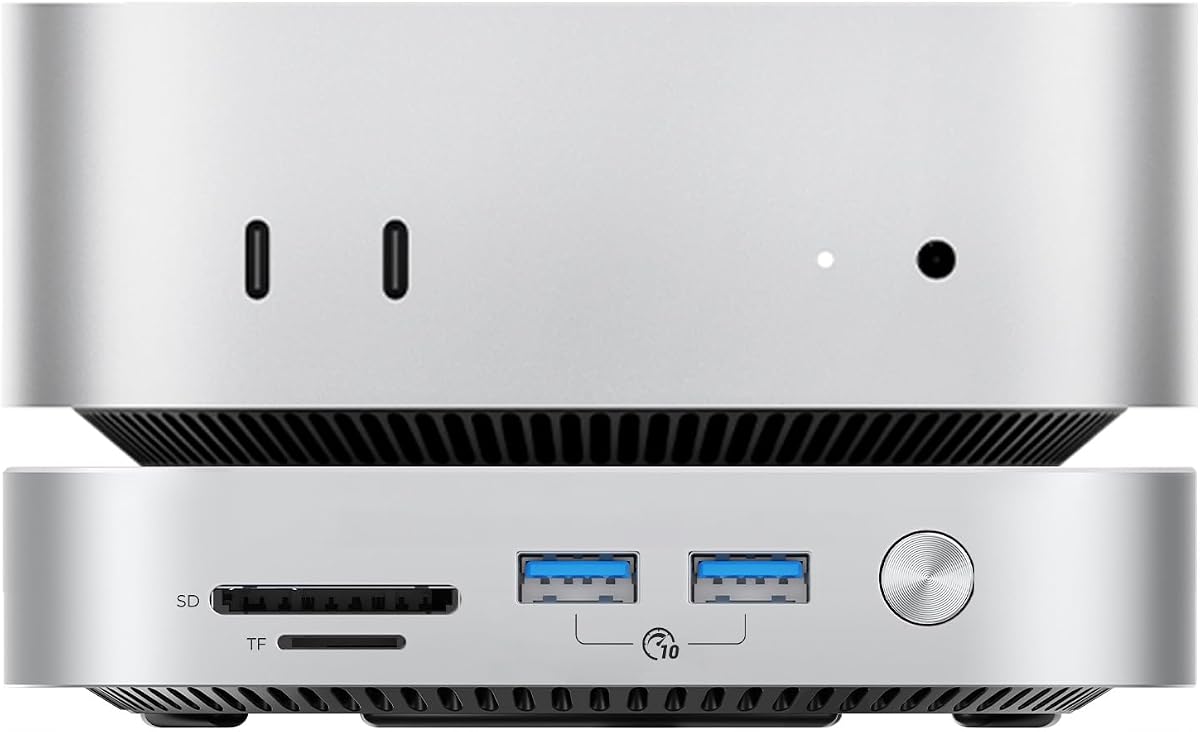
The ORICO 2TB External SSD stands out as a top choice for Mac Mini M4 users needing significant storage expansion. It offers seamless integration with Apple ecosystems and supports high-speed data transfer for demanding workflows.
We may earn a commission when you buy through this link, at no additional cost to you.
This drive features a dual-SSD design that allows for expansive storage without cluttering your desk. The inclusion of multiple USB ports and an SD card reader enhances connectivity, making it versatile for various peripherals and media cards.
While it excels in performance and capacity, the drive may require external power for sustained use. Its larger size might not suit minimalists, but the trade-off is justified for users prioritizing storage and connectivity.
Ideal for creative professionals and developers, this drive provides the reliability and speed needed for daily tasks. Its plug-and-play setup ensures you can start working immediately without complex configuration steps.
Multiple USB ports and card readers allow you to connect various peripherals directly to the drive hub.
Certified for macOS Sonoma and M-series chips, ensuring smooth operation with Time Machine backups.
We may earn a commission when you buy through this link, at no additional cost to you.
The Samsung T7 Portable SSD offers excellent value for users seeking reliable portable storage. Its fast speeds and durable design make it a solid choice for everyday backups and file transfers.
We may earn a commission when you buy through this link, at no additional cost to you.
Equipped with PCIe NVMe technology, the T7 delivers speeds nearly twice as fast as its predecessor. The compact aluminum unibody ensures durability, protecting your data during travel or daily use.
Although it lacks some advanced features like hardware encryption, its performance and reliability are hard to beat for the price. It is an ideal solution for those needing a straightforward, efficient storage drive.
Perfect for students and casual users, this drive handles everything from photo backups to video recording. Its compatibility with multiple devices ensures you can use it across your entire tech ecosystem.
Up to 1050MB/s read speeds enable quick access to large files and smooth video editing workflows.
Built to withstand drops up to six feet, ensuring your data stays safe even if the drive falls.
We may earn a commission when you buy through this link, at no additional cost to you.
The SanDisk Professional 4TB PRO-G40 SSD is designed for professionals who need maximum performance and durability. Its high speeds and robust build make it suitable for demanding creative and enterprise workflows.
We may earn a commission when you buy through this link, at no additional cost to you.
Featuring Thunderbolt 3 connectivity, this drive delivers speeds up to 3000MB/s, allowing you to move large files in seconds. The IP68 rating provides exceptional protection against dust and water, ensuring reliability in harsh environments.
While it comes at a premium price, the investment pays off in speed and storage capacity. Users with Thunderbolt-compatible Macs will benefit most from its full potential.
Ideal for video editors and power users, this drive handles 4K and 8K workflows with ease. Its rugged design ensures that your data remains secure regardless of the working conditions.
40Gbps Thunderbolt 3 support enables lightning-fast data transfers for high-resolution media projects.
IP68 dust and water resistance plus crush protection keeps the drive safe in extreme conditions.
We may earn a commission when you buy through this link, at no additional cost to you.
The Lexar 2TB ES3 External SSD combines speed and style in a compact package. Its sleek design and robust build make it a versatile option for users needing reliable portable storage.
We may earn a commission when you buy through this link, at no additional cost to you.
Equipped with double layer graphite sheets, the drive manages heat effectively during high-speed transfers. This ensures consistent performance without overheating, even during extended use.
The drive is also drop-resistant, adding a layer of protection for your data. Its plug-and-play compatibility with Mac and PC systems simplifies setup, getting you started quickly.
Perfect for users who value both aesthetics and functionality, this drive fits seamlessly into any setup. It is a great choice for everyday backups and portable file access.
Graphite heat dissipation keeps the drive cool during intense data transfers for consistent performance.
Compact and sturdy design makes it easy to carry in a bag for on-the-go data access.
We may earn a commission when you buy through this link, at no additional cost to you.
The Sandisk 1TB Extreme Portable SSD delivers impressive speeds for a USB drive. Its compact size and durable design make it suitable for users who need reliable high-speed storage on the move.
We may earn a commission when you buy through this link, at no additional cost to you.
With transfer speeds up to 2000MB/s, this drive can move large files quickly. The IP65 rating ensures it can withstand spills and dust, making it ideal for outdoor use.
Included encryption software adds a layer of security for sensitive files. While it is pricier than some competitors, the performance and durability justify the cost.
Best for users who need fast access to large files regularly. Its pocket-sized design ensures it fits easily in your bag for daily use.
Up to 2000MB/s transfer speeds mean faster access to large files and efficient backups.
256-bit AES encryption helps keep your private files secure with password protection.
We may earn a commission when you buy through this link, at no additional cost to you.
The Lexar ES3 1TB Portable SSD is designed for portability and efficiency. Its lightweight design and fast speeds make it a convenient choice for users on the go.
We may earn a commission when you buy through this link, at no additional cost to you.
At just 42 grams, this drive is easy to carry in your pocket. It supports fast data transfer speeds, ensuring that you can access your files quickly when needed.
Included encryption software protects your data from unauthorized access. The drive works seamlessly with Mac and Windows systems, simplifying cross-platform use.
Ideal for travelers and students, this drive combines speed with minimal bulk. It is a practical choice for those who prioritize portability.
Weighing only 42 grams, this drive is one of the lightest options available for easy travel.
256-bit AES encryption software provides robust protection for your sensitive files.
We may earn a commission when you buy through this link, at no additional cost to you.
The SSK Portable SSD 1TB offers solid performance at an affordable price. Its lightweight build and fast speeds make it a great option for budget-conscious users.
We may earn a commission when you buy through this link, at no additional cost to you.
Featuring SLC caching, the drive maintains consistent speeds during large transfers. The included USB-C and USB-A cables ensure compatibility with various devices.
An LED light indicates activity, helping you track data transfers easily. While it lacks the name recognition of bigger brands, its performance is reliable.
Best for users needing a reliable drive without breaking the bank. It is a practical choice for everyday storage and backups.
SLC caching ensures steady transfer speeds even when moving large files.
Both USB-C and USB-A cables are included for maximum connectivity options.
We may earn a commission when you buy through this link, at no additional cost to you.
The Crucial X10 2TB Portable SSD is a powerful option for gamers and creators. Its high capacity and fast speeds make it ideal for storing large game libraries and media files.
We may earn a commission when you buy through this link, at no additional cost to you.
With read speeds up to 2100MB/s, this drive reduces load times significantly. The IP65 rating ensures durability against dust and water, protecting your data in various environments.
Included software adds value to the purchase, offering tools for photo management and backups. Its compatibility with consoles and computers makes it versatile for multiple uses.
Perfect for users who need to store and access large amounts of data quickly. It is a reliable choice for gaming and creative workflows.
Fast read speeds mean quicker load times and a smoother gaming experience.
Includes three months of Mylio Photos plus and Acronis True Image for added value.
We may earn a commission when you buy through this link, at no additional cost to you.
The Samsung T9 Portable SSD delivers top-tier performance for demanding tasks. Its advanced thermal guard ensures that speeds remain consistent even during prolonged use.
We may earn a commission when you buy through this link, at no additional cost to you.
With transfer speeds up to 2000MB/s, this drive handles large file transfers efficiently. The inclusion of Magician software allows for easy drive management and health monitoring.
While it requires specific ports to achieve maximum speeds, the performance is worth it. The solid build protects your data from daily wear and tear.
Best for professionals who need reliable speed without throttling. It is a strong choice for video editing and large backups.
Dynamic Thermal Guard keeps the drive cool to prevent speed drops during heavy use.
Magician software provides easy updates and health monitoring for peace of mind.
We may earn a commission when you buy through this link, at no additional cost to you.
The SABRENT Rocket Nano XTRM 2TB is an excellent choice for users with Thunderbolt ports. Its compact size and high speeds make it ideal for mobile professionals.
We may earn a commission when you buy through this link, at no additional cost to you.
With speeds up to 2700MB/s over Thunderbolt 3, this drive handles 4K and 8K video editing with ease. The aluminum body helps dissipate heat during intensive tasks.
Included cables and a silicone sleeve provide added value and protection. It is a convenient solution for those needing high performance without bulk.
Perfect for users who want the best of both worlds in terms of speed and portability. It is a robust option for creative workflows.
2700MB/s transfer speeds allow for smooth editing of high-resolution video projects.
Compact and pocket-sized, this drive is easy to carry without sacrificing capacity.
We may earn a commission when you buy through this link, at no additional cost to you.
Selecting the right external SSD involves considering several key factors to ensure compatibility and performance with your Mac Mini M4.
The interface determines the maximum speed your drive can achieve. Ensure the drive supports USB 3.2 Gen 2 or Thunderbolt 3 for optimal performance with your Mac Mini M4.
Prioritize drives with interfaces that match your ports to avoid speed bottlenecks.
Consider how much data you need to store regularly. For video editing or large datasets, look for drives with 2TB or more capacity.
Choose a capacity that meets your current needs and allows room for future growth.
Transfer speeds affect how quickly you can move files. Higher read and write speeds are crucial for tasks like video editing and backup.
Look for drives with speeds matching your workflow requirements to maintain efficiency.
Portable drives should have robust protection against drops and water. IP ratings indicate resistance levels that ensure longevity.
Select a drive with sufficient protection for your usage environment to prevent data loss.
Ensure the drive works seamlessly with macOS. Some drives come pre-formatted for Mac, simplifying setup.
Verify compatibility with your specific Mac OS version to avoid formatting issues.
Hardware or software encryption protects your data from unauthorized access. This is vital for sensitive or confidential files.
Prioritize drives with robust encryption features for added security.
Materials like aluminum enhance heat dissipation and durability. A sturdy build ensures the drive lasts longer.
Choose a drive with high-quality materials for reliability.
Prices vary based on speed and capacity. Set a budget that balances performance needs with cost.
Find a drive that offers the best value for your specific requirements.
Connect the drive directly to a USB or Thunderbolt port on your Mac Mini M4 for the best performance. Avoid using hubs if possible to ensure full speed.
Format the drive to APFS or exFAT if necessary using Disk Utility to ensure compatibility with macOS. This step optimizes the drive for your system.
Store the drive in a cool, dry place when not in use. Avoid exposing it to extreme temperatures or moisture to extend its lifespan.
Many drives come pre-formatted for Mac, but you may need to use Disk Utility to format to APFS or exFAT. This ensures optimal performance and compatibility with macOS. Check the product specifications before purchasing to confirm format compatibility.
Yes, most external SSDs work seamlessly with Time Machine backups. Ensure the drive is formatted correctly and has enough capacity for your backup needs. Regular backups help protect your data from loss.
Thunderbolt offers higher speeds than standard USB interfaces. If your Mac Mini M4 supports Thunderbolt, use that for maximum performance. Otherwise, USB 3.2 Gen 2 is also fast for most tasks.
Check the product description for compatibility with M-series chips and macOS. Most modern USB-C SSDs work well, but verifying ensures you avoid issues. Look for Apple-specific certifications if available.
Yes, but ensure proper ventilation and avoid constant read/write cycles. Ejecting the drive before unplugging helps prevent data corruption. Regular maintenance prolongs the drive's lifespan.
Most drives come with the necessary cables, but verify the connectors match your ports. If you only have USB-C ports, ensure the drive supports USB-C connectivity. Having spare cables can be helpful.
External SSDs generally last several years depending on usage. Factors like heat exposure and write volume affect longevity. Choose reputable brands for better reliability and durability.
Yes, you can connect multiple drives using hubs or ports. Ensure the total power draw does not exceed what your Mac can supply. Proper power management is key to stable operation.
We reviewed ten top external SSDs, each offering unique benefits for different needs. From budget-friendly options to high-performance Thunderbolt drives, there is a choice for everyone.
Prioritize speed and capacity based on your specific workflow. Compatibility and durability are also key factors to ensure a smooth experience.
Prices and availability change frequently, so check current listings before buying. This guide helps you make an informed decision tailored to your needs.