
UGREEN Ethernet Coupler 10Gbps
4.7Editor score
Supports up to 10Gbps speeds
Compatible with Cat8 and Cat7
PoE power supply support included
This guide compares the top Ethernet Line Extender options for 2026, reviewing powerline, VDSL, and cabling solutions to help you choose the right network
Finding reliable network connectivity in large homes or offices can be challenging when walls or distance block standard cables. An Ethernet Line Extender solves this by using existing wiring to push signals further than usual limits allow.
We evaluated ten distinct products ranging from powerline adapters to specialized VDSL kits. Our comparison focused on range, speed, ease of setup, and compatibility with various cable types to ensure accurate recommendations for diverse needs.
Each pick below highlights specific strengths and ideal use cases for different environments. Keep in mind that availability and pricing fluctuate over time, so verify current details before making your final purchase decision today.
4.7Editor score

4.8Editor score
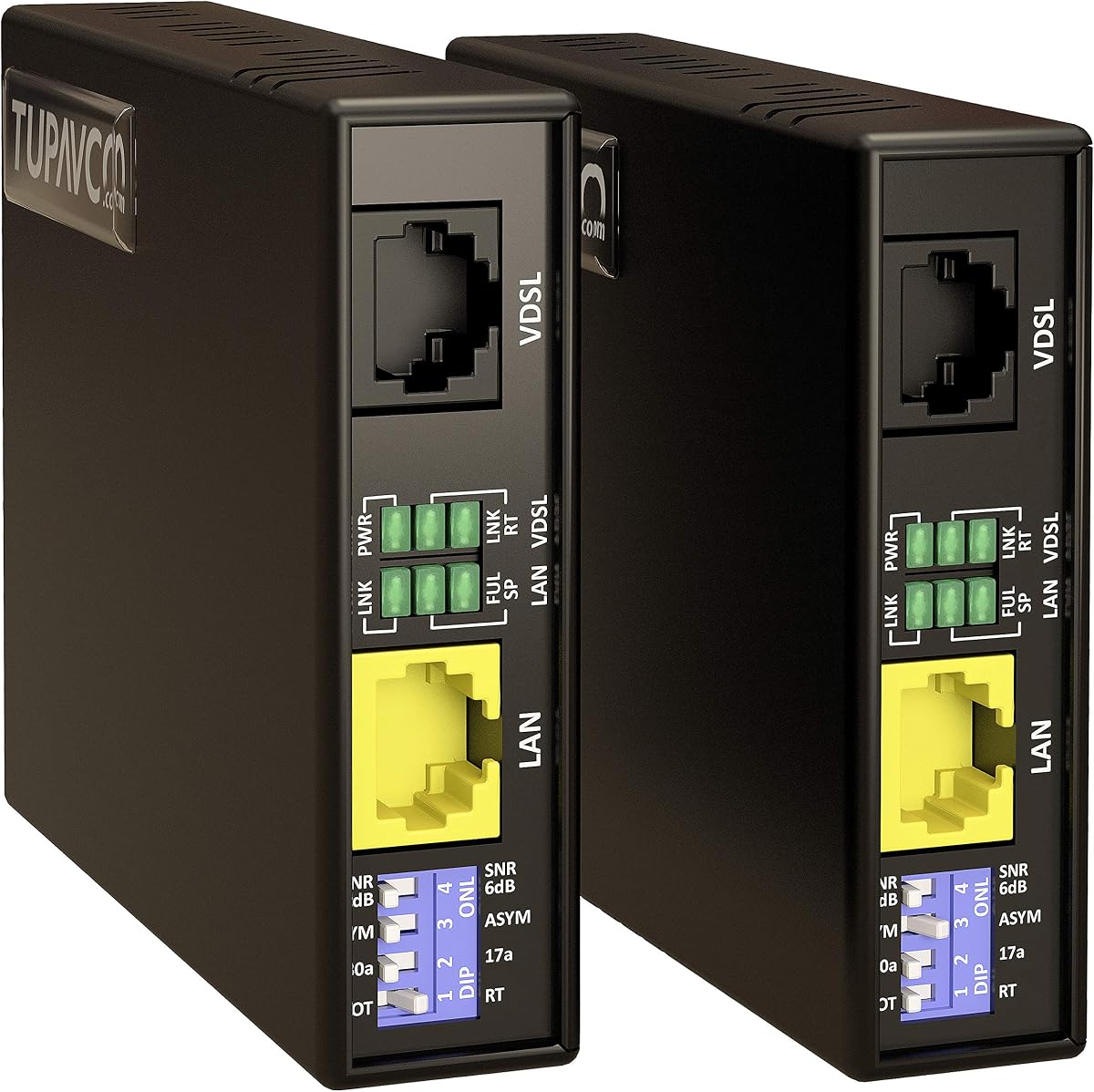
4.4Editor score
This side-by-side comparison summarizes key specifications and capabilities across all ten selected products to help you quickly identify the model that fits your specific network extension requirements.


This Ethernet Line Extender stands out for its ability to reach distances up to half a mile using standard copper cabling. It holds a high rating and serves as a transparent network device that passes protocols without alteration.
We may earn a commission when you buy through this link, at no additional cost to you.
Its standout qualities include support for RJ11 phone line cabling and VLAN tag pass-through which ensures compatibility with complex network setups. The DIP switches allow IT administrators to configure specific settings easily while LED indicators provide clear status monitoring.
While it operates at 10/100 speeds which may not suit gigabit requirements it remains ideal for surveillance VoIP and remote equipment diagnosis. The trade-off in speed is acceptable given the extended range capabilities it delivers reliably across long distances.
Network administrators and IT professionals should buy this kit for remote access and automation tasks where standard Ethernet limits fall short. It is a solid choice for extending networks without needing expensive fiber upgrades.
This device reaches up to 0.5 miles using two-pair Ethernet cabling for 10Mbps or 984 feet for 100Mbps with single-pair wiring.
DIP switches allow easy configuration while LED indicators for power and network status help administrators monitor connectivity status effectively.
We may earn a commission when you buy through this link, at no additional cost to you.
This coupler offers high-speed connectivity at a very accessible price point. It supports up to 10Gbps and is compatible with various Cat cable types making it a versatile choice for short to medium distance extensions.
We may earn a commission when you buy through this link, at no additional cost to you.
Its key strengths include PoE support which eliminates the need for separate power supplies when connecting IP cameras. The unique arch pins and Z shape structure ensure stable data transmission without signal degradation over standard cable lengths.
While it extends up to 328 feet which is the standard limit for Ethernet it allows joining two cable segments easily without rewiring the entire run. This makes it ideal for quick fixes or extending existing setups without buying longer cables.
Home users and small office managers looking for an inexpensive way to fix short cable issues should consider this coupler. It delivers reliable performance without breaking the bank for basic connectivity needs.
The coupler supports up to 10Gbps speed and is downward compatible with 1000Mbps 100Mbps and 10Mbps for flexible network setups.
PoE support means no additional power supply is needed for devices like security cameras making installation safer and more convenient.
We may earn a commission when you buy through this link, at no additional cost to you.
This VDSL kit delivers premium performance by extending network cables up to 7000 feet using existing phone or network wiring. It provides a stable connection for remote devices without needing new infrastructure installation.
We may earn a commission when you buy through this link, at no additional cost to you.
Its standout qualities include support for CAT5 through CAT8 cables and RJ11 phone lines which offers flexibility in different environments. The kit comes ready to use out of the box with no driver or software installation required for immediate deployment.
The higher price reflects the significant range increase it offers over standard solutions. While wiring quality impacts actual performance the ability to reach over a mile makes it a powerful tool for large estates or industrial sites.
Facility managers and network technicians should buy this for long-distance remote access where running new fiber is impractical. It simplifies network extension with reliable performance for cameras and other remote hardware.
This kit improves the typical 328ft limit up to 7000ft allowing network reach across vast distances without additional infrastructure.
With no software or driver installation needed the kit is ready out of the box for quick and easy network deployment.
We may earn a commission when you buy through this link, at no additional cost to you.
NETGEAR adapter delivers extremely fast Gigabit speeds over existing household wiring ideal for high bandwidth tasks. It includes features like MIMO to optimize signal direction and performance across your home network environment.
We may earn a commission when you buy through this link, at no additional cost to you.
Key strengths include the extra noise filtered power outlet built into the adapter which keeps power access available. This setup supports 4K streaming and lag-free gaming without needing to run cables through walls or floors.
Performance depends on electrical circuit quality and distance which means results may vary. However the dedicated outlet and Beamforming help mitigate interference making it a strong option for gaming and media centers.
Gamers and streaming enthusiasts should buy this kit if they need wired reliability without visible cables. It bridges the gap between wireless convenience and wired speed effectively in compatible electrical systems.
Powered by HomePlug AV2 this adapter supports Gigabit speeds for improved coverage and faster data transfer across your home.
The extra plug with noise filtered power outlet ensures top performance while maintaining access to your wall power source.
We may earn a commission when you buy through this link, at no additional cost to you.
This kit offers a compact and secure wired network solution extending connectivity through electrical wiring. Its small size ensures it does not block adjacent outlets making it convenient for tight spaces.
We may earn a commission when you buy through this link, at no additional cost to you.
Strengths include AV1000 speeds up to 750 feet which suits most multi-story homes. The Gigabit port supports desktops and smart TVs while power saving mode reduces energy consumption without affecting performance significantly.
Users should note that it requires direct wall outlets on the same circuit and does not work with power strips. This limitation ensures stable performance but limits flexibility in some outlet arrangements.
Homeowners needing wired reliability for gaming or streaming should choose this kit for its balance of speed and size. It is a practical addition for expanding network access without running new cables.
Nano size design ensures the adapter does not block adjacent outlets making it ideal for use in tight wall spaces.
Power saving mode automatically reduces consumption by up to 85 percent when not in use without affecting performance.
We may earn a commission when you buy through this link, at no additional cost to you.
This budget-friendly kit provides basic wired connectivity extension through powerlines without complex setup. It is designed for simpler needs where 100 Mbps throughput is sufficient for browsing and light media use.
We may earn a commission when you buy through this link, at no additional cost to you.
Strengths include its secure design commitment and plug-and-play installation process. The power saving mode helps reduce energy usage making it a practical choice for extending connections to low-bandwidth devices.
Performance may be limited if wiring quality is poor or AFCI breakers are present. However for basic network needs it delivers reliable results without requiring professional installation or configuration steps.
Users seeking a cost-effective way to connect devices like printers or IoT hardware should consider this kit. It offers essential functionality without the cost of higher-speed models for standard tasks.
Advanced security is integrated into the design and maintenance of this adapter to ensure safe wired network connections.
Powerline adapters must be used in sets of two or more with no new wiring or configuration required for use.
We may earn a commission when you buy through this link, at no additional cost to you.
This hybrid kit delivers both wired and wireless expansion through electrical wiring with advanced Wi-Fi 6 support. It bridges the gap between wired reliability and flexible wireless coverage in challenging areas.
We may earn a commission when you buy through this link, at no additional cost to you.
Strengths include dual-band Wi-Fi speeds that support up to 64 devices simultaneously. The WiFi Clone button simplifies setup while EasyMesh compatibility allows whole-home coverage expansion seamlessly across rooms.
Wiring quality and distance still impact performance which is typical for powerline systems. However the inclusion of Gigabit Ethernet ports makes it versatile for high-bandwidth devices alongside wireless connections.
Households needing both wired and wireless coverage should buy this kit for its dual functionality. It is ideal for multi-story homes where standard routers struggle to reach all areas effectively.
AX1500 Wi-Fi 6 dual-band speeds ensure seamless HD streaming and gaming without interruption across connected devices.
Effortlessly control your network with the web interface tpPLC desktop app and intuitive mobile app for easy settings.
We may earn a commission when you buy through this link, at no additional cost to you.
This kit extends connections through thick walls using AV1000 powerline technology combined with Wi-Fi 5 capabilities. The passthrough design ensures you do not lose power outlet access while extending your network.
We may earn a commission when you buy through this link, at no additional cost to you.
Strengths include AC1200 dual-band speeds that support HD streaming and gaming. WiFi Clone button mirrors router settings which simplifies setup for users who want seamless network integration without reconfiguring devices.
Performance depends on electrical wiring quality which may vary in older homes. However the Gigabit port and Wi-Fi support offer flexible connectivity options for various devices in hard-to-reach spots.
Users wanting both wired and wireless coverage with a simple design should consider this kit. It is well-suited for homes needing reliable expansion without complex mesh configurations or hardware changes.
Passthrough design allows you to simply plug in a device into the integrated power socket without using extra outlets.
Easily expand your network for seamless whole-home coverage by connecting to any TP-Link OneMesh compatible router.
We may earn a commission when you buy through this link, at no additional cost to you.
This extender uses any two copper conductors such as alarm wire or spare pairs to transmit Ethernet up to 600 meters. It is designed for industrial environments where standard cable runs are not feasible.
We may earn a commission when you buy through this link, at no additional cost to you.
Strengths include transparency to network protocols which means VLAN tags and camera streams pass without alteration. Both units are mains powered to regenerate the signal ensuring reliable performance over long distances.
Speed may decrease with distance and wire quality but the link stays up reliably. This makes it a robust choice for connecting remote sensors or cameras in areas without standard network infrastructure.
Facility managers and industrial users should buy this kit for remote access where existing wiring must be reused. It offers dependable long-range connectivity without requiring new cable installation.
Any two copper conductors work including alarm cable bell wire or existing spare pairs inside Cat5e or Cat6 runs.
Both units are mains powered to regenerate and retransmit the signal ensuring reliability across long copper spans.
We may earn a commission when you buy through this link, at no additional cost to you.
This kit extends network cabling over 5000 feet using existing phone or network lines with up to 300Mbps speed. It supports G.INP technology to reduce sensitivity to noise and interference during transmission.
We may earn a commission when you buy through this link, at no additional cost to you.
Strengths include the adaptable DIP switch with eight profile settings to optimize performance based on wiring conditions. LED indicators provide status monitoring which helps users troubleshoot connectivity issues quickly and easily.
While wiring quality impacts actual throughput the ability to reuse existing infrastructure saves on cabling costs. It remains a reliable option for long-range connections where standard Ethernet limits are insufficient.
Businesses and large property owners should buy this kit for cost-effective network expansion over existing wiring. It delivers high-speed connectivity without the need for extensive new cable installations.
Increases effective range of network cabling from 300ft to over 5000ft providing long range high speed connection up to 300Mbps.
Supports G.INP which makes broadband signal significantly less sensitive to noise and interference for better performance.
We may earn a commission when you buy through this link, at no additional cost to you.
Choosing the right Ethernet Line Extender requires understanding your distance needs wiring type and speed requirements.
Consider how far you need to extend your network. Powerline extenders generally work up to 750 feet while VDSL and active extenders can reach over 5000 feet. Measuring the actual distance between outlets or endpoints ensures you select a model that covers your space without signal loss.
Choose models with range specifications exceeding your actual distance for optimal performance.
Match the extender speed to your internet plan and device needs. Gigabit ports suit high bandwidth tasks while 100 Mbps options work for basic browsing. Active extenders may limit speeds over long distances so verify throughput ratings before purchase.
Ensure the device supports your required Mbps to avoid bottlenecks in your network.
Different extenders use various wiring options including electrical outlets twisted pair or phone lines. Confirm which type your existing infrastructure supports to avoid needing new cables. Some units support multiple formats such as RJ11 and RJ45 for flexibility.
Verify compatibility with existing wiring to simplify installation and reduce costs.
Plug-and-play models require minimal configuration while others need DIP switches or software. For non-technical users prefer adapters with simple pairing buttons. More complex units offer advanced control but demand time to configure correctly.
Select a setup complexity level that matches your technical comfort and time availability.
Active extenders often require separate power adapters for each unit whereas powerline adapters draw power from outlets. Check if mains power is available at remote endpoints. Units with power-saving modes help reduce energy usage over time.
Ensure power availability at both ends to maintain stable network connections consistently.
Transparent pass-through ensures VLAN tags and DHCP requests work without interruption. Important for professional or complex home setups. Models supporting IEEE standards like 1901 or 802.3 offer better interoperability with existing hardware.
Look for transparent network device behavior to maintain full network functionality.
Industrial environments benefit from metal enclosures and wide temperature tolerances. For home use plastic housings suffice but ensure adequate ventilation. Check warranty terms and customer support options for long-term reliability.
Choose durable builds that match your environment to prevent premature hardware failure.
Cost varies from affordable couplers to expensive VDSL kits. Balance price with needed features like speed and range. Sometimes spending more on an active extender saves on cabling costs over time.
Prioritize features that solve your specific network issues to justify the investment.
Install the local unit near your router and the remote unit at the target location. Connect devices via Ethernet cables and ensure adapters are plugged directly into wall outlets on the same circuit for powerline models.
Check LED indicators on both units to confirm link and speed status. If indicators show errors verify wiring integrity and try different outlets to avoid interference from appliances or extension cords.
Keep units well ventilated to prevent overheating and update firmware if supported. Avoid physical stress on cables and connectors to maintain signal integrity and longevity over years of use.
Ranges vary by technology with powerline units typically reaching 750 feet and VDSL or active extenders going beyond 5000 feet. Always check specifications for your specific environment as wiring quality influences actual distance.
Different models support different wiring types. Powerline units use electrical wiring while others use twisted pair or phone lines. Verify compatibility with your existing infrastructure before purchasing to ensure connectivity.
Some kits combine powerline adapters with Wi-Fi extender capabilities allowing both wired and wireless expansion. Others focus solely on wired connections so choose based on whether you need wireless access at the remote location.
Most powerline adapters should be plugged directly into wall outlets to avoid interference. Using power strips or surge protectors may block the signal or reduce performance significantly in many cases.
Most modern units feature plug-and-play setup without software. Advanced models may offer configuration tools via web interfaces but basic connectivity requires no installation steps for typical users.
Wiring quality distance between units and electrical interference all impact speed. Powerline models are especially sensitive to AFCI breakers and appliance noise so test performance in your specific environment.
The StarTech 10/100 Ethernet Extender leads our list for its exceptional range and compatibility with phone lines while UGREEN coupler offers budget-friendly speed for shorter runs.
Prioritize range and speed needs based on your environment wiring type. Active extenders suit long distances and powerline units fit home setups where running cables is impractical.
Prices and availability change so check current listings before buying to ensure you get the best value for your network extension project today.