
Anker Laptop Docking Station Dual Monitor
4.5Editor score
8-in-1 connectivity
Dual HDMI 4K
85W Pass-through
Discover the top docking stations for Dell laptops compared for ports, power delivery, and display support to find the perfect hub for your workstation.
Finding the right docking station for your Dell laptop can transform your workspace into a fully functional desktop environment. With the right hub, you can connect multiple monitors, peripherals, and charging devices through a single cable connection.
We have carefully compared ten top-rated docking stations available today. Our analysis focuses on compatibility with Dell models, power delivery capabilities, video output options, and overall build quality to ensure reliable performance.
Each product pick highlights specific strengths and ideal use cases for different users. Please note that prices and availability can change frequently, so verify current details before making your final purchase decision.
4.5Editor score

4.5Editor score

4.3Editor score
This side-by-side comparison outlines the key specifications and capabilities of each docking station to help you quickly identify which model fits your specific Dell laptop requirements.




The Dell Pro Laptop Docking Station WD25 stands out as a top choice for users invested in the Dell ecosystem. With a rating of 4.5 stars, it delivers exceptional compatibility and power management for modern workloads.
We may earn a commission when you buy through this link, at no additional cost to you.
This docking station supports up to 100W of power delivery, ensuring your laptop stays charged while you work. Its ability to drive up to four high-resolution displays makes it ideal for multitasking and creative workflows.
While it is designed primarily for Dell AI PCs, it also works with non-Dell machines. The ambidextrous cable design adds convenience, allowing you to route connections left or right based on your desk setup.
If you need reliable power and expandability for a Dell laptop, this station is a strong recommendation. It balances performance with thoughtful design features that enhance productivity without cluttering your workspace.
This dock offers enhanced compatibility across various Dell AI PCs and non-Dell systems.
Built with at least 65% postconsumer recycled materials and renewable packaging.
We may earn a commission when you buy through this link, at no additional cost to you.
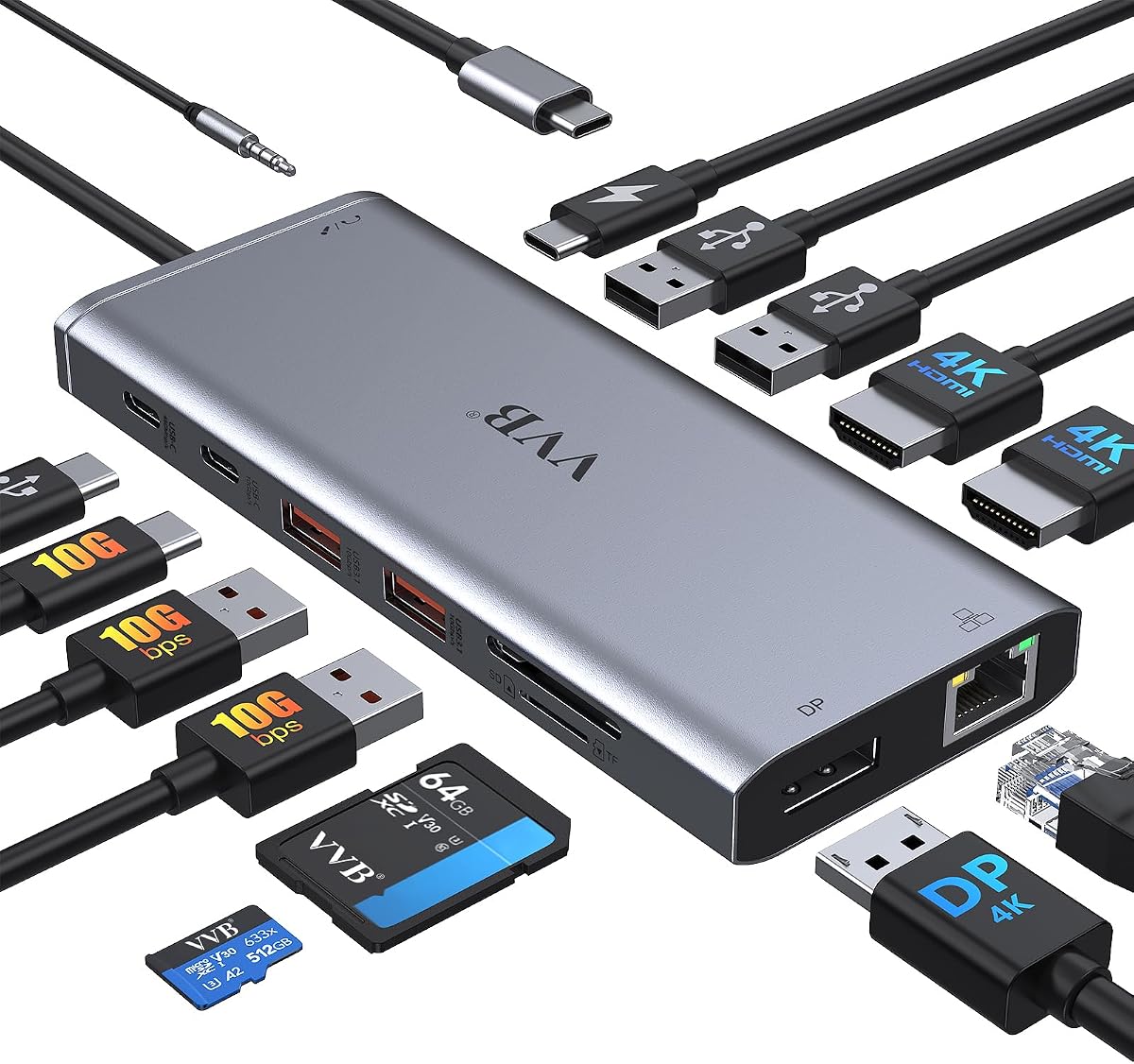
The Anker Laptop Docking Station Dual Monitor is a fantastic budget-friendly option for expanding your laptop capabilities. It earns a 4.5-star rating for its massive expansion capabilities packed into an 8-in-1 form factor.
We may earn a commission when you buy through this link, at no additional cost to you.
Equipped with two HDMI ports, you can connect external displays in stunning 4K@60Hz or dual 4K@30Hz setups. The USB-C Power Delivery port provides up to 85W pass-through charging to keep your device powered.
While it may not match the raw power of premium models, it covers essential ports like Ethernet and SD card readers. Users appreciate its plug-and-play simplicity and the trusted Anker warranty support.
For those seeking value without compromising on core connectivity, this hub is an excellent choice. It transforms your laptop into a versatile workstation at a fraction of the cost of enterprise docks.
Includes USB-C PD-IN, USB-A ports, HDMI, Ethernet, and card readers.
Compatible with USB-C PD for high-speed pass-through charging.
We may earn a commission when you buy through this link, at no additional cost to you.
The Anker Prime Docking Station brings together all your devices with a robust 14-in-1 solution. Its high rating reflects its powerful performance and extensive connectivity options for advanced users.
We may earn a commission when you buy through this link, at no additional cost to you.
This dock delivers 160W of total output, capable of charging up to four devices simultaneously through multiple USB-C ports. It also supports high-speed data transfer at up to 10Gbps for quick file movement.
Dual HDMI ports enable crystal-clear streaming across two displays at up to 2K@60Hz. While macOS users should note mirroring limitations, the dock works seamlessly with Windows and ChromeOS setups.
If you need maximum connectivity and charging power in one unit, this premium model delivers. It is ideal for power users who refuse to compromise on port variety or data transfer speeds.
Delivers 160W total output for up to four devices at once.
Versatile ports offering speeds up to 10Gbps for efficient workflows.
We may earn a commission when you buy through this link, at no additional cost to you.
The HoDo USB C Docking Station offers impressive flexibility with four video output ports. It allows for complex multi-monitor setups that are often restricted in standard hubs.
We may earn a commission when you buy through this link, at no additional cost to you.
You can connect up to 4K Dual/Triple Display videos using HDMI, DisplayPort, and VGA. With 100W PD charging input, it ensures your laptop stays powered while managing multiple screens.
Note that using VGA may limit resolutions to 1080P on all displays. Always verify your laptop supports DP1.4 signals to maximize the potential of this docking station.
For users needing specific video output types like VGA, this hub fills a niche need. It is a solid choice for budget-conscious setups requiring triple monitor support.
Outputs up to 4K via HDMI, DP, and VGA ports combined.
Supports up to 100W input for reliable laptop charging.
We may earn a commission when you buy through this link, at no additional cost to you.
The Anker Nano Laptop Docking Station features a unique detachable design perfect for both desk and travel. Its 13-in-1 setup offers extensive ports while allowing you to take a smaller hub on the go.
We may earn a commission when you buy through this link, at no additional cost to you.
It supports triple display setups with HDMI and DisplayPort outputs, accommodating various professional needs. With 100W laptop charging and 10Gbps data transfer, it handles heavy workloads efficiently.
The detachable 6-in-1 hub snaps off for portability, saving the need for separate devices. This innovation makes it highly versatile for users who move between home and office frequently.
Ideal for travelers who still need robust connectivity, this dock bridges the gap between mobility and desktop power. It is a smart investment for professionals who value flexibility.
Features a portable 6-in-1 hub that snaps off for travel use.
Supports up to 3 monitors via HDMI and DisplayPort options.
We may earn a commission when you buy through this link, at no additional cost to you.
This 14-in-1 USB C docking station extends your laptop capabilities significantly. It supports dual monitor outputs and includes a wide range of data ports for versatile connectivity.
We may earn a commission when you buy through this link, at no additional cost to you.
With 100W Power Delivery and 10Gbps transfer speeds, it handles both charging and high-speed data requirements. The inclusion of SD card readers and Gigabit Ethernet enhances its utility.
Users should ensure their laptop supports DP Alt Mode for video output. While powerful, the adapter is not included, so check existing hardware before purchasing.
For those needing broad connectivity without brand-specific constraints, this adapter works well. It is a cost-effective way to maximize your laptop's output options.
Supports dual monitor and triple displays for Windows users.
Supports input up to 100W for reliable laptop charging.
We may earn a commission when you buy through this link, at no additional cost to you.
The Dell WD19S 180W Docking Station is a robust solution designed to power connections efficiently. While older, it provides reliable dual display output and strong power delivery capabilities.
We may earn a commission when you buy through this link, at no additional cost to you.
It supports up to 130W Power Delivery, ensuring your high-performance laptop stays charged during demanding tasks. The dual DisplayPort setup is ideal for users requiring specific monitor configurations.
Though it has a lower rating than newer models, it remains a solid choice for those prioritizing raw power over modern features. It optimizes your workspace with essential connectivity.
If you need a proven docking station with high wattage output, this model is worth considering. It simplifies your setup without the complexity of newer proprietary features.
Built to optimize workspace with high power delivery.
Designed for future-proofing your workstation setup.
We may earn a commission when you buy through this link, at no additional cost to you.
Turn your laptop into a desktop workstation with the Anker 13-in-1 Docking Station. It is specifically optimized for triple external monitor support on Windows systems.
We may earn a commission when you buy through this link, at no additional cost to you.
With 85W host charging and 13 ports including USB-C data, it handles heavy multitasking. The included power adapter ensures stable performance without extra purchases.
The compact vertical design saves desk space while maintaining robust connectivity. For Windows users needing screen real estate, this dock is a practical solution.
Ideal for analysts and creators, this station extends your desktop significantly. It offers reliable performance and broad compatibility with standard USB-C laptops.
Turn your laptop into a desktop workstation with 13 ports.
Transfer files at 10Gbps for a power-user workflow.
We may earn a commission when you buy through this link, at no additional cost to you.
The Dell WD19 130W Docking Station offers a balance of functionality and reliability for Dell users. It supports dual DisplayPort and HDMI outputs for versatile display setups.
We may earn a commission when you buy through this link, at no additional cost to you.
With 90W Power Delivery, it suffices for most standard business laptops. The included audio combo port and multiple USB ports cover daily peripheral needs effectively.
Though not as powerful as the WD19S, it remains a solid choice for standard office environments. It simplifies your setup with essential connectivity without premium pricing.
For those looking for a trustworthy Dell dock at a reasonable price, this model delivers. It is a safe bet for users prioritizing stability over cutting-edge features.
Includes USB-C, USB-A, and DisplayPort 1.4 for diverse needs.
130W adapter supports stable docking interface via USB-C.
We may earn a commission when you buy through this link, at no additional cost to you.
The WD19 Dell Docking Station Renewed provides full functionality at a competitive price point. It supports various devices including select Inspiron and Latitude series laptops.
We may earn a commission when you buy through this link, at no additional cost to you.
With an 180W adapter included, it offers substantial power delivery for demanding tasks. The dual monitor support via HDMI and DisplayPort ensures productivity remains high.
Though renewed, it undergoes verification to ensure reliable performance. Users should check firmware compatibility to avoid any potential connectivity issues.
For those seeking enterprise-grade docking without the premium price, this renewed option is smart. It simplifies your setup and maximizes productivity affordably.
Effortlessly connect peripherals and monitors with one device.
Supports various devices including Inspiron, Precision, and Latitude.
We may earn a commission when you buy through this link, at no additional cost to you.
Selecting the right docking station requires evaluating several technical factors to ensure compatibility with your specific Dell laptop model.
Power delivery determines how much energy the dock sends to your laptop. Look for docks with at least 65W output, but 100W is recommended for high-performance machines.
Ensure the dock supports the correct power protocol for your device to avoid charging issues.
Check how many monitors and which types of ports the dock supports. HDMI and DisplayPort combinations should match your current monitor capabilities.
Verify if your laptop supports DP Alt Mode for video output through the USB-C connection.
A good dock should offer a mix of USB-A, USB-C, Ethernet, and audio ports. Ensure the count matches your peripheral needs to avoid dongle dependency.
Prioritize docks with high-speed USB 3.2 ports for faster data transfer rates.
Different docks work better with specific laptop models. Confirm that the product page lists your Dell model as a supported device.
Always check if your system meets the minimum OS requirements for the dock to function correctly.
Build quality affects longevity and reliability. Look for docks with robust connectors and durable housing materials.
A well-built dock should stay cool under load and resist physical damage over time.
Consider how the dock is designed regarding cable routing. Some models allow ambidextrous connections or include cable clips.
A clean setup helps prevent accidental disconnections and maintains a tidy workspace.
A solid warranty indicates manufacturer confidence. Aim for at least an 18-month coverage period on the product.
Good customer support ensures quick resolution of any technical issues that arise.
The physical size of the dock matters for desk space. Vertical designs often save more room than horizontal ones.
Choose a form factor that fits comfortably in your workspace without being too bulky.
To start using your dock, connect the USB-C cable to your laptop first. Then plug the power adapter into the dock and connect your monitors and peripherals.
If your screen resolution is incorrect, adjust the display settings in your operating system. Use the device manager to update drivers if necessary.
To prolong the dock's life, avoid bending cables sharply and keep it in a cool, dry environment. Unplug connections carefully by gripping the plug instead of pulling the cable.
Most modern docking stations are plug-and-play, but installing the latest Dell Docking Station Manager software can improve performance. It helps in managing power settings and firmware updates effectively.
Flickering often occurs due to insufficient bandwidth or driver conflicts. Ensure your cable supports the required resolution refresh rate and update your graphics drivers.
Yes, docking stations with Power Delivery pass-through allow simultaneous charging and video output. Verify the dock's wattage matches your laptop's power needs.
Thunderbolt docks offer higher data speeds and more versatile display support. USB-C docks are compatible with more devices but might have lower bandwidth limits.
Use the Dell Peripheral Manager software to check for firmware updates. Ensure the dock is connected to both power and your laptop during the process.
This typically happens if your system is set to mirror mode. Switch to extended display settings in your OS display preferences to resolve this.
The Dell Pro WD25 stands out for those seeking optimized power and display support for their Dell machines. It offers a balance of features that make it a top contender in 2026.
For budget-conscious users, the Anker 8-in-1 provides essential connectivity without breaking the bank. It is ideal for simple setups requiring reliable dual monitor support.
Always check the latest product specs and current prices before purchasing. Your specific requirements will determine which docking station delivers the most value.