
Eyoyo 3.5" Portable Digital Video Magnifier
4.6Editor score
2X to 25X zoom range
8 adjustable color modes
Compact lightweight design
Living with low vision can make everyday tasks like reading menus, checking labels, or enjoying a book challenging. Digital magnifiers offer a technological solution by capturing images on a screen and enlarging them significantly. These devices come in various forms, from handheld units to desktop models, each designed to meet specific visual needs and lifestyles.
We have carefully evaluated ten leading digital magnifiers available on the market to help you find the perfect tool for your visual assistance needs. Our comparison considers essential factors such as screen size, magnification range, battery life, and user-friendly interfaces. We also look at specialized features like color inversion and text-to-speech capabilities that enhance accessibility for diverse users.
Each pick in this list highlights a unique strength, whether it is affordability, advanced imaging, or premium build quality. Note that while ratings reflect current user feedback, product availability and specific features can change over time. Reviewing the detailed specifications and user experiences provided here will guide you toward a reliable investment for better visibility.
4.6Editor score
4.0Editor score

4.4Editor score
As an Amazon Associate we earn from qualifying purchases.
The following table provides a side-by-side comparison of the ten digital magnifiers reviewed in this guide. Each entry highlights core specifications such as screen size, zoom capabilities, and unique features to help you distinguish between models quickly.


This device stands out as an accessible entry point for those needing digital magnification without a high cost. It holds a strong rating from users who appreciate its simplicity and effectiveness for short reading tasks. The ability to freeze the screen is a significant convenience for capturing text details for later review.
We may earn a commission when you buy through this link, at no additional cost to you.
The 8 adjustable color modes allow users to find high-contrast settings that reduce eye strain effectively. Whether using white on black or blue on yellow, the device adapts to different visual preferences. Additionally, the AV output feature lets you connect to a television for an even larger viewing area when needed.
While the 3.5-inch screen is compact, it may limit prolonged reading sessions compared to larger models. The lack of advanced connectivity like HDMI might be a drawback for some users. However, for quick checks of labels or menus, this portable unit delivers reliable performance at a fraction of the cost.
This magnifier is ideal for users seeking a basic, functional tool for daily visual assistance. Its lightweight design makes it easy to carry in a bag for use outside the home. If you need a straightforward aid for occasional reading or shopping, this model offers excellent value.
The variety of color modes ensures that users with specific contrast sensitivities can find a comfortable viewing configuration quickly.
Its small size and foldable bracket make it easy to position on flat surfaces for steady reading without needing to hold it constantly.
We may earn a commission when you buy through this link, at no additional cost to you.
This model features a large 5-inch screen that provides ample space for viewing magnified text and images clearly. Its simplified button layout is designed for ease of use, making it suitable for elderly users or those unfamiliar with complex electronics. The auto-focus capability helps maintain clarity as you move across different reading materials.
We may earn a commission when you buy through this link, at no additional cost to you.
The device includes a memory function that retains your preferred settings after shutdown, saving time during daily use. With 26 color modes available, you can tailor the visual output to match your specific needs for contrast and comfort. The high power magnification range ensures you can tackle everything from fine print to larger text easily.
Some users may find the build quality inconsistent or the interface less intuitive than premium options. The battery life could be a consideration for extended use without a power source. Despite these limitations, the combination of screen size and ease of use makes it a solid contender for home-based reading assistance.
If you prioritize a balance between screen real estate and operational simplicity, this magnifier is a strong choice. It is particularly well-suited for stationary reading tasks where a larger display improves visibility. The ability to connect to a TV adds versatility for users who prefer a bigger visual setup.
The removal of redundant buttons streamlines the experience, allowing users to focus on reading rather than navigating complex menus.
The HD color LCD screen restores details and colors accurately, ensuring text remains legible even at higher magnification levels.
We may earn a commission when you buy through this link, at no additional cost to you.
This magnifier is designed with an ergonomic foldable handle that allows users to position the device comfortably on a page. The 5-inch screen supports up to 32x zoom, ensuring that even small text becomes legible for those with macular degeneration or other conditions. The integration of DSP technology helps maintain image clarity without distortion at high zoom levels.
We may earn a commission when you buy through this link, at no additional cost to you.
The foldable handle is a standout feature because it allows the unit to rest on books or menus at an angle, reducing neck strain. Users can also memorize their preferred settings, avoiding the need to adjust every time they turn the device on. This memory function significantly enhances the daily usability of the unit for regular readers.
While it offers excellent ergonomics, the build quality may feel slightly heavier than some handheld options. The price point is higher than basic models, reflecting its enhanced features and comfort-oriented design. However, the reduction in physical strain during reading sessions often justifies the additional cost for serious users.
This device is an excellent choice for users who need long-term comfort while reading printed materials. The combination of a sturdy bracket and a high-resolution screen makes it versatile for both home and office use. If ergonomic design is a priority for your visual aid, this model warrants strong consideration.
The integrated handle and bracket allow for stable placement on documents, enabling users to read without hunching or holding the device.
Advanced image processing ensures that colors and details are restored accurately, providing a natural viewing experience even when magnified.
We may earn a commission when you buy through this link, at no additional cost to you.
This reading aid offers a solid 5-inch display with high power magnification suitable for various visual impairments. The simplified button layout ensures that operation is straightforward for elderly users or children with amblyopia. The ergonomic design allows the device to be laid on a page at an angle, which helps prevent fatigue during long reading sessions.
We may earn a commission when you buy through this link, at no additional cost to you.
The inclusion of multiple color modes allows users to switch between different high-contrast settings depending on their specific needs. It also features a memory function that recalls user habits before shutdown, making the workflow smoother. This feature is particularly helpful for those who rely on specific color settings for comfort.
While functional, it may lack some of the advanced connectivity options found in higher-end models. Users looking for TV output or extensive customization might find it slightly limited. However, for daily tasks like reading grocery store items or magazines, it performs reliably and comfortably.
This model is well-suited for users who need a dedicated reading aid with a large screen and easy controls. The focus on simplicity and ergonomic placement makes it a practical choice for home environments. If you value straightforward operation over complex features, this magnifier serves the purpose well.
By removing redundant buttons, the design focuses on core reading functions, reducing confusion and making it accessible for all ages.
The angled bracket placement reduces the need to hunch over text, providing a healthier posture during extended reading periods.
We may earn a commission when you buy through this link, at no additional cost to you.
This magnifier features a unique 13MP near and far dual lens system, allowing for versatile viewing of both close documents and distant objects. The zoom range extends up to 48x, providing significant magnification power for detailed inspections or reading very fine text. The ability to connect to a TV via HDMI or AV output expands its utility for group viewing or personal preference.
We may earn a commission when you buy through this link, at no additional cost to you.
With 26 color modes and adjustable brightness, users can customize the visual experience to reduce eye strain effectively. The inclusion of a foldable handle adds convenience for holding the unit or setting it down on a table. The built-in battery provides lasting power for uninterrupted reading sessions without immediate tethering to a wall outlet.
While the feature set is impressive, some users report inconsistencies in build quality or ease of use. The interface might require a learning curve compared to simpler models on the market. Additionally, the reliance on TF cards for storage might feel dated to some users expecting modern digital interfaces.
If you need a magnifier that can handle both near and far objects with high zoom potential, this model offers distinct advantages. The dual output capability makes it flexible for different viewing environments, from a kitchen table to a living room TV. It is a strong candidate for those who prioritize versatility over simplicity.
The dual lens system enables users to switch seamlessly between reading documents and viewing distant signs or boards without changing devices.
Support for both AV and HDMI outputs provides flexibility to project the magnified image onto larger screens for better visibility.
We may earn a commission when you buy through this link, at no additional cost to you.
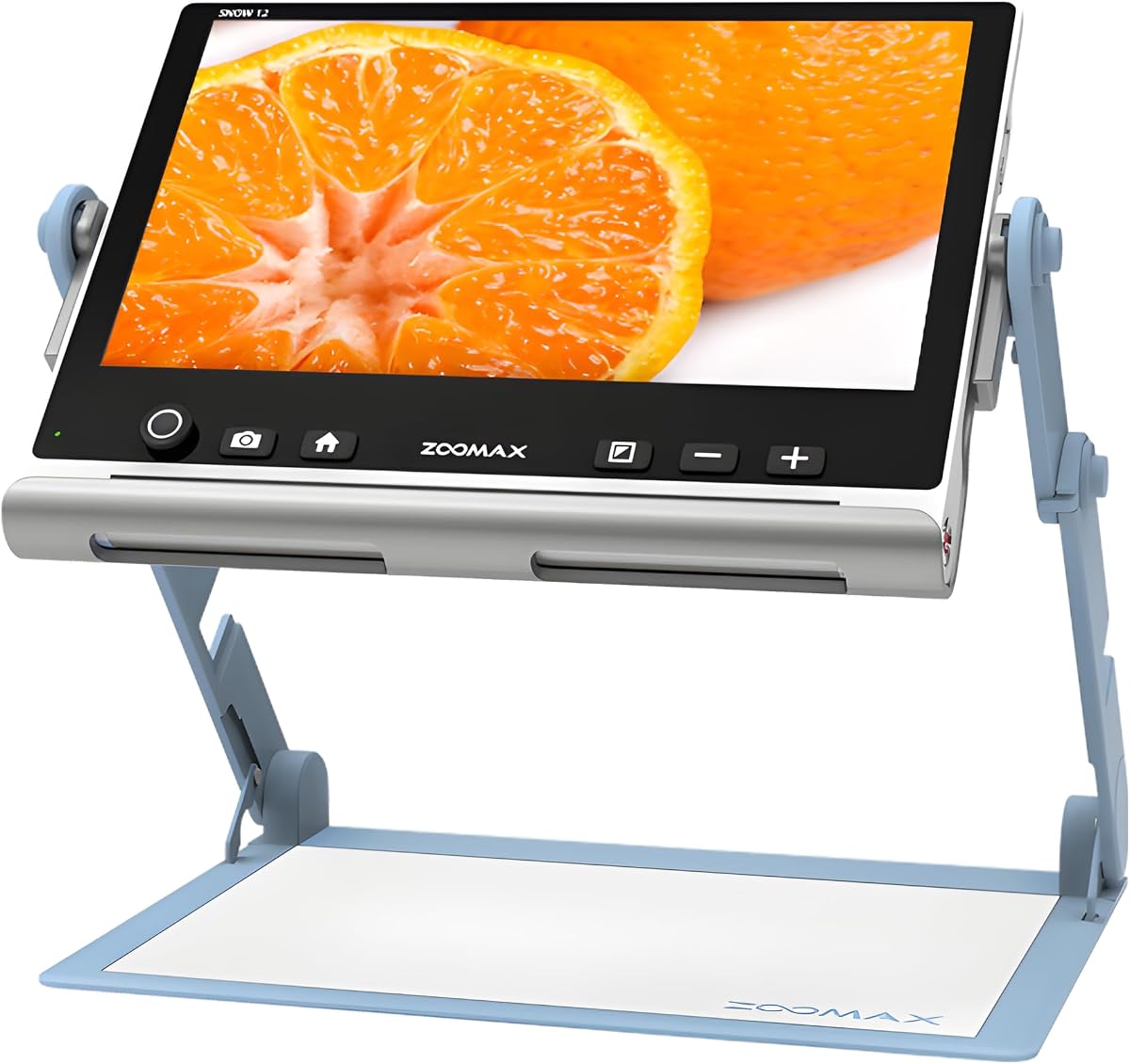
This premium device distinguishes itself with built-in Optical Character Recognition (OCR) technology that converts printed text into digital text. The large 12-inch display provides an immersive viewing experience that mimics a standard monitor. For users with advanced visual impairments, the text-to-speech feature offers an additional layer of accessibility that reads the content aloud in over 20 languages.
We may earn a commission when you buy through this link, at no additional cost to you.
The foldable stand is robust and adjustable, ensuring stability on various surfaces for different viewing angles. Its lightweight design allows for easy portability, making it convenient for travel or moving between rooms. The high-quality HD camera ensures that images captured and displayed on the screen are sharp and detailed.
The main drawback is the higher price point compared to basic magnifiers, which might be prohibitive for some budgets. The added weight of the larger screen means it may not be as easy to hold in one hand for extended periods. However, for users who need more than just magnification, the advanced features justify the investment.
This magnifier is best suited for users who need robust accessibility tools like OCR and speech synthesis. If independence in reading is a primary goal, the ability to convert text to speech provides significant value. It is a top choice for those looking for a comprehensive visual aid solution that goes beyond simple enlargement.
The optical character recognition allows users to transform static text into editable or readable formats, increasing independence significantly.
With support for over 20 languages, the text-to-speech feature makes this device useful for diverse households and travelers.
We may earn a commission when you buy through this link, at no additional cost to you.
This handheld magnifier combines a 5-inch screen with a robust 4500mAh battery, offering over four hours of continuous operation. The 4X to 32X zoom range provides clear visibility for a wide variety of text sizes. Its foldable handle ensures a comfortable grip and allows the device to stand independently on a page for hands-free reading.
We may earn a commission when you buy through this link, at no additional cost to you.
The device automatically saves your preferred settings so you do not have to reset them every time you use it. With 17 color modes available, users can customize contrast to reduce strain and improve clarity. The ability to capture and save photos on a TF card makes it useful for keeping records of important documents.
While it does not have HDMI output for connecting to a TV, the internal screen is large enough for personal use. The build is relatively lightweight, which helps during extended reading sessions without arm fatigue. Some users might prefer more color options, but the existing range covers most high-contrast needs.
This unit is a reliable choice for users who prioritize battery longevity and ease of use. The combination of portability and stable stand functionality makes it great for both home and travel. If you need a dependable tool for daily reading with minimal interruptions for charging, this model is highly effective.
The large battery capacity ensures that you can use the device for several hours without needing to find a power outlet.
Automatic saving of preferences streamlines the workflow, allowing you to start using the device immediately after turning it on.
We may earn a commission when you buy through this link, at no additional cost to you.
This model offers an 800×480 high resolution LCD screen that restores colors and details accurately for a natural view. The integrated handle design includes a foldable bracket that lets you position the magnifier at a comfortable angle. With 26 color modes to choose from, users can easily adjust the display to match their visual preferences.
We may earn a commission when you buy through this link, at no additional cost to you.
The inclusion of DSP technology ensures that text does not deform even when magnified significantly. It can connect to a television via a TV cable, offering a larger display option for those who prefer it. The large buttons make navigation simple, accommodating users with limited dexterity or those who need an intuitive system.
While the zoom range is solid, it may not reach the extremes found in some specialized models. The build is functional but may not feel as premium as higher-end devices. However, the balance of resolution and usability makes it a strong option for everyday reading tasks like labels or documents.
If you want a device that provides sharp, true-to-life images and is easy to navigate, this is a compelling option. The ability to connect to a TV adds flexibility for shared viewing or larger displays. It is a practical choice for users needing a reliable and clear magnification solution.
The high resolution ensures text remains sharp and readable even at higher zoom levels, preventing blurring or distortion.
The foldable bracket and adjustable handle allow for versatile positioning, making it comfortable for both left and right-handed users.
We may earn a commission when you buy through this link, at no additional cost to you.
This premium handheld device delivers HD video magnification with distinct magnification levels ranging from 5x to 12x. The lightweight design makes it easy to hold for extended periods without causing fatigue. It includes image capture functionality, allowing users to save and review important text or images later without needing an external card.
We may earn a commission when you buy through this link, at no additional cost to you.
The brand's reputation for quality ensures a reliable and durable unit for long-term use. It features five viewing modes that cater to different visual needs, offering a customized experience. The inclusion of a liberty cleaning cloth shows attention to detail in user convenience and device maintenance.
While the price is higher than many competitors, the build quality and reliability often justify the investment. The fixed magnification steps might limit flexibility compared to zoom models that allow continuous adjustment. However, for users who prefer simplicity and consistent performance, this is a highly effective tool.
This magnifier is ideal for users who value premium craftsmanship and consistent quality. If you need a reliable, lightweight device for daily tasks that you can carry anywhere, it delivers on those needs. It is a great choice for those who prefer a streamlined, user-friendly experience without unnecessary complexity.
The brand's focus on quality ensures a durable and consistent performance, reducing the likelihood of technical issues over time.
The built-in image capture allows you to save important text for later reference, adding utility to your reading sessions.
We may earn a commission when you buy through this link, at no additional cost to you.
This electronic aid provides a high zoom range from 3X to 48X, making it suitable for extremely small text. The 5-inch HD screen delivers clear visuals with minimal distortion. Its simplified button layout ensures easy operation for elderly users, while the memory function remembers your preferred settings for the next session.
We may earn a commission when you buy through this link, at no additional cost to you.
The device is lightweight and portable, making it easy to carry for dining out or trips to the pharmacy. It can connect to a TV for larger visibility, which is helpful for those who need a bigger display. The battery lasts over 4 hours for typical usage, supporting extended reading outside the home.
It is not recommended for long books or novels due to design limitations. However, for quick readings of prescriptions or maps, it excels. The AV output connection adds versatility, allowing for a more comfortable viewing experience on a larger screen.
If you need high magnification power in a compact unit, this device is a strong contender. Its focus on simplicity and portability makes it a great gift for seniors or loved ones with visual impairments. For short to medium reading tasks, it offers excellent value and utility.
The 48x zoom capability ensures that even the smallest print becomes legible, helping users with severe vision loss.
Its lightweight build makes it easy to carry everywhere, ensuring you have visual assistance ready for any daily task.
We may earn a commission when you buy through this link, at no additional cost to you.
Selecting the right digital magnifier involves considering several key factors that impact usability and comfort. This guide breaks down the essential elements to help you make an informed decision based on your specific visual needs.
The screen size determines how much text you can view at once. Larger screens, such as 10 inches or more, are better for extended reading, while 5-inch screens are more portable. Resolution also matters for clarity; higher pixel counts ensure that text remains sharp and not pixelated at high zoom levels.
Look for a screen size that matches your usage patterns and a resolution of at least 800×480 for clear text.
Different tasks require different levels of zoom. A range starting at 2x or 3x is good for large text, while higher zoom levels like 32x or 48x are essential for small print. Ensure the device offers adjustable zoom to handle various materials like newspapers, menus, or prescription labels.
Choose a magnifier with a range that covers both your daily reading needs and your smallest text challenges.
Adjustable color modes are crucial for reducing eye strain. Look for devices that offer high-contrast settings like white on black, black on white, or yellow on blue. These modes help users with cataracts or macular degeneration read more comfortably by enhancing the difference between text and background.
Prioritize models with at least 10 different color options to find the perfect setting for your eyes.
Comfort is key for long reading sessions. Devices with foldable handles or stands allow you to place the magnifier on a flat surface without holding it. This reduces arm fatigue and neck strain. Lightweight designs are also beneficial for users who need to carry the device frequently.
Select a unit with a stable stand or handle that fits your natural reading posture to minimize physical discomfort.
If you plan to use the magnifier away from a power source, battery life is critical. Aim for a device that lasts at least 4 hours on a single charge. Rechargeable batteries are standard, but check the charging time and availability of replacement batteries for long-term use.
Ensure the battery capacity matches your typical usage duration to avoid interruptions during reading.
Some users benefit from connecting their magnifier to a larger display like a television. Look for models with AV or HDMI outputs. This feature allows multiple people to view the content or provides a bigger screen for those who need more space. It adds versatility for home use.
Consider HDMI or AV outputs if you want to use the magnifier with an external monitor or TV.
Modern magnifiers may include features like OCR for converting text to digital formats or text-to-speech for listening to content. These tools can significantly increase independence for users who cannot see well enough to read even magnified text. Photo capture is also useful for saving important information.
Look for OCR or speech features if you need digital conversion or audio assistance for better accessibility.
Simplified interfaces are important for elderly users or those with limited technical experience. Devices with large buttons and memory functions that save settings reduce the learning curve. Avoid models with complex menus that might be frustrating to navigate during daily use.
Choose a unit with intuitive controls and memory functions to ensure smooth operation every time you use it.
To begin using your digital magnifier, place it on a flat surface over the text you wish to read. Ensure the lens is positioned directly above the material for clear focus. Adjust the zoom level and brightness to a comfortable setting before starting your reading session to reduce eye strain.
Clean the lens regularly with a microfiber cloth to maintain clear visibility. Avoid using harsh chemicals or rough materials that could scratch the glass. Keeping the device in a protective case when not in use prevents dust and physical damage, ensuring it lasts longer.
Store the device in a cool, dry place to protect the electronics from heat and humidity. Charge the battery periodically even if not in use to maintain its health. If you plan to store it for a long time, keep the charge at around 50 percent to prevent battery degradation.
Yes, many digital magnifiers are portable and can be used outdoors. However, direct sunlight can sometimes cause screen glare. It is best to use the device in shaded areas or adjust the brightness settings to counteract natural light for better visibility.
Digital magnifiers use a camera and screen to enlarge text, allowing for features like color inversion and saving images. Analog magnifiers use simple glass lenses to physically enlarge text. Digital models offer more customization and are often more effective for people with complex visual needs.
Use a soft microfiber cloth to gently wipe the lens in circular motions. Avoid using alcohol or abrasive cleaners as they can damage the coating. If the lens is very dirty, slightly dampen the cloth with water before cleaning and dry it thoroughly afterward.
Most standard digital magnifiers do not require WiFi to function as they work independently. However, models with OCR or cloud storage features may need an internet connection to process text or save documents online. Check your specific model's requirements for connectivity.
Yes, digital magnifiers are highly effective for users with macular degeneration. The high contrast modes and magnification capabilities help bring text into focus for those with central vision loss. Many users find them essential for reading menus, labels, and books independently.
Some advanced magnifiers have companion apps that allow you to view images on a tablet or smartphone. These apps can offer additional features like cloud storage or advanced text processing. Check if your device supports Bluetooth or app integration for extended functionality.
With proper care, a quality digital magnifier can last several years. The battery life may degrade over time, but replacements are often available. Regular cleaning and careful handling can extend the overall lifespan of the device significantly.
Choosing the right digital magnifier depends largely on your specific visual needs and how you plan to use it. The options covered here range from budget-friendly handheld units to advanced models with OCR and text-to-speech capabilities. Each device offers unique strengths tailored to different reading scenarios and environments.
Prioritize features like screen size, zoom range, and color contrast modes to find a device that reduces eye strain effectively. Consider portability if you travel frequently or need a device for home use. A comfortable design with ergonomic stands can make a significant difference in daily usability.
Always check the current product details and prices before making a final decision. Your needs may vary based on health conditions, making it vital to select a tool that supports your independence. With the right device, everyday tasks like reading labels and books become much more manageable and enjoyable.