
SANSUI 24 Inch Curved 160Hz Gaming Monitor
4.4Editor score
160Hz Refresh Rate
1500R Curved Panel
1ms MPRT Response
FreeSync Compatible
Discover the top curved 160Hz gaming monitors compared by experts. We analyze screen size, refresh rates, and performance to help you choose the perfect
Finding the right display can transform your gaming experience significantly. A curved 160Hz gaming monitor offers immersive visuals and smooth motion for competitive play. These screens reduce distortion and keep you engaged in every moment of action during intense sessions.
We compared ten leading models based on refresh rates, panel quality, and build features. Our analysis covers everything from budget-friendly options to premium ultrawide displays. Each product was evaluated for its ability to deliver consistent performance across various game genres.
Each pick highlights key strengths and potential trade-offs to guide your decision. Prices and availability change frequently so check current listings before purchasing. This guide ensures you find a monitor that fits your specific needs and budget requirements perfectly.
4.4Editor score
4.5Editor score

4.6Editor score
This side-by-side comparison highlights key specifications across all ten models. We focus on resolution, refresh rates, and connectivity options to show how each monitor stacks up against the others in the current market landscape.






This SANSUI monitor delivers impressive performance for its price category with a 160Hz refresh rate. Users appreciate the immersive 1500R curvature which enhances focus during gameplay. It is rated highly for offering smooth visuals without breaking the bank.
We may earn a commission when you buy through this link, at no additional cost to you.
The fast VA display ensures deep blacks and high contrast which make colors pop. You get multiple gaming modes tailored to FPS RTS and movie viewing. Connectivity includes HDMI 2.0 and DP 1.4 ensuring compatibility with most modern graphics cards.
While the stand offers tilt adjustment it lacks height or swivel options. There are no built-in speakers so you will need external audio. These trade-offs are acceptable given the competitive pricing and solid gaming performance it provides.
It is ideal for gamers on a tight budget who want high refresh rates. If you need a secondary screen or an entry-level gaming monitor this model fits well. It balances essential features effectively for casual to mid-range competitive play.
The 1500R curve wraps around your vision reducing distortion and eye strain during long sessions.
With 160Hz and 1ms MPRT you get fluid animations and reduced blur in fast-paced games.
We may earn a commission when you buy through this link, at no additional cost to you.
This 27-inch model expands your viewing area while maintaining the same 160Hz refresh rate. It keeps the same 1500R curvature that many gamers love for immersion. The contrast ratio is higher than standard panels which improves dark detail.
We may earn a commission when you buy through this link, at no additional cost to you.
Gamer-centric features like crosshair and timers help improve your play strategy. HDR mode can be enabled via the OSD menu when using HDMI. The low blue light and anti-flicker tech reduce fatigue during extended work or play sessions.
The main compromise is 1080p resolution on a 27-inch panel which may look less sharp than QHD. The stand is simple with tilt only. However for budget-conscious users wanting a bigger screen these limitations are often worth the trade-off.
Perfect for those upgrading from 24 inches without spending too much. It works well for console gaming where 1080p is still common. Consider this if screen real estate matters more to you than pixel density.
Built-in crosshair and timer features give you practical advantages in competitive matches.
The 4000:1 contrast ratio delivers deeper blacks and richer visuals across media types.
We may earn a commission when you buy through this link, at no additional cost to you.
This variant of the 24-inch SANSUI line offers strong color performance with DCI-P3 97 coverage. The 160Hz refresh rate ensures smooth motion which is key for competitive shooters. It maintains the 1500R curve for an immersive experience.
We may earn a commission when you buy through this link, at no additional cost to you.
The wide 178-degree viewing angle means colors stay consistent even when viewed from the side. Flicker-free and blue light reduction features protect your eyes during long hours of use. You get HDMI and DP ports supporting full refresh rates.
The lack of built-in speakers and basic stand are standard for this price point. Some users note the warranty is limited to 30 days for replacements but lifetime support is offered. Overall it remains a solid choice for budget builds.
Ideal for entry-level setups or office use where gaming is also important. The color accuracy helps when doing light content creation too. It delivers consistent performance without requiring a high-end graphics card.
97 percent DCI-P3 coverage ensures vibrant visuals that look true to life.
Flicker-free and blue light reduction help keep your eyes comfortable over time.
We may earn a commission when you buy through this link, at no additional cost to you.
The CRUA 32-inch model stands out with 4K resolution at 160Hz which is rare in this segment. It offers breathtaking clarity for open-world games and multitasking. The built-in speakers reduce desktop clutter for a cleaner workspace.
We may earn a commission when you buy through this link, at no additional cost to you.
With 120 percent sRGB color accuracy it is great for content creation too. You get HDMI 2.1 support for next-gen console connectivity. The 1500R curve adds immersion while keeping details sharp across the wide screen.
It costs more than 1080p options but delivers significantly higher pixel density. The stand is sturdy but takes up desk space due to its size. Users report that color quality is impressive out of the box.
Best for users who prioritize resolution and color fidelity over pure budget savings. If you have a powerful GPU this monitor will utilize its full potential. It blends gaming and creative work well.
Experience detailed landscapes and crisp text with 3840 by 2160 pixels.
High color accuracy makes this suitable for photo and video editing tasks.
We may earn a commission when you buy through this link, at no additional cost to you.
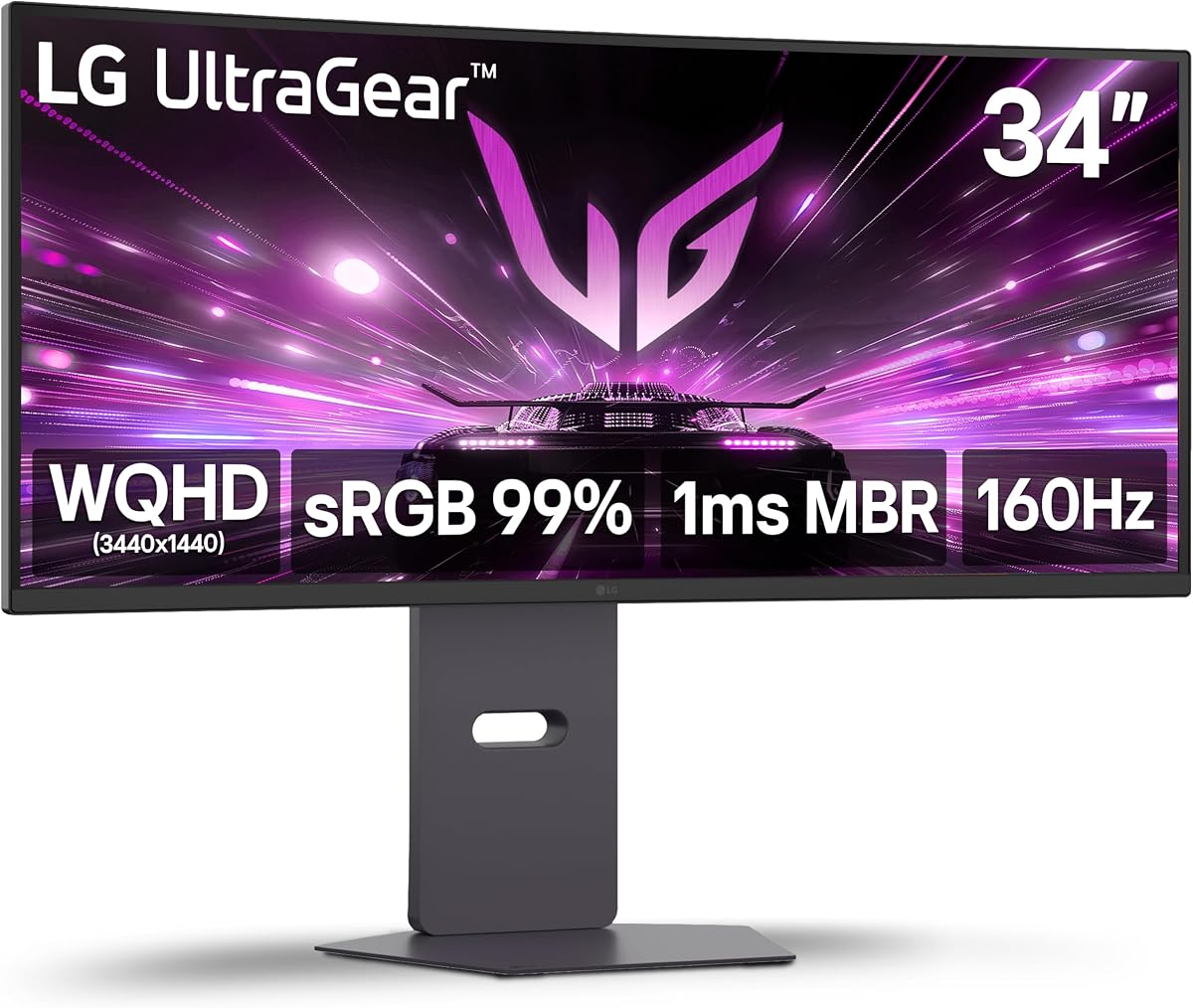
This LG UltraGear offers a stunning 34-inch ultrawide WQHD experience with smooth 160Hz performance. It includes HDR10 and FreeSync Premium to minimize tearing and lag. The stand allows height tilt and swivel adjustments for perfect positioning.
We may earn a commission when you buy through this link, at no additional cost to you.
Features like Black Stabilizer help you spot enemies in dark scenes instantly. The crosshair tool increases accuracy in shooters without modifying your game files. Built-in stereo speakers with Waves MaxxAudio provide decent audio without external gear.
The investment is higher but the build quality and features justify the cost. Dynamic Action Sync reduces input lag for faster reactions during crucial moments. It is well-suited for both competitive gaming and media consumption.
Choose this if you want an all-around premium experience with minimal compromises. The wide screen enhances multitasking as well as gaming. It is a top pick for serious gamers wanting reliability and quality.
The 21 by 9 aspect ratio expands your field of view significantly.
Full stand adjustments ensure you can position the monitor comfortably.
We may earn a commission when you buy through this link, at no additional cost to you.
This renewed version of the LG UltraGear offers the same specs at a lower price point. Users report it arrives in excellent condition with full functionality. It retains all the premium features like HDR10 and height adjustable stands.
We may earn a commission when you buy through this link, at no additional cost to you.
The 160Hz refresh rate and WQHD resolution remain ideal for immersive gameplay. You get the same connectivity including HDMI 2.1 and DP 1.4. It is a smart choice for those wanting LG quality without the full new price.
While renewed items may have minor cosmetic signs they are tested for performance. The warranty is typically reliable through Amazon. Just ensure you verify the return policy upon arrival.
Great for buyers wanting premium ultrawide specs at a mid-range cost. It balances value and performance effectively. Ideal for gamers who know exactly what they need but watch the budget.
Get high-end ultrawide features at a reduced cost by choosing renewed.
Does not sacrifice performance or connectivity compared to new units.
We may earn a commission when you buy through this link, at no additional cost to you.
The Samsung Odyssey G55C features a deep 1000R curve that wraps tightly around you. This design pulls you into the game world more than standard curves. It delivers QHD resolution at 165Hz for sharp and smooth visuals.
We may earn a commission when you buy through this link, at no additional cost to you.
HDR10 support brings vibrant shades and details to dark scenes. Eye Saver Mode minimizes blue light which is crucial for long sessions. The 1ms response time helps reduce motion blur during fast action.
Some find the 1000R curve too extreme for non-gaming tasks like coding. But for pure immersion it is unmatched in this price range. The build quality is solid and the OSD is intuitive.
Best for gamers who prioritize deep immersion and high refresh rates. If you prefer a more enclosed feeling while playing this model fits well. It is a strong contender for mid-range QHD gaming.
The 1000R curve matches the human eye for maximum immersion.
Eye Saver Mode and reduced flicker protect your vision over time.
We may earn a commission when you buy through this link, at no additional cost to you.
This Sceptre model delivers up to 180Hz refresh rate for exceptionally smooth motion. It offers a 34-inch ultrawide WQHD panel that increases workspace significantly. The LED backcover lights add a unique modern design element.
We may earn a commission when you buy through this link, at no additional cost to you.
Built-in speakers and dual DisplayPort connections add to its versatility. The 99 percent sRGB coverage ensures decent color performance. At a lower price point it offers a lot of screen real estate and speed.
The build quality is functional but may not match premium brands. Some users note the contrast is lower than VA panels. However for raw speed and wide screen space it is very competitive.
Ideal for budget ultrawide buyers who want high refresh rates. It suits those who value speed over color accuracy. A solid option for racing and action games.
180Hz offers ultra-smooth transitions in fast-paced competitive titles.
LED backcover lights provide a stylish look in dark rooms.
We may earn a commission when you buy through this link, at no additional cost to you.
The Alienware AW3425DWM offers top-tier performance with 180Hz refresh rate and 1ms response. It features a 34-inch ultrawide panel designed for deep immersion. The VESA DisplayHDR 400 certification ensures consistent brightness and contrast.
We may earn a commission when you buy through this link, at no additional cost to you.
A dedicated console mode optimizes input for Xbox and PlayStation users. Hardware-based low blue light reduces strain without affecting color fidelity. The design is iconic with clean lines and a sturdy base.
It is one of the most expensive options but delivers premium quality. The stand is sleek but lacks height adjustment which may be a drawback for some. Overall it excels in build and performance.
Choose this for a high-end setup that will last years. It is perfect for those who want the best available tech. Ideal for serious gamers and enthusiasts.
Dedicated console mode ensures optimal performance with next-gen systems.
DCI-P3 95 percent coverage ensures rich and accurate colors.
We may earn a commission when you buy through this link, at no additional cost to you.
This AOC monitor pushes the limits with up to 200Hz refresh rate via DisplayPort. It offers a 0.3ms MPRT response which helps reduce blur further. The 34-inch ultrawide curved display enhances immersion significantly.
We may earn a commission when you buy through this link, at no additional cost to you.
The ergonomic stand includes height tilt and swivel adjustments for comfort. You get one DisplayPort and two HDMI ports plus audio out. HDR Ready support adds contrast to compatible content.
The 200Hz mode requires specific signal configurations but delivers speed. While HDR is basic it adds some depth to dark scenes. The VA panel ensures deep blacks and good contrast.
Best for competitive gamers who prioritize refresh rate above all. It delivers speed and comfort for long sessions. A strong choice for ultrawide performance seekers.
200Hz refresh rate offers ultra-smooth motion for competitive play.
Height adjustable stand helps you find the perfect viewing position.
We may earn a commission when you buy through this link, at no additional cost to you.
Choosing the right curved 160Hz gaming monitor involves balancing several factors. This guide covers key aspects to ensure you find a model that fits your needs and budget.
Screen size impacts immersion while resolution determines sharpness. A 24 to 27-inch FHD is budget-friendly but a 32 to 34-inch QHD offers more detail.
Pick a resolution your GPU can support to maintain high frame rates.
Refresh rate dictates how smooth motion looks. 160Hz is a sweet spot for competitive play but some models go up to 200Hz.
Higher refresh rates benefit fast games but require stronger hardware.
Response time measures how quickly pixels change color. Look for 1ms or lower to minimize ghosting and motion blur.
Lower is better for competitive games to ensure clear visuals.
Most curved gaming monitors use VA panels for high contrast. IPS offers better viewing angles but may have lower contrast.
VA is generally preferred for dark scenes in gaming.
Curvature is measured in radius. 1500R is common and immersive while 1000R wraps tighter.
Deeper curves enhance immersion but may feel too strong for some users.
AMD FreeSync and NVIDIA G-Sync prevent screen tearing. Ensure the monitor supports the tech your GPU uses.
Adaptive sync is essential for smooth gameplay without tearing.
Check for HDMI 2.0 and DP 1.4 ports to support 160Hz at full resolution. HDMI 2.1 is needed for next-gen consoles.
Choose inputs that match your PC or console capabilities.
Adjustable stands improve comfort by allowing height tilt and swivel. Look for VESA mounts if you need wall mounting.
Ergonomic features reduce strain during long gaming sessions.
Connect the monitor using the DisplayPort cable to ensure you get the full 160Hz refresh rate. If using HDMI check that it is version 2.0 or higher for supported speeds.
Calibrate your monitor settings in the OSD menu to reduce eye strain. Use the preset game modes to tailor visuals for different genres like FPS or racing.
Clean the screen with a microfiber cloth and avoid harsh chemicals. Adjust brightness and contrast based on your room lighting to protect your eyes.
160Hz offers smoother visuals than 60Hz or 144Hz and is ideal for competitive play. It reduces motion blur significantly and makes tracking targets easier. While not strictly required it enhances performance in fast games.
A curved screen wraps around your field of view reducing peripheral distortion. This design enhances immersion and can reduce eye strain during long sessions. It helps focus attention on the center of the screen.
Yes most curved 160Hz monitors work well for office tasks. The wider screen real estate supports multitasking and the high refresh rate makes scrolling smoother. Look for models with eye care features.
To fully utilize 160Hz your GPU must render high frame rates. Lower-end PCs may struggle in demanding games but can manage lighter titles. Consider your hardware before upgrading to high refresh rates.
DisplayPort 1.4 is the most reliable for 160Hz at high resolutions. HDMI 2.0 often supports 160Hz at 1080p or 1440p but check specs. Always use high-quality cables.
Many support console-friendly features like FreeSync and HDMI 2.1. Check for specific modes like console mode to optimize input lag and visuals. Ensure your console supports the refresh rate.
We explored ten top curved 160Hz monitors ranging from budget to premium options. Each model brings unique strengths like high resolution deep curves or ergonomic stands to fit different setups.
Prioritize refresh rate and resolution based on your gaming style and PC specs. For pure immersion consider ultrawide options while budget builders may prefer 24-inch models.
Check current prices and availability as deals change frequently. Finding the right monitor now ensures you enjoy smooth gaming for years to come.