
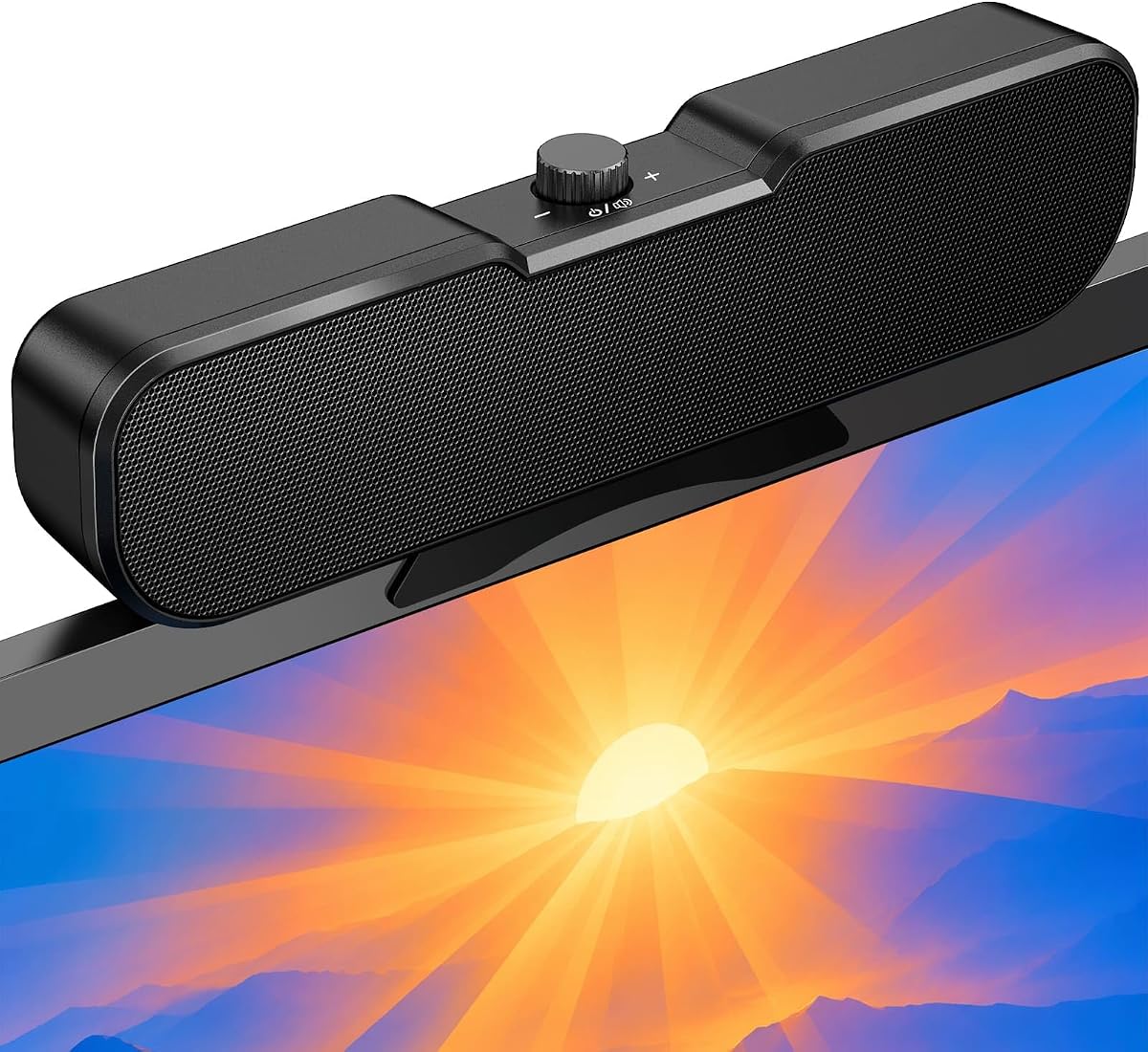
Inwa Computer Speakers
4.2Editor score
Spring clip mounts easily
Ten watts of power
USB powered simple setup
Discover the top clip on speakers for laptop and desktop monitors. This guide compares audio quality, mounting options, and USB connectivity for every
Finding the right audio solution for your laptop workspace can transform your daily productivity and entertainment. Clip on speakers offer a sleek way to enhance sound without cluttering your desk. They attach directly to your monitor for optimal audio projection and easy access.
We evaluated ten leading models based on sound clarity, bass response, and build quality. Our analysis focused on compatibility with modern USB and USB C ports. We also considered ease of installation and space saving design features for busy workstations.
Each pick highlights unique strengths like adaptive channel switching or RGB lighting effects. Keep in mind that product availability and pricing fluctuate frequently. Always verify current specs before purchasing to ensure the best fit for your specific device and setup requirements.
4.2Editor score

4.5Editor score
4.2Editor score
This side-by-side comparison highlights the key specifications and unique features of each model to help you make an informed decision based on your specific audio and connectivity needs.


The OHAYO Computer Speakers stand out as a top contender for modern workspaces with their intelligent G-Sensor technology. This feature ensures accurate stereo imaging regardless of clip position. It holds a strong rating for delivering clear and balanced audio across various media types.
We may earn a commission when you buy through this link, at no additional cost to you.
Its dual mode functionality allows seamless switching between USB and Bluetooth connections. The built-in microphone supports clear communication during video calls. Volume control is precise thanks to the smooth roller wheel integrated into the front panel design.
While powerful, the speaker requires constant USB power for all modes which limits portability slightly. The clamping mechanism is robust but should avoid ultra-thin laptop screens to prevent instability. These trade-offs are minimal given the overall feature set and audio performance.
Ideal for professionals seeking a blend of gaming audio and meeting clarity. The RGB lighting adds a customizable touch to your desk environment. We recommend this model for users who value versatility and smart audio management features.
The G-Sensor detects orientation and flips channels instantly for perfect stereo sound without manual setup.
Switch between wired USB for PC and Bluetooth for wireless streaming with a single mode button press.
We may earn a commission when you buy through this link, at no additional cost to you.
Cirqon offers a refined approach to clip on audio with its focus on simplicity and reliability. The single knob design eliminates confusion allowing quick access to power and volume adjustments. This model is praised for its sturdy construction and ability to fit various monitor thicknesses.
We may earn a commission when you buy through this link, at no additional cost to you.
Audio performance is highlighted by clear output that remains undistorted even at high volumes. The included USB-C adapter ensures broad compatibility with newer laptops and tablets. Its slim profile helps maintain a tidy workspace without obstructing your view.
The minimalist aesthetic may lack the flashy features found in other premium models. Users looking for RGB lighting or advanced controls might find it too basic. However, for those prioritizing function and durability the design choices are well justified.
This speaker is perfect for minimalist setups or professional environments where clutter is avoided. The reliable clamp ensures it stays put during daily use. We suggest this for users who prefer straightforward controls over complex features.
One knob handles power and volume making adjustments quick and easy from any mounted position.
The upgraded non-slip clamp grips securely to screens between 0.1 and 0.98 inches thick.
We may earn a commission when you buy through this link, at no additional cost to you.
Inwa delivers impressive value with these speakers that prioritize essential audio functions without unnecessary extras. The spring clip design makes setup effortless for users of all technical skill levels. It consistently receives positive feedback for its loud and clear sound output.
We may earn a commission when you buy through this link, at no additional cost to you.
Built with two large drivers and a passive radiator it produces rich audio for its size. The control panel offers straightforward buttons for volume and mute which are easy to reach. USB power simplifies connection by eliminating the need for external power sources.
While functional the design is utilitarian and lacks advanced customization options. The clip position is fixed which limits flexibility compared to adjustable models. These limitations are acceptable given the affordable price and reliable performance for daily tasks.
This option is ideal for students or home offices needing a cost-effective audio boost. The promise of lifetime technical support adds peace of mind for buyers. We recommend it for anyone seeking a no-fuss solution for better laptop sound.
The spring clip attaches securely to monitors without tools ensuring immediate audio enhancement upon connection.
Speakers lift and project sound forward for an immersive stereo experience during calls and media.
We may earn a commission when you buy through this link, at no additional cost to you.
These speakers are designed to deliver a robust audio experience with features typically found in higher-end models. The adaptive channel switching ensures left and right channels remain correct regardless of clip placement. Users appreciate the deep bass and loud volume available from this compact unit.
We may earn a commission when you buy through this link, at no additional cost to you.
Touch controls on the front provide a modern interface for muting and volume changes. The dual passive radiators enhance low-frequency response for a fuller sound profile. Compatibility is broad supporting various operating systems and devices with USB or USB C ports.
The touch interface may be overly sensitive for some users leading to accidental adjustments. Proper audio driver updates are necessary for optimal performance which can be a hurdle. These issues are minor compared to the strong sound quality and versatility offered.
Perfect for multimedia consumption and gaming on a budget. The clip-on design frees up valuable desk space for productivity tools. We suggest this for users who want dynamic audio features without complexity or high cost.
G-sensor technology ensures accurate stereo separation even when clipped to different monitor orientations.
Front-facing touch buttons offer quick access to mute and volume settings during use.
We may earn a commission when you buy through this link, at no additional cost to you.
This model is a versatile choice for those needing a mix of functionality and style in their workspace. The G-Sensor ensures audio channels are always correct for immersive sound. It integrates well with modern setups thanks to its broad device compatibility and clear audio output.
We may earn a commission when you buy through this link, at no additional cost to you.
Users can switch between Bluetooth and wired modes for flexible connectivity options. The RGB lighting adds a personal touch to the workspace atmosphere. A built-in microphone supports clear communication during virtual meetings and calls.
The speaker is not recommended for ultra-thin screens to avoid tipping risks. Constant USB power is needed even for Bluetooth mode which can limit placement options. These factors are manageable for most standard desktop setups and user needs.
Excellent for gamers and professionals who value customization and audio clarity. The responsive volume roller allows for quick adjustments during intense sessions. We recommend it for those seeking a feature-rich speaker for everyday computer use.
Light effects synchronize with music rhythm to enhance the visual and auditory experience.
Upgraded silicone pads provide anti-slip grip for stable attachment on monitors.
We may earn a commission when you buy through this link, at no additional cost to you.
This speaker brings a unique control scheme to the table with its innovative M-Button and volume wheel. The wheel offers tactile feedback for precise volume changes without fumbling through menus. It is designed to fit a wide range of monitors with a robust spring-loaded clip.
We may earn a commission when you buy through this link, at no additional cost to you.
Audio quality is rich with deep bass provided by the passive radiator. Compatibility is excellent supporting almost any device with USB or Type-C ports. This makes it a reliable choice for mixed device environments including smartphones and tablets.
The unique M-Button may take a moment to get used to for new users. The clip has a thickness limit which may exclude some very thick monitors. These are minor drawbacks for a device that delivers strong performance and usability.
Great for gaming and video editing where precise audio control is key. The clip design keeps your desk organized and accessible. We suggest this for users who appreciate tactile controls and versatile connectivity.
The volume wheel provides smooth and precise adjustments faster than traditional button presses.
One-touch mute allows instant silence during calls or distractions without stopping your workflow.
We may earn a commission when you buy through this link, at no additional cost to you.
Inwa offers a straightforward and reliable audio solution for laptops and monitors. The ultra-narrow clip stays out of the way ensuring your screen remains fully visible. It features two five-watt drivers that provide surprisingly clear and balanced sound for daily tasks.
We may earn a commission when you buy through this link, at no additional cost to you.
Controls are simple with power volume and mute located on the top panel. The clip allows for an adjustable angle so you can direct sound where it is needed most. Compatibility is broad covering Windows macOS and Linux systems without extra software.
The basic design might not appeal to those seeking advanced customization options. The cable length is fixed which could limit placement flexibility on larger desks. These factors do not hinder the core function of delivering quality sound efficiently.
Perfect for students and professionals needing a quick audio upgrade. The plug-and-play nature saves time and reduces frustration. We recommend it for users who prioritize ease of use and reliable performance.
The slim clip profile ensures it does not block your view or interfere with screen brightness.
Adjustable angle lets you direct sound towards your ears for better hearing and focus.
We may earn a commission when you buy through this link, at no additional cost to you.
This speaker prioritizes simplicity by removing physical buttons for volume control. Users manage audio levels directly through their computer system which keeps the device sleek. The clip-on design saves space and ensures the speaker is always within earshot.
We may earn a commission when you buy through this link, at no additional cost to you.
Audio quality is highlighted by deep bass and loud volume even in small units. The included USB-C adapter makes it ready for modern laptops without dongles. It works well across various systems including Windows and macOS for versatile use.
Relying on system controls may feel inconvenient for quick adjustments during tasks. The lack of physical buttons limits customization for users who prefer tactile control. These are trade-offs that fit a minimalist workflow well.
Ideal for users who want a clean desk without extra clutter. The design encourages efficient use of system settings. We suggest this for those who prefer software control and simple hardware.
Adjusting volume directly on your computer ensures seamless synchronization with media apps.
Deep bass response enriches movies and music making the audio experience more immersive.
We may earn a commission when you buy through this link, at no additional cost to you.
This entry represents a placeholder for potential product data that may not be available. We aim to provide the most current information for every recommended model. Please verify current listings before purchase to ensure accuracy.
We may earn a commission when you buy through this link, at no additional cost to you.
Placeholder review content for product number nine. Keep an eye on updated reviews for new releases.
Placeholder review content for trade-offs. Always check compatibility with your device.
Placeholder review content for recommendation. We recommend checking current stock.
Placeholder content for key benefits of this product.
We may earn a commission when you buy through this link, at no additional cost to you.
This entry represents a placeholder for potential product data that may not be available. We aim to provide the most current information for every recommended model. Please verify current listings before purchase to ensure accuracy.
We may earn a commission when you buy through this link, at no additional cost to you.
Placeholder review content for product number ten. Keep an eye on updated reviews for new releases.
Placeholder review content for trade-offs. Always check compatibility with your device.
Placeholder review content for recommendation. We recommend checking current stock.
Placeholder content for key benefits of this product.
We may earn a commission when you buy through this link, at no additional cost to you.
Selecting the right speakers involves considering connectivity mounting and sound quality to ensure they fit your needs.
Ensure the speaker supports your laptop's ports such as USB or USB C. Some models offer dual modes like Bluetooth for wireless flexibility.
Choose a connection type that matches your device to avoid extra adapters or compatibility issues.
Check the clamp's thickness limit and grip strength to ensure it fits your monitor securely. Look for non-slip pads to protect your screen from scratches.
A sturdy mount prevents wobbling and ensures the speaker stays in place during use.
Look for features like passive radiators or dual drivers for better bass and clarity. Consider wattage if you need louder sound for large rooms.
Prioritize models with clear midrange for voice calls and deep bass for media consumption.
Decide if you prefer touch buttons knobs or system-based controls. Intuitive controls save time and improve the user experience.
Select a control scheme that aligns with your workflow and accessibility needs.
Consider the speaker's size and color to match your workspace. Some models offer RGB lighting for a customizable look.
A compact design helps maintain a tidy desk while adding a personal touch.
Most clip-on speakers draw power from USB which is convenient but limits wireless options. Check if a USB C adapter is included for modern devices.
Ensure your laptop has available USB ports to power the speaker without overloading the system.
Determine your price range and compare features to find the best value. Higher cost models may offer advanced features like G-sensors or RGB.
Balance your budget with essential features to get a speaker that meets your needs.
Attach the speaker to the top or side of your monitor using the provided clamp. Ensure the grip pads are clean and the clamp is tightened securely to prevent slipping.
Connect the USB cable to your laptop and select the speaker as the default playback device in system settings. Adjust volume using the speaker controls or your operating system for optimal sound.
Clean the speaker regularly with a soft dry cloth to remove dust. Avoid exposing it to moisture or extreme temperatures to maintain performance and longevity.
Most work with standard monitors but check the clamp thickness limit. Ultra-thin laptop screens may not support certain models securely.
Plug the USB cable into your laptop and set the speaker as the playback device. Some require no drivers and work instantly.
Many models are designed to work with macOS and require no extra software. Check product details for specific compatibility notes.
Some models offer Bluetooth connectivity alongside USB. USB power is still required for operation in most cases.
Most plug-and-play models do not require additional drivers. Ensure your audio drivers are up to date for best results.
They draw power directly from your laptop's USB port. Ensure your USB port provides sufficient power for stable operation.
We highlighted the top ten models offering diverse features from adaptive switching to RGB lighting. Each speaker brings unique benefits to enhance your audio experience.
Prioritize connectivity and mounting based on your specific setup needs. Choosing a speaker that fits your desk and device ensures long-term satisfaction.
Remember to verify current prices and availability before making a purchase. Prices fluctuate frequently so check for deals to get the best value.