
Acer Nitro 29.5in Curved Gaming Monitor
4.3Editor score
200Hz refresh rate
AMD FreeSync Premium
1ms response time
Finding the right display for your setup can be challenging when you need extra screen real estate without breaking the bank. A cheap ultrawide monitor offers a wide aspect ratio that enhances productivity and gaming immersion while keeping costs low for budget-conscious shoppers.
We have carefully selected and compared ten top-rated models available in the market today to help you make an informed decision. Each product was evaluated based on panel quality, refresh rate, connectivity options, and overall value to ensure you get the most bang for your buck.
Every pick in this list highlights specific strengths such as color accuracy, refresh rates, or ergonomic stands so you can find the perfect fit. Keep in mind that availability and deals change frequently so check current listings before making your final purchase decision today.
4.3Editor score

4.4Editor score

4.6Editor score
As an Amazon Associate we earn from qualifying purchases.
The following comparison table presents a side-by-side overview of all ten monitors included in this guide to help you quickly identify key differences in resolution refresh rate and connectivity options.


This monitor stands out as a top contender for anyone seeking high performance without breaking the bank. It features a 34-inch curved display with UWQHD resolution and an impressive 200Hz refresh rate that ensures smooth visuals for gaming and productivity.
We may earn a commission when you buy through this link, at no additional cost to you.
The inclusion of AI features such as blue light reduction and crosshair optimization adds unique value for gamers who want enhanced comfort and precision. The fast VA panel delivers deep blacks and vibrant colors which makes media consumption and work tasks equally enjoyable.
While it lacks built-in speakers and a fully adjustable stand which are common compromises at this price point the VESA compatibility allows you to mount it on an arm for a cleaner setup. The 1ms response time and support for VRR ensure you avoid motion blur and tearing during intense sessions.
If you prioritize refresh rate and resolution over ergonomic features this monitor delivers exceptional value. It is ideal for gamers and multitaskers who want a wide canvas and fluid motion without spending premium prices on higher-end models.
The 200Hz refresh rate provides fluid motion that is rare in budget monitors making competitive gaming feel responsive and smooth.
AI tools like blue light reduction and crosshair assist enhance user experience by reducing eye strain and improving aiming precision.
We may earn a commission when you buy through this link, at no additional cost to you.
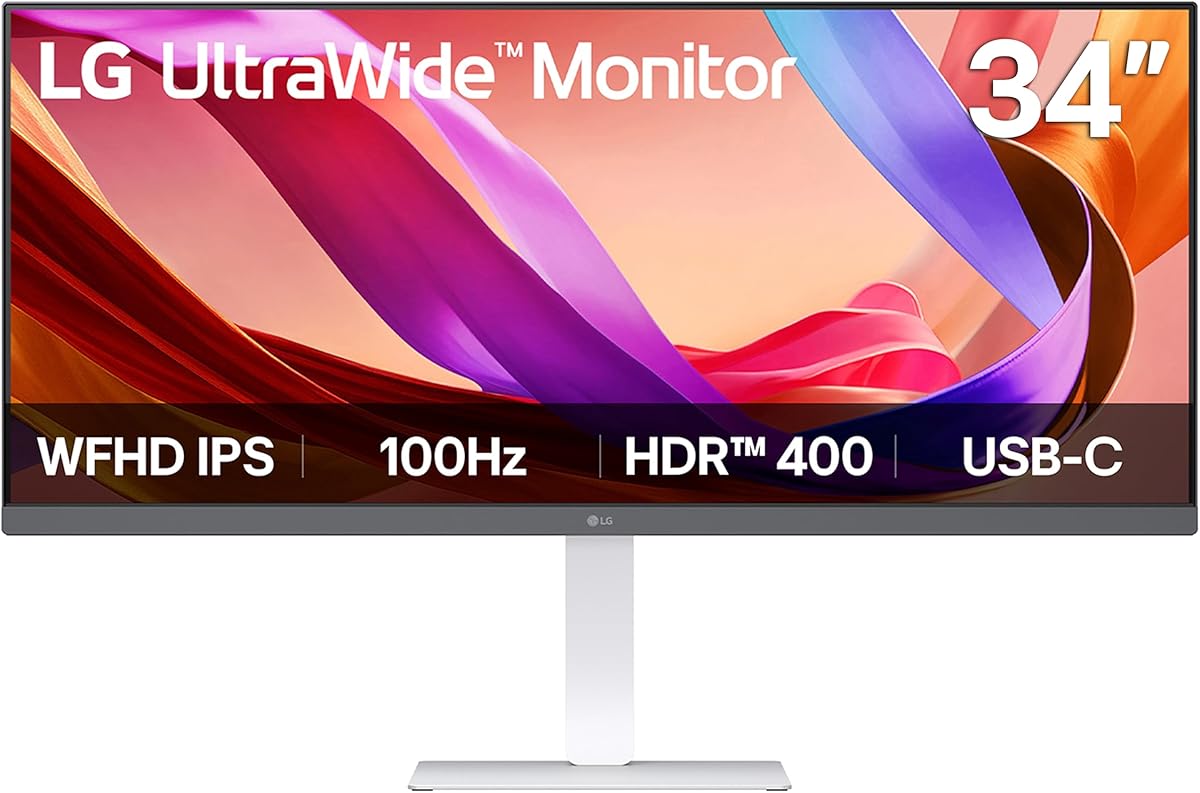
The LG 34U530A-W offers a practical solution for users who need a wide screen for work and general entertainment. Its IPS panel ensures consistent colors across wide viewing angles and the USB Type-C connection simplifies setup for laptops.
We may earn a commission when you buy through this link, at no additional cost to you.
With features like Height Height and Swivel adjustments this monitor supports better ergonomics compared to many budget models. The built-in speakers with Waves MaxxAudio provide decent sound for calls and media which reduces clutter from external speakers.
Although the resolution is WFHD rather than UWQHD it remains sharp enough for most office tasks and casual gaming. The Switch app enhances productivity by allowing quick screen splits which helps manage multiple windows efficiently.
This model is perfect for office workers or students who value ergonomics and connectivity over raw gaming specs. It delivers a comfortable viewing experience and reliable performance for everyday computing needs.
Adjustable height and tilt reduce neck strain during long work sessions improving comfort and posture over time.
Single cable connectivity transfers data and display signals simplifying desk setups for laptop users significantly.
We may earn a commission when you buy through this link, at no additional cost to you.
This MSI monitor combines high resolution with eye care features making it suitable for professionals who spend long hours at their desks. The 120Hz refresh rate offers smooth motion for casual gaming while the UWQHD resolution provides ample space for work apps.
We may earn a commission when you buy through this link, at no additional cost to you.
Certified Low Blue Light and Flicker Free technologies help reduce eye strain which is critical for writers and coders. The VA panel ensures good contrast which makes dark scenes in videos look detailed and vibrant.
While the stand lacks height adjustment the tilt function and VESA compatibility allow you to customize the viewing angle. Firmware updates ensure the monitor stays optimized over time which adds to its longevity and value.
Ideal for office professionals this monitor balances performance with health-focused features. It provides a clear sharp image that supports detailed work without causing unnecessary fatigue.
Low Blue Light and Flicker Free modes reduce strain making long reading or coding sessions more comfortable.
3440 x 1440 resolution allows multiple windows side-by-side improving multitasking efficiency significantly.
We may earn a commission when you buy through this link, at no additional cost to you.
The LG 34WR55QK-B stands out with its premium features like a height adjustable stand and USB-C with power delivery. These elements make it a top choice for professionals who want a polished setup without needing extra accessories.
We may earn a commission when you buy through this link, at no additional cost to you.
HDR10 support enhances video playback with better brightness and contrast which is great for media consumption. The curved screen wraps around your vision providing an immersive experience that standard flat screens cannot match.
While the 5ms response time may lag slightly behind dedicated gaming monitors it is negligible for most general use. The OnScreen Control app simplifies adjustments and window management making workflow more efficient.
If you need a reliable high quality display for work and creative tasks this model delivers on all fronts. It combines ergonomic comfort with robust connectivity options for a seamless user experience.
Charge laptops while connecting display and data through one cable reducing desk clutter significantly.
Software interface allows quick window splitting and setting changes enhancing productivity workflows.
We may earn a commission when you buy through this link, at no additional cost to you.
This LG model excels in visual quality thanks to its IPS panel and 99% sRGB coverage. Colors appear vibrant and consistent making it a strong choice for designers or anyone who values accurate visuals.
We may earn a commission when you buy through this link, at no additional cost to you.
The curved design and HDR10 support add depth to media consumption which enhances the viewing experience significantly. Built-in speakers with DepthSound provide clear audio for calls without needing external devices.
While the stand is space-saving it lacks height adjustment which might require a monitor arm for better ergonomics. The Switch app allows easy screen customization making multitasking easier across different applications.
For creative professionals this monitor delivers color fidelity and visual immersion that are hard to find at this price. It is perfect for photo editing and multimedia work where clarity matters.
99% sRGB coverage ensures vibrant and consistent colors ideal for creative professionals.
Subtle curve follows natural line of sight reducing eye strain and improving focus.
We may earn a commission when you buy through this link, at no additional cost to you.
Samsung's focus on eye care makes this monitor a top pick for users who spend long hours in front of the screen. The ambient light sensor and Eye Saver Mode help reduce strain automatically adjusting brightness to match the room.
We may earn a commission when you buy through this link, at no additional cost to you.
The virtually bezel-free design creates an immersive viewing experience which is great for both work and gaming. HDR10 support adds dynamic range to videos making dark scenes more detailed and vibrant.
While the response time is not the fastest it is acceptable for casual gaming and daily use. PBP and PIP modes allow you to view multiple inputs on one screen which boosts productivity significantly.
If eye comfort and design are your priorities this monitor delivers excellent value. It is ideal for professionals who want a comfortable long term viewing experience.
Automatically adjusts brightness to room lighting reducing eye strain during long sessions.
Minimal bezels create a seamless look that enhances focus and aesthetics.
We may earn a commission when you buy through this link, at no additional cost to you.
Handpicked by Amazon this monitor reflects a curated selection of quality models for home office use. The combination of thin bezels and high resolution provides a modern look that fits well in professional settings.
We may earn a commission when you buy through this link, at no additional cost to you.
AMD FreeSync ensures smooth visuals even during light gaming which adds versatility to its work capabilities. The 100Hz refresh rate makes scrolling and moving windows feel fluid and responsive.
While the stand lacks height adjustment the tilt function helps reduce glare and improve viewing angles. Eye Care features ensure that even after hours of work your eyes remain comfortable and focused.
For home offices this monitor offers a balance of style performance and comfort. It supports multitasking with PBP modes and delivers a clean aesthetic.
View two inputs simultaneously enhancing productivity by managing multiple tasks efficiently.
Minimal borders maximize screen space for an immersive viewing experience.
We may earn a commission when you buy through this link, at no additional cost to you.
CRUA offers impressive performance at a budget-friendly price point with this 165Hz UWQHD monitor. It delivers fluid motion and vibrant colors thanks to the IPS panel and high refresh rate.
We may earn a commission when you buy through this link, at no additional cost to you.
Built-in speakers and PIP/PBP modes add convenience for users who want to reduce desk clutter. The 165Hz refresh rate makes competitive gaming smooth and responsive which is rare for this price.
While the brand is less known the quality is competitive with larger manufacturers. The wide viewing angles ensure colors remain consistent even when viewed from the side.
If you are on a tight budget this monitor is a fantastic option for gaming and work. It delivers high-end specs without the premium price tag.
165Hz refresh rate ensures fluid motion for smooth competitive gaming experiences.
Vibrant and accurate colors enhance media consumption and gaming immersion.
We may earn a commission when you buy through this link, at no additional cost to you.
This Acer monitor is one of the most affordable options on the list making it perfect for entry-level gamers. The 200Hz refresh rate and 1ms response time ensure smooth motion even on a lower resolution panel.
We may earn a commission when you buy through this link, at no additional cost to you.
The curved design wraps around your field of view which improves immersion significantly. AMD FreeSync Premium syncs the refresh rate with your GPU to eliminate screen tearing and stuttering.
While the resolution is lower than UWQHD it remains sharp enough for most users who prioritize speed over detail. The stand allows tilt adjustments but lacks height customization which is typical at this price.
If you need a fast responsive monitor for competitive games this model is ideal. It delivers performance that matches much more expensive models.
Extreme refresh rate ensures ultra-smooth motion for competitive gaming.
Curved screen wraps around your vision for a more immersive experience.
We may earn a commission when you buy through this link, at no additional cost to you.
KTC delivers exceptional value with a high refresh rate and UWQHD resolution at a competitive price. The HVA panel ensures deep blacks and vibrant colors making media consumption and gaming enjoyable.
We may earn a commission when you buy through this link, at no additional cost to you.
Adjustable stand features including height and pivot allow you to customize the view for comfort. The 180Hz refresh rate provides smooth motion that supports both work and casual gaming tasks well.
While the brand is lesser known the warranty and support provide peace of mind for buyers. The contrast ratio ensures details remain visible in dark scenes which enhances realism.
If you want high specs without premium pricing this monitor is a smart choice. It balances performance features and value effectively for most users.
Deep blacks and vibrant colors enhance realism in games and movies.
Height and pivot adjustments allow you to find the perfect viewing angle.
We may earn a commission when you buy through this link, at no additional cost to you.
Choosing the right monitor involves weighing several key factors to ensure it fits your budget and usage needs.
Panel type determines color accuracy and contrast levels. IPS panels offer wider viewing angles and better color consistency ideal for creative work. VA panels provide deeper blacks which improve contrast for media consumption.
Refresh rate affects motion smoothness in gaming and scrolling. Higher rates like 144Hz or 200Hz reduce motion blur for fast-paced games. Budget models often offer 60Hz which is sufficient for office work.
Resolution defines image sharpness and workspace size. UWQHD (3440 x 1440) offers more screen space than WFHD. Ensure your graphics card supports the resolution for smooth performance.
Adjustable stands improve posture and reduce strain during long sessions. Look for tilt height and swivel options. VESA mounts offer flexibility if you want to use a monitor arm.
Ports like HDMI DisplayPort and USB-C allow you to connect various devices. USB-C with power delivery simplifies laptop setups. Ensure the monitor supports your required refresh rate via selected ports.
Response time measures how fast pixels change colors. Lower times like 1ms reduce ghosting during gaming. Most budget monitors range between 1ms and 5ms which is acceptable for general use.
High color accuracy is vital for designers and photo editors. Look for sRGB coverage of 99 percent or higher. HDR support adds dynamic range which improves visual depth.
Established brands often offer better build quality and support. However newer budget brands like KTC and CRUA provide competitive features. Read reviews to ensure warranty and reliability.
Always plug your monitor directly into a wall outlet using the provided power adapter. Avoid using it to protect it from power surges during storms.
Use the included HDMI or DisplayPort cable to connect to your computer. Ensure the cable supports the monitor's refresh rate and resolution.
Clean the screen gently with a microfiber cloth to remove dust and fingerprints. Do not use harsh chemicals or spray water directly on the panel.
An ultrawide monitor offers a wider aspect ratio that allows you to view more content side by side. This improves productivity for multitasking and immersion for gaming.
Many budget models feature high refresh rates and adaptive sync which are excellent for gaming. Look for specs like 144Hz or higher for competitive titles.
Yes higher resolutions like UWQHD require more graphics power. Ensure your GPU can handle the resolution and refresh rate for smooth performance.
Most monitors include VESA compatibility which allows wall mounting or use of monitor arms. Check the specific model specs to confirm support.
UWQHD offers more space for spreadsheets and documents than standard HD. It is ideal for professionals who need to manage multiple windows.
Some models include speakers but quality varies. If audio is important consider checking specs or adding external speakers for better sound.
Enable features like blue light filters and adjust brightness to match room lighting. Taking regular breaks and maintaining proper distance also helps.
Yes warranty ensures you are covered if hardware fails. Look for models offering at least a one-year warranty for peace of mind.
We have reviewed ten affordable monitors that deliver impressive performance for their price. Each model offers unique strengths depending on your needs for gaming productivity or design.
Consider your priorities such as refresh rate resolution or ergonomic features before making a final decision. Investing in the right monitor improves both your work experience and leisure time.
Prices and availability change quickly so check the current listings before buying. Keep an eye on deals to get the best value for your chosen model.