
Zobirez 750W 10-Port Fast Charger
4.6Editor score
750W Total Output
Five 120W USB-C Ports
Durable One-Piece Slots
This guide compares the top 10 charging stations for multiple devices to help you find the perfect multi port dock for your home office setup needs.
Keeping all your devices powered up can be a real challenge in today's tech heavy world. A good charging station for multiple devices helps organize cables and saves outlets.
We compared ten real products based on port types, power output, safety features, and build quality to find the best options for your needs today.
Each pick shows key specs, pros, and cons so you can decide quickly. Prices and availability may change so check current listings before you buy.
4.6Editor score

4.6Editor score

4.5Editor score
Here is a side-by-side look at all ten models to help you compare power, ports, and design at a glance.




The Zobirez 420W 10-Port Fast USB Charging Station is a practical choice for those needing many ports at a reasonable cost. It holds a strong 4.5 rating from users who appreciate its ability to tidy up a cluttered desk.
We may earn a commission when you buy through this link, at no additional cost to you.
This station shines with its ten ports and four USB output which is enough for phones and tablets. It comes with eight short mixed cables so you can start using it right away without hunting for extra cords.
The main trade off is that it is not built for heavy laptops which need more than 65 watts. Also the included cables are short so you may need longer ones for reach across a large desk.
If you need a simple way to charge ten devices at once and want to save space this station is a solid buy for families and offices.
The built-in slots keep devices upright and separate which prevents tangling and makes it easy to grab one phone at a time.
It has over-voltage and overheat protection to keep your gear safe while charging overnight or when you are away from home.
We may earn a commission when you buy through this link, at no additional cost to you.
The Zobirez 750W 10-Port Fast Charger delivers massive power to handle everything from phones to laptops at once. With a 4.6 rating it stands out for its ability to charge high-end devices quickly.
We may earn a commission when you buy through this link, at no additional cost to you.
Each USB-C port can push up to 120 watts which means you can charge two laptops and a phone at full speed. The kit includes ten cables so everyone has their own cord ready to go.
The station is quite large so it takes up more space on a desk. The price is also higher than basic models but you get much more power and flexibility in return.
For households with many devices and laptops this dock removes the need for multiple wall bricks and keeps everything neat in one spot.
With 120 watts per USB-C port it can charge MacBook Pro and other power hungry laptops without slowing down when other devices are plugged in.
The included ten cable set covers USB-C Lightning and Micro-USB so you do not need to buy extra wires to get started right away.
We may earn a commission when you buy through this link, at no additional cost to you.
The Anker Prime 200W 6-Port GaN Desktop Charger is a top pick for its mix of power and safety. It has a 4.6 rating and users trust Anker for durable and well built charging solutions.
We may earn a commission when you buy through this link, at no additional cost to you.
It uses GaN tech to stay cool and small while pushing 200 watts. You can charge two USB-C devices at 100 watts each which works great for laptops and tablets at the same time.
It only has six ports and no cables so you may need to add your own wires. But for quality and reliability it is hard to beat for daily home or office use.
If you value a trusted brand and safe fast charging this charger is a smart investment that will last for years.
GaN allows the charger to be smaller and cooler which means it takes less desk space and feels safe to touch while in use.
The built in system checks temperature and power flow to stop damage and keep your devices safe during long charging sessions.
We may earn a commission when you buy through this link, at no additional cost to you.
The USB Fast Charger Block is a tiny hub that fits in any bag and charges six devices at once. It has a 4.3 rating and is designed for people who travel or want a small desk solution.
We may earn a commission when you buy through this link, at no additional cost to you.
It offers 100 watts total which is enough for phones and tablets but not for big laptops. The included five foot cord helps reach outlets behind a nightstand or under a desk.
Because it is made for mobile devices you should not use it with high power laptops. But for a travel kit or small desk it is a neat and handy tool to have.
If you need something portable that works well for phones and earbuds this little block is a smart pick.
Its small size and light weight make it easy to pack in a laptop bag or carry on without adding bulk.
The five foot detachable cord adds reach to outlets behind furniture so you can place it where you need it most.
We may earn a commission when you buy through this link, at no additional cost to you.
The Anker MagGo 3-in-1 is a wireless dock made for iPhone Apple Watch and AirPods. It has a 4.6 rating and offers a clean setup without plugs on your nightstand.
We may earn a commission when you buy through this link, at no additional cost to you.
It gives full 15 watts to your phone and can charge an Apple Watch in about one hour. You can adjust the angle to use StandBy mode which is great for a bedside clock.
This dock only works with Apple gear so it is not good if you have Android phones. There are also no wired ports so you must use wireless charging pads.
If you are all in on Apple devices this dock looks great and keeps your nightstand free of wires.
The magnets hold your iPhone in place so it charges fast without slipping off the pad during the night.
It includes a spot for your Apple Watch so you can charge both your phone and watch on one compact stand.
We may earn a commission when you buy through this link, at no additional cost to you.
The Anker Desktop Charger combines a power strip with six USB ports so you can plug in lamps and phones all at once. It has a 4.7 rating and is built for a busy desk setup.
We may earn a commission when you buy through this link, at no additional cost to you.
It gives 100 watts through USB and has three outlets for big plugs. The surge protection helps save your gear from power spikes which is key for home offices.
It is wider than a small brick and takes up more desk space. But if you need both AC and USB ports this one saves you from using two different devices.
For a workspace that needs many power options this combo strip is a practical choice.
You get three wall outlets and six USB ports in one unit which reduces clutter and keeps everything powered from a single place.
The 300 joule surge guard protects your electronics from power surges which helps your devices last longer.
We may earn a commission when you buy through this link, at no additional cost to you.
The MSTJRY 5-Port Multi USB-A Charger Station is a basic dock for older devices that use USB-A. It has a 4.3 rating and is easy to set up with seven included cables.
We may earn a commission when you buy through this link, at no additional cost to you.
It offers five ports and a power switch so you can control when it is on. The cables fit many common phones and tablets which saves you from buying extra ones.
It does not have USB-C so it may be slow for newer phones. But for a guest room or kids area it does the job well for less money.
If you need a simple and cheap way to charge a few older phones this dock is a decent pick.
The seven included cables mean you can start charging right away without needing to buy extra wires.
The power switch gives a clear sign when the dock is on so you know it is active and charging.
We may earn a commission when you buy through this link, at no additional cost to you.
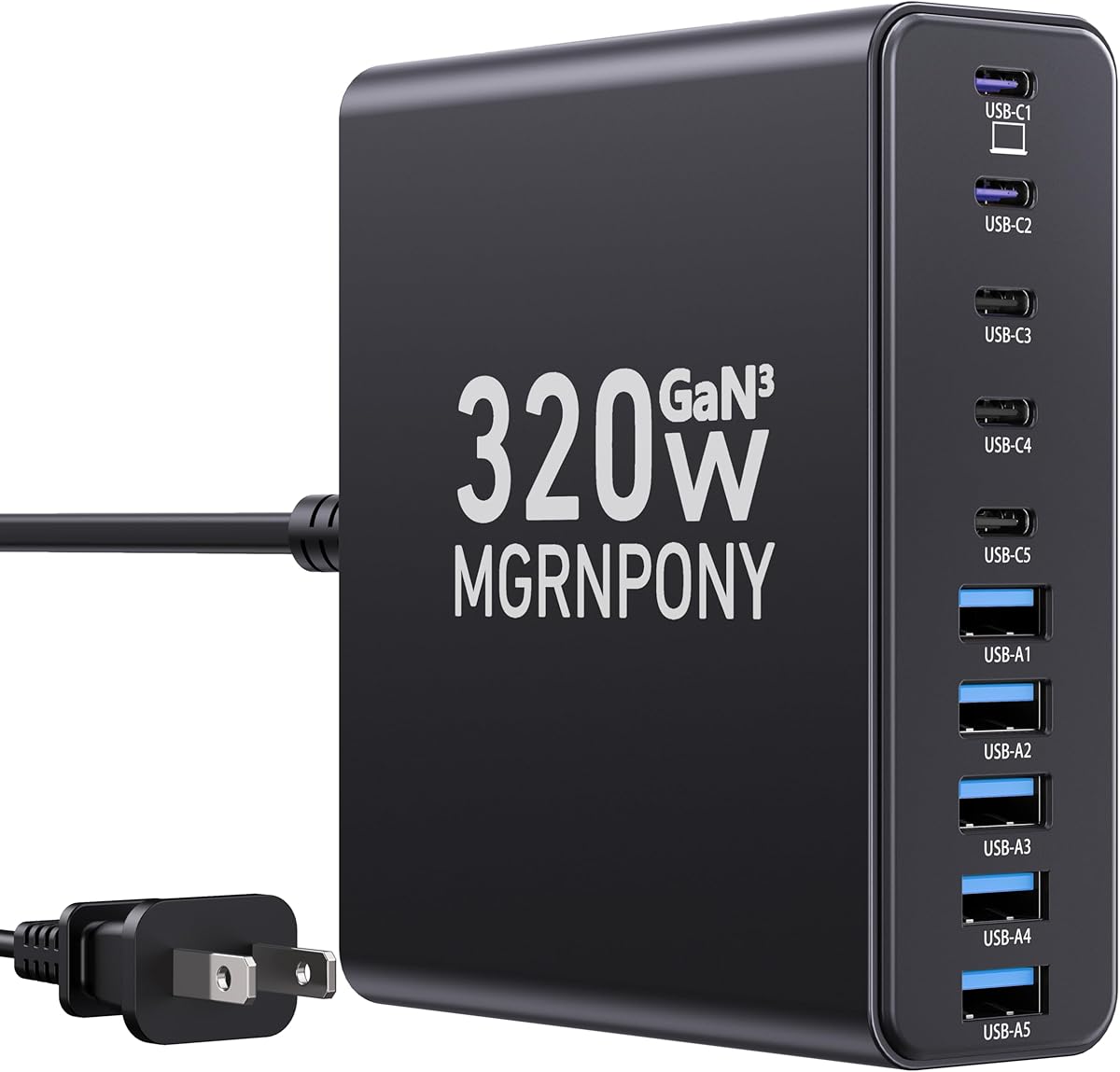
The MGRNPONY 320W 10-Port GaN USB C Charging Station gives strong power to ten devices at once. It has a 4.5 rating and uses GaN tech to stay cool and safe.
We may earn a commission when you buy through this link, at no additional cost to you.
It can charge laptops and phones together which is great for shared spaces. The design can stand up or lie flat so you can choose what fits your desk.
It costs a bit more than basic units but the power and safety are worth it. The cables may be short so you should check the reach before you buy.
If you need to charge many devices and some laptops this dock is a strong all around pick.
The GaN III tech protects your devices from heat and overcharging which keeps everything safe during long use.
You can place it vertically or horizontally to save space and fit your desk or shelf layout.
We may earn a commission when you buy through this link, at no additional cost to you.
The 8-in-1 Retractable Charger uses built-in cords that pull back so your desk stays clean. It has a 4.4 rating and is a neat option for those who hate cable clutter.
We may earn a commission when you buy through this link, at no additional cost to you.
It can charge eight devices at once and uses GaN tech for speed. The cords extend up to 31 inches so you can reach nearby phones and tablets.
The cords may wear out over time and it is not made for big laptops. But for a desk or nightstand it keeps things tidy and easy to use.
If you want to hide your wires and charge many devices this retractable dock is a clever pick.
The cords pull back into the dock so you do not have tangled wires lying on your desk.
It holds eight ports so you can charge phones earbuds and tablets all at once.
We may earn a commission when you buy through this link, at no additional cost to you.
The Lcssio 300W 8-Port Fast Charger is built to handle laptops and phones together. It has a 4.5 rating and uses dual 65 watt ports for high power devices.
We may earn a commission when you buy through this link, at no additional cost to you.
The fixed slots hold devices in place without wobbling so they charge safely. It comes with a cable pack and has protections against heat and overcharge.
It has eight ports which is fewer than some ten port models. But for a family setup that needs to charge laptops and tablets it is a strong and safe choice.
If you want a sturdy dock that works for the whole family this one is a smart pick.
The fixed slots keep devices steady and upright which helps prevent drops and tangles during charging.
Two ports can push 65 watts so you can charge laptops like MacBook Pro while still charging other devices.
We may earn a commission when you buy through this link, at no additional cost to you.
Use this guide to find a charging station that fits your devices and desk needs.
Total wattage tells you how much power the station can give to all ports at once. If you plan to charge a laptop and phones together you need high total wattage to keep speeds fast.
Look for at least 200 watts if you have laptops and more if you have multiple laptops at the same time.
Port count shows how many devices you can plug in at once. A higher count is best for families or offices with many people.
Choose ten ports for big groups and six to eight for small households.
USB-C ports are needed for laptops and new phones. USB-A ports work for older devices and small gadgets.
Get a mix of both if you have older and newer gear.
Fast charging support like PD or GaN helps devices charge in less time. Not all ports can charge fast at once.
Check which ports support high wattage before you buy.
Build quality affects how long the station lasts and how safe it is. Look for flame retardant materials and sturdy slots.
Solid one-piece designs are more durable than removable parts.
Some stations come with cables and some do not. If cables are not included you will need to buy them separately.
Look for included cables if you want to save time and money.
Safety features protect your devices from heat and power issues. Look for over-voltage and overheat protection.
These features help your gear last longer and stay safe.
Footprint size is how much desk space the station takes. A small size is best for small desks and travel.
Measure your desk before you buy to make sure it fits.
Plug the charging station into a wall outlet and turn on the power switch if there is one.
Connect each device to a port using the included cables or your own cords.
Clean the surface with a dry cloth to keep it working well.
Most stations can charge between six and ten devices at once. The exact count depends on how many ports the model has and how much power you need.
Some stations share power across ports which can slow down charging. Look for models with high total wattage and fast ports to avoid slowdown.
Yes but you need a station with enough power like 65 watts or more per port. Not all models can charge laptops so check the specs.
Most are safe if they have overheat and overcharge protection. Always use models from trusted brands and follow the safety rules.
Some stations come with cables and some do not. Check the product details before you buy to see what is included in the box.
Unplug it and wipe the surface with a dry soft cloth. Do not use water or cleaners that could damage the ports.
We looked at ten models from budget to high power to find the best charging stations for multiple devices. The Zobirez 750W is great for many laptops and the Anker Prime is a top pick for safety.
When you choose look at total wattage port count and build quality. Pick one that fits your desk and supports your devices.
Prices and deals can change so check current listings before you buy. The right station will keep all your tech charged and your desk clean.