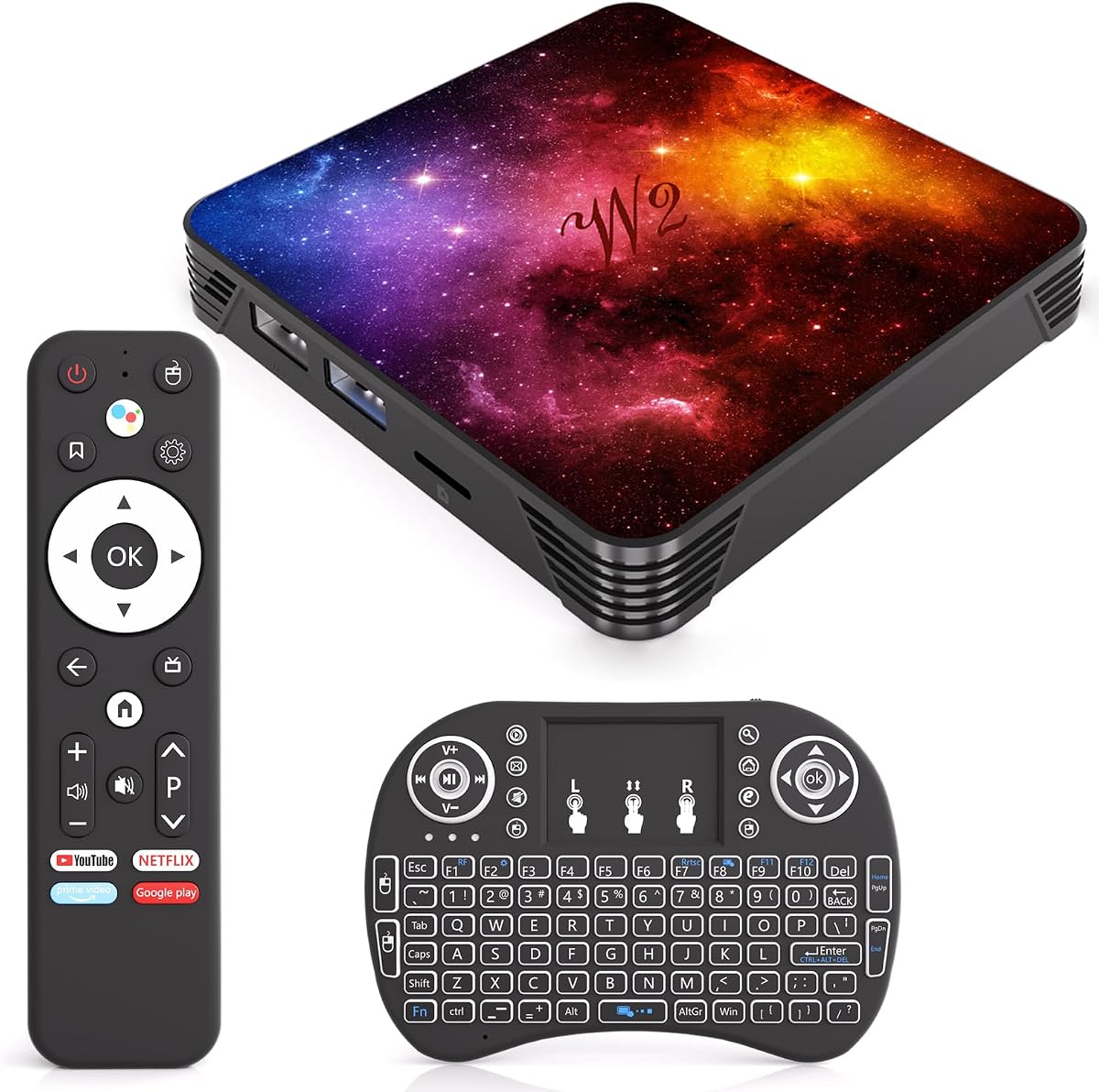
Android 14.0 TV Box
5.0Editor score
4GB RAM 64GB ROM
Quad-Core Processor
Dual Band WiFi
This guide compares the top Android TV Box models for streaming 4K content, gaming, and smart home control with expert analysis on performance and features.
Finding the right streaming device can transform your television into a powerful entertainment hub. An Android TV Box offers access to thousands of apps, games, and streaming services directly on your screen.
We evaluated ten popular models based on hardware performance, interface quality, connectivity options, and user feedback. Each product was analyzed to determine its value for different viewer needs and budgets.
Every pick below highlights specific strengths and potential limitations. Prices and availability fluctuate frequently so checking current listings ensures you get the most up to date information before buying.
5.0Editor score

4.4Editor score

4.3Editor score
This side by side comparison highlights key specifications across all ten selected devices to help you quickly identify the model that fits your specific entertainment requirements.





This Xiaomi TV Box S 3rd Gen ranks as our top pick for its balanced performance and modern features. It supports 4K Ultra HD streaming at 60FPS with Dolby Vision and Atmos for immersive visuals and audio.
We may earn a commission when you buy through this link, at no additional cost to you.
The Google TV platform offers personalized recommendations and easy access to major streaming apps. Its quad-core CPU and Wi-Fi 6 connectivity ensure smooth navigation and quick app launches without lag or buffering.
While it lacks an Ethernet port and has modest 32GB storage, these trade-offs are acceptable given its price and performance. The compact size fits discreetly behind most televisions for a clean setup.
Anyone seeking a reliable upgrade for their TV should consider this model. It delivers high-quality streaming with minimal setup effort and integrates well with smart home devices via Google Assistant.
Dolby Vision and Atmos deliver enhanced contrast, brightness, and surround sound for a theater-like feel at home.
Wi-Fi 6 provides greater bandwidth and speed for instant playback of high-resolution content without interruptions.
We may earn a commission when you buy through this link, at no additional cost to you.
This Android 14.0 TV Box stands out for offering the latest operating system at an accessible price point. It supports 4K Ultra HD streaming and comes with ample 4GB RAM and 64GB storage for apps and media.
We may earn a commission when you buy through this link, at no additional cost to you.
The included mini keyboard makes text entry far easier than using a standard remote. Dual band Wi-Fi ensures stable connections for streaming high-definition content without frequent dropouts or lag.
Though it lacks advanced HDMI 2.1 features and has less detailed hardware specs than premium models, it delivers reliable daily performance. The system is optimized for smooth multitasking and fast app launches.
Budget conscious buyers will appreciate its value and versatility. It turns any standard TV into a functional smart system quickly while supporting a wide range of apps and games.
Android 14.0 provides a secure responsive interface with access to a broad selection of modern applications.
64GB internal ROM allows you to store plenty of videos games and files without running out of space.
We may earn a commission when you buy through this link, at no additional cost to you.
The Google TV Streamer 4K delivers fast personalized entertainment directly from the source. It offers up to 4K HDR with Dolby Vision for captivating detail and immersive 3D sound with Atmos support.
We may earn a commission when you buy through this link, at no additional cost to you.
Its home screen aggregates content from all your services and provides tailored recommendations based on viewing habits. You can watch live TV and access over 800 free channels without extra subscriptions or hardware.
While the price is higher than many competitors and the HDMI cable is sold separately, the performance and ecosystem integration justify the cost. It is ideal for households deeply invested in Google services.
Users wanting a seamless smart home experience with quick voice search and control should choose this model. It simplifies navigation across apps and devices with intuitive Google Assistant features.
Tailored recommendations help everyone find new shows and movies based on their unique interests and habits.
Use voice commands to control lights and other connected devices without needing a separate controller.
We may earn a commission when you buy through this link, at no additional cost to you.
This variant of the Xiaomi TV Box S 3rd Gen focuses on cinematic visuals with support for HDR10+ and Dolby Vision. The 6nm platform ensures smooth operation while the 360° remote offers flexible control from any angle.
We may earn a commission when you buy through this link, at no additional cost to you.
Google TV integration provides personalized recommendations and cross app search to help you find content quickly. Wi-Fi 6 connectivity enhances bandwidth for instant playback of high resolution online media without buffering.
The device enforces authorized app usage and restricts unlicensed content which may limit flexibility for some users. Still the hardware delivers reliable performance for mainstream streaming services and games.
Households seeking a polished interface and crisp image quality will find this box valuable. It balances performance and convenience while maintaining a small footprint behind your television.
The 360 Bluetooth remote works from any direction and supports voice commands for hands free operation.
The 6nm architecture reduces power use while improving responsiveness for app switching and multitasking.
We may earn a commission when you buy through this link, at no additional cost to you.
The 2026 Android TV Box emphasizes forward looking specs with 8K HDR decoding and 128GB of internal storage. It runs on Android 14 to ensure smooth daily operation across various streaming software and offline games.
We may earn a commission when you buy through this link, at no additional cost to you.
High speed Wi-Fi 6 and Bluetooth 5.0 connectivity enable faster network transmission and stable pairing with wireless peripherals. USB 3.0 and LAN ports allow for storage expansion and reliable wired connections if needed.
While 8K content is still emerging and the brand is generic, the hardware offers ample headroom for future upgrades. The plug and play design makes setup easy without complicated settings or configurations.
Tech enthusiasts wanting maximum storage and connectivity options will appreciate this model. It supports high bandwidth needs and provides professional after sales support for a better user experience.
USB 3.0 and LAN ports allow you to connect external drives and maintain strong wired internet links.
HDR optimization restores true color and fine image details for immersive cinema level viewing enjoyment.
We may earn a commission when you buy through this link, at no additional cost to you.
Another iteration of the popular Xiaomi TV Box S 3rd Gen brings 4K UHD image quality with Dolby Vision and Atmos support. Its powerful 6nm platform performance ensures smooth operation during extended streaming sessions.
We may earn a commission when you buy through this link, at no additional cost to you.
Google TV integration centralizes your favorite apps and services while voice control simplifies navigation and searching. High-speed Wi-Fi 6 connectivity keeps playback fluid even with multiple devices connected to the same network.
The 32GB storage may fill up quickly if you install many large games or downloads but cloud services mitigate this issue. The voice remote allows quick commands without needing to type manually on screen.
This model is ideal for users prioritizing visual fidelity and a clean interface. It delivers consistent performance for mainstream streaming and integrates seamlessly with Android smartphones and tablets.
Google TV brings Netflix YouTube Disney Plus and more into one screen with unified search capabilities.
Use Google Assistant on the remote to find shows control playback and manage smart home tasks easily.
We may earn a commission when you buy through this link, at no additional cost to you.
TiVo Stream 4K eliminates app switching by enabling one centralized place for searching and browsing across all your streaming services. It supports 4K UHD with Dolby Vision HDR and Atmos sound for a rich viewing experience.
We may earn a commission when you buy through this link, at no additional cost to you.
The system recommends content based on your actual preferences rather than platform walls so you find shows faster. Integrated Google Assistant lets you launch apps dim lights and control playback with voice commands.
This compact plug-in device works well for basic smart TV upgrades though storage is limited for offline use. Its design emphasizes convenience and cross app functionality over advanced hardware specifications.
Anyone tired of navigating multiple apps will enjoy its unified interface. It brings major streaming services like Netflix and Prime Video together on one screen for effortless access.
Forget learning new screens for each app since one search bar finds content across all installed services.
Use Google Assistant to control connected lights and devices without switching away from your entertainment.
We may earn a commission when you buy through this link, at no additional cost to you.
Ugoos AM6B Plus targets enthusiasts with its Amlogic S922X-J hexa-core CPU and 4GB DDR4 RAM for fast smooth operation. The device supports 4K 60fps H.265 playback and offers reliable 1000M Ethernet connectivity.
We may earn a commission when you buy through this link, at no additional cost to you.
Its cooling system prevents overheating during long sessions so you never worry about buffering while watching movies or gaming. OTA updater lets you update firmware automatically without manual intervention or technical steps.
Running Android 9.0 may limit some modern apps but the hardware strength compensates for those constraints. Dual band Wi-Fi and Bluetooth 5.0 ensure stable connections with various external peripherals and devices.
Power users who need robust performance and customization options will find this box suitable. It includes dual antennas and multiple ports for diverse entertainment scenarios and wired internet support.
The hexa-core CPU and GPU enable fast multitasking and smooth playback of high resolution media files.
1000Mbps LAN allows for stable streaming without wireless interference even in crowded network environments.
We may earn a commission when you buy through this link, at no additional cost to you.
T95Z Plus offers a mid-range option with Android 12.0 and support for 6K decoding and 3D playback. The Allwinner H618 quad-core CPU ensures stable operation for loading movies pictures and games without buffer.
We may earn a commission when you buy through this link, at no additional cost to you.
With 4GB RAM and 64GB ROM you can download plenty of apps and videos for family entertainment. Fast WiFi 6 and BT 5.0 make using mini keyboards and headphones enjoyable during streaming or gaming sessions.
The lower user rating suggests some inconsistency in quality control or software updates over time. Still the hardware specs provide decent value for those needing higher resolution support beyond standard 4K options.
This model fits users who want a balanced mix of performance and features. Its 3D capabilities and H.265 processing help ensure smooth playback with rich visual details on compatible screens.
H.265 technology makes watching movies smoother with the same picture quality loaded to the system memory.
2.4G and 5G Wi-Fi ensure faster browsing and streaming even in environments with many wireless signals.
We may earn a commission when you buy through this link, at no additional cost to you.
This box supports 8K ultra HD decoding with HDR10 for rich realistic color performance on compatible displays. Powered by Android 13.0 it maintains stable performance during extended use for streaming and gaming tasks.
We may earn a commission when you buy through this link, at no additional cost to you.
RK3528 quad-core processor delivers responsive multitasking while 4GB RAM keeps background apps running smoothly. Built-in multi-screen interaction lets you cast content from phones or tablets directly to the TV for larger viewing.
The included mini keyboard simplifies text search and menu navigation compared to standard remotes which helps usability. 2.4G and 5G dual-band Wi-Fi ensures buffer-free streaming even with high-bandwidth media files and apps.
Budget focused users seeking high resolution potential will appreciate its spec sheet. While true 8K content is rare it offers room for future growth and strong multi-device connectivity for modern entertainment setups.
HDR10 technology brings immersive true-to-life visuals with sharp delicate detail straight to your home screen.
The mini keyboard makes typing passwords and search terms far easier than using a standard remote.
We may earn a commission when you buy through this link, at no additional cost to you.
Selecting the right device depends on your specific needs such as resolution support, storage, and ecosystem preferences. Understanding these factors helps you narrow down the many options available today.
Most modern boxes run on Android TV or Google TV which provide access to thousands of apps and seamless integration with Google services. Interfaces vary in design and customization so consider how intuitive they are for your household members and daily habits.
Look for a system that offers easy navigation and personalized recommendations to reduce time searching for content.
Ensure the box supports at least 4K resolution at 60FPS if your TV has that capability. Features like Dolby Vision and HDR10+ enhance contrast and color accuracy significantly for a cinematic experience at home.
Higher resolutions like 8K are available but remain limited in content availability so prioritize proven 4K performance first.
A quad-core processor with at least 2GB RAM ensures smooth app switching and multitasking without lag. More RAM and storage allow you to keep more apps installed locally without constant clearing or downloading.
Opt for models with 4GB RAM and 64GB storage if you plan to install multiple games or media libraries.
Wi-Fi 6 and dual-band support provide faster and more stable streaming. Ethernet ports are valuable for wired connections that reduce buffering in areas with weaker wireless signals.
Check for Bluetooth versions that support your peripherals and enough USB ports for external drives or accessories.
Remote controls with built-in microphones allow voice search and smart home commands. Some remotes offer 360-degree Bluetooth for flexible use without line of sight constraints.
If typing is frequent in your use case consider models that include a mini keyboard accessory for convenience.
Dolby Atmos and DTS:X support creates immersive surround sound that complements high-quality video playback. Ensure your audio system can decode these formats to fully benefit from them.
High-fidelity audio codecs make a significant difference in overall immersion and enjoyment of movies and shows.
Internal storage determines how many apps and files you can keep offline. Limited ROM may require frequent management or cloud storage solutions to maintain space.
Choose at least 32GB for basic streaming and more if you store games or videos locally on the device.
Established brands often provide longer software updates and better customer support. Generic boxes may lack firmware support leading to security risks or incompatibility over time.
Check product reviews and seller information to ensure reliable after-sales support and warranty coverage.
Begin by connecting the box to your TV via HDMI and power it on. Follow the on-screen setup to connect to your Wi-Fi network and sign in to your Google account for personalized features and content access.
Download preferred streaming apps from the Play Store and organize them on the home screen for easy access. Regularly update apps and the system to maintain security and access to new features and performance improvements.
Keep the device in a well-ventilated space to prevent overheating during extended use. Clean the exterior with a soft cloth and avoid placing it near direct heat sources or humid environments to ensure longevity.
No basic functionality works without a subscription though most streaming apps require their own paid plans. Free apps and channels are also available but may include ads. You only need an internet connection and device to start.
Yes many models support games from the Play Store and some offer controller compatibility. Performance depends on RAM and processor power so more advanced games require higher spec devices. Check specs for gaming needs.
Android TV is the base operating system while Google TV is a newer interface layered on top for better content discovery. Both allow app installations but Google TV focuses on personalized recommendations across all services easily.
For most users 32GB is enough for essential apps. If you store local media or games aim for 64GB or more. External USB drives can extend storage if the box supports file access directly.
Yes you can connect it via HDMI alongside or switch between them using the TV input menu. Some setups allow HDMI pass-through if the box supports it but most function independently alongside existing services.
Yes Ethernet provides more stable latency and consistent speeds without interference. It is especially helpful for large households or areas with congested wireless networks. Many boxes include a LAN port for this purpose.
Navigate to Settings and select System Update or About Device to check for new versions. Most models download updates automatically when connected to the internet. Keeping software current improves performance and security.
Most major streaming services are available through the Play Store. Some specialized or region-locked apps may not be supported. Always verify app compatibility before purchasing if you need specific platforms or tools.
Our top picks include the Xiaomi TV Box S 3rd Gen for best overall value the Android 14.0 Box for budget users and the Google TV Streamer 4K for premium integration. Each model offers distinct strengths to match different needs.
Consider resolution support storage size and interface preferences when making your final choice. Balancing price and performance will ensure you get a device that meets your current expectations and lasts for years.
Prices and availability can change so review current listings before buying. Always check for warranty details and seller ratings to protect your investment and ensure a smooth setup experience at home.