
Canon PIXMA TR4720
3.9Editor score
Affordable entry-level price
Compact home office design
Alexa smart reorder support
This guide compares the top ten all in one printer with fax models for 2026, evaluating features like speed, ink costs, wireless connectivity, and fax
Finding the right all in one printer with fax can streamline your office workflow significantly. These versatile devices combine printing, scanning, copying, and faxing into a single unit, saving space and simplifying connectivity. Whether you run a home business or manage a small office, choosing the right model ensures efficiency and reliability.
We compared ten leading models based on critical factors like print speed, ink efficiency, wireless connectivity, and fax quality. Our analysis focuses on real-world performance metrics, user feedback, and total cost of ownership. This ensures you get a comprehensive view of what each machine offers beyond just the marketing claims.
Each pick below highlights specific strengths such as budget-friendly options, high-volume capabilities, or advanced security features. Please note that product availability and pricing can change frequently over time. We recommend checking the latest deals before making your final decision to ensure you get the best value available.
3.9Editor score

4.0Editor score

4.3Editor score
This table provides a side-by-side comparison of the top ten all in one printer with fax models available in the current market. It highlights key specifications to help you quickly identify which device meets your specific office requirements and budget constraints.






The HP OfficeJet Pro 9125 stands out as a robust solution for professional environments needing reliable fax capabilities. It holds a strong rating among users who value speed and quality in their daily print tasks. Its integration of HP AI helps refine layouts automatically, reducing wasted paper and improving document clarity significantly.
We may earn a commission when you buy through this link, at no additional cost to you.
This model excels with print speeds up to 22 pages per minute in black, ensuring deadlines are met efficiently. The dual-band Wi-Fi ensures stable connectivity even in busy office networks where interference might occur. Additionally the HP App allows seamless remote management so you can fax documents directly from your smartphone without hassle.
While the printer offers excellent performance, users should be aware that it blocks non-HP chips or circuitry strictly. This restriction ensures quality control but limits third-party ink options which can increase long-term costs for high-volume users. The Instant Ink trial helps offset initial costs but subscription fees apply after the initial period ends.
If you need a professional all in one printer with fax that balances speed and smart features this is a top choice. It suits businesses that prioritize document security and automated formatting tools. The included security features protect your data which is vital for maintaining client confidentiality in shared office spaces.
HP AI removes unwanted content from web pages ensuring clean prints without wasted space.
HP Wolf Pro Security bolsters defenses against cyber threats keeping your network safe.
We may earn a commission when you buy through this link, at no additional cost to you.
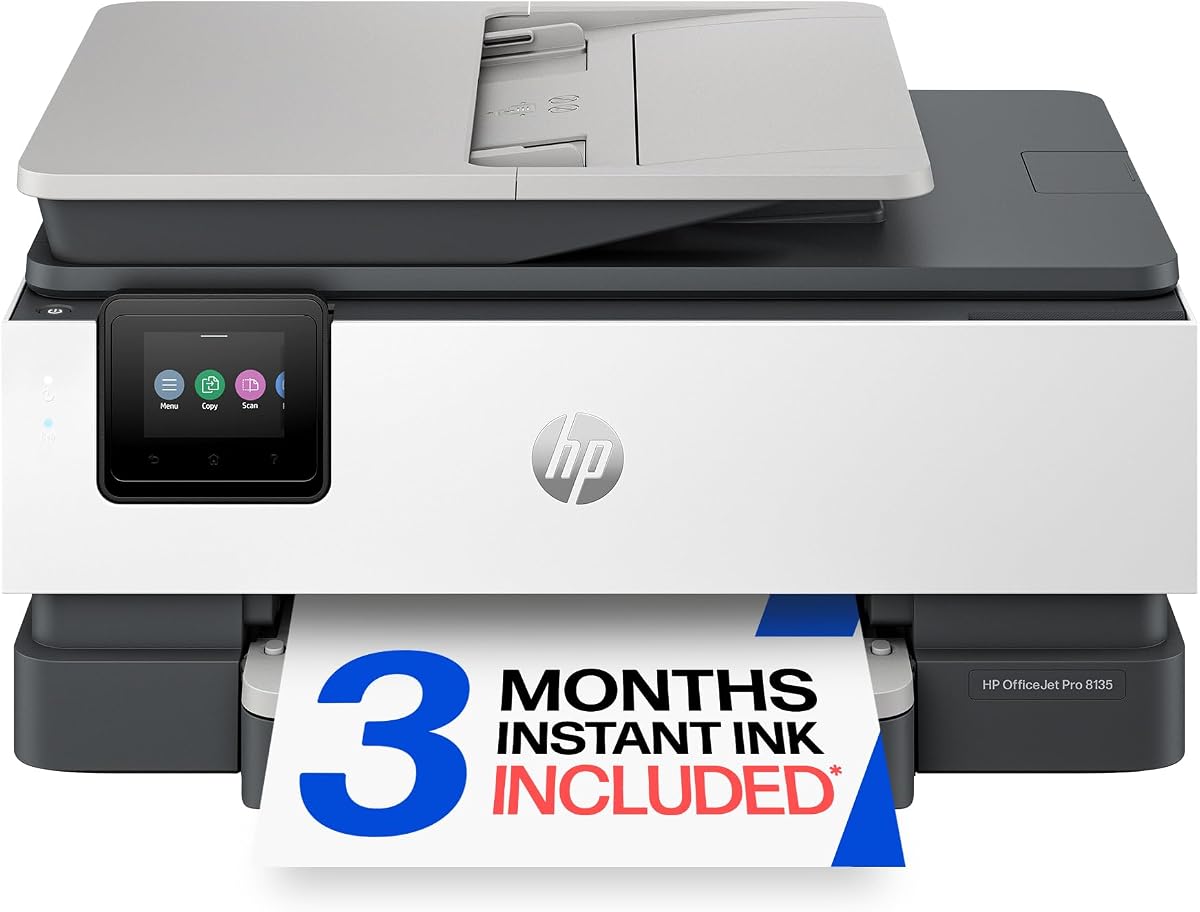
The HP OfficeJet Pro 8135 is tailored specifically for home office environments requiring professional output. It delivers solid performance with a focus on ease of use and reliable wireless connectivity. Users appreciate the included Instant Ink trial which helps manage costs during the initial setup phase effectively.
We may earn a commission when you buy through this link, at no additional cost to you.
With print speeds up to 20 pages per minute this model handles daily reports and flyers efficiently. The 2.7-inch touchscreen provides intuitive navigation similar to a phone interface making setup straightforward for non-technical users. The HP App extends functionality allowing you to manage fax tasks remotely from your mobile device.
While it performs well, the color printing speed is lower at 10 pages per minute which might slow down graphic heavy jobs. The device blocks non-HP cartridges which ensures print quality but may limit budget options over time. However the sustainable design using recycled plastic aligns with eco-friendly office goals.
This printer is a strong contender for home offices needing an all in one printer with fax. It balances affordability with professional features like auto duplex printing and scanning. If you value consistent reliability and smart security features this model offers a solid foundation for your home work setup.
Designed to print professional documents like reports and presentations efficiently.
Made with over 45 percent recycled plastic content supporting sustainability.
We may earn a commission when you buy through this link, at no additional cost to you.
The Epson EcoTank ET-4800 redefines cost efficiency with its innovative cartridge-free printing system. Instead of expensive cartridges it uses high-capacity ink tanks that reduce waste and lower long-term expenses. This model is ideal for users who print frequently and want to avoid the hassle of constant ink replacements.
We may earn a commission when you buy through this link, at no additional cost to you.
Its Micro Piezo Heat-Free Technology produces sharp text and vibrant colors on virtually any paper type. The EcoFit ink bottles make refilling easy and worry-free eliminating mess typical of traditional cartridges. Users benefit from zero cartridge waste which helps reduce landfill impact significantly.
While the initial purchase price is higher than cartridge models the savings over time are substantial. The print speeds are generally slower compared to laser printers but the tradeoff offers massive cost reductions. It includes a high-resolution flatbed scanner for easy document copying and navigation.
If you need an all in one printer with fax that prioritizes ink economy this is a top choice. It suits high-volume users who want to minimize ongoing costs. The reliable heat-free technology ensures consistent quality making it a great investment for long-term efficiency.
EcoFit ink bottles simplify refilling process ensuring easy and clean maintenance.
By using EcoTank you help reduce cartridge waste in landfills significantly.
We may earn a commission when you buy through this link, at no additional cost to you.
The HP OfficeJet Pro 8125 offers a compact solution for home offices needing all-in-one functionality. It delivers professional-quality color documents with reliable wireless connectivity for seamless integration. The Instant Ink trial ensures you have supplies ready for your first few months without additional cost.
We may earn a commission when you buy through this link, at no additional cost to you.
Print speeds reach up to 20 pages per minute in black making it efficient for regular documents. The 2.7-inch touchscreen provides a phone-like interface for quick navigation of fax and copy tasks. HP AI optimizes formatting to prevent wasted pages ensuring your emails print cleanly.
It is designed for home use where space is limited but performance cannot be compromised. The device includes Wolf Essential Security to protect your network from cyber threats effectively. However the input tray size is standard which may require frequent reloading during heavy batches.
For those seeking an all in one printer with fax that fits smaller desks this is ideal. It balances speed with essential security features needed for modern home businesses. The AI features simplify daily workflows making document management easier for busy professionals.
Compact design fits easily into smaller home office desks and spaces.
Wolf Essential Security keeps network protected from external cyber threats.
We may earn a commission when you buy through this link, at no additional cost to you.
The HP Smart Tank 7603 is built for users who want minimal maintenance and long-term savings. It comes with up to three years of ink included in the box which reduces running costs significantly. This model is perfect for home offices that print regularly and want to avoid buying cartridges.
We may earn a commission when you buy through this link, at no additional cost to you.
You get up to 8,000 color pages right out of the box ensuring you can handle heavy workloads. The mess-free refill system uses bottles that plug in and drain without squeezing or spilling. It supports borderless prints and wireless printing for flexibility in how you access the machine.
While the printer is larger than standard models the included ink savings often justify the size and cost. It avoids the frustration of running out of ink unexpectedly thanks to the generous initial supply. The Magic Touch control panel simplifies navigation for fax and scan tasks efficiently.
If you need an all in one printer with fax that guarantees low maintenance this is a top pick. It suits users who prioritize long-term value over initial purchase price. The reliable system ensures you can focus on work rather than managing ink supplies constantly.
Get up to three years of ink included reducing long-term operational costs.
Easy access system prevents spilling when replenishing ink tanks.
We may earn a commission when you buy through this link, at no additional cost to you.
The HP OfficeJet Pro 9135 is designed for busy offices requiring high output and reliability. It features the fastest print speeds in this list at 25 pages per minute in black. The large dual trays reduce refills frequency making it efficient for departments with heavy document flow.
We may earn a commission when you buy through this link, at no additional cost to you.
Its 4.3-inch touchscreen provides intuitive navigation for fax and copy tasks without confusion. Single-pass duplex scanning saves time by capturing two-sided documents quickly. Wolf Pro Security helps keep your network protected from cyber threats ensuring safe data transmission.
While the price is higher the investment pays off in speed and efficiency for larger teams. The Instant Ink trial provides initial convenience but users should plan for subscription fees later. It also blocks non-HP chips which maintains quality but limits third-party options.
If you need an all in one printer with fax for a high-volume office this is ideal. It supports professional document needs with smart features that streamline workflows. The advanced security ensures your business communications remain private and secure during transmission.
Up to 25 ppm black speed handles heavy workloads quickly.
Wolf Pro Security bolsters defenses against external cyber threats.
We may earn a commission when you buy through this link, at no additional cost to you.
The Canon PIXMA TR4720 offers an affordable entry point for home users needing fax capabilities. It is designed for ease of use with mobile printing and auto document feeder support. The compact footprint makes it suitable for smaller desks without sacrificing essential multifunction features.
We may earn a commission when you buy through this link, at no additional cost to you.
You can connect to Alexa for smart reorder notifications when ink runs low. This feature ensures you never have too much or too little supply without a subscription. It produces borderless prints up to 8.5 by 11 inches suitable for small photo or document tasks.
While it has slower speeds compared to office models it is sufficient for light home use. The 100-sheet capacity may need refilling during heavier batches but keeps the unit small. It supports ENERGY STAR standards reducing power consumption during standby and active modes.
If you need an all in one printer with fax on a tight budget this is the top choice. It covers basic needs like scanning copying and faxing without high upfront costs. The smart reorder feature adds convenience that simplifies maintenance for non-technical users.
Alexa sends alerts and places smart reorders when ink is running low.
Small footprint fits well in home offices with limited space.
We may earn a commission when you buy through this link, at no additional cost to you.
The Canon PIXMA TR8620a provides a versatile option for home offices needing photo and document support. It features a generous 200-sheet capacity reducing the need for frequent paper refills. The voice control compatibility with Alexa allows hands-free operation for convenient daily use.
We may earn a commission when you buy through this link, at no additional cost to you.
With a Micro SD slot you can print photos directly without connecting to a computer. This adds flexibility for users who prefer physical media workflows. The auto duplex printing saves paper and ensures professional results for business documents.
Smart reorders ensure you never run out of ink but require enrollment to function. The machine uses a standard duty cycle suitable for moderate home business needs. EPEAT Silver certification indicates it meets electronic product environmental standards.
If you need an all in one printer with fax that balances photo and document work this is ideal. It offers modern conveniences like voice control that enhance user experience. The larger paper tray supports longer sessions without interruptions.
Use voice commands to discover printer and manage basic tasks easily.
Micro SD slot allows direct printing from memory cards without PC.
We may earn a commission when you buy through this link, at no additional cost to you.
The HP OfficeJet Pro 8139 is a reliable option for home offices seeking extended ink support. It includes a one-year Instant Ink trial which provides significant initial savings compared to standard models. This allows users to test the device and its features without worrying about running out of supplies.
We may earn a commission when you buy through this link, at no additional cost to you.
Print speeds reach up to 20 pages per minute in black ensuring efficient handling of daily documents. The 2.7-inch touchscreen provides a phone-like interface for easy navigation. Wolf Essential Security keeps your network protected from cyber threats effectively.
The longer trial period helps manage costs but may delay purchasing external supplies for a while. AI optimization ensures web pages and emails print with precision and minimal wasted space. The device supports duplex printing and scanning which reduces paper usage.
If you need an all in one printer with fax with strong initial support this is a top choice. It suits users who want to minimize upfront ink expenses. The security and speed features ensure consistent performance for small business needs.
One year Instant Ink trial provides long term initial supply support.
Wolf Essential Security bolsters network protection against cyber threats.
We may earn a commission when you buy through this link, at no additional cost to you.
The Brother MFC-L2820DW delivers premium monochrome performance for offices prioritizing text documents. Its laser technology ensures sharp black and white print quality and fast speeds up to 36 pages per minute. This efficiency is vital for businesses handling high-volume text reports daily.
We may earn a commission when you buy through this link, at no additional cost to you.
It includes secure connection options like Ethernet which is crucial for office security. The 50-page auto document feeder allows for time saving multi-page copy and fax tasks. Refresh EZ Print Subscription helps manage toner supply and savings efficiently.
While it only supports black and white it offers faster speeds and lower page costs than ink. The 2.7-inch touchscreen enables easy navigation and cloud app integration like Google Drive. Alexa support adds voice control convenience for basic tasks.
If you need an all in one printer with fax for heavy text workflows this is ideal. It suits small offices needing robust security and speed. The compact footprint saves space while delivering professional monochrome results.
Up to 36 ppm black speed ensures fast document processing.
Ethernet connection provides secure reliable network access.
We may earn a commission when you buy through this link, at no additional cost to you.
Selecting the right multifunction device requires understanding specific needs and technical capabilities.
Print speed is measured in pages per minute (ppm) and determines how fast documents are produced. For busy offices high-speed models like laser printers or high-speed inkjets are essential to meet tight deadlines. Home users may find standard speeds sufficient for occasional use.
Choose a model with speeds matching your daily volume to avoid bottlenecks in your workflow.
Laser printers use toner cartridges which often last longer for text printing than inkjets. Inkjet printers using tank systems reduce cost per page significantly over time. Consider whether you need color quality or just black and white for your fax and print tasks.
Evaluate the total cost of ownership including initial price and replacement supplies before buying.
Wireless connectivity via Wi-Fi is standard but Ethernet offers more stability for office networks. Bluetooth or NFC can help with mobile printing directly from smartphones without setup. Ensure the printer supports your devices operating system including iOS or Android.
Opt for dual-band Wi-Fi to ensure reliable connection in environments with signal interference.
Digital faxing allows sending documents via email or cloud services without phone lines. Traditional fax uses analog lines which may be required for specific legal or business compliance. Check if the fax features include security encryption to protect sensitive data.
Ensure the fax quality meets your needs and supports necessary resolution for legible documents.
A larger input tray reduces the frequency of paper refills during heavy workloads. Auto duplex printing saves paper and time by printing on both sides automatically. Consider models with dedicated trays for different paper sizes if you print diverse documents.
Look for sufficient capacity to handle peak usage times without manual intervention.
Modern printers connect to networks making them vulnerable to cyber threats. Built-in security like encryption and authentication protects sensitive business data. Look for features that prevent unauthorized access to the printer or stored documents.
Prioritize models with robust security protocols to keep your network safe from vulnerabilities.
A touchscreen simplifies navigation through complex fax and copy menus. A larger screen size makes it easier to view document previews before printing. Intuitive interfaces reduce training time for new users in an office environment.
Select a model with a responsive screen to streamline daily tasks effectively.
Some printers offer ink subscription services that deliver supplies automatically before you run out. These can save money but may lock you into proprietary supplies. Check the trial periods and costs associated with these services before committing.
Weigh the convenience of automatic delivery against the flexibility of buying third-party supplies.
Start by connecting the printer to your network via Wi-Fi or Ethernet using the touchscreen interface. Install the required software on your computer or mobile device to enable full functionality like faxing and remote printing. Ensure all drivers are updated for optimal compatibility and security.
Load paper into the input tray and ensure the guides are adjusted correctly to prevent jams. For faxing verify that the connection lines are secure or that digital fax settings are properly configured. Test a page print to check alignment and ink quality before sending important documents.
Clean the scanner glass regularly with a soft cloth to maintain clear image quality. Use manufacturer recommended cleaning cycles for the printhead to prevent clogging in inkjets. Periodically check for firmware updates to keep the device secure and functional over time.
Many modern models support digital faxing which sends documents over the internet or email. This reduces the need for physical phone lines and can be more cost-effective. Check if your model supports email-to-fax features for better integration with your workflow.
Ensure that network settings are updated and the fax drivers are installed on connected devices. If using traditional fax lines keep the phone line connected securely. Regular updates to firmware will fix bugs related to fax transmission or quality issues.
Many HP and Canon models block non-original cartridges to ensure quality. Using third-party ink may void the warranty or cause print errors. Always check the manufacturer policy before purchasing supplies for your specific model.
High volume faxing requires robust models with auto document feeders like the HP OfficeJet Pro 9135. These allow scanning multiple pages at once without manual intervention. Look for fax features that support compression to save storage space.
Wireless faxing with encryption is generally secure but can be vulnerable if network security is weak. Traditional phone lines are private but less flexible. Always use encryption and strong passwords to protect your data transmission regardless of method.
Yes a touchscreen simplifies navigation for settings like fax numbers and paper sizes. It allows for quick preview of documents which reduces errors and wasted paper. This feature is particularly useful for users who print or fax frequently.
Open the paper tray and remove any crumpled paper gently. Check the rollers for debris and clean them according to the manual. Reset the printer and ensure paper guides are aligned before attempting another fax.
Yes most models support apps like HP App or Canon PRINT for mobile faxing. This allows sending documents directly from your phone without connecting to a computer. Ensure your mobile device is on the same network for seamless operation.
The HP OfficeJet Pro 9135 stands out for high-volume offices needing speed and security. The Canon PIXMA TR4720 offers a budget-friendly option for home users. The Brother MFC-L2820DW delivers premium monochrome performance for text-heavy environments.
Prioritize your specific needs like color capability fax type and ink efficiency when selecting. Consider the total cost of ownership beyond the initial purchase price to ensure value over time. Choose a model with the security features your business requires.
Remember to check current pricing and availability before purchasing as deals change often. We recommend visiting the official links for the latest updates on warranty and support. Selecting the right machine will improve your workflow and document management efficiency significantly.