
Redragon BM4195 AI Wireless Optical Computer Office Mouse
3.9Editor score
Affordable voice typing entry
Multi-mode connectivity
Fast Type-C charging
Discover the top AI Smart Wireless Mouse models of October 2026. This guide compares features, voice typing, and battery life to help you choose.
The landscape of computer peripherals is shifting rapidly with the integration of artificial intelligence. An AI Smart Wireless Mouse represents a significant leap forward, transforming a simple pointing device into a productivity hub. These devices offer voice typing, real-time translation, and AI-driven assistants that streamline workflows without needing a keyboard.
We evaluated ten leading models based on accuracy, connectivity, battery life, and software capabilities. Our analysis covers everything from budget-friendly options to premium devices with detachable designs. Each product was assessed for its ability to handle multilingual tasks and maintain seamless connections across multiple operating systems.
Every pick highlights unique strengths, whether it is silent clicks for offices or 600mAh batteries for travel. Prices and availability fluctuate frequently, so checking the latest offers before purchasing is always recommended. This guide ensures you find the right tool to enhance your digital interaction experience.
3.9Editor score

4.1Editor score

5.0Editor score
This side-by-side comparison outlines the core specifications of every model reviewed. It helps you quickly identify differences in battery capacity, language support, and connectivity modes to make an informed decision based on your specific professional or academic needs.




This model ranks first due to its balanced blend of AI capabilities and hardware reliability. It features a robust 600mAh battery that ensures days of uninterrupted work without constant recharging.
We may earn a commission when you buy through this link, at no additional cost to you.
The voice typing engine claims 98% accuracy across multiple languages including Chinese, English, and German. This makes it ideal for global teams needing seamless cross-language communication during meetings.
While software setup requires a brief download of the GAMINJA app, the local processing ensures your data remains private. This is a significant advantage for users concerned about cloud security.
It is best suited for professionals and writers who need fast dictation and multilingual tools. The ergonomic shape and silent clicks add to its appeal for long office hours.
With 98% recognition accuracy, this mouse minimizes corrections needed during dictation sessions.
Local offline AI processing ensures voice and text data are never stored in the cloud.
We may earn a commission when you buy through this link, at no additional cost to you.
The Redragon BM4195 offers an accessible entry point into AI mouse technology. It provides essential voice typing and translation features without breaking the bank.
We may earn a commission when you buy through this link, at no additional cost to you.
Users can switch between 2.4G and two Bluetooth modes to connect three devices instantly. This seamless toggling is perfect for those who work across desktops and tablets.
Although it requires software activation via the scroll wheel, the long standby time compensates for this extra step. It is a cost-effective tool for general office tasks.
Best for students and casual users looking to boost productivity without a major investment. The Type-C fast charging ensures minimal downtime during heavy usage periods.
Three connection modes allow instant switching between desktop, laptop, and tablet devices effortlessly.
A high-capacity 500mAh battery supports long workdays with ultra-long standby time.
We may earn a commission when you buy through this link, at no additional cost to you.
This device stands out with a unique 6-in-1 magnetic detachable design. It functions as a mouse, touchpad, and presentation clicker all in one sleek unit.
We may earn a commission when you buy through this link, at no additional cost to you.
The presentation mode allows you to glide the cursor and flip slides using touchpad gestures. This is a game-changer for professionals who need to move freely during meetings.
Weighing just 70 grams, it is incredibly portable and fits easily into a pocket. The 20-day battery life means you can travel for weeks without carrying a charger.
Ideal for consultants and speakers who need versatility beyond a standard pointer. It justifies its premium price with features that enhance public speaking and workflow flexibility.
Walk freely while presenting with laser pointers and touchpad cursor control.
Six distinct functions in one device replace a desk full of separate gadgets.
We may earn a commission when you buy through this link, at no additional cost to you.
This mouse is distinguished by its real-time translation and battery display screen. It supports over 200 languages for near-zero latency translations during calls.
We may earn a commission when you buy through this link, at no additional cost to you.
The built-in USB receiver ensures plug-and-play convenience for quick setup. Users can customize mouse commands to assign specific functions to keys for operational freedom.
It offers 5-level adjustable DPI settings ranging from 1000 to 4000 for precise control. This versatility makes it suitable for both creative design and standard office work.
Recommended for multilingual professionals and students needing accurate dictation. The LED power display helps avoid unexpected shutdowns during critical tasks.
Translate voice and text instantly across 200+ languages for global business needs.
Assign different functions to keys to achieve operational freedom in your workflow.
We may earn a commission when you buy through this link, at no additional cost to you.
The LTC OM021 focuses on comfort and quiet operation for shared offices. Its ergonomic shape is designed to reduce hand strain during extended use sessions.
We may earn a commission when you buy through this link, at no additional cost to you.
Users can enjoy a peaceful workspace with silent clicks that prevent disturbances. This feature is particularly valuable for libraries and quiet workspaces.
With BT 5.0 and 2.4G support, it offers flexible connectivity options for Mac and PC. The Type-C fast charging ensures quick power-ups when the battery runs low.
Best for professionals prioritizing comfort over advanced AI features. It serves as a reliable daily driver for standard office tasks with a touch of voice capability.
Lightweight ergonomic shape reduces strain for all-day comfort.
Silent clicks allow focus without disturbing colleagues around you.
We may earn a commission when you buy through this link, at no additional cost to you.
Logitech brings a reliable option with the M750, featuring up to 24-months battery life with the USB receiver. It is compatible with Logi Options+ for detailed customization.
We may earn a commission when you buy through this link, at no additional cost to you.
The connection options include Bluetooth Low Energy and Logi Bolt for seamless switching between devices. This ensures stability and reliability across different systems.
It supports Windows and macOS natively, making it a safe choice for mixed environments. The included AA battery simplifies power management for many users.
Best for enterprise users seeking longevity and stability over flashy AI tools. It delivers consistent performance with minimal interruptions or recharges.
Enjoy up to 24 months of battery life on a single set of AA batteries.
Compatible with both Windows and macOS for flexible deployment across teams.
We may earn a commission when you buy through this link, at no additional cost to you.
This model offers a responsive upgrade with RGB lighting for visual flair. It handles multilingual meetings and business translation with near-zero latency real-time translation.
We may earn a commission when you buy through this link, at no additional cost to you.
The 500mAh battery supports up to 600-hour standby with sleep mode activated. This helps extend battery life significantly during non-active periods.
Users can access a suite of AI tools including code generation and article polishing. Local processing ensures your private work data remains secure on your device.
Ideal for creators and writers who value customization and privacy. The RGB feature adds a modern aesthetic suitable for gaming or personal desktop setups.
The 6000 upgrade improves sensitivity and response time for precise tracking.
Access tools for code generation, writing, and article polishing directly via mouse.
We may earn a commission when you buy through this link, at no additional cost to you.
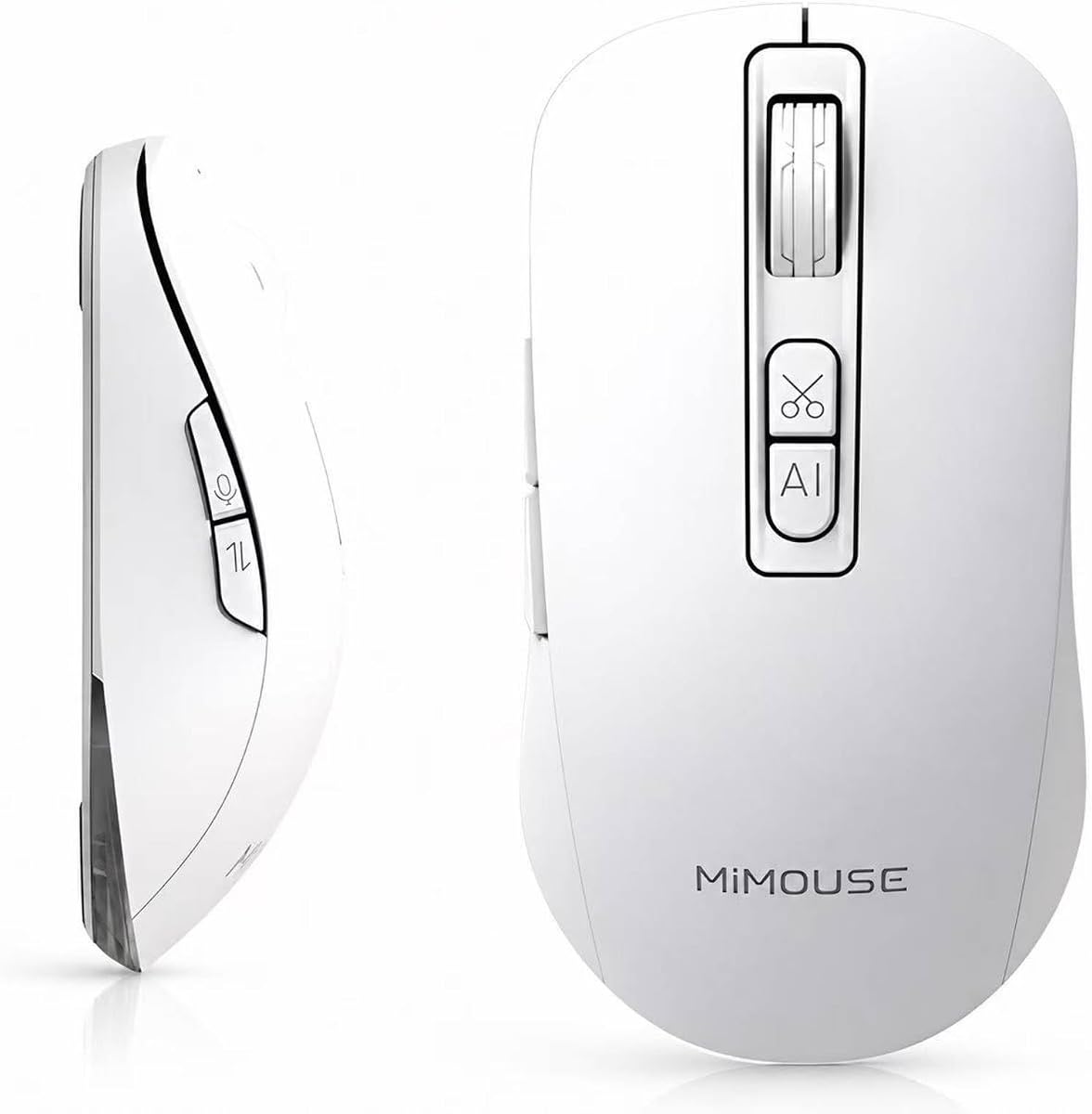
MiMouse offers a free centralized AI platform powered by ChatGpt, Gemini, and Claude. This allows for powerful writing and presentation creation directly from the mouse.
We may earn a commission when you buy through this link, at no additional cost to you.
It supports connecting three devices simultaneously via 2.4G and dual Bluetooth. This seamless switching is crucial for multi-monitor or multi-device setups.
The ergonomic design with matte coating brings comfort for both small and large hands. It also features a 500Hz polling rate for gaming-level sensitivity when needed.
Recommended for heavy document users and lawyers needing transcription tools. The 30-day battery life ensures you can focus on work without charging anxiety.
Access multiple AI models like Gemini and Claude in one free platform.
Connect and switch between three devices simultaneously with zero lag.
We may earn a commission when you buy through this link, at no additional cost to you.
This mouse features one-click PPT generation and copywriting via voice commands. It replaces multiple tools and revolutionizes your workflow by simplifying tasks.
We may earn a commission when you buy through this link, at no additional cost to you.
The real-time voice typing is perfect for business and academic use. It breaks language barriers for meetings and research by translating instantly.
Connectivity is robust with one-button switching between 2.4G and two Bluetooth channels. You can connect up to three devices simultaneously for seamless transitions.
Best for students and remote workers needing versatile office tools. The 5 DPI levels ensure precise control for both design and daily tasks.
Generate PPTs and copywriting instantly with one-click voice commands.
Switch between 2.4G and Bluetooth channels with a single button press.
We may earn a commission when you buy through this link, at no additional cost to you.
This straightforward AI mouse turns spoken words into text quickly. It captures ideas and meeting notes before you forget them in a busy environment.
We may earn a commission when you buy through this link, at no additional cost to you.
It features real-time translation in 200+ languages for international work. Practical tools include AI writing and text summaries for organizing rough content.
The rechargeable design keeps your desk simple and works naturally with computers. Silent clicks help reduce distractions during meetings and shared offices.
Ideal for casual users who want basic dictation without complex software. It serves as an efficient tool for everyday office work and simple note-taking.
Speed up everyday office work with faster and easier dictation.
Turn rough ideas into organized content with built-in summarization tools.
We may earn a commission when you buy through this link, at no additional cost to you.
Selecting the right mouse depends on your specific workflow needs. Below are key factors to consider before purchasing.
Accuracy is paramount for dictation tasks. Look for models claiming at least 95% accuracy to reduce editing time. This ensures your spoken words convert directly into text with minimal errors.
For multilingual teams, support for over 200 languages is essential. Ensure the mouse translates between your working languages smoothly. This helps bridge gaps in international meetings and research.
Battery capacity varies significantly between models. A 500mAh battery supports days of work while 600mAh offers longer endurance. Check if charging is via Type-C for convenience.
Multi-device support allows seamless switching between laptop and tablet. Look for Bluetooth 5.0 and 2.4G options. This flexibility is crucial for hybrid work environments.
Some models offer advanced tools like PPT generation and code writing. Others focus strictly on voice input. Determine which features align with your daily tasks.
Comfort is key for long hours of use. An ergonomic shape reduces strain on your wrist. Quiet clicks also prevent distracting colleagues in shared spaces.
Many AI mice require software installation for full functionality. Ensure the software is compatible with your operating system. Check for offline capabilities to protect your privacy.
Start by pairing the mouse via Bluetooth or USB receiver. Ensure you download the necessary software from the provided link to activate AI functions. This step unlocks voice typing and translation features.
Hold the dedicated voice key to record speech for dictation. Use the translation tool during meetings to break language barriers. Regularly charge the device using the Type-C port to maintain battery health.
Store the mouse in a dry place when not in use. Clean the sensor with a soft cloth to ensure precise tracking. Update software periodically to access new features and security patches.
Most models support offline processing for voice typing. However, real-time translation may require internet access. Check the product specs for offline capabilities before purchasing.
Many models explicitly support macOS. Look for compatibility with Mac 10 or above. Always verify software support for Mac OS before buying to ensure full functionality.
Most AI mice support connecting up to three devices. You can switch between them easily with a button press. This is ideal for users working across multiple screens or laptops.
Top models support over 200 languages including English and Chinese. They cover major global languages like German and Spanish. This makes them perfect for international business and travel.
Most rechargeable models have a built-in battery. You charge them via Type-C rather than replacing cells. Some premium models may use AA batteries for easy replacement.
While they offer high DPI settings, they are optimized for productivity. Gaming features are secondary to voice and translation tools. Dedicated gaming mice are better for competitive play.
Our top pick highlights the value of the Ai Mouse with Voice Typing for its balance of features. It offers strong voice accuracy and battery life for professionals needing reliability.
If you need advanced presentation tools, the Cheerdots2 is a premium choice. For budget-conscious buyers, the Redragon BM4195 provides essential AI functions at a lower cost.
Prices change frequently so check current listings before finalizing your purchase. Selecting the right tool will significantly enhance your daily workflow efficiency.