
AceGamer 2 Pack Controller
4.2Editor score
Two controllers included
Non-slip grip design
Turbo key customization
Compare top aftermarket PS4 controllers for gaming performance comfort and features to find the perfect controller upgrade for your PlayStation 4 console setup
Finding the right controller can transform your gaming experience on the PlayStation 4. Aftermarket options offer unique features like extra paddles improved grips and customizable buttons that standard controllers lack.
We analyzed ten top controllers based on build quality connectivity and features to help you choose. Each product was evaluated for comfort durability and compatibility with PS4 systems and PC.
This guide shows you the best picks across different needs and budgets. Prices change frequently so always check current listings before making your final purchase decision online.
4.2Editor score

4.6Editor score

3.8Editor score
This table compares all ten controllers side by side. Look at key specs like connectivity type included accessories and special features to decide which matches your gaming style.




This official Sony controller stands out as the most reliable choice for PS4 gamers. With a rating of 4.6 it delivers consistent performance and ergonomic comfort for long sessions.
We may earn a commission when you buy through this link, at no additional cost to you.
Its dual analog sticks and trigger buttons are finely tuned for precise control. The touchpad adds a layer of interactivity that enhances gameplay across many supported titles.
While it costs more than third party options the quality justifies the investment. You get reliable wireless connectivity and full feature support without extra setup steps.
Buy this if you want guaranteed performance and durability. It is ideal for gamers who prioritize comfort and official support over budget savings.
Sony certification ensures seamless pairing and full feature access on your PS4 console without driver issues or limited functionality.
The shape and button layout fit naturally in most hands reducing fatigue during extended play sessions.
We may earn a commission when you buy through this link, at no additional cost to you.
AceGamer offers two controllers in one box which is perfect for multiplayer gamers. Rated 4.2 it balances affordability with solid wireless performance and useful features.
We may earn a commission when you buy through this link, at no additional cost to you.
The turbo key function allows you to customize any button for rapid fire. This adds a competitive edge in shooter games without needing expensive pro gear.
One note is that PC connectivity needs a receiver not included in the package. Also initial pairing requires the USB cable which is a minor setup step.
Choose this if you want cost effective options for friends. It delivers good value for casual and competitive play alike.
Getting two controllers at once saves money and lets you play with friends or family right away.
Adjustable turbo frequency gives you control over input speed for better gameplay responsiveness.
We may earn a commission when you buy through this link, at no additional cost to you.
MOVONE provides a straightforward wireless controller that works well on PS4 and PC. Its 4.2 rating reflects reliable performance and essential features for daily use.
We may earn a commission when you buy through this link, at no additional cost to you.
The dual vibration motors deliver immersive feedback during gameplay. Combined with the clickable touchpad it offers modern controls at an accessible price.
Some users might find the design generic compared to premium models. But for casual gaming it holds up well without unnecessary extras.
This is a good choice for budget conscious gamers who need a backup controller or secondary device.
Compatible with PS4 consoles and Windows PCs making it versatile for multiple gaming setups.
A 3.5mm jack lets you connect headphones for private audio and voice chat.
We may earn a commission when you buy through this link, at no additional cost to you.
This controller brings pro features like rear paddles and anti-drift sticks to the masses. With a 4.2 rating it aims for competitive gaming at a lower cost.
We may earn a commission when you buy through this link, at no additional cost to you.
The ALPS sticks provide steady movement and aiming which is vital for shooters. Rear paddles allow quick actions without taking thumbs off the sticks.
While the battery life is excellent the price sits between budget and premium models. You get solid performance but lack some elite materials.
Buy this if you want advanced control features without paying top dollar for a fully custom build.
Back paddles let you map common actions like jumping or reloading for faster reactions.
Anti-drift ALPS sticks reduce wear and maintain accuracy over time.
We may earn a commission when you buy through this link, at no additional cost to you.
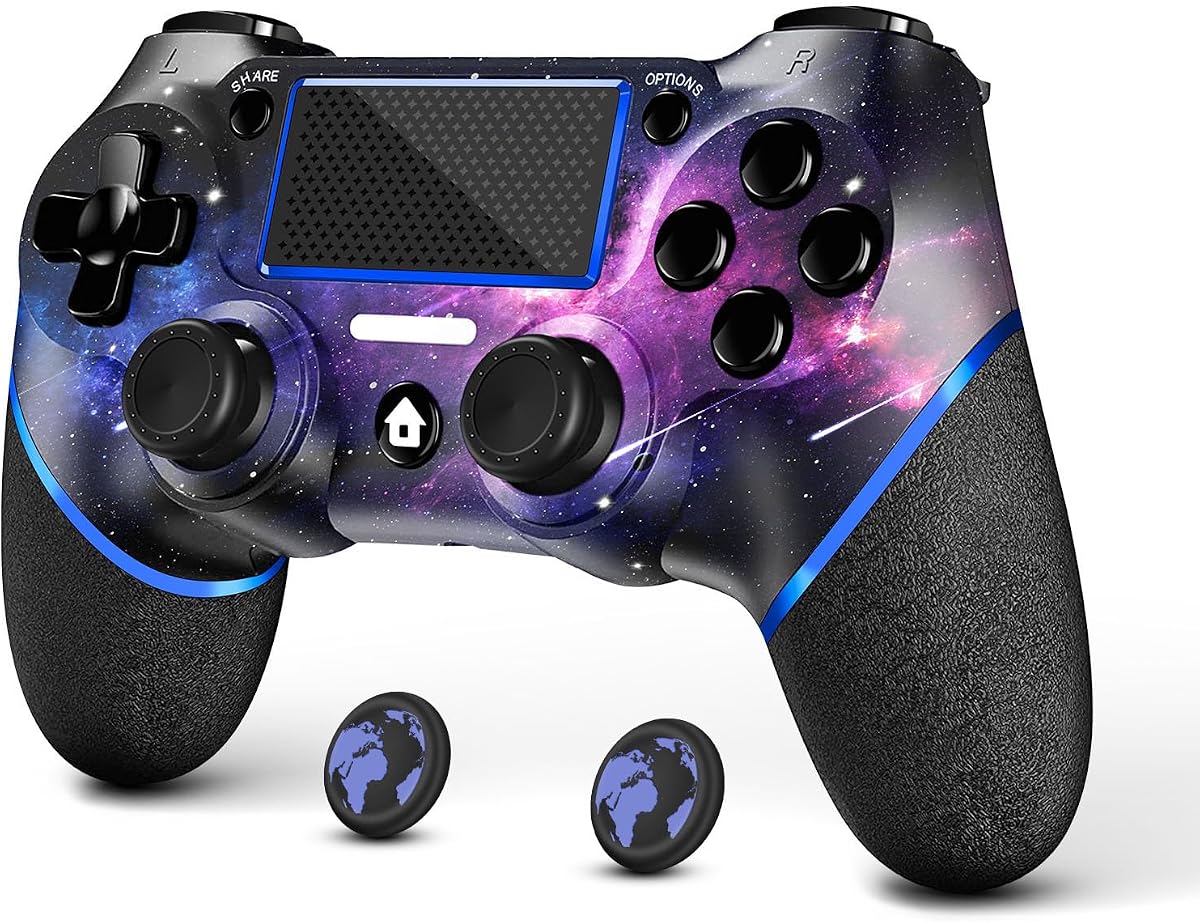
AceGamer brings a unique galaxy design that stands out visually. Rated 4.2 it combines style with solid performance and useful gaming features.
We may earn a commission when you buy through this link, at no additional cost to you.
The custom print uses a water transfer process for durability. This avoids cheap stickers and ensures the design feels integrated into the shell.
However the paint might show wear over heavy use. Also initial setup requires a cable which adds a small step before wireless play.
Choose this if you value aesthetics and want a controller that looks as good as it plays.
The galaxy nebula print creates a unique visual appeal for personalization.
Included thumb caps help improve grip and comfort on analog sticks.
We may earn a commission when you buy through this link, at no additional cost to you.
This renewed DualShock 4 offers Sony quality at a reduced price. Its 3.9 rating reflects variations in condition but still provides reliable play.
We may earn a commission when you buy through this link, at no additional cost to you.
As an official product it retains full compatibility with PS4 features like touchpad and motion sensors. Certified refurbishment ensures basic functionality works well.
Some buyers may worry about wear from previous owners. But the lower cost makes it an attractive option for budget focused shoppers.
Buy this if you want official features without paying full retail and accept minor cosmetic signs.
Renewed units go through testing to confirm they meet performance standards.
You get the same shape and button layout as a new Sony controller.
We may earn a commission when you buy through this link, at no additional cost to you.
Nacon provides an officially licensed wired option that removes battery worries. Rated 4.2 it offers consistent input and comfort with a rubberized grip.
We may earn a commission when you buy through this link, at no additional cost to you.
The three meter cable ensures low latency for competitive play. This is great for gamers who prefer direct connections and steady power.
PC use may require third party software for full button mapping. Also the cable restricts movement compared to wireless models.
Choose this if you prioritize reliability and do not mind being tethered to your console.
Sony approval guarantees compatibility with PS4 menus and system features.
Wired inputs reduce potential interference and keep response times fast.
We may earn a commission when you buy through this link, at no additional cost to you.
Another renewed Sony controller offering similar features to the Magma Red. It carries a 3.9 rating indicating functional use with possible cosmetic wear.
We may earn a commission when you buy through this link, at no additional cost to you.
You still get essential features like touchpad and speaker which some third party units skip. This keeps it close to the original experience.
As a renewed unit check the condition details carefully. Some may show scratches but still work perfectly for everyday gaming.
Buy this if you want official hardware at a discount and are comfortable with used electronics.
Retains built-in speaker and touchpad for full system interaction.
Renewed status lowers the cost while keeping core functionality intact.
We may earn a commission when you buy through this link, at no additional cost to you.
This controller targets serious gamers with pro features like hair triggers and rear paddles. Its 3.8 rating reflects high performance with some complexity.
We may earn a commission when you buy through this link, at no additional cost to you.
You can save up to six remapping profiles to suit different games. Interchangeable thumbsticks let you adjust height and shape for better precision.
However the price is much higher than standard units and no cable comes in the box. You must buy accessories separately which adds to cost.
Buy this if you want competitive edge features and are willing to invest in advanced gear.
Triggers activate in 1.5mm allowing instant firing for fast shooters.
Eight options help find the perfect grip for your play style.
We may earn a commission when you buy through this link, at no additional cost to you.
This is a mod kit that adds paddles and scripts to your existing DualShock 4. With a 4.2 rating it offers great customization without a full new controller.
We may earn a commission when you buy through this link, at no additional cost to you.
Built-in scripts like anti-recoil help reduce weapon shake. The remappable paddles let you keep thumbs on sticks while accessing buttons.
Older PS4 models may need a USB headset for audio. Also it requires an existing controller to function as a mod unit.
Choose this if you want upgrade options for your current controller without buying a complete new unit.
Works with standard controllers to add features without replacing the whole device.
Quick scope and drop shot scripts simplify complex moves during matches.
We may earn a commission when you buy through this link, at no additional cost to you.
Choosing the right aftermarket controller involves considering connectivity comfort and special features that match your play style.
Wireless controllers use Bluetooth to connect to your PS4 offering freedom from cables. Look for good battery life to avoid interruptions during play. Wired controllers offer zero latency and do not need charging which is useful for competitive gaming. Decide if you prefer the convenience of wireless or the reliability of a wired connection.
Prioritize wireless for casual play and wired for tournaments where lag is a concern.
Comfort is key for long gaming sessions. Look for non-slip grips and contoured shapes that fit your hand. Quality materials ensure the buttons and sticks last longer under stress. A lightweight but sturdy build reduces fatigue over time.
Choose controllers with ergonomic grips to prevent hand strain during extended use.
Some controllers add paddles turbo buttons or adjustable triggers. These features can give you a competitive edge in action games. Check if you need these extras or if standard controls work fine. More features usually mean a higher price.
Only pay for extra features if they genuinely improve your gameplay experience.
Wireless controllers rely on batteries which can drain quickly if not monitored. Models with 1200mAh or more last longer between charges. USB-C charging is becoming standard and makes recharging easier. Consider how often you play to estimate battery needs.
Pick a controller with high capacity for uninterrupted gaming.
Ensure the controller works with your PS4 console and any PC you plan to use. Official licensed products guarantee full support for all features. Third party units may need extra steps or software for PC gaming. Verify compatibility before purchasing to avoid issues.
Check system requirements to ensure seamless integration with your setup.
Prices vary widely from budget packs to premium pro units. Set a budget that fits your needs without overspending on unused features. Value packs offer good cost per unit for multiplayer. Higher end models provide better materials and customization options.
Balance cost with essential features to get the best value.
A good controller should withstand heavy use over years. Look for reinforced buttons and sturdy sticks that resist wear. Check user reviews for long term feedback on reliability. Durability ensures your investment lasts longer.
Prioritize build quality to reduce replacement costs.
Some controllers allow button mapping or adjustable settings. This lets you tailor controls to your preferences for different games. Remappable paddles and profiles add flexibility. If you play multiple genres customization is valuable.
Select controllers with mapping options for personalized control.
Pair your controller with the PS4 by pressing and holding the Share and PlayStation buttons until the light bar flashes. Select the device in Bluetooth settings to connect. First time connections may require a USB cable to activate the pairing.
Keep your controller clean by wiping it with a dry cloth. Avoid exposing it to liquids or direct sunlight. Store it in a cool dry place when not in use to protect the battery and electronics.
Regularly check for firmware updates on your console. Recharge the battery before it drains completely to maintain its lifespan. Avoid dropping the controller or pulling on the cable to prevent physical damage.
Most PS4 controllers are compatible with PS5 only when playing PS4 titles. They cannot play PS5 exclusive games directly. Always check product listings to confirm backward compatibility.
Typical wireless controllers last 10 to 15 hours on a single charge. Battery life varies with usage and features like vibration. Higher capacity batteries extend play time between charges.
Many models support PC via USB or Bluetooth. Some need specific software like DS4Windows for full button mapping. Wired connections often work plug and play without extra tools.
Turbo buttons are generally acceptable but some games may detect them as exploits. Always check game terms to avoid bans. Used wisely they enhance convenience rather than cheating.
Budget controllers range from twenty to thirty dollars. Mid range options offer extra features around forty dollars. Premium pro controllers exceed one hundred. Choose based on needs not just price.
Most include a USB charging cable in the box. Some premium models omit cables to lower environmental impact. Check the package contents before buying to avoid surprises.
Use the small reset hole on the back with a paperclip. Hold it for five seconds then reconnect to the console. This clears pairing errors and fixes glitches.
Stick drift happens due to wear on internal sensors. Higher quality sticks resist this better. Look for anti-drift designs and check warranty terms for support.
We explored ten top options ranging from budget packs to premium pro models. The DualShock 4 Official offers reliability while the AceGamer 2 Pack provides value. For advanced gamers the HEXGAMING NEW EDGE brings competitive features.
Consider what matters most to you whether it is price battery life or customization. A controller should match your gaming habits and comfort needs. The right choice enhances your experience without unnecessary extra.
Remember that prices fluctuate so check current listings before buying. This guide helps you make an informed decision. Enjoy better gameplay with a controller that fits your style.