
ViewSonic VA2256-MHD 22 Inch Frameless 1080p IPS Computer Monitor
4.7Editor score
Compact Full HD IPS Display
Frameless Design for Multi-monitor
AMD FreeSync Technology
A frameless computer monitor offers a sleek, modern aesthetic that minimizes distractions and maximizes screen real estate. Whether you are setting up a dual monitor workspace or seeking an immersive gaming experience, borderless designs provide a seamless visual flow that enhances productivity and entertainment.
We have evaluated the top models available in the market based on display quality, refresh rates, connectivity options, and ergonomic features. Our analysis focuses on real-world performance, color accuracy, and eye comfort technologies to ensure you find a monitor that meets your specific professional or personal needs.
Each pick in this guide highlights key strengths and potential trade-offs to help you make an informed decision. Prices and availability can change frequently, so we recommend checking the latest deals before finalizing your purchase to ensure you get the best value for your investment.
4.7Editor score

4.8Editor score

4.2Editor score
As an Amazon Associate we earn from qualifying purchases.
This side-by-side comparison highlights the key specifications and unique features of each top-rated frameless monitor to help you quickly identify the model that best fits your budget and performance requirements.
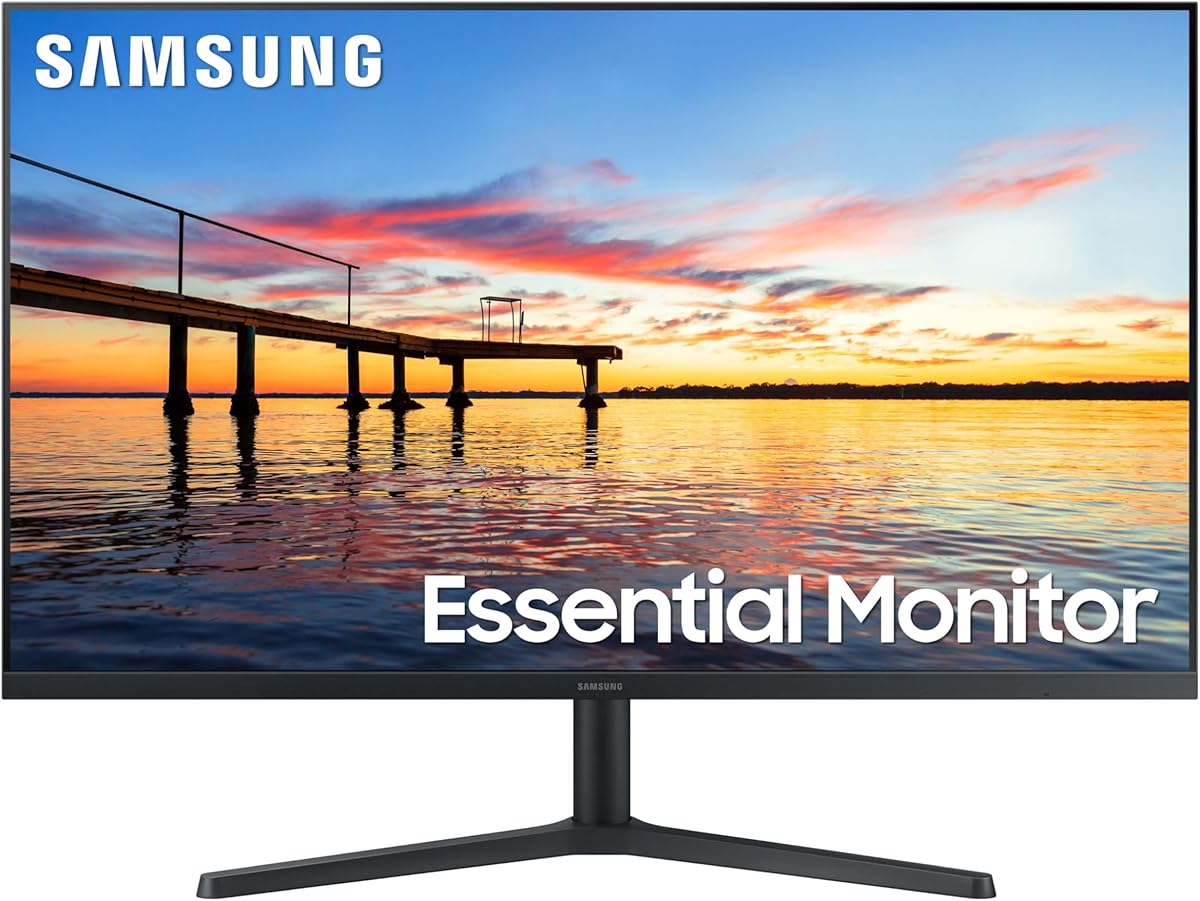




The Samsung 32" Flat Computer Monitor delivers a clean, modern aesthetic with its three-sided borderless display. With a 4.5 rating from users, it stands out for its ability to create a virtually gapless view in multi-monitor setups.
We may earn a commission when you buy through this link, at no additional cost to you.
Its AMD FreeSync technology ensures synchronized action between your graphics card and monitor, reducing image tearing for smooth visuals. The 75Hz refresh rate provides fluid scenes without lag, making it suitable for work presentations and casual gaming.
While the refresh rate may not satisfy competitive gamers, the focus on eye care through Flicker Free technology and Eye Saver Mode is a significant trade-off for professionals spending long hours at their desk.
This monitor is ideal for users seeking a spacious, distraction-free workspace. Its sleek design and synchronized action features make it a strong contender for home offices requiring multiple displays.
The three-sided borderless design allows multiple displays to line up seamlessly for an expansive workspace.
Flicker Free technology and Eye Saver Mode minimize eye strain during extended computing sessions.
We may earn a commission when you buy through this link, at no additional cost to you.
The ViewSonic VA2256-MHD offers a compact Full HD IPS display with a frameless design that elevates any home office. Boasting a 4.7 rating, it is praised for consistent colors and wide viewing angles essential for efficient multi-monitor setups.
We may earn a commission when you buy through this link, at no additional cost to you.
Enhanced viewing comfort is achieved through integrated Flicker-Free technology and a Blue Light Filter, reducing fatigue during long workdays. The AMD FreeSync technology eliminates screen tearing, ensuring fluid multimedia performance for streaming and transitions.
Trade-offs include a smaller 22-inch size which may not suit users needing vast screen real estate. However, the ViewMode presets allow you to tailor the display for specific tasks like gaming or text reading effectively.
This monitor is perfect for students and professionals needing a reliable, ergonomic display. Its streamlined connectivity options make it an excellent choice for clutter-free desk environments.
Utilize DisplayPort-out technology to daisy chain multiple monitors with a single cable connection.
Optimize performance by switching between presets for Game, Movie, Web, Text, and Mono.
We may earn a commission when you buy through this link, at no additional cost to you.
The ViewSonic VS2725-2K is a 27-inch QHD monitor with a smooth 100Hz refresh rate. With a 4.4 rating, it delivers consistent colors and wide viewing angles thanks to its IPS panel and frameless design.
We may earn a commission when you buy through this link, at no additional cost to you.
Seamless adaptive sync performance enables fluid visuals for casual gaming and multimedia. The industry-leading 3-year warranty provides peace of mind for long-term productivity, while ViewMode presets optimize the screen for various tasks.
Trade-offs include a refresh rate that may be lower than high-end gaming monitors, but it remains sufficient for smooth gaming and everyday transitions. The eye care features help minimize fatigue during prolonged sessions.
This monitor is ideal for users wanting a balance of resolution and performance. Its warranty and seamless design make it a reliable choice for expanding your workspace.
Access to US-based customer service and a 3-year limited warranty coverage for reliability.
Ultra-thin bezels provide a sleek aesthetic for nearly seamless multi-monitor setups.
We may earn a commission when you buy through this link, at no additional cost to you.
The LG 24U411A-B delivers sharp, vibrant visuals with a 4.6 rating. Its virtually borderless design creates a modern look perfect for dual setups, while HDR10 support enriches color across a wide spectrum.
We may earn a commission when you buy through this link, at no additional cost to you.
Experience smooth motion with a 120Hz refresh rate and 1ms motion blur reduction for crisp gameplay. The Switch app transforms your screen into a multitasking hub, allowing effortless screen splitting and custom layouts.
Trade-offs include a relatively basic stand that lacks height adjustment, though the tilt is adjustable. Users seeking higher resolution might prefer QHD, but this model excels in fluidity and visual clarity for its class.
This monitor is excellent for creative projects and everyday productivity. Its dynamic action sync and black stabilizer features provide an edge for gaming and immersive media consumption.
Split the screen into up to 6 sections and launch video calls with a single hotkey.
Enjoy smoother frame transitions with less stutter and blur during work or gaming.
We may earn a commission when you buy through this link, at no additional cost to you.
The CRUA 27" 4K UHD monitor offers ultra-sharp visuals with 3840×2160 resolution. Rated 4.2, it delivers rich, accurate colors ideal for designers, creators, and collaborative work in modern workspaces.
We may earn a commission when you buy through this link, at no additional cost to you.
AMD FreeSync technology helps reduce screen tearing for smoother motion, while the USB Type-C port allows versatile connectivity for laptops and desktops. The height-adjustable stand and wall-mount compatibility support ergonomic setups.
Trade-offs include a 60Hz refresh rate which is not suitable for high-speed gaming, but it is adequate for most professional workflows. The silver aluminum housing adds a professional look to any office.
This monitor is best for work-from-home setups needing detailed visuals. Its professional-grade color accuracy and versatile connectivity make it a strong choice for creative tasks.
Featuring 120% sRGB and 98% DCI-P3 coverage for accurate color reproduction.
Features USB-C, dual HDMI, and dual DP ports for easy connection to various devices.
We may earn a commission when you buy through this link, at no additional cost to you.
The ASUS BE249QG-R features a frameless IPS panel with a SmoothMotion 120Hz refresh rate. It has a 4.6 rating and offers 95% DCI-P3 color coverage for accurate and vibrant color reproduction.
We may earn a commission when you buy through this link, at no additional cost to you.
Eye Care technology ensures a comfortable viewing experience with certified Flicker-free and Low Blue Light features. The monitor includes extensive connectivity options like HDMI and DisplayPort, plus a USB hub for flexibility.
Trade-offs include a standard 1080p resolution which is less detailed than QHD, and a limited Adobe Creative Cloud subscription. However, the comprehensive adjustability makes it suitable for prolonged use.
This monitor is ideal for government and enterprise procurement due to TAA compliance. Its ergonomic design and smooth visual experience make it a solid choice for office environments.
Comprehensive tilt, swivel, pivot, and height adjustments for comfortable viewing angles.
95% DCI-P3 and 100% sRGB coverage for vibrant and accurate color reproduction.
We may earn a commission when you buy through this link, at no additional cost to you.
The SAMSUNG 34" ViewFinity S50GC Series offers an Ultra-WQHD display with a 21:9 aspect ratio for seamless multitasking. With a 4.4 rating, it maximizes screen real estate to experience truly seamless multitasking on one screen.
We may earn a commission when you buy through this link, at no additional cost to you.
HDR10 delivers over 1 billion colors for incredible depth, while an ambient light sensor automatically adjusts brightness. AMD FreeSync ensures sync with your graphics card to reduce image tearing for fluid entertainment.
Trade-offs include a higher price point and basic eye care features compared to specialized models. However, the PIP and PBP functions allow you to view input from 2 simultaneous sources effectively.
This monitor is perfect for users wanting immersive productivity and gaming. Its minimal bezel design ensures maximum concentration and a gapless look in dual setups.
Ultra WQHD provides the simplest way to maximize screen real estate and multitasking.
Detects lighting in your workstation and automatically adjusts brightness to reduce eye strain.
We may earn a commission when you buy through this link, at no additional cost to you.
The BenQ GW2491 is an IPS Eye-Care Monitor with an ultra-slim bezel and 100Hz refresh rate. It holds a 4.8 rating and provides accurate color reproduction from any angle with 99% sRGB color space.
We may earn a commission when you buy through this link, at no additional cost to you.
It reacts quickly to changes for a smoother user experience, and its TUV certification ensures eyesafe 2.0 reduced blue light. The ePaper Mode ensures effortless readability for long reading sessions.
Trade-offs include a lack of USB-C connectivity and standard FHD resolution, but these are acceptable given the focus on eye comfort. The stylish design doubles as furniture for enhanced focus.
This monitor is best for users prioritizing eye comfort. Its stunning visuals and certified eye-friendly features make it a top choice for long workdays.
Eyesafe 2.0 ensures reduced blue light with vivid colors for a comfortable viewing experience.
Enjoy a seamless viewing experience with enhanced focus on a frameless monitor.
We may earn a commission when you buy through this link, at no additional cost to you.
The Dell 24 Plus Monitor features a 144Hz refresh rate and 1ms MPRT for a smooth viewing experience. Rated 4.6, it includes integrated dual 3W speakers and a TÜV-certified display to reduce harmful blue light.
We may earn a commission when you buy through this link, at no additional cost to you.
Designed for comfort, you can adjust the monitor to suit your preference throughout the day. The Dell Display and Peripheral Manager application optimizes performance for your entire Dell PC workspace.
Trade-offs include basic speakers that may not replace dedicated audio, but they offer wider frequency ranges for a minimal setup. The high refresh rate makes it versatile for work and light gaming.
This monitor is ideal for users wanting simplicity and comfort. Its elevated entertainment features and ergonomic design make it a strong choice for home offices.
ClHD resolution and 1500:1 contrast ratio bring clarity for immersive viewing.
Experience Dell’s singular innovative application to optimize the performance of your workspace.
We may earn a commission when you buy through this link, at no additional cost to you.
The Dell 27 Plus QHD Monitor brings astounding depth and vivid detail with its 144Hz refresh rate and 1ms MPRT. Rated 4.6, it includes integrated dual 3W speakers and a TÜV-certified display for reduced blue light emissions.
We may earn a commission when you buy through this link, at no additional cost to you.
Designed for comfort, you can adjust the monitor to suit your preference throughout the day. The Dell Display and Peripheral Manager application optimizes performance for your entire Dell PC workspace.
Trade-offs include the requirement for more GPU power to drive QHD resolution and a higher price than FHD models. However, the depth and smooth motion make it a superior choice for demanding users.
This monitor is ideal for users wanting elevated entertainment and detail. Its QHD resolution and smooth viewing experience make it a strong choice for high-resolution tasks.
QHD resolution and 1500:1 contrast ratio bring depth and detail for immersive viewing.
Experience Dell’s singular innovative application to optimize the performance of your workspace.
We may earn a commission when you buy through this link, at no additional cost to you.
Selecting the right frameless computer monitor involves evaluating several key factors to ensure it aligns with your specific workflow and environment.
Resolution determines the clarity and detail of your display. For professional work, consider QHD or 4K options like the CRUA 27" 4K UHD Monitor which offers professional-grade color accuracy. Gamers may prioritize refresh rates over resolution but still benefit from crisp visuals provided by Full HD or QHD panels.
Choose a resolution that matches your content and hardware capabilities to ensure smooth performance and clear text rendering.
A higher refresh rate such as 120Hz or 144Hz provides smoother motion essential for gaming and fast-paced video editing. Look for Adaptive Sync technologies like AMD FreeSync or VESA Adaptive Sync to reduce screen tearing and ensure seamless transitions across your frameless display.
Prioritize monitors with refresh rates and sync features that match your gaming or multimedia requirements for fluid visuals.
Prolonged screen time can lead to eye strain. Models like the BenQ GW2491 and ViewSonic VA2256-MHD include integrated Flicker-Free technology and Blue Light Filters. These features reduce harmful emissions and provide a more comfortable viewing experience for students and professionals alike.
Always look for TÜV-certified eye care features to protect your vision during long workdays.
Adjustability is key to maintaining a healthy posture. Look for monitors that offer height, tilt, pivot, and swivel adjustments. The Dell 24 Plus Monitor exemplifies this with its comprehensive adjustability ensuring you find a comfortable viewing position throughout the day.
Choose a monitor with a stand that allows you to customize your viewing angle for long-term comfort.
Versatile connectivity ensures compatibility with various devices. USB-C ports are highly valuable for modern laptops and offer single-cable solutions. HDMI and DisplayPort remain essential for broader compatibility with desktops and gaming consoles.
Ensure the monitor has the necessary ports to connect all your devices without requiring extra adapters or hubs.
Frameless monitors excel in multi-monitor setups due to minimal bezels. Features like Daisy Chain connectivity allow you to extend your workspace with single-cable connections for a clutter-free desk. The ViewSonic VA2256-MHD supports this with its DisplayPort-out technology.
Select monitors with borderless designs and daisy chain options if you plan to use multiple screens for productivity.
A robust warranty offers peace of mind for your investment. Models like the ViewSonic VS2725-2K come with a 3-year limited warranty covering reliability issues. Reliable customer service can save you time and frustration if technical problems arise.
Always check the warranty terms and support availability to ensure long-term protection for your display.
To get the best visual experience, calibrate your monitor settings using built-in presets like ViewMode or HDR profiles. This ensures colors are accurate and brightness is comfortable for your environment.
Keep your screen clean with a microfiber cloth and specialized screen cleaner. Avoid harsh chemicals that could damage the ultra-slim bezels and frameless coating of your display.
Adjust your monitor height so the top of the screen is at eye level. Proper ergonomics reduce neck and eye strain during long working hours.
A frameless computer monitor has minimal bezels around the display panel creating a seamless visual experience. This design enhances immersion and makes it ideal for multi-monitor setups without distracting gaps.
Yes many frameless monitors like the Dell 24 Plus offer high refresh rates and Adaptive Sync for smooth gaming. Look for models with at least 120Hz refresh rates and low input lag for competitive gaming.
Use a soft microfiber cloth to remove dust gently. If needed use a small amount of screen cleaner sprayed on the cloth rather than directly on the monitor to avoid damaging the coating.
Most frameless monitors feature VESA mounting compatibility allowing you to attach them to wall mounts or arms. Check the specific VESA pattern size like 100x100mm before purchasing a mount.
IPS panels provide wider viewing angles and consistent colors from any position. This is especially useful for frameless monitors where you may view the screen from different angles in a multi-monitor setup.
HDMI and DisplayPort are video connection interfaces. HDMI is common for consumer electronics while DisplayPort supports higher resolutions and refresh rates making it preferred for high-performance computer setups.
Many models include features like Flicker-Free technology and Blue Light Filters that reduce eye strain. Additionally the frameless design reduces visual distractions which can help maintain focus and reduce fatigue.
Computer monitors generally last between 5 to 10 years depending on usage and maintenance. Proper care such as avoiding heat and cleaning regularly can extend their lifespan significantly.
Our guide highlights diverse options from budget-friendly models like the ViewSonic VA2256-MHD to premium choices such as the CRUA 27" 4K UHD Monitor. Each model offers unique strengths whether for gaming productivity or creative work.
Prioritize your needs such as resolution refresh rate and ergonomic features when deciding. A frameless monitor can transform your workspace into a seamless efficient and visually appealing environment for any task.
Remember that prices and availability change frequently. Check the current deals and latest specifications before purchasing to ensure you get the best value for your investment today.