
UGREEN USB C to Ethernet Adapter
4.7Editor score
Gigabit 1Gbps Speed
Aluminum Alloy Build
Plug and Play Setup
This guide compares the top Ethernet iPhone Adapter options for stable wired internet on iOS devices, highlighting MFi certification, speed, and charging
In today fast connected world, relying solely on Wi-Fi can be risky. An Ethernet iPhone Adapter ensures your device stays online with a stable wired connection. These tools are essential for professionals, gamers, and travelers who need reliable access without drops.
We evaluated ten leading adapters based on compatibility, speed, build quality, and user feedback. Our analysis focuses on how well each model integrates with iOS systems and handles daily networking demands. We looked at MFi certification, port types, and additional features like charging.
Each pick below details specific strengths and ideal use cases to help you choose wisely. Note that availability and costs can shift over time. Always verify current details before purchasing to ensure the best fit for your specific device and network needs.
4.7Editor score

5.0Editor score

4.4Editor score
This side-by-side comparison highlights key specifications across all ten models to help you find the right fit for your network needs.
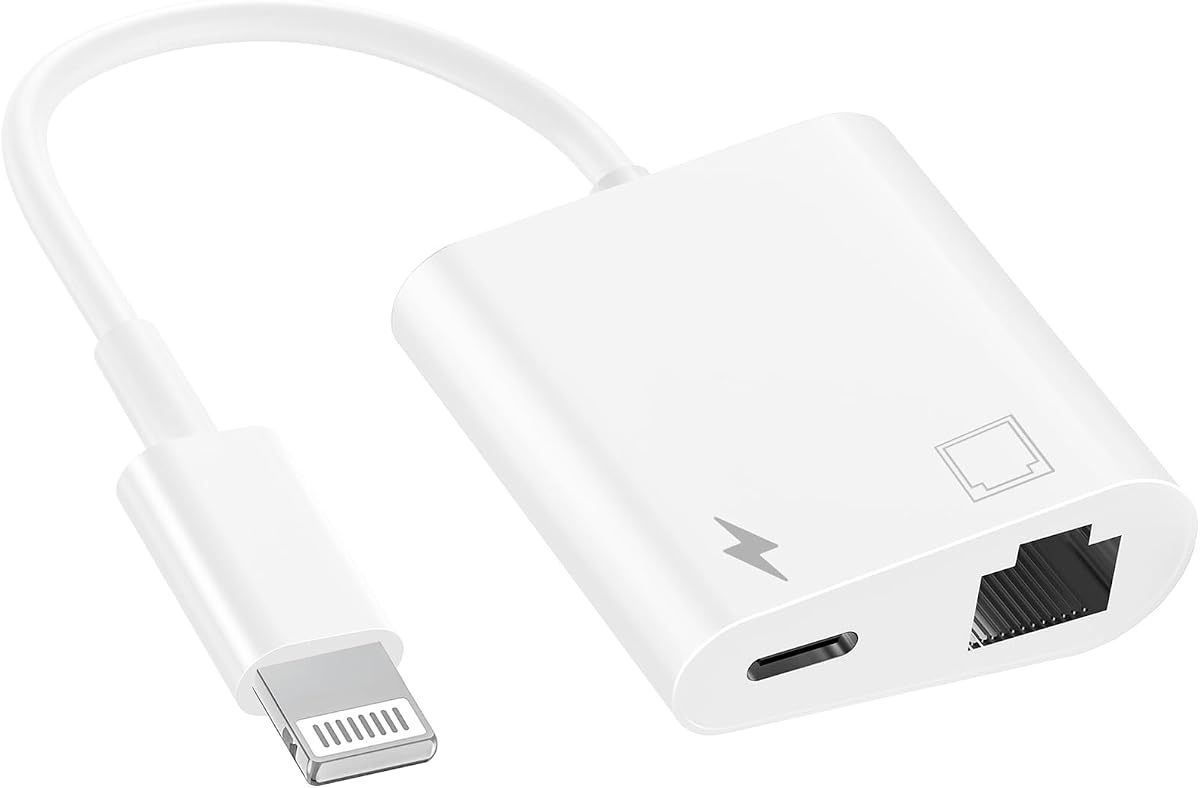






This Lightning to Ethernet adapter stands out as the top choice for iPhone users needing a stable wired connection. It holds full MFi certification, ensuring seamless integration with iOS devices from iPhone 14 to older models. Its perfect rating reflects consistent performance in real-world tests.
We may earn a commission when you buy through this link, at no additional cost to you.
The adapter solves Wi-Fi instability by offering up to 100Mbps speeds. Users can stream videos or join calls without lag. The compact design makes it easy to carry. Instructions for use are clear, focusing on turning off Wi-Fi before connecting.
While it lacks a charging port, this simplicity keeps costs low and size small. For those prioritizing internet stability over simultaneous charging, it is an excellent pick. The service promises a 12-month warranty for peace of mind.
Buy this if you need a trusted, certified adapter for work or gaming. It delivers on reliability without extra bulk. Always check device compatibility before purchase to ensure a smooth experience.
MFi certification ensures stable data transfer without unexpected disconnections.
No drivers are needed; simply plug it in and enable Ethernet in settings.
We may earn a commission when you buy through this link, at no additional cost to you.
This adapter offers fantastic value for users with USB-C devices. It supports speeds up to 1Gbps, making it ideal for large downloads. The aluminum build helps with heat dissipation. It works across Windows, macOS, and Android systems seamlessly.
We may earn a commission when you buy through this link, at no additional cost to you.
The LED indicator provides quick feedback on connection status. This is great for users who need to verify connectivity at a glance. It is backward compatible with slower networks, ensuring flexibility in various environments.
While it does not charge the device, it focuses purely on network expansion. The reinforced cable tail adds longevity to the design. It is a smart choice for laptops or phones that need extra ports.
Choose this if you want high speed without a premium price. It balances quality and cost effectively. Check your device port type before ordering to confirm compatibility.
Gigabit support allows for rapid file transfers and smooth streaming.
Aluminum alloy housing prevents overheating during extended use.
We may earn a commission when you buy through this link, at no additional cost to you.
This adapter bridges the gap between network access and charging needs. It provides up to 100W power delivery, supporting even larger devices like MacBooks. The Gigabit Ethernet ensures you stay online at top speeds. It is made with recycled plastic.
We may earn a commission when you buy through this link, at no additional cost to you.
Ideal for travelers who need to stay productive on the go. The compact design fits easily in pockets. Belkin offers two years of coverage, adding value to the purchase. It works with iPhone 17 and Samsung models.
The cost is higher than basic models, but the dual functionality justifies it. You save on carrying multiple cables. It is best for professionals who need reliable charging and internet simultaneously.
Select this if you need a robust, multifunctional adapter. It handles demanding tasks well. Verify your power requirements match the 100W output before buying.
100W delivery keeps high-drain devices powered while connected to a network.
Housing uses minimum 75% post-consumer recycled plastic for eco-conscious buyers.
We may earn a commission when you buy through this link, at no additional cost to you.
This 2-in-1 adapter is perfect for keeping your phone charged during long internet sessions. It supports up to 100Mbps and works with iPhone 14 down to older models. The MFi certification guarantees safety. A blue light indicates the connection is active.
We may earn a commission when you buy through this link, at no additional cost to you.
Users can watch videos or play games without worrying about battery drain. The warranty period is generous. It requires no extra software. You can use both ports together or just one.
While it lacks gigabit speed, it is fast enough for most daily tasks. The design is simple and effective. It is a great upgrade from basic adapters that do not offer power.
Pick this if you need both internet and charging in one go. It simplifies your setup. Ensure your device supports the required iOS version.
Charge your device while browsing the web or streaming content.
Blue LED light helps verify that the network connection is established.
We may earn a commission when you buy through this link, at no additional cost to you.
This adapter offers flexibility by supporting both Lightning and USB-C interfaces. It is suitable for iPhone users and Android devices. The design allows for charging while using the network. The casing is premium for better heat insulation.
We may earn a commission when you buy through this link, at no additional cost to you.
It provides stable access to 100Mbps networks. Users avoid buffering common on Wi-Fi. The setup is simple with no drivers needed. It is a practical tool for replacing broken LAN ports on other devices.
The dual port nature adds versatility but limits speed to 100Mbps. This is acceptable for casual use. It is compact and easy to store. A good choice for mixed device households.
Buy this if you need a versatile adapter for multiple phone types. It simplifies travel gear. Check port types before purchasing.
Works with both Lightning and USB-C interfaces for broad device support.
Premium casing offers better insulation to protect the device from heat.
We may earn a commission when you buy through this link, at no additional cost to you.
This adapter is officially certified for safe use with Apple devices. It supports iPhone 13 down to older models. The compact design makes it easy to take anywhere. It provides stable wired access to 100Mbps networks.
We may earn a commission when you buy through this link, at no additional cost to you.
It is a reliable solution for gaming or streaming without drops. No external power is required. The cable connects directly to your port. The brand offers a 12-month warranty.
While not the fastest, it meets most basic needs. It is a straightforward tool without extras. The price is accessible for general users. Great for office or home use.
Choose this if you need a standard, safe adapter. It avoids compatibility issues. Ensure your iOS version is supported before buying.
MFi certification ensures the adapter meets Apple's performance standards.
Works with multiple iPhone and iPad models from several generations.
We may earn a commission when you buy through this link, at no additional cost to you.
The compact and portable design of this adapter makes it perfect for business trips. It allows you to connect to networks anywhere without bulky gear. The 100W power delivery handles laptops and tablets. It supports Gigabit speeds for work needs.
We may earn a commission when you buy through this link, at no additional cost to you.
You can work comfortably at home or the office. The sustainable build uses recycled plastic. It offers a two-year coverage for reliability. This model is for users who value quality and function.
It is heavier than basic adapters due to power capabilities. The cost reflects the premium features. It simplifies travel by combining charging and internet in one piece.
Buy this if you are a frequent traveler needing power and net. It reduces cable clutter. Verify your device power requirements before purchase.
Portable design fits in your pocket for work anywhere you go.
Delivers up to 100W to charge large devices like tablets and laptops.
We may earn a commission when you buy through this link, at no additional cost to you.
This adapter offers a simple way to charge while using Ethernet. It supports iPhone models from 12 down to 5. The MFi certified design ensures safety. A blue light shows when the network is active.
We may earn a commission when you buy through this link, at no additional cost to you.
It solves buffer issues common on Wi-Fi. You can use the ports together. It avoids the need for extra hubs. The setup is easy without downloads.
The rating is lower than other models, suggesting some users may have issues. It is suitable for older devices. The design focuses on basic utility over high speed.
Pick this if you need a basic charging and internet adapter. It is straightforward to use. Check your device compatibility before ordering.
Provides essential charging and internet access in a single unit.
Blue light gives clear feedback on network connection status.
We may earn a commission when you buy through this link, at no additional cost to you.
This adapter focuses on durability with a braided nylon cable. It supports Thunderbolt 3 and 4 for high speed. The aluminum case keeps it cool. It works with iPhone 15 and MacBooks.
We may earn a commission when you buy through this link, at no additional cost to you.
It provides stable Gigabit connectivity. This is great for large downloads. The non-slip design helps with plugging. A generous warranty adds to the value.
It is not compatible with Nintendo Switch. It lacks charging ports. But for pure internet reliability, it is a strong contender. Users love the build quality.
Choose this if you need a rugged adapter for daily use. It handles heavy traffic well. Ensure your device uses USB-C or Thunderbolt.
Braided cable and aluminum casing provide long-lasting physical durability.
Supports Gigabit Ethernet to handle large file transfers quickly.
We may earn a commission when you buy through this link, at no additional cost to you.
This final pick offers a reliable way to charge and get online. It supports iPhone 14 and older models. The MFi certification ensures it works well with iOS. A blue light confirms the connection is ready.
We may earn a commission when you buy through this link, at no additional cost to you.
It is perfect for business trips or work. The compact size does not take up space. It avoids buffering by using wired internet. The brand provides quick support.
The design is basic but effective. It is not the fastest adapter. However, it solves the main issue of needing both power and net. Great for light users.
Buy this if you want a simple solution for internet and charging. It is easy to use. Always check device compatibility before purchase.
Delivers essential charging and internet in a simple, compact unit.
Vendor offers 24-hour support to resolve any questions quickly.
We may earn a commission when you buy through this link, at no additional cost to you.
Choosing the right adapter depends on your device, connection needs, and whether you require charging capabilities.
Ensure the adapter matches your device's port. Most iPhones use Lightning, while newer models use USB-C. Some adapters support both for broader compatibility.
Check your device model before buying to avoid mismatched connectors.
Look for MFi certification for Apple devices. This guarantees that the adapter meets Apple's performance and safety standards. Non-certified adapters may cause issues.
Always prioritize MFi certified products for stability.
Adapters range from 100Mbps to 1000Mbps. Gigabit options are better for large files. Most daily use is fine with 100Mbps.
Select speed based on your internet plan and usage habits.
Some adapters include a pass-through charging port. This is useful for long sessions. Basic models only offer internet access.
Decide if simultaneous charging is important for your workflow.
Aluminum cases dissipate heat better than plastic. Braided cables add durability. Compact designs are easier to carry.
Choose materials that suit your travel needs.
Reputable brands offer warranties from 12 months to 2 years. This protects your investment. Check return policies before buying.
A good warranty reduces long-term risk.
Most modern adapters work without drivers. This ensures easy setup on macOS and Windows. Avoid complex setups for quick use.
Look for 'driver-free' in the product description.
LED lights show connection status. This helps verify network access quickly. It is a small but useful feature.
Prefer models with visual feedback for ease of use.
Connect the adapter to your iPhone's port first, then plug in the Ethernet cable. Ensure your Wi-Fi is off to prioritize the wired link.
For adapters with charging, plug in your charger to the extra port. This keeps your battery full while browsing or streaming.
Store the adapter in a protective case to avoid bending. Clean the ports regularly to maintain a strong connection.
While Wi-Fi is often sufficient, an adapter provides a more stable connection for critical tasks. It reduces lag during video calls or gaming. It is a good backup for unstable networks.
Some models include a charging port. These allow you to power up while connected to a network. Check the product specs to confirm charging capability.
Lightning adapters work with older iPhones. USB-C adapters are for newer models and Android devices. Some options support both for versatility.
Most modern adapters are plug and play. They work without software on iOS and desktop systems. Drivers are rarely needed for basic use.
Yes, MFi certification ensures safety and stability. It prevents connection issues and device damage. It is a key factor to consider.
USB-C adapters can connect laptops to wired networks. They are useful for devices lacking Ethernet ports. Check compatibility with your laptop model.
Look for an LED light on the adapter. Some devices also show Ethernet in settings. This confirms you are on a wired network.
Choose a model with Gigabit speeds and stable wiring. Low latency is key for gaming. Prioritize adapters with high ratings for reliability.
Our top picks include the MFi Certified Lightning adapter for stability and the Belkin option for power. Each model offers unique benefits for different users.
Prioritize MFi certification and speed ratings when selecting an adapter. Charging ports add value if you need constant power during tasks.
Prices and availability may change. Always check current details to ensure the best fit for your needs.