
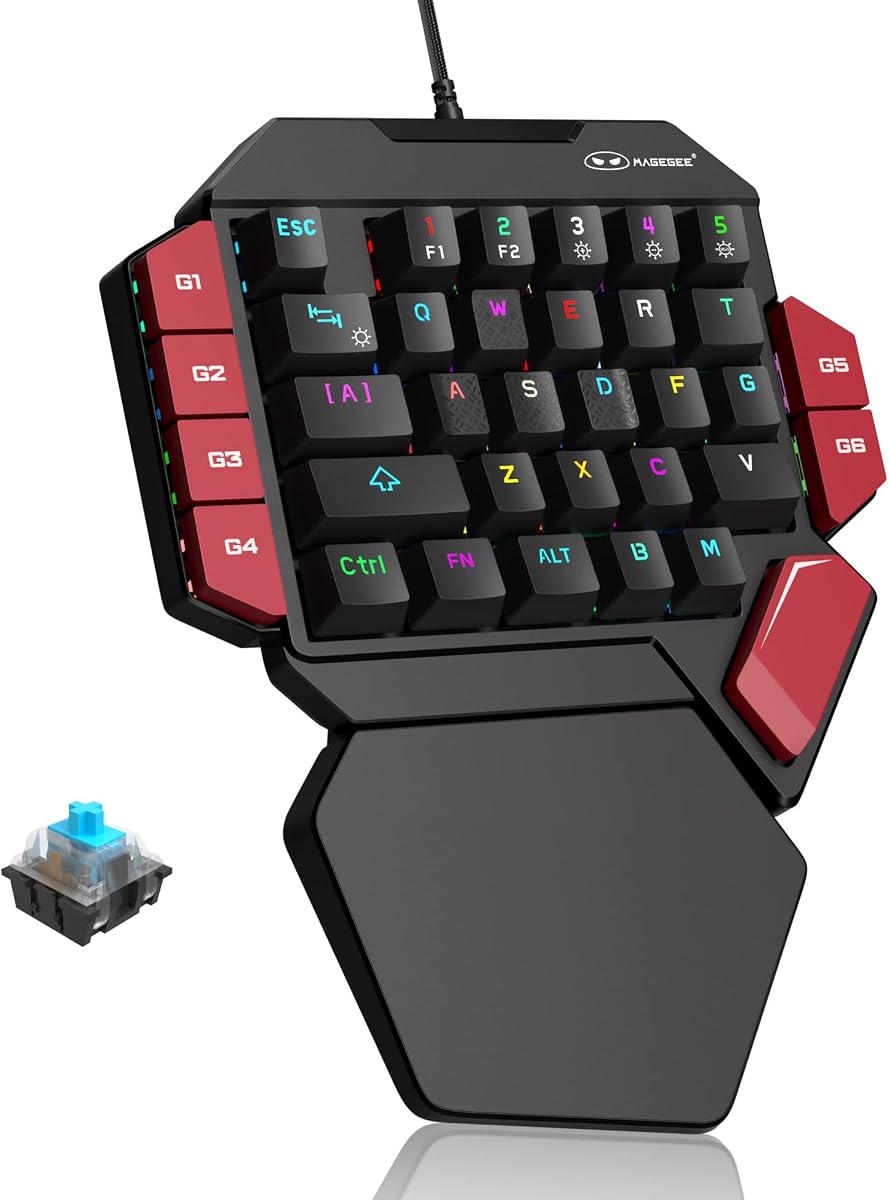
RedThunder One Handed Gaming Keyboard RGB Backlit 35 Keys Portable Mini Gaming Keypad
4.4Editor score
Affordable Price Point Under 25
RGB Backlit with Multiple Modes
Plug and Play Without Drivers
Discover the top gaming keypads for 2026. This guide compares features, ergonomics, and performance to help you choose the best one-hand controller for your
Gaming keypads offer a specialized solution for players seeking enhanced control and comfort. These devices allow you to map complex commands to a single hand, freeing up your mouse for precise aiming. A good keypad balances ergonomics, switch quality, and customization options.
We evaluated ten top models based on build quality, response time, and user feedback. Our analysis covers wired and wireless options, mechanical and membrane switches, and analog features. This list helps you find the right tool for competitive or casual play.
Each pick highlights unique strengths like Hall Effect switches, macro support, or compact designs. We include detailed specs and pros cons to guide your decision. Remember that prices and availability can change, so check current listings before buying.
4.4Editor score

4.2Editor score

4.3Editor score
This table provides a side-by-side view of the ten selected gaming keypads. Compare key specifications like switch type, connectivity, and special features to find the model that fits your gaming style and budget.




The Keychron C0 HE stands out as the top choice for competitive players who need precision. It features Rapid Trigger Hall Effect magnetic switches that detect key movement in real-time. This technology eliminates fixed actuation points, allowing for faster reset times and more fluid control during intense matches.
We may earn a commission when you buy through this link, at no additional cost to you.
Its 8K polling rate ensures that every input is registered with minimal delay. This is particularly useful for games like Valorant or CS2 where split-second reactions matter. The web-based configurator simplifies setup since you do not need to install heavy drivers. You can customize actuation settings and RGB lighting directly in your browser.
While it offers high performance, the lack of wireless connectivity might be a limitation for some users. Additionally, the price point is higher than many standard membrane or traditional mechanical keypads. However, the precision and customization options justify the cost for serious gamers.
If you prioritize performance and want a device that adapts to your playing style, the Keychron C0 HE is the recommendation. It bridges the gap between gaming keyboards and specialized keypads effectively.
The 8K polling rate and magnetic switches provide the low latency needed for high-level play.
Web-based tools allow you to tweak settings without cluttering your system with software.
We may earn a commission when you buy through this link, at no additional cost to you.
The RedThunder One Handed Gaming Keyboard is an excellent entry point for those exploring one-handed controls. It offers a solid set of features at a very accessible price point. With 35 keys and anti-ghosting technology, it handles multiple inputs well during gameplay.
We may earn a commission when you buy through this link, at no additional cost to you.
Macro recording is a key feature that allows you to bind complex commands to single keys. This can streamline your workflow in MMOs or productivity tasks. The RGB backlighting adds a touch of style with static and breathing modes to match your setup.
While it lacks the advanced customization of premium models, it serves its purpose well for casual gaming. The build is functional though not as robust as higher-end options. It is ideal for students or casual players on a tight budget.
For anyone looking to try a gaming keypad without a significant investment, this model delivers great value. It provides the essential tools needed to enhance one-handed control effectively.
This model offers core gaming features without the high cost of flagship devices.
Plug and play compatibility makes it easy to use across different systems immediately.
We may earn a commission when you buy through this link, at no additional cost to you.
The AZERON Gaming Keypad represents the pinnacle of innovation in one-handed controllers. Its standout feature is the Hall Effect analog thumbstick which allows for smooth 360-degree movement. This eliminates stick drift and offers precision comparable to standard game controllers.
We may earn a commission when you buy through this link, at no additional cost to you.
With 30 mappable inputs and specialized software, you can map keyboard or mouse actions to any button. The 3D printed body ensures a perfect ergonomic fit for various hand sizes. This level of customization is unmatched by mass-produced alternatives.
The price is a significant factor as it is one of the most expensive options available. It also targets right-handed users specifically, which may limit its appeal. However, the unique capabilities justify the cost for those seeking a competitive edge.
If you want a device that combines a keypad with an analog stick for superior control, the AZERON is the definitive choice. It transforms how you interact with complex game mechanics.
The thumbstick provides fluid movement control essential for simulation and strategy games.
Software allows for complex macro and input mapping beyond standard key functions.
We may earn a commission when you buy through this link, at no additional cost to you.
The Razer Tartarus V2 is a trusted name in gaming peripherals. It features a comfortable ergonomic design that fits the hand naturally during long sessions. The mecha-membrane switches offer a tactile feel that is softer than mechanical keys but still responsive.
We may earn a commission when you buy through this link, at no additional cost to you.
Integration with the Razer ecosystem is a major benefit for existing users. You can sync lighting effects with other Chroma supported gear for a unified look. The thumbpad allows for precise movement control without taking your hand off the device.
Some users might find the requirement for Synapse software cumbersome. The membrane switches also lack the crisp actuation of mechanical alternatives. Despite this, it remains a solid choice for those invested in the Razer brand.
For gamers who value seamless lighting synchronization and ergonomic comfort, the Tartarus V2 is a reliable option. It balances performance with ease of use effectively.
The design ensures your wrist and palm stay relaxed during extended gameplay.
Sync lighting with hundreds of compatible games and devices instantly.
We may earn a commission when you buy through this link, at no additional cost to you.
The Redragon K585 offers a generous 42-key layout for those needing extensive command access. This is ideal for MMOs or complex strategy games where you need many hotkeys readily available. The tactile switches provide satisfying feedback for every press.
We may earn a commission when you buy through this link, at no additional cost to you.
Onboard macro keys allow you to store commands directly on the device. This means your settings are portable even if you change computers. The USB pass-through port keeps your desk tidy by allowing direct connection of a mouse or headset.
While the extra keys are useful, the unit takes up significant desk space. The wrist rest is detachable which offers some flexibility in size management. It is a feature-rich option for budget conscious gamers.
If you need a high number of keys without breaking the bank, the K585 is a strong contender. It balances quantity of inputs with practical features well.
42 keys provide ample room for complex macro setups and skill rotations.
Onboard storage and pass-through ports make moving setups easier.
We may earn a commission when you buy through this link, at no additional cost to you.
The Redragon K585 PRO takes the popular wired design into the wireless realm. It offers both Bluetooth and 2.4GHz connectivity options for flexibility. This reduces cable clutter on your desk significantly. The battery life supports around 15 to 20 hours of continuous use.
We may earn a commission when you buy through this link, at no additional cost to you.
It retains the 42-key layout which is excellent for heavy macro usage. The magnetic wrist rest adds comfort without permanently adding bulk. You can swap switches without soldering which adds long-term value to the device.
While convenient, wireless connectivity can introduce latency compared to wired options. Battery management is another consideration for long gaming sessions. However, for most users the freedom of wireless is worth the trade-off.
If you prefer a clean setup with many keys, this model offers the right balance. It brings wireless convenience to the tactical layout successfully.
Choose between Bluetooth for low power or 2.4GHz for stability.
A single charge lasts long enough for several extended gaming sessions.
We may earn a commission when you buy through this link, at no additional cost to you.
This version of the RedThunder keypad focuses on compact portability. It is perfect for users with limited desk space or those who travel frequently. The 35-key layout covers essential functions without overwhelming the user. Response speed is optimized to 3ms for smooth gameplay.
We may earn a commission when you buy through this link, at no additional cost to you.
Macro recording is straightforward using specific key combinations. This simplifies setup for quick automations. The RGB lighting adds visual appeal with various modes to choose from. It works immediately without needing additional drivers.
The compact size might feel cramped for users with larger hands. The build quality is functional but not premium. It is a budget choice that prioritizes function over luxury.
For travelers or small desk setups, this mini keypad is a practical tool. It provides the necessary inputs without taking up much room.
Its small form factor keeps your desk clear for mouse movement.
Plug and play ensures you can start using it right away.
We may earn a commission when you buy through this link, at no additional cost to you.
The AJAZZ AK029 brings Hall Effect technology to a more affordable price bracket. This switch type ensures longevity and prevents debounce issues. The 29-key layout is highly compact which saves significant desk space for your mouse.
We may earn a commission when you buy through this link, at no additional cost to you.
An 8KHz polling rate provides ultra-fast response times for competitive play. The aluminum-reinforced build gives it a premium feel compared to plastic alternatives. Web-based customization allows you to tweak settings without heavy software.
The lower key count means fewer options for complex macros. It is strictly a wired device which limits flexibility. However, the build quality and switch technology make it stand out in its price range.
If you want Hall Effect switches without paying premium prices, this is a great option. It prioritizes speed and durability over extra buttons.
Magnetic switches provide faster reset times and longer life than mechanical contacts.
Internal aluminum plate ensures stability and durability over time.
We may earn a commission when you buy through this link, at no additional cost to you.
This model represents the classic version of the Tartarus V2. It relies on the proven mecha-membrane switch technology for a smooth typing experience. The thumbpad is highly rated for comfort during movement control. RGB lighting syncs with other Razer products via Chroma.
We may earn a commission when you buy through this link, at no additional cost to you.
Software support ensures you can keep macros updated easily. The build quality is durable and feels solid on the desk. It is a safe choice for fans of the Razer ecosystem.
Newer models have moved to Hall Effect switches so the feel may feel dated to some. Synapse can be resource heavy for older systems. It remains a reliable device for general gaming.
If you already own Razer hardware, this keeps your setup consistent. It offers familiar features that work well for standard needs.
The thumbpad allows natural movement without reaching across the keyboard.
Lighting effects match your other devices for a cohesive look.
We may earn a commission when you buy through this link, at no additional cost to you.
The Redragon RM104 offers a unique twist with a multifunction smart knob. You can rotate it for volume or press it for muting. It also cycles RGB modes easily. This device bridges the gap between a keypad and a full keyboard with extra features.
We may earn a commission when you buy through this link, at no additional cost to you.
It supports Bluetooth, 2.4GHz, and USB-C connections for versatility. The battery capacity is high ensuring long usage between charges. Software allows you to map commands to buttons effectively.
While not a dedicated one-handed keypad, it serves as a compact control center. The pink and white color scheme is unique and appealing to some users. It is a creative alternative to standard layouts.
If you need audio control and wireless connectivity, this model is a solid pick. It offers a distinct experience compared to traditional gaming keypads.
The knob streamlines audio and RGB adjustments without extra menus.
The large internal battery supports weeks of typical usage without charging.
We may earn a commission when you buy through this link, at no additional cost to you.
Selecting the right gaming keypad depends on your play style and technical needs. This guide covers key factors to consider before purchasing.
Switch type defines the feel and speed of the device. Mechanical switches offer tactile feedback while membrane switches are softer. Hall Effect switches provide adjustable actuation for faster response times.
Choose the switch based on your preference for clickiness and performance needs.
Decide between wired and wireless options based on your desk setup. Wireless models reduce clutter but may have slightly higher latency. Wired models ensure consistent signal and no need for charging.
Prioritize wireless if you prefer a clean desk or wired for competitive play.
Different models offer between 29 to 42 keys. More keys allow for complex macros and skill rotations. Fewer keys save space and focus on essential commands.
Match the key count to the complexity of your games.
Ergonomic design prevents fatigue during long sessions. Look for wrist rests and contoured bodies that fit your hand. Some models offer 3D printed custom bodies for perfect fits.
Comfort is essential for sustained gameplay without injury.
Software allows you to program macros and RGB lighting. Web-based tools are convenient while desktop apps offer more depth. Ensure the software is compatible with your operating system.
Check if the device supports your preferred customization tools.
A sturdy build ensures durability over time. Aluminum frames and double-shot keycaps resist wear. Plastic bodies might feel less premium but save cost.
Invest in quality materials if you plan to use it daily.
Some advanced models include analog thumbsticks for movement. These allow smoother control than digital keys. This is useful for FPS and strategy games.
Consider analog features if precise movement is a priority.
Prices range significantly from basic to premium models. Determine how much you are willing to spend on a device. Higher prices often bring better switches and build quality.
Set a budget that matches your specific gaming requirements.
Connect your keypad to the computer via USB or pair wirelessly. Install the required software to program keys and macros. Test the keys to ensure they register correctly.
Clean the keys regularly using a soft brush to remove dust. Avoid harsh chemicals that could damage the surface. Store the device in a dry place when not in use.
Update firmware regularly for better performance. Recharge the battery if using a wireless model before it runs out. Replace keys if they wear down over time.
Yes, they are worth it if you need complex macro access or better ergonomics. They free up your mouse hand for precise aiming. Casual players might not need one but competitive gamers benefit.
Install the manufacturer software and select the macro recording option. Press the keys you want to record and save the sequence. Assign it to a specific key on the keypad.
Many models support macOS but check compatibility before buying. Keychron and Redragon offer Mac support. Some software might be limited compared to Windows versions.
Hall Effect switches offer faster reset times and higher durability. They allow adjustable actuation points for better control. They are generally superior for competitive gaming.
Yes, you can use them for typing but they have fewer keys. They are best for specific tasks rather than full text entry. Some people use them as a secondary input device.
Battery life varies by model and usage. Wireless models usually last 15 to 20 hours per charge. Always keep a cable handy for extended sessions.
We have explored ten diverse models catering to different needs and budgets. From the precision of the Keychron C0 HE to the affordability of the RedThunder, there is a fit for everyone.
Prioritize switch quality and ergonomics when making your decision. A device that feels good and responds quickly will enhance your performance more than extra buttons.
Check current listings for the latest offers and availability. Prices may vary so ensure you get the best deal for your needs.