
Wireless Alarm System for Home Security 16Pcs
4.6Editor score
WiFi and 4G dual network
No monthly monitoring fees
120dB siren included
This guide compares the top cellular alarm systems for home security including features like GSM backup, app control, and professional monitoring to help you
A cellular alarm system provides reliable security by using mobile networks to send alerts when Wi-Fi fails. This ensures your home stays protected even during outages or connectivity issues. Modern systems offer smart features like remote arming and real-time notifications for peace of mind.
We evaluated ten top-rated models based on connectivity options, sensor compatibility, ease of setup, and monitoring capabilities. Our analysis covers standalone communicators as well as full kits suitable for homes and businesses. Each entry highlights key strengths to help you find the right fit.
Each pick showcases specific advantages like dual-network support, voice control, or no monthly fees. Prices vary by package size and included sensors so check current listings before buying. We include direct links to official product pages for the most accurate and up-to-date information available.
4.6Editor score

4.7Editor score

4.7Editor score
The following table provides a side-by-side comparison of all ten cellular alarm systems reviewed in this guide. Each entry lists essential specifications to help you quickly identify the model that best fits your security needs and budget requirements.




The Alula BAT-Connect-V is a high-end universal alarm communicator designed for robust security needs. It holds a strong 4.7 rating and stands out for its ability to use cellular, Ethernet, and WiFi simultaneously for maximum reliability.
We may earn a commission when you buy through this link, at no additional cost to you.
This device supports near-universal panel compatibility which makes it versatile for existing systems. You can also use keyswitch arming for remote interactive controls. The inclusion of Ethernet and WiFi onboard ensures you have multiple pathways to stay connected.
While it offers premium features, the price is higher than basic modules. Professional installation may also be needed depending on your existing setup. These trade-offs are acceptable if you need enterprise-grade reliability.
This system is ideal for users with existing panels who need a cellular upgrade without replacing everything. It is a strong choice for businesses or larger homes requiring consistent communication channels.
Using cellular Ethernet and WiFi together ensures alerts go through even if one network fails.
Near-universal compatibility means you can integrate this communicator with most major alarm control panels.
We may earn a commission when you buy through this link, at no additional cost to you.
This GSM alarm security module is designed for property monitoring with built-in 4G 3G and GSM capabilities. It allows you to receive instant alerts anywhere you have cellular coverage. While it lacks a public rating it features robust hardware for custom setups.
We may earn a commission when you buy through this link, at no additional cost to you.
The eight independent alarm detection channels let you set specific notifications for different points. Each input port supports normally closed or open modes which adds flexibility for various sensors. This makes it suitable for warehouses or large homes.
The lack of a rating suggests limited user feedback available. Some users might find the configuration less intuitive than consumer kits. However the flexible port configuration offers significant value for DIY enthusiasts.
This module is best for users who need specific sensor customization without brand lock-in. It is a practical solution for securing commercial premises or storage facilities.
Built-in global modules ensure you stay connected even when traveling or moving to different regions.
Each channel supports custom alert content so you know exactly which sensor triggered an event.
We may earn a commission when you buy through this link, at no additional cost to you.
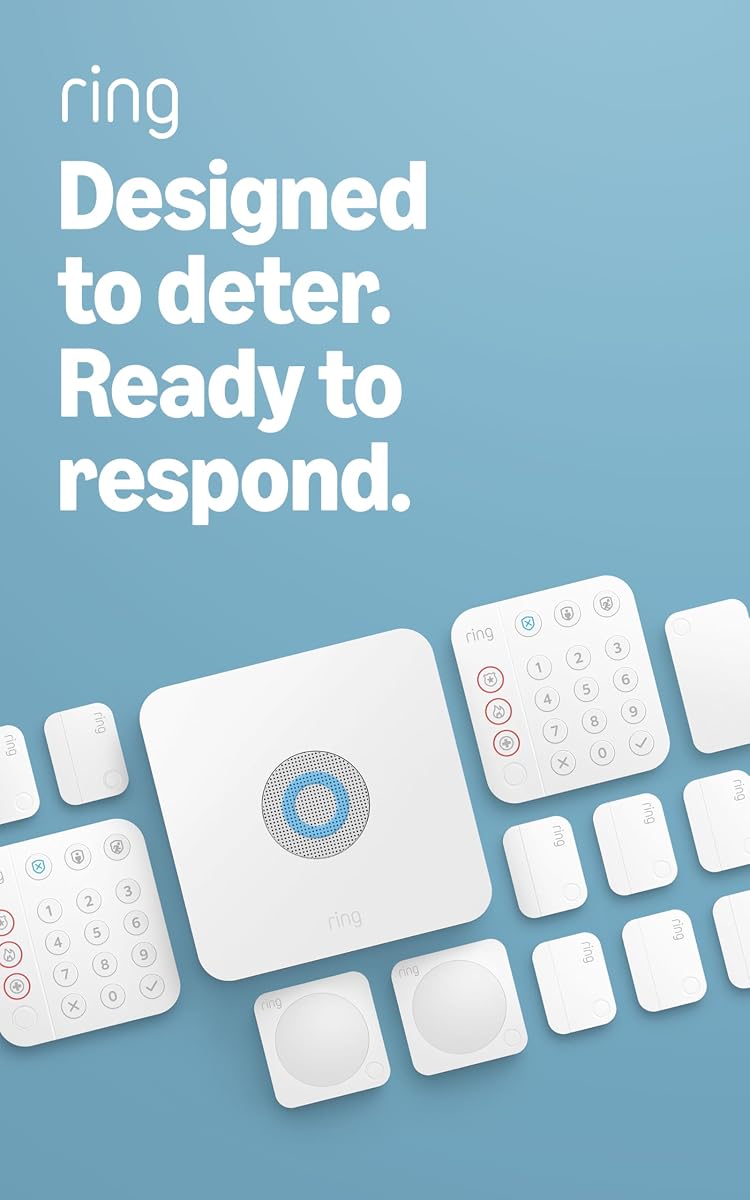
The Ring Alarm 8-Piece Kit is a top choice for home security with a 4.7 rating. It includes a base station keypad contact sensors and motion detector. It is perfect for one or two bedroom homes needing reliable protection.
We may earn a commission when you buy through this link, at no additional cost to you.
You can receive mobile notifications and control devices via the Ring app. Optional 24/7 professional monitoring adds peace of mind for emergencies. Alexa integration allows voice commands for arming or disarming the system.
Professional monitoring requires a separate subscription which adds to long-term costs. The range extender included helps but larger homes may need more accessories. Still it balances cost and features well for most users.
This kit is ideal for renters and homeowners who want a balance of ease and capability. It is our top pick for overall performance in the cellular alarm category.
Voice control with Alexa makes it easy to arm your system without using your phone.
Choose between self-monitoring or upgrading to 24/7 professional service as your needs change.
We may earn a commission when you buy through this link, at no additional cost to you.
This 14-Piece Kit suits two to four bedroom homes with its generous sensor count. It includes two keypads eight contact sensors two motion detectors and a range extender. The rating is strong at 4.6 showing user satisfaction with the setup.
We may earn a commission when you buy through this link, at no additional cost to you.
Expandability is a key strength since you can add more sensors as needed. Mobile app control ensures you stay informed no matter where you are. Alexa compatibility adds convenience for voice-based security management.
The upfront cost is higher than smaller kits but you get more coverage initially. Monitoring is optional and requires a subscription for emergency response features. These are standard trade-offs for robust systems.
If you have a larger property this kit provides comprehensive entry and motion coverage. It is a solid choice for those who want to avoid buying extra sensors later.
Two keypads allow convenient arming from different locations inside your home or office.
Eight contact sensors ensure you can monitor all major doors and windows in a large space.
We may earn a commission when you buy through this link, at no additional cost to you.
The TG7LA001 TG-7 LTE-A is a dedicated cellular alarm communicator for existing systems. It uses LTE technology to ensure reliable communication with monitoring centers. This model is useful for upgrading legacy systems without replacing sensors.
We may earn a commission when you buy through this link, at no additional cost to you.
It is designed as a standalone unit focused solely on alarm communication. This means it does not include sensors but works with your existing setup. This can be a cost-effective upgrade path for current users.
Public information is limited so verify compatibility with your specific panel before buying. Installation may require technical expertise to wire correctly. These constraints are manageable for those familiar with alarm panels.
This communicator is best for upgrading older systems to modern cellular networks. It provides a straightforward path to maintain security without changing your whole system.
LTE-A support ensures faster signal transmission compared to older 3G networks.
Use this unit to bring older panels up to date with current cellular standards.
We may earn a commission when you buy through this link, at no additional cost to you.
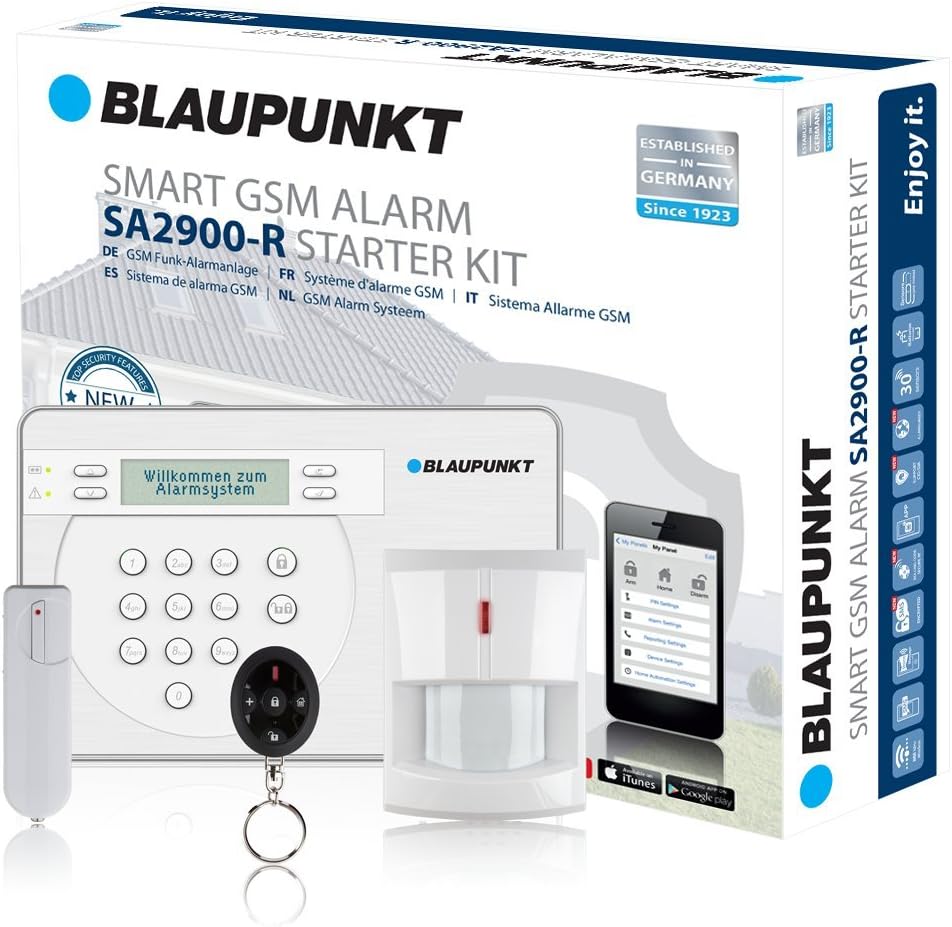
The Blaupunkt SA 2900 is a wireless GSM alarm system with strong security features. It includes motion and door window sensors for basic protection. With a 4.4 rating it is well received for its ease of use.
We may earn a commission when you buy through this link, at no additional cost to you.
Anti-replay code protects signals against manipulation which adds security depth. The app control allows you to manage the system from your phone. A built-in microphone supports listening functions for status assessment.
You must provide your own SIM card which is a small setup step. Some users may find language options limited compared to other apps. These minor issues do not detract from its core value.
This system is great for small offices or homes wanting quick setup. Its GSM nature ensures connectivity without relying on broadband internet.
Anti-replay codes prevent hackers from capturing and replaying alarm signals.
The built-in mic lets you listen in on the monitored area via your app.
We may earn a commission when you buy through this link, at no additional cost to you.
This kit offers a massive 24-piece setup with WiFi and GSM connectivity. It includes motion and door sensors plus a color screen on the main unit. With a 4.3 rating it balances affordability with comprehensive coverage options.
We may earn a commission when you buy through this link, at no additional cost to you.
Voice assistant support allows hands-free control while the color screen shows system status and weather. It also includes an emergency SOS device for quick alerts. App control lets you manage sensors remotely and customize naming.
The large number of pieces may overwhelm casual DIY users. Some features like weather display are nice but not critical for security. These extras make it feel modern and feature-rich.
This is ideal for large homes needing many sensors without buying separately. The SOS device is a valuable addition for elderly family members living alone.
Connect to WiFi and use 4G SIM as backup if internet goes down.
A color screen on the hub shows alerts and status at a glance.
We may earn a commission when you buy through this link, at no additional cost to you.
The Ring Alarm 5-Piece Kit is perfect for condos and small apartments. It includes a base station keypad contact sensor motion detector and range extender. The 4.7 rating reflects high user satisfaction with its performance.
We may earn a commission when you buy through this link, at no additional cost to you.
Expandability means you can add more sensors as your space changes. You control it all via the Ring app for mobile monitoring. Alexa integration allows voice commands which is very convenient for daily use.
With only one contact sensor you may need more for all entry points. Professional monitoring costs extra but improves emergency response times. These are minor limits for a compact starter kit.
This is a top choice for renters or small spaces needing reliable security. Its simplicity and brand reputation make it a safe and smart option.
Designed specifically for smaller living spaces with fewer sensors included.
Add more sensors later to expand the system as your needs grow.
We may earn a commission when you buy through this link, at no additional cost to you.
This SimpliSafe kit includes eight pieces for quick wireless setup with no drilling needed. It offers optional professional monitoring without long-term contracts. Compatible with Alexa and Google Assistant it integrates well into smart homes.
We may earn a commission when you buy through this link, at no additional cost to you.
Secret alerts let you monitor private areas silently which adds a layer of privacy. The panic button provides fast dispatch for emergencies. Sensors protect entry points with customizable alert types.
The monitoring fee is extra and service is US-only. The keypad lacks a display but works well for arming. These constraints are reasonable given the flexible monitoring model.
Choose this if you want security without being locked into a contract. It is a great fit for privacy-conscious users who value flexibility.
Get notified without sounding the siren to monitor areas quietly.
Cancel monitoring anytime without penalties thanks to flexible subscription plans.
We may earn a commission when you buy through this link, at no additional cost to you.
This budget-friendly system includes 16 pieces with nine sensors and dual network support. It offers no monthly fees making it a top pick for cost-sensitive users. With a 4.6 rating it delivers strong value for home security.
We may earn a commission when you buy through this link, at no additional cost to you.
The 4G backup ensures alerts go through even if WiFi fails. The 48-hour battery keeps it running during power outages. Tamper protection adds physical security to prevent removal attempts.
App control uses Tuya or Smart Life which is reliable but basic. The kit may not cover very large homes without expansion. These limits are acceptable given the price point.
This kit is ideal for users who want solid security without subscriptions. It is our best budget pick for reliable dual network backup and protection.
Enjoy free monitoring and alerts forever without monthly fees or hidden charges.
A rechargeable backup battery keeps the system active for 48 hours during blackouts.
We may earn a commission when you buy through this link, at no additional cost to you.
Selecting the right cellular alarm system requires understanding your property size, desired features, and budget constraints. This guide covers essential factors to help you make an informed decision that fits your security needs.
Look for systems with dual network support such as WiFi and 4G or GSM. This redundancy ensures your system sends alerts even if your internet goes down or cables get cut.
Prioritize models that use SIM cards for cellular backup to maintain protection during outages.
Check how many sensors come in the base kit and whether you can add more later. A system with limited sensors might not cover all entry points initially.
Choose a platform that lets you add door motion and environmental sensors over time as your needs change.
Decide if you want self-monitoring through an app or professional monitoring for emergency dispatch. Professional monitoring often costs a monthly subscription fee.
Review pricing plans carefully to avoid hidden fees or long-term contract requirements that limit flexibility.
Consider whether the system requires professional installation or supports DIY setup. Wireless systems generally offer easier and faster installation compared to hardwired ones.
Ensure the package includes all necessary mounting hardware to avoid extra costs during setup.
If you use Alexa Google Assistant or other smart platforms verify the alarm system is compatible. Integration allows voice control and scene automation which adds convenience.
Check for app support on both iOS and Android devices for full functionality.
Ensure the system has a backup battery to function during power outages. Look for battery life of at least 24 hours for extended coverage.
Systems with tamper-proof designs add another layer of reliability against physical interference.
Evaluate the mobile app for intuitive navigation and real-time alerts. You should be able to arm or disarm the system easily from anywhere.
Features like status screens weather updates and custom sensor naming improve daily usability significantly.
Compare upfront costs against ongoing fees like subscriptions or SIM card charges. Some systems may be cheaper initially but cost more over time due to mandatory monitoring.
Factor in potential expansion needs when calculating your total investment for security.
Start by carefully unboxing all components and checking the parts list. Place the base station in a central location near power outlets with clear visibility for the display if equipped.
Download the required app from your device store and register your account. Follow the prompts to pair each sensor using the provided instructions to ensure they connect correctly.
Test the system after installation by triggering each sensor individually. Check that alerts arrive on your phone and confirm the battery and cellular backup are functioning properly.
A cellular alarm system uses mobile networks to send security alerts instead of relying solely on landlines or WiFi. This ensures communication even if the internet fails or lines are cut. Most systems include a SIM card slot for cellular data.
Not necessarily. Some systems offer free self-monitoring via an app while others charge for professional monitoring. Check if the product includes monthly fees for alerts or just one-time purchase costs.
Usually the SIM slot is on the back or side of the base station. You must power down the device remove the cover swap the card and restart the unit to reconnect.
Yes many systems work solely with cellular networks so you do not need WiFi. However WiFi is often used for faster updates or local control features when available.
Most systems last between 12 to 48 hours depending on the model. Check the specifications to know how long the alarm will remain active without AC power.
Most modern systems are designed for DIY with wireless sensors and plug-and-play hubs. Installation typically involves sticking sensors on doors and windows and mounting the hub on a wall.
Many systems have backup options such as WiFi or landline connections. Check if your device supports multiple communication channels to stay connected in any scenario.
Yes most kits are expandable with additional contact motion or environmental sensors. You can usually add them through the app pairing menu without needing new hubs.
We reviewed ten top models ranging from budget-friendly kits to premium communicators. Each offers unique benefits like dual network support no fees or expandable sensor options for various needs.
Prioritize systems that fit your property size and desired monitoring style. Consider whether you want DIY control or professional emergency services based on your security goals.
Prices and availability change so check current listings before purchasing. Use our links to find the best deals and confirm the latest features for each model.