
XIAOWTEK Wireless Earbuds
4.9Editor score
4 ENC noise cancelling mics
50H total playtime
IPX7 waterproof design
Discover the top earbuds for laptop conference calls in October 2026. We compare microphones, noise cancellation, battery life, and comfort for remote work.
Finding the right earbuds for laptop conference calls is essential for remote professionals. Clear audio and reliable connections ensure you stay productive during long meetings without technical distractions.
We compared ten top-rated models based on microphone quality, battery life, and compatibility with laptops. Our analysis focuses on features that matter most for video calls and virtual collaboration.
Each pick highlights specific strengths like noise cancellation or extended playtime. Prices vary by model and retailer, so check current listings before making your final decision today.
4.9Editor score

3.9Editor score
4.0Editor score
This table provides a side-by-side overview of the key specifications for each model to help you quickly identify the best fit for your workspace needs.




The XIAOWTEK Wireless Earbuds stand out as a top contender for budget-friendly laptop conference calls. With a high rating and robust features like Bluetooth 5.4, these earbuds offer impressive value without compromising on essential performance metrics.
We may earn a commission when you buy through this link, at no additional cost to you.
Its primary strength lies in the combination of advanced connectivity and long battery life. The 50-hour total playtime ensures you rarely need to recharge during busy work weeks, while the ENC noise cancelling technology focuses on your voice for clearer meetings.
While the touch controls might require some adjustment to avoid accidental inputs, the overall experience remains seamless. The IPX7 waterproofing adds durability, making these suitable for use in various environments beyond just the home office.
For professionals seeking reliable audio hardware without a high price tag, these earbuds are a solid choice. They deliver clear call quality and consistent connectivity, making them an excellent investment for daily remote work.
The 4-mic design with ENC technology ensures your voice is isolated from background noise, which is critical for professional communication.
With up to 50 hours of total playtime, you can use these earbuds for days on a single charge cycle.
We may earn a commission when you buy through this link, at no additional cost to you.
These Wireless Earbuds leverage the latest Bluetooth 5.4 technology to provide stable connections for laptop users. The focus on low latency and strong signal penetration makes them ideal for uninterrupted conference calls and media consumption.
We may earn a commission when you buy through this link, at no additional cost to you.
The inclusion of dual 14.2mm composite dynamic drivers delivers immersive sound quality. Additionally, the advanced ENC call noise cancellation ensures that your voice remains the focus during conversations, even in noisy environments.
Battery life is substantial at 36 hours, supported by a Type-C fast charging case. The ergonomic design ensures comfort during extended wear, while the LED display keeps you informed of power levels at a glance.
Overall, these earbuds offer a balanced mix of audio quality and connectivity. They are well-suited for users who prioritize stable connections and clear voice transmission during professional calls.
Bluetooth 5.4 provides faster pairing and a stable 15-meter range, reducing dropouts during important meetings.
High-resolution decoders and ENC technology work together to filter background noise for crystal-clear voice transmission.
We may earn a commission when you buy through this link, at no additional cost to you.
The Soundcore P30i offers impressive noise cancellation capabilities suitable for focused work environments. Its active system can reduce external noise by up to 42dB, allowing you to concentrate on calls without distractions from the surroundings.
We may earn a commission when you buy through this link, at no additional cost to you.
A unique feature is the charging case that doubles as a phone stand for hands-free viewing. This is particularly useful when switching between listening to audio and watching meeting videos on your laptop or mobile device.
Call quality is enhanced by 4 microphones and AI algorithms that filter your voice. With up to 45 hours of total battery life and Bluetooth 5.4, the user experience is seamless and reliable for daily tasks.
For users who need strong noise isolation and versatile case features, the P30i is a compelling choice. It balances performance and convenience effectively for professional use.
Adaptive technology detects external sound and automatically adjusts ANC levels for optimal performance in different environments.
The 2-in-1 charging case includes a stand feature for hands-free viewing of content during breaks or meetings.
We may earn a commission when you buy through this link, at no additional cost to you.
The Panasonic ErgoFit Wired Earbuds provide a straightforward solution for users who prefer a direct wired connection. Without the need for battery charging or pairing, these earbuds offer instant connectivity and consistent audio quality for calls.
We may earn a commission when you buy through this link, at no additional cost to you.
Designed with ergonomics in mind, they include multiple earpad sizes to ensure a secure and comfortable fit. This design minimizes noise leakage and enhances bass response, delivering clear audio for both work and leisure.
The integrated call controller and microphone simplify managing calls without touching your device. This makes them ideal for office environments where distraction-free operation is preferred over wireless conveniences.
If you need a reliable audio tool that never runs out of power, these wired earbuds are a practical choice. They deliver high-fidelity sound and call performance with zero fuss.
Wired connections ensure zero audio delay, making these perfect for syncing with video calls on any device.
Custom-fit earpieces and soft materials allow for extended wear without discomfort during long sessions.
We may earn a commission when you buy through this link, at no additional cost to you.
Antool Wired Earbuds offer an affordable and practical solution for users needing reliable audio for calls. The 2-pack design ensures you always have a spare pair available, which is beneficial for shared office environments or backup needs.
We may earn a commission when you buy through this link, at no additional cost to you.
These earbuds feature a sensitive microphone that filters out noise, delivering clear conversations on platforms like Zoom. The 3.5mm international certified plug ensures broad compatibility with various laptops and devices without requiring adapters.
The lightweight ergonomic design reduces fatigue during long calls, while the durable TPE cable resists tangling and daily wear. With a focus on clarity and convenience, these are ideal for users who prioritize simplicity.
For those who want a no-fuss, highly durable option for daily communication, these earbuds provide excellent value. Their straightforward functionality ensures consistent performance for online meetings.
Built with wear-resistant materials and high-quality TPE, these earbuds withstand thousands of bending tests.
Multifunction remote allows easy management of calls and media without touching your device.
We may earn a commission when you buy through this link, at no additional cost to you.
The JLab Work Buds are designed specifically for professionals who need clear communication across multiple devices. The detachable noise-canceling boom mic ensures your voice is captured precisely, even in noisy office environments.
We may earn a commission when you buy through this link, at no additional cost to you.
With Bluetooth multipoint support, you can switch seamlessly between your laptop and phone without reconnecting. This feature is crucial for staying productive when managing both personal and work calls on different devices simultaneously.
Battery life is exceptional at over 55 hours total, supported by a USB-C charging dock that keeps everything organized. This longevity reduces charging interruptions during long conference weeks and travel days.
For professionals needing versatile audio with superior microphone control, these earbuds are a top choice. They combine convenience with high-quality call performance to meet demanding work requirements.
The detachable boom mic features noise-canceling technology that isolates your voice for unmatched call clarity.
Connect to two devices at once for easy switching between laptop meetings and mobile notifications.
We may earn a commission when you buy through this link, at no additional cost to you.
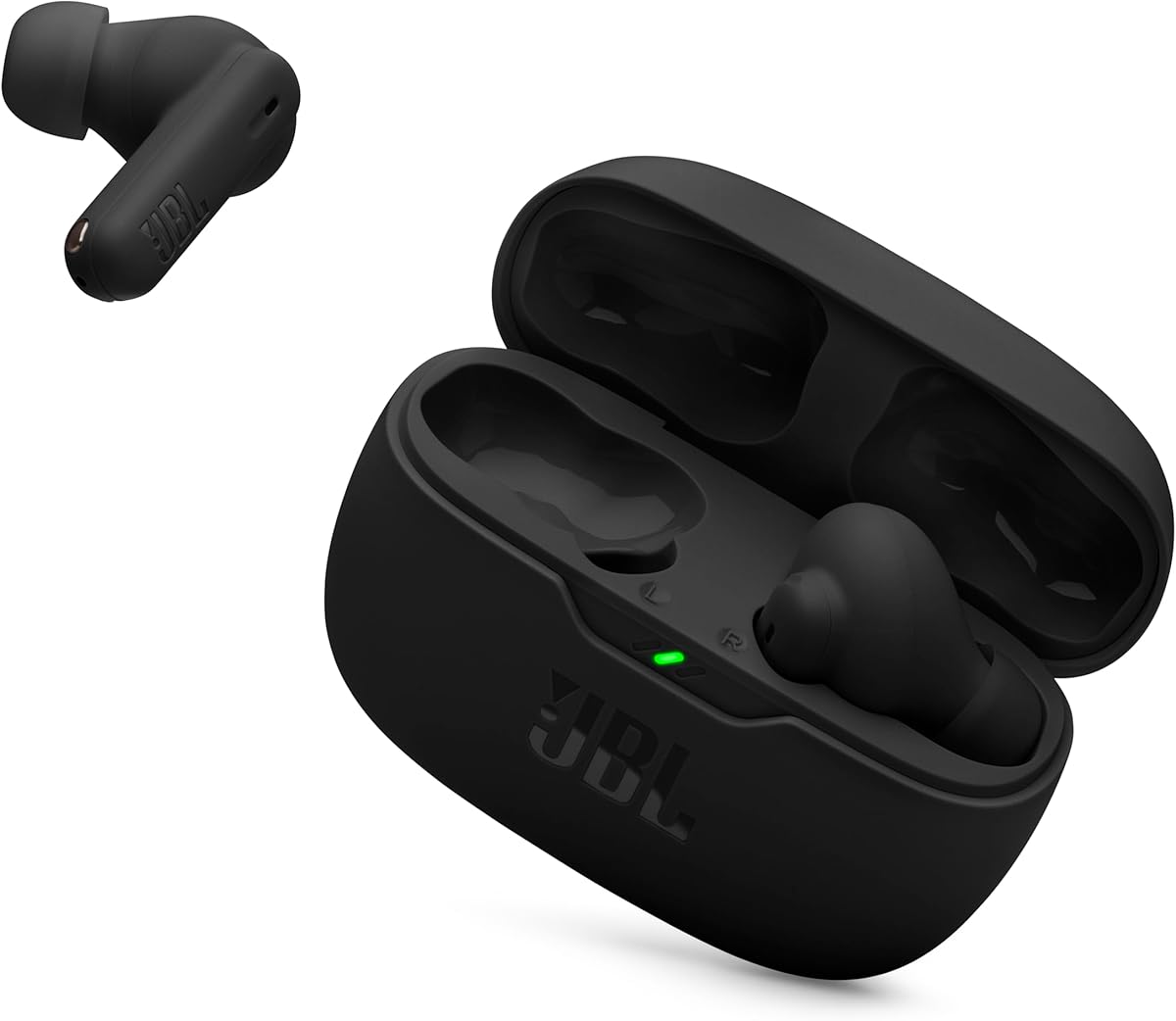
The JBL Vibe Beam 2 delivers the signature Pure Bass sound while providing effective noise cancellation for focused work. This model is designed to help you filter out distractions and stay connected during important calls.
We may earn a commission when you buy through this link, at no additional cost to you.
With four microphones dedicated to calls, voice transmission remains clear even in active environments. The Smart Ambient mode allows you to stay aware of your surroundings without removing the earbuds, which is useful for quick office interactions.
Battery life provides 40 hours total, with rapid charging capabilities to keep you going when needed. The JBL Headphones app further allows you to tailor the EQ settings to your specific sound preferences.
For users who value brand reliability and balanced audio performance, the Vibe Beam 2 is a solid choice. It offers the tools needed to maintain professional communication throughout the day.
Active Noise Cancelling lets you switch between deep focus and ambient awareness as needed.
JBL Pure Bass sound delivers rich, immersive audio that enhances both music and call experiences.
We may earn a commission when you buy through this link, at no additional cost to you.
The Dell Pro Plus Earbuds EB525 are engineered for distraction-free communication in professional settings. Their AI-based noise-cancelling mic focuses on your voice, ensuring it is heard loud and clear during meetings.
We may earn a commission when you buy through this link, at no additional cost to you.
Adaptive ANC allows you to switch between deep focus and heightened awareness with a simple pinch. This intelligent control helps you manage your environment efficiently without interrupting your workflow or calls.
On-device touch controls streamline call management and volume adjustment. These earbuds are designed to fit comfortably for long periods, making them suitable for marathon meeting sessions.
For corporate users prioritizing voice clarity and intelligent audio features, the EB525 is a strong investment. It provides enterprise-grade reliability and performance for business communication.
AI algorithms recognize your voice and intelligently filter out background noise for superior clarity.
Switch easily between ANC and transparency modes to stay focused or aware of your surroundings.
We may earn a commission when you buy through this link, at no additional cost to you.
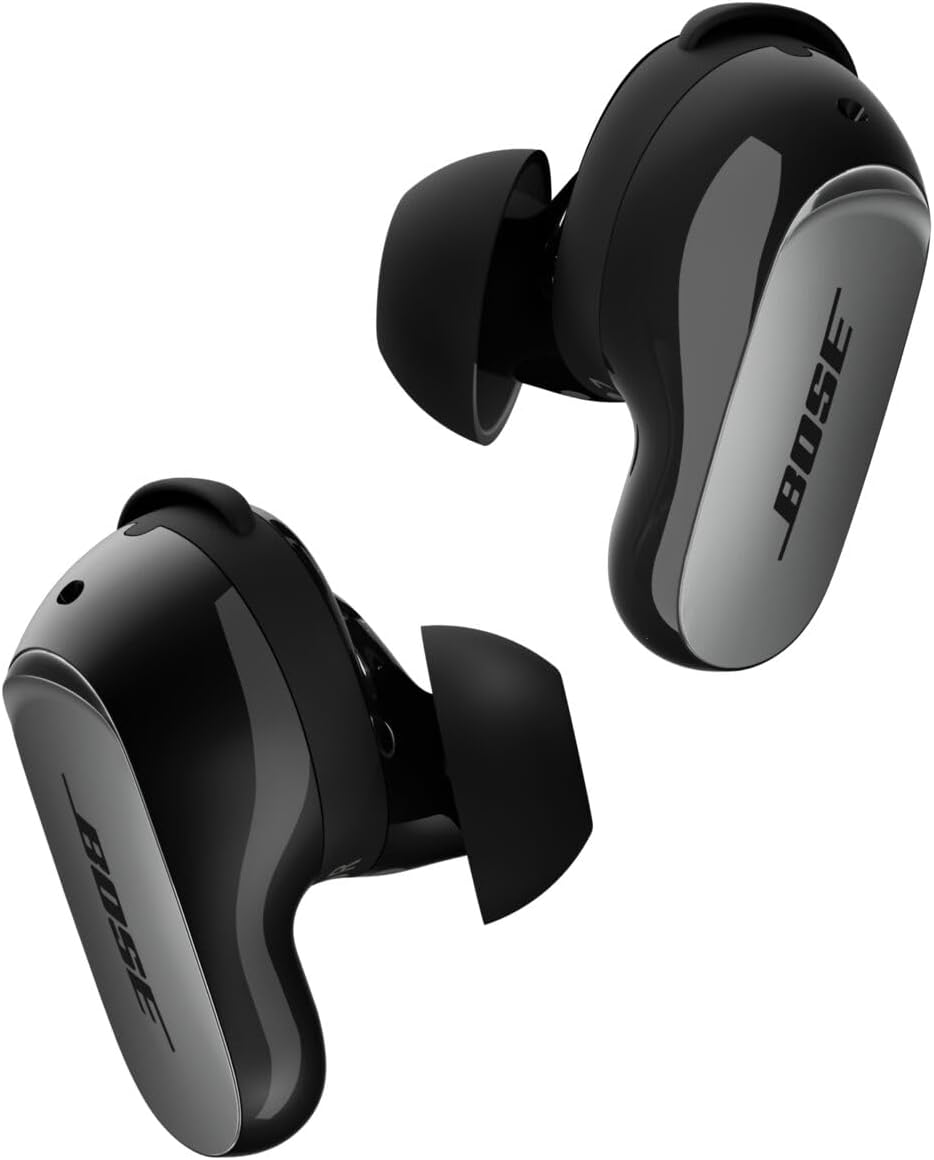
The Bose QuietComfort Ultra Earbuds set the benchmark for noise cancellation in wireless audio. ActiveSense technology smooths sound spikes, allowing you to maintain focus even in challenging acoustic environments.
We may earn a commission when you buy through this link, at no additional cost to you.
Bose's best call quality is enabled by SpeechClarity technology, which filters out wind and background noise. This ensures you are heard clearly during critical business calls regardless of where you are working.
Bluetooth multipoint connectivity provides seamless listening across devices without missing moments. CustomTune technology adapts the sound to your ear shape, delivering a tailored audio experience every time you use them.
For professionals seeking the absolute best noise isolation and audio fidelity, these earbuds are unmatched. They represent the pinnacle of premium audio performance for demanding work scenarios.
Analyzes your ears and adapts sound to their shape for personalized audio and world-class noise cancellation.
Places audio beyond the earbuds for a spacious, theater-like experience during calls or media.
We may earn a commission when you buy through this link, at no additional cost to you.
The Soundcore Liberty 5 Pro Max brings innovative AI features to your earbuds. It includes an AI Note-Taker that records and transcribes in-person meetings, making it a unique tool for productivity and documentation.
We may earn a commission when you buy through this link, at no additional cost to you.
Call quality is exceptional, with Whisper-Clear technology allowing you to be heard even in very noisy environments. Business-grade privacy ensures your conversations remain secure with local encryption and compliance standards.
The large AMOLED display on the case provides a convenient interface for managing settings and voice recordings. This display enhances usability, allowing you to control audio features without needing to access your phone.
For tech-forward professionals needing advanced recording and privacy features, these earbuds offer a distinct advantage. They combine premium audio with practical AI tools for a comprehensive work solution.
The case records and transcribes in-person meetings, helping you capture key points and action items.
10 sensors and an AI Chip ensure your voice is heard clearly even in extremely noisy environments.
We may earn a commission when you buy through this link, at no additional cost to you.
Selecting the right earbuds for laptop conference calls involves evaluating microphone quality, battery life, and connectivity features to ensure smooth communication.
Microphone quality is the most critical factor for conference calls. Look for models with multiple microphones and Environmental Noise Cancellation (ENC) or AI-based noise reduction. These technologies filter out background sounds like keyboard typing or office chatter, ensuring your voice is the primary focus during meetings.
Prioritize earbuds that explicitly mention noise-rejecting or wind-resistant features for clear communication in diverse environments.
Stable connectivity prevents interruptions during critical meetings. Bluetooth 5.3 or 5.4 chips offer better range and lower latency than older versions. Multipoint connectivity is highly valuable as it allows you to switch between your laptop and phone seamlessly.
Choose models with a robust connection range to maintain audio stability even if you move away from your desk during calls.
Long battery life ensures you do not miss meetings due to a dead battery. Aim for earbuds offering at least 6 to 8 hours per charge and a case that provides at least 24 hours total. Fast charging features are beneficial for quick top-ups between meetings.
Consider options with wireless charging or fast Type-C charging to minimize downtime during busy workdays.
Comfort is essential for long conference calls. Ergonomic designs with multiple ear tip sizes ensure a secure fit without ear fatigue. Models with lightweight materials prevent the earbuds from feeling heavy over several hours of continuous wear.
Look for designs specifically tested for extended wear to guarantee comfort during marathon meeting sessions.
Ensure the earbuds are compatible with your operating system whether Windows, macOS, or Linux. Most Bluetooth earbuds work universally, but app support can enhance features like EQ adjustment and firmware updates. Wired options may require a 3.5mm jack or a specific dongle.
Check product specifications to confirm your devices are supported without requiring additional hardware adapters.
Durability ensures your investment lasts. Look for water resistance ratings like IPX4 or higher to protect against sweat or accidental spills. A sturdy charging case protects the earbuds during transport and storage.
Opt for models with reinforced cables or robust casings if you travel frequently for work.
Some models offer features tailored for professionals such as AI transcription or detachable boom microphones. These tools can enhance productivity by summarizing meetings or providing studio-quality voice capture.
Consider these advanced features if you require extra functionality beyond standard audio playback and voice calls.
Pair your earbuds with your laptop via Bluetooth settings or insert them into the USB-C receiver port. Ensure both devices are within range to establish a stable connection before joining any meeting.
Keep the earbuds clean by wiping them with a dry cloth after use. Regular cleaning prevents earwax buildup that can affect audio quality and microphone performance.
Store the earbuds in their charging case when not in use to maintain battery health. Avoid exposing the case to extreme temperatures which can degrade battery life over time.
While any Bluetooth headphones work, specialized models offer better microphones and noise cancellation. These features ensure your voice is clear and distractions are minimized during meetings. It is worth investing in models designed for communication.
Ideally, you should look for at least 6 hours of continuous playback per charge. A case that provides 20 hours of additional battery life ensures you can go through a full work week without frequent charging interruptions.
Yes, but modern laptops often lack a 3.5mm jack. You may need a USB-C or USB-A adapter to connect wired earbuds. Wired models are reliable but less flexible than wireless options.
Noise cancellation filters out background sounds like traffic or office noise. This ensures your microphone focuses only on your voice, improving clarity for everyone on the call.
Use a soft, dry cloth to wipe the exterior and silicone tips. Do not use water or cleaning fluids directly on the earbuds. Regular cleaning keeps the mesh filters clear for optimal sound quality.
Bluetooth multipoint allows you to connect to two devices simultaneously, such as your laptop and phone. This lets you switch between devices without manually disconnecting and reconnecting.
Choosing the right earbuds for laptop conference calls significantly impacts your professional communication. Models like the JLab Work Buds and Bose QuietComfort Ultra offer specialized features for clear voice transmission and stability.
Prioritize microphone quality and connectivity features that suit your specific work environment. A balanced combination of battery life and comfort ensures you can work productively without interruptions.
Prices for these products vary based on features and availability. Always check current listings to find the best option for your budget and workflow needs today.