
BenQ LK936ST
5.0Editor score
Native 4K resolution clarity
5100 ANSI lumens output
Laser source longevity
This guide compares the top Benq projector for golf simulator options focusing on brightness throw distance and color accuracy to help you choose the right
Creating an immersive indoor golf experience requires the right visual hardware to simulate real-world conditions accurately. A high-quality projector ensures that every flagstick and sand trap appears vivid and realistic on your impact screen or wall.
We evaluated ten leading projector models based on brightness output throw distance compatibility with swing sensors and overall color fidelity. Our analysis focuses on devices that minimize shadows and deliver crisp images even in brightly lit garage environments.
Each selection highlights specific strengths such as low input lag for motion tracking or laser longevity for long-term use. Prices fluctuate regularly so please verify current availability and deals before finalizing your purchase decision.
5.0Editor score

3.5Editor score

4.4Editor score
The following table provides a side-by-side comparison of all ten selected models highlighting their key specifications and unique features to help you decide which unit fits your space best.


The BenQ AH700ST stands out as a dedicated solution for golf simulation enthusiasts seeking reliability and clarity. With a 4000 ANSI lumens brightness rating this model ensures that your virtual course remains visible even when ambient light is present in a garage or basement setting.
We may earn a commission when you buy through this link, at no additional cost to you.
Its short-throw design is specifically optimized to minimize player shadows which is critical for accurate swing analysis. The 0.69 to 0.83 throw ratio allows you to place the projector closer to the screen ensuring the image remains large without obstructing the golfer path.
While it lacks some of the modern smart TV integrations found in other models the focus on picture quality and dedicated golf modes makes it a strong contender. The laser light source promises up to 20000 hours of life reducing the need for maintenance over time.
This unit is best suited for users who prioritize visual fidelity and installation flexibility over streaming apps. If you already have a media PC connected for your simulation software this projector delivers the crisp images needed for an immersive practice session.
A dedicated picture mode enhances visual clarity specifically for golf simulation software making it easier to track ball flight and green textures.
The long-lasting laser light source ensures consistent brightness levels over years of use without the gradual dimming typical of traditional lamps.
We may earn a commission when you buy through this link, at no additional cost to you.
The BenQ TH671ST offers an excellent entry point for those looking to set up a golf simulator without breaking the bank. Its 3000 lumens brightness provides a decent image in controlled lighting conditions making it suitable for darker basements or dedicated rooms.
We may earn a commission when you buy through this link, at no additional cost to you.
Gaming features are prominent here with ultra-fast low input lag ensuring that your swings translate instantly to the screen. This responsiveness is crucial for swing tracking software that relies on precise timing to analyze your stroke and ball speed accurately.
The short-throw capability allows you to project a large 100-inch image from just 5 feet away which helps keep the projector out of the way. This design choice helps maintain a safe swing zone and reduces the risk of accidental impacts during practice sessions.
While it may not have the raw brightness of more expensive units its color accuracy and gaming performance make it a solid choice for hobbyists. It is a reliable workhorse that delivers consistent results for casual practice and home entertainment alike.
Designed with ultra-fast low input lag this projector ensures that your movements are reflected on screen without noticeable delay for a natural feel.
Despite its lower price tag this model delivers high-quality visuals and reliability that rivals much more expensive entertainment systems.
We may earn a commission when you buy through this link, at no additional cost to you.
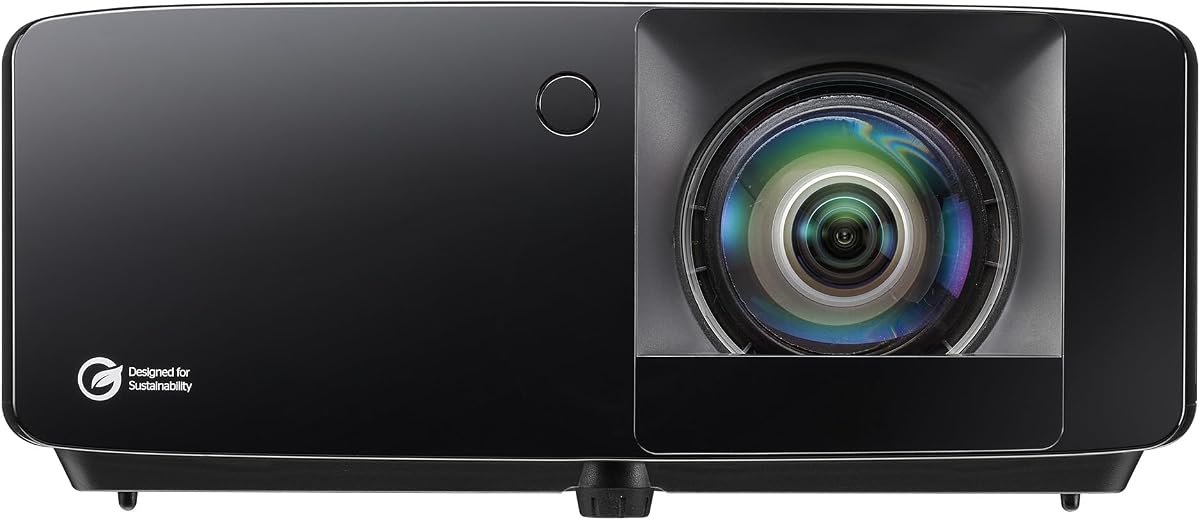
The BenQ LK936ST represents the pinnacle of projector technology for golf simulation with its native 4K UHD resolution delivering incredibly sharp details. This level of clarity ensures that even the smallest course markers and grass textures appear lifelike on your impact screen or projection surface.
We may earn a commission when you buy through this link, at no additional cost to you.
With 5100 ANSI lumens this projector can easily overcome ambient light in bright garages ensuring the image remains vibrant during daytime practice sessions. The short-throw ratio allows for a large image without requiring excessive distance from the wall or screen providing installation flexibility.
Connectivity is robust with dual HDMI 2.0b ports and additional inputs allowing you to connect multiple devices simultaneously. The laser light source offers up to 20000 hours of life providing consistent performance and reducing the hassle of lamp replacements over time.
This model is ideal for serious enthusiasts who demand the best visual fidelity and brightness available. While the investment is significant the clarity and reliability it offers make it a standout choice for professional-grade home simulation setups.
Native 4K resolution provides exceptional sharpness making every flagstick and bunker edge clearly defined for a realistic simulation experience.
At 5100 ANSI lumens this unit cuts through ambient light effectively ensuring a vivid and clear picture regardless of the room conditions.
We may earn a commission when you buy through this link, at no additional cost to you.
The Optoma GT3900UHD combines True 4K UHD resolution with a powerful 4000 lumens output to deliver a high-impact viewing experience. Its HDR compatibility adds depth to images ensuring that shadows and highlights in your virtual golf course are rendered accurately.
We may earn a commission when you buy through this link, at no additional cost to you.
With an ultra-short throw ratio of 0.496 this projector can place a massive image very close to the screen which is ideal for tight spaces. This design helps reduce player shadows significantly keeping the projector safely out of the swing zone for safer practice sessions.
Gaming performance is optimized with support for high refresh rates and low input lag ensuring that your movements are tracked instantly. This responsiveness is vital for simulation software that relies on precise timing to analyze your swing mechanics and ball flight data accurately.
Although it lacks built-in smart streaming apps it excels as a dedicated display for external computers or consoles. If you need the sharpest possible image and maximum brightness for a home setup this model is a top-tier choice for serious golfers.
The incredibly short 0.496 throw ratio allows for a large screen projection from a minimal distance reducing swing shadows and saving space.
True 4K UHD provides razor-sharp details that bring every aspect of the virtual course to life with stunning clarity and realism.
We may earn a commission when you buy through this link, at no additional cost to you.
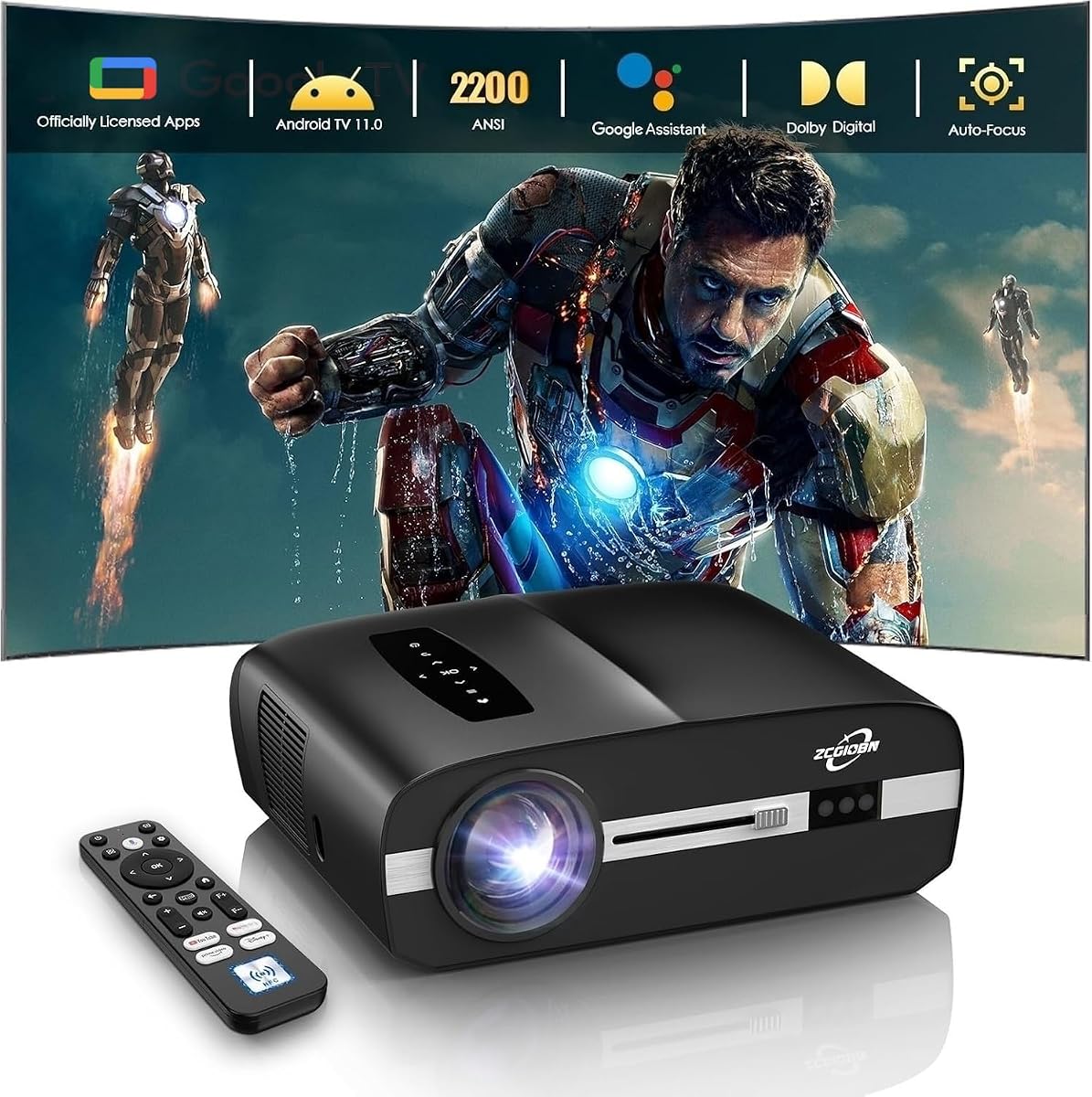
This 4K Projector for Golf Simulator stands out for its integration of Google TV OS which simplifies media consumption alongside your simulation needs. The 2200 ANSI lumens brightness ensures vivid colors and contrast even in illuminated garages delivering a cinematic experience for both practice and entertainment.
We may earn a commission when you buy through this link, at no additional cost to you.
Its auto focus and auto keystone features streamline setup allowing you to get a perfectly aligned image quickly without manual adjustment. This convenience is especially useful for those who need to set up and tear down their simulation environment frequently in shared spaces.
While it is not a short-throw model the design supports flexible ceiling mounting which can keep the projector out of the way effectively. The fully sealed optical engine protects internal components from dust ensuring long-term reliability in environments that may accumulate debris.
This unit is best suited for users who want a versatile device for both gaming and movie nights. If you prioritize ease of use and smart features over raw throw distance performance this projector offers a compelling balance of capabilities and convenience.
Powered by official Google TV OS you can easily access streaming apps and connect your simulator PC for a unified entertainment experience.
Built-in sensors handle auto focus and keystone correction ensuring a sharp image is instantly delivered from any angle without hassle.
We may earn a commission when you buy through this link, at no additional cost to you.
The BenQ TH575i offers a bright and smart option for home entertainment with a 3800lm brightness rating that supports a vibrant 120-inch screen. The included Google TV dongle provides immediate access to streaming apps making it a versatile addition to any media room or simulation setup.
We may earn a commission when you buy through this link, at no additional cost to you.
With 16.7ms input lag this projector ensures ultra-smooth performance for fast-paced gaming and simulation tracking. This responsiveness helps maintain a natural feel during swings reducing lag that can distract from a focused practice session or casual play.
The flexible setup options with optical zoom and auto vertical keystone make installation straightforward even in rooms with less than ideal projector placement. While it is primarily a home entertainment unit its brightness and speed make it a capable contender for indoor golf simulation.
This model is best for those who want an all-in-one solution for both movies and games. If you need a bright projector that handles streaming content well alongside your simulator software this unit delivers solid performance at a competitive price point.
The included Google TV dongle gives you instant access to popular streaming platforms without needing an external streaming device.
Ultra-smooth low input lag ensures your actions are reflected on screen instantly keeping the experience natural and engaging.
We may earn a commission when you buy through this link, at no additional cost to you.
The BenQ LU935ST is a high-performance unit designed for professional environments but it brings powerful specs to simulation setups. Its 5500 ANSI lumens brightness ensures vivid images even in well-lit conference rooms or bright garages where ambient light control is difficult.
We may earn a commission when you buy through this link, at no additional cost to you.
With WUXGA resolution this model offers a higher pixel count than standard 1080p ensuring that text and graphics appear sharp and clear. This extra detail is beneficial for reading data charts or course information projected on the screen during detailed analysis of your swing.
The short-throw ratio and extensive lens shift capabilities allow for flexible installation ensuring the projector can be placed safely out of the swing zone. This versatility helps in customizing the layout to fit your specific room dimensions without compromising image alignment.
This unit is best suited for users who need maximum brightness and connectivity options. While it may be overkill for basic home use its professional-grade performance ensures reliable operation and consistent visuals for demanding applications.
At 5500 ANSI lumens this projector delivers impactful images that remain visible and vivid even in well-lit environments.
Large lens shift and short throw ratio allow for easy placement adjustments ensuring a perfect image alignment in diverse spaces.
We may earn a commission when you buy through this link, at no additional cost to you.
The BenQ W4100i delivers a cinematic experience with True 4K HDR resolution ensuring that every detail is sharp and defined. Its HDR-PRO technology enhances local contrast and tone mapping making dark and bright scenes appear realistic and vivid on the screen.
We may earn a commission when you buy through this link, at no additional cost to you.
With 100% DCI-P3 color coverage this projector ensures that greens and blues appear natural and rich which is essential for accurate course representation. The 3200 lumens brightness provides sufficient light for home environments keeping the image clear during both day and night sessions.
Installation flexibility is provided through 2D lens shift and optical zoom allowing you to position the projector optimally without losing image quality. This feature helps in fitting the unit into existing furniture or ceiling mounts seamlessly without needing complex adjustments.
This model is best for users who want a high-end home theater that doubles as a simulator display. If color fidelity and resolution are your top priorities this projector offers a premium visual experience that rivals dedicated simulation hardware.
Factory calibrated color accuracy with 100% DCI-P3 ensures that every course color is reproduced with stunning richness and depth.
HDR-PRO technology brings out the finest details in shadows and highlights making for a lifelike and immersive viewing experience.
We may earn a commission when you buy through this link, at no additional cost to you.
The ViewSonic LS740W is a standout choice for golf enthusiasts due to its specialized Golf Mode designed to boost greens and blues. This feature ensures lifelike play and world-class accuracy for high-end golf simulation facilities and residential training centers seeking precise color replication.
We may earn a commission when you buy through this link, at no additional cost to you.
With 5500 lumens this projector maintains superior visibility in expansive rooms ensuring that details remain vivid even in highly illuminated environments. The long-lasting laser light source provides reliable performance without the need for frequent maintenance or lamp replacements.
The throw ratio allows for large screen sizes ranging from 80 to 150 inches making it suitable for larger simulation screens. While the WXGA resolution is lower than Full HD the high brightness and dedicated golf mode make it a practical choice for focused simulation use.
This unit is best for commercial setups or large residential spaces where brightness is a priority. If you need a projector that delivers a professional experience with minimal downtime for maintenance this model offers robust performance for serious training needs.
A specialized Golf Mode boosts greens and blues to deliver lifelike play and world-class accuracy for high-end simulation facilities.
With 5500 ANSI lumens you get superior visibility in well-lit rooms ensuring vivid presentations even in bright environments.
We may earn a commission when you buy through this link, at no additional cost to you.
The GoSports Projector Cover offers essential protection for your investment by shielding the unit from accidental ball impacts. Made from ultra-durable HDPE and polycarbonate this floor-mounted enclosure allows you to place the projector on the ground without worrying about costly repairs or replacements.
We may earn a commission when you buy through this link, at no additional cost to you.
Its turf edition cover blends in seamlessly with your simulator setup maintaining a professional aesthetic while providing critical protection. The design includes side vents for airflow preventing overheating while allowing cables to pass through for a clean and organized setup.
Installation is instant and requires no assembly making it easy to place the cover over your projector and route cords through the openings. This simplicity ensures that you spend more time playing and less time worrying about the safety of your equipment.
This accessory is a must-have for any indoor simulator where ball flight risks equipment damage. By securing your projector in a safe enclosure you protect your setup from mishits ensuring long-term performance and reliability for your practice sessions.
The ultra-durable HDPE and polycarbonate shield protects your projector from mishits and impacts during fast-paced swing sessions.
Avoids complex ceiling hardware by allowing you to safely place the projector on the ground protected by the durable enclosure.
We may earn a commission when you buy through this link, at no additional cost to you.
Selecting the right projector for a golf simulator requires balancing technical specifications with the physical constraints of your space.
Brightness measured in lumens is critical for simulators as many are set up in garages or basements with ambient light. Higher brightness ensures the image remains vivid and visible on the screen even when lights are on.
Look for at least 3000 ANSI lumens for indoor setups to maintain contrast and clarity during practice sessions.
Short-throw projectors are essential for simulators as they allow the unit to be placed close to the screen without casting shadows of the player. A short throw ratio helps keep the projector out of the swing zone.
Verify the throw ratio and calculate the distance needed for your screen size to ensure safe installation.
Higher resolution like 1080p or 4K ensures that the virtual course details appear sharp and realistic. This is important for identifying subtle features like bunkers or grass textures.
Prioritize native resolution over interpolated values to ensure consistent image quality at all viewing distances.
Low input lag is vital for golf simulations as it ensures that your swing data is reflected on screen without noticeable delay. High lag can disrupt the feel of the game and affect accuracy.
Choose a projector with a low input lag rating to maintain a responsive and natural gaming experience.
Laser light sources typically last longer than traditional lamps reducing the need for maintenance and replacements. This longevity ensures consistent brightness over years of use.
Look for projectors with laser technology if you plan to use your simulator frequently to minimize downtime.
Accurate color reproduction ensures that greens and blues appear natural and lifelike which contributes to a better simulation experience. Poor color rendering can make the course look artificial.
Check for wide color gamut coverage like Rec. 709 or DCI-P3 to ensure realistic visuals.
Versatile connectivity options allow you to connect your simulator PC and gaming consoles easily. Ensure the projector has HDMI ports that match your devices.
Dual HDMI inputs can be useful if you need to switch between simulation software and entertainment sources.
Protecting the projector from ball impacts is essential for indoor setups. A cover or enclosure can prevent costly damage from accidental mishits.
Invest in a dedicated projector cover to shield your equipment when it is not in use.
Begin by mounting the projector securely using a ceiling mount or floor enclosure to keep it safe from potential impacts. Ensure that the projector is positioned at the correct height and distance to achieve the desired image size without shadows.
Connect the projector to your simulator PC or laptop using an HDMI cable and power it on to calibrate the image. Use the keystone correction and focus tools to align the image perfectly with your screen or wall.
Regularly clean the lens and vents with a soft cloth to prevent dust buildup which can affect brightness and cooling. For laser projectors there are no lamp replacements required but periodic checks for dust accumulation are recommended to maintain performance.
While 1080p is standard for many setups 4K resolution provides sharper details and better textures for a realistic experience. For high-end simulation 4K is recommended but a good 1080p unit with high brightness and low input lag will also deliver solid performance for most users.
This depends on the throw ratio of the projector. Short-throw models can project a large image from just 5 to 7 feet away which helps keep shadows out of the swing zone. Always check the specific throw distance requirements for your model.
No special lens is required but a wide-angle or short-throw lens is helpful to fit the image into smaller rooms. Most simulation projectors come with a fixed lens that is optimized for standard screen sizes and distances.
Yes but ensure it has low input lag to prevent delay during swings. Also check that the brightness is sufficient to cut through ambient light if your setup is in a lit garage or room.
To minimize shadows place the projector as high as possible or use a short-throw model. A ceiling mount is often ideal to keep the light source above the players head and out of the swing arc.
It is highly recommended as indoor golf often involves fast ball flight that can damage equipment. A floor-mounted cover or a ceiling mount with a protective shield helps prevent costly damage from mishits.
For a garage setting which often has ambient light a projector with at least 3000 to 4000 lumens is ideal. This ensures the image remains bright and clear even when the room is not fully dark.
Lamp-based projectors typically last between 3000 and 5000 hours depending on usage. Laser models last significantly longer often up to 20000 hours reducing the need for replacements and maintenance.
We have reviewed the top Benq projectors for golf simulation highlighting models like the BenQ AH700ST for brightness and the BenQ LK936ST for premium 4K clarity. Each option offers unique strengths depending on your budget and specific simulation requirements.
When making your choice prioritize brightness and throw distance to ensure a safe and vibrant setup. Low input lag and color accuracy are also critical factors that contribute to a realistic and enjoyable practice experience.
Prices and availability change frequently so always verify the latest specs and deals before purchasing. With the right equipment you can create a professional-grade indoor golf experience in the comfort of your home.