
YBING Keyboard Case for Samsung Galaxy Tab A11 Plus & Galaxy Tab A9 Plus
4.5Editor score
360 degree rotation stand
16 built-in magnets
80 hours battery life
This guide compares the top 10 keyboards for the Samsung Galaxy A11 tablet to help you find the perfect accessory for productivity and portable typing
Finding the right keyboard for your Samsung A11 tablet transforms it into a versatile workhorse. A quality case offers protection while adding essential typing capabilities for daily tasks and professional use.
We evaluated ten highly rated options based on build quality, battery life, and feature sets. This list covers magnetic detachable designs, trackpad integration, and premium protection to suit various user needs.
Each pick highlights specific strengths like backlighting or multitasking support. Please note that availability and pricing change frequently, so verify current details before finalizing your purchase decision.
4.5Editor score

4.3Editor score

4.6Editor score
This side-by-side comparison details key specifications and unique features across all ten selected keyboard cases to help you make an informed choice quickly.


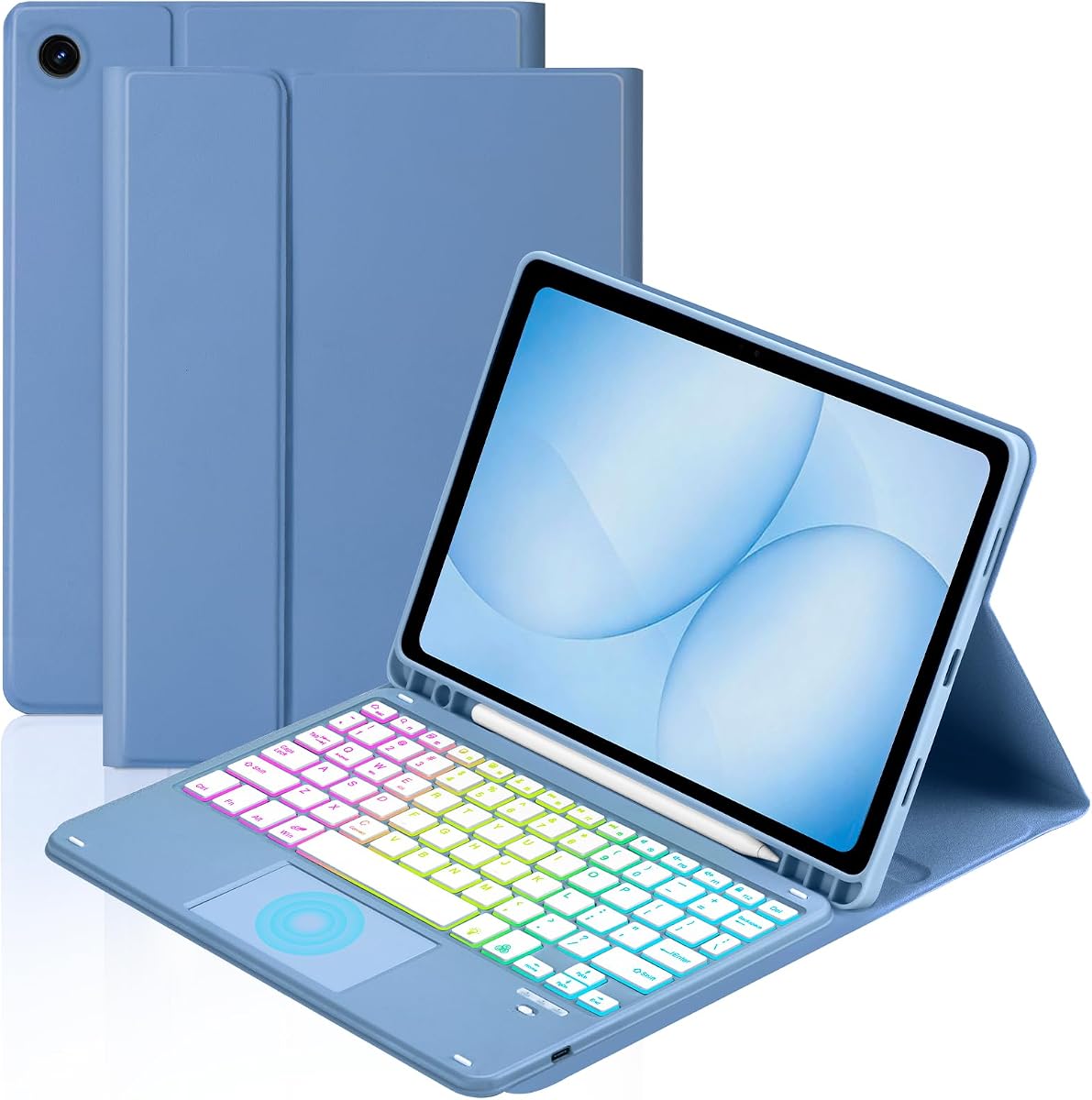

The Dexnor case offers a robust solution for transforming your Samsung Galaxy Tab A11 into a laptop-like device. It boasts a 4.3 rating for its balance of protection and typing utility. The built-in trackpad is a standout feature that simplifies navigation significantly.
We may earn a commission when you buy through this link, at no additional cost to you.
Its magnetic support ensures the tablet stays firmly attached during typing. The responsive scissor-switch keys allow for fast typing. The 650mAh battery provides substantial usage time including a bright backlight option for evening work.
While the keyboard sits flat without elevating the screen, this stable base is secure for most desk or lap use. Users should note the keyboard cannot fold completely around the back but offers a magnetic clasp for carrying.
This case is ideal for professionals needing a portable workstation. The auto sleep/wake feature helps preserve battery. For those seeking a reliable all-in-one package with a trackpad, this option stands out strongly.
The multi-touch trackpad allows for precise cursor movement and gesture control. This means you can edit documents or browse without constantly touching the screen. You can disable it via FN plus spacebar if preferred.
Simply opening the case powers on the keyboard and wakes the tablet. Closing it turns everything off to save energy. This smart design ensures your device enters sleep mode quickly during inactivity.
We may earn a commission when you buy through this link, at no additional cost to you.
TUNKARMOR delivers a versatile option with a detachable magnetic keyboard. Its 4.3 rating reflects user satisfaction with its slim profile and ease of use. The ability to reposition the keyboard adds significant flexibility for different tasks.
We may earn a commission when you buy through this link, at no additional cost to you.
The case supports three viewing angles allowing you to adjust the tablet for writing or reading. Honeycomb grid pattern on the inner layer provides cushioning. This design helps protect your tablet from bumps and overheating.
You can attach or detach the keyboard in seconds for different setups. The auto sleep/wake function helps save battery life effectively. The pen holder keeps your stylus organized though it is not included.
This is a great choice for users who value portability. The full 360 degree protection offers peace of mind. It is a solid investment for daily protection and enhanced productivity on the go.
You can move the keyboard to match your preference instantly. This helps turn the tablet into a mini laptop quickly. The magnetic attachment ensures it stays firmly in place during typing.
The case covers all edges with an anti-slip design. It guards against scratches and dents effectively. The honeycomb grid increases the device lifespan significantly according to specifications.
We may earn a commission when you buy through this link, at no additional cost to you.
This case stands out by including a Bluetooth mouse alongside the keyboard. Its 4.4 rating highlights the productivity boost from dual input devices. The multi-touch trackpad further enhances control without screen contact.
We may earn a commission when you buy through this link, at no additional cost to you.
The keyboard features vibrant 7-color backlight modes including breathing effects. This adds ambiance and utility for typing in dim areas. You can switch modes easily to match your mood or environment.
It includes shortcut keys for quick access to functions like volume. The case offers three non-slip grooves for angle adjustments. A built-in slot keeps your stylus organized and safe during travel.
For creatives who need precise mouse control this is ideal. The compatibility with Android and iOS makes it versatile. It is a comprehensive solution for multimedia consumption and creative work.
Having both a keyboard and a mouse allows for efficient multitasking. You can manage apps without touching the screen. This setup is perfect for editing documents or browsing complex websites.
The rainbow backlight adds a stylish touch to your workflow. It supports constant or breathing modes to suit your needs. The lighting levels are adjustable for comfort in various settings.
We may earn a commission when you buy through this link, at no additional cost to you.
Soke offers a high-quality compact solution with an impressive 4.6 rating. It is designed exclusively for the A11 Plus 2025 release ensuring perfect fit. The magnetic detachable keyboard connects wirelessly for versatile use.
We may earn a commission when you buy through this link, at no additional cost to you.
The 7-color backlight provides a comfortable typing experience in dark settings. You can switch between colors easily with a button press. The keyboard supports iOS Android and Windows systems for broad compatibility.
Non-slip grooves keep the tablet stable at two viewing angles. This prevents sliding during intense typing sessions. The auto sleep wake function preserves battery life automatically when not in use.
This is a top choice for those seeking reliability. The high user rating indicates consistent performance and quality. It balances portability with essential features for daily work or study.
You can switch between operating systems easily using the keyboard. This reduces the burden if you use multiple devices. It provides convenience for travel across different environments.
Bluetooth wireless connection ensures a clean setup without cables. You can charge the keyboard via Type-C quickly. The indicator light helps you monitor power status effectively.
We may earn a commission when you buy through this link, at no additional cost to you.
YBING provides exceptional value with a 4.5 rating. Its design allows 360 degree rotation for horizontal or vertical use. The case uses 16 magnets to secure the keyboard firmly against drops.
We may earn a commission when you buy through this link, at no additional cost to you.
The keyboard supports rainbow and breathing backlight modes for style. It includes function keys for quick actions like copy or paste. A built-in holder keeps your stylus organized and ready for use.
Battery life is impressive at 80 hours without backlight. The case protects against dust and scratches effectively. However the stand slots are optimized for landscape rather than portrait viewing.
This is the ideal budget choice for students. You get premium features like a strong magnet system at a low price. It is a durable option for daily entertainment and note-taking.
The case rotates fully to support any viewing preference. You can watch videos or read comfortably in any position. This flexibility makes it versatile for different use cases.
Priced under twenty dollars this offers high value. It includes essential protection and typing features. This makes it accessible for most users needing basic productivity tools.
We may earn a commission when you buy through this link, at no additional cost to you.
Harvopu includes a specialized mouse with three-level DPI adjustment. It targets users needing desktop-grade accuracy for editing. The keyboard offers 180 hours of use per charge which is marathon-ready.
We may earn a commission when you buy through this link, at no additional cost to you.
The case is designed to be easy-clean and stain-resistant. It repels coffee spills and restores a like-new appearance easily. This adds a practical layer of daily defense for the device.
Multi-color backlit keyboard provides flexibility for dim cafes. The mouse helps with detailed graphic editing. You can switch mouse sensitivity instantly to match your current task needs.
This bundle suits professionals needing precision. The battery life ensures long sessions without charging. The protective case is a strong addition for maintaining device aesthetics.
The adjustable DPI allows for detailed control. It supports smooth navigation and fast-paced browsing. This adds desktop accuracy to your tablet experience effectively.
The protective design repels stains and scratches. It wipes clean easily for a fresh look. This makes it a practical choice for daily protection.
We may earn a commission when you buy through this link, at no additional cost to you.
TiMOVO is known for its vibrant 7-color backlight options. It rates 4.4 for its fun typing experience and solid protection. The case supports three adjustable angles for comfortable use in any environment.
We may earn a commission when you buy through this link, at no additional cost to you.
Its power-saving mode enters hibernation after inactivity. The battery lasts over 90 hours of use per charge. It also supports 90 days of standby time which reduces charging frequency.
The anti-slide design protects from scratches and bumps. The keyboard is detachable for easy carrying when not typing. A buckle design secures the case effectively against falling.
This is great for creative users who enjoy customization. The colorful lights add a fun element to work. It offers a good balance of protection and visual appeal.
The seven colors and three brightness levels offer variety. It makes typing fun even in dark environments. You can switch colors easily to match your setup.
Standby time reaches 90 days between charges. This reduces the need for frequent power checks. It ensures the keyboard is ready when inspiration strikes.
We may earn a commission when you buy through this link, at no additional cost to you.
MePadKey focuses on a smart touchpad for navigation. It rates 4.2 for its support of multi-touch gestures. The keyboard allows 1 to 4 finger gestures for various commands.
We may earn a commission when you buy through this link, at no additional cost to you.
You can switch apps with three-finger swipes or scroll with two. It provides precise cursor control without touching the screen. The rainbow backlight supports both rainbow and breathing modes.
The first row includes shortcut keys for quick actions. It helps reduce the burden of travel with full control. The anti-slip grooves stabilize the tablet for writing.
This is good for users who prefer touchpad navigation. It is a compact way to get full input control. The gesture support makes navigation feel more natural.
Support for 1 to 4 fingers covers most needs. You can scroll or switch apps easily. This reduces reliance on touch for basic navigation.
The keyboard is detachable for easy carrying. It includes essential function keys for productivity. This balances typing power with portable convenience.
We may earn a commission when you buy through this link, at no additional cost to you.
This MePadKey model offers 360 rotation for flexible viewing. It rates 4.3 for its robust protection and pen holder. The convex edges protect against drops and scraping effectively.
We may earn a commission when you buy through this link, at no additional cost to you.
The touchpad supports multi-finger gestures for efficiency. You can switch between systems using specific key combos. A built-in holder keeps your stylus secure during use.
The case includes non-slip grooves for angle adjustment. It is compatible with multiple operating systems. The detachable keyboard allows for easy separate typing.
This is a solid choice for versatile users. The rotation feature supports different positions for work or play. It balances functionality with secure protection.
The case rotates 360 degrees for any orientation. You can adjust it for entertainment or work. This ensures comfort in any case or setting.
You can switch systems via function keys. This allows freedom to choose your preferred OS. It reduces travel burden when using multiple devices.
We may earn a commission when you buy through this link, at no additional cost to you.
Supveco stands out with premium materials like TPU cover. It rates 4.6 for its high-quality protection and efficient battery. The honeycomb grid pattern increases lifespan by protecting against overheating.
We may earn a commission when you buy through this link, at no additional cost to you.
It features automatic color change for visual enjoyment. The large battery ensures energy efficiency and lower consumption. A pencil holder makes it convenient to carry your stylus safely.
Auto sleep/wake function helps save battery life effectively. The magnetic detachment allows for easy repositioning. It supports shortcuts for IOS Windows and Android systems.
This is the best choice for quality seekers. The material quality ensures durability and a premium feel. It is a reliable companion for demanding daily tasks.
The honeycomb grid increases device lifespan significantly. It protects against overheating during intense use. This premium material ensures long-term reliability.
A large battery ensures lower consumption rates. It supports long typing sessions efficiently. This reduces the frequency of charging needs.
We may earn a commission when you buy through this link, at no additional cost to you.
Selecting the right keyboard involves considering features that align with your daily workflow and usage habits.
The Samsung Galaxy Tab A11 Plus has specific model numbers. Always check your device settings for SM-X codes before purchasing. An incompatible case will not fit correctly or support your tablet.
Verify the model number in settings to ensure fit. This prevents returns and ensures the keyboard connects properly.
Bluetooth connectivity is standard for most keyboards. It avoids cable clutter and allows for easy detachment. Look for keyboards with reliable connection range for better usability.
Choose Bluetooth keyboards for a cleaner workspace. This ensures easy detachment and reliable connection.
Detachable keyboards offer flexibility for portability. Fixed keyboards provide better stability but are less portable. Choose based on whether you prioritize travel or a fixed setup.
Select detachable for travel or fixed for stability. This matches your preference for portability versus stability.
Battery life varies from 50 hours to 180 hours. Consider how often you will charge your device. Higher battery life means less interruption for your workflow.
Look for longer battery life to minimize charging. This ensures your device is ready for extended use.
Backlighting is essential for low light typing. Some offer single color while others offer multiple colors. Consider if you need a simple backlight or customizable colors.
Choose a backlight that suits your lighting needs. This improves typing comfort in dark environments.
The case should offer full edge protection. Look for anti-slip grooves and durable materials. Protection against drops and scratches extends your tablet's life.
Prioritize full coverage and anti-slip designs. This keeps your tablet safe from daily wear.
Some keyboards include a built-in touchpad. Others may include a separate wireless mouse. A touchpad is convenient for compact setups.
Decide if you prefer a touchpad or separate mouse. This affects your navigation style and portability.
Ensure the keyboard supports your operating system. Most support Android but some support multiple systems. This ensures all shortcut keys work correctly.
Verify system compatibility for full functionality. This prevents issues with key mapping and shortcuts.
To begin, ensure your keyboard is fully charged. Connect it to your tablet via Bluetooth settings by enabling pairing. Once connected, test a few keys to confirm functionality.
Store your keyboard in a dry place when not in use. Avoid exposing it to moisture or extreme temperatures. This will extend the life of the battery and materials.
Clean the keys regularly with a soft dry cloth. Do not use harsh chemicals as they may damage the finish. This keeps your typing surface smooth and clean.
No, they are designed specifically for the Galaxy Tab A11 Plus and A9 Plus 11-inch models. Always verify your tablet model number in settings before buying to ensure the case fits correctly.
Some options come with a dedicated wireless mouse while others rely on a built-in touchpad. The specific model description will clearly state if a mouse is included in the box.
Most keyboards support switching between systems like Android Windows and iOS. However you must ensure the specific keys and layout work correctly with your device setup.
Charging times vary by model but generally take between two to four hours. A full charge usually provides enough power for several days of regular usage sessions.
Most cases feature a built-in holder for a stylus but the pen is not included. You should check the product description to confirm whether a pen is part of the package.
Yes, most designs include an auto sleep/wake function. Closing the case puts the keyboard to sleep and conserves battery power until you reopen it next.
Warranty details vary by manufacturer so check the seller's page for specifics. Typically you will find a limited warranty covering defects in materials or workmanship.
We have reviewed ten top keyboard options to help you find the best fit for your Samsung Galaxy Tab A11. The Dexnor stands out for its trackpad while YBING offers unbeatable value.
Your choice depends on whether you prioritize battery life, portability, or advanced features. Look for models that match your specific workflow needs to maximize productivity.
Prices change frequently so always verify current offers before buying. We hope this guide helps you find the perfect keyboard to enhance your tablet experience.