
ASUS ROG G700 Gaming
4.7Editor score
Intel Core Ultra 7 CPU
RTX 5060 graphics card
32GB DDR5 memory
This guide compares the top 10 ASUS Desktop PC models for October 2026, evaluating performance, connectivity, storage, and value for business and gaming users.
Finding the right ASUS Desktop PC can transform your workflow or gaming experience. These machines offer reliable performance, sleek designs, and robust connectivity for diverse needs. Whether you need power for creative work or smooth gaming, ASUS delivers versatile tower options.
We evaluated ten top ASUS models based on processor speed, memory capacity, storage options, and graphics capabilities. Our analysis covers business towers, gaming rigs, and all-in-one solutions. We focused on real-world usability, upgrade potential, and value for money across different price points.
Each pick highlights specific strengths like multitasking power, gaming frame rates, or office productivity features. Prices and availability change frequently, so verify current offers before buying. Use this guide to match your exact requirements with the right ASUS Desktop PC model for long-term satisfaction.
4.7Editor score
5.0Editor score

4.2Editor score
This side-by-side comparison highlights key specifications across all ten models. You can quickly see differences in processors, memory, storage, and graphics to find the best fit for your specific use case and budget constraints.


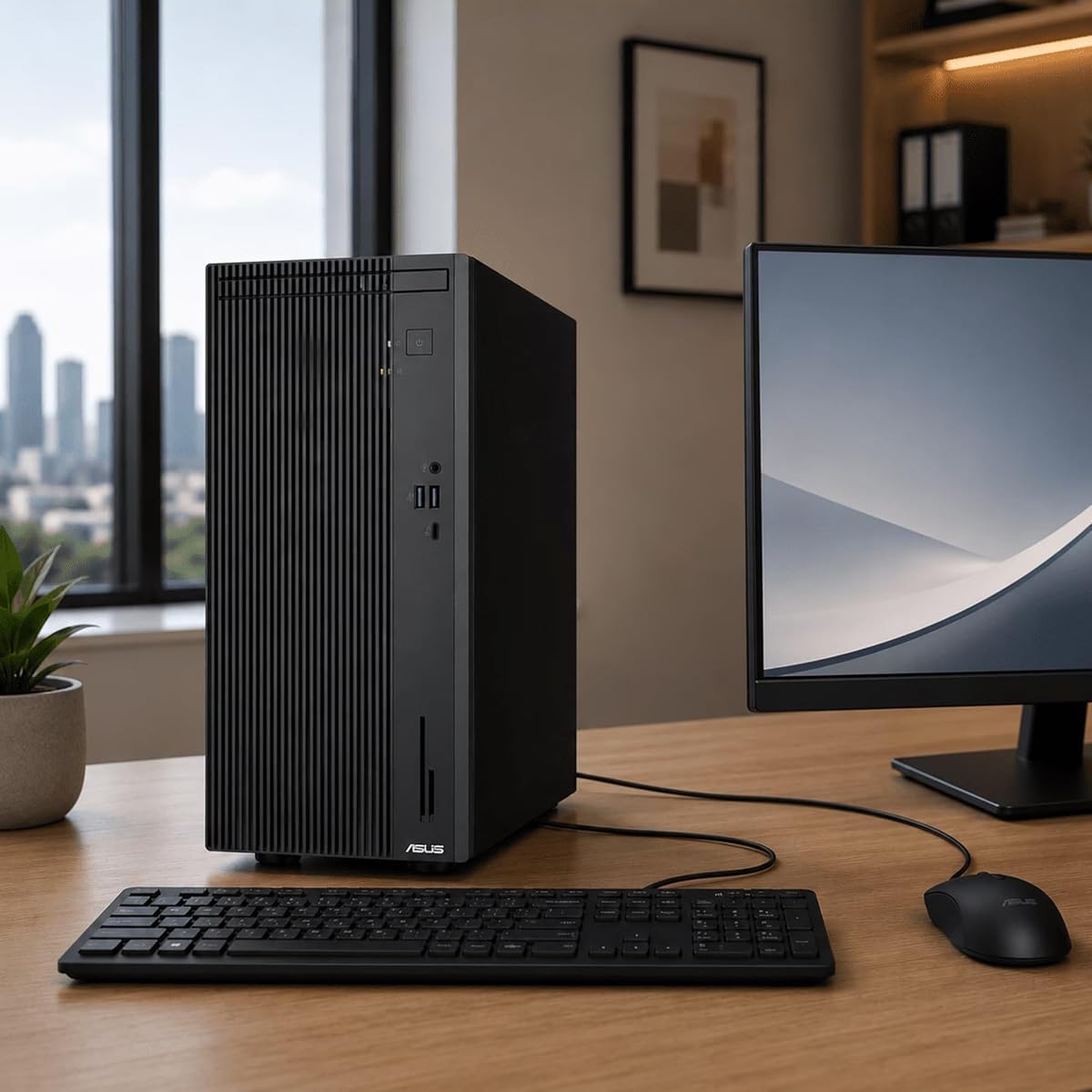
The ASUS V500 Business Tower stands out as the top overall choice for general productivity and office work. With a perfect 5.0 rating from users, it delivers consistent reliability and speed for daily tasks. Its 10-core processor handles multiple applications smoothly without noticeable lag.
We may earn a commission when you buy through this link, at no additional cost to you.
Key strengths include the generous 16GB DDR5 RAM and flexible 1TB storage setup combining internal SSD with external options. The inclusion of HDMI and DisplayPort outputs makes it ideal for dual-monitor setups, boosting productivity significantly. WiFi 6 ensures fast and stable internet connections for cloud-based work.
Trade-offs involve the lack of dedicated graphics power, making it unsuitable for heavy gaming or 3D rendering. However, for business users who prioritize stability, speed, and connectivity, these limitations are acceptable. The bundled peripherals also save time on immediate setup.
This model is best suited for small businesses, remote workers, and home offices needing a dependable main computer. If you value quick boot times, responsive performance, and solid build quality, the V500 Business Tower is a highly recommended investment for long-term use.
The 10-core Intel Core i7-13620H processor provides exceptional efficiency for running several apps at once. This ensures that switching between browsers, spreadsheets, and video calls remains seamless and quick.
With 512GB internal SSD plus 512GB external storage, users get fast system access and ample space for files. This hybrid approach balances speed and capacity effectively without requiring immediate upgrades.
We may earn a commission when you buy through this link, at no additional cost to you.
The ASUS ROG G700 Gaming Desktop offers an excellent entry point into serious gaming without breaking the bank. Rated 4.7 stars, it balances performance and value effectively for competitive and AAA titles. The RTX 5060 delivers smooth frame rates at 1080p and 1440p resolutions.
We may earn a commission when you buy through this link, at no additional cost to you.
Its 32GB DDR5 RAM ensures heavy multitasking and future-proofing for demanding games and streaming software. The 1TB NVMe SSD provides fast load times, reducing wait periods between matches or scenes. Integrated RGB keyboard and mouse add aesthetic appeal right out of the box.
While the price is higher than basic office PCs, the included extended protection plan adds significant value by covering failures beyond standard warranty. Some users may find the port selection slightly limited for extensive peripheral setups. However, WiFi 6 compensates with fast wireless connectivity.
Gamers on a budget who want reliable performance and good visuals should consider this model highly. It is also suitable for streamers needing enough RAM to run capture software alongside games. The robust cooling keeps temperatures in check during long sessions.
The Intel Core Ultra 7 265F processor reaches speeds up to 5.3GHz for exceptional multitasking and streaming capabilities. This ensures your gameplay remains smooth even when background apps are active.
NVIDIA GeForce RTX 5060 graphics with ray tracing and DLSS provide realistic lighting and high frame rates. Enjoy detailed visuals in modern games without needing to lower settings drastically for performance.
We may earn a commission when you buy through this link, at no additional cost to you.
For enthusiasts seeking maximum performance, the ASUS ROG GM700 Gaming Desktop represents the pinnacle of home computing power. With a 4.2 rating, users appreciate its ability to handle the most demanding workloads. The Ryzen 7 9800X3D processor delivers blazing-fast multitasking and gaming speed.
We may earn a commission when you buy through this link, at no additional cost to you.
Key features include 32GB DDR5 RAM and a spacious 2TB NVMe SSD, ensuring near-instant load times for vast game libraries. The Radeon RX 9070 XT GPU offers immersive visuals with advanced ray tracing and AV1 encoding. This setup supports high-resolution streaming and editing seamlessly.
The main trade-off is the significant cost, which may not justify the upgrade for average users. However, for professional content creators or hardcore gamers, the performance gain is worth the investment. It is built to remain relevant for many years without needing upgrades.
Buyers looking for a no-compromise machine should choose this premium model. It excels in creative workflows and competitive gaming alike. Ensure your budget aligns with its high-end specs before purchasing to maximize value.
Powered by the AMD Ryzen 7 9800X3D, this desktop handles intense workloads like editing and streaming effortlessly. The processor ensures that every task runs smoothly without bottlenecks.
The 2TB PCIe Gen 4.0 SSD storage provides near-instant access to games and applications. You can spend more time playing and creating without waiting for files to load.
We may earn a commission when you buy through this link, at no additional cost to you.
The ASUS S501MER Desktop brings the latest 14th Gen Intel Core i7-14700 processor to a compact tower design. Rated 4.2 stars, it balances modern performance with space-saving dimensions. This model is particularly noted for its upgradeability and efficient connectivity options.
We may earn a commission when you buy through this link, at no additional cost to you.
It features 16GB DDR5 RAM that can be expanded up to 64GB, giving users flexibility as needs grow. The inclusion of Wi-Fi 6E ensures faster wireless speeds and stable connections for streaming or large downloads. Front and rear ports allow versatile peripheral connections.
While the stock memory is standard, the ease of expanding it makes this a smart long-term investment. Some users may find the rear I/O limited for heavy setups, but front access helps. Overall, it fits well in home offices needing future-proofing.
This desktop is ideal for users who want the latest processing power in a smaller footprint. If you anticipate needing more RAM later, this model offers straightforward upgrade paths. Its compact size keeps desktop space organized without sacrificing capability.
The 14th Gen Intel Core i7-14700 processor provides up to 5.3GHz speeds for demanding tasks. This ensures efficient performance for both business and light entertainment needs.
Seamless connectivity with Dual-Band Wi-Fi 6E offers faster wireless speeds and reduced latency. This is ideal for streaming 4K video or working from home without cable clutter.
We may earn a commission when you buy through this link, at no additional cost to you.
The ASUS V500 Home & Business Desktop stands out with its substantial 32GB DDR5 memory configuration. Rated a perfect 5.0, it excels in handling multiple applications simultaneously without slowdowns. This makes it a robust choice for power users and small business owners.
We may earn a commission when you buy through this link, at no additional cost to you.
Key strengths involve the high-speed memory and 1TB PCIe SSD which ensure rapid boot times and file access. The support for 4K displays via HDMI and DisplayPort allows for crisp visuals on external monitors. Integrated UHD Graphics keep costs down while maintaining good visual clarity.
While it lacks a dedicated graphics card, the included RAM capacity is rare at this price point. Some users might prefer a mechanical keyboard, but the wired one included is durable. This model is best for those prioritizing system smoothness over gaming performance.
Select this desktop if you run heavy browser tabs, spreadsheets, or light design tools regularly. The extra memory ensures longevity and prevents lag during peak work hours. It represents excellent value for productivity-focused users seeking stability.
Running multiple applications simultaneously with 32GB DDR5 memory ensures smooth performance without lag. This is essential for multitaskers who switch between programs constantly during the day.
Connectivity options including USB and HDMI ensure seamless integration with peripherals and external devices. This flexibility supports various office setups and media consumption needs effectively.
We may earn a commission when you buy through this link, at no additional cost to you.
The ASUS ROG G700 (2026) brings a fearless dual-glass design and powerful RTX 5070 graphics to the table. As a new 2026 model, it promises next-gen performance for gamers and streamers. Its aesthetic appeal is matched by robust internal components for high frame rates.
We may earn a commission when you buy through this link, at no additional cost to you.
Features like a quad-fan system and 240mm liquid cooler maintain optimal temperatures under heavy loads. The tool-less chassis design makes component swapping easy, extending the machine's useful life. RGB lighting adds a customizable touch to your gaming setup.
While there are no user reviews yet, the specs suggest high-end capabilities for demanding titles. The premium price reflects its cutting-edge hardware and unique look. It is aimed at enthusiasts who value both performance and visual style in their PC.
Buyers should choose this if they want a standout gaming rig with top-tier graphics. It is well-suited for those planning to play AAA titles at high settings. Expect reliable performance and easy maintenance with its advanced cooling and access design.
The G700’s dual-glass chassis showcases iconic ROG design with the ROG Slash and Aura Sync RGB lighting. This design supports triple-slot GPUs for maximum graphical power and flexibility.
Game without lag with 2.5Gbps Ethernet and WiFi 6 for versatile connections. Dolby Atmos audio and AI noise cancellation enhance sound and communication during multiplayer sessions.
We may earn a commission when you buy through this link, at no additional cost to you.
The ASUS V500 Bundle offers a strong business setup with Windows 11 Pro and an extra USB drive. Rated 3.0 stars, it provides essential tools for office productivity and data transfer. The 10-core processor ensures responsive performance for daily business applications.
We may earn a commission when you buy through this link, at no additional cost to you.
Key strengths include Windows 11 Pro for advanced security and management tools. The bundle with an ADATA 64GB USB Flash Drive makes it convenient for quick file transfers. Multi-display support enhances workspace efficiency for data management tasks.
Users should note that the upgrade warranty on RAM or SSD is provided by a third-party partner. This may limit support options compared to standard manufacturer warranties. Despite this, the included software adds tangible value to the package.
This bundle suits small businesses needing immediate professional features out of the box. If you value data transfer ease and security, it is a practical choice. Verify warranty terms before purchasing to ensure peace of mind.
Windows 11 Pro offers advanced security features, system management tools, and professional-grade productivity support. This ensures your data remains safe and your workflow is optimized for business environments.
The included USB flash drive offers convenient, high-speed data transfer and extra storage. It serves as a perfect portable companion for your desktop setup.
We may earn a commission when you buy through this link, at no additional cost to you.
The ASUS ROG Strix G700 Desktop delivers extreme storage and memory specifications. Rated 5.0, it caters to power users needing 11TB total space and 128GB DDR5 RAM. The 15th Gen Core Ultra 9 processor boosts up to 6.00GHz for unmatched speed.
We may earn a commission when you buy through this link, at no additional cost to you.
Features include a mix of SSD and HDD storage for balance between speed and capacity. This setup is ideal for media libraries, large datasets, and heavy multitasking environments. The inclusion of Windows 11 Pro adds professional-grade management features.
While the price is high, the sheer volume of resources offered is unmatched in standard setups. Some users might find the HDD speed slower than NVMe for large files. However, the RAM capacity ensures smooth operation regardless of workload.
Choose this machine if you need to store vast amounts of data locally. It is perfect for video editors, researchers, or servers. Ensure your software can utilize this level of RAM and storage to get full value.
128 GB of DDR5 RAM provides PREMIUM performance for handling massive datasets or virtual machines. This ensures no memory bottlenecks even with dozens of apps open simultaneously.
11 TB Storage combining SSD and HDD offers ample space for extensive libraries. This balances quick access for active files with bulk storage for archives.
We may earn a commission when you buy through this link, at no additional cost to you.
The ASUS V500 High RAM version offers 64GB DDR5 memory for extreme multitasking. As a new entry, it aims to support heavy business workflows without needing upgrades. The Intel Core i7-13620H ensures consistent performance across daily tasks.
We may earn a commission when you buy through this link, at no additional cost to you.
Key strengths involve the massive RAM which prevents bottlenecks when running multiple virtual machines or heavy spreadsheets. The 1TB PCIe SSD provides fast boot and load times. 4K multi-monitor support enhances visual workspace productivity.
While there are no user reviews yet, the specs suggest high reliability for professional use. The lack of a dedicated GPU limits gaming potential. However, for pure productivity, the memory size is a major advantage.
This model suits professionals dealing with large data sets or development environments. If you need maximum RAM for seamless operation, it is a strong candidate. Consider the lack of reviews when making your final decision.
The 13th Gen Intel Core i7 Processor handles demanding tasks with ease. Fast efficient performance for multitasking business applications and entertainment remains stable under load.
Run multiple applications simultaneously with high-speed DDR5 memory ensuring smooth performance. A 512GB PCIe NVMe M.2 SSD provides fast bootup and reliable storage for files.
We may earn a commission when you buy through this link, at no additional cost to you.
The ASUS Business Desktop Computer PC offers a compact tower design ideal for small offices. Rated 5.0, it combines power with space efficiency. The 10-Core i7-13620H Processor ensures reliable performance for business applications and daily computing.
We may earn a commission when you buy through this link, at no additional cost to you.
It features 16GB DDR5 memory and a 1TB SSD for quick access and smooth multitasking. Windows 11 Pro adds security features critical for corporate environments. The compact dimensions help maintain a tidy desk area without sacrificing capability.
While port selection is standard, it includes essential options for peripherals and networking. Users looking for a discreet workstation will appreciate its balanced design. The included accessories support immediate deployment.
This desktop is perfect for modern office environments needing stability and security. If you want a reliable workhorse that fits on a desk neatly, choose this model. It offers a strong value for professional and home office setups.
Pre-installed Windows 11 Pro for enhanced security and productivity. Compact tower design balances performance and space efficiency for modern office environments.
Equipped with 16GB DDR5 5600MHz memory expandable up to 64GB. Ensures fast boot times quick file access and smooth multitasking for business workloads.
We may earn a commission when you buy through this link, at no additional cost to you.
Selecting the right desktop requires understanding your needs. This guide covers key factors to help you compare models effectively.
The processor determines how fast your computer runs tasks. For office work, a Core i5 or i7 is sufficient. Gaming and creative work need higher cores and threads like the Ultra series or Ryzen 7. Look at clock speeds and core counts when comparing models.
Prioritize more cores for multitasking and single-core speed for gaming. Ensure the CPU matches your workload needs before buying.
RAM affects how many programs you can run at once. 16GB is standard for general use. If you edit video or run virtual machines, consider 32GB or 64GB. DDR5 offers faster speeds than DDR4 for better efficiency.
Check if the RAM is upgradable. Models with expansion slots allow future upgrades without replacing the whole system.
SSD storage is essential for fast boot times and file access. NVMe SSDs are faster than SATA. For gaming and media, 1TB is a good baseline. If you store many files, look for models with HDD expansion or larger NVMe drives.
Ensure the system has enough storage for your current files plus future growth. Check for extra slots to add drives later.
Integrated graphics save money but limit gaming. Dedicated GPUs like NVIDIA RTX or AMD Radeon are necessary for high-performance visual tasks. Check VRAM amounts for smooth 4K gaming or rendering.
For business or media consumption, integrated graphics are usually sufficient. For gaming, prioritize dedicated GPU models.
Check ports for monitors, printers, and peripherals. HDMI and DisplayPort support multiple screens. USB-C and USB-A options allow connecting various devices. Wi-Fi 6 or 6E ensures fast wireless internet access.
Make sure the desktop has enough ports for your workflow. Avoid models that require too many adapters for basic setup.
Windows 11 is standard across these models. Home edition works for personal use while Pro offers better security and management tools. Pro is ideal for business environments needing remote desktop or BitLocker.
Choose Pro if you need advanced network features or security controls. Home is fine for general home use.
Tower sizes range from compact to large mid-towers. Compact models save desk space but may have limited upgradeability. Larger cases offer better airflow and more slots for extra drives or GPUs.
Measure your desk space before buying. Consider if you need to add hardware later which requires room inside the case.
Prices vary widely based on specs. Budget models suit basic tasks while premium units handle heavy loads. Balance your needs with what you can afford to avoid overspending on unused power.
Invest in core components like RAM and storage first. These impact daily performance more than marginal CPU upgrades.
Place your desktop in a well-ventilated area away from direct sunlight to prevent overheating. Ensure the intake vents are not blocked by walls or clutter to maintain proper airflow.
Install regular Windows updates and run security scans to keep the system secure. Keep your desktop drivers current for optimal hardware performance and compatibility.
Use a surge protector to safeguard your components from power spikes. Dust the interior gently once a year to maintain cooling efficiency without damaging internal parts.
Most ASUS Desktop models have memory slots that allow for RAM upgrades. Check the specific model manual to confirm maximum capacity. You can often increase RAM by adding more sticks if slots are available.
Yes, all listed models include Windows 11 either Home or Pro. This ensures you have access to the latest features and security updates immediately.
Models with dedicated NVIDIA or AMD GPUs are designed for gaming. The V500 series uses integrated graphics and is better for productivity. Check GPU specs before buying for gaming needs.
Most models support dual displays via HDMI and DisplayPort. Ensure the ports match your monitor cables. Some models can support higher resolutions like 4K on secondary screens.
Yes, most bundles include wired keyboards and mice. This helps you start using the PC immediately without buying peripherals separately.
Standard manufacturer warranty is typically one year. Some models include extended protection plans. Check the listing for specific warranty details before purchase.
We highlighted ten top ASUS models ranging from office workstations to high-end gaming rigs. Each offers distinct strengths for specific user needs and budgets.
Focus on processor speed and memory capacity when choosing. These components define daily performance and future readiness for your tasks.
Remember to verify current availability and specs before purchase. Prices change often so check the latest offers to ensure you get the best value.