
NOYAFA NF-488 POE Cable Tester
4.5Editor score
Affordable price point
Backlit LCD screen
Loop-back testing function
This guide compares the top inline POE testers for network professionals, highlighting features like voltage detection, cable testing, and compliance standards
Inline POE testers are essential tools for network technicians and IT professionals who need to verify power delivery over Ethernet cables. These devices ensure that switches and injectors provide the correct voltage and wattage to connected devices like cameras and access points without interruption.
We evaluated ten leading models based on their testing accuracy, display readability, ease of use, and compatibility with various PoE standards including 802.3af at and bt. Our analysis focuses on real-world performance for troubleshooting power issues and validating network infrastructure installations efficiently.
Each pick below highlights specific strengths such as battery-free operation, OLED screens, or advanced cable diagnostics. Please note that product availability and pricing may fluctuate over time so check current listings before making your final purchase decision for your specific needs.
4.5Editor score

4.1Editor score

4.1Editor score
The following table provides a side-by-side comparison of all ten models evaluated in this guide helping you quickly identify which tool matches your specific technical requirements and budget constraints for network maintenance tasks.


The TRENDnet TC-NTP1 stands out as a top choice for professionals needing reliable PoE verification. It supports IEEE 802.3af at bt standards and measures up to one hundred watts ensuring compatibility with most modern devices. Its rating reflects consistent performance in field tests.
We may earn a commission when you buy through this link, at no additional cost to you.
This model features three distinct testing modes allowing users to verify PSE devices check passive PoE units and perform inline testing efficiently. The step button lets you lock specific readouts like wattage for real-time monitoring during installation. The NDAA compliance makes it ideal for government projects.
While it offers robust functionality the physical design is somewhat bulkier than some compact competitors which might be a consideration for tight pockets. Additionally the display is monochrome which while functional lacks the visual clarity of OLED alternatives available in higher priced models.
Technicians working on regulated networks or requiring extensive support will find this tool invaluable. The two year manufacturer protection adds peace of mind for long-term use. It remains a solid recommendation for those prioritizing compliance and feature depth over portability.
The NDAA compliance ensures this tester meets strict government procurement standards for secure networking solutions.
Locking the display to specific metrics allows continuous observation of power delivery without constant button pressing.
We may earn a commission when you buy through this link, at no additional cost to you.
The PoE-T100 delivers exceptional clarity with its bright OLED display making readings easy to see in various lighting conditions. It handles standard and passive PoE along with DC power supplies ranging from twelve to fifty seven volts. The self-powered operation eliminates the need for external batteries.
We may earn a commission when you buy through this link, at no additional cost to you.
A key strength is the PD mode which simulates a powered device up to 802.3bt standards allowing you to test switches without a camera or phone attached. The screen shows real-time power voltage and current on a single page facilitating quick diagnosis of power issues.
The unit does rely on the cable providing power to function which means it cannot test unpowered cables without an external source. The price is also higher than basic testers potentially limiting accessibility for casual users or those on tight budgets.
Installers and network engineers who frequently troubleshoot complex setups will appreciate the detailed data and visual clarity. The ability to differentiate between standard and non-standard PoE ensures accurate troubleshooting. It is a premium tool worth the investment for frequent use.
The OLED screen provides high contrast that ensures visibility even in dark server rooms or outdoor settings.
Simulating a PD allows you to verify switch port readiness without needing a physical endpoint device connected.
We may earn a commission when you buy through this link, at no additional cost to you.
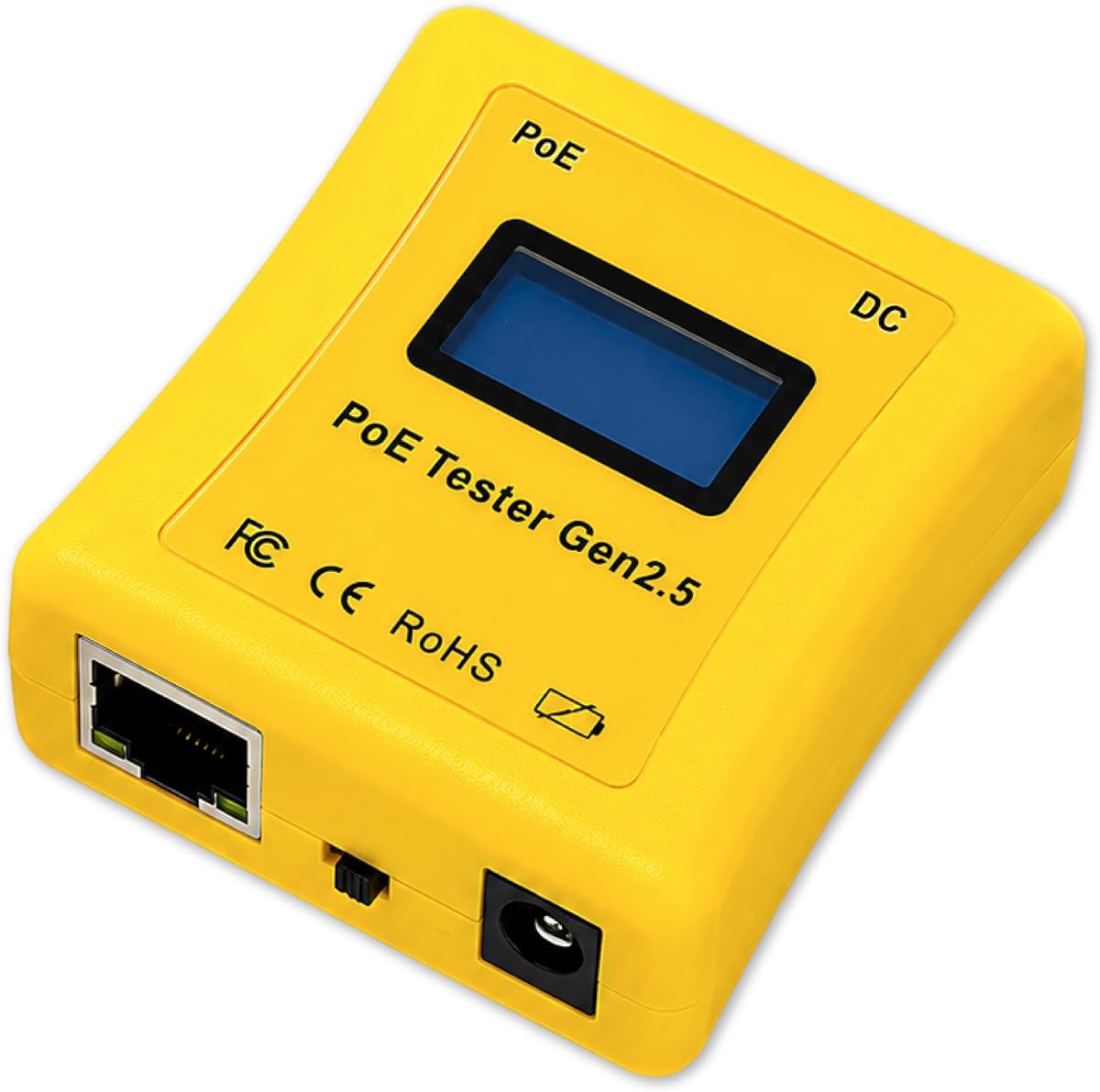
The NOYAFA NF-488 offers impressive value for professionals needing basic PoE verification and cable continuity checks at a low cost. It detects standard and non-standard PoE while also supporting network cable testing for opens shorts and crossovers. The backlit LCD ensures readability in dim environments.
We may earn a commission when you buy through this link, at no additional cost to you.
This tool is ideal for initial installation checks where you need to confirm both data and power connectivity quickly. The loop-back test helps diagnose switch port issues effectively. Its compact design fits easily into a toolbox for daily carry without adding bulk.
The trade-off lies in the lack of advanced power measurements like wattage monitoring which limits deep troubleshooting capabilities. The display is functional but not as crisp as premium options. However for basic validation tasks it performs reliably and efficiently.
Cable technicians and small business owners will find this model sufficient for routine maintenance. The combination of PoE detection and cable continuity testing in one unit saves carrying multiple tools. It is a smart choice for budget-conscious buyers.
This model provides essential PoE and cable testing functions at a fraction of the cost of specialized testers.
Combining PoE verification with standard network cable continuity checks reduces the need for separate devices on site.
We may earn a commission when you buy through this link, at no additional cost to you.
The PoE Texas tester is designed for portability with an ergonomically curved body that is smaller and easier to hold than many competitors. It draws power directly from the PoE line ensuring infinite usage without worrying about battery levels. It supports high power testing up to 280 watts.
We may earn a commission when you buy through this link, at no additional cost to you.
Its primary strength is simplicity allowing quick checks of voltage and current without complex navigation. The device can activate ports on AF AT BT switches making it useful for verifying switch functionality. The pocket-sized form factor makes it perfect for field work.
It lacks the detailed cycling features found in advanced models which might slow down thorough diagnostics. The display is functional but not backlit which can be an issue in low light. However its reliability and ease of use are significant assets.
Field technicians who need a lightweight tool for quick checks will appreciate this model. The absence of batteries reduces maintenance and weight significantly. It is a practical choice for those prioritizing physical comfort and simplicity over complex features.
Drawing power from the PoE line eliminates battery changes and ensures the tool is always ready for use.
Testing up to 280 watts allows verification of high-power devices like PTZ cameras and access points.
We may earn a commission when you buy through this link, at no additional cost to you.
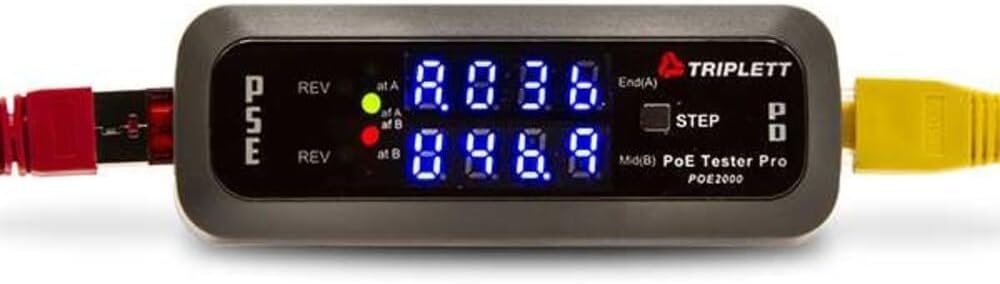
The Triplett POE2000 uses dual seven-digit LEDs to indicate power source types and polarity making it easy to identify wiring issues visually. It determines standard and non-standard PoE while also showing voltage and current readings. The step button allows cycling through different data points.
We may earn a commission when you buy through this link, at no additional cost to you.
This tool is useful for quick identification of power source configurations without needing to interpret complex numbers. The visual indicators help confirm end span or midspan connections rapidly. It serves well for basic verification tasks where numerical precision is less critical.
However the display is not as informative as LCD or OLED screens which limits its ability to show exact values at a glance. The build quality is good but it lacks some advanced features like wattage monitoring found in newer models. Users may find it limiting for detailed analysis.
IT professionals needing a reliable way to check polarity and power types will find this effective. It is a straightforward device that delivers on basic promises without unnecessary complexity. It remains a viable option for simple network checks.
LED indicators provide immediate visual feedback on power source type and polarity without reading numbers.
A simple step button lets you cycle between voltage current and power readings sequentially.
We may earn a commission when you buy through this link, at no additional cost to you.
The Triplett POE3000 focuses on speeding up installation and troubleshooting with a simple interface and visual LED indicators. It detects PSE types classes and polarity quickly making it useful for verifying connections before deploying devices. The inline power monitoring helps ensure stable delivery.
We may earn a commission when you buy through this link, at no additional cost to you.
Its ease of use makes it suitable for installers who need to verify connections without fiddling with menus. The visual alerts for polarity errors prevent common installation mistakes. The tool provides essential data for ensuring devices receive correct power levels.
The price point is higher than basic testers despite offering similar core features which might limit its appeal for some buyers. It also lacks detailed wattage metrics compared to more advanced models. It is best for users prioritizing speed over precision.
Technicians performing large scale deployments will appreciate the quick verification capabilities. It helps reduce misconfigurations by providing immediate feedback on power types. It remains a solid choice for installation-focused workflows.
The simplified interface allows for rapid verification of power connections during large network installations.
Visual LED alerts for polarity errors help prevent damage to connected devices during setup.
We may earn a commission when you buy through this link, at no additional cost to you.
The Jonard Tools POE-1 is part of a kit that includes essential accessories like a remote and adapter. It supports passive and IEEE standards while measuring voltage and resistance. The package includes a belt clip for easy portability on your tool belt.
We may earn a commission when you buy through this link, at no additional cost to you.
This model is designed for technicians who need a lightweight tool that covers both power and cable continuity in one device. The included AA battery allows testing unpowered cables which is useful for verifying cable integrity before applying power. It is convenient for varied tasks.
The testing capabilities are basic compared to professional-grade units which limits detailed analysis of power delivery. The build is functional but may not withstand heavy daily use as well as rugged models. It suits general maintenance tasks effectively.
Professionals looking for a portable kit with accessories will find value here. The inclusion of a remote adds flexibility for cable testing. It is a practical choice for general technicians needing a lightweight option.
The complete kit includes remote and adapters that enhance testing flexibility without extra purchases.
A belt clip allows easy attachment to your workspace for quick access during field tasks.
We may earn a commission when you buy through this link, at no additional cost to you.
This tester offers comprehensive PoE testing along with cable length measurement which is rare in this price range. It verifies continuity and detects faults like shorts and miswires effectively. The rechargeable battery and auto shutoff ensure long usage sessions without constant charging.
We may earn a commission when you buy through this link, at no additional cost to you.
Port flash detection helps locate active ports quickly in busy racks reducing troubleshooting time. The load testing validates power delivery to ensure devices receive stable power. The high user rating reflects satisfaction with its reliability and ease of use.
Battery life may be shorter than expected for long field jobs requiring frequent recharging. The power data is functional but not as precise as dedicated power analyzers. It serves well for general verification needs.
Installers who need to verify cable runs and power simultaneously will benefit most. It streamlines workflows by combining multiple checks in one device. It is a strong candidate for versatile maintenance work.
Measuring cable length ensures compliance with standards and identifies runs that are too long for reliable performance.
Port flash detection allows you to quickly identify active ports in complex network environments.
We may earn a commission when you buy through this link, at no additional cost to you.
This model provides basic CAT5 CAT6 network testing and voltage checking. It is designed for environments where standard network cables are predominant. The power panel feature adds utility for monitoring power sources in controlled settings.
We may earn a commission when you buy through this link, at no additional cost to you.
It serves well for legacy network maintenance where advanced PoE standards are not required. The tool offers straightforward voltage verification without complex setup. It remains a functional option for basic network validation.
Limited documentation and an older design may make it harder to use for modern setups. Advanced features like cable length or wattage are missing. It suits users with simpler technical needs only.
Network administrators managing legacy infrastructure will find it useful for routine checks. It offers essential validation without unnecessary complexity. Consider it for basic voltage and continuity tasks.
This tool is suitable for verifying older CAT5 and CAT6 cables in established network environments.
Power panel features assist in monitoring fixed power sources in controlled data centers.
We may earn a commission when you buy through this link, at no additional cost to you.
The NF-488 Network Cable Tester & POE Cable Tester offers solid performance for network and PoE verification. It includes loop-back testing and measures current and voltage effectively. An LED lamp helps in dark areas adding convenience during installation.
We may earn a commission when you buy through this link, at no additional cost to you.
Lifetime service support from the manufacturer provides confidence for buyers needing assistance. The tool identifies non-standard PoE devices and supports CAT5e and CAT6 cables. It remains a practical option for general maintenance.
Build quality is basic which may limit durability under heavy use. Advanced power monitoring like wattage is not included. It serves best for routine checks rather than complex diagnostics.
Technicians needing reliable basic testing with support will find value here. The added LED lamp and service options increase overall utility. It is a good choice for standard network maintenance.
Manufacturer offers lifetime customer service ensuring you can get help with usage questions anytime.
An included LED lamp helps illuminate dark cable ports for easier connection verification.
We may earn a commission when you buy through this link, at no additional cost to you.
Selecting the right inline POE tester requires understanding your specific needs for power verification cable testing and portability. Below are key factors to consider before making a purchase.
Ensure the tester supports the specific PoE standards you use such as 802.3af at and bt. Advanced models handle passive PoE and DC power which is crucial for mixed environments. Compatibility ensures accurate readings across all your devices.
Choose a device with a clear display like OLED or backlit LCD for viewing in various lighting. Readability reduces errors during critical testing moments. A simple LED interface may suffice for basic needs but screens offer more data.
Tools that draw power from the PoE line eliminate the need for batteries ensuring uninterrupted use. This feature is vital for field technicians who cannot pause work to charge. Check if it requires external power for unpowered cable tests.
If you need to check for shorts opens or cable length combine PoE testing with continuity checks. Multifunctional devices save carrying separate tools. This integration streamlines troubleshooting for both power and data issues.
Consider the size and weight of the tester for daily carry. Ergonomic designs reduce hand fatigue during long jobs. Rugged casings protect against drops and ensure longevity in demanding environments.
Government projects often require NDAA compliant tools to meet security standards. Verify compliance if you work in public sector contracts. This ensures your equipment meets legal requirements for secure networking.
Features like PD simulation and load testing help diagnose switch issues without extra devices. These modes save time by confirming port functionality before connecting endpoints. Look for tools that offer these for deeper analysis.
Check for manufacturer warranty and customer support availability. Tools with longer warranties and responsive teams provide peace of mind. Good support helps resolve issues quickly when they arise.
To begin use connect the tester between the PoE switch and the powered device. Ensure the device is powered on so the tester can draw voltage for its operation. Most models will light up immediately showing current readings on the screen.
Observe the displayed metrics such as voltage and current to confirm they match device specifications. If readings are unstable check cable connections for damage or looseness. Use the step button to cycle through different data points for detailed analysis.
Store the tester in a protective case when not in use to prevent physical damage. Avoid exposing it to extreme temperatures or moisture which can affect internal electronics. Regular cleaning of the ports keeps connections clean for accurate testing.
Standard PoE follows IEEE 802.3af at and bt protocols that negotiate power delivery safely. Passive PoE supplies constant voltage without negotiation which can damage devices not designed for it. Using a tester helps identify which type you have to prevent equipment failure.
Most inline testers do not need batteries because they draw power directly from the Ethernet line. Some models include batteries for testing unpowered cables or continuity checks. Battery-free operation ensures the tool is always ready when you plug it in.
Yes most testers work with Cat5e Cat6 and similar Ethernet cables carrying power. However ensure the cable supports the power level you are testing to avoid overheating. Specialized testers may exist for fiber or coaxial cables which differ significantly.
Connect the tester to the switch port and observe the voltage and wattage readings. Compare these values with the requirements of your connected device like a camera. If values are lower than expected check the switch configuration or cable quality.
Yes inline PoE testers are designed to handle live circuits safely without damaging equipment. They isolate the testing circuit internally to protect the network. Always follow manufacturer instructions to ensure safe handling during testing.
NDAA compliance ensures the tester meets specific security standards required for government projects. It means the equipment does not contain components from restricted manufacturers. This is essential for contracts in public sector networks in the US and Canada.
Some advanced models include cable length measurement features to verify run distances. Standard testers focus on power and continuity but lack length functionality. Check product specs carefully if measuring run distances is important for your workflow.
We have reviewed ten distinct models ranging from budget-friendly options to premium tools with OLED displays. Each offers unique strengths such as NDAA compliance or advanced power monitoring to suit varied technical needs. Selecting the right one depends on your specific installation requirements.
Prioritize features like battery-free operation and display clarity if you work frequently in the field. For regulated environments ensure compliance certifications are in place to meet legal standards. Balancing these factors helps optimize your testing workflow effectively.
Remember that product pricing and availability may vary over time so check current listings before purchasing. Regular updates ensure you have the most accurate information for your decisions. This guide helps simplify that choice process.