
ASUS Dual GeForce RTX 5060 Ti 16GB GDDR7 OC Edition Gaming Graphics Card
4.7Editor score
Dual BIOS for performance profiles
0dB technology for silent operation
2.5-slot design for compatibility
This guide compares the top 10 flagship graphics cards of October 2026 for gaming and professional use, evaluating performance, cooling, and value.
Selecting the right flagship graphics card is crucial for modern gaming and creative workflows. These powerful components drive high-resolution visuals, ray tracing, and AI-enhanced tasks. A good card balances raw performance with efficient cooling and reliable build quality for long-term use.
We evaluated ten leading models based on architectural advancements, thermal performance, and real-world utility. Each product offers distinct advantages for different budgets and system requirements. Our analysis focuses on technical specifications and user-focused features to help you make an informed choice.
Each pick highlights key strengths and potential trade-offs for various scenarios. Pricing fluctuates based on market demand and availability. Always verify current stock and compatibility with your system before purchasing to ensure a seamless upgrade experience for your setup.
4.7Editor score

4.8Editor score

4.6Editor score
Compare the top ten flagship graphics cards side by side to find the perfect match for your computing needs. This table highlights key specifications and unique features across all models.




This card stands out for its reliability and advanced cooling. With a high rating, it delivers consistent performance under load. The military-grade components ensure long-term stability.
We may earn a commission when you buy through this link, at no additional cost to you.
The Blackwell architecture enables DLSS 4 for improved frame rates. Phase-change thermal pads outlast traditional paste, maintaining efficiency. Axial-tech fans optimize airflow across the fin array.
System requirements include a verified 16-pin power connector. The 3.125-slot design needs adequate case clearance. These trade-offs ensure optimal power and thermal performance.
Ideal for users seeking top-tier durability and performance. It balances power efficiency with robust protection features. A strong choice for demanding workloads and gaming.
The phase-change thermal pad ensures optimal heat transfer under heavy loads, extending the card's operational lifespan and maintaining consistent performance levels.
Military-grade components and Auto-Extreme precision manufacturing deliver rock-solid power and longer lifespan for ultimate durability in challenging environments.
We may earn a commission when you buy through this link, at no additional cost to you.
Designed for small chassis without compromising capability. The dual-fan setup balances cooling and silence. AI performance tops 767 TOPS for efficient workloads.
We may earn a commission when you buy through this link, at no additional cost to you.
Dual BIOS allows toggling between Quiet and Performance profiles. The smaller fan hub increases downward air pressure for better cooling. Bearings last twice as long as sleeve designs.
Light gaming benefits from 0dB technology. The compact form factor limits some overclocking potential. These are acceptable trade-offs for tight spaces.
Great for budget-conscious buyers needing flagship features. It delivers reliable performance in compact builds. A practical choice for silent and efficient setups.
A 2.5-slot design maximizes compatibility and cooling efficiency for superior performance in small chassis without sacrificing critical performance capabilities.
The 0dB technology lets you enjoy light gaming in relative silence while dual-ball bearings ensure lasting durability and reduced noise over time.
We may earn a commission when you buy through this link, at no additional cost to you.
This model excels with Blackwell architecture and DLSS 4. The WINDFORCE cooling ensures thermal efficiency during demanding tasks. It supports PCIe 5.0 for future bandwidth needs.
We may earn a commission when you buy through this link, at no additional cost to you.
The 16GB GDDR7 interface offers fast data access. This enhances 4K gaming and content creation. The 256-bit interface balances speed and efficiency.
Verify PSU compatibility before purchase. The price reflects top-tier specs. These trade-offs suit enthusiasts prioritizing performance.
Perfect for high-end gaming rigs. It combines next-gen tech with proven cooling. A premium pick for maximum visual fidelity.
Powered by the NVIDIA Blackwell architecture and DLSS 4, this card delivers significant performance gains for modern gaming and AI workloads.
Integrated with 16GB GDDR7 and a 256-bit memory interface, offering faster data throughput and improved rendering efficiency for complex scenes.
We may earn a commission when you buy through this link, at no additional cost to you.
This card combines Blackwell power with TUF durability. It requires an 850W PSU with 16-pin connectors. The 3.6-slot design optimizes airflow for better cooling.
We may earn a commission when you buy through this link, at no additional cost to you.
Protective PCB coating guards against moisture and dust. Phase-change pads ensure longevity under heavy loads. Auto-Extreme manufacturing ensures higher reliability.
Check case clearance before buying. The weight may need extra support. These are acceptable for stable, long-term use.
Ideal for users needing robust performance. It balances power with protection. A strong pick for demanding workloads.
Military-grade components and protective PCB coating deliver rock-solid power and longer lifespan for ultimate durability against environmental factors.
Phase-change GPU thermal pads help ensure optimal thermal performance and longevity, outlasting traditional thermal paste during heavy gaming sessions.
We may earn a commission when you buy through this link, at no additional cost to you.
This card offers a strong alternative with Radeon technology. The WINDFORCE system uses Hawk Fans for focused airflow. It includes server-grade thermal gel for better heat transfer.
We may earn a commission when you buy through this link, at no additional cost to you.
16GB GDDR6 memory handles high-resolution tasks well. RGB lighting allows aesthetic customization. PCIe 5.0 ensures future compatibility.
Architecture differences may affect specific software. Memory types differ from GDDR7. These suit users preferring AMD ecosystems.
Great for gaming and creative work. It balances cooling and features well. A reliable choice for AMD users.
WINDFORCE Cooling System with Hawk Fans ensures efficient heat dissipation for stable performance during extended gaming and rendering sessions.
Server-grade thermal conductive gel improves heat transfer between the GPU and cooling solution for better temperature management.
We may earn a commission when you buy through this link, at no additional cost to you.
This model features 32GB GDDR7 for heavy workloads. It is SFF-Ready for enthusiast builds. Axial-tech fans ensure airflow in a 2.5-slot frame.
We may earn a commission when you buy through this link, at no additional cost to you.
Dual-ball bearings last twice as long as sleeve designs. Dual BIOS allows switching between Quiet and Performance profiles. Auto-Extreme ensures precision manufacturing.
The rating suggests variability in experiences. Power requirements are high. These trade-offs suit specific enthusiast needs.
Ideal for large memory requirements. It balances size with performance. A specialized pick for demanding tasks.
The 32GB GDDR7 memory supports high-resolution textures and large datasets, ideal for professional workloads and future-proofing.
SFF-Ready Enthusiast GeForce Card design allows greater build compatibility while maintaining effective cooling performance.
We may earn a commission when you buy through this link, at no additional cost to you.
This Prime model delivers strong performance with efficiency. Axial-tech fans increase downward air pressure. Phase-change pads enhance heat transfer for reliability.
We may earn a commission when you buy through this link, at no additional cost to you.
It offers high boost clocks for peak tasks. Dual BIOS profiles give quiet or performance options. Bearings last twice as long as standard sleeves.
Memory type may limit top speeds vs GDDR7. These are acceptable for value seekers. The card balances cost and capability well.
Perfect for balanced builds. It ensures stable, quiet operation. A solid pick for reliable performance.
Phase-change GPU thermal pads help ensure optimal heat transfer, lowering GPU temperatures for enhanced performance and long-term reliability.
The 0dB technology lets you enjoy light gaming in relative silence, providing a quiet experience during non-intensive tasks.
We may earn a commission when you buy through this link, at no additional cost to you.
This card brings Blackwell architecture to efficient systems. Military-grade components ensure stability. Phase-change pads offer longevity under heavy loads.
We may earn a commission when you buy through this link, at no additional cost to you.
ASUS GPU Guard reduces crack risk. Auto-Extreme manufacturing ensures reliability. It balances performance with durability for daily use.
12GB may limit future 4K needs. The 3.125-slot size requires clearance. These suit current high-performance needs.
Ideal for solid, reliable builds. It prioritizes long-term stability. A good pick for consistent performance.
Military-grade components deliver rock-solid power and longer lifespan for ultimate durability in demanding gaming and professional environments.
ASUS GPU Guard and bracket secure the GPU, reducing the risk of cracks and ensuring stable mounting during transport or upgrades.
We may earn a commission when you buy through this link, at no additional cost to you.
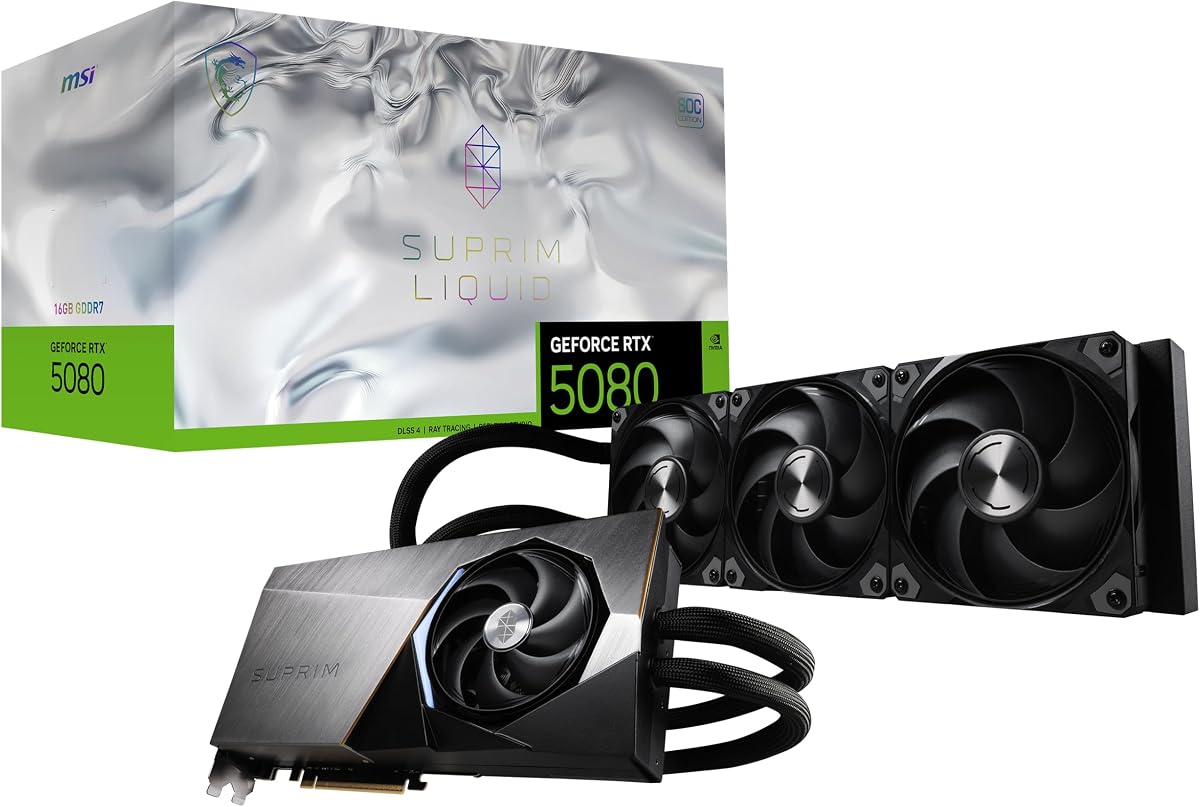
This card offers extreme performance with liquid support. It supports 7680 x 4320 resolution for multi-display setups. DisplayPort 2.1a and HDMI 2.1b ensure compatibility.
We may earn a commission when you buy through this link, at no additional cost to you.
The 2760 MHz boost clock delivers high frame rates. It supports 16GB GDDR7 for efficient data access. These features suit high-resolution workflows.
Liquid cooling adds installation complexity. The setup may need extra space. These trade-offs suit enthusiasts seeking top performance.
Perfect for high-end gaming rigs. It balances power with connectivity. A specialized pick for maximum fidelity.
Digital maximum resolution supports 7680 x 4320, enabling immersive multi-monitor setups and professional display configurations.
Outputs include DisplayPort x 3 (v2.1a) and HDMI 2.1b x 1, providing broad compatibility with modern monitors and TVs.
We may earn a commission when you buy through this link, at no additional cost to you.
This card remains strong with 16.384 CUDA cores. It supports 4K 120Hz and 8K 60Hz HDR. Fourth Gen Tensor Cores boost AI performance significantly.
We may earn a commission when you buy through this link, at no additional cost to you.
Third Gen RT Cores double ray tracing speed. DLSS 3 accelerates frame rates. NVIDIA Reflex reduces latency for gaming precision.
It lacks newer architecture features. The price reflects legacy status. These suit existing system upgrades.
Great for high-resolution gaming. It balances AI and display features. A reliable pick for 8K tasks.
Fourth Generation Tensor Cores provide up to 2x AI performance, accelerating rendering and machine learning tasks efficiently.
Third Generation RT Cores deliver up to 2x ray tracing performance, enabling realistic lighting and reflections in supported titles.
We may earn a commission when you buy through this link, at no additional cost to you.
Choosing the right flagship card requires understanding key factors that impact performance and stability. This guide outlines the most critical aspects to evaluate before purchasing.
Modern cards use architectures like Blackwell to deliver efficiency and AI support. Features such as DLSS 4 improve frame rates through smart upscaling. Look for next-gen tech that matches your workflow needs.
Prioritize newer architectures for longevity and performance headroom. This ensures your system handles future titles and applications effectively.
Memory capacity and interface width dictate how fast data moves during rendering. GDDR7 offers faster speeds than previous GDDR6 models. High bandwidth is crucial for 4K and 8K workloads.
Select sufficient VRAM for your target resolution. More memory prevents bottlenecks in creative and gaming scenarios.
Thermal performance determines how long a card sustains peak speeds. Look for phase-change pads and military-grade components. These enhance durability and prevent thermal throttling under heavy loads.
Check for protective coatings and robust fan designs. These features maintain reliability during daily and seasonal use.
Verify your power supply meets the minimum wattage and connector type. Many new models require an 850W PSU with 16-pin connectors. Measure case clearance for large card designs.
Ensure your motherboard supports PCIe 5.0 for optimal performance. Proper installation prevents power and connectivity issues.
Flagship cards support high resolutions and refresh rates. HDMI 2.1a and DisplayPort 2.1a are essential for 8K setups. Verify your monitor compatibility before purchasing.
Prioritize ports that match your current and future display needs. This ensures seamless integration and maximum visual fidelity.
Vendor software allows performance tweaking and thermal monitoring. Dual BIOS options let you switch between Quiet and Performance profiles. Intuitive tools simplify customization without technical risks.
Look for software that supports system monitoring. This helps track stability and optimize settings over time.
Manufacturers offer varying warranty periods and support channels. Longer coverage provides peace of mind for high-cost components. Check for advanced features like secure mounting guards.
Choose brands with strong support records. This ensures assistance is available if hardware issues arise.
Balance upfront cost with expected lifespan and performance gains. Higher-end cards often offer better long-term value. Consider future needs to avoid quick obsolescence.
Evaluate total cost of ownership over years. This ensures the investment meets evolving computing demands.
Begin by updating your motherboard BIOS and power supply drivers. Verify that your PSU meets the minimum wattage and connector requirements listed for the card. Proper power ensures stable performance without unexpected shutdowns during peak tasks.
Install the latest drivers directly from the manufacturer or vendor portal. Use official software tools to monitor thermal profiles and adjust fan speeds. Regular checks prevent overheating and maintain optimal performance levels during extended sessions.
Clean dust from fan blades and fins every few months using compressed air. Ensure your case has adequate airflow to support the card's cooling needs. Proper maintenance extends the life of components and keeps thermal resistance low.
Most flagship cards require at least an 850W power supply with a 16-pin 12V-2×6 connector. Verify your unit meets this requirement before purchase to ensure stable performance. Upgrading your PSU prevents potential issues under heavy loads.
Measure your case clearance carefully since flagship cards often exceed 300mm in length. Models with 2.5-slot designs fit smaller cases better than 3.6-slot variants. Confirm slot spacing and GPU bracket compatibility before purchasing.
Newer architectures like Blackwell offer better AI performance and power efficiency. They support advanced features like DLSS 4 for improved frame rates. The investment often pays off through longer usability and higher visual fidelity.
Phase-change thermal pads and server-grade gels last longer than traditional paste. These materials maintain consistent thermal transfer under heavy loads. Look for cards with these features for better long-term performance and durability.
Not all cards support 8K gaming; check specifications for maximum resolution and refresh rate. Models like the RTX 4090 support 8K 60Hz HDR. Ensure your display and card match these requirements for optimal use.
Use vendor-specific software like GPU Tweak III or third-party tools to track clock speeds and temperatures. These programs allow real-time adjustments to fan curves and performance modes. Consistent monitoring helps maintain system stability.
Our top three picks offer distinct advantages for different needs. The TUF 5070 Ti leads in reliability while the Dual 5060 Ti suits tight spaces. The GIGABYTE 5080 delivers premium performance with advanced cooling.
Prioritize architecture, cooling, and compatibility over raw specs alone. Verify power and space needs to avoid installation issues. Longevity depends on proper thermal management and robust build quality.
Check current prices and stock levels before purchasing. Deals change frequently as market conditions shift. Ensure your final choice aligns with both budget and technical requirements for success.