
UGREEN SD Card Reader USB 3.0
4.6Editor score
Reads four cards simultaneously
USB 3.0 up to 5Gbps
Compact design with 1.7ft cable
This guide compares the top ten compact flash card reader options for photographers and videographers seeking reliable multi-card transfer solutions in 2026.
Finding the right compact flash card reader is essential for professionals who need quick access to their footage. A good reader supports multiple card types and offers fast transfer speeds without compromising reliability during critical workflow moments.
We evaluated ten top-rated models based on compatibility, build quality, and data transfer performance. Each product was assessed for its ability to handle various memory formats and integrate seamlessly with modern computers and mobile devices.
Each pick highlights key strengths and potential limitations to help you decide quickly. Please note that availability and pricing may change over time so verify current details before making your final purchase decision online.
4.6Editor score

4.7Editor score

4.4Editor score
The following table provides a side-by-side comparison of all ten selected compact flash card readers to help you identify the model that best fits your specific storage and transfer requirements.



The Lexar Multi-Card 3-in-1 Reader stands out as the top choice for professionals who need reliable and fast data transfers. With a rating of 4.7 stars it has earned trust from users who value performance in their daily workflow.
We may earn a commission when you buy through this link, at no additional cost to you.
This device delivers transfer speeds of up to 312MB/s for SD and microSD cards which is exceptional for large media files. It supports SD microSD and CompactFlash cards making it versatile for various camera types. The USB 3.1 connectivity ensures you get the most out of your hardware.
While the price is higher than some basic models the performance justifies the investment. The only trade-off is that it does not support Memory Stick or other legacy formats beyond its three dedicated slots. For most users this limitation is acceptable given the speed.
Photographers and videographers who work with high-resolution images and 4K video will find this reader indispensable. It provides the speed and reliability needed to keep projects moving without technical bottlenecks during critical editing sessions.
The high-speed data transfer capabilities reduce wait times significantly when moving large batches of photos or video files.
By supporting SD microSD and CF cards this reader covers the most common formats used in modern photography and videography.
We may earn a commission when you buy through this link, at no additional cost to you.
The UGREEN SD Card Reader USB 3.0 offers exceptional value for users seeking a budget-friendly solution without sacrificing key features. With a solid 4.6 rating it is a popular choice for hobbyists and professionals alike who need flexibility.
We may earn a commission when you buy through this link, at no additional cost to you.
This reader supports reading and writing four different memory cards at the same time which eliminates the need to swap cards constantly. It features USB 3.0 technology providing speeds up to 5Gbps. The compact design makes it easy to carry in a camera bag.
While the build is primarily plastic it remains durable enough for regular use. Some users might prefer a heavier metal chassis but the lightweight nature helps with portability. The included cable is sufficient for most desktop setups.
Anyone looking for a reliable multi-card reader at an accessible price will appreciate this model. It works well with Windows Mac Linux and Chrome OS making it a universal tool for diverse computing environments.
The ability to read four cards simultaneously streamlines workflow for users managing multiple memory cards from different shoots.
Compatibility with major operating systems ensures you can use this reader with virtually any computer or laptop you own.
We may earn a commission when you buy through this link, at no additional cost to you.
The CFast 2.0 Card Reader is designed for professionals who require high-speed data transfer from advanced memory cards. With a focus on CFast 2.0 support it caters to videographers and content creators working with high-end cinema cameras.
We may earn a commission when you buy through this link, at no additional cost to you.
This reader supports CFast CF SD TF and XD cards allowing up to five cards to be read simultaneously. The aluminum housing dissipates heat effectively during large transfers ensuring consistent performance over long periods. It comes with a dual USB cable for flexibility.
While the premium price may not suit casual users it is justified by the specialized CFast support and robust build. The size is slightly larger than basic readers but necessary to accommodate the multiple slots and heat management features.
Videographers using modern cinema cameras will find this reader essential for their workflow. It ensures that large 4K or 8K video files can be offloaded quickly without overheating or connection drops.
Support for CFast 2.0 cards means you can handle the fastest data rates available on professional camera systems today.
The aluminum body helps maintain optimal operating temperatures even during extended data transfer sessions.
We may earn a commission when you buy through this link, at no additional cost to you.
The BENFEI 4in1 USB 3.0 Reader offers a versatile hybrid design that connects via both USB-C and USB 3.0 ports. This flexibility makes it an excellent choice for users transitioning between older and newer computing devices.
We may earn a commission when you buy through this link, at no additional cost to you.
It supports SD Micro SD MS and CF cards allowing simultaneous reading and writing. The integrated design provides high-speed access to four card types. It is specifically compatible with iPhone 15 Series and MacBook Pro models from 2023.
While it offers broad compatibility there are some limitations with older Memory Stick formats and CF Type I cards. Users with legacy equipment should check compatibility before purchasing. Otherwise it is a robust solution for modern setups.
Anyone using Apple devices or modern Windows laptops will benefit from the USB-C connection. The 18-month warranty provides added peace of mind for those investing in a reliable card reader for daily use.
Compatibility with iPhone 15 Series and recent MacBooks ensures seamless integration with the latest mobile and desktop devices.
The exclusive 18-month unconditional warranty ensures long-time satisfaction and timely customer service support.
We may earn a commission when you buy through this link, at no additional cost to you.
This 6-in-1 Compact Flash Card Reader is designed for users who need to manage a wide variety of memory cards simultaneously. It offers extensive compatibility with legacy and modern formats in one device.
We may earn a commission when you buy through this link, at no additional cost to you.
The reader supports CFast CF SD TF MS and XD cards reading up to six cards at once. It features USB 3.0 technology with speeds up to 5Gbps. The aluminum alloy chassis dissipates heat during prolonged transfers ensuring reliability.
The dual USB-C and USB-A connectors allow easy connection to phones tablets and computers. While it is more complex than a 3-in-1 it saves significant time for professionals managing multiple card types from different cameras.
Photographers and videographers with diverse camera fleets will find this reader ideal for archiving workflows. It ensures that older formats like XD cards are not obsolete while supporting modern high-speed CFast media.
Dedicated slots for legacy formats ensure your older memory cards remain accessible for years to come.
The aluminum alloy construction effectively dissipates heat during prolonged data transfers for stable performance.
We may earn a commission when you buy through this link, at no additional cost to you.
The CF Card Reader USB 3.0 is an excellent value option for users needing reliable multi-card access without breaking the bank. It supports five different card types simultaneously which is impressive for its price range.
We may earn a commission when you buy through this link, at no additional cost to you.
This reader allows you to read two or more cards at the same time saving transfer time. It features a high-quality aluminum alloy cover that provides durability and heat dissipation. The built-in protection safeguards against over-current and short circuits.
Plug and play functionality means no driver installation is required. It works with Windows Mac Linux and Chrome OS. While the grey finish may show wear over time the build quality ensures a long service life.
Students and hobbyists looking for an affordable yet capable reader will appreciate this model. It provides the essential speed and compatibility needed for everyday file transfers.
Intelligent multiple protection against over-current and short circuit ensures connected equipment remains safe during use.
The slim aluminum cover makes it delicate and durable for easy transport in a camera bag.
We may earn a commission when you buy through this link, at no additional cost to you.
The UGREEN USB C SD Card Reader is specifically designed for modern devices that use USB-C connections. It is an ideal choice for mobile users who need to access camera cards directly from phones or tablets.
We may earn a commission when you buy through this link, at no additional cost to you.
This reader supports SD Micro SD CF and MS slots allowing simultaneous access to all connected cards. It transfers files at up to 5Gbps ensuring quick uploads. It works with iPhone 15 Pro and Android phones with USB-C.
Because it requires USB-C ports users with older laptops may need an adapter. However for the target audience of mobile users it provides a seamless experience without extra hardware. It is a great addition for workers on the go.
Mobile photographers who want to edit photos on an iPad or phone will find this reader indispensable. It simplifies the process of offloading media directly to devices for quick sharing.
Designed for USB-C devices like the iPhone 15 and modern tablets this reader integrates perfectly with mobile workflows.
Transfer 1GB files in seconds allowing you to quickly share photos without waiting on slow connections.
We may earn a commission when you buy through this link, at no additional cost to you.
The SmartQ C368 USB 3.0 Card Reader provides a straightforward solution for users who need reliable access to common card formats. With a strong 4.6 rating it is a favorite for its simplicity and clear status indicators.
We may earn a commission when you buy through this link, at no additional cost to you.
This reader supports Micro SD SD MS and CF cards. It features a blue LED light that lights up when powered on giving you clear visibility of the device status. It is plug and play ready with no drivers needed.
It is designed for mobile use during travel making it easy to keep in a pocket. The included cable organizer helps keep your workspace tidy. While it lacks simultaneous read features it is simple and effective for standard use.
Users who value simplicity and clear status feedback will appreciate this model. It is a reliable choice for casual photographers who do not need multi-card simultaneous reading.
The blue LED light indicator ensures you know exactly when the device is powered on and ready to use.
The compact form factor and included cable organizer make it ideal for travel and mobile use.
We may earn a commission when you buy through this link, at no additional cost to you.
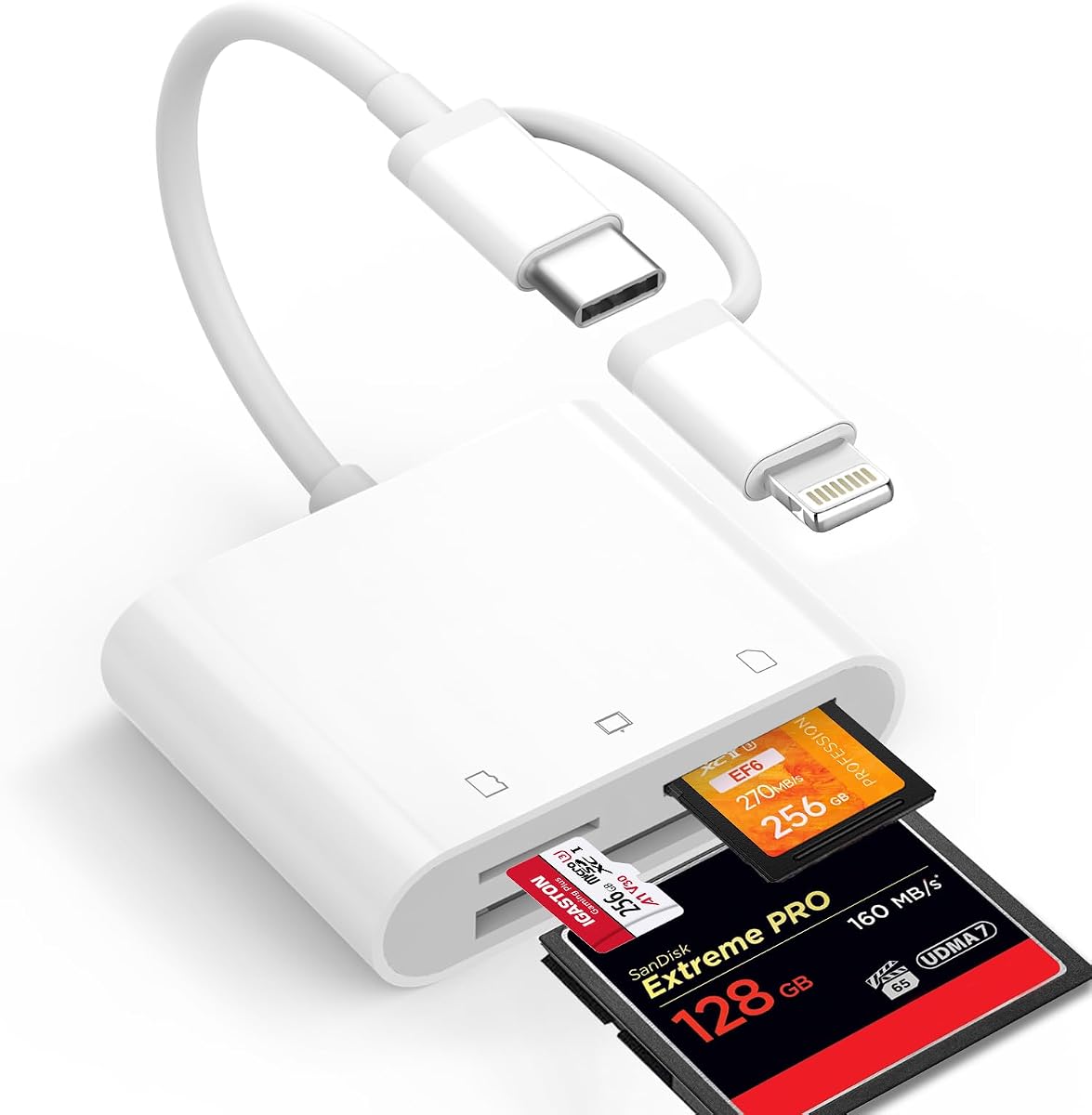
The CF SD Card Reader Dual Connector is designed for users who switch between Lightning and USB-C devices. It allows you to view photos on different interface devices without buying multiple adapters.
We may earn a commission when you buy through this link, at no additional cost to you.
This reader supports CF SD and MicroSD cards with a 3-in-1 design. It features Apple MiFi certified connectors for fast and stable transmission. It is plug and play requiring no app or network connection.
While the two connectors cannot be used simultaneously the fixed design means you do not lose parts. The short cable makes photo transmission stable. It also supports bi-directional transfer to free up phone storage.
iPhone and iPad users who travel often will find this adapter perfect for instant viewing. It allows you to quickly share moments with friends without waiting for cloud uploads.
Built-in USB-C and Lightning connectors mean you can use this with older iPhones and newer devices.
This reader allows you to transfer photos without needing any specific apps or network connections.
We may earn a commission when you buy through this link, at no additional cost to you.
The ChiaoPio USB C to SD CF Reader is designed to plug directly into USB-C devices without blocking other ports. It is an excellent choice for iPad and Mac users who need a compact solution.
We may earn a commission when you buy through this link, at no additional cost to you.
This reader supports Compact Flash SD and MicroSD cards. The built-in USBC cord ensures it does not block other ports on your laptop or tablet. It is plug and play requiring no additional power.
While it is not compatible with Lightning ports it works with almost all USB-C devices. The compact design allows you to view your photos instantly. It is a great addition for content creators on the go.
Users of iPad Pro and MacBook Air will appreciate the seamless connection. It provides a simple way to upload files anytime and anywhere without carrying an extra cable.
The built-in USBC cord does not block your other ports ensuring you can connect other devices simultaneously.
You can view photos and videos from camera cards instantly on your iPad or Mac without setup.
We may earn a commission when you buy through this link, at no additional cost to you.
Selecting the right compact flash card reader involves considering factors like transfer speeds compatibility build quality and specific device needs. This section helps you identify what to look for.
Transfer speeds are critical for photographers and videographers working with large files. Look for readers that support USB 3.0 or higher standards to ensure fast data movement.
High-speed transfers save time during busy shoots and reduce the wait time when offloading footage from memory cards.
Ensure the reader supports all the card formats you currently use. Some models support a wider range of formats than others.
Check for support of CF SD Micro SD and other legacy formats you might need for older camera equipment.
Modern readers should offer versatile connectivity like USB-C and USB-A to work with laptops and mobile devices.
Choosing a reader with dual connectors ensures you can use it with both older and newer computers without extra adapters.
A durable build is essential for readers that are frequently moved around in camera bags. Aluminum alloys are often preferred for better heat dissipation.
Look for models with robust housings that protect the internal components during travel and regular use.
Some readers allow you to read multiple cards at once which can significantly speed up your workflow.
If you work with multiple memory cards from different cameras this feature can be a major time saver.
Most readers are plug and play but it is important to verify support for your specific operating system.
Check that the reader works with Windows Mac and Linux systems to avoid software issues later.
A solid warranty indicates the manufacturer stands behind their product quality and customer service.
Look for options with at least a one-year warranty to protect your investment from potential defects.
Price varies significantly between basic models and professional-grade readers. Balance the features with your budget needs.
Choose a model that offers the necessary features without overpaying for capabilities you do not use.
To use your reader simply plug it into an available USB port on your computer. Wait for the operating system to recognize the device before inserting your memory cards.
Insert the memory card into the corresponding slot gently until it clicks into place. You should see the card appear in your file explorer immediately.
After transferring files safely eject the card through your operating system before removing it from the reader. Always store the reader in a dry place to prevent moisture damage.
Most modern Compact Flash Card Readers are designed to be plug and play meaning they work with Windows Mac and Linux without drivers. Just plug the device in and your system will recognize it automatically.
Yes many multi-card readers support simultaneous reading of multiple cards. This feature allows you to transfer data from several memory cards at once saving significant time.
USB 3.0 typically refers to the standard rectangular port while USB-C is a smaller reversible connector. Both can offer fast speeds but USB-C is more common on modern devices like the iPhone 15.
Yes many readers support legacy formats like CompactFlash and XD cards ensuring your older camera data remains accessible. Check the specific compatibility list before buying.
Many models feature aluminum bodies that are durable and dissipate heat well. Look for compact designs with sturdy connectors to ensure reliability during travel.
If your iPad uses USB-C ensure the reader has a USB-C connector. For older iPads with Lightning ports choose a reader that includes both USB-C and Lightning options for maximum versatility.
The Lexar Multi-Card 3-in-1 and the UGREEN SD Card Reader stand out as top choices for different budget levels. Both offer excellent performance and reliability for daily transfers.
Prioritize transfer speeds and connectivity options that match your specific camera gear and computer ports. A reader that fits your ecosystem will save you time and effort.
Prices and availability can change frequently so check current listings before making your purchase decision. Ensure you have the right cables for your setup.