
GOLDENMATE 2000VA Lithium
4.4Editor score
Long life battery
High power output
Maintenance free
This guide compares the top battery backup for workstation PC units to help you choose reliable power protection for your critical computer equipment and data.
Choosing the right battery backup for workstation PC is essential for protecting valuable data and hardware from unexpected power outages. A reliable uninterruptible power supply ensures your system stays online during brief interruptions and allows safe shutdowns during longer failures.
We compared ten leading models based on output capacity, waveform type, outlet configurations, and management features. Each unit was evaluated for its ability to support active PFC power supplies and deliver consistent power to demanding workstation components without interruption.
Each pick highlights specific strengths and ideal use cases for different workstation needs. Please note that availability and specifications may change over time, so verify current details before making your final selection for your setup.
4.4Editor score

4.5Editor score

4.7Editor score
The following table provides a side by side comparison of all ten selected battery backup units. Review the specifications to find the capacity and features that best match your workstation power requirements.




The CyberPower CP1500PFCLCD stands out as the top choice for workstation environments requiring robust power protection. With a 1500VA capacity and pure sine wave output, it ensures compatibility with active PFC power supplies found in modern workstations. Its 4.5 rating reflects consistent performance and user satisfaction.
We may earn a commission when you buy through this link, at no additional cost to you.
This model features a multifunction color LCD panel that displays detailed battery and power conditions instantly. The automatic voltage regulation corrects minor fluctuations without draining the battery, extending its lifespan. Six outlets provide battery backup and surge protection while six additional outlets offer surge protection alone, totaling twelve connections for diverse peripherals.
While highly capable, the unit is heavier than compact alternatives due to its internal components. Users should ensure adequate space for the fourty five degree offset plug and five foot cord. Despite these minor spatial considerations, the comprehensive protection features justify the physical footprint.
Workstation owners needing reliable support for high performance computers should consider this unit. It balances capacity, waveform quality, and outlet variety effectively. The included software allows for system monitoring and safe shutdowns during extended outages.
Pure sine wave output ensures that sensitive workstation components receive clean power identical to wall outlet quality preventing potential hardware stress.
AVR technology stabilizes incoming voltage automatically reducing unnecessary battery cycling and preserving energy reserves for actual power failures.
We may earn a commission when you buy through this link, at no additional cost to you.
The CP1500AVRLCD3 delivers significant power capacity suitable for demanding workstation tasks. It uses simulated sine wave technology which is effective for many devices but may not suit all active PFC supplies. The intelligent color LCD keeps users informed about runtime and load status clearly.
We may earn a commission when you buy through this link, at no additional cost to you.
Twelve outlets are available with six dedicated to battery backup and six for surge protection. This distribution allows users to plug in essential computing gear and non critical peripherals appropriately. The six foot power cord offers flexibility in placement within a workspace.
The simulated sine wave output is a cost effective solution but might not be ideal for high end audio or sensitive medical equipment. Users should verify compatibility with their power supply units before purchase. The warranty covers the battery ensuring long term reliability.
Ideal for users prioritizing outlet count and display quality over pure waveform fidelity. This unit offers a balanced feature set for general workstation protection and home office use effectively.
Separating battery backed outlets from surge only ones helps prioritize power usage during emergencies ensuring critical systems stay active longer.
Integrated USB Type A and Type C ports allow convenient charging of mobile devices without needing separate adapters during outages.
We may earn a commission when you buy through this link, at no additional cost to you.
This model focuses on energy efficiency with its Ecologic technology that turns off power to peripherals when the computer sleeps. It is a solid option for users wanting to minimize energy consumption while maintaining essential backup capabilities. The LCD panel displays necessary power condition information clearly.
We may earn a commission when you buy through this link, at no additional cost to you.
Twelve outlets are provided with three controlled by the ECO mode feature. This arrangement allows users to connect monitors and printers to the ECO outlets automatically turning them off when the PC is idle. Five outlets offer battery backup for critical systems.
The lower wattage limits its use with high power workstations. Users with standard office setups will find it sufficient for powering a computer and essential accessories. The five foot cord is suitable for most desk setups.
Best for environmentally conscious users or those with lighter workstation loads. The energy saving features make it a practical choice for long term operation without excessive power draw.
ECO controlled outlets detect when the PC is off and cut power to connected devices reducing standby power consumption significantly.
This unit offers reliable surge protection and battery backup at a competitive price point suitable for budget minded consumers.
We may earn a commission when you buy through this link, at no additional cost to you.
The CP1000PFCLCD offers pure sine wave output at a more accessible price point than higher capacity models. This makes it ideal for workstations that require waveform purity but do not need maximum power output. The color LCD provides clear real time status updates.
We may earn a commission when you buy through this link, at no additional cost to you.
It includes ten outlets with five battery backup and five surge protected. This configuration supports most standard desktop and peripheral setups efficiently. The integrated USB ports allow for convenient mobile device charging without extra adapters.
While the ten outlets may not fit every multi monitor setup, the pure sine wave ensures safe operation of sensitive components. The automatic voltage regulation helps extend battery life by correcting minor power fluctuations automatically.
Recommended for small office workstations needing reliable waveform quality. It balances performance features with cost effectively for users requiring PFC compatibility.
Getting pure sine wave technology at this price allows users to protect expensive electronics without investing in top tier models.
The color screen tilts up to twenty two degrees improving visibility of battery status and runtime information from various angles.
We may earn a commission when you buy through this link, at no additional cost to you.
The AVRG900LCD distinguishes itself with data line protection against phone line surges. This feature is valuable for workstations using legacy modems or fax lines. The unit maintains a high user rating due to its reliable performance and comprehensive protection features.
We may earn a commission when you buy through this link, at no additional cost to you.
It offers twelve outlets split between battery backup and surge protection. This flexibility allows users to connect various devices while prioritizing critical systems. The simulated sine wave output works well for standard office equipment and home entertainment systems.
While the power rating is modest, it suffices for basic workstation needs. The automatic voltage regulation ensures stability without constant battery usage. The intelligent LCD panel keeps users informed about battery health and current load.
Best for users needing both power and communication line protection. Its high rating suggests consistent quality and durability over time.
Protection against telephone line surges prevents damage to network equipment and modems during electrical storms.
The slim profile fits easily in tight spaces without compromising on outlet availability or protection capabilities.
We may earn a commission when you buy through this link, at no additional cost to you.
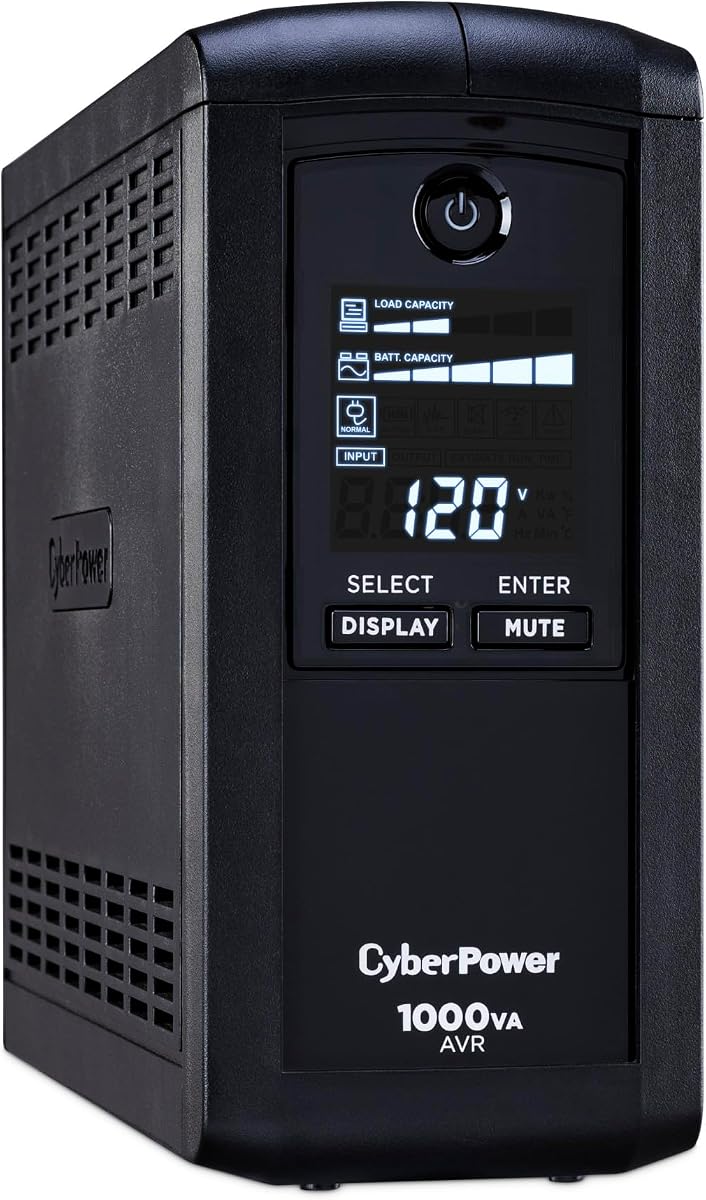
This model provides detailed status information including estimated runtime and battery capacity directly on the LCD. This transparency helps users plan for outages effectively. The 1000VA capacity supports standard workstation loads with ease.
We may earn a commission when you buy through this link, at no additional cost to you.
Nine outlets are available with five battery backed and four surge protected. This configuration is sufficient for desktops and monitors. The six foot power cord offers better reach than the standard five foot option on some units.
While it uses simulated sine wave, it remains effective for general protection needs. The automatic voltage regulation helps preserve battery life by handling minor voltage fluctuations before they require backup power.
Ideal for users who want clear visibility into power conditions. The LCD display details support informed decision making during power events.
Displaying estimated runtime allows users to gauge how much time they have to save work and shut down safely.
The six foot cord improves placement flexibility ensuring the unit can be positioned near outlets without stretching.
We may earn a commission when you buy through this link, at no additional cost to you.
The GOLDENMATE unit features a Lithium Iron Phosphate battery with a lifespan exceeding ten years. This significantly reduces long term costs compared to traditional lead acid units. The 1600W capacity supports demanding workstations with high power requirements effectively.
We may earn a commission when you buy through this link, at no additional cost to you.
It includes eight outlets with wide spacing for bulky adapters. The communication port allows automatic PC shutdowns via Windows settings. Built in safety features include battery management systems preventing overcharge or discharge risks.
The weight is higher due to the larger transformer required for the voltage system. Users should ensure a sturdy surface is available for placement. Despite the weight, the maintenance free operation is a major benefit.
Best for users prioritizing battery life and high power. The pure sine wave and lithium tech make it a future proof investment for critical workstation setups.
Over 3000 charge cycles mean replacement is rarely needed saving money and reducing electronic waste.
The USB communication port enables the UPS to signal the PC to shut down gracefully during extended outages.
We may earn a commission when you buy through this link, at no additional cost to you.
The ST900U features a slim design perfect for tight desk spaces. It offers twelve outlets with four widely spaced to accommodate larger adapters. This unit is designed for home offices and standard workstations needing basic protection.
We may earn a commission when you buy through this link, at no additional cost to you.
It uses simulated sine wave output suitable for common electronics. The high efficiency design reduces power consumption during operation. This helps lower energy costs over time compared to less efficient models.
The standby technology is a basic form of UPS that switches to battery quickly. While not suitable for all high power needs, it covers essential equipment well. The five foot cord fits most setups.
Recommended for space constrained environments requiring multiple outlets. Its slim build and efficient operation make it a practical choice for standard office use.
The slim form factor allows placement on shelves or under desks without obstructing airflow or space.
High efficiency technology minimizes waste heat and energy usage contributing to lower operating costs.
We may earn a commission when you buy through this link, at no additional cost to you.
This unit provides a clear LCD display for monitoring battery health and load. With nine outlets, it serves smaller workstation setups effectively. The 850VA capacity is sufficient for standard desktop computers and peripherals.
We may earn a commission when you buy through this link, at no additional cost to you.
Automatic voltage regulation protects against minor fluctuations without using battery power. The five foot cord is standard for most outlets. The simulated sine wave supports most common devices without issues.
It is lighter than larger models making it easy to move or reposition. The connected equipment guarantee offers additional peace of mind for users investing in protection.
Best for smaller workstations needing visibility and standard protection. It balances cost and functionality well for general office use.
The light weight allows easy repositioning during office moves or cleaning without strain.
The connected equipment guarantee covers damages related to electrical issues within warranty terms.
We may earn a commission when you buy through this link, at no additional cost to you.
The BRG1500AVRLCD2 offers a five year warranty including the battery. This extended coverage reflects confidence in its durability. The color LCD provides detailed power condition alerts clearly to users.
We may earn a commission when you buy through this link, at no additional cost to you.
It includes twelve outlets with six battery backed. The unit supports optional management cards for remote monitoring. This feature is valuable for network environments needing centralized control over power assets.
The higher price point is justified by the warranty and management features. Users seeking long term reliability and monitoring capabilities will find this model superior. The 4.7 rating indicates high satisfaction.
Ideal for enterprise workstations needing advanced management. The warranty and connectivity options make it a top choice for professional setups.
Five year coverage reduces long term risk and maintenance costs for business users.
Optional management cards enable remote monitoring ensuring IT teams can track UPS status from anywhere.
We may earn a commission when you buy through this link, at no additional cost to you.
Selecting the right battery backup requires understanding your workstation power needs and environment. Consider these factors to ensure reliable protection.
Power capacity measured in VA and watts determines how much load your unit can support. Calculate the total wattage of your PC and peripherals to choose a suitable size. Higher capacity units provide longer runtime during outages.
Choose a unit with capacity exceeding your load to ensure stability.
Pure sine wave output matches utility power quality making it safe for sensitive electronics. Simulated sine wave is cost effective but may not suit all power supplies. Check your power supply compatibility before selecting.
Prioritize pure sine wave for advanced workstations with active PFC supplies.
Look for a mix of battery backed and surge protected outlets. This allows prioritizing critical equipment for battery backup while protecting other devices. Ensure enough outlets for your monitors and peripherals.
Select models with at least six battery outlets for standard setups.
Automatic Voltage Regulation (AVR) stabilizes incoming power without using the battery. This protects against minor fluctuations and extends battery life. Units without AVR may drain battery faster during brownouts.
Ensure your chosen model includes AVR for better battery longevity.
LCD panels provide real time status such as runtime and battery capacity. Color displays offer better visibility and alerts. Management software helps with automatic shutdowns and system monitoring.
Pick units with clear displays to stay informed during power events.
A comprehensive warranty covering the battery ensures long term support. Connected equipment guarantees provide additional protection for your gear. Compare warranty lengths to assess durability claims.
Opt for longer warranties to reduce replacement costs over time.
Consider the size and weight of the unit relative to your workspace. Larger units may be heavier but offer better capacity. Ensure outlet spacing accommodates large adapters if needed.
Check dimensions to fit your desk or rack space properly.
Look for UL safety certification and battery management systems. These features prevent overcharging and internal hazards. Safety certifications ensure tested compliance with industry standards.
Always choose units with recognized safety certifications.
Place the UPS in a well ventilated area away from direct sunlight and moisture. Ensure proper airflow around the unit to prevent overheating during operation. Keep the area free from dust accumulation.
Connect your critical devices to battery backup outlets rather than surge only ones. Plug the UPS directly into a wall outlet without intermediate power strips. Verify that the power cord is securely seated.
Perform regular battery tests and firmware updates as recommended by the manufacturer. Monitor the LCD panel for battery health warnings. Replace the battery according to warranty terms to maintain protection levels.
Pure sine wave units provide power identical to wall outlets which is ideal for sensitive electronics. Simulated sine wave provides a modified waveform that works for most devices but may not suit active PFC supplies.
Runtime depends on capacity and load but typical runtimes range from five to thirty minutes. Higher capacity units offer longer backup times for critical workstation shutdowns.
It is generally not recommended as printers draw high surge power that can overload the UPS. Use surge protected outlets for non critical devices like printers.
Software is optional for basic protection but useful for automatic shutdowns and monitoring. The unit works without software but software adds advanced features.
Typically every three to five years depending on usage. Check the warranty details and manufacturer recommendations. Regular tests help determine if replacement is needed earlier.
Most battery backups are not designed for generator power as generators may have inconsistent waveforms. Verify manufacturer specifications before connecting to generators.
The top three picks offer strong protection for varying workstation needs. The CP1500PFCLCD leads with pure sine wave output and extensive outlet capacity. The GOLDENMATE unit stands out for battery life while the BRG1500AVRLCD2 offers premium warranty benefits.
Prioritize power capacity and waveform type based on your specific hardware. Ensure the unit supports active PFC supplies if your computer requires it. Selecting the right model safeguards both hardware and data effectively.
Remember to verify current specifications and availability before purchase. Power needs may change and new models appear regularly. Stay informed to maintain reliable protection for your workstation over time.