
Hyperkin Trooper 2 Premium USB Game Controller
4.1Editor score
Ergonomic classic design
Durable construction materials
Quiet responsive joystick
This guide compares the top 10 Mac Game Joysticks for 2026, evaluating compatibility, precision, and comfort for immersive gaming on your Apple device.
Finding the right Mac Game Joysticks can transform your desktop gaming experience significantly. Whether you prefer flight sims, arcade classics, or modern titles, the right controller ensures precise inputs and comfortable handling during long sessions.
We evaluated ten top-rated controllers focusing on Mac compatibility, build quality, and feature sets. Our analysis covers wired and wireless options, ensuring you find a device that integrates seamlessly with your macOS environment without driver headaches.
Each pick highlights specific strengths like Hall Effect sensors or ergonomic designs. Prices and availability change frequently, so verify current listings before purchasing. This guide helps you invest in a joystick that matches your gaming style and budget effectively.
4.1Editor score

4.3Editor score
4.6Editor score
This side-by-side comparison breaks down the key specifications and features of each controller to help you decide quickly based on your specific gaming needs and system requirements.


The Hyperkin Trooper 2 is a solid entry-level option for Mac users seeking a traditional arcade experience. It holds a strong rating for its value proposition. The controller offers a familiar layout that appeals to retro gaming fans looking for simplicity.
We may earn a commission when you buy through this link, at no additional cost to you.
Its ergonomic design with chamfered corners provides comfort during extended play sessions. The high-quality materials ensure longevity while the soft rubber grommet reduces wear on the joystick mechanism. Inputs remain precise and smooth for various game types.
While it lacks modern wireless features the reliability of a wired connection ensures consistent performance. The cable length is generous but might be restrictive for some setups. It is not ideal for complex flight sims requiring analog precision.
Buyers wanting a straightforward controller for emulation or casual games should consider this model. It delivers on core functionality without unnecessary bloat. This makes it a smart choice for budget-conscious gamers on macOS.
The classic feel combined with modern build quality ensures consistent performance for retro titles.
Designed to work seamlessly with macOS out of the box without needing extra drivers.
We may earn a commission when you buy through this link, at no additional cost to you.
This joystick is engineered specifically for flight simulation enthusiasts who demand precision. It integrates seamlessly with flight sim titles on PC which often translates well to Mac environments. The adjustable resistance allows you to tailor the feel to your preferences.
We may earn a commission when you buy through this link, at no additional cost to you.
The weighted base keeps the stick firmly planted during intense maneuvers preventing unwanted sliding. Integrated throttle and rudder twist features offer a complete control system in one device. This saves desk space while enhancing immersion in aviation games.
Some Mac users might find driver support less robust compared to Windows systems. The features are highly specialized for flight rather than general gaming. You must ensure your specific simulator title supports this hardware configuration properly.
If your primary interest is aviation or space simulation this device is an excellent investment. The ergonomics and control variety are unmatched at this price point. It provides a professional feel for serious hobbyists and fans.
Integrated rudder and throttle controls remove the need for extra peripherals in tight setups.
Twelve programmable buttons allow deep mapping for complex flight scenarios and actions.
We may earn a commission when you buy through this link, at no additional cost to you.
The abxylute C6 stands out with Hall Effect sensors that eliminate stick drift permanently. This technology ensures longevity and precision that is crucial for competitive gaming on Mac. It supports both wired and wireless modes for flexible connectivity options.
We may earn a commission when you buy through this link, at no additional cost to you.
Its 1000Hz polling rate in wired mode minimizes input lag effectively. This responsiveness is vital for fast-paced games where split-second timing matters. The vibration and gyro features add immersion across multiple platforms including iOS and macOS.
While the dongle mode is recommended for lowest latency Bluetooth is still viable. The battery life is impressive allowing extended sessions without interruption. Some users may need to adjust settings for optimal performance on different devices.
Gamers seeking a versatile wireless controller with modern tech features should pick this. It balances performance and compatibility better than many rivals. It is a top tier choice for Mac users who want reliability.
Hall Effect technology uses magnets instead of contact points to prevent wear and drift.
Works seamlessly across Mac Switch and mobile devices for unified gaming experiences.
We may earn a commission when you buy through this link, at no additional cost to you.
This fight stick is designed for fighting game enthusiasts who need precision inputs. It is compatible with Mac systems which allows arcade enthusiasts to play on desktop computers easily. The design supports Sanwa components for a genuine arcade feel.
We may earn a commission when you buy through this link, at no additional cost to you.
It supports both XINPUT and DINPUT modes on PC ensuring broad compatibility. The turbo functions help automate rapid button presses for specific game mechanics. Users can customize buttons to suit their preferred fighting styles and layouts.
The build quality is decent for the price but is not heavy duty premium. Some users might prefer metal plates for added durability during intense sessions. It lacks wireless connectivity which may limit setup flexibility on some desks.
If you focus on fighting games this stick provides excellent value and performance. The compatibility with multiple systems makes it versatile for your gaming library. It is a recommended choice for dedicated fighting game fans.
Compatible with Sanwa buttons and joysticks allows deep customization for player preferences.
Switches between consoles and PC easily allowing one device for multiple systems.
We may earn a commission when you buy through this link, at no additional cost to you.
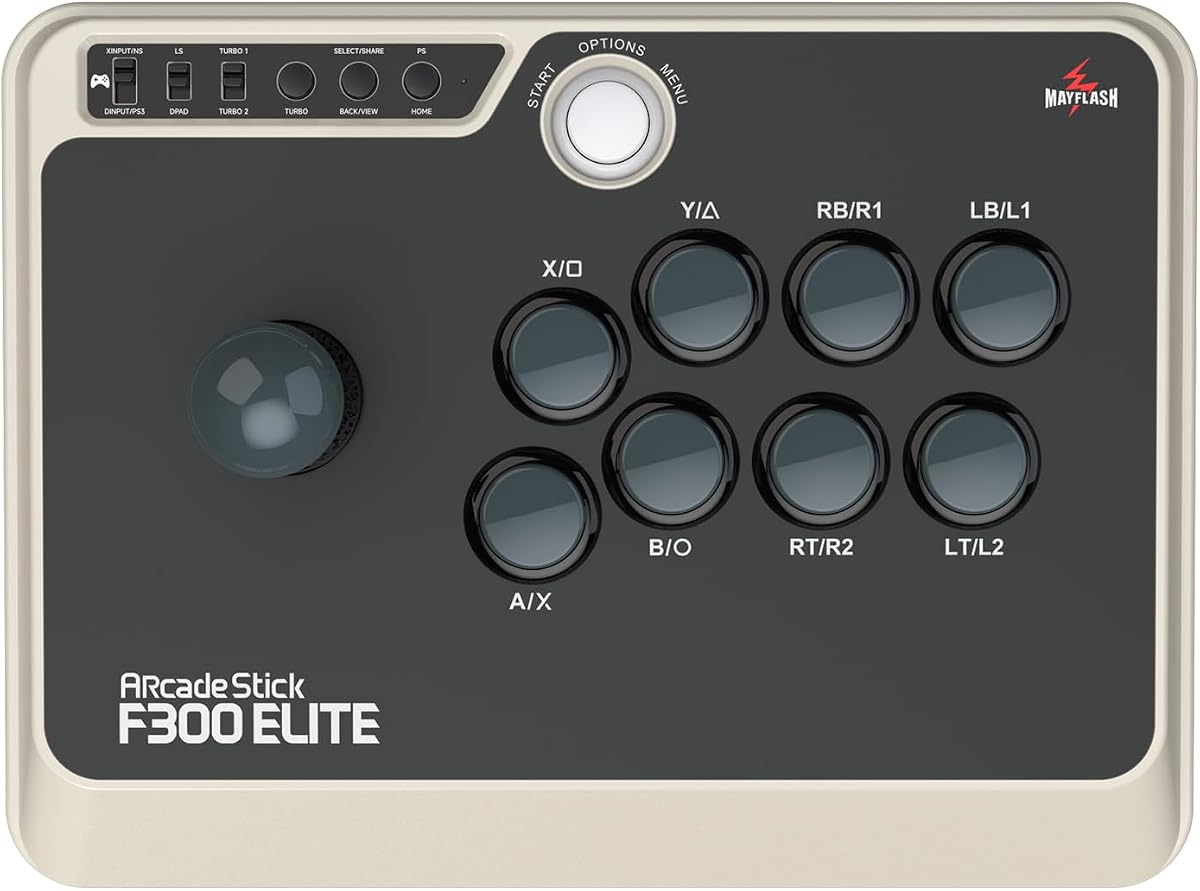
The Elite version upgrades the standard stick with genuine Sanwa components throughout. This ensures consistent and responsive inputs that rival arcade cabinet performance. It maintains broad Mac support for those who prefer desktop setups for fighting games.
We may earn a commission when you buy through this link, at no additional cost to you.
Its internal design is accessible for modding enthusiasts who wish to change parts. This modularity extends the product life and allows personalized tuning. Turbo functions are supported for faster execution of special moves in various titles.
The price is higher than the base model but justified by component quality. Some users might find the initial configuration slightly complex if they are new to fight sticks. It requires a stable surface for optimal play experience.
Serious fighting game players looking for arcade grade quality should consider this Elite version. The build quality and modding potential make it a future proof option. It delivers premium performance for competitive play on Mac.
Designed to be opened easily for upgrades which extends the product lifespan.
Sanwa components offer tactile feedback and speed essential for competitive fighting games.
We may earn a commission when you buy through this link, at no additional cost to you.
This specialized joystick targets farming simulation players who need realistic machinery control. It features a 3-axis design perfect for operating tractors and construction equipment accurately. The Hall Effect sensors ensure long term precision without drift issues over time.
We may earn a commission when you buy through this link, at no additional cost to you.
With up to 33 programmable inputs you can manage complex tasks without a keyboard. The ambidextrous design allows pairing with wheels or other sticks for cockpit setups. It aims to mimic real world controls for maximum immersion in simulation titles.
The high price reflects its niche purpose and specialized hardware features. It is not suitable for general gaming or competitive titles outside of sims. Mac support should be checked as most sims prioritize PC platforms primarily.
Farm Sim enthusiasts will appreciate the detailed controls and realistic feel. It bridges the gap between gaming and simulation hardware effectively. If you play farming titles this is a highly recommended specialized tool.
3-axis joystick provides precise control for lifting and moving heavy virtual loads.
Pairable with wheels to create a full simulator setup for immersion.
We may earn a commission when you buy through this link, at no additional cost to you.
The 8Bitdo Ultimate 2 offers modern features like TMR joysticks for enhanced durability. It uses a proprietary wireless technology that delivers ultra low latency for responsive gameplay on Mac. The included dock charges the controller and keeps your desk organized.
We may earn a commission when you buy through this link, at no additional cost to you.
You can switch between linear and tactile triggers to suit different game genres. The back paddle buttons and extra bumpers provide additional inputs without shifting grips. Motion control and vibration add depth to supported titles and interactive games.
Some users might find the dock a bit bulky for small gaming areas. The controller is slightly larger than standard gamepads which may affect comfort for small hands. Compatibility is wide but specific game support may vary.
Mac gamers wanting a premium wireless experience with charging convenience will love this. The build quality and features justify the price point for many users. It is a versatile choice for both casual and serious gaming.
Proprietary 2.4G technology ensures stable connection free from interference or lag.
Switchable triggers allow adapting the controller for racing or shooter games.
We may earn a commission when you buy through this link, at no additional cost to you.
This controller brings Hall Effect technology to budget conscious gamers effectively. It prevents stick drift which is a common issue with standard analog controllers. The RGB lighting adds a visual flair that enhances your gaming atmosphere on Mac.
We may earn a commission when you buy through this link, at no additional cost to you.
Support for 1000Hz polling ensures quick response times for competitive matches. The macro programming allows complex commands with single button presses. Battery life is robust supporting long sessions without constant recharging cycles needed.
Ergonomics are decent but not perfect for all hand sizes. The lack of Xbox support limits its utility if you use that ecosystem often. Software for customization may have a learning curve for new users.
Gamers wanting modern features at an affordable price should check this model. It balances performance and aesthetics well for general gaming needs. It is a strong contender for budget wireless setups on Mac.
RGB lighting effects can be customized to match your setup or team colors.
Hall Effect sensors use magnetism for contactless operation reducing wear over time.
We may earn a commission when you buy through this link, at no additional cost to you.
This HOTAS system is a professional grade tool for serious flight simulation fans. It offers hundreds of programmable controls to manage complex cockpit systems. The adjustable springs allow you to change the feel of the stick for different aircraft types.
We may earn a commission when you buy through this link, at no additional cost to you.
RGB lighting adds a futuristic look to your setup while indicating active modes. The precision of the sensors ensures accurate inputs for VR and detailed flight sims. It provides the level of control professional pilots or enthusiasts expect.
The high cost and physical space required are significant trade-offs. It is an investment that may not suit casual gamers with limited space. Mac compatibility should be verified carefully as this is primarily a PC focused device.
If flight simulation is your passion this device offers unmatched control and realism. The build quality matches the high price point with durability in mind. It transforms your desk into a professional flight cockpit.
Adjustable springs let you tune stick tension to match different aircraft physics.
Nearly two hundred buttons allow direct access to every aircraft function.
We may earn a commission when you buy through this link, at no additional cost to you.
This joystick recreates the feel of classic arcade cabinets for retro enthusiasts. It connects via USB and works with PC and Android systems seamlessly. The design is faithful to the original Competition Pro arcade machine aesthetic.
We may earn a commission when you buy through this link, at no additional cost to you.
It includes a collection of retro games which adds immediate value for users. The simplicity of a digital stick is perfect for 8-bit era titles. It evokes nostalgia while providing reliable inputs for older game engines.
Modern 3D games might not benefit from this digital input style. The build is robust but lacks modern features like vibration or wireless options. Mac support is implied but may require specific emulator configurations to work well.
Retro gamers looking for authentic arcade feel will appreciate this controller. It is a niche product that does exactly what it promises for older games. It is a great gift for fans of arcade history.
Digital inputs offer the crisp directional changes needed for pixel perfect movement.
The design honors classic arcade heritage with authentic styling and layout.
We may earn a commission when you buy through this link, at no additional cost to you.
Selecting the right joystick requires understanding your gaming habits and technical needs. This guide breaks down the key factors to consider for a satisfying experience.
Ensure the device lists macOS support specifically. Some controllers are designed primarily for Windows or consoles and may require extra configuration. Checking the system requirements on the product page is the safest first step to avoid driver issues.
Look for plug and play USB or Bluetooth options that reduce setup time. Native support ensures smoother operation and better integration with your Mac system settings.
Decide between wired and wireless based on your priority. Wired connections offer the lowest latency and no battery concerns. Wireless freedom is great for clean setups but check if the dongle is compatible with your specific Mac ports.
Bluetooth is convenient but might introduce slight lag compared to a dedicated 2.4GHz dongle. For competitive games a wired connection is generally safer for consistent performance.
Hall Effect sensors are becoming the standard for durability and precision. They use magnets instead of physical contact to detect position which prevents stick drift over time. This is especially important for long-term investment in a controller.
Traditional potentiometers can wear out and cause drift. Opting for Hall Effect technology ensures your joystick remains accurate even after years of heavy use.
A higher polling rate means the device reports its position more often to the computer. A rate of 1000Hz is ideal for competitive gaming as it minimizes input lag. Lower rates might result in noticeable delays during fast actions.
For casual gaming a standard rate is often sufficient. However if you play shooters or fast arcade games prioritizing a high polling rate is recommended.
The controller should fit your hand comfortably to prevent fatigue during long sessions. Weighted bases and textured grips add stability and comfort. Test the button layout to ensure your fingers reach them naturally without stretching.
A poorly designed controller can lead to discomfort or strain. Prioritize designs that support natural hand positions for extended play.
Materials matter for longevity. A sturdy plastic or metal construction resists wear from intense use. Removable parts like buttons or sticks add value if they can be replaced or upgraded later.
Cheap plastics might crack under pressure. Investing in a durable build ensures the device lasts as long as your gaming hobby does.
Customizable software lets you remap buttons and adjust sensitivity. This flexibility is crucial for tailoring the controller to your specific games. Ensure the software runs on your version of macOS for a seamless experience.
Without software support you are stuck with factory defaults. Good software adds value by making the device more adaptable to your needs.
Balance your budget with the features you actually need. A higher price does not always mean better performance for your specific use case. Determine which features like vibration or extra buttons are essential for you.
Budget options can be excellent for specific tasks like arcade play. Premium options justify cost with advanced sensors and build quality for serious simulators.
Connect your joystick to your Mac via USB or pair it through Bluetooth settings. Ensure the system recognizes the device before launching your game. Some models may require you to switch a physical mode switch to PC or Mac mode for proper detection.
Adjust settings in your operating system control panel to calibrate the joystick if needed. Most modern devices auto calibrate but manual checks can improve accuracy. Use in-game settings to map buttons to your preferred layout for best results.
Keep the joystick clean by wiping it down regularly with a dry cloth. Avoid exposing it to liquids or direct sunlight which can damage the electronics. Store it in a cool dry place when not in use to extend its lifespan significantly.
Most of the listed products support macOS either directly via USB or Bluetooth. Always check the product details for specific OS versions as some older devices may require drivers that are no longer updated for newer Mac systems.
Flight sticks like the Thrustmaster and Logitech models usually work if the simulator software supports Mac. Drivers may need to be installed manually. Check the manufacturer website for Mac specific drivers before purchasing.
Most USB and Bluetooth controllers are universal and work with Apple Silicon Macs. However specific software for mapping might not be optimized for M-series chips. Verify compatibility with your specific Mac architecture on the product page.
Digital arcade sticks like the Hyperkin Trooper or SPEEDLINK Competition PRO are ideal for retro games. They offer the precise input required for 8-bit and arcade titles without the complexity of analog controls.
Stick drift is often fixed by cleaning around the stick or using a software recalibration feature. If the controller uses Hall Effect sensors drift should be minimal. If not a replacement of internal components might be necessary.
Many wireless controllers support pass-through charging via USB. Check the product specifications for charging features. Some models like the 8Bitdo come with a dock that charges while you disconnect for use.
Most modern controllers are plug and play with macOS and do not need drivers. However specialized sim devices often require specific software for full functionality. Download software from the manufacturer before connecting.
XINPUT is used for Xbox style controllers while DINPUT is for older or generic controllers. Many PCs support both but Mac support varies. Ensure your game supports the mode your joystick uses for correct functionality.
We explored ten top controllers ranging from arcade sticks to flight sims to find the best for Mac users. Each product offers unique features whether you need wireless freedom or precise simulation controls.
Prioritize sensor technology and compatibility to ensure a smooth experience on your desktop. Whether you choose a budget retro stick or a premium flight system make sure it fits your gaming style.
Prices and stock change frequently so review the current listings before making your final decision. Use this guide as a starting point to find a joystick that enhances your Mac gaming setup today.