
CyberPower BRG1500AVRLCD2 Intelligent LCD UPS Battery Backup
4.7Editor score
1500VA Simulated Sine Wave
Color LCD Interface Panel
Five Year Warranty Included
This guide compares the top 10 battery backup for gaming laptop options to help you choose reliable power protection and surge safeguard for your gaming setup.
Gaming laptops require stable power to perform at their peak without interruption during intense sessions. A quality battery backup ensures your device stays running even when the grid fails unexpectedly.
We evaluated ten leading UPS models based on output capacity, waveform quality, outlet count, and management software. Each unit offers distinct advantages for gamers needing reliable power continuity.
Every selection below includes detailed specs, real user ratings, and key features to simplify your decision. Prices and availability fluctuate so verify current listings before purchasing your unit.
4.7Editor score

4.5Editor score

4.6Editor score
This side by side comparison highlights key specifications across all ten selected units. Review output capacity waveform type outlet count and warranty coverage to find the right match.


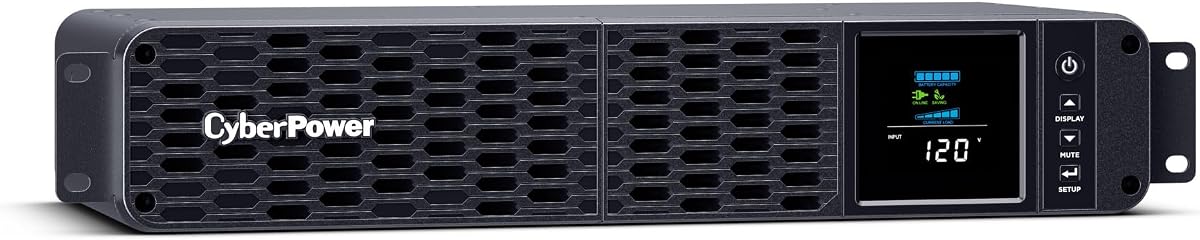


This model stands as the top choice for its genuine PFC Sinewave output ensuring safe power for modern active PFC gaming supplies. It holds a solid rating from users who trust its performance during unexpected outages.
We may earn a commission when you buy through this link, at no additional cost to you.
The 1500VA capacity provides ample power headroom for most gaming laptops and peripherals. The color LCD panel shows real time battery conditions and voltage so you stay informed without software.
While it weighs more than smaller units this tradeoff ensures internal components are robust enough for long term reliability. The extra weight is acceptable given the protection it offers your equipment.
Gamers who demand high quality power for their rigs should buy this unit. Its combination of waveform quality and monitoring tools makes it the safest recommendation for critical setups.
This output type matches utility power ensuring your laptop power supply does not draw excess current or overheat during battery mode.
The color screen displays battery load and voltage status instantly helping you anticipate issues before they cause unexpected shutdowns.
We may earn a commission when you buy through this link, at no additional cost to you.
This UPS focuses on energy efficiency with its ECO mode that cuts power to peripherals when your system sleeps. It maintains a solid user rating for reliable performance in standard setups.
We may earn a commission when you buy through this link, at no additional cost to you.
The 850VA output suits most mid range gaming laptops and basic peripherals. The LCD panel gives clear readings on battery health and load percentage for easy monitoring.
The ECO feature reduces idle power waste but only applies to three specific outlets. This might limit flexibility if you have many always on devices that need control.
Buy this if you want to lower electricity usage alongside backup protection. It is an excellent choice for eco minded gamers who do not need maximum power capacity.
The ECO controlled outlets automatically turn off power to peripherals when the main computer shuts down or enters sleep mode.
The multifunction display provides detailed battery and power data for informed decision making during outages or normal use.
We may earn a commission when you buy through this link, at no additional cost to you.
This model delivers high capacity power with a simulated sine wave suitable for many non active PFC power supplies. Users praise its large outlet count and easy to read color display.
We may earn a commission when you buy through this link, at no additional cost to you.
The 1500VA rating supports demanding gaming laptops and monitors simultaneously. Automatic Voltage Regulation handles minor fluctuations without draining the battery prematurely.
Active PFC supplies may struggle with simulated sine wave so check your laptop specs first. This unit is best for those who do not require true sine wave output.
Choose this if you need high VA output at a reasonable price. It is a solid workhorse for standard gaming setups without specialized power supply needs.
The 1500VA rating provides significant power headroom ensuring your gaming rig stays online during extended outages without overloading the battery.
AVR corrects minor power surges or sags using internal circuitry to keep devices safe without needing battery power.
We may earn a commission when you buy through this link, at no additional cost to you.
This unit is distinguished by its industry leading five year warranty which covers the battery for a long operational life. It has an impressive rating reflecting user trust in its durability.
We may earn a commission when you buy through this link, at no additional cost to you.
The 1500VA simulated sine wave output covers most standard gaming laptops well. The color LCD panel provides detailed information at a glance for convenient monitoring.
Remote management requires an optional card so plan extra budget if you need network monitoring. The five year coverage makes it cost effective for long term use.
Buy this if you want extended protection without frequent replacement costs. It is ideal for users who plan to keep their setup for many years.
The five year warranty includes the battery and connected equipment guarantee providing superior long term peace of mind.
Optional management cards enable network monitoring for enterprise environments needing centralized power management capabilities.
We may earn a commission when you buy through this link, at no additional cost to you.
This model offers excellent value for single laptop setups needing reliable backup without high costs. It holds a very high rating from users who appreciate its data line protection feature.
We may earn a commission when you buy through this link, at no additional cost to you.
The 900VA output is sufficient for most gaming laptops and a monitor. The built in data line protection safeguards your network equipment from surges passing through phone lines.
It lacks advanced monitoring features found in pricier models but covers the basics well. The outlet count is generous for the size and price point offered.
Choose this if you need affordable protection for a standard laptop setup. It is a practical choice for students or casual gamers on a tight budget.
Integrated protection for data lines prevents surges from traveling through network or telephone lines to damage your electronics.
The compact design focuses on essential features without extra cost making it an economical entry point for surge protection.
We may earn a commission when you buy through this link, at no additional cost to you.
This unit is optimized for Automatic Voltage Regulation to extend battery life by avoiding switching during minor fluctuations. Users appreciate its strong capacity for an accessible price point.
We may earn a commission when you buy through this link, at no additional cost to you.
The 1500VA capacity supports demanding laptops without stress. LED lights indicate power status and wiring faults quickly without needing a digital interface.
It lacks a detailed display for real time metrics which some users prefer. This is acceptable if you need simple reliable power without complex data.
Buy this if you prioritize battery longevity over detailed monitoring. It is a robust choice for areas with frequent voltage fluctuations.
AVR adjusts voltage internally to avoid switching to battery mode for minor issues preserving battery health over time.
LED lights provide immediate status feedback for power and faults allowing quick checks without powering on the unit.
We may earn a commission when you buy through this link, at no additional cost to you.
This listing includes two APC units providing flexible power options for separate devices. Each supports charging needs with USB C and A ports on the units.
We may earn a commission when you buy through this link, at no additional cost to you.
The 1050VA and 500VA split covers a desktop and a laptop independently. User replaceable batteries allow you to extend the life of the UPS without buying new hardware.
Having two units means more outlets and flexibility but also requires more space. Ensure you have room for both when planning your power setup.
Buy this if you want modular protection for multiple devices. It is ideal for homes needing independent backup for a PC and a mobile workstation.
Two units allow you to distribute backup power across critical devices keeping them independent during outages.
The battery can be swapped by the user when it degrades extending the overall lifespan of your equipment.
We may earn a commission when you buy through this link, at no additional cost to you.
This unit is designed for shallow rack installations while offering high quality PFC Sinewave output. It holds a decent rating from users in network server environments.
We may earn a commission when you buy through this link, at no additional cost to you.
The 1500VA output supports critical networking gear in compact spaces. The color LCD panel ensures you can monitor status clearly in server rooms.
It requires rack hardware to mount securely which adds to installation complexity. The short depth helps save room in shallow server cabinets.
Buy this if you need a reliable server room solution. It is perfect for small office IT setups that require rack compatibility without deep units.
Short depth design allows fit into shallow racks making it suitable for network cabinets with limited depth space.
PFC Sinewave output ensures safe power for active PFC equipment common in networking servers and routers.
We may earn a commission when you buy through this link, at no additional cost to you.
This inverter is a portable solution for off grid power needs requiring a DC battery source. It provides high pure sine wave output suitable for sensitive electronics like laptops.
We may earn a commission when you buy through this link, at no additional cost to you.
The 3500W capacity ensures plenty of power for high draw devices. Dual cooling fans help maintain temperature during continuous high load operations.
It needs a 60V DC system to function unlike wall plug UPS units. This limits it to RV or solar setups rather than standard home backup.
Buy this if you need power from a DC battery bank outdoors. It is ideal for camping or remote work where grid power is unavailable.
The output matches utility power ensuring laptops and cameras run safely without risk of damage from power distortion.
Built in thermal and overload protection prevents the unit from overheating or shutting down during intense use.
We may earn a commission when you buy through this link, at no additional cost to you.
This is a variant of the inverter featuring a smart screen for enhanced monitoring. It offers the same high power pure sine wave output for sensitive electronics.
We may earn a commission when you buy through this link, at no additional cost to you.
The 3500W capacity supports high draw devices effectively. Dual cooling fans ensure efficient heat dissipation during heavy loads.
It needs a 60V DC input so check your battery bank voltage before buying. This is strictly for off grid systems without standard wall power.
Buy this if you need DC to AC conversion with smart monitoring. It is suitable for travelers needing reliable power during outdoor activities.
The digital display provides clear information on input voltage and load output for better control.
At 3500 watts it can handle multiple devices simultaneously including powerful gaming laptops and large screens.
We may earn a commission when you buy through this link, at no additional cost to you.
Selecting the right battery backup requires understanding your power needs and environment. This guide breaks down the key factors that determine which unit is right for you.
The VA rating indicates the total power the unit can supply in volts times amps. Ensure the wattage capacity exceeds your laptop and monitor draw by a margin to avoid overload.
Aim for a unit with at least 20% higher wattage than your total load for safe operation during outages.
Active PFC power supplies found in modern laptops often require pure sine wave output. Using a simulated sine wave unit with these supplies can cause overheating or shutdowns.
Check your laptop manual for PFC requirements before deciding on a simulated or pure sine wave model.
AVR adjusts voltage fluctuations without draining the battery which prolongs internal cell life. This is essential in areas with unstable grid voltage or frequent brownouts.
Prioritize units with AVR if you experience regular minor power dips in your location.
Gaming setups often need multiple outlets for the laptop, monitor, speakers, and router. Ensure the unit provides enough backup outlets for your critical devices.
Look for USB ports if you want to charge peripherals directly from the UPS without adapters.
Batteries degrade over time so a longer warranty indicates confidence in build quality. Some models offer five years while others offer only three.
A longer warranty period reduces long term cost of ownership and ensures better support.
Some units include software that safely shuts down your laptop when battery is low. This prevents file corruption during unexpected power loss.
Check if the unit offers compatible software for your operating system if remote shutdown is needed.
Tower units take up desk space while rackmount versions require a cabinet. Consider where you will place the unit to avoid clutter or obstruction.
Measure your available space before buying to ensure the unit fits comfortably in your gaming area.
User replaceable batteries allow you to maintain the unit without buying a new one when old cells fail. This is cost effective for long term use.
Choose a model with accessible battery access if you plan to keep the UPS for several years.
Place the UPS on a flat stable surface with adequate ventilation. Avoid covering the intake fans to prevent overheating during operation.
Plug your laptop and critical peripherals into the battery backup outlets. Connect non critical devices to surge protected outlets to save battery life.
Perform monthly self tests to ensure the battery is charging correctly. Replace the internal battery every three to five years depending on usage.
Yes a UPS provides backup power only when the main power is connected. If the laptop is unplugged the battery will drain immediately without the external source. Always keep the laptop plugged into the UPS during gaming sessions.
Run time depends on your total load and VA capacity. A 900VA unit may provide 10 to 20 minutes for a laptop and monitor. Higher VA units offer longer run times for critical equipment.
High end rigs with large power supplies may require higher wattage UPS units. Ensure the UPS wattage rating exceeds the rig draw. Otherwise the unit will trip the breaker during outages.
Tower units are designed to sit on the floor or a desk. Rackmount units fit into standard server cabinets. Choose rackmount only if you have a network cabinet for installation.
Yes most units require management software to communicate with your system. This software allows the UPS to send a signal to safely close files before power is lost. Install it as instructed.
Many models allow user replacement but some require professional service. Check the manual for access instructions. Always recycle the old battery properly to protect the environment.
UPS units offer surge protection but extreme lightning strikes may overwhelm them. For high risk areas use additional surge protectors at the wall outlet. The UPS provides a secondary layer of defense.
Yes the UPS consumes a small amount of power to maintain its battery. This is negligible compared to the risk of data loss. Modern units are energy efficient and safe for 24/7 use.
The top picks offer reliable power solutions for every gaming setup. The CyberPower CP1500PFCLCD stands out for its waveform quality and monitoring.
Prioritize VA capacity and waveform type to match your laptop requirements. Ensure you have enough outlets for your peripherals before making a purchase.
Prices and availability change so verify current listings before buying. Select the model that fits your budget and power needs today.