
Calculated Industries Scale Master Pro
4.7Editor score
72 built-in scales
Portable takeoff tool
Area and volume calc
This comprehensive guide compares the top digital architectural scale ruler models available in October 2026 for professionals seeking precision and efficiency.
Digital architectural scale rulers are revolutionizing how architects and engineers measure plans. These tools combine traditional scaling with digital precision to save time on complex takeoffs and estimates. Choosing the right model ensures accuracy across various project types and drawing standards.
We compared ten leading products based on build quality, scale variety, and ease of use. Our analysis focuses on features that matter most to professionals working with blueprints daily. Each selection offers unique advantages for different workflows and budget considerations.
Every pick includes detailed specs and real-world performance notes to help you decide. Prices fluctuate frequently so verify current offers before purchasing. Trust these findings to streamline your measurement process and improve project accuracy effectively today.
4.7Editor score

4.4Editor score

5.0Editor score
The following table offers a side-by-side comparison of all ten top-rated digital architectural scale rulers. Each entry highlights key specifications to help you quickly identify the model that best fits your professional needs and workflow requirements.


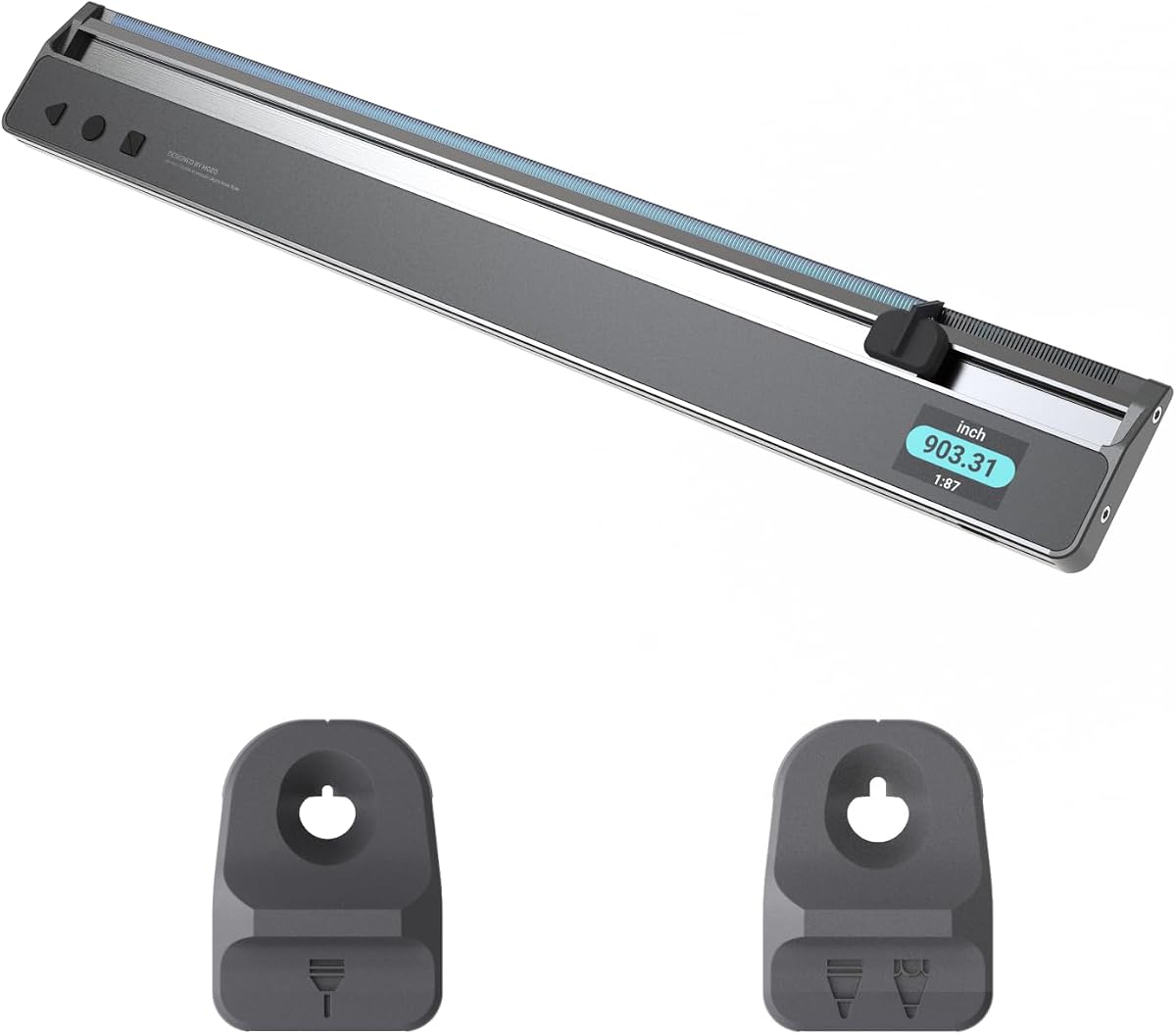


The HOZO NeoRuler stands out as a smart digital tool for modern architects and engineers. It features a robust set of 93 built-in scales and the ability to create infinite custom scales for unique project needs. Users appreciate the accuracy and durability of its design for daily professional use.
We may earn a commission when you buy through this link, at no additional cost to you.
Its standout strength lies in the Bluetooth connectivity that allows data transfer to the MEAZOR APP. This enables further editing and exporting to CAD formats like DXF and PDF which streamlines workflow significantly. The space divider function adds utility by quickly dividing distances into sections without manual math.
While highly capable, the price point is higher than basic models which might deter budget conscious buyers. Battery reliance means you must keep it charged to avoid interruptions during critical measurement tasks on site. These trade-offs are generally acceptable given the advanced features offered.
This model is best suited for professionals who need advanced digital capabilities and data integration. If you work with complex plans and require precise scaling with easy data export the NeoRuler is a top recommendation for efficiency and accuracy.
The Bluetooth app connection allows you to export measurements directly to CAD files for seamless documentation.
Constructed with high-pressure aluminum alloy and stainless steel it ensures durability and accuracy during daily use.
We may earn a commission when you buy through this link, at no additional cost to you.
The Calculated Industries Scale Master Pro offers exceptional value for professionals needing a reliable digital plan measure. It includes 72 built-in scales and 6 custom scales to handle most architectural and engineering plans effectively. Its compact size makes it easy to carry to jobsites or meetings.
We may earn a commission when you buy through this link, at no additional cost to you.
Key strengths include its straightforward interface which allows users to get takeoffs quickly without complex setup. The dedicated length width and height keys make area and volume calculations simple and efficient for estimation tasks. Memory functions help you track values throughout a large project easily.
It lacks the Bluetooth connectivity found in more expensive models which limits direct data export capabilities. The smaller 7.3 inch wheel may be less comfortable for very large plans compared to 12 inch alternatives. These limitations are minor considering the cost savings and ease of use.
Buy this model if you need a reliable affordable tool for quick takeoffs without advanced digital features. It is ideal for contractors and estimators who prioritize speed and accuracy over digital integration and connectivity.
Dedicated keys for length width and height allow you to compute areas and volumes with minimal effort.
The compact size and included hard case make it easy to transport and protect during daily use.
We may earn a commission when you buy through this link, at no additional cost to you.
This bundle combines the HOZO NeoRuler with a NeoReading Kit to create a complete premium solution for detailed drafting. The NeoMagnifier enhances visibility for reading small text and intricate details on complex blueprints effectively. It maintains all the smart features of the base NeoRuler model.
We may earn a commission when you buy through this link, at no additional cost to you.
The primary advantage is the enhanced visibility provided by the NeoMagnifier which aids in accurate readings of fine print. Combined with the app integration this setup supports a fully digital workflow from measurement to CAD export. The high quality materials ensure this kit lasts through years of professional use.
Managing multiple components can be slightly cumbersome when compared to single unit digital rulers. The premium price point may not be justified for users who do not need the magnification or extra drafting accessories. However for precision work these additions provide significant value.
Opt for this kit if you need maximum visibility and a complete drafting solution in one package. It is perfect for architects and engineers working with detailed plans where reading fine print is critical to accuracy.
The NeoMagnifier makes it significantly easier to read tiny annotations and details on technical drawings.
This bundle includes everything you need to start measuring and drafting immediately without buying extra accessories.
We may earn a commission when you buy through this link, at no additional cost to you.
The Scale Master Pro XE builds on the classic design with enhanced versatility for various plan types. It includes 91 architectural and engineering scales along with 10 custom scales for reduced or enlarged plans. The high visibility red wheel ensures you track your movement clearly on any background.
We may earn a commission when you buy through this link, at no additional cost to you.
Strengths include the automatic counter mode which helps estimate studs or recurring items while rolling along lines. This feature saves significant time compared to manual counting on large projects. The PC interface option allows for data transfer to a computer for further analysis if needed.
It lacks modern Bluetooth features which are common in newer digital tools for wireless data sharing. The design is somewhat dated compared to sleeker alternatives available today but functionality remains top tier. For those who prefer physical buttons over screens this is a robust choice.
Choose this tool if you prefer traditional digital measurement with enhanced scale options and durability. It is well suited for professionals who need reliability and extensive scale coverage without relying on smartphone apps.
The built-in counter allows you to estimate recurring items like studs without stopping your rolling process.
The bright red wheel provides high contrast against various paper colors for clear path tracking.
We may earn a commission when you buy through this link, at no additional cost to you.
This traditional architectural scale ruler offers a classic approach to blueprint measurement without digital dependencies. Made from anodized aluminum it is extremely durable and built to withstand daily studio or jobsite use. The triple sided design provides access to multiple scales on a single tool.
We may earn a commission when you buy through this link, at no additional cost to you.
The laser etched technology ensures that markings remain clear and resistant to fading over time. This makes it reliable for long term use where accuracy is paramount for drawing and drafting tasks. It is a solid choice for those who prefer physical tools over digital devices.
Being an imperial only ruler limits its versatility for projects that require metric conversions. Manual reading means you must perform calculations yourself without automated digital assistance which can be slower. These factors make it less ideal for complex takeoffs requiring quick math.
Select this ruler if you value durability and simplicity for standard imperial architectural drawings. It is an essential tool for students or professionals who need a reliable traditional scale for drafting and design work.
The anodized aluminum construction ensures the ruler withstands heavy daily use without warping or damage.
Laser etching provides high contrast markings that remain readable throughout the product lifespan.
We may earn a commission when you buy through this link, at no additional cost to you.
This comprehensive bundle pairs the NeoRuler with a full drafting kit including a NeoMagnifier and penholders. It aims to provide everything needed for both measuring and drafting in a single purchase. The penholders accommodate two different sizes for versatile drafting options on any project.
We may earn a commission when you buy through this link, at no additional cost to you.
The inclusion of the NeoMagnifier adds significant value for reading detailed text on small scale plans. Having a dedicated drafting kit helps streamline the workflow from measurement to drawing execution. This is particularly useful for students or professionals building their toolkit from scratch.
Some users find the configuration of multiple accessories slightly complex compared to simpler single tools. Review feedback suggests variability in satisfaction which may reflect specific expectations of the bundle contents. It is a great value but requires patience to set up properly.
Ideal for buyers who want an all-inclusive package for digital measurement and manual drafting. This bundle works well for educational purposes or for those who need a complete set of tools immediately.
The included penholders allow for precise drafting work directly alongside your digital measurements.
The NeoMagnifier ensures that small text and intricate details are clearly visible during analysis.
We may earn a commission when you buy through this link, at no additional cost to you.
This set includes both an architectural and an engineering scale ruler plus a standard metal ruler. It covers the essential needs for various drafting and technical drawing tasks effectively. The laser etched markings ensure high contrast and long lasting clarity for all measurements.
We may earn a commission when you buy through this link, at no additional cost to you.
Having both architectural and engineering scales in one set simplifies tool selection for diverse projects. The included stainless steel ruler provides an additional straight edge for general measuring tasks. The durable metal construction ensures these tools withstand frequent use without bending.
As manual rulers they do not offer automated calculations which may slow down large takeoff jobs. You must perform all math manually without digital assistance for areas or volumes. This is a standard trade-off for traditional tools that remain essential for precise drafting.
Best for drafters who need reliable traditional rulers for a variety of technical drawings. This set is an excellent value for students and professionals who prefer physical tools over digital options.
The set includes both architect and engineer scales to cover different technical drawing standards.
Black and blue rulers with white graduations ensure clear visibility in various lighting conditions.
We may earn a commission when you buy through this link, at no additional cost to you.
This bundle merges the NeoRuler digital scale with a drafting kit to bridge measurement and drawing. The two penholders accommodate different pen sizes for flexible drafting needs on various projects. It keeps the core smart features like Bluetooth integration and infinite custom scales.
We may earn a commission when you buy through this link, at no additional cost to you.
The integration of drafting tools with a digital scale creates a smooth workflow for technical drawings. You can measure accurately and then draft with the same device nearby for precision and efficiency. The app connectivity allows you to document your work digitally as you go.
Limited reviews make it hard to gauge long term reliability compared to other established models. The penholders are useful but require you to purchase specific pens to fully utilize them. It is a great conceptual kit for those who work digitally and manually.
Choose this if you need a digital scale that complements your manual drafting workflow. It is best for designers who want to integrate measurement data with physical drawing tasks.
The included penholders allow you to switch between pen sizes for different drafting requirements.
The NeoRuler ensures your measurements are precise and easily transferable to digital files.
We may earn a commission when you buy through this link, at no additional cost to you.
This ultimate bundle includes the NeoRuler with all reading drafting and storage accessories. The NeoCollection Case provides organized storage for the NeoMagnifier and penholders using magnetic attachment. It ensures all your tools stay secure and easily accessible during travel or site work.
We may earn a commission when you buy through this link, at no additional cost to you.
The magnetic storage feature is a standout utility that keeps modules securely in place during use. This reduces the risk of losing small parts and streamlines your daily workflow. Having everything in one compact case makes transport to jobsites much more convenient.
The price reflects the comprehensive nature of the kit which may be higher than buying items separately. The case adds some bulk to your bag which might be a consideration for very light carry needs. However the organization benefits often outweigh the slight weight increase.
Best for professionals who want a fully organized and portable solution for digital drafting. If you need a complete system that keeps all components secure this bundle is an excellent investment.
Magnetic attachment ensures your NeoMagnifier and penholders stay secure in the case during transport.
The case is designed to hold all modules neatly making it easy to find the tool you need.
We may earn a commission when you buy through this link, at no additional cost to you.
This bundle combines two top models from Calculated Industries for comprehensive takeoff capability. It includes both the XE and the standard Scale Master Pro to cover a wide range of project types. Each device offers distinct scale counts and features for specialized tasks.
We may earn a commission when you buy through this link, at no additional cost to you.
The advantage of two devices is the ability to assign different workflows to each one. The XE handles complex architectural plans while the standard Pro manages simple quick takeoffs efficiently. Both models offer reliable performance and proven accuracy for estimation tasks.
Managing two separate devices can be more complex than using a single integrated solution. The cost is higher than buying one model which may not suit all budgets. However for firms needing redundancy and versatility this bundle offers significant value.
Select this bundle if you need multiple tools for different project types simultaneously. It is ideal for teams or firms that require reliable takeoff tools with varying capabilities for different job needs.
Having two devices allows you to optimize one for complex plans and the other for quick estimates.
Both models come from a proven track record of accuracy and durability in the construction industry.
We may earn a commission when you buy through this link, at no additional cost to you.
Choosing the right digital scale ruler depends on your specific workflow needs and budget. Understanding key factors will help you select the tool that offers the best balance of features and usability.
Look for models with a wide range of built-in scales to handle both imperial and metric drawings. The ability to create custom scales is essential for plans that have been reduced or enlarged. This feature ensures you can measure any document accurately without needing conversions manually.
Prioritize products that offer at least 70 built-in scales and several custom scale options for flexibility.
Accuracy is critical for digital rulers to ensure your measurements translate correctly to real world dimensions. High-end models often specify precision levels such as ±0.004 inch for professional assurance. Check reviews for reports on rolling error to confirm consistency during long takeoffs.
Ensure the model you choose has a stated accuracy rating that meets your project tolerance requirements.
Modern digital rulers often offer Bluetooth connectivity to transfer data to smartphones or tablets. This allows for immediate export to CAD files or design apps which speeds up the documentation process. If you work in a digital workflow this feature is a significant time saver for teams.
Select a model with a dedicated app if you need to share measurement data easily with clients.
Since these tools are used on jobsites they must withstand drops and rough handling. Look for materials like aluminum alloy or stainless steel for the frame and wheel. A protective case is also a valuable inclusion to keep the device safe during transport.
Opt for models with sturdy construction and a protective case to ensure longevity on the job.
The interface should be intuitive with clearly labeled buttons for common tasks like length and width. A high visibility display helps you read measurements in various lighting conditions on site. Models with dedicated keys for calculations reduce the steps needed to get an area or volume result.
Choose a ruler with simple physical buttons and a clear display for faster and more accurate work.
Advanced features like manual or automatic counters help estimate items like studs without manual counting. Some bundles include accessories like magnifiers for reading small text on technical drawings. These add-ons can enhance productivity depending on the complexity of your typical projects.
Consider extra tools like magnifiers or drafting kits if you need to read fine print or draw manually.
Battery life determines how long you can work before needing to recharge or replace cells. Rechargeable models are convenient for long days on site while button cells are easy to swap. Ensure you have a spare battery or charging plan to avoid interruptions during critical measurements.
Check the battery type and expected usage time to ensure uninterrupted work on large projects.
Prices vary widely from basic traditional rulers to advanced smart kits with app support. Determine which features are essential for your workflow to avoid paying for unnecessary tech. Often a mid-range model offers the best balance of performance and cost for most professionals.
Balance your budget against the features you actually need daily to maximize the value of your purchase.
To begin using your digital scale ruler set the correct scale based on your blueprint legend. Press the start button and roll the wheel steadily along the line you need to measure. Avoid lifting the wheel during a single roll to ensure the distance is recorded correctly.
For area calculations measure the length and width separately then use the calculate function to find the total area. Most models have dedicated keys for this purpose which simplifies the workflow significantly. Review the result on the display before clearing it for your next measurement.
Store your ruler in the provided case when not in use to protect the wheel and display. Keep the device away from extreme temperatures and moisture to prevent electronic damage. If it requires charging ensure it is fully charged before heading to a jobsite.
A digital architectural scale ruler is an electronic tool that measures distances on scaled plans and converts them to real world units. It uses a rolling wheel to capture length and automatically calculates area or volume based on the selected scale.
Yes, high quality digital scale rulers offer professional grade accuracy suitable for construction estimates and design. Most top models feature rolling error margins within 2-3 percent which meets industry standards for most projects.
No, most digital scale rulers work offline and do not require internet access for basic measurements. However, some models with Bluetooth app features may need connectivity to export data to cloud services or CAD software.
Many modern digital rulers support both imperial and metric units allowing you to switch between them easily. Check the specific model specifications to ensure it covers the units required for your regional or project standards.
To calculate volume measure the length and width of a floor plan first and enter these values into the device. Then input the height and use the volume calculation function to get the total cubic measurement automatically.
Custom scales allow you to calibrate the tool for plans that have been resized or do not match standard scales. This ensures your measurements remain accurate even if the document has been printed at a non-standard ratio.
No, you do not need a companion app for the basic measurement functions of most digital rulers. Apps provide additional features like CAD exports and data storage but the ruler works independently for takeoffs.
Battery life varies by model but rechargeable units often last for hundreds of measurements on a single charge. Button cell models may last several months depending on usage frequency and display brightness settings.
We reviewed ten top models ranging from affordable manual tools to advanced digital bundles with smart features. The HOZO NeoRuler and Calculated Industries Scale Master Pro stand out for their balance of precision and usability across various projects.
When selecting a model prioritize accuracy and scale variety to ensure it meets your professional requirements. Features like Bluetooth connectivity and custom scales add significant value if you work with complex or varied documentation regularly.
Remember to check the latest pricing and availability before buying as these values change frequently. Investing in the right tool will streamline your workflow and improve the reliability of your takeoffs and estimates.