
DJI Osmo Pocket 3 Creator Combo
4.5Editor score
1-inch CMOS sensor for clarity
4K at 120fps recording
Rotating touch screen design
Discover the top cameras for social media content creation in October 2026. We compare features, video quality, and portability for creators.
Creating engaging content for platforms like TikTok, Instagram, and YouTube requires reliable tools that capture high-quality visuals effortlessly. A good camera for social media content should offer strong video resolution, stable footage, and easy sharing capabilities to keep your audience engaged.
We evaluated ten diverse options ranging from compact pocket cameras to advanced creator kits. Our comparison focuses on video quality, ease of use, stabilization, and connectivity features that matter most for daily posting and streaming needs.
Each pick below highlights specific strengths for different creator styles, whether you are filming solo vlogs or family memories. Note that pricing and availability change frequently, so check current listings before making your final purchase decision.
4.5Editor score
5.0Editor score

4.4Editor score
The following table provides a side-by-side comparison of all ten selected cameras to help you quickly identify the model that fits your specific content creation needs.


This 4K Vlogging Camera offers excellent value for beginners looking to start creating content on YouTube or TikTok. It receives a 4.4 rating from users who appreciate its straightforward interface and versatile rotating lens.
We may earn a commission when you buy through this link, at no additional cost to you.
The standout quality is the 330 degree rotating lens which allows for effortless framing without needing to move the entire camera body. Combined with WiFi transfer, it makes sharing content to social media platforms quick and seamless.
While it lacks advanced stabilization found in pricier models, the built-in digital features provide adequate steady shots for casual recording. The included kit with memory card and tripod ensures you can start filming immediately.
This camera is ideal for first-time creators who need a reliable device without a heavy investment. Its portability and ease of use make it a top recommendation for daily vlogging and travel recording.
The rotating lens design simplifies solo shooting by allowing you to frame yourself accurately without constant adjustments.
Built-in WiFi connectivity ensures you can transfer files to your smartphone instantly for quick editing and posting.
We may earn a commission when you buy through this link, at no additional cost to you.
The DJI Osmo Pocket 3 stands out as a premium tool for serious creators needing professional-grade footage in a portable form factor. With a 4.5 rating, it is praised for its exceptional sensor and stabilization technology.
We may earn a commission when you buy through this link, at no additional cost to you.
Its 1-inch CMOS sensor delivers breathtaking clarity even in low light, while the 4K at 120fps capability allows for smooth slow-motion sequences. The rotating touch screen makes framing vertical content for TikTok and Reels intuitive.
ActiveTrack 6.0 ensures you stay in focus during movement, making it perfect for vlogs where you are walking or dancing. The main trade-off is the cost, which is justified by the advanced features and build quality.
Investing in this camera is recommended for those aiming for high-quality YouTube channels or Instagram feeds. It bridges the gap between smartphone cameras and larger cinema systems effectively.
The large sensor size captures more light and detail, resulting in stunning visuals that stand out on social media.
The 2-inch touch screen rotates to support both horizontal and vertical shooting without manual camera flipping.
We may earn a commission when you buy through this link, at no additional cost to you.
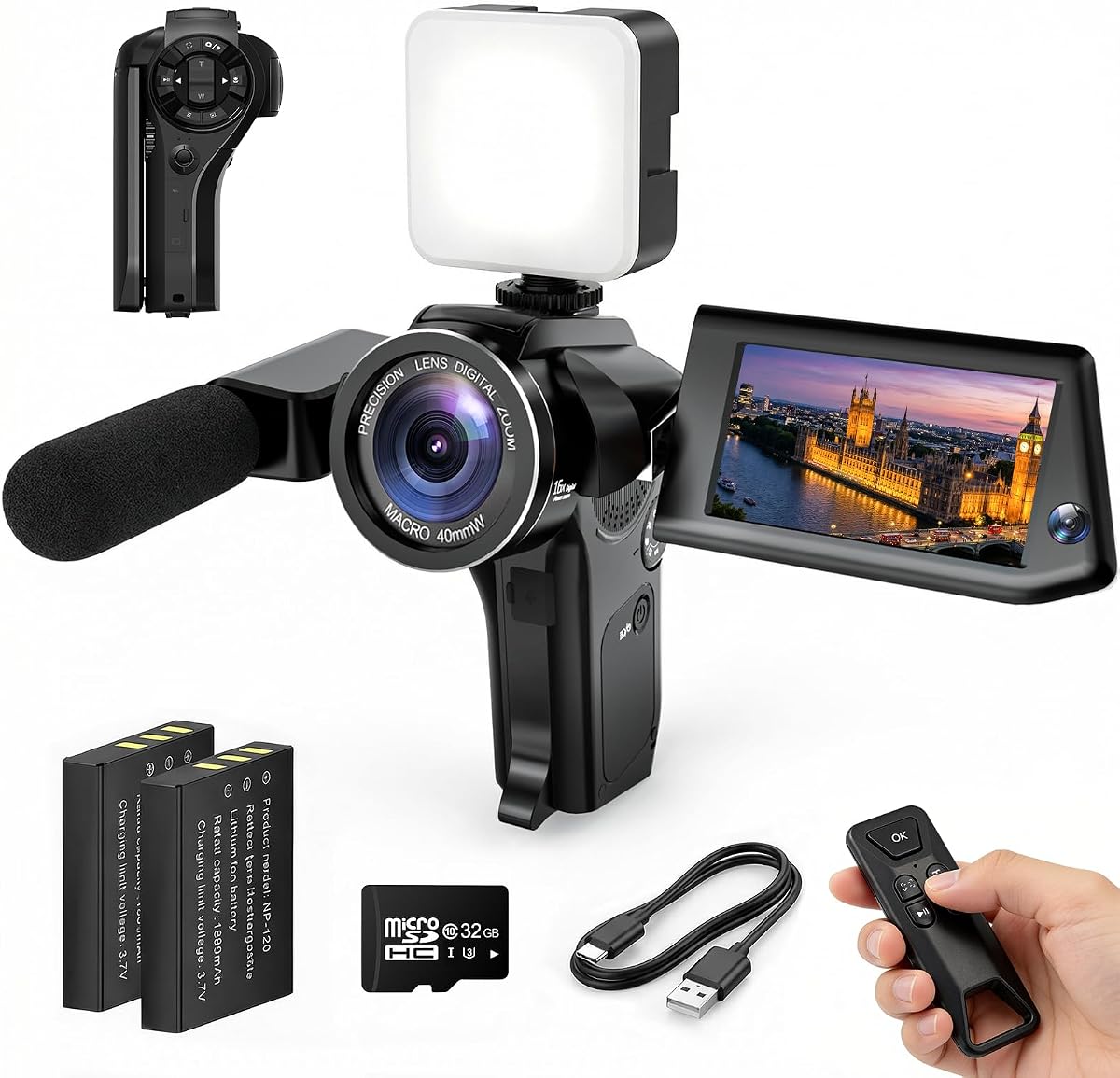
This Vlogging Camera receives a perfect 5.0 rating due to its unique Picture-in-Picture mode that captures both the scene and your reaction simultaneously. It is an ideal choice for family events or product reviews.
We may earn a commission when you buy through this link, at no additional cost to you.
The ability to record your facial expression while filming an event adds a personal touch that traditional cameras lack. The included 8K Creator Kit provides necessary accessories like WiFi support and a flip screen for easy self-recording.
Users appreciate how this feature helps tell a more complete story, especially for tutorials or commentary videos. While the interface might take a moment to master, the results are highly engaging and distinct.
We recommend this for creators who want to add a personal layer to their content without buying separate gear. It is particularly useful for family memories or educational content where emotion matters.
Capture the moment and your reaction simultaneously to create more engaging and personal video content.
The included accessories ensure you have everything needed to start filming professionally right out of the box.
We may earn a commission when you buy through this link, at no additional cost to you.
The FlyFrost 8K Video Camera promises high-end specs like 8K video and 88MP photos at a competitive price point. With a 4.3 rating, it appeals to users wanting maximum resolution for detailed content creation.
We may earn a commission when you buy through this link, at no additional cost to you.
Features like IR night vision allow for recording in dim environments, making it versatile for evening events or low-light scenarios. The remote control and two batteries ensure extended usage without interruption during long shoots.
While the advertised 8K resolution is impressive, the actual output relies on interpolation, but it still offers excellent clarity for social media standards. The included stabilizer helps manage shake for smoother footage.
This camera suits users who prioritize specs and accessories in their package. It is a solid choice for hobbyists looking to experiment with high resolution video without breaking the bank.
IR night vision extends your filming opportunities into dark environments while maintaining clear visibility.
Including two batteries means you can film longer sessions without worrying about finding a power source.
We may earn a commission when you buy through this link, at no additional cost to you.
This 8K Digital Camera is designed with creators in mind, featuring a 3.5 inch flip screen that simplifies framing selfies and vlogs. Users rate it 4.4 stars for its user-friendly interface and versatile zoom capabilities.
We may earn a commission when you buy through this link, at no additional cost to you.
The 20X digital zoom allows you to capture distant details effectively, which is useful for travel or outdoor content. Anti-shake technology ensures your footage remains stable even when walking or moving quickly.
WiFi transfer functionality means you can quickly move content to your phone for editing, keeping your workflow efficient. The included SD card helps you start recording immediately upon purchase.
It is a strong contender for beginners who need a dedicated camera with modern conveniences. The flip screen is particularly valuable for vloggers who need to see themselves while recording.
The 180 degree flip screen makes it simple to frame yourself for vlogs without guesswork.
Built-in anti-shake ensures your videos look professional even if you are filming while walking.
We may earn a commission when you buy through this link, at no additional cost to you.
The Mini Camcorder Handheld is a perfect option for capturing spontaneous moments without carrying heavy gear. It holds a 4.0 rating for simplicity and portability, making it a great travel companion.
We may earn a commission when you buy through this link, at no additional cost to you.
With a 7-hour battery life, you can record for most of the day without recharging, which is ideal for long excursions. The one-button recording ensures you never miss a shot due to complicated setup.
While it does not offer professional resolution, it serves well for personal memories or casual social media updates. The rotating lens adds a bit of flexibility for framing selfies or different angles.
This device is recommended for those who prioritize ease of use and convenience over high-end specs. It is a great backup camera for quick clips or travel documentation.
The 7-hour battery life ensures you can document entire days of travel without interruptions.
One-button recording and no app downloads mean you are ready to film immediately.
We may earn a commission when you buy through this link, at no additional cost to you.
This version of the 4K Vlogging Camera provides a reliable option for daily content creation. It carries a 4.4 rating reflecting consistent performance and user satisfaction with its ease of use.
We may earn a commission when you buy through this link, at no additional cost to you.
The 330 degree rotating lens is a standout feature that helps frame shots naturally. WiFi transfer ensures that uploading content to social media is fast and efficient for your audience.
Users appreciate the accessory kit that comes with the camera, removing the need for extra purchases. It is a practical choice for those who want a dedicated device over a smartphone.
We recommend this for everyday vlogging and travel where portability is key. It balances quality and convenience effectively for most social media needs.
The unique rotating lens allows for comfortable selfie framing without awkward angles.
Built-in WiFi means you can upload content instantly to keep your social feed active.
We may earn a commission when you buy through this link, at no additional cost to you.
This Vlogging Kit transforms your existing smartphone into a more powerful content creation tool. It receives a 4.4 rating for the value it adds to mobile video production workflows.
We may earn a commission when you buy through this link, at no additional cost to you.
The wireless microphone ensures your audio is clear, which is crucial for engagement on social platforms. The RGB fill light helps balance lighting conditions for better video quality indoors.
With both sturdy and flexible tripods, you can achieve steady shots in various environments. This kit is perfect for creators who want professional features without buying a new camera.
We suggest this for anyone looking to elevate their mobile content. It addresses audio and lighting issues that often plague smartphone videos effectively.
The wireless microphone ensures your voice is heard clearly without background noise interference.
The RGB fill light helps you look your best in any lighting condition.
We may earn a commission when you buy through this link, at no additional cost to you.
This Content Creator Vlogging Kit offers advanced features like auto face tracking and gesture control for hands-free operation. It has a 4.4 rating among users who appreciate smart automation.
We may earn a commission when you buy through this link, at no additional cost to you.
The 70-inch tripod allows for versatile framing angles that are difficult to achieve with short stands. Dual wireless microphones provide redundancy and ensure high-quality audio capture during recording.
Gesture control lets you start or pause recording with a simple hand movement, which is convenient for solo creators. This setup is ideal for livestreaming or structured tutorials.
We recommend this for those who want professional mobile recording capabilities. It enhances your smartphone significantly for more complex content creation tasks.
Auto face tracking keeps you in frame even when you move around during recording.
Control recording start and stop with simple hand gestures for true hands-free operation.
We may earn a commission when you buy through this link, at no additional cost to you.
The Logitech Brio 101 is an excellent choice for streaming or recorded content directly from a computer. It holds a 4.4 rating for reliability and ease of use in digital environments.
We may earn a commission when you buy through this link, at no additional cost to you.
Auto-Light Balance ensures you look good even with poor room lighting, while the privacy slide gives peace of mind when not on camera. Its plug and play nature saves setup time.
This is best suited for creators who work primarily at a desk or home studio. It offers consistent quality for Zoom calls or YouTube tutorials where mobility is not required.
We recommend it for home-based content creators needing a solid webcam. It delivers consistent performance for streaming and meetings without fuss.
Auto-Light Balance adjusts brightness automatically to make you look your best in any room.
The integrated privacy slide ensures your camera is off when you are not using it.
We may earn a commission when you buy through this link, at no additional cost to you.
Selecting the right camera involves understanding what features align with your specific content goals. This guide breaks down the key factors to consider.
Video resolution determines the clarity of your footage. For platforms like YouTube and Instagram, 4K is becoming standard, but 1080p is often sufficient for mobile viewing.
Prioritize 4K if you plan to crop footage or want the sharpest possible images.
Stabilization is crucial for smooth footage when you are moving or walking. Optical or 3-axis mechanical stabilization is better than digital stabilization for reducing shakes.
Look for mechanical stabilization if you plan to vlog outdoors or move often.
Audio is just as important as video for audience retention. Built-in microphones often pick up noise, so look for external mic compatibility or kits that include microphones.
Choose a camera that supports external audio inputs for professional sound quality.
Wireless transfer via WiFi or Bluetooth speeds up your workflow. Being able to send photos to a phone immediately is useful for quick posting.
Ensure the camera supports easy file transfer to your smartphone or computer.
If you travel often, a compact and lightweight camera is essential. Pocket cameras are discreet and easy to carry compared to larger DSLRs.
Select a model that fits your bag easily for spontaneous recording.
Complex menus can slow down content creation. Beginners should look for cameras with simple interfaces, flip screens, and automatic settings.
Choose a user-friendly device if you do not want to learn complex technical settings.
Long recording sessions require adequate battery capacity. Look for models that offer extended life or the ability to charge while recording.
Check battery specs and consider buying extras for long events.
Some cameras come with kits including tripods and memory cards. Others require you to buy these separately.
Consider a bundle kit to save money and get ready to record faster.
Before filming, ensure your camera is charged and set to the correct resolution. Clean the lens with a soft cloth to avoid smudges in your videos.
During recording, keep the camera steady by using a tripod or stabilizer. Use your voice or a mic to narrate if the built-in mic is far from the action.
After filming, transfer your files promptly and back them up. Store your camera in a protective case to avoid damage during transport.
A budget-friendly option like the 4K Vlogging Camera is ideal for beginners due to its simple interface and included accessories. It allows you to start creating without technical complexity.
While smartphones work well, a dedicated camera offers better stabilization and low-light performance. If you post daily, a compact vlogging camera can improve quality significantly.
4K provides sharper images and allows cropping. While platforms compress video, starting with 4K ensures your content looks crisp even after compression.
Yes, webcams like the Logitech Brio 101 are great for desk-based tutorials or live streaming. They are convenient for home setups but lack mobility for outdoor content.
Essentials include a tripod for stability, an external microphone for clear audio, and good lighting. Many kits bundle these together for convenience.
Most modern cameras have built-in WiFi apps that allow wireless transfer. Connect your camera to your phone via the app to download files instantly.
The ten cameras highlighted in this guide offer diverse options for every type of creator. Whether you need premium quality from the DJI Osmo Pocket 3 or budget-friendly tools like the 4K Vlogging Camera, there is a fit for your needs.
When choosing, prioritize features that match your workflow, such as stabilization for movement or wireless transfer for quick posting. Audio quality should also be a top consideration for viewer retention.
Remember that prices and availability fluctuate, so check current listings to ensure you get the best deal. Investing in the right gear today can significantly improve the quality of your social media presence.