
Digital Calendar 10.1" Touchscreen
4.4Editor score
No subscription fees
Weekly meal manager
Sleep wake mode
Digital touchscreen organizers have revolutionized how modern households manage schedules, chores, and daily tasks. These smart devices replace cluttered paper planners with vibrant displays that sync with your existing calendar apps effortlessly.
We evaluated ten leading models based on screen quality, synchronization features, ease of setup, and overall value. Our comparison covers devices ranging from compact 10-inch screens to large 21-inch displays suitable for any room.
Each pick highlights unique strengths like built-in chore charts, meal planning tools, and photo frame capabilities. Please note that product availability and pricing may change frequently so verify current details before purchasing.
4.4Editor score

4.4Editor score

4.6Editor score
As an Amazon Associate we earn from qualifying purchases.
This side-by-side comparison highlights the core specifications of each model to help you find the perfect fit for your household needs and budget constraints.


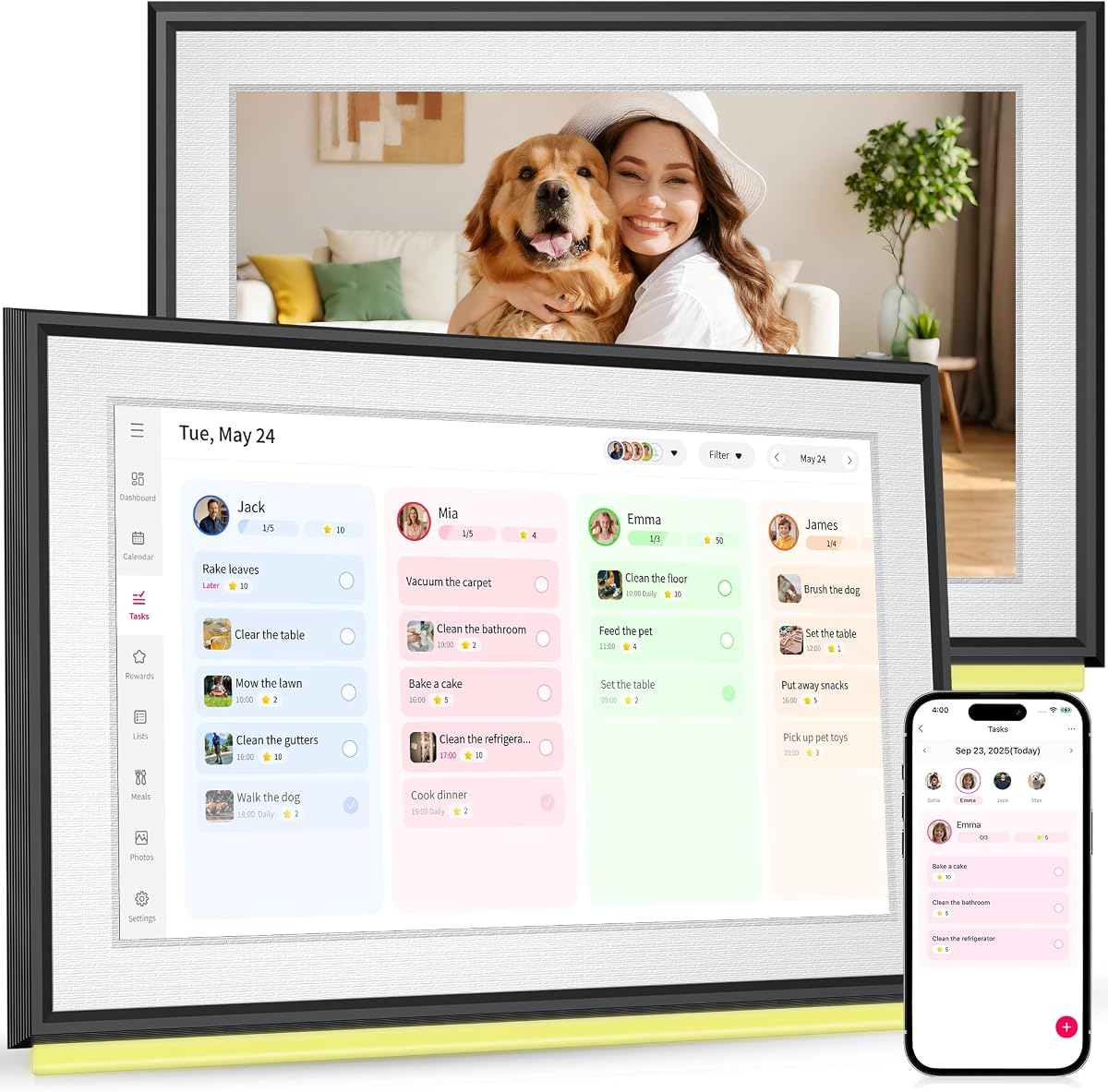

This 15.6-inch digital calendar stands out as a comprehensive family command center designed to replace paper planners completely. With a high rating and robust features it manages schedules, chores, and memories seamlessly without demanding ongoing costs.
We may earn a commission when you buy through this link, at no additional cost to you.
The real-time synchronization with major calendar platforms ensures that every family member sees updates instantly. The interactive chore chart turns daily tasks into a fun game helping children build responsibility while parents reduce nagging.
While it requires an initial setup effort the flexibility of wall or desk mounting makes it adaptable to any home layout. Some users note that battery options are not included but the constant power connection ensures reliability.
For families seeking a durable and feature-rich organizer this model offers exceptional value. It is ideal for busy households needing a centralized hub for coordination and memory keeping.
Syncing with Google and Outlook means everyone stays updated without manual entry or confusion.
The built-in reward system motivates kids to complete tasks consistently and happily.
We may earn a commission when you buy through this link, at no additional cost to you.
Skylight Calendar offers a premium experience with its sleek white design and dedicated Disney mode for younger family members. It excels at visual planning with a focus on meal management and shared household schedules.
We may earn a commission when you buy through this link, at no additional cost to you.
The device connects effortlessly to Wi-Fi and syncs with multiple calendar services to keep the household organized. Users appreciate the ability to add updates directly on the device or via the companion app easily.
However some advanced features like Magic Import require a premium subscription which may add to the long-term cost. This trade-off is acceptable for families who prioritize a polished aesthetic and fun engagement tools.
Choose this model if you want a device that blends functionality with charm. It is particularly suited for homes that value visual appeal and interactive elements for children.
Icons and animations make daily scheduling fun and less intimidating for kids.
Built-in tools simplify the process of planning weekly menus and shopping lists.
We may earn a commission when you buy through this link, at no additional cost to you.
This 10.1-inch model provides essential smart organization features without demanding a high investment. It is an excellent choice for budget-conscious buyers who still want calendar syncing and chore management tools.
We may earn a commission when you buy through this link, at no additional cost to you.
The interface allows easy real-time syncing with major calendar platforms ensuring that plans are never missed. Parents can assign chores and manage meal plans through a simple and intuitive system that everyone can use.
The smaller screen makes it perfect for tight spaces like kitchen counters or small desks. While it lacks some advanced customization options found in premium models it covers all core needs effectively.
For those seeking a practical and affordable entry into digital organization this device delivers solid performance. It is a thoughtful gift option for parents needing a centralized planner.
All major features like syncing and recipes work without any monthly payments.
The compact footprint ensures it fits easily on any counter or desk.
We may earn a commission when you buy through this link, at no additional cost to you.
This model combines a sharp 1080P display with smart AI tools to streamline family management tasks. It is designed to reduce mental load by offering clear visibility of schedules and weather updates.
We may earn a commission when you buy through this link, at no additional cost to you.
The star-based reward system helps motivate children to complete daily chores independently. Users can sync events from phones or the device directly ensuring everyone stays aligned without confusion.
While the setup process may require some patience the intuitive interface makes daily use simple. The inclusion of weather updates adds practical value for planning outdoor activities or daily commutes.
Ideal for families wanting clear visuals and smart tools this device balances functionality with ease of use. It works well in any central home location.
High resolution ensures text and images remain sharp and readable from a distance.
Real-time weather updates help families plan outings and dress appropriately.
We may earn a commission when you buy through this link, at no additional cost to you.
With a perfect user satisfaction rating this 15.6-inch model is built for households needing maximum visibility and clarity. It supports color-coded tasks that help organize complex schedules for multiple family members effectively.
We may earn a commission when you buy through this link, at no additional cost to you.
The large display ensures that details are visible from across a room. Users appreciate the sleep and wake modes that balance energy efficiency with readiness for daily use.
While the device requires a secure mounting solution the included hardware supports stable wall installation. Some users find the power draw higher but the constant readiness offsets this concern.
For families seeking a reliable and clear planning hub this device is a top choice. Its robust features ensure that daily life runs smoothly.
Distinct colors for each member make it easy to track individual responsibilities.
Sleep modes ensure the screen saves power when not in active use.
We may earn a commission when you buy through this link, at no additional cost to you.
This model focuses on connection allowing families to share photos and schedules even when apart. The Wanmine app support enables remote updates and sharing which is vital for extended family groups.
We may earn a commission when you buy through this link, at no additional cost to you.
The color coded system helps standardize daily routines making it easier for everyone to follow plans. Recipe storage and checklists simplify the mental load of managing household logistics.
The setup is straightforward ensuring that users can get started quickly. However reliance on a specific app means compatibility could be a concern for some users.
Best suited for families needing remote access this device offers a reliable way to stay connected. It is practical for coordinating complex schedules.
Family members can update schedules and photos from anywhere easily.
Color coding helps keep daily plans clear and consistent.
We may earn a commission when you buy through this link, at no additional cost to you.
This massive 21.5-inch display acts as a smart home hub beyond just a calendar. It runs a dual mode system allowing switching between calendar views and full Android apps for maximum versatility.
We may earn a commission when you buy through this link, at no additional cost to you.
The Google Gemini voice assistant enables hands-on management of schedules and smart home devices. Users can control lights and cameras directly from the screen which simplifies daily tasks.
Its size ensures that content is readable from across a living room or kitchen. While it requires a dedicated space the added functionality justifies the investment for tech-savvy homes.
For those wanting a command center that does everything this model leads the pack. It delivers premium features without subscription fees.
Full app support allows for widgets and tools not found on standard calendars.
Voice commands simplify checking schedules and controlling smart devices.
We may earn a commission when you buy through this link, at no additional cost to you.
Apolosign brings premium features to a 15.6-inch display with the added convenience of a built-in stand. It is designed for desks and counters where wall mounting is not an option.
We may earn a commission when you buy through this link, at no additional cost to you.
The dual mode system allows users to access apps and widgets for enhanced utility. Voice control via Gemini further simplifies the management of daily tasks and smart home systems.
The white finish complements modern decor styles making it a stylish addition to any office or kitchen. While it requires some learning to master Android features the payoff is significant.
For those needing a powerful desktop organizer this model offers unmatched flexibility. It bridges the gap between a tablet and a dedicated planner.
The included stand ensures stable positioning on any flat surface.
Download custom apps to tailor the device to your specific needs.
We may earn a commission when you buy through this link, at no additional cost to you.
This device offers a straightforward approach to digital organization with its simple tablet-style design. It syncs with major calendar platforms and offers basic chore and meal planning tools effectively.
We may earn a commission when you buy through this link, at no additional cost to you.
The free mobile app ensures that updates can be made from a phone when not near the device. Users appreciate the photo frame mode which keeps family memories visible throughout the day.
The lack of wall mounting options may limit placement choices in smaller spaces. Performance may be slightly slower than high-end models but it meets core needs well.
For households needing a no-frills solution this model is a practical choice. It keeps essential tasks organized without complexity.
Plug in and connect to Wi-Fi to start syncing immediately.
Frame mode keeps photos of loved ones visible and accessible.
We may earn a commission when you buy through this link, at no additional cost to you.
This 21.5-inch model prioritizes visibility and customization with its IPS screen and thematic options. It supports essential family tasks like chore rewards and meal planning with a user-friendly interface.
We may earn a commission when you buy through this link, at no additional cost to you.
The high resolution ensures that text is sharp and clear for all ages. Included hardware allows for immediate wall mounting making it easy to integrate into home layouts.
While basic features are free premium customization options may require additional payment. However the value of the large display remains strong for any family.
For those wanting a clear and customizable command center this model fits the bill. It helps manage daily life with style.
1080P IPS display ensures bright colors and clear text everywhere.
Choose from various themes to match your home decor style.
We may earn a commission when you buy through this link, at no additional cost to you.
Selecting the right digital touchscreen organizer requires understanding key features that impact daily utility and long-term value for your household.
Screen size determines where you can place the device and how visible the calendar is. Larger screens like 21.5 inches are ideal for living rooms or kitchens while smaller 10.1 inch models fit better on desks.
Higher resolution ensures text remains crisp and readable from a distance.
Many devices offer basic features without monthly costs but premium apps or cloud storage may require a subscription.
Always check if all core functions work without additional fees to avoid unexpected costs.
Real-time syncing with platforms like Google, iCloud, and Outlook is essential for family coordination.
Choose a device that supports all the platforms you already use to prevent data silos.
Consider whether you need a wall mount or a desktop stand for your intended space.
Some models only offer tabletop setups which limits placement in tight areas.
Interactive chore charts with gamified rewards help engage children in household tasks.
Look for systems that allow easy task assignment and progress tracking.
Companion apps allow remote updates from your phone ensuring the wall unit is always current.
A robust app ecosystem adds significant value to the physical device.
Many organizers double as digital photo frames for displaying family memories.
Check storage capacity and ease of photo uploads to maximize this feature.
Premium models offer smart home control and voice assistants for a unified command center.
This adds convenience if you own connected devices like lights or cameras.
Start by connecting the device to your home Wi-Fi network. Use the companion app to create an account and link your existing calendar services for seamless synchronization.
Regularly update the software to access new features and maintain optimal performance. Avoid rapid operations immediately after startup to allow the system to process data correctly.
Keep the screen clean with a soft dry cloth to prevent scratches. Place the device away from direct sunlight to avoid overheating and fading of colors.
Most models allow core scheduling and syncing without monthly fees. Premium features like custom themes or advanced photo options may require a paid plan.
Yes most devices support multi-user syncing. Changes made on one device reflect immediately across all connected platforms for real-time coordination.
The calendar will retain local data but syncing will pause until connection resumes. Most models allow offline edits that upload once online.
Basic functions work offline but syncing with cloud services requires internet. You can manually add events but they won't update remotely.
Navigate to the chores section in the app or on screen. Assign tasks and set point values or stars that kids earn for completion.
These devices are designed for family use with secure interfaces. Parental controls limit access to settings ensuring kids can only modify tasks.
Yes most companion apps support both iOS and Android platforms. Ensure your phone meets minimum requirements for smooth operation.
Yes you can enable sleep mode or turn off the display manually. This saves energy and extends screen lifespan.
The 15.6-inch Digital Calendar Wall Touch Screen leads as the best overall choice for families needing a balance of screen size and features. Its robust syncing and reward systems make daily planning seamless.
If budget is a priority the Digital Calendar 10.1" Touchscreen offers essential functionality without hidden fees. It remains a solid pick for smaller households or starter homes.
Always check current availability and pricing before purchase since product details can change. Choose a model that aligns with your home layout and family habits.