
Thrustmaster T-Flight Hotas X USB Flight Sim Stick & Throttle
4.5Editor score
Detachable throttle for flexible setup
Adjustable resistance on joystick axis
Preconfigured controls for instant takeoff
Discover the top Mac Game Flight Controllers tested for 2026. Our guide compares yokes, HOTAS, and throttles to help you find the perfect simulation setup for
Finding the right flight controller for your Mac can transform your simulation experience from simple gameplay into immersive aviation training. Whether you are a casual gamer or a serious flight sim enthusiast, the right hardware makes all the difference in how you interact with virtual cockpits and aircraft systems.
We have evaluated ten leading flight control systems to determine which ones offer the best performance, build quality, and compatibility for Mac users. Our analysis focuses on ergonomics, programmability, sensor precision, and software support to ensure every recommendation meets high standards for realistic flight simulation on desktop platforms.
Each product selection highlights specific strengths that cater to different budget levels and simulation preferences. While the recommendations below reflect current market availability, always verify compatibility and pricing before purchasing since product specs and costs can change frequently over time.
4.5Editor score

4.4Editor score

4.0Editor score
This side-by-side comparison highlights the key specifications and strengths of each flight controller to help you quickly identify which device matches your simulation needs and budget constraints.






The Honeycomb Aeronautical Alpha Flight Controls Yoke and Switch Panel stands out as the top choice for users seeking authentic flight simulation on a Mac. With a 4.4 rating, this system delivers the precision and tactile feedback needed for serious aviation training or immersive gameplay that closely mimics real aircraft controls.
We may earn a commission when you buy through this link, at no additional cost to you.
Its standout feature is the realistic full 180-degree rotation paired with a solid steel shaft and dual linear ball bearings. This construction ensures smooth, accurate control without dead zones. The included switch panel adds immense value by providing master, alternator, avionics, and light switches that enhance system management during flight.
While the unit offers excellent performance, it does command a higher price and requires significant desk space for installation. These trade-offs are acceptable for users who prioritize realism, as the design was developed by pilots and aerospace engineers to ensure the most realistic simulation experience possible.
This yoke system is best suited for dedicated flight sim enthusiasts who want professional-grade equipment. If you are building a serious cockpit setup on a Mac, this product provides the foundation you need for a lifelike aviation experience.
The 180-degree rotation range allows for full pitch and roll maneuvers without hitting hard stops, making every flight feel natural and responsive.
The integrated switch panel lets you manage electrical and avionics systems without needing to switch views in software, deepening immersion.
We may earn a commission when you buy through this link, at no additional cost to you.
The Thrustmaster T-Flight Hotas X is the ideal entry point for Mac users wanting to jump into flight simulation without breaking the bank. Rated 4.5 stars, it combines a comfortable ergonomic design with enough programmable features to make early flight sessions engaging and manageable for newcomers.
We may earn a commission when you buy through this link, at no additional cost to you.
Key strengths include its detachable throttle which offers flexible setup options for smaller desks, and the adjustable resistance dial that lets you fine-tune stick tension. The wide hand rest and natural throttle positioning help prevent fatigue during long sessions, while preconfigured controls mean you can start flying immediately.
Trade-offs include a plastic build that may feel less premium than higher-end models and compatibility primarily focused on PC systems which may require extra configuration for Mac. However, these compromises are minor given the price, making it a solid value for beginners prioritizing functionality over luxury materials.
This product is perfect for students or casual gamers starting their flight sim journey. If you need a reliable, comfortable controller that grows with your skills without a huge investment, the T-Flight Hotas X is a smart choice to consider.
Separating the throttle from the stick lets you customize your desk layout for maximum comfort or space efficiency.
Preconfigured controls and exclusive preset buttons let you switch profiles quickly, reducing the setup time before flight.
We may earn a commission when you buy through this link, at no additional cost to you.
The Logitech G X56 H.O.T.A.S is a powerhouse for enthusiasts who demand extensive programmability and precision. With a 4.0 rating, this system offers over 189 controls and hall-effect sensors that deliver military-grade accuracy. It is designed for advanced users who need granular control over complex aircraft systems during simulation.
We may earn a commission when you buy through this link, at no additional cost to you.
Its standout features include the twin throttle configuration with friction adjusters, allowing for fine power management, and the extensive RGB backlighting that enhances immersion and rig aesthetics. The mini analog stick control surfaces enable separate control for weapons or gimballed systems, adding depth to space or fighter jet scenarios.
Users should note that the sheer number of buttons can make setup complex and time-consuming. The high price is another consideration. However, for those who need every function mapped instantly, the X56 offers a level of customization few other controllers can match on the market today.
This controller is best for professional simmers or military flight enthusiasts. If you want a fully featured HOTAS setup that scales with your expertise and offers unmatched control surface options, the X56 is a premium investment worth making.
Mini analog sticks allow separate pitch roll and yaw control, giving you precise handling for complex maneuvers.
Customizable lighting lets you assign colors to critical systems, helping you identify active controls at a glance.
We may earn a commission when you buy through this link, at no additional cost to you.
The Turtle Beach VelocityOne Flightstick is designed for users who want a compact yet feature-rich controller. Rated 4.2 stars, it offers high-precision non-contact axes and a unique OLED flight management display that provides real-time data. The integrated touchpad adds a layer of navigation not found in most traditional sticks.
We may earn a commission when you buy through this link, at no additional cost to you.
Key strengths include its universal compatibility with Xbox and PC, making it versatile for different platforms. The ambidextrous design ensures comfort for both left and right-handed users, while the customizable throttle and flap levers add useful control options within a single unit footprint.
Users may find the integrated throttle limits setup flexibility compared to detachable options. Additionally, mastering the touchpad navigation can take time. However, for those seeking an all-in-one solution with modern digital features, this stick balances size and capability well for desktop use.
This product suits gamers who value modern features and cross-platform use. If you want a sleek controller with digital feedback and navigation tools without cluttering your desk, the VelocityOne Flightstick is a compelling option to explore.
The OLED screen shows real-time performance metrics, allowing you to monitor speed and altitude without opening overlays.
The touchpad sensor allows full cursor control for easy menu navigation and waypoint selection during missions.
We may earn a commission when you buy through this link, at no additional cost to you.
The Logitech G Saitek X52 Pro Flight Control System is a classic choice for tactical flight simulation enthusiasts. Rated 3.9 stars, it features an LCD multi-function display and progressive throttle with detents for afterburner and idle settings. These features make it particularly well-suited for military combat and jet flight scenarios.
We may earn a commission when you buy through this link, at no additional cost to you.
Its strengths lie in the powerful Smart Technology software that allows deep customization for specific games, and the 5-position handle adjustment system to suit all hand sizes. The precision centering mechanism improves control accuracy, ensuring smooth inputs during high-speed maneuvers.
Users should note that as an older model, compatibility with newer Mac versions may require extra configuration steps. The software can occasionally be buggy. Still, for users who value the specific layout and throttle mechanics of the X52 Pro, it remains a solid mid-range fighter jet controller.
This controller is best for those focused on military aviation sims. If you prefer a dedicated fighter jet layout with an LCD display for mission data and need adjustable ergonomics, the X52 Pro offers proven performance at a competitive price point.
Progressive throttle with detents allows quick transitions between idle and afterburner settings, essential for tactical maneuvers.
The 5-position handle system lets you adjust the grip angle, ensuring comfort for users of different hand sizes.
We may earn a commission when you buy through this link, at no additional cost to you.
The Turtle Beach VelocityOne H.O.T.A.S offers an ambitious feature set for users wanting a full HOTAS experience. Rated 2.6 stars, this bundle includes 73 programmable inputs, 15 axes, and a full-color display for real-time tuning. It supports expandability with pedals and mounting solutions, positioning it as a comprehensive ecosystem.
We may earn a commission when you buy through this link, at no additional cost to you.
Its standout features include swappable dual throttle detents for tactile thrust points and adjustable stick tension settings that allow for personalized flight feel. The VelocityOne Flight Hangar app enables full customization, ensuring you can tailor inputs to specific aircraft profiles and game requirements.
Users should be aware that the lower reliability rating suggests potential quality control issues. The setup complexity can also be daunting for beginners. However, for those who find working through these hurdles, the expandability and premium features offer a potentially rewarding high-end simulation experience.
This bundle is best for advanced users willing to troubleshoot. If you want a highly configurable system with a dedicated app and expandable design, the VelocityOne HOTAS is worth considering for its feature depth.
Supports pedals and mounts, allowing you to build a full cockpit setup around the core HOTAS unit over time.
Swappable detents let you customize reference points for different aircraft types, improving throttle control accuracy.
We may earn a commission when you buy through this link, at no additional cost to you.
The Logitech G Pro Flight Yoke System and Pro Flight Rudder Pedals Bundle provides everything needed for a complete cockpit entry. With a 4.6 rating, this bundle combines realistic yoke controls with differential toe brakes that allow precise aircraft positioning. The adjustable foot rests ensure comfort for users of different sizes.
We may earn a commission when you buy through this link, at no additional cost to you.
Key strengths are the smooth accurate self-centering pedals that add a layer of realistic control to simulation, and the 54 programmable controls across the yoke. The bundle saves you from buying components separately, ensuring seamless compatibility between the yoke and pedals for a unified experience.
The main trade-off is the space required for a full yoke and pedal setup. The price reflects the bundled value. However, for users who want a cohesive system without compatibility headaches, this bundle offers a reliable foundation for building a professional flight simulation environment.
This bundle is best for serious simmers who want a full control set. If you plan to fly airliners or multi-engine aircraft requiring independent rudder control, this complete package delivers the necessary tools efficiently.
Differential toe brakes let you control nose wheel steering and braking separately, essential for realistic runway operations.
Since both units are from the same brand, drivers and mapping are guaranteed to work together smoothly without conflicts.
We may earn a commission when you buy through this link, at no additional cost to you.
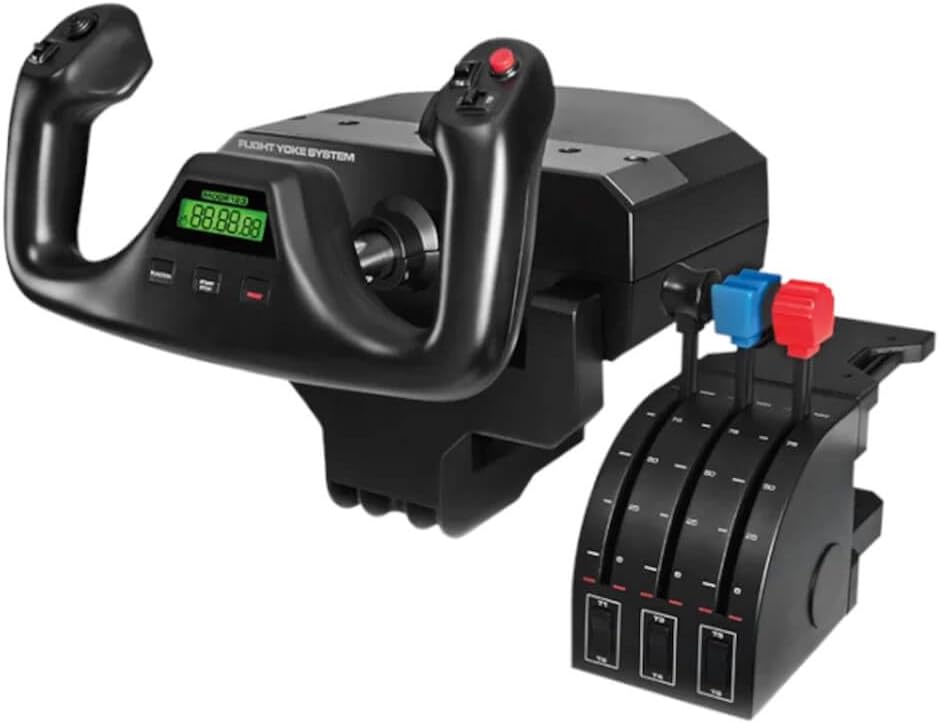
The Logitech G PRO Flight Yoke System offers a balanced combination of durability and programmability. Rated 4.4 stars, it features a stainless steel yoke shaft for smooth control and a separate three-axis lever throttle that provides precise engine management. The integrated USB hub simplifies cabling for additional peripherals.
We may earn a commission when you buy through this link, at no additional cost to you.
Its strengths include the configurable throttle knobs which can be adapted for different aircraft types, and the 75 programmable controls that cover most essential functions. The 3-position mode switch adds flexibility, allowing you to quickly toggle between different flight configurations or profiles.
Trade-offs include the requirement for desk clamps which may not suit all desk materials. The initial setup requires time to map functions. However, for users seeking a robust standard professional yoke with good durability, this system delivers reliable performance for various flight simulation titles.
This product is best for users wanting a standalone yoke without pedals. If you value a steel shaft for smooth feel and need extensive programmability for complex avionics, the G PRO Flight Yoke System is a solid choice.
The stainless steel shaft ensures long-term durability and smooth movement, reducing wear over thousands of flight hours.
Configurable throttle knobs allow you to simulate different power settings for various aircraft engines or systems.
We may earn a commission when you buy through this link, at no additional cost to you.
The Logitech G Saitek PRO USB Flight Yoke System (Renewed) is an excellent option for budget-conscious users. Rated 4.2 stars, it retains the premium features of the original model, including a stainless steel shaft with ultra-precise bearings. The digital chronograph is a unique feature for timing checkpoints and IFR procedures.
We may earn a commission when you buy through this link, at no additional cost to you.
Key strengths include its compatibility with Mac OSX and various Windows versions, making it versatile for older or newer setups. The Smart Technology software allows complete customizability. Buying renewed saves money while still delivering a top-of-the-line device for realistic action-packed aviation adventures.
As a renewed product, cosmetic wear or warranty limitations may vary. However, the core performance remains consistent with new units. For users who prioritize the specific features of this model over brand new condition, the cost savings are significant and worthwhile.
This product is best for those on a budget. If you want the proven performance of the Saitek PRO system but at a reduced price, this renewed option offers a smart way to enter professional flight simulation.
The built-in chronograph helps with time management during navigation checks, adding a practical tool for training flights.
Certified renewed products offer substantial savings while maintaining full functionality of the original high-quality hardware.
We may earn a commission when you buy through this link, at no additional cost to you.
The Logitech G PRO Flight Yoke System Professional Simulation serves as a strong entry point into dedicated flight controls. Rated 4.3 stars, it offers a stainless steel yoke shaft and a flight throttle quadrant for realistic input. This setup helps pilots build muscle memory and enjoy smoother virtual aircraft control.
We may earn a commission when you buy through this link, at no additional cost to you.
Its strengths include the robust desk clamp design which ensures your controls stay secure, and the 54 programmable controls that provide flexibility. The 3-position mode switch adds versatility. While it requires optional software for some simulators, the hardware itself is reliable and functional out of the box.
Trade-offs involve the setup process which may take time to configure fully. The software requirement for specific simulators adds a step. However, for users seeking a dedicated yoke system that balances features and price, this model delivers excellent value for new and experienced pilots.
This product is best for pilots starting out. If you want a realistic yoke and throttle set with durable steel construction and good programming options, this system offers a solid foundation for your simulation needs.
The realistic feel and layout help pilots build muscle memory, transitioning skills from virtual to real flying environments.
The robust 2-position desk clamp provides a stable base, ensuring your controls do not shift during intense flight moments.
We may earn a commission when you buy through this link, at no additional cost to you.
Choosing the right flight controller involves balancing budget, features, and your specific simulation goals to ensure a rewarding setup.
Always verify that the controller supports macOS directly or has workarounds. Some devices listed are Windows-focused but may require third-party drivers or mapping software to function on a Mac. Check system requirements on the product page to confirm OS support before purchasing.
Choose products with explicit Mac compatibility or strong community support for third-party driver solutions.
Premium flight controllers often use stainless steel shafts, high-density plastics, or metal housings. These materials ensure durability during long sessions. A robust build prevents wear on moving parts, maintaining precision over time which is essential for realistic flight mechanics.
Look for steel shafts and sturdy clamps to ensure your controller remains stable and precise for years.
The number of buttons and axes you can program determines how deep your simulation experience can be. Advanced simmers need hundreds of programmable inputs for complex avionics. Beginners may find a lower count sufficient for essential flight functions like throttle and pitch.
Select a controller with enough programmable inputs to match the complexity of the aircraft you plan to simulate.
Flight sessions often last for hours, so ergonomics are critical. Look for handles that fit your hand comfortably, adjustable tension, and a layout that reduces strain. A good design prevents fatigue and ensures you can focus on flying rather than adjusting your grip constantly.
Prioritize controls with adjustable tension, comfortable grips, and layouts that fit your desk and hand size.
Quality controllers come with mapping software that lets you assign functions to buttons and axes. This software allows you to create profiles for different simulators. Ensure the software is well-supported and can handle the specific flight sim titles you use most frequently.
Check that the manufacturer provides software for creating and managing different aircraft profiles and button mappings.
A flight controller must be securely mounted to avoid drifting or slipping during maneuvers. Options include desk clamps, suction pads, or dedicated mounting kits. Ensure the mounting mechanism is sturdy enough for your desk type and provides the stability needed for accurate inputs.
Look for robust clamps or mounts that provide a secure hold on your specific desk surface.
Hall-effect sensors provide non-contact detection which reduces friction and wear, ensuring smoother and more accurate movements over time. Traditional potentiometers may wear out faster and introduce dead zones. Modern controllers often use hall-effect sensors for long-term precision.
Choose controllers with hall-effect sensors for consistent accuracy and reduced mechanical wear.
Some controllers can expand with additional pedals, throttles, or rudder systems. Bundles can save money and ensure compatibility. Consider whether you might want to add more components later, as some manufacturers have ecosystems that integrate easily with other products.
Consider future expansion needs when choosing a controller to avoid compatibility issues with add-ons.
Begin by installing the manufacturer's drivers and software to ensure full functionality on your Mac. Follow the provided setup instructions to connect USB or PS/2 cables correctly. Use the software to create profiles for your specific flight simulator, mapping buttons to aircraft functions for easy access.
Clean your controller regularly with a soft, dry cloth to remove dust and oils. Avoid using harsh chemicals that could damage plastic or rubber components. If your controller has a removable throttle, periodically check the tension mechanisms to ensure they remain smooth and free of debris.
Adjust the mounting clamps to ensure stability during use. If your controller has adjustable tension or force settings, set them to a comfortable level that matches your flying style. For bundles with pedals, ensure they are positioned so your feet have a natural resting position without strain.
Most flight controllers require third-party drivers on macOS, but Logitech and Honeycomb models are known to work well. The Logitech G X56 and Honeycomb Alpha Yoke have strong community support. Check the simulator forums for updated drivers or mapping profiles that support X-Plane specifically.
Many controllers are cross-platform, but Mac support may vary by software. Check the manufacturer's system requirements list. If a device is PC-only, you may need tools like Boot Camp or third-party drivers to use it on a Mac. Verify compatibility before purchasing to avoid issues.
Yoke systems typically need significant desk space to install clamps and allow full rotation. HOTAS sticks are more compact. Measure your available area before buying. Some models offer detachable throttles or vertical mounting to save space if you have limited room.
Hall-effect sensors are non-contact, reducing wear and ensuring consistent precision over time. Potentiometers can develop dead zones due to friction. For flight simulation, hall-effect sensors are preferred for smooth and accurate inputs. Many modern controllers use them for this reliability.
Most manufacturers provide dedicated mapping software. Download the tool, connect your controller, and assign functions like throttle or pitch to buttons. Save profiles for different simulators. Follow the on-screen tutorials to learn how to set up custom actions and mode switches.
For airliners, pedals provide essential rudder control. For military jets, a twist-grip stick may suffice. Pedals add realism but cost more. If you plan to fly aircraft that require distinct yaw control, adding pedals is a recommended upgrade for better immersion.
The Thrustmaster T-Flight Hotas X is a strong budget choice. It offers a detachable throttle and ergonomic design. While less expensive than premium systems, it still provides enough controls for a solid experience. It is ideal for beginners looking to start without a large investment.
Yes, but ensure the controller is compatible with the VR simulator. Yoke systems can be bulky in VR setups. Check software support and mounting options for a headset. Controllers with compact layouts may offer better immersion in VR environments.
We have reviewed ten top flight controllers for Mac users, ranging from budget HOTAS sticks to premium yoke systems. Each device offers unique strengths, whether it is the realism of the Honeycomb Yoke or the versatility of the Logitech X56. Selecting the right model depends on your simulation goals.
Consider what matters most: affordability, realism, or programmability. If you are new to flight simulation, start with an entry-level stick to gauge interest. For advanced users, investing in a full yoke and pedal setup enhances immersion. Prioritize features that match your flying style.
Prices and availability fluctuate frequently. Always check current listings and verify compatibility before finalizing your purchase. By choosing the right controller, you ensure that your flight simulation experience is both enjoyable and as realistic as possible for your Mac setup.