
Epson Workforce ES-50
4.3Editor score
Ultra-lightweight design
USB powered operation
Includes Nuance OCR
This guide compares the best document scanner for iPhone 18, evaluating portable mobile options that seamlessly integrate with iOS workflows for efficient
Finding the right document scanner for iPhone 18 means looking for devices that offer true portability and seamless connectivity. Modern mobile scanners should allow you to capture crisp images of receipts and contracts without needing bulky hardware or complex setup processes.
We evaluated ten top-rated scanners based on speed, compatibility, and ease of use. Our list includes compact feeders and wireless models designed to work alongside iOS devices, ensuring you can digitize paperwork anywhere you go.
Each pick highlights key features and real-world performance. Prices and availability change frequently, so check current listings before purchasing. This guide helps you choose the perfect tool for your specific document management needs.
4.3Editor score
4.4Editor score

4.3Editor score
Below is a side-by-side look at all ten models. We compare their key specifications to help you find the best fit for your specific scanning needs and workflow requirements.





The Epson Workforce ES-50 stands out as a top choice for those needing a basic, effective mobile scanner. With a rating of 4.3, it delivers consistent performance for daily document digitization tasks without the bulk of larger devices.
We may earn a commission when you buy through this link, at no additional cost to you.
Its standout quality is speed and convenience. Scanning a single page takes as little as 5.5 seconds. The included Epson ScanSmart software makes organizing files easy, while the built-in Nuance OCR turns scanned images into editable Word or Excel documents effortlessly.
A trade-off is its reliance on USB power. You must connect it to a computer or powered hub, which limits true standalone use. However, for users who scan near a laptop, this ensures reliable operation without battery anxiety.
This scanner is ideal for small business owners or students who need to digitize receipts quickly. It offers excellent value for its price point and provides a seamless bridge between paper and digital workflows.
Epson ScanSmart allows you to scan, review, and save files with minimal clicks, keeping your digital workspace organized.
It handles documents up to 8.5 x 72 inches, making it perfect for receipts, IDs, and standard business papers.
We may earn a commission when you buy through this link, at no additional cost to you.
The Brother DS-640 is a reliable workhorse for professionals on the move. Its 4.3 rating reflects consistent quality in delivering sharp scans. It is designed to be small enough to carry anywhere without weighing you down.
We may earn a commission when you buy through this link, at no additional cost to you.
Its speed is impressive at up to 16 pages per minute. The Brother iPrint&Scan app lets you send files to PCs, networks, or cloud services directly. Automatic color detection and text enhancement ensure your scans look professional every time.
Like many compact models, it requires a USB connection to function. This means you cannot scan independently of a computer. However, the micro USB 3.0 cable allows flexible power from any available port.
If you need a scanner that disappears into your bag but performs well when needed, this is a great pick. It balances size, speed, and software features effectively for mobile users.
Weighing only about 1.5 pounds and under one foot long, this scanner truly fits in a pocket or small purse.
Built-in software automatically adjusts colors and removes background noise for clearer, more readable scans.
We may earn a commission when you buy through this link, at no additional cost to you.
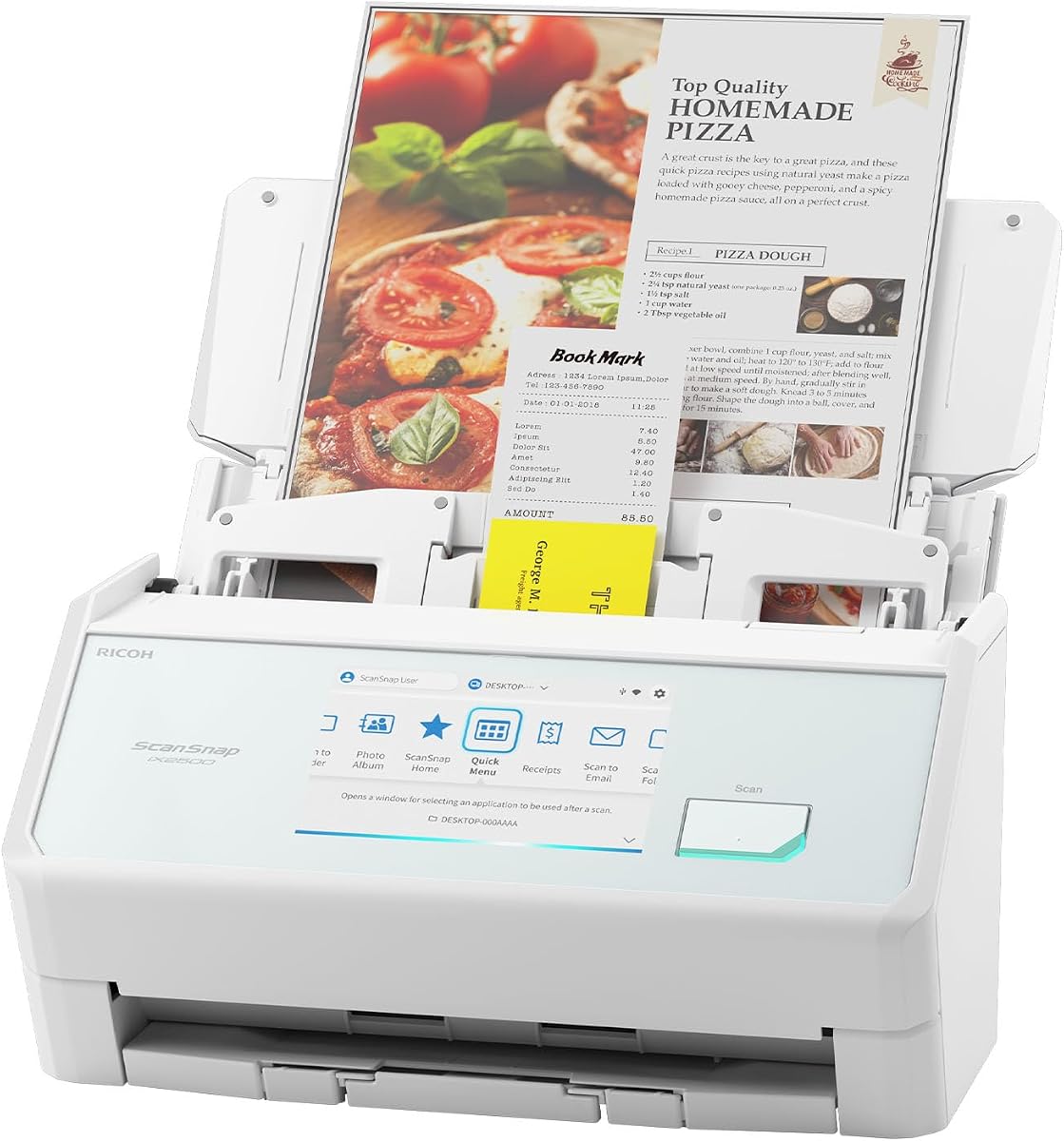
The ScanSnap iX2500 earns our Editor's Choice award for its superior performance and features. With a 4.4 rating, it is built for users who handle high volumes of documents. It replaces previous models with faster and more intelligent scanning capabilities.
We may earn a commission when you buy through this link, at no additional cost to you.
It scans both sides of a page simultaneously at up to 45 pages per minute. The built-in touchscreen lets you customize profiles and send scans directly to mobile devices or cloud services without a computer. Its wireless Wi-Fi 6 ensures stable connections.
The main drawback is the cost. It is significantly pricier than entry-level scanners. Additionally, its size is larger than pocket models. For heavy users, however, the efficiency gains justify the investment easily.
This device is perfect for offices or serious power users who need to digitize hundreds of pages daily. It combines speed, capacity, and ease of use in a way few other scanners can.
It automatically organizes and names files, saving you time on manual sorting and filing after every scan.
Wi-Fi 6 and USB-C options mean you can connect to almost any modern device or network with ease.
We may earn a commission when you buy through this link, at no additional cost to you.
The CZUR Shine Ultra is designed differently, functioning as a high-resolution document camera. It is excellent for flat papers and books that cannot be fed into a standard scanner. However, note it does not support iOS devices.
We may earn a commission when you buy through this link, at no additional cost to you.
It uses a 13MP camera to capture clear images. Its patented technology flattens curved book pages digitally. The auto-cropping and smart paging features reduce manual effort. This makes it a great choice for digitizing libraries or archives.
The lack of iOS compatibility is a major limitation for iPhone 18 users. It works mainly with Windows and macOS. Also, it requires more setup space than pocket scanners. Consider this only if you prioritize book scanning over mobile use.
If your workflow involves scanning physical books or large documents regularly, this tool offers unique capabilities. For iPhone-focused workflows, other options listed here may be more suitable.
Specialized algorithms automatically flatten curved pages, preserving text clarity in thick books without damage.
You can switch between multiple color modes and resolutions depending on whether you are scanning photos or text.
We may earn a commission when you buy through this link, at no additional cost to you.
The Brother DS-740D improves on earlier models by adding duplex scanning. It captures both sides of a document in a single pass. This doubles your efficiency compared to manual flipping. Its rating of 4.3 confirms reliability.
We may earn a commission when you buy through this link, at no additional cost to you.
Like the DS-640, it is pocket-friendly and powered via USB. It includes software that handles OCR and image optimization. The Desk Saving Design feature reduces the space needed on your desk when in use.
It lacks wireless capabilities, meaning you must have a computer nearby. However, for users who prioritize speed and space efficiency in a portable form, this is an excellent upgrade. It delivers professional results on the go.
Choose this if you frequently scan contracts or invoices with backside content. The duplex feature alone justifies the small price difference compared to single-sided scanners.
Scan both sides of a page simultaneously without manual intervention, speeding up document digitization significantly.
Its compact form and unique design reduce desk clutter, making it ideal for shared or small workspaces.
We may earn a commission when you buy through this link, at no additional cost to you.
The Canon imageFORMULA R10 offers a solid mix of features for a reasonable investment. It provides duplex scanning at up to 12 pages per minute. While not the fastest, it handles business cards and receipts with ease.
We may earn a commission when you buy through this link, at no additional cost to you.
It comes with built-in software that requires no installation. This makes setup quick and simple. The preview tool allows you to adjust scans before finalizing. It is ENERGY STAR certified, saving energy during long work sessions.
It relies on USB power and lacks Wi-Fi. This limits mobility if you are away from a computer. However, for budget-conscious users needing reliable duplex performance, it is a smart choice.
If you need to scan double-sided documents regularly without breaking the bank, this model delivers. It balances cost and functionality well for small office or home use.
Plug and play installation means you can start scanning immediately without complex software configuration or drivers.
The ENERGY STAR certified design helps reduce power consumption, keeping energy bills lower over time.
We may earn a commission when you buy through this link, at no additional cost to you.
The Epson Perfection V19 II is designed for photo and document preservation. Its 4800 dpi resolution captures fine details. This is ideal for digitizing old photos or artwork that you want to keep for years.
We may earn a commission when you buy through this link, at no additional cost to you.
It includes Easy Photo Fix to restore faded colors with one click. The kickstand allows vertical storage to save space. One-touch scanning simplifies the process for quick tasks.
It requires you to place items on the glass and lift the lid manually. This is slower than automatic feeders. But for preserving memories or scanning items that can not be fed, it is unbeatable.
Choose this if your focus is on photo archives rather than paperwork. It ensures high quality and care for fragile items that might jam in other scanners.
Built-in tools help you recover color and clarity from old or faded photographs with a single click.
A built-in kickstand lets you store the scanner vertically, saving valuable shelf or desk space.
We may earn a commission when you buy through this link, at no additional cost to you.
The Epson Workforce ES-60W brings wireless freedom to mobile scanning. It can scan to PCs, Macs, or iOS devices directly. Its speed of 4 seconds per page is among the fastest available.
We may earn a commission when you buy through this link, at no additional cost to you.
It uses a battery or USB for power. The software automatically switches between modes without user input. This flexibility is perfect for on-the-go work where outlets are scarce.
Wireless models are generally more expensive. You also need to manage battery levels for uninterrupted use. But if you value connectivity over cost, this scanner delivers unmatched convenience.
For users who need to scan without cables anywhere, this is a top choice. It integrates well with Apple devices and cloud storage workflows.
Connect directly to your iOS device or laptop without any cables, allowing scanning from anywhere within range.
The scanner detects power sources and switches between battery and USB automatically for seamless operation.
We may earn a commission when you buy through this link, at no additional cost to you.
This handheld scanner is the most affordable option available. It is a scanning wand that you move over a page manually. It stores files directly on an SD card so you do not need a computer immediately.
We may earn a commission when you buy through this link, at no additional cost to you.
It offers resolution up to 900 DPI, which is decent for basic text. The plug-and-play design is simple. It fits easily in a backpack. This makes it great for travelers needing basic digitization.
The manual motion requires a steady hand to avoid blurry images. It is slower than automatic feeders. But for the price, it is a handy backup tool for quick tasks.
If you need a cheap way to digitize documents without software, this works. It is best for occasional use rather than heavy workloads.
Files save directly to an SD card, allowing you to transfer data later without needing a laptop.
Plug and play setup means no drivers are needed, just turn it on and start scanning your documents.
We may earn a commission when you buy through this link, at no additional cost to you.
This silver model offers the same features as the blue version. It is a budget-friendly handheld scanner that scans manually. It is perfect for users seeking a cheap way to digitize text quickly.
We may earn a commission when you buy through this link, at no additional cost to you.
It uses a scanning wand mechanism. You move it over the document to capture the image. It stores files on an SD card. This ensures you can keep your data safe without a computer.
Manual scanning requires a steady hand to avoid blur. It is slower than automatic feeders. But for basic tasks, it provides good value. It is compact enough for any bag.
Consider this if you need a backup scanner for travel. It offers basic functionality at a minimal cost with no software requirements.
Its small form factor makes it easy to carry in any pocket or small bag for on-the-go use.
No driver installation is needed, allowing you to start using it immediately after unboxing.
We may earn a commission when you buy through this link, at no additional cost to you.
Choosing the right scanner involves balancing connectivity, speed, and budget. Here are key factors to consider before you buy.
Ensure the scanner supports wireless or USB connection compatible with your device. Wi-Fi models offer more freedom, while USB ensures reliability.
Choose based on whether you need to scan without a computer or near a laptop.
Speed impacts productivity. Look for models that scan at least 10 pages per minute for efficient daily use.
Faster speeds reduce waiting time and keep workflows moving quickly.
Decide between single-sheet feeders and flatbeds. Feeders are faster for bulk documents, while flatbeds handle books and fragile items.
Choose based on your document types and volume.
Look for OCR software and cloud integration. These tools turn images into searchable text and help you organize files automatically.
Good software saves time on manual organization and editing.
Consider weight and size if you travel often. Models under one pound and fitting in a pocket are ideal for commuters.
A lighter scanner reduces burden during travel.
Some scanners are USB powered, others use batteries. USB ensures continuous power, while batteries offer true mobility.
Choose based on access to power outlets.
For documents, 300 DPI is standard. Higher DPI is needed for photos or detailed graphics.
Ensure resolution meets your clarity needs.
Set a budget range. Entry-level models cost less but may lack features like wireless or duplex.
Invest in features that match your specific needs.
Set up your scanner by connecting it to your computer or Wi-Fi network. Install any necessary apps on your iPhone to ensure seamless communication.
Place documents flat in the feeder or on the glass. Adjust settings for resolution and file format before scanning to save time.
Clean the glass and rollers regularly with a soft cloth to prevent streaks. Store the device in a dry, cool place to maintain longevity.
Yes, many portable scanners support Wi-Fi or USB connections compatible with iOS. Look for models with dedicated apps or MFi certification for seamless use.
Wireless and battery-powered scanners can operate without a computer. They store files directly on memory cards or send them via Wi-Fi to your phone.
For standard text documents, 300 DPI is sufficient. Higher resolutions like 600 DPI are better for photos or detailed graphics.
Yes, duplex scanners scan both sides of a page automatically. This saves time and ensures accurate document capture.
Use OCR software included with the scanner or third-party apps. This converts images into editable Word or text files.
Most compact models handle standard letter-sized papers. Some support larger legal pages or up to 72 inches in length.
We reviewed ten excellent scanners ranging from budget-friendly handhelds to premium feeders. Each offers unique strengths for mobile users.
Prioritize connectivity and speed based on your workflow. Wireless options offer convenience, while duplex scanners boost efficiency.
Always verify current prices and availability before purchasing to ensure you get the best value.