
SaiDian 1Pcs 5.25 inch Fan Speed Controller
3.9Editor score
Fan jam alarm feature
Manual and auto modes
Three groups of fans
Compare the top front panel fan controllers for PC cooling. This guide reviews features, compatibility, and performance to help you choose the best thermal
Finding the right front panel fan controller helps you manage airflow and noise levels effectively. A good unit offers clear displays and reliable temperature monitoring for your system.
We compared ten top-rated models based on channel count, display quality, and safety features. Each option provides unique benefits for different PC builds and cooling needs.
Each pick shows key specs and real-world performance highlights to guide your decision. Remember that availability and details may change over time as products update.
3.9Editor score

5.0Editor score

4.2Editor score
This side-by-side comparison highlights the core specifications and unique capabilities of each model. Review the details to find the unit that matches your specific hardware setup.
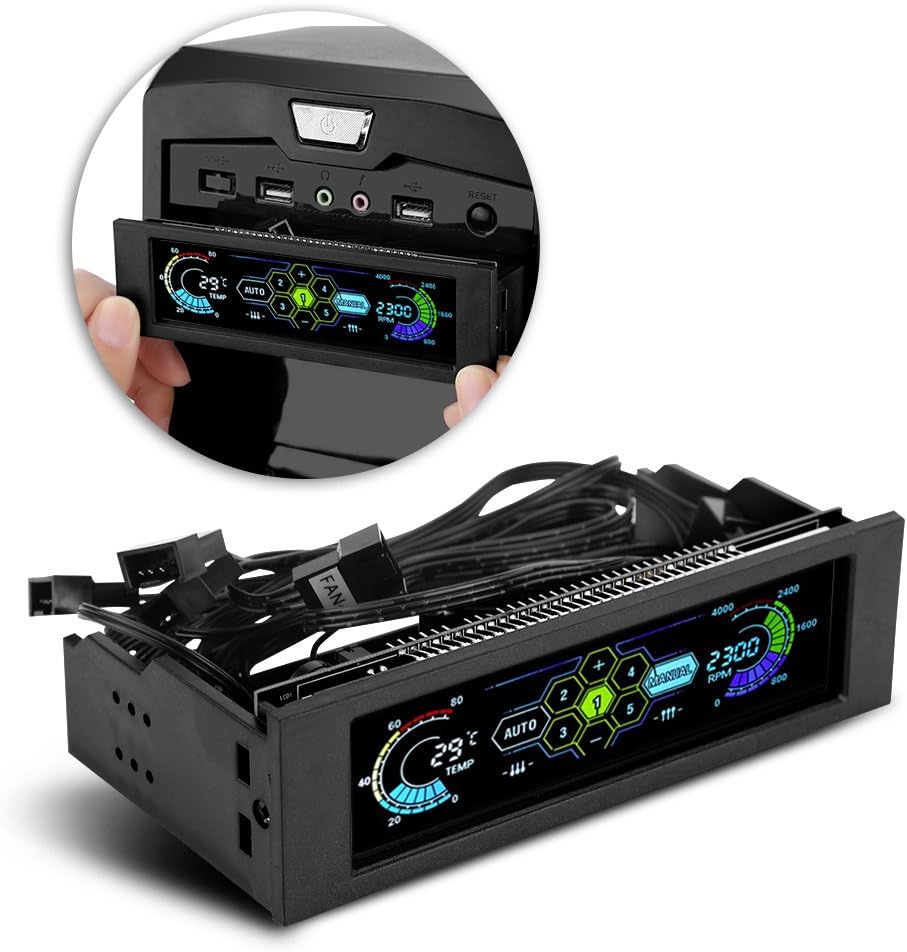


This unit stands out with a reliable display and strong safety systems. It receives top marks for its ability to manage four fans independently while keeping an eye on temperatures.
We may earn a commission when you buy through this link, at no additional cost to you.
The LCD screen provides clear readouts for fan speeds and thermal data. This visibility helps users maintain optimal cooling without guessing current system states.
Some users may find the installation requires an available optical drive bay. The complexity of wiring multiple sensors might also deter casual builders.
It is ideal for enthusiasts wanting precise control over airflow. The robust build and alarm system make it a strong choice for demanding environments.
Having a dedicated LCD screen lets you track multiple data points at a glance without needing extra software on your desktop.
High-specification capacitors and temperature alarms protect your hardware from overheating, ensuring long term stability for your computing setup.
We may earn a commission when you buy through this link, at no additional cost to you.
This controller offers extensive control over five separate fan groups. Its big LCD screen helps you see the full picture of your system cooling health.
We may earn a commission when you buy through this link, at no additional cost to you.
You can manually set alarm temperatures to suit your specific needs. This flexibility allows for tailored protection against overheating risks.
The display includes many data points which might feel crowded at first. Users should read instructions carefully to manage the features effectively.
It works well for complex cases needing detailed monitoring. The alert system ensures you are warned instantly if a fan stops working.
Monitoring temperature and fan speed alongside hard disk state provides a holistic view of system health during intensive tasks.
Setting alarm limits between 40 and 90 degrees gives you control over when warnings trigger based on your environment.
We may earn a commission when you buy through this link, at no additional cost to you.
This model provides essential fan control features at a lower cost. It includes a large screen to monitor temperature and fan speed effectively.
We may earn a commission when you buy through this link, at no additional cost to you.
It can control three groups of fans with adjustable alarm thresholds. This allows for decent thermal management without complex setups.
The build quality is simpler compared to higher end models. Some users may notice the materials feel less premium over time.
It is a good entry point for basic cooling needs. The fan jam alarm provides peace of mind against potential overheating issues.
Getting a functional controller with a display helps new builders manage airflow without investing in expensive solutions.
Seeing temperature and fan speed on one screen helps keep your system running safely during daily tasks.
We may earn a commission when you buy through this link, at no additional cost to you.
This premium unit offers extensive channels and visual customization. It supports six voltage control knobs for precise adjustment of each fan.
We may earn a commission when you buy through this link, at no additional cost to you.
The RGB screen adds style while showing necessary thermal data. Six sensors ensure detailed monitoring across different zones in your case.
The cost is higher than simpler alternatives. Users need a dedicated bay and compatible fans to get full value from the features.
It suits users wanting both performance and aesthetics. The warranty offers extra reassurance for such a significant investment in cooling.
Combining RGB lighting with a functional LCD screen helps your controller match the look of modern gaming builds.
Having six temperature sensors allows you to track hotspots across your case for optimized fan placement and speeds.
We may earn a commission when you buy through this link, at no additional cost to you.
This controller focuses on four independent channels and clear monitoring. The wide LCD display shows RPM and temperatures for each fan easily.
We may earn a commission when you buy through this link, at no additional cost to you.
Automatic regulation supports demand oriented cooling to reduce noise. PWM operation helps adjust performance as needed for comfort.
Lack of user ratings makes it harder to judge long term reliability. The panel build is robust but might require careful installation.
It is a strong candidate for standard case management. The safety functions provide necessary alerts to prevent hardware damage.
PWM circuitry allows precise speed adjustments that minimize annoying high-frequency hum while keeping components cool.
High-temperature capacitors ensure the device operates reliably over long periods without failure due to heat.
We may earn a commission when you buy through this link, at no additional cost to you.
This unit provides ten ports for extensive fan setups. It offers individual PWM control for every fan to move beyond hub limits.
We may earn a commission when you buy through this link, at no additional cost to you.
Native driver support works with Windows and Linux for monitoring. This centralizes cable management and eliminates the need for splitters.
It functions as an internal hub rather than a front panel. Users comfortable with software control will appreciate the flexibility.
Ideal for large builds needing superior airflow management. The power delivery ensures consistent performance across all connected fans.
Support for both operating systems allows you to use your preferred monitoring tools without extra hardware steps.
Centralized control through one unit reduces cable clutter inside your case for a cleaner and safer build.
We may earn a commission when you buy through this link, at no additional cost to you.
This compact controller works well for manual speed adjustments. It supports 4-pin PWM fans to achieve truly quiet operation with high speed models.
We may earn a commission when you buy through this link, at no additional cost to you.
The No stop mode prevents fan speed from dropping too low. This helps avoid BIOS fan errors that occur with very slow spins.
It lacks a temperature display which requires relying on motherboard monitoring. The manual knobs are simple but offer limited automation.
Best for those who prefer physical dials over software. It is a reliable add-on for reducing noise without complex electronics.
Manual reduction allows you to dial down speeds to silence even industrial fans when full cooling is not needed.
The No stop mode keeps fans above 300 RPM to ensure BIOS systems do not flag errors during idle periods.
We may earn a commission when you buy through this link, at no additional cost to you.
This kit includes components for versatile thermal regulation. It supports USB-C chargers and provides a hub for five fans simultaneously.
We may earn a commission when you buy through this link, at no additional cost to you.
Digital display shows real-time temperature and fan speed. It allows for precise management with adjustable start and full-speed temps.
You must assemble parts like probes and adapters. The compact size limits where it can be mounted in larger enclosures.
Ideal for NAS and small projects requiring control. The dual mode gives you flexibility between auto and manual operations.
Compatibility with various voltages allows you to use standard USB-C chargers for powering the unit easily.
Built-in protection against over-voltage ensures long-term stable use in different scenarios and environments.
We may earn a commission when you buy through this link, at no additional cost to you.
This unit offers visual tracking of four fans. The wide LCD screen displays speeds and temperatures so you can see system work.
We may earn a commission when you buy through this link, at no additional cost to you.
It includes a safety system that triggers alarms. High temp warnings help prevent hardware damage from overheating risks.
Low ratings suggest potential issues with build or reliability. Users may find setup time consuming compared to simpler hubs.
It serves basic visual monitoring needs well. The noise reduction helps keep your system quieter during normal operation.
Seeing four sets of data on one screen makes it easier to spot thermal issues before they become critical.
Temperature flashing and alarm sounds alert you immediately when conditions exceed safe limits to protect hardware.
We may earn a commission when you buy through this link, at no additional cost to you.
This controller manages five groups of fans effectively. A big LCD screen shows temperature and hard disk state for monitoring.
We may earn a commission when you buy through this link, at no additional cost to you.
Manual alarm setup allows customization to your needs. Alerts trigger immediately when a fan breaks down to protect your system.
User ratings indicate some quality or durability concerns. It may not offer the refined experience of more expensive units.
It is a functional choice for multiple fans. The display offers useful data points for keeping an eye on your hardware.
Managing five groups gives you detailed control over airflow to maintain balanced cooling across your case.
Instant alerts on fan failure ensure you can address cooling issues before they cause overheating problems.
We may earn a commission when you buy through this link, at no additional cost to you.
Selecting the right controller depends on your system layout and cooling needs. Consider these factors to find a unit that fits your build perfectly.
Determine how many fans you need to control. Most units range from three to six channels, but some offer more for large cases. Ensure the controller supports all fans in your setup to avoid extra splitters.
Choose a model with enough channels for your current and future needs.
Some controllers use LCD screens while others rely on software. LCDs provide immediate data without software. Consider if you want to see temperatures on the front panel or in a program.
Opt for an LCD if you prefer visual data at a glance.
Check fan connector types. Most support 4-pin PWM fans for speed control. Ensure voltage matches your fans to prevent damage. Some controllers support specific motherboard features.
Verify connection types and voltage to ensure safe operation.
Alarms and alerts protect your system. Look for over-temperature warnings and fan failure alerts. These features notify you before damage occurs. Built-in protection circuits add reliability.
Prioritize models with active safety alarms to prevent overheating.
Front panel controllers often need a 5.25 inch bay. Measure your case to ensure fit. Some units mount internally or use adhesive. Cabling should be manageable for your build.
Confirm your case has the required space for installation.
Look for durable materials like aluminum alloy. This ensures long-term stability. High-quality capacitors improve lifespan. A sturdy panel resists daily wear better.
Choose robust materials for a controller that lasts.
Some units work with Windows and Linux software. This allows detailed monitoring. Others work independently of software. Decide how much integration you need with your system.
Select based on your preference for software or manual control.
First connect the controller to your power source and fan headers. Ensure cables are secure to prevent loose connections. This step ensures stable operation for all attached fans.
Set temperature thresholds and modes according to your needs. Use manual mode to test fan speeds. Automatic mode saves energy by adjusting based on heat.
Keep the display clean and free of dust. Periodically check connections for wear. Regular maintenance ensures accurate readings and reliable performance over time.
Most controllers handle between three and six fans directly. Some specialized models offer up to ten ports for large setups. Always check the channel count to match your case.
Many units support 3-pin and 4-pin fans. 4-pin PWM allows precise speed control. 3-pin fans may work but with limited adjustability. Confirm specs before buying.
Most front panel units require a 5.25 inch bay. However some internal hubs mount elsewhere. Check the mounting options for your specific case model.
Controllers with alarms alert you to failure. A sensor detects the lack of signal. An audible or visual warning helps you address the issue quickly.
Use the display menu to set limits. Choose a degree range where warnings trigger. Save the setting to activate protection for your system.
Many work independently via physical controls. Some internal models support software. If you use a front panel, no software is needed for basic use.
The STW‑6041 stands out as a top choice with strong features. It offers reliable monitoring and safety for most users.
Prioritize channel count and safety alarms when selecting a model. These factors ensure your system remains protected during heavy use.
Check current availability and details before purchasing to confirm compatibility. Your system needs may change over time.