
Omada AX3000 Wireless Access Point
4.5Editor score
Free cloud management
Wi-Fi 6 speeds
Slim design
This guide compares the top 10 commercial wireless routers for businesses, covering speed, security, and scalability to help you choose the right network
Finding the right commercial wireless router is essential for modern businesses that rely on stable and secure internet connections. A good router ensures seamless connectivity for employees, customers, and IoT devices without dropping signals or slowing down critical operations.
We have carefully compared ten top-rated models based on real-world performance, security features, and management capabilities. This list covers everything from budget-friendly access points to high-end WiFi 7 systems designed for dense environments.
Each pick highlights key strengths and potential trade-offs so you can match the device to your specific business needs. Please note that prices and availability change frequently, so verify current details before making your final purchase decision.
4.5Editor score

4.2Editor score

4.6Editor score
The following table provides a side-by-side comparison of all ten commercial wireless routers to help you quickly identify the best fit for your network infrastructure and performance requirements.





The ASUS ExpertWiFi EBR63 is a robust commercial router designed for businesses that need secure and flexible networking. It earns an Editor's Choice badge for its blend of enterprise features and user-friendly management tools.
We may earn a commission when you buy through this link, at no additional cost to you.
Its standout quality is the ability to create up to five separate SSIDs for different business scenarios. You can customize the guest portal to match your brand and ensure secure usage separation for staff and visitors alike.
A key trade-off is that the backup WAN requires a mobile hotspot connection via USB, which may not be ideal for all environments. However, the free commercial-grade security and easy remote management make up for this limitation.
Small to medium businesses should buy this router if they need scalable Wi-Fi with strong security. It is the final recommendation for those wanting an all-in-one solution without complex controller hardware.
Customize the SSID, portal type, brand name and templates to fit your business style perfectly.
Receive a free subscription to ASUS AiProtection Pro and safe browsing features to secure your WiFi environment.
We may earn a commission when you buy through this link, at no additional cost to you.
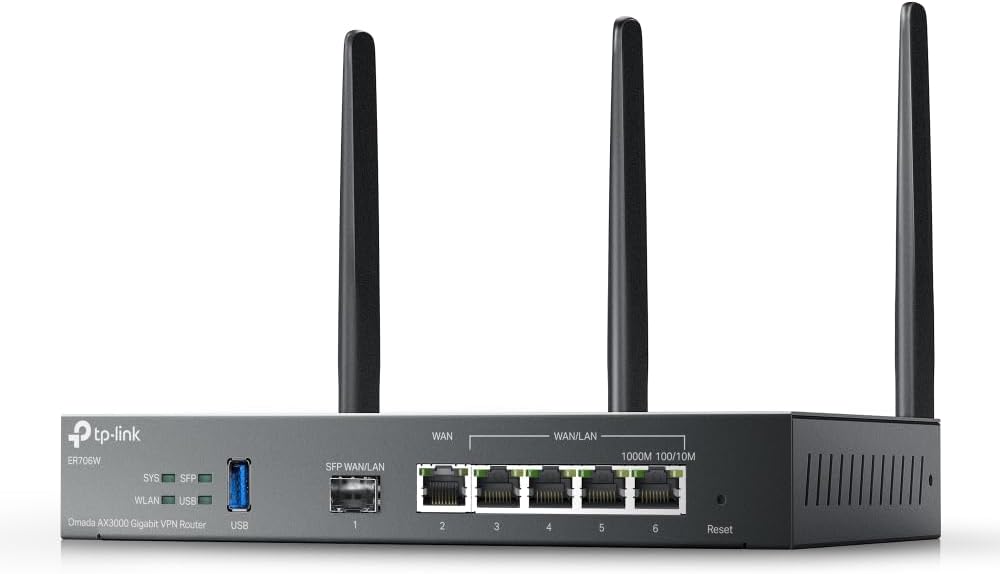
The Omada ER706W offers excellent value for businesses seeking reliable connectivity without breaking the budget. It is ranked as Best Budget due to its competitive pricing and solid feature set.
We may earn a commission when you buy through this link, at no additional cost to you.
Key strengths include load balancing on up to five WAN ports and a SFP slot for flexible fiber connections. The high-security VPN protocols ensure safe data transmission for remote workers.
Some users may find the initial setup complex if they do not have the Omada controller installed. However, the price point and performance make it a worthy investment for cost-conscious enterprises.
Buy this router if you need a versatile gateway with strong redundancy features. It is the final recommendation for small offices needing a budget-friendly yet powerful network core.
Load Balancing on up to 5 WAN ports raises the utilization rate of multi-line broadband connections.
Supports SSL IPSec GRE WireGuard PPTP L2TP and OpenVPN for secure remote access.
We may earn a commission when you buy through this link, at no additional cost to you.
The Ruckus R750 is engineered specifically for ultra-dense environments where many devices connect simultaneously. Its performance rating makes it a top choice for high-traffic commercial spaces.
We may earn a commission when you buy through this link, at no additional cost to you.
This access point delivers consistent connectivity in crowded areas by utilizing advanced beamforming and channel management. It ensures that every user gets a stable signal even when hundreds of devices are active.
The main trade-off is the cost and the need for a controller to unlock full functionality. However, the reliability and coverage in dense scenarios justify the investment for large venues.
Hotels conference centers and large offices should buy this to handle heavy loads. It is the final recommendation for venues where connection stability is critical for customer satisfaction.
Part number 901-R750-US00 ensures reliable Wi-Fi 6 access for ultra-dense environments.
We may earn a commission when you buy through this link, at no additional cost to you.
The Ruckus R670 leads the pack as a premium access point with Wi-Fi 7 technology. It earns the Best Premium badge for its ability to handle next-generation data rates and device connections.
We may earn a commission when you buy through this link, at no additional cost to you.
Its standout feature is BeamFlex+ adaptive antenna technology that maximizes signal coverage and throughput. With a combined data rate of 9.34 Gbps, it supports simultaneous connections across multiple spatial streams seamlessly.
The high price reflects the cutting-edge features and future-proofing it offers. However, for businesses requiring maximum performance now, the investment ensures you won't need to upgrade soon.
Large enterprises and tech-forward companies should buy this for superior performance. It is the final recommendation for those needing top-tier speed and capacity.
BeamFlex+ offers first-of-its-kind smart antenna technology that maximizes signal coverage and throughput.
Provides exceptional end-user experience expanding the range of use cases for Wi-Fi 7.
We may earn a commission when you buy through this link, at no additional cost to you.
The NETGEAR Orbi 970 Series is a powerful mesh system designed to blanket large properties in reliable high-speed Wi-Fi 7. It is ideal for businesses needing extensive coverage across multiple floors or floors.
We may earn a commission when you buy through this link, at no additional cost to you.
Its standout quality is the dedicated quad-band backhaul that prevents slowdowns on every device simultaneously. With up to 27 Gbps speeds, it handles lag-free streaming and large file transfers effortlessly.
The main trade-off is the high price tag for the 3-pack system. However, the coverage and performance make it a cost-effective solution compared to hardwired access point deployments.
Large offices and campus-like buildings should buy this for seamless connectivity. It is the final recommendation for those needing whole-building coverage without dead zones.
Exclusive patented Quad-Band technology reserves a dedicated lane for satellite traffic so WiFi stays fast on every device.
10 Gig internet port plus 10 Gig LAN ports deliver ultra-fast wired connections for gaming PCs and home offices.
We may earn a commission when you buy through this link, at no additional cost to you.
The Omada EAP650 offers incredible value as a standalone access point for small to medium networks. It earns a Best Budget badge for its low cost and solid performance capabilities.
We may earn a commission when you buy through this link, at no additional cost to you.
Key strengths include free cloud management and a sleek design that blends into modern offices. The ultra-fast true Wi-Fi 6 speeds ensure smooth data transmission for connected devices.
While it supports mesh features, using them requires a controller which adds complexity. However, for simple deployments, it provides excellent reliability and security features out of the box.
Small businesses and retail shops should buy this for easy deployment. It is the final recommendation for those needing a reliable point without expensive hardware controllers.
Free cloud management with no additional fees managed entirely in the cloud without the need for hardware controllers.
Compact design ensures simple installation while saving space making EAP650 blend into any modern office.
We may earn a commission when you buy through this link, at no additional cost to you.
The Ubiquiti U6+ is a reliable wireless access point that provides high-speed data transfer for businesses. It is a strong mid-range option for those in the UniFi ecosystem.
We may earn a commission when you buy through this link, at no additional cost to you.
Its key strength is the 3 Gbit/s transmission speed and data encryption features that protect valuable data. The wall mountable form factor ensures maximum comfort and fatigue-free usage during installation.
The trade-off is that full functionality requires the UniFi controller software which may be complex for some. However, the hardware quality and integration options make it a preferred choice for many IT managers.
Offices using UniFi gear should buy this for seamless integration. It is the final recommendation for those needing a dependable wireless solution.
Data Encryption feature effectively protects your precious and valuable data from unauthorized access.
Wall Mountable form factor ensures maximum comfort and pain fatigue-free usage.
We may earn a commission when you buy through this link, at no additional cost to you.
The TP-Link BE6500 is a high-performance router utilizing the latest Wi-Fi 7 technology. It is designed for businesses needing future-ready connectivity for demanding applications.
We may earn a commission when you buy through this link, at no additional cost to you.
Key strengths include Multi-Link Operation which delivers enhanced throughput and lower latency. With speeds up to 5764 Mbps on 5 GHz, it ensures seamless 4K streaming and fast downloads.
The trade-off is that it is not compatible with Deco mesh systems which limits scalability. However, its strong security features and high throughput make it a great choice for standalone use.
Tech businesses and high-demand offices should buy this for speed. It is the final recommendation for those needing a fast router with secure design.
Simultaneously transfers data across frequency bands delivering enhanced throughput lower latency and improved reliability.
TP-Link is a signatory of the CISA Secure-by-Design pledge designed with advanced security as a core requirement.
We may earn a commission when you buy through this link, at no additional cost to you.
The NETGEAR Nighthawk router delivers robust performance with Wi-Fi 7 technology for busy environments. It offers a great balance of speed and ease of use for commercial settings.
We may earn a commission when you buy through this link, at no additional cost to you.
Its key strength is the dedicated tri-band setup ensuring devices get a fast lane even in crowded networks. With up to 9.3 Gbps, it keeps streaming and video calls smooth without lag.
The main trade-off is that coverage may need a mesh system for very large properties. However, the Nighthawk app makes setup and management straightforward for all technical levels.
Small to mid-sized offices should buy this for reliable Wi-Fi. It is the final recommendation for those needing a capable router without complex management.
A dedicated tri-band WiFi 7 router with a third high-speed band for demanding devices keeps up as your connected home grows.
NETGEAR routers give you more control over your home network with security features enabled out of the box.
We may earn a commission when you buy through this link, at no additional cost to you.
The ASUS RT-BE88U is a powerhouse router built for speed and reliability in demanding networks. It is a top choice for businesses needing high wired and wireless bandwidth.
We may earn a commission when you buy through this link, at no additional cost to you.
Key strengths include two 10G ports that bolster network capacity for large data transfers. The Wi-Fi 7 tech boosts throughput up to 7.2 Gbps ensuring always-on internet.
The trade-off is the premium cost which may not be necessary for smaller setups. However, for those needing top-tier wired and wireless performance, it is a great investment.
Large enterprises and data-heavy offices should buy this for robust performance. It is the final recommendation for those needing maximum wired and wireless capacity.
Bolster your wired network capacity up to 34G with one 10G SFP+ port and one standard 10G WAN/LAN port.
Ensure seamless connectivity for all devices with a feature-rich whole-home network powered by AiMesh.
We may earn a commission when you buy through this link, at no additional cost to you.
Choosing the right commercial router involves assessing your network needs and technical requirements. This guide helps you focus on the factors that matter most for business environments.
The WiFi standard determines the maximum speed and efficiency of your network. Look for devices supporting at least WiFi 6 for current needs or WiFi 7 for future-proofing and high bandwidth.
Speed is critical for supporting multiple devices without latency. Ensure the router offers enough throughput for your data usage and applications like video conferencing or file transfers.
Coverage determines how far your signal reaches throughout the office. Consider the square footage and layout to ensure every workstation has a reliable connection without dead zones.
Ports allow wired connections for critical devices like servers or desktops. Check for sufficient Gigabit or Multi-Gig ports to avoid bottlenecks when connecting hardwired equipment.
Management tools help you control and monitor network traffic easily. Look for cloud-based interfaces or intuitive apps that let you update settings and guest access without complex tools.
Security features protect your business data from unauthorized access. Prioritize routers with built-in firewalls, guest network isolation, and encryption protocols to ensure safe browsing.
Scalability ensures your network can grow as your business expands. Choose devices that support adding more access points or mesh nodes without needing a complete replacement.
Reliability means your network stays up and running when you need it. Look for devices with proven uptime records, failover options like backup WAN, and stable firmware updates.
Start by placing your router in a central location away from obstructions and electronic interference. This ensures optimal signal strength and coverage for all connected devices in your office.
Regularly update the firmware to patch security vulnerabilities and improve performance. Most modern routers support automatic updates, but check settings to ensure they are enabled for continuous protection.
Monitor your network traffic to identify any bottlenecks or unauthorized usage. Use the management app or dashboard to adjust bandwidth limits or prioritize critical business applications as needed.
A commercial wireless router is a networking device designed for businesses to provide secure and reliable internet access. It often includes features like multiple SSIDs, guest portals, and robust security not found in standard home routers.
Modern commercial routers can handle hundreds of devices simultaneously. High-end models with WiFi 7 or advanced management can support up to 200 connected devices without significant performance drops.
A router connects your network to the internet and manages traffic, while an access point extends wireless coverage. Many commercial setups use a router with multiple access points for wider reach.
Not all commercial routers require a controller. Some models have standalone cloud management or simple apps, while enterprise-grade systems often benefit from a controller for centralized setup and monitoring.
Yes, WiFi 6 offers better speed, efficiency, and device handling than WiFi 5. For businesses with many devices, the improved performance and security features make WiFi 6 a necessary upgrade.
Secure your router by changing default credentials, enabling WPA3 encryption, isolating guest networks, and updating firmware regularly. Many commercial routers include built-in firewalls and intrusion prevention tools.
The top picks like the ASUS ExpertWiFi EBR63 and Omada EAP650 offer excellent value for different business sizes and needs. Whether you need budget-friendly access or premium speed, there is a suitable option in this list.
Prioritize features like security and scalability to ensure your network grows with your business. Investing in a reliable router now can save money and downtime in the future.
Remember to verify current prices and availability before purchasing. Network needs change over time so check if the latest models meet your requirements for the best results.