
NGTeco Standalone Time Clock
4.3Editor score
Zero setup hassle operation
USB data export support
No monthly subscription fees
This guide compares the top biometric fingerprint scanner time clocks for small businesses, evaluating security, accuracy, cloud access, and payroll integration
Modern businesses need accurate time tracking to reduce payroll errors and prevent time theft. A biometric fingerprint scanner time clock offers secure verification through unique biological traits. This technology ensures every employee clocks in personally, eliminating buddy punching and simplifying attendance management for growing teams.
We evaluated ten leading models based on authentication methods, data security, and ease of use. Our analysis considered standalone versus cloud capabilities, storage limits, and warranty support. Each product was assessed for reliability, user interface design, and compatibility with existing payroll systems to help you choose the right solution.
Each pick highlights specific strengths like budget friendliness or advanced cloud reporting. We include detailed pros and cons to guide your decision making. Prices and availability change frequently, so verify current offers before purchasing to ensure you get the best value for your specific workplace needs.
4.3Editor score

4.1Editor score

4.7Editor score
This side-by-side comparison helps you quickly identify key differences between the top models available. We highlight unique features and specifications to match your business needs.

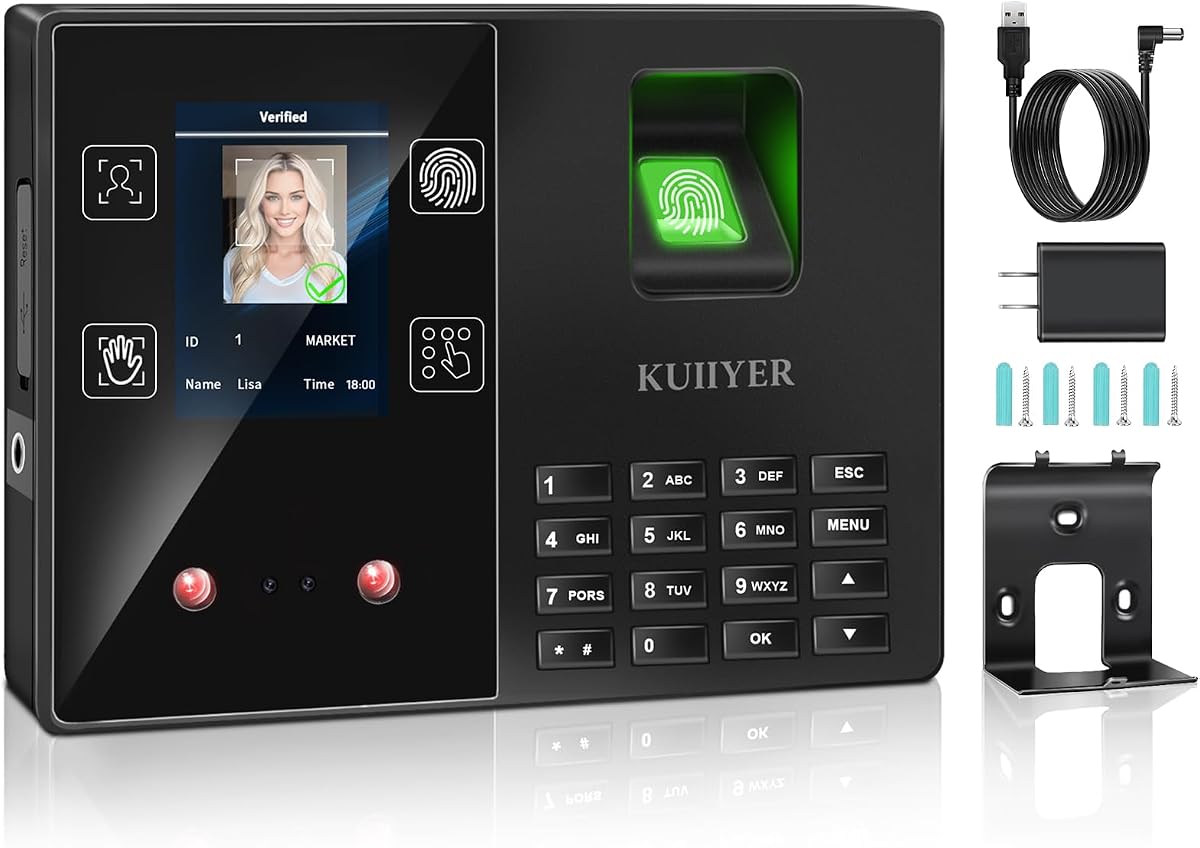


This device combines face palm and fingerprint scanning for maximum security. It holds a 4.1 rating from users who appreciate its reliability. The web based punch time clock machine eliminates paperwork by sending data directly to the cloud.
We may earn a commission when you buy through this link, at no additional cost to you.
Its remote accessibility allows managers to track attendance from anywhere using the included mobile app. The system sends alerts for early or late punches which helps manage labor costs. You can export CSV files for easy payroll integration saving hours of manual work.
While powerful it requires a subscription after the thirty day free trial. This cost is ongoing but the benefits of automated reporting justify it for most businesses. Some users noted initial setup took time to configure all access methods.
Ideal for small businesses needing robust security without hiring IT staff. The lifetime warranty with free replacements minimizes risk over time. Choose this if you want a comprehensive solution that grows with your team.
Using multiple biometric options ensures only authorized employees clock in reducing fraud.
Automated reports and exports free up time to focus on business growth.
We may earn a commission when you buy through this link, at no additional cost to you.
This model offers true standalone operation so you can get started in minutes. It carries a 4.3 rating for its simplicity and durability. The digital system delivers precise records without requiring complex network installations.
We may earn a commission when you buy through this link, at no additional cost to you.
Users benefit from onboard memory supporting up to 500 user profiles and 50,000 punch records. The included USB drive allows you to export attendance data for instant payroll integration. Built with industrial grade materials it handles daily use in warehouses or retail counters.
Since it lacks cloud features you cannot monitor staff remotely. Data export is manual via USB which might not suit larger teams. However the lack of monthly fees makes it highly cost effective for simple needs.
Perfect for small businesses wanting a paperless solution without subscriptions. The internal backup preserves records during power loss ensuring no data is lost. Choose this if you value privacy and zero setup hassle.
Zero setup hassle means no WiFi or complex software is required for basic use.
Ditch wasteful paper cards and ribbons to cut supply costs significantly.
We may earn a commission when you buy through this link, at no additional cost to you.
The uAttend JR2000 makes time tracking effortless with a cloud-based system. It holds a 3.7 rating reflecting its functional but basic appeal. The system automates payroll tasks handling tax filings and switching easily.
We may earn a commission when you buy through this link, at no additional cost to you.
Real-time data access lets you manage attendance from any device for flexibility. The interface is designed for any team from first-time users to tech-savvy managers. Comprehensive reporting tools provide valuable insights into productivity and labor costs.
Some users find the subscription model less competitive than free options. The lower rating suggests occasional connectivity or usability issues. Ensure you test the cloud service before committing to long-term use.
Best for businesses already using uAttend services needing a quick upgrade. The automatic backups provide peace of mind regarding data availability. Choose this if you prioritize cloud management over offline independence.
Automate payroll with attendance data and handle tax filings with ease.
View and manage employee attendance from any device for maximum flexibility.
We may earn a commission when you buy through this link, at no additional cost to you.
This device offers the highest rating at 4.7 due to its speed and support. It handles fingerprint recognition in just 0.5 seconds ensuring quick clock-ins. Real-time punch detection ensures accurate attendance records simplifying admin tasks.
We may earn a commission when you buy through this link, at no additional cost to you.
The mobile app allows you to edit punches in seconds with instant sync. This feature reduces time spent on payroll adjustments when errors occur. Built-in backup safeguards records during power outages minimizing disruption to tracking.
Syncing requires the same local network which can limit remote editing. However the US-based support team is available for troubleshooting issues. The one-year warranty adds reliability for business critical devices.
Ideal for offices needing fast reliable clock-ins and easy correction. The automatic calculations eliminate manual totals reducing payroll mistakes. Choose this if you value speed and accessible customer support.
Advanced sensor authenticates fingerprints in 0.5 seconds for quick secure clock-ins.
Edit punches via app with instant sync to ensure accurate hours.
We may earn a commission when you buy through this link, at no additional cost to you.
This clock supports up to 1000 users making it great for larger teams. It has a 3.7 rating but offers four ways to punch clock including face and palm. The TFT color LCD display makes it intuitive to set up.
We may earn a commission when you buy through this link, at no additional cost to you.
No monthly fees and auto hour calculations keep ongoing costs low. Intelligent voice announcements confirm identity in multiple languages for diverse teams. The infrared camera identifies faces and palms even in dim environments.
Some users report a steeper learning curve for advanced configuration. The voice features might distract in quiet offices. USB drives are not included but data can be easily downloaded.
Best for medium businesses needing high capacity without recurring costs. The eco-friendly upgrade from paper cards reduces waste and supply costs. Choose this if you need large user support and zero fees.
Latest identification technology provides responsive and accurate identification of employees.
No monthly fees and automatic calculations make this an easy upgrade.
We may earn a commission when you buy through this link, at no additional cost to you.
This USB device is designed for desktop use with existing software. It has no rating listed but focuses on fast and accurate verification. The play USB interface allows easy connection with computers for quick setup.
We may earn a commission when you buy through this link, at no additional cost to you.
Multiple user enrollments are supported ensuring secure verification for teams. The compact and lightweight design makes it convenient for office desktop use. It is compatible with most attendance and access control software.
Since it is a scanner you need separate software for reporting. This adds a layer of complexity for smaller businesses. It is best used in controlled environments with existing IT systems.
Best for IT managers needing a hardware scanner for existing apps. The stable performance ensures consistent verification over time. Choose this if you already have a time tracking platform.
Ensures secure user verification and efficient attendance tracking.
USB interface allows easy connection with computers for quick setup.
We may earn a commission when you buy through this link, at no additional cost to you.
Designed with privacy in mind this device requires no WiFi or network setup. It has a 4.1 rating and data stays local and secure via USB transfer. You can have the time clock ready within 10 minutes.
We may earn a commission when you buy through this link, at no additional cost to you.
Working hours are totaled automatically reducing manual calculations and paper cards. It supports five languages for diverse workforce communication. The package includes five RFID cards for additional punch methods.
The lack of internet connection limits remote monitoring capabilities. However the absence of subscriptions makes it highly affordable for small teams. The one-year warranty ensures protection against defects.
Best for businesses prioritizing data privacy and budget. The easy setup minimizes downtime when starting a new project. Choose this if you want a standalone solution with zero costs.
No Internet needed keeps data local and secure via USB transfer.
Ready to use out of the box with no monthly fees.
We may earn a commission when you buy through this link, at no additional cost to you.
This model allows real-time access to punch data from anywhere. It has a 3.8 rating with robust shift management tools. The system uses AWS US servers with end-to-end encryption.
We may earn a commission when you buy through this link, at no additional cost to you.
Customizable shifts support rotating and split schedules for complex teams. Offline punch capture syncs automatically when the network is restored. The free management app covers basic needs without subscription costs.
User capacity is limited to 200 which may suit mid-sized businesses. Some features like GPS check-ins require a TimeEntrix subscription. Security compliance is a strong point for regulated industries.
Best for teams needing flexible shift rules and cloud access. The secure storage ensures workforce records are protected. Choose this if you need compliance and shift customization.
Access real-time punch data from anywhere via any web browser.
Flexible shift configurations suit all team structures.
We may earn a commission when you buy through this link, at no additional cost to you.
This device keeps data private and fully under your control without internet. It has a 3.9 rating and supports up to 1000 employees. The system automatically totals employee hours helping reduce payroll errors.
We may earn a commission when you buy through this link, at no additional cost to you.
Get up and running in minutes with a step-by-step video guide. You can switch between five languages easily for diverse teams. No hidden costs exist beyond the one-time purchase.
The basic reporting may not satisfy advanced HR needs. However the simplicity is perfect for small teams just starting. The lifetime support ensures help is available when needed.
Best for businesses needing simple privacy-focused time tracking. The video guides minimize setup frustration for non-tech managers. Choose this if you want simplicity and reliability.
No WiFi needed keeps data private under your control.
Skip subscriptions and hidden costs for a simple one-time purchase.
We may earn a commission when you buy through this link, at no additional cost to you.
This model offers fast stable connectivity with both 2.4GHz and 5GHz WiFi. It holds a 4.2 rating for its reliability and power backup. The intuitive mobile app lets managers monitor real-time clock-ins on the go.
We may earn a commission when you buy through this link, at no additional cost to you.
Dual-band WiFi ensures uninterrupted performance for daily office operations. The built-in 2000mAh battery keeps the time clock running during power cuts. AWS cloud storage ensures your data is fully protected.
Some advanced features require a separate TimeEntrix subscription. The backup power adds resilience against outages protecting data loss. Support is available locally for quick resolution of issues.
Best for offices needing reliable connection and uptime. The auto-reporting simplifies payroll preparation significantly. Choose this if you value connectivity and power reliability.
Manage attendance effortlessly from anywhere with intuitive app and portal.
Fast stable connectivity for uninterrupted performance and smooth tracking.
We may earn a commission when you buy through this link, at no additional cost to you.
Selecting the right device requires understanding your business size security needs and budget. This guide breaks down the critical factors to ensure a smooth purchase.
Different models offer various biometric options like fingerprint face palm or PIN codes. Choose a method that suits your environment such as face scanning for gloved hands. Multi-modal systems provide higher security but may be more complex to configure initially.
Decide between standalone devices that export via USB or cloud models with WiFi. Standalone units offer better privacy but lack remote access. Cloud models allow remote monitoring but require reliable internet and potential subscriptions.
Check the maximum number of user profiles and punch records supported. Businesses with large teams need devices supporting at least 500 users. Ensure the storage can handle a months worth of data without overwriting recent records.
Look for models that export data in formats compatible with your payroll software. Automated reports save time compared to manual CSV processing. Advanced tools offer insights into overtime and labor trends for better budgeting.
Data security is crucial when storing sensitive employee information. Cloud models should use encryption and secure servers like AWS. Check if the device supports features like GPS tracking for remote workers.
A user-friendly interface reduces training time for employees and managers. Models with clear displays and simple navigation minimize clock-in errors. Consider devices with multilingual support if your team speaks various languages.
Reliable customer support helps resolve technical issues quickly. Look for warranties of at least one year with responsive service. US-based support ensures you can get assistance during business hours.
Beyond the initial purchase consider ongoing subscription fees for cloud features. Some models offer free basic cloud storage while others charge monthly. Calculate the yearly cost to determine the true investment for your business.
Start by registering all employee biometric data through the setup interface. Ensure each scan is clean and complete for accurate recognition. Assign unique PINs or IDs to staff as backups if biometric scans fail.
Biometric clocks use unique biological traits to verify identity ensuring that the employee clocking in is who they say they are. This prevents buddy punching and simplifies payroll processing significantly.
Not all devices require internet. Standalone models work offline and export data via USB. Cloud models need WiFi for remote access but often store data locally for offline use.
Some models allow using alternative methods like PIN codes or card swabs if a fingerprint fails to register. Enrolling multiple authentication methods ensures every employee can clock in reliably.
Most modern systems export CSV files or connect directly to popular payroll platforms. Check the specifications to confirm compatibility with your specific software provider before purchasing.
High-quality models include internal backup batteries or capacitors to preserve records during power outages. This ensures no data loss occurs during unexpected electrical interruptions.
Some devices are built with rugged industrial-grade materials for tough conditions. Always check the housing rating if installing the clock in a warehouse or outdoor area.
Many models like NGTeco offer free cloud services without hidden costs. Always review the subscription terms to ensure you are not paying for features you do not need.
This guide highlighted ten top models ranging from budget-friendly standalone units to advanced cloud systems. Each offers unique benefits such as high user capacity or robust remote monitoring capabilities.