
TECKNET Mouse Jiggler Undetectable USB Mover Device
4.6Editor score
Three Smart Movement Modes
Color LED Indicator Feedback
Plug and Play Functionality
Compare the top laptop jiggler devices for remote work and meetings. This guide reviews undetectable mouse movers to keep your PC awake without software.
Keeping your computer active during long remote work sessions is essential for seamless virtual meetings. A laptop jiggler helps prevent your system from entering sleep mode or showing away status to colleagues. These devices simulate natural mouse movements to keep your status green on platforms like Teams or Zoom.
We evaluated ten top-rated mouse jigglers based on undetectability, ease of use, and build quality. Our comparison focuses on hardware solutions that require no software installation or IT permissions. Each product was analyzed for compatibility with Windows, Mac, and Linux systems to ensure broad utility.
Every pick in this guide highlights specific strengths like silent operation, programmable timers, or premium materials. You will find detailed breakdowns of how each device works and who it suits best. Please note that product availability and pricing can change frequently on retail platforms.
4.6Editor score

4.7Editor score

4.5Editor score
This table provides a side-by-side comparison of all ten selected laptop jiggler models. It highlights key specifications such as connection type, movement style, and unique features to help you make an informed decision quickly.



The TECH8 USA mouse mover is our top choice for its innovative design and reliable performance. It carries a strong user rating for effectively keeping computers awake without software intervention. The 3D hologram disc adds a visual flair to your workspace while serving a functional purpose.
We may earn a commission when you buy through this link, at no additional cost to you.
This device shines with its custom activity settings and auto timer features. You can choose from low, medium, or high motion levels to suit different needs. The built-in power button and auto shut-off timer ensure you have full control over when the device runs without needing to unplug it.
While the unique disc design is a plus, it does require you to place your mouse on top of it. This might not work well with ergonomic mice that cannot sit flat on a surface. Additionally, the price is higher than basic stick-type jigglers but justifies the build quality.
If you want a premium jiggler that doubles as a desk accessory, this is an excellent pick. It is ideal for professionals who value design and need reliable status keeping on multiple platforms. The US-based support team adds peace of mind for any potential issues.
The ambient glow ring and hologram disc make this device stand out on any desk setup.
Simply place your mouse on the disc and power it on for instant operation without driver installation.
We may earn a commission when you buy through this link, at no additional cost to you.
TECKNET offers one of the most versatile options on the market with three distinct movement modes. It is highly rated for its ability to keep systems active without drawing IT attention. The unique color LED indicator helps users know exactly which mode is running at any time.
We may earn a commission when you buy through this link, at no additional cost to you.
The device is extremely easy to use with a single button to cycle through settings. Mode one moves the cursor slightly every few seconds while mode two and three offer random movements. This flexibility allows you to tailor the activity to match your specific workflow requirements.
One trade-off is that the single button can make switching modes slightly less intuitive than toggle switches. The build is also more basic compared to premium metal models. However, given the low price, these compromises are minor for a functional daily tool.
This device is perfect for budget-conscious users who need a reliable and undetectable solution. It works seamlessly across Windows, macOS, and Linux systems making it a safe choice for mixed environments. The warranty support also adds value to this already cost effective product.
The color LED indicator discreetly shows you which jiggle mode is currently active.
Choose from slight pixel movements or random variable speeds to avoid detection.
We may earn a commission when you buy through this link, at no additional cost to you.
The Meatanty mouse mover stands out for its exceptional silence and user-friendly interface. It is designed to operate quietly so it does not disturb others around you. The visual LED display makes adjusting the interval timer effortless and intuitive to use.
We may earn a commission when you buy through this link, at no additional cost to you.
This device uses a large turntable that accommodates almost any mouse type including ergonomic ones. You do not need to calibrate it before use which saves time during setup. The random trajectory feature ensures the movements look completely natural to anyone watching your screen.
The main downside is that it takes up more desk space than smaller USB sticks. It requires your mouse to sit on top which might interfere with other peripherals on your desk. However, the noise reduction and ease of use outweigh this size consideration.
If silence is your priority in a shared office or home environment this is the best choice. The durable build ensures it lasts through years of daily use without issues. Its thoughtful design makes it a great gift for colleagues who work long hours.
The silent motor emits less than 20 dB of sound to keep your workspace quiet.
Set the movement frequency between five and sixty seconds using the plus and minus buttons.
We may earn a commission when you buy through this link, at no additional cost to you.
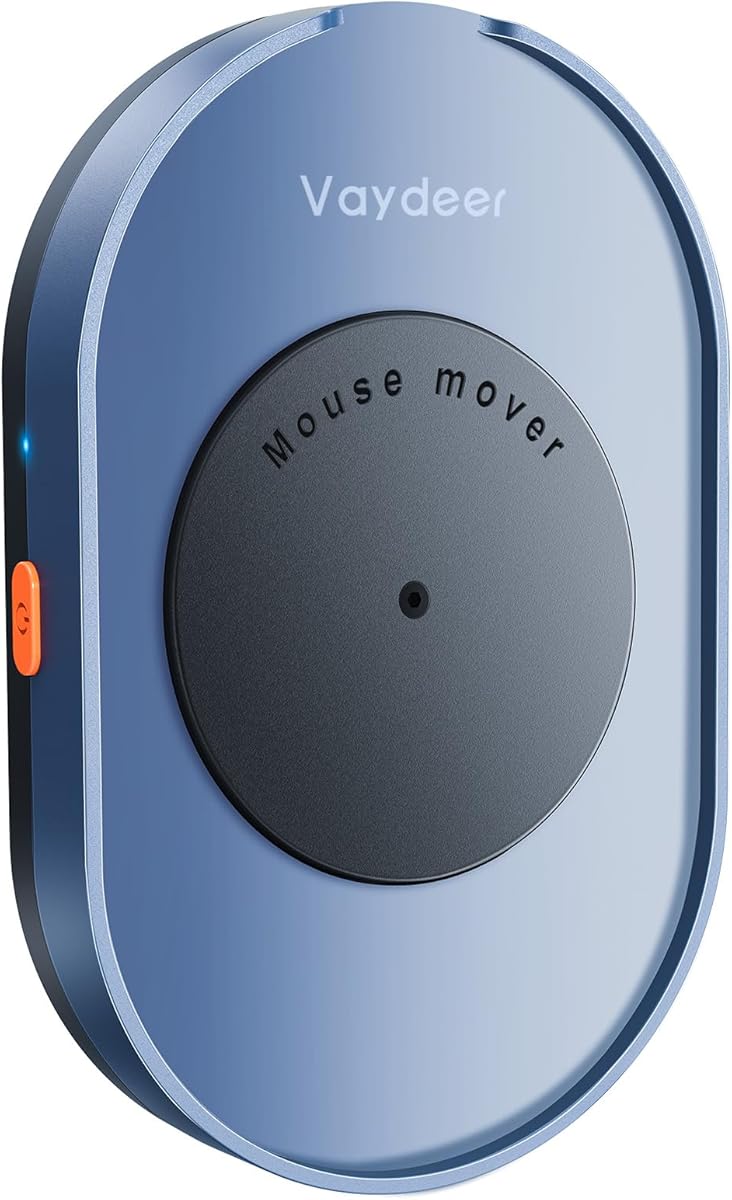
Vaydeer emphasizes safety and reliability with its ISO certified security features. This makes it a strong candidate for corporate environments where device trust is a major concern. The motor is designed to be extremely quiet ensuring your work sessions remain distraction free.
We may earn a commission when you buy through this link, at no additional cost to you.
You have the flexibility to power the device via USB or an external adapter. This versatility ensures it works even if your computer ports are limited or busy. The dedicated switch means you do not have to plug and unplug the cable every time you use it.
One minor inconvenience is managing the cable if you choose to use the external adapter. The bulk of an adapter adds to the cable clutter compared to direct USB power. However, this is a small price for the added flexibility and security assurances.
This model is ideal for those who prioritize security compliance in their device choices. It offers a reliable and silent way to stay active on your network. The responsive support team ensures any questions are answered quickly and efficiently.
Passed ISO/IEC27001:2013 certification to ensure the device is safe for use.
Power the device via USB port or included adapter for maximum flexibility.
We may earn a commission when you buy through this link, at no additional cost to you.
The WFB 2 pack offers great value for users with multiple devices or those who want backups. These devices are recognized by computers as standard 2.4G mice making them highly secure. They run directly after plugging in which means no software setup is ever required.
We may earn a commission when you buy through this link, at no additional cost to you.
The movement is designed to be minimal shifting the cursor by only one or two pixels. This ensures you can work normally without the cursor interfering with your actual tasks. It is perfect for keeping a status green during long meetings where you might be distracted.
Because the movement is so slight it might be noticeable on very high resolution screens. The build is also quite basic and is not as durable as metal or high end plastic models. However for the price point and quantity these are acceptable compromises for most users.
This pack is a smart choice for families or teams needing multiple jigglers at once. You can keep one device on your laptop and another on a desktop for seamless coverage. The compatibility across systems makes it a universal option for many setups.
The system identifies this device as a standard 2.4G mouse to avoid detection.
Slight 1-2 pixel shifts keep your PC awake without disrupting your work.
We may earn a commission when you buy through this link, at no additional cost to you.
AUEDROT caters to modern laptop users with its native USB-C connection. This eliminates the need for dongles and keeps your ports tidy while maintaining full functionality. The device is recognized as a trusted composite device ensuring safety and compatibility across systems.
We may earn a commission when you buy through this link, at no additional cost to you.
You can switch between two modes to customize how the cursor moves. A short press toggles between settings while a long press turns the device off completely. This simple interface removes the hassle of frequent plugging and unplugging during your workday.
One limitation is that it only works with USB-C ports which may require an adapter on older PCs. The feature set is also relatively basic compared to models with timers or displays. However for USB-C native support it is a very practical solution for new devices.
This is the best pick if you want a simple and direct solution for newer hardware. It works seamlessly without interfering with your regular mouse or software. The minimalist design fits well into professional setups without drawing unnecessary attention.
Connect directly to modern USB-C ports without needing extra adapters or hubs.
The sleek black profile stays unobtrusive on any desk surface.
We may earn a commission when you buy through this link, at no additional cost to you.
Yonktoo offers a solution that combines a slim profile with a mechanical movement system. You place your optical mouse on its rotating platform to create continuous movement. This hardware based approach works independently without needing any software installation on your machine.
We may earn a commission when you buy through this link, at no additional cost to you.
The device starts automatically as soon as it connects allowing you to focus on work. The included cable gives you flexibility to position the device anywhere on your desk. This helps you keep your setup organized while ensuring the jiggler functions perfectly.
Since it relies on mechanical movement it may be slightly less silent than solid state options. The rotating platform also means your mouse must be placed on top which could limit its usability. These factors are manageable for users who prioritize physical movement simulations.
This is a great option if you want a simple plug and play experience. It keeps your computer active without complex settings or software configurations. The long cable ensures you can route it neatly even on larger desks.
The ultra slim shape fits neatly into home offices without taking up workspace.
The device begins working immediately when connected to your system.
We may earn a commission when you buy through this link, at no additional cost to you.
This model features a sturdy aluminum alloy body that feels more premium than standard plastic. The build quality suggests durability and longevity making it a reliable choice for daily use. It includes a USB-C adapter ensuring it works well with modern laptops out of the box.
We may earn a commission when you buy through this link, at no additional cost to you.
You can freely switch between slight and random jiggle modes to fit your needs. The device is recognized as a trusted USB composite device for safety. A simple button control allows you to turn it on or switch modes easily without hassle.
The switch mechanism might require a bit of practice to master during meetings. The metal build also adds a small amount of weight compared to lightweight alternatives. However the sturdiness and included adapter make up for these minor conveniences.
If you prefer a more durable device that feels solid in hand this is a great pick. It ensures your system stays active without compromising on build quality. The compatibility with multiple systems makes it versatile for different environments.
The aluminum alloy body provides a sturdy and durable construction.
Includes an adapter to support both USB and USB-C connections seamlessly.
We may earn a commission when you buy through this link, at no additional cost to you.
This device is designed for simplicity and portability above all else. Its tiny size makes it easy to throw in a laptop bag for use anywhere. The system recognizes it as a regular mouse so it is safe to use in most settings.
We may earn a commission when you buy through this link, at no additional cost to you.
It is fully driver-free allowing you to plug it in and start working immediately. There are no complicated settings or modes to worry about during meetings. This simplicity ensures a reliable experience without potential software conflicts or errors.
The trade-off for this small size is that it lacks advanced features like timers. You cannot customize how it moves or when it stops other than unplugging it. However for basic use cases this does not hinder its effectiveness significantly.
This is a great backup option for those who travel frequently with their laptops. It ensures your device stays awake even when you are away from your main desk. The broad compatibility makes it a reliable tool for various operating systems.
The compact design makes it easy to carry for on the go use.
Plug it into your computer and it works instantly without any installation.
We may earn a commission when you buy through this link, at no additional cost to you.
This device offers a unique cordless solution for laptops with trackpads. It simulates natural fingertip movements across your touchpad to keep the system active. This is especially useful for users who do not have an external mouse to place on a mover.
We may earn a commission when you buy through this link, at no additional cost to you.
The battery life is impressive lasting up to six months with typical daily use. This eliminates the need for constant plugging or changing batteries frequently. The silent motor ensures your workspace remains quiet even when it is moving the cursor.
You may need to adjust your touchpad settings to ensure reliable detection of movement. Some built-in rejection features might filter out the gentle motions so disabling them is key. This setup step might be a slight hurdle for less technical users.
It is an excellent option for those who want a fully wireless and unobtrusive tool. The portability and battery life make it a great companion for remote work setups. Just remember to optimize your settings for the best performance.
Enjoy a clutter-free workspace without any cables or connections required.
Designed specifically to work with built-in laptop touchpads directly.
We may earn a commission when you buy through this link, at no additional cost to you.
Selecting the right laptop jiggler involves considering several key factors to ensure it meets your needs effectively.
Most devices use standard USB or USB-C connections. Ensure your laptop has the required ports or that you have the necessary adapters before purchasing. Some modern models are cordless and run on batteries for greater flexibility.
Check your laptop ports to match the device connection type for seamless integration without extra hardware.
A reliable jiggler should not trigger IT security scans. Look for devices that are recognized as standard mice or composite devices by your operating system. This ensures safe use in corporate environments without violating policies.
Prioritize models explicitly designed to be hardware undetectable to avoid any potential security flags.
Some units offer multiple movement patterns such as slight shifts or random walks. These options help mimic natural behavior more effectively than a single repetitive motion. Having modes gives you flexibility to adapt to different usage scenarios.
Choose a device with multiple modes if you want to vary movement patterns to stay active naturally.
The best devices have intuitive controls like dedicated buttons or dials. Some models require plugging and unplugging to toggle power while others have switches for convenience. A clear interface makes daily operation simple and efficient for users.
Look for a simple switch or button interface to avoid the hassle of frequent plugging.
Materials like aluminum alloys tend to be more durable than basic plastic. A sturdy build ensures the device lasts longer even with daily use in busy environments. Consider the weight and design if you plan to carry it often.
Opt for metal construction if you need a rugged device that withstands frequent travel.
Power can come directly from your computer via USB or an external adapter. Cordless battery powered options offer the most freedom but require occasional charging. Choose based on your preference for convenience versus cable management.
Decide if you prefer the simplicity of USB power or the mobility of a battery powered unit.
Ensure the device works with your operating system whether Windows Mac or Linux. Most hardware movers are universal but it is important to verify before buying. Compatibility ensures you can use it across different devices without issues.
Verify support for your specific operating system to guarantee seamless functionality.
If you travel frequently a compact design will fit easily in your laptop bag. Larger devices might be more comfortable for stationary use but take up more desk space. Balance the footprint with your need for mobility in different locations.
Pick a slim design if you need a portable solution for working on the go.
Most devices require you to simply plug them into your computer or connect the power adapter. Once connected ensure the power switch is set to the on position before starting your work session.
For mechanical models place your mouse on the rotating platform ensuring it is stable. Adjust any settings or modes according to your preference to keep your cursor moving naturally.
Keep the device clean by wiping it with a dry cloth occasionally. Avoid exposure to moisture or extreme temperatures to maintain longevity and reliable performance.
Hardware jigglers generally simulate physical movement so they are often treated as standard peripherals. However policies vary by company so it is best to check your IT guidelines before using them at a corporate job.
No the products featured in this guide are plug and play devices. They function as hardware peripherals so your computer recognizes them without needing any downloads or driver installations.
Most of these devices are designed to be universal and work across Windows Mac and Linux systems. Just ensure the connection type matches your computer ports for immediate functionality.
They draw minimal power from the USB port or use their own battery so the drain is negligible. This means you can use them throughout the day without worrying about your laptop battery life.
Look for products described as undetectable by IT scans or hardware compliant. Devices that mimic standard mouse inputs are generally safe and less likely to raise security alarms.
Many models come with a dedicated switch or button to toggle power on and off. This feature is convenient so you do not have to disconnect cables repeatedly during your workday.
Choosing the right device depends on your specific needs for portability and features. The TECH8 USA model offers premium design while the TECKNET option provides excellent value for budget buyers.
Prioritize devices that are undetectable and compatible with your operating system to ensure a smooth experience. A good jiggler helps maintain productivity without disrupting your workflow or causing technical issues.
Prices and availability change frequently so review the current details before making a final decision. Investing in a reliable hardware solution is a smart move for anyone who works remotely.