
QUI Presentation Clicker with Volume Control
4.3Editor score
328ft wireless range
Bright red pointer light
Compact portable design
This guide compares the top laser pointers for presentations including wireless clickers, green and red lasers, and rechargeable models for teachers and pros.
Finding the right laser pointer for presentations ensures your message lands clearly. Whether you teach, pitch, or lead meetings, a reliable tool keeps you in control without technical hiccups during critical moments.
We evaluated ten top-rated wireless presenter clickers based on visibility, range, battery life, and ease of use. Our comparison covers red and green lasers, USB-C rechargeables, and plug-and-play models for Mac and Windows.
Each pick highlights key strengths and trade-offs to help you choose quickly. Note that availability and pricing can change on Amazon, so check current listings before finalizing your purchase decision today.
4.3Editor score

4.6Editor score

4.6Editor score
This side-by-side comparison lists all ten selected models with their core specifications to help you match features like laser color, connectivity, and battery type to your specific presenting needs.




This green light clicker stands out for educators and professionals who need high visibility. It holds a strong 4.6 star rating from users who praise its crisp dot on bright projectors and whiteboards.
We may earn a commission when you buy through this link, at no additional cost to you.
The 532nm green laser cuts through ambient light better than standard red pointers. Combined with a USB-C rechargeable battery that lasts weeks, it removes the hassle of hunting for AAA cells before every lecture.
While the price is slightly higher than basic models, the convenience of rechargeable power and dedicated buttons for hyperlinks and volume make it worth the investment. The magnetic receiver storage also prevents losing the dongle.
Buy this if you present in large rooms with bright lights and want a reliable, modern tool that works instantly on Mac or Windows without software installation or Bluetooth pairing steps.
The 532nm green laser provides a brighter dot that remains visible even on LCD screens or in well-lit conference halls where red lasers often disappear.
A single one-hour USB-C charge powers weeks of daily presentations, reducing battery waste and ensuring you never run out of power mid-talk.
We may earn a commission when you buy through this link, at no additional cost to you.
The Logitech R800 is a trusted premium choice known for its brilliant green laser and robust build. It maintains a 4.6 star rating from professionals who value reliability during important corporate presentations.
We may earn a commission when you buy through this link, at no additional cost to you.
Its standout feature is the built-in LCD timer with silent vibrating alerts, helping you manage speaking time without looking at your phone. The green laser ensures visibility on plasma or LCD displays where red might fail.
The trade-off is a higher price and reliance on AAA batteries rather than rechargeable options. However, the range and ergonomic button layout provide confidence from the first slide to the last.
Choose this if you need a durable, feature-rich tool for large auditoriums or executive meetings where time management and visibility are critical to your success.
The LCD timer with silent vibrating alerts lets you track your speaking time without breaking eye contact with the audience or checking a device.
The powerful green laser is easy to see even on LCD and plasma displays and in brightly lit rooms where standard pointers struggle.
We may earn a commission when you buy through this link, at no additional cost to you.
This QUI model offers essential presentation features at an unbeatable budget price. It earns a 4.3 star rating from students and trainers who need basic slide control without extra cost or complexity.
We may earn a commission when you buy through this link, at no additional cost to you.
It supports page up/down, volume control, and hyperlink navigation with a bright red pointer. The wireless range extends up to 328 feet, allowing you to roam far from your laptop while presenting.
Red lasers may struggle on LCD screens, but for standard projectors or whiteboards, it performs well. The included clip makes it easy to carry in a notebook pocket for quick meetings.
Buy this if you want a reliable, no-frills clicker for classrooms or small offices where cost matters more than advanced features like timers or rechargeable batteries.
For those on a tight budget, this clicker delivers core functions like page advance, volume control, and volume control without a high price tag.
With a control distance of up to 328 feet, you can move freely across large halls and interact directly with your audience during the session.
We may earn a commission when you buy through this link, at no additional cost to you.
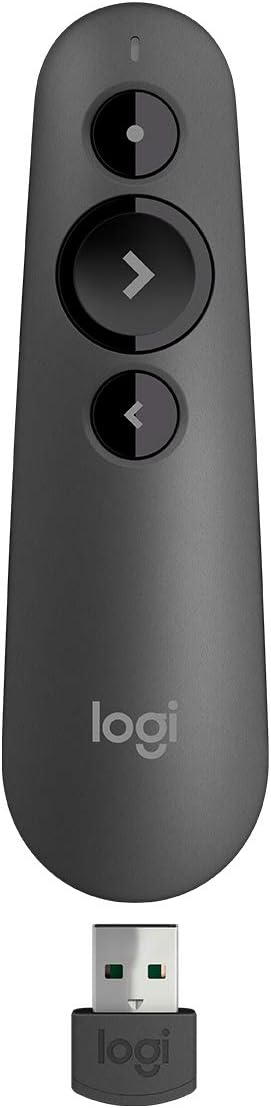
The R400 is a classic choice that has served presenters for years with solid performance. It holds a 4.6 star rating thanks to its intuitive design and consistent wireless connectivity without setup.
We may earn a commission when you buy through this link, at no additional cost to you.
Its red laser is bright against most backgrounds, and the receiver stores inside the remote to prevent loss. The simple touch keys make advancing slides easy without needing to read labels.
The main limitation is the 50-foot range, which works in small meeting rooms but may not suit large auditoriums. You also need to replace AAA batteries periodically.
This is a great pick if you prefer a proven, simple tool that works instantly on any laptop and you do not need extreme range or rechargeable power options.
The touch keys are designed for easy use, allowing you to control slides without fumbling through menus or looking at the remote during your talk.
The built-in docking bay stores the wireless receiver after use, making portability easier and reducing the risk of losing the small USB component.
We may earn a commission when you buy through this link, at no additional cost to you.
This model packs useful controls like volume adjustment and hyperlink navigation into an affordable package. It has a 4.4 star rating from users who appreciate the extra functionality without paying premium prices.
We may earn a commission when you buy through this link, at no additional cost to you.
The bright red pointer works well for slides, and the 100-foot range allows movement around large rooms. The soft rubber buttons and bumped design make it comfortable to hold during long sessions.
Users note the red laser may not show on LCD or LED TV screens, so verify your display type before buying. The auto-sleep function saves energy but might cause a slight delay after waking.
Choose this if you need more control options like volume or window switching but still want a simple plug-and-play experience without spending much money on advanced tech.
Dedicated buttons for hyperlink clicks and volume control give you more command over your presentation software and media settings without reaching for a mouse.
Soft rubber buttons with a bumped design provide tactile feedback and comfort, ensuring precise control even when your hands are slightly sweaty during stress.
We may earn a commission when you buy through this link, at no additional cost to you.
The R500s stands out for its dual connectivity options, supporting both USB and Bluetooth low energy. This flexibility earns it a 4.4 star rating from users who switch between desktops and mobile devices.
We may earn a commission when you buy through this link, at no additional cost to you.
It works with iOS and Android in addition to Mac and Windows, making it versatile for modern hybrid presentations. The Logitech Presentation app allows customization of button functions and on-screen timers.
You will need to install software to unlock full features, which may deter simple users. Also, the red laser may not be visible on modern LCD or LED displays.
Buy this if you need to connect to mobile devices or prefer Bluetooth and want a reliable Logitech brand tool that lasts long on a single AAA battery.
Connect via USB receiver or Bluetooth low energy, giving you flexibility to pair with a wider range of computers and mobile devices seamlessly.
Optimized to work with Windows, Mac OS, iOS, and Android, plus leading presentation software like PowerPoint, Keynote, and Google Slides.
We may earn a commission when you buy through this link, at no additional cost to you.
The Norwii N95 combines a bright green laser with modern USB-C charging for a versatile tool. It holds a 4.5 star rating from users who appreciate its long range and reprogrammable buttons.
We may earn a commission when you buy through this link, at no additional cost to you.
It supports up to 100 meters of wireless range, making it suitable for auditoriums or large teaching environments. The rechargeable battery provides weeks of use on a single charge.
Note that the charging cable is not included in the box, so you may need to use a spare. Also avoid using the pointer on direct TV screens where it may reflect poorly.
Select this if you want a modern rechargeable clicker with green laser visibility and customizable buttons for complex presentations in large spaces.
The built-in 300mAh lithium polymer battery charges via USB-C and can work for weeks on a single charge, reducing downtime between meetings.
Download the Norwii app to remap button functions to suit your personal needs, allowing precise operation and less confusion during your sessions.
We may earn a commission when you buy through this link, at no additional cost to you.
This clicker offers broad compatibility with both USB-A and USB-C ports directly in its receiver design. It earns a 4.4 star rating from users who value flexibility with modern and older laptops.
We may earn a commission when you buy through this link, at no additional cost to you.
Its compact ergonomic design fits easily in a pocket and includes a rubber feeling material for comfort. The bright red light helps highlight points against standard backgrounds effectively.
The wireless range is limited to 49 feet, which works for small to medium rooms but not large halls. Mac users might need to complete a quick setup before using.
Choose this if you need a simple tool that works across different device types without adapters and you typically present in smaller to medium-sized spaces.
Features a receiver with both USB-A and USB-C connectors built in, ensuring instant compatibility with new Macs and older PCs without hunting for adapters.
Compact but perfect size meeting ergonomic principles, making it comfortable to hold in hand and easy to fit in a pocket when not in use.
We may earn a commission when you buy through this link, at no additional cost to you.
This model solves the adapter headache by including both USB-A and USB-C connectors in one receiver. It maintains a 4.4 star rating from professionals who present on mixed device fleets.
We may earn a commission when you buy through this link, at no additional cost to you.
It supports page navigation, volume control, and black screen toggles with an ergonomic body designed for comfort. The magnetic slot at the bottom securely holds the receiver to prevent loss.
The laser is red, so visibility on LCD screens may be limited. It also requires two AAA batteries rather than rechargeable options, but auto-sleep technology extends standby time.
Select this if you need universal port compatibility to avoid dongles and want a comfortable clicker for presentations in conferences, classrooms, or meetings.
No more dongle hunting, just plug the 2.4GHz receiver with both USB-A and USB-C into your computer port to start presenting instantly.
A magnetic slot at the bottom securely holds the receiver, ensuring you never lose your USB A and USB C dongle after packing up your bag.
We may earn a commission when you buy through this link, at no additional cost to you.
This lightweight clicker prioritizes portability with a slim body that fits easily in a pocket. It has a 4.5 star rating from users who value compactness for travel and quick meetings.
We may earn a commission when you buy through this link, at no additional cost to you.
It offers a 100-foot control distance and runs on a single AAA battery, which can last about two months. The USB dongle stores inside the battery compartment to prevent loss.
The small size might be hard to grip for people with larger hands. It focuses on basic slide advancement without extra buttons for volume or hyperlinks.
Buy this if you need a travel-friendly clicker for simple presentations where weight and size matter more than advanced control features or ergonomic bulk.
The compact design ensures it fits easily in your pocket or bag, making it the perfect companion for presenters who travel frequently between locations.
Powered by just one AAA battery, this remote simplifies your needs and ensures long runtime without requiring frequent battery replacements during tours.
We may earn a commission when you buy through this link, at no additional cost to you.
Choosing the right laser pointer involves balancing visibility, battery life, and compatibility with your existing tech stack. Consider these factors to match your specific needs.
Green lasers like those in the Logitech R800 or Norwii N95 offer superior visibility on LCD, LED, and plasma screens compared to red lasers. If you present in bright rooms or use modern displays, green is often the better choice.
Red lasers are generally affordable and work well on traditional whiteboards or projectors. They remain the standard for cost-effective models but may struggle with high contrast modern screens.
Wireless range determines how far you can move from your computer while presenting. Models like the QUI clicker offer up to 328 feet, while others like the R400 top out at 50 feet.
Match the range to your venue size. Large auditoriums and conference halls benefit from longer ranges, while small meeting rooms or classrooms can function well with shorter distances.
Rechargeable models like the Green Light Presentation Clicker eliminate ongoing battery costs and ensure you always have power available. They typically use USB-C or USB-A charging.
Battery-powered clickers are convenient if you forget to charge devices. Look for models claiming weeks of usage per charge or single battery longevity to avoid interruptions during talks.
Most wireless presenters support both Windows and Mac OS without driver installation. However, features like timers or app integration may require specific OS versions or software downloads.
Check if the device works seamlessly with your preferred software such as PowerPoint, Keynote, Google Slides, or Prezi before purchasing to ensure full functionality.
Some clickers include dedicated buttons for hyperlink navigation, volume control, or black screen toggles. These add convenience if you manage media or need to hide content temporarily.
Basic models focus solely on slide advancement. Consider whether you need extra functionality or prefer simplicity to minimize learning curves during critical presentations.
An ergonomic design with soft rubber buttons ensures comfort during long sessions. Compact models are great for travel, but larger ones provide better tactile feedback.
Build quality influences durability and longevity. Look for reputable brands known for quality assurance if you present frequently in professional settings.
Modern laptops often lack traditional USB-A ports. Choose a clicker with a USB-C receiver or dual USB-A and USB-C support to ensure compatibility without extra adapters.
Some models come with magnetic or internal storage for the receiver to prevent loss. This small detail can save significant frustration during travel.
Prices range from under ten dollars for basic red pointer models to fifty or more for advanced green laser units. Determine how much you invest in your tools based on frequency.
Higher cost often correlates with better build, longer range, and more features. However, budget models can work perfectly for occasional classroom use or small meetings.
To start using your wireless clicker, simply plug the USB receiver into your computer. Most models are plug-and-play and do not require software installation. Press the power button if present and begin clicking to advance your slides.
Keep the device charged if it is rechargeable to ensure longevity. If it uses batteries, remove them when storing for long periods to prevent leakage damage. Clean the lens with a soft dry cloth to maintain pointer brightness.
Store the receiver in its built-in slot or magnetic compartment when not in use to avoid losing it. Always test your clicker before a session to confirm range and battery levels match your expectations.
Green lasers are generally best because they are more visible on modern screens like LCD or LED. Red lasers work well for traditional projectors but may be hard to see on bright displays. If you present often in varied environments, green provides better visibility.
Most basic clickers work without software by using a standard USB receiver. However, some advanced models with timers or customizable buttons require specific software. Check the product description to know if installation is needed.
Rechargeable models can last weeks on a single charge depending on usage frequency. Battery-powered clickers may last months on a single set of batteries. Look for models with auto-sleep modes to extend battery life further.
Yes, most models listed are compatible with Mac OS without additional drivers. Always verify system requirements if you need advanced features like app integration or timers on your specific Mac version.
Most standard red pointers struggle on direct TV screens due to glare or contrast issues. Some green laser models are better but still advise avoiding direct TV use for consistent visibility during presentations.
If battery dies, you can switch to keyboard arrow keys temporarily to continue. To avoid this, keep spare batteries or ensure rechargeable models are fully charged before important events.
Warranty terms vary by brand and seller. Logitech typically offers standard warranties while third-party brands may differ. Check the specific product page for details on return policies and coverage periods.
Turn on the clicker and enable Bluetooth on your computer. Select the device in your Bluetooth settings to pair. This process varies slightly by model so consult the user guide for exact steps.
Our top picks cover various needs from the Green Light Clicker for classrooms to the Logitech R800 for high-end executive meetings. Each model balances price features and range to suit different presenting scenarios effectively.
Prioritize visibility and battery life if you present frequently. A green laser and rechargeable power often pay off in reliability. For basic needs, budget-friendly red pointers offer solid value without extra cost.
Prices and availability change on Amazon so verify current listings before purchasing. Check reviews for compatibility with your specific laptop model to ensure a smooth presentation experience every time.